News Recap: Classes, Methods, Objects Recap: Declare vs. Construct - - PowerPoint PPT Presentation

news recap classes methods objects recap declare vs
SMART_READER_LITE
LIVE PREVIEW

News Recap: Classes, Methods, Objects Recap: Declare vs. Construct - - PowerPoint PPT Presentation

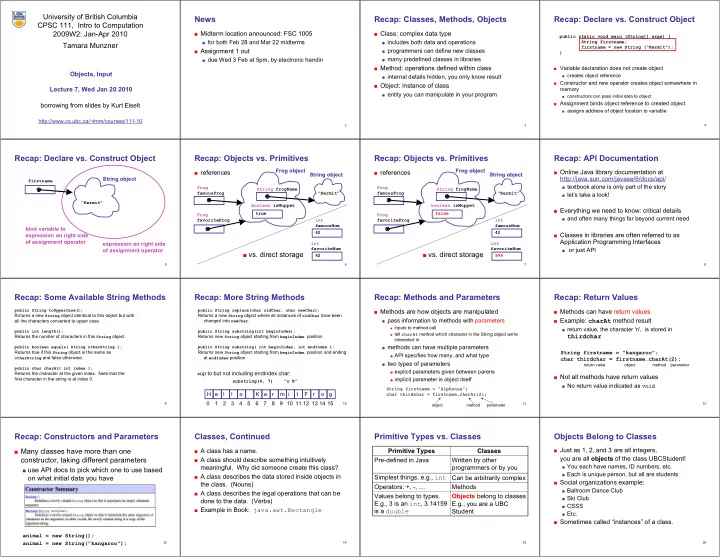
University of British Columbia News Recap: Classes, Methods, Objects Recap: Declare vs. Construct Object CPSC 111, Intro to Computation 2009W2: Jan-Apr 2010 Midterm location announced: FSC 1005 Class: complex data type public static


slide-1
SLIDE 1 1

University of British Columbia CPSC 111, Intro to Computation 2009W2: Jan-Apr 2010 Tamara Munzner

Objects, Input Lecture 7, Wed Jan 20 2010

http://www.cs.ubc.ca/~tmm/courses/111-10

borrowing from slides by Kurt Eiselt

2

News

■ Midterm location announced: FSC 1005

■ for both Feb 28 and Mar 22 midterms

■ Assignment 1 out

■ due Wed 3 Feb at 5pm, by electronic handin 3

Recap: Classes, Methods, Objects

■ Class: complex data type

■ includes both data and operations ■ programmers can define new classes ■ many predefined classes in libraries

■ Method: operations defined within class

■ internal details hidden, you only know result

■ Object: instance of class

■ entity you can manipulate in your program 4

Recap: Declare vs. Construct Object

■ Variable declaration does not create object ■ creates object reference ■ Constructor and new operator creates object somewhere in

memory

■ constructors can pass initial data to object ■ Assignment binds object reference to created object ■ assigns address of object location to variable

public static void main (String[] args) { String firstname; firstname = new String (“Kermit"); }

5

Recap: Declare vs. Construct Object

firstname

String object

“Kermit”

expression on right side

  • f assignment operator

bind variable to expression on right side

  • f assignment operator
6

Recap: Objects vs. Primitives

■ references

int favoriteNum

Frog object

Frog favoriteFrog 42 int famousNum 42 Frog famousFrog ■ vs. direct storage boolean isMuppet true String frogName

String object

“Kermit”

7

Recap: Objects vs. Primitives

■ references

int favoriteNum

Frog object

Frog favoriteFrog 999 int famousNum 42 Frog famousFrog boolean isMuppet false String frogName

String object

“Kermit” ■ vs. direct storage

8

Recap: API Documentation

■ Online Java library documentation at

http://java.sun.com/javase/6/docs/api/

■ textbook alone is only part of the story ■ let’s take a look!

■ Everything we need to know: critical details

■ and often many things far beyond current need

■ Classes in libraries are often referred to as

Application Programming Interfaces

■ or just API 9

Recap: Some Available String Methods

public String toUpperCase(); Returns a new String object identical to this object but with all the characters converted to upper case. public int length(); Returns the number of characters in this String object. public boolean equals( String otherString ); Returns true if this String object is the same as

  • therString and false otherwise.

public char charAt( int index ); Returns the character at the given index. Note that the first character in the string is at index 0.

10

Recap: More String Methods

public String replace(char oldChar, char newChar); Returns a new String object where all instances of oldChar have been changed into newChar. public String substring(int beginIndex); Returns new String object starting from beginIndex position public String substring( int beginIndex, int endIndex ); Returns new String object starting from beginIndex position and ending at endIndex position

H e l l

  • K

e r m i t F r

  • g

1 2 3 4 5 6 7 8 9 11 10 12 13 14 15

substring(4, 7) “o K”

up to but not including endIndex char: 11

String firstname = "Alphonse"; char thirdchar = firstname.charAt(2);

  • bject method parameter

Recap: Methods and Parameters

■ Methods are how objects are manipulated

■ pass information to methods with parameters ■ inputs to method call ■ tell charAt method which character in the String object we're

interested in

■ methods can have multiple parameters ■ API specifies how many, and what type ■ two types of parameters ■ explicit parameters given between parens ■ implicit parameter is object itself 12

Recap: Return Values

■ Methods can have return values ■ Example: charAt method result

■ return value, the character 'n', is stored in

thirdchar

String firstname = "kangaroo"; char thirdchar = firstname.charAt(2);

■ Not all methods have return values

■ No return value indicated as void

return value object method parameter

13

Recap: Constructors and Parameters

■ Many classes have more than one

constructor, taking different parameters

■ use API docs to pick which one to use based

  • n what initial data you have

animal = new String(); animal = new String("kangaroo");

14

Classes, Continued

■ A class has a name. ■ A class should describe something intuitively

  • meaningful. Why did someone create this class?

■ A class describes the data stored inside objects in

the class. (Nouns)

■ A class describes the legal operations that can be

done to the data. (Verbs)

■ Example in Book: java.awt.Rectangle

15

Primitive Types vs. Classes

Objects belong to classes E.g., you are a UBC Student Values belong to types. E.g., 3 is an int, 3.14159 is a double Methods Operators: +, -, … Can be arbitrarily complex Simplest things, e.g., int Written by other programmers or by you Pre-defined in Java Classes Primitive Types

16

Objects Belong to Classes

■ Just as 1, 2, and 3 are all integers,

you are all objects of the class UBCStudent!

■ You each have names, ID numbers, etc. ■ Each is unique person, but all are students

■ Social organizations example:

■ Ballroom Dance Club ■ Ski Club ■ CSSS ■ Etc.

■ Sometimes called “instances” of a class.

slide-2
SLIDE 2 17

Class Libraries

■ Before making new class yourself, check to see if someone

else did it already

■ libraries written by other programmers ■ many built into Java ■ Examples (built into Java) ■ BigInteger (java.math.BigInteger) lets you compute with

arbitrarily big integers.

■ Date (java.util.Date) lets you get the current time. ■ Calendar (java.util.Calendar) does fancy date

computations.

18

Example: BigInteger

import java.math.BigInteger; // Tell Java to use standard BigInteger package public class GetRichQuick { public static void main(String[] args) { BigInteger salary = new BigInteger("111222333444555666777888999"); BigInteger stockOptions = new BigInteger("100000000000000000000000000000000"); BigInteger profitPerShare = new BigInteger("314159"); BigInteger optionCompensation = stockOptions.multiply(profitPerShare); BigInteger totalCompensation = salary.add(optionCompensation); System.out.println("Total Compensation = $" + totalCompensation.toString()); } } 19

BigInteger Constructors

import java.math.BigInteger; // Tell Java to use standard BigInteger package public class GetRichQuick { public static void main(String[] args) { BigInteger salary = new BigInteger("111222333444555666777888999"); BigInteger stockOptions = new BigInteger("100000000000000000000000000000000"); BigInteger profitPerShare = new BigInteger("314159"); BigInteger optionCompensation = stockOptions.multiply(profitPerShare); BigInteger totalCompensation = salary.add(optionCompensation); System.out.println("Total Compensation = $" + totalCompensation.toString()); } } 20

Literals

With the primitive types, how do you create values with that type? E.g., how do we create integer values?

  • 1. You type some digits, like 3, or 42
  • 2. You combine integer-valued things with
  • perators that work on integers, e.g.,

3+42*(a-b)

21

Literals

With the primitive types, how do you create values with that type? E.g., how do we create integer values?

  • 1. You type some digits, like 3, or 42
  • 2. You combine integer-valued things with
  • perators that work on integers, e.g.,

3+42*(a-b)

A bunch of digits are an integer literal.

It’s the basic way to create an integer value

22

More Literals

■ How about a value of type double?

  • 1. You type a bunch of digits with a

decimal point, and optionally the letter e or E followed by an exponent

  • 2. You can combine doubles with
  • perators that work on doubles.
23

More Literals

■ How about a value of type double?

  • 1. You type a bunch of digits with a

decimal point, and optionally the letter e or E followed by an exponent

  • 2. You can combine doubles with
  • perators that work on doubles.

Those are literals!

24

Long Literals

■ How about values of type long?

  • 1. You type a bunch of digits followed

by the letter l or L

  • 2. You combine previously created longs
25

Literals – General Pattern

■ To create values of a primitive type:

  • 1. There’s some way to type a literal
  • 2. There are operators that create values
  • f the given type.
26

Literals for Classes?

■ Classes are like primitive types, except they can be

defined any way you like, and they can be much more complex.

■ How to create a value (an object) of a given class?

  • 1. Invent some way to type a literal???
  • 2. Operators that create objects of that

class (methods).

27

Constructors!

■ A constructor is the equivalent of a literal for a

  • class. It’s how you create a new object that belongs

to that class.

■ Examples:

new BigInteger(“999999”) new Rectangle(10, 20, 30, 40) new UBCStudent(“Joe Smith”,12345678,…)

28

Constructor Syntax

■ The reserved word new ■ Followed by the name of the class ■ Followed by an open parenthesis ( ■ Followed by an parameters (information needed to

construct the object)

■ Followed by a closing parenthesis )

29

Using Constructors

■ Use a constructor just as you’d use a literal.

Example:

■ For the int type:

int a = 3;

■ For the BigInteger class:

BigInteger a = new BigInteger(“3”);

30

Primitive Types vs. Classes

Objects belong to classes E.g., you are a UBC Student Values belong to types. E.g., 3 is an int, 3.14159 is a double Constructors Literals Methods Operators: +, -, … Can be arbitrarily complex Simplest things, e.g., int Written by other programmers or by you Pre-defined in Java Classes Primitive Types

31

What about String?

■ Is String a primitive type? Is it a class? ■ String is a class, but it’s a special class!

■ Automatically imported ■ Built-in literals, e.g., “This is a String literal.” ■ + operator for concatenation

■ But it also has many other methods, that you can

call, just like for any ordinary class…

32

String Example – Constructor Syntax

public class StringTest { public static void main (String[] args) { String firstname; String lastname; firstname = new String (“Kermit"); lastname = new String (“the Frog"); System.out.println("I am not " + firstname + " " + lastname); } }

slide-3
SLIDE 3 33

String Example - Literal Syntax

public class StringTest { public static void main (String[] args) { String firstname; String lastname; firstname= “Kermit”; lastname= “the Frog”; System.out.println("I am not " + firstname + " " + lastname); } }

String is the only class that supports both literals and constructors!

34

Escape Characters

■ How can you make a String that has quotes?

■ String foo = “oh so cool”; ■ String bar = “oh so \”cool\”, more so”;

■ Escape character: backslash ■ general principle

35

Keyboard Input

■ Want to type on keyboard and have Java program read in

what we type

■ store it in variable to use later ■ Want class to do this ■ build our own? ■ find existing standard Java class library? ■ find existing library distributed by somebody else? ■ Scanner class does the trick ■ java.util.Scanner ■ nicer than System.in, the analog of System.out 36

import java.util.Scanner; public class Echo { public static void main (String[] args) { String message; Scanner scan = new Scanner (System.in); System.out.println ("Enter a line of text: "); message = scan.nextLine(); System.out.println ("You entered: \"" + message + "\""); } }

Scanner Class Example

37

import java.util.Scanner; public class Echo { public static void main (String[] args) { String message; Scanner scan = new Scanner (System.in); System.out.println ("Enter a line of text: "); message = scan.nextLine(); System.out.println ("You entered: \"" + message + "\""); } }

Scanner Class Example

■ Import Scanner class from java.util package

38

Importing Packages

■ Collections of related classes grouped into

packages

■ tell Java which packages to keep track of with import

statement

■ again, check API to find which package contains

desired class

■ No need to import String, System.out because core

java.lang packages automatically imported

39

import java.util.Scanner; public class Echo { public static void main (String[] args) { String message; Scanner scan = new Scanner (System.in); System.out.println ("Enter a line of text: "); message = scan.nextLine(); System.out.println ("You entered: \"" + message + "\""); } }

Scanner Class Example

■ Declare string variable to store what user types in 40

import java.util.Scanner; public class Echo { public static void main (String[] args) { String message; Scanner scan = new Scanner (System.in); System.out.println ("Enter a line of text: "); message = scan.nextLine(); System.out.println ("You entered: \"" + message + "\""); } }

Scanner Class Example

■ Use Scanner constructor method to create new Scanner
  • bject named scan
■ could be named anything, like keyboardStuff or foo 41

import java.util.Scanner; public class Echo { public static void main (String[] args) { String message; Scanner scan = new Scanner (System.in); System.out.println ("Enter a line of text: "); message = scan.nextLine(); System.out.println ("You entered: \"" + message + "\""); } }

Scanner Class Example

■ Prompt user for input 42

import java.util.Scanner; public class Echo { public static void main (String[] args) { String message; Scanner scan = new Scanner (System.in); System.out.println ("Enter a line of text: "); message = scan.nextLine(); System.out.println ("You entered: \"" + message + "\""); } }

Scanner Class Example

nextLine method reads all input until end of line

■ returns it as one long string of characters 43

import java.util.Scanner; public class Echo { public static void main (String[] args) { String message; Scanner scan = new Scanner (System.in); System.out.println ("Enter a line of text: "); message = scan.nextLine(); System.out.println ("You entered: \"" + message + "\""); } }

Scanner Class Example

■ Print out the message on the display 44

Scanner Class Example

■ Let’s try running it