Network layer transport segment from sending to receiving host - - PDF document

network layer transport segment from sending to receiving
SMART_READER_LITE
LIVE PREVIEW

Network layer transport segment from sending to receiving host - - PDF document

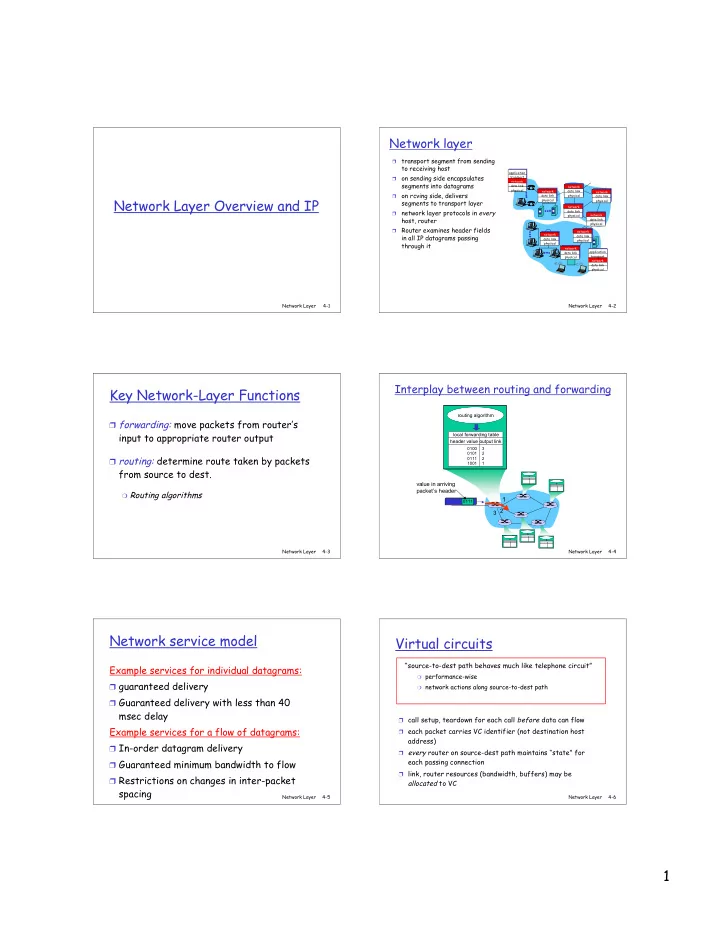
Network layer transport segment from sending to receiving host application on sending side encapsulates transport network segments into datagrams data link network physical network data link network on rcving side, delivers


slide-1
SLIDE 1

1

Network Layer 4-1

Network Layer Overview and IP

Network Layer 4-2

Network layer

transport segment from sending to receiving host

  • n sending side encapsulates

segments into datagrams

  • n rcving side, delivers

segments to transport layer

network layer protocols in every host, router

Router examines header fields in all IP datagrams passing through it

network data link physical network data link physical network data link physical network data link physical network data link physical network data link physical network data link physical network data link physical application transport network data link physical application transport network data link physical

Network Layer 4-3

Key Network-Layer Functions

❒ forwarding: move packets from router’s

input to appropriate router output

❒ routing: determine route taken by packets

from source to dest.

❍ Routing algorithms

Network Layer 4-4

1 2 3

0111

value in arriving packet’s header

routing algorithm local forwarding table header value output link 0100 0101 0111 1001 3 2 2 1

Interplay between routing and forwarding

Network Layer 4-5

Network service model

Example services for individual datagrams:

❒ guaranteed delivery ❒ Guaranteed delivery with less than 40

msec delay Example services for a flow of datagrams:

❒ In-order datagram delivery ❒ Guaranteed minimum bandwidth to flow ❒ Restrictions on changes in inter-packet

spacing

Network Layer 4-6

Virtual circuits

❒ call setup, teardown for each call before data can flow ❒ each packet carries VC identifier (not destination host

address)

❒ every router on source-dest path maintains “state” for

each passing connection

❒ link, router resources (bandwidth, buffers) may be

allocated to VC “source-to-dest path behaves much like telephone circuit”

❍ performance-wise ❍ network actions along source-to-dest path

slide-2
SLIDE 2

2

Network Layer 4-7

Datagram networks

no call setup at network layer

routers: no state about end-to-end connections

❍ no network-level concept of “connection”

packets forwarded using destination host address

❍ packets between same source-dest pair may take different paths

Why is this OK for the Internet? application transport network data link physical application transport network data link physical

  • 1. Send data
  • 2. Receive data

Network Layer 4-8

Forwarding table

Destination Address Range Link Interface 11001000 00010111 00010000 00000000 through 0 11001000 00010111 00010111 11111111 11001000 00010111 00011000 00000000 through 1 11001000 00010111 00011000 11111111 11001000 00010111 00011001 00000000 through 2 11001000 00010111 00011111 11111111

  • therwise 3

4 billion possible entries

Network Layer 4-9

Longest prefix matching

Prefix Match Link Interface 11001000 00010111 00010 0 11001000 00010111 00011000 1 11001000 00010111 00011 2

  • therwise 3

DA: 11001000 00010111 00011000 10101010 Examples DA: 11001000 00010111 00010110 10100001 Which interface? Which interface?

Network Layer 4-10

Datagram or VC network: why?

Internet

data exchange among computers

❍ “elastic” service, no strict

timing req.

“smart” end systems (computers)

❍ can adapt, perform control,

error recovery

❍ simple inside network,

complexity at “edge”

many link types

❍ different characteristics ❍ uniform service difficult

ATM

evolved from telephony

human conversation:

❍ strict timing, reliability

requirements

❍ need for guaranteed

service

“dumb” end systems

❍ telephones ❍ complexity inside network Network Layer 4-11

The Internet Network layer

forwarding table

Host, router network layer functions:

Routing protocols

  • path selection
  • RIP, OSPF, BGP

IP protocol

  • addressing conventions
  • datagram format
  • packet handling conventions

ICMP protocol

  • error reporting
  • router “signaling”

Transport layer: TCP, UDP Link layer physical layer

Network layer

Network Layer 4-12

IP datagram format

ver length 32 bits data (variable length, typically a TCP

  • r UDP segment)

16-bit identifier Internet checksum time to live 32 bit source IP address IP protocol version number header length (bytes) max number remaining hops (decremented at each router) for fragmentation/ reassembly total datagram length (bytes) upper layer protocol to deliver payload to head. len type of service “type” of data flgs fragment

  • ffset

upper layer 32 bit destination IP address Options (if any) E.g. timestamp, record route taken, specify list of routers to visit. how much overhead with TCP?

20 bytes of TCP

20 bytes of IP

= 40 bytes + app layer overhead

slide-3
SLIDE 3

3

Network Layer 4-13

IP Fragmentation & Reassembly

network links have MTU (max.transfer size) - largest possible link-level frame.

❍ different link types,

different MTUs

large IP datagram divided (“fragmented”) within net

❍ one datagram becomes

several datagrams

❍ “reassembled” only at

final destination

❍ IP header bits used to

identify, order related fragments fragmentation: in: one large datagram

  • ut: 3 smaller datagrams

reassembly

Network Layer 4-14

IP Fragmentation and Reassembly

ID =x

  • ffset

=0 fragflag =0 length =4000 ID =x

  • ffset

=0 fragflag =1 length =1500 ID =x

  • ffset

=185 fragflag =1 length =1500 ID =x

  • ffset

=370 fragflag =0 length =1040 One large datagram becomes several smaller datagrams Example ❒ 4000 byte datagram ❒ MTU = 1500 bytes 1480 bytes in data field

  • ffset =

1480/8

Network Layer 4-15

IP Addressing: introduction

❒ IP address: 32-bit

identifier for host, router interface

❒ interface: connection

between host/router and physical link

❍ router’s typically have

multiple interfaces

❍ host may have multiple

interfaces

❍ IP addresses

associated with each interface

223.1.1.1 223.1.1.2 223.1.1.3 223.1.1.4 223.1.2.9 223.1.2.2 223.1.2.1 223.1.3.2 223.1.3.1 223.1.3.27 223.1.1.1 = 11011111 00000001 00000001 00000001 223 1 1 1

Network Layer 4-16

Subnets

❒ IP address:

❍ subnet part (high

  • rder bits)

❍ host part (low order

bits) ❒ What’s a subnet ?

❍ device interfaces with

same subnet part of IP address

❍ can physically reach

each other without intervening router

223.1.1.1 223.1.1.2 223.1.1.3 223.1.1.4 223.1.2.9 223.1.2.2 223.1.2.1 223.1.3.2 223.1.3.1 223.1.3.27 network consisting of 3 subnets LAN

Network Layer 4-17

Subnets

223.1.1.0/24 223.1.2.0/24 223.1.3.0/24

Recipe

❒ To determine the

subnets, detach each interface from its host or router, creating islands of isolated networks. Each isolated network is called a subnet. Subnet mask: /24

Network Layer 4-18

Subnets

How many?

223.1.1.1 223.1.1.3 223.1.1.4 223.1.2.2 223.1.2.1 223.1.2.6 223.1.3.2 223.1.3.1 223.1.3.27 223.1.1.2 223.1.7.0 223.1.7.1 223.1.8.0 223.1.8.1 223.1.9.1 223.1.9.2

slide-4
SLIDE 4

4

Network Layer 4-19

Classful Addressing

0network host 10 network host 110 network host 1110 multicast address A B C D class 1.0.0.0 to 127.255.255.255 128.0.0.0 to 191.255.255.255 192.0.0.0 to 223.255.255.255 224.0.0.0 to 239.255.255.255 32 bits

Network Layer 4-20

IP addressing: CIDR

CIDR: Classless InterDomain Routing

❍ subnet portion of address of arbitrary length ❍ address format: a.b.c.d/x, where x is # bits in

subnet portion of address 11001000 00010111 00010000 00000000

subnet part host part

200.23.16.0/23

Network Layer 4-21

IP addresses: how to get one?

Q: How does host get IP address?

❒ hard-coded by system admin in a file ❍ /etc/hosts ❒ DHCP: Dynamic Host Configuration Protocol:

dynamically get address from as server

❍ “plug-and-play”

(more in next chapter)

Network Layer 4-22

IP addresses: how to get one?

Q: How does network get subnet part of IP addr? A: gets allocated portion of its provider ISP’s address space

ISP's block 11001000 00010111 00010000 00000000 200.23.16.0/20 Organization 0 11001000 00010111 00010000 00000000 200.23.16.0/23 Organization 1 11001000 00010111 00010010 00000000 200.23.18.0/23 Organization 2 11001000 00010111 00010100 00000000 200.23.20.0/23 ... ….. …. …. Organization 7 11001000 00010111 00011110 00000000 200.23.30.0/23

Network Layer 4-23

Hierarchical addressing: route aggregation

“Send me anything with addresses beginning 200.23.16.0/20”

200.23.16.0/23 200.23.18.0/23 200.23.30.0/23

Fly-By-Night-ISP Organization 0 Organization 7 Internet Organization 1 ISPs-R-Us “Send me anything with addresses beginning 199.31.0.0/16”

200.23.20.0/23

Organization 2

. . . . . . Hierarchical addressing allows efficient advertisement of routing information:

Network Layer 4-24

Hierarchical addressing: more specific routes

ISPs-R-Us has a more specific route to Organization 1

“Send me anything with addresses beginning 200.23.16.0/20”

200.23.16.0/23 200.23.18.0/23 200.23.30.0/23

Fly-By-Night-ISP Organization 0 Organization 7 Internet Organization 1 ISPs-R-Us “Send me anything with addresses beginning 199.31.0.0/16

  • r 200.23.18.0/23”

Longest prefix match!

200.23.20.0/23

Organization 2

. . . . . .

slide-5
SLIDE 5

5

Network Layer 4-25

IP addressing: the last word...

Q: How does an ISP get block of addresses? A: ICANN: Internet Corporation for Assigned

Names and Numbers

❍ allocates addresses ❍ manages DNS ❍ assigns domain names, resolves disputes

Network Layer 4-26

NAT: Network Address Translation

10.0.0.1 10.0.0.2 10.0.0.3 10.0.0.4 138.76.29.7 local network (e.g., home network) 10.0.0/24 rest of Internet

Datagrams with source or destination in this network have 10.0.0/24 address for source, destination (as usual) All datagrams leaving local network have same single source NAT IP address: 138.76.29.7, different source port numbers

Network Layer 4-27

NAT: Network Address Translation

❒ Motivation: local network uses just one IP address as

far as outside word is concerned:

❍ no need to be allocated range of addresses from

ISP: - just one IP address is used for all devices

❍ can change addresses of devices in local network

without notifying outside world

❍ can change ISP without changing addresses of

devices in local network

❍ devices inside local net not explicitly addressable,

visible by outside world (a security plus).

Network Layer 4-28

NAT: Network Address Translation

Implementation: NAT router must:

❍ outgoing datagrams: replace (source IP address, port #) of

every outgoing datagram to (NAT IP address, new port #) . . . remote clients/servers will respond using (NAT IP address, new port #) as destination addr.

❍ remember (in NAT translation table) every (source IP address,

port #) to (NAT IP address, new port #) translation pair

❍ incoming datagrams: replace (NAT IP address, new port #) in

dest fields of every incoming datagram with corresponding (source IP address, port #) stored in NAT table

Network Layer 4-29

NAT: Network Address Translation

10.0.0.1 10.0.0.2 10.0.0.3

S: 10.0.0.1, 3345 D: 128.119.40.186, 80

1 10.0.0.4 138.76.29.7 1: host 10.0.0.1 sends datagram to 128.119.40, 80 NAT translation table WAN side addr LAN side addr 138.76.29.7, 5001 10.0.0.1, 3345 …… ……

S: 128.119.40.186, 80 D: 10.0.0.1, 3345

4

S: 138.76.29.7, 5001 D: 128.119.40.186, 80

2 2: NAT router changes datagram source addr from 10.0.0.1, 3345 to 138.76.29.7, 5001, updates table

S: 128.119.40.186, 80 D: 138.76.29.7, 5001

3 3: Reply arrives

  • dest. address:

138.76.29.7, 5001 4: NAT router changes datagram dest addr from 138.76.29.7, 5001 to 10.0.0.1, 3345

Network Layer 4-30

NAT: Network Address Translation

❒ 16-bit port-number field:

❍ 60,000 simultaneous connections with a single

LAN-side address! ❒ NAT is controversial:

❍ routers should only process up to layer 3 ❍ violates end-to-end argument

  • NAT possibility must be taken into account by app

designers, eg, P2P applications ❍ address shortage should instead be solved by

IPv6

slide-6
SLIDE 6

6

Network Layer 4-31

ICMP: Internet Control Message Protocol

used by hosts & routers to communicate network-level information

❍ error reporting:

unreachable host, network, port, protocol

❍ echo request/reply (used

by ping)

network-layer “above” IP:

❍ ICMP msgs carried in IP

datagrams

ICMP message: type, code plus first 8 bytes of IP datagram causing error Type Code description 0 0 echo reply (ping) 3 0 dest. network unreachable 3 1 dest host unreachable 3 2 dest protocol unreachable 3 3 dest port unreachable 3 6 dest network unknown 3 7 dest host unknown 4 0 source quench (congestion control - not used) 8 0 echo request (ping) 9 0 route advertisement 10 0 router discovery 11 0 TTL expired 12 0 bad IP header

Network Layer 4-32

Traceroute and ICMP

❒ Source sends series of

UDP segments to dest

❍ First has TTL =1 ❍ Second has TTL=2, etc. ❍ Unlikely port number

❒ When nth datagram

arrives to nth router:

❍ Router discards datagram ❍ And sends to source an

ICMP message (type 11, code 0)

❍ Message includes name of

router& IP address ❒ When ICMP message arrives, source calculates RTT ❒ Traceroute does this 3 times Stopping criterion ❒ UDP segment eventually arrives at destination host ❒ Destination returns ICMP “host unreachable” packet (type 3, code 3) ❒ When source gets this ICMP, stops.

Network Layer 4-33

IPv6

❒ Initial motivation: 32-bit address space soon

to be completely allocated.

❒ Additional motivation:

❍ header format helps speed processing/forwarding ❍ header changes to facilitate QoS

IPv6 datagram format:

❍ fixed-length 40 byte header ❍ no fragmentation allowed

Network Layer 4-34

IPv6 Header (Cont)

Priority: identify priority among datagrams in flow Flow Label: identify datagrams in same “flow.” (concept of“flow” not well defined). Next header: identify upper layer protocol for data

Network Layer 4-35

Other Changes from IPv4

❒ Checksum: removed entirely to reduce

processing time at each hop

❒ Options: allowed, but outside of header,

indicated by “Next Header” field

❒ ICMPv6: new version of ICMP

❍ additional message types, e.g. “Packet Too Big” ❍ multicast group management functions

Network Layer 4-36

Transition From IPv4 To IPv6

❒ Not all routers can be upgraded simultaneous

❍ no “flag days” ❍ How will the network operate with mixed IPv4 and

IPv6 routers? ❒ Dual-stack ❒ Tunneling: IPv6 carried as payload in IPv4

datagram among IPv4 routers

slide-7
SLIDE 7

7

Network Layer 4-37

Tunneling

A B E F IPv6 IPv6 IPv6 IPv6 tunnel Logical view: Physical view: A B E F IPv6 IPv6 IPv6 IPv6 C D IPv4 IPv4

Flow: X Src: A Dest: F data Flow: X Src: A Dest: F data Flow: X Src: A Dest: F data

Src:B Dest: E

Flow: X Src: A Dest: F data

Src:B Dest: E A-to-B: IPv6 E-to-F: IPv6 B-to-C: IPv6 inside IPv4 B-to-C: IPv6 inside IPv4