.NET Passport Security Framework CPSC 328 Spring 2009 UDDI Review - - PDF document

net passport security framework
SMART_READER_LITE
LIVE PREVIEW

.NET Passport Security Framework CPSC 328 Spring 2009 UDDI Review - - PDF document

.NET Passport Security Framework CPSC 328 Spring 2009 UDDI Review Publish/Find functionality Yellow Pages businessService White Pages businessEntity Green Pages bindingTemplate tModel


slide-1
SLIDE 1

1

.NET Passport Security Framework

CPSC 328 Spring 2009

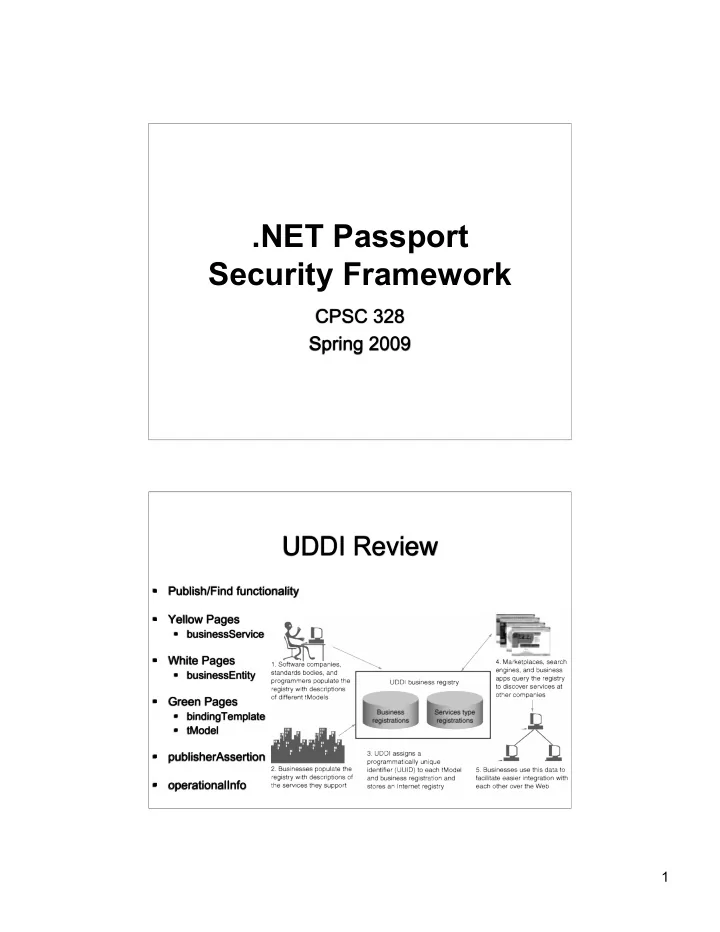
UDDI Review

  • Publish/Find functionality
  • Yellow Pages
  • businessService
  • White Pages
  • businessEntity
  • Green Pages
  • bindingTemplate
  • tModel
  • publisherAssertion
  • perationalInfo
slide-2
SLIDE 2

2

Cross Site Request Forgery (CSRF)

  • Quite similar, yet different from XSS
  • Malicious script or link involved
  • Exploits trust
  • XSS - exploit user’s trust in the site
  • CSRF - exploit site’s trust in the user’s browser
  • CSRF relies on browser automatically

sending authentication/session data

  • Very difficult to detect
  • Server side: looks like legitimate request from user
  • Client side: never know you just sent something

Simple Example

  • Code snippet from evil.mel.com
  • How can this work?
  • Reliant upon browser automatically

sending still-current session data

  • GET vs POST

<html> <body> <img src=“http://foo.bar.com/logout.php”> </body> </html> <html> <body> <img src="http://www.example.com/transfer.do? frmAcct=document.form.frmAcct& toAcct=4345754&toSWIFTid=434343&amt=3434.43"> </body> </html>

slide-3
SLIDE 3

3

Simple Example

  • So lets only use POST. Fixed, right?
  • Not exactly!
  • Automatically POSTs form after page loaded

(via javascript)

  • Again, cookie sent implicitly by browser

<html> <body onload="document.getElementById('f').submit()"> <form id="f" action="http://foo.com/logout" method="post"> <input name="Log Me Out" value="Log Me Out" /> </form> </body> </html>

CSRF: Protection

  • How can we prevent it?
  • Check the referrer
  • Hidden fields
  • Hash of timestamp, userID, & nonce
  • ASP.NET: ViewStateUserKey
  • Double cookies
  • Re-authenticate if important
  • Don’t use GET
  • But don’t rely on POST!
  • Clients, don’t use “remember me”

<form action="/transfer.do" method="post"> <input type="hidden" name="8438927730" value="43847384383"> </form>

slide-4
SLIDE 4

4

.NET & Passport

  • MS foray into single sign-on
  • Began as MS Passport
  • Became MS .NET Passport
  • Now Windows Live ID
  • Access to federation of sites/services once

authenticated by one member

  • Hotmail, MSNBC, Xbox Live, MSN, …

Single Sign-On: Kerberos

  • Developed @ MIT
  • Distributed authentication system
  • Don’t need full

trust in client

  • Tickets
  • TGT
  • TGS
  • Finite life
  • Encrypted

Source: www.xml-dev.com/blog/

slide-5
SLIDE 5

5

Passport

  • Functions very similar to kerberos
  • Authenticate once to server
  • Use services of several hosts
  • Application & Authentication Servers exchange

secret key (out of band)

  • Happens before system can be used
  • Keys must be protected (no expiration)
  • Once completed, users can log in & use service

Passport Login Process

  • User visits site
  • Site redirects user to Passport Server
  • User authenticates to server
  • Server returns user to site with cookies

Source: microsoft.com

slide-6
SLIDE 6

6

Passport Cookies

  • MSPAuth
  • Ticket: user ID
  • Timestamps
  • MSPProf
  • User profile information
  • MSPSec
  • Ticket Granting Cookie
  • Cookies support claim of authentication
  • Communicated to application server through client

browser

Passport Attacks

  • Steal username & password?
  • Replay cookies?
  • Steal profile info?
  • Username/passwd not stored/collected on partner

sites

  • Cookies have timestamps
  • Cookies are encrypted
  • Profile info not enough to gain credentials
  • Privacy is still a concern
slide-7
SLIDE 7

7

Web Services & .NET

  • .NET & CLR provide functionality similar to Java & JVM
  • Managed code provides safety features
  • Sandboxing execution
  • Compiled to MSIL (similar to java bytecode)
  • Unmanaged code does not
  • Overflows, privilege escalation, etc…
  • Security defined in terms of
  • Role-based
  • Code Access
  • Evidence-Based

Role-Based Security

  • A.K.A. User-Based Security
  • Traditional model
  • Permission defined by account or role
  • Security Identifier tracks user
  • Checked before resource use
slide-8
SLIDE 8

8

Code Access Security

  • Access permissions assigned based on trust

in code

  • Can assign range of trust
  • Similar to IE’s trust zones
  • Allows finer degree of control than role-based
  • Controls assigned at various levels
  • Application
  • Class
  • Module, library, …

Evidence Based

  • Trust zones defined based on
  • Digital signature
  • URL of origin
  • Zone
  • Notion of code

groups

slide-9
SLIDE 9

9

.NET Vulnerabilities

  • Standard concerns w/Web Services
  • Input validation
  • SQL Injection
  • Solution?
  • Stored procedures (good & bad)
  • Known-good validation only! Discard all else
  • Minimal error handling
  • Non-descript error messages

Hardening .NET Server

The standard fare:

  • Web root on separate volume (not w/OS)
  • Disable unused ISAPI filters
  • Don’t allow outbound originating traffic from IIS
  • Incoming traffic only on ports 80 & 443
  • Penetration testing
  • Remove development/installation files!
  • Accounts & passwords! (on DB, too)