Motivation Organize main memory to Facilitate byte-addressability - - PowerPoint PPT Presentation

motivation
SMART_READER_LITE
LIVE PREVIEW

Motivation Organize main memory to Facilitate byte-addressability - - PowerPoint PPT Presentation

7b.1 7b.2 Motivation Organize main memory to Facilitate byte-addressability EE 457 Unit 7b while maintaining Efficient fetching of the words in a cache block __________________________ helps us achieve this Main Memory


slide-1
SLIDE 1

7b.1

EE 457 Unit 7b

Main Memory Organization

7b.2

Motivation

  • Organize main memory to

– Facilitate byte-addressability while maintaining… – Efficient fetching of the words in a cache block

  • __________________________ helps us achieve this

7b.3

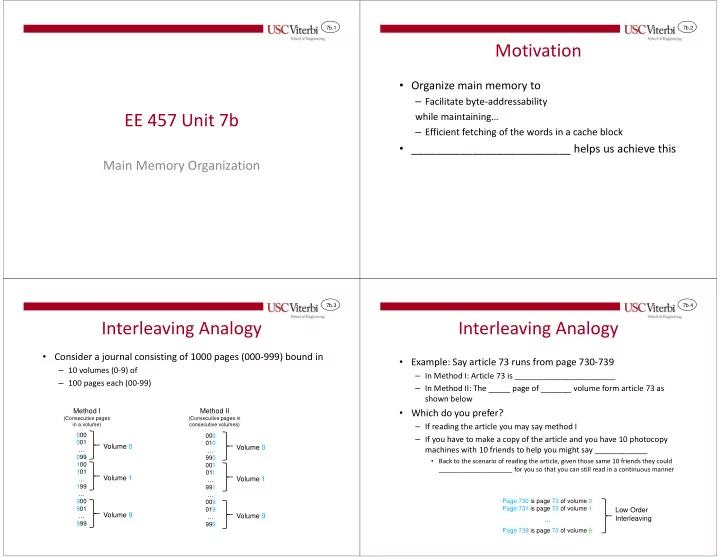
Interleaving Analogy

  • Consider a journal consisting of 1000 pages (000-999) bound in

– 10 volumes (0-9) of – 100 pages each (00-99)

Method I

(Consecutive pages in a volume)

Method II

(Consecutive pages in consecutive volumes)

000 001 … 099 100 101 … 199 … 900 901 … 999 000 010 … 990 001 011 … 991 … 009 019 … 999

Volume 0 Volume 1 Volume 9 Volume 0 Volume 1 Volume 9

7b.4

Interleaving Analogy

  • Example: Say article 73 runs from page 730-739

– In Method I: Article 73 is _______________________ – In Method II: The _____ page of _______ volume form article 73 as shown below

  • Which do you prefer?

– If reading the article you may say method I – If you have to make a copy of the article and you have 10 photocopy machines with 10 friends to help you might say ____________

  • Back to the scenario of reading the article, given those same 10 friends they could

_____________________ for you so that you can still read in a continuous manner

Page 730 is page 73 of volume 0 Page 731 is page 73 of volume 1 … Page 739 is page 73 of volume 9

Low Order Interleaving

slide-2
SLIDE 2

7b.5

Byte Addressability

1. Intel 8085: 16-bit addr., 8-bit data, byte addressable processor.

Memory space: 216 = 64KB, A15-A0, D7-D0

2. Intel 8086: 20-bit addr., 16-bit data, byte addressable, little-endian proc.

Memory space: 220 = 1MB, A19-A0 [A19-A1, BHE (BE1), A0 (BE0)], D15-D0

3. Intel 80386: 32-bit addr., 32-bit data, byte addressable, little-endian proc.

Memory space: 232 = 4GB, A31-A0 [A31-A2, BE3, BE2, BE1, BE0], D31-D0

A15-A0 64K 8 A19-A1 ½ MB 8 ½ MB 8 D[15:8] D[7:0] BHE=0 A0=0 A31-A2 8 1 GB 8 D[31:24] D[7:0] BE3 8 8 BE2 BE1 BE0 Byte 43 Byte 42 Byte 41 Byte 40 = Word 40 Byte 41 Byte 40 = Word 40 7b.6

Byte Addressability

4. Intel 80386: 32-bit addr., 32-bit data, byte addressable, big-endian proc.

Memory space: 232 = 4GB, A31-A0 [A31-A2, BE3, BE2, BE1, BE0], D31-D0

5. Little-Endian system, ______________ system: 32-bit addr., 32-bit data, byte addressable

(Narrow, 32-bit data bus b/w mem. and cache)

Memory space: 232 = 4GB, A31-A0 [A31-A2, BE3, BE2, BE1, BE0], D31-D0

6. Same as 5 above, but __________________

A31-A2 8 1 GB 8 D[31:24] D[7:0] BE_ 8 8 BE_ BE_ BE_ Byte 40 Byte 41 Byte 42 Byte 43 = Word 40 A31-A_ 8 ½ GB

D[31:24]

8 8 8

BE3 BE2 BE1 BE0 BE3 BE2 BE1 BE0

8 8 8 8

D[7:0] D[31:24] D[7:0] XCVR XCVR D[31:0] Narrow Bus

A31-A_ _____ ____

XCVR XCVR XCVR XCVR D[31:0] A3,A2 = __ A3,A2 = __ A3,A2 = __ A3,A2 = __

¼ GB

7b.7

2-Way L.O.I.

  • System address bus uses

– A1:A0 and size info to generate /BE3../BE0 (Byte Enables)

  • In a 32-bit data bus, we need 2

address bits to produce the 4 BE’s

  • In a 64-bit data bus, we would

need ___ address bits to produce ___ BE’s

– Lower order bits to select a “bank”

  • Only 1 address bit, A2, to select
  • ne of 2 banks

– Upper bits connect to each memory chip

  • Each memory chip is just a

collection of ½ GB requiring 29 address bits…we can connect appropriate 29 bits

A31-A3

A28-A0 8 ½ GB

D[31:24]

A28-A0 8 8 8

BE3 BE2 BE1 BE0 BE3 BE2 BE1 BE0

8 8 8 8

D[7:0] D[31:24] D[7:0] XCVR XCVR

D[31:0]

Narrow Bus

A2=1 A2=0 A2=1 A2=0

Shift of 3-bits in address connections

Bank 1 Bank 0

7b.8

4-Way L.O.I.

  • System address bus

uses

– A1:A0 and size info to generate /BEi (Byte Enables) – Lower order bits to select a “bank” – Upper bits connect to each memory chip

Shift of 4-bits in address connections

Bank 3

A31-A4 A27-0 A27-0 A27-0 A27-0

XCVR XCVR XCVR XCVR

D[31:0]

A3,A2 = 11 A3,A2 = 10 A3,A2 = 01 A3,A2 = 00

¼ GB Bank 2 Bank 3 Bank 2

slide-3
SLIDE 3

7b.9

Organization Options

Bus CPU Cache Memory Bus CPU Cache Memory

Multiplexer

Mem. Bank Mem. Bank 1 Mem. Bank 2 Mem. Bank 3 Bus CPU Cache

c.) EE 457 Interleaved b.) Wide Memory Organization a.) One-word-wide memory Organization 7b.10

Organization Comparison

  • Assume following latencies
  • Find time to access a cache line of 4-words

Send address to MM 1 clock MM (DRAM) Access Time 15 clocks Transfer time for one word 1 clock

  • a. Narrow Memory

____________________________

(assume mem. controller will auto-increment address)

  • b. Wide Memory
  • c. Interleaved Memory

7b.11

Example

  • Consider a set-associative mapping and physical organization of main

memory, cache data RAMs, and cache tag RAMs.

  • Specs:

– 32-bit physical address, byte-addressable system – Cache Size = 64KB – Block Size = 4 words (16 bytes) – Set Size = 4 blocks (64 bytes)

TAG SET WORD BYTE Member A1 – A0 /BE3 - /BE0

# of MM Blocks = _____________ # of Cache Blocks = _____________ # of Sets = _____________________________ # of Groups = ___________________________

7b.12

Tag RAM Example

Set Tag RAM (Holding Tags & Valid Bits for Way 0) DI DO ______ ________ + V-bit A

=

Hit/Miss Tag RAM (Holding Tags & Valid Bits for Way 2) DI DO A

=

Hit/Miss Tag RAM (Holding Tags & Valid Bits for Way 1) DI DO A

=

Hit/Miss Tag RAM (Holding Tags & Valid Bits for Way 3) DI DO A

=

Hit/Miss Tag ______ ________ + V-bit ______ ________ + V-bit ______ ________ + V-bit

slide-4
SLIDE 4

7b.13

MM & Data RAM Example

256MB 256MB 256MB 256MB 256MB 256MB 256MB 256MB 256MB 256MB 256MB 256MB 256MB 256MB 256MB 256MB

A31-A4 32-bit Bidirectional XCVR 32-bit Bidirectional XCVR 32-bit Bidirectional XCVR 32-bit Bidirectional XCVR

80386 + Buffers

A3,A2 = 11 A3,A2 = 10 A3,A2 = 01 A3,A2 = 00

4 KB 4 KB 4 KB 4 KB

A13-A2

D[31:24] D[23:16] D[15:8] D[7:0]

Way 0

4 KB 4 KB 4 KB 4 KB

A13-A2

D[31:24] D[23:16] D[15:8] D[7:0]

Way 2

4 KB 4 KB 4 KB 4 KB 4 KB 4 KB 4 KB 4 KB

D[31:24] D[23:16] D[15:8] D[7:0] D[31:24] D[23:16] D[15:8] D[7:0]

A13-A2 A13-A2

Way 3 Way 1

/BE3 - /BE0 /BE3 - /BE0 /BE3 - /BE0 /BE3 - /BE0 Set + Word A31-A2, /BE3-/BE0

7b.14

DRAM TECHNOLOGIES

Main memory organization

7b.15

Memory Module Organization

  • Memory module is designed to

always access data in chunks the size of the data bus (64-bit data bus = 64-bit accesses)

  • Parallelizes memory access by

accessing the byte at the same location in all (8) memory chips at once

  • Only the desired portion will be

forwarded to the registers

  • Note the difference between

system processor address and local memory chip addresses

A4

...

50

0x1 0x0

F8 22

...

8A

0x1 0x0

2C 6D

...

57

0x1 0x0

E4

A[31:3] D[63:56] D[15:8] D[7:0] DWord at address 0x000c: A[31:0] = 0000…1100 0000..01 57 8A

Processor with 64-bit Data Bus fb 8A 57 c6 13 a7 98 50

50 A[2:0] + SIZE _____ ______ Byte/ 7 6 5 4 3 2 1 0 Lane

Processor Core / Registers

  • Each chip on the module reads 1 byte and
  • utputs it to form a collectively larger word
  • n the data bus (i.e. 8-bytes = 64-bits)

1

Control

0000..01 0x5098a7fb 2 4 3 5 1 7 f e 8 10 11 17 Byte address from individual chip perspective Byte address from system/processor perspective 7b.16

Memory Chip Organization

  • Memory technologies share the

same layout but differ in their cell implementation

– ___________ – ___________

  • Memories require the row bits

be sent first and are used to select one row (aka “____ line")

– Uses a hardware component known as a decoder

  • All cells in the selected row

access their data bits and

  • utput them on their respective

“___________"

  • The column address is sent next

and used to select the desired 8 bit lines (i.e. 1 byte)

– Uses a hardware component known as a mux

  • Addr. Decoder

Row Addr WL[0]

WL[1023]

Cell Cell Cell Cell

BL[0] BL[1024]

Amplifiers & Column Mux 1K Bit Lines Data[7:0] in/out

XXX Row Col

0000000001 0000010 000 0x000410 Column Addr

10-bits

Cell Cell

WL[1] 1 1 1

SRAM and DRAM differ in how each cell is made, but the

  • rganization is roughly

the same

slide-5
SLIDE 5

7b.17

SRAM vs. DRAM

  • Dynamic RAM (DRAM) Cells (store 1 bit)

– Will _____________if not refreshed periodically every few _______________ [i.e. dynamic] – Extremely small (_______________ & a capacitor)

  • Means we can have very high density (GB of RAM)

– Small circuits require more time to access the bit

  • _______________

– Used for _________________

  • Static RAM (SRAM) Cells (store 1 bit)

– Will retain values as long as _____________ [i.e. static] – Larger (___ transistors) – Larger circuitry can access bit faster

  • FASTER

– Used for __________ memory

This Photo by Unknown Author is licensed under CC BY-NC

7b.18

Memory Controller

  • DRAMs require non-trivial hardware

controller (aka memory controller)

– To split up the address and send the row and column address as the right time – To periodically refresh the DRAM cells – Plus more…

  • Used to require a separate chip from

the processor

  • But due to scaling (i.e. Moore's Law)

most processors integrate the controller on-chip

– Helps reduce access time since fewer hops

Legacy architectures used separate chipsets for the memory and I/O controller Current general-purpose processors usually integrate the memory controller on chip.

7b.19

Implications of Memory Technology

  • Memory latency of a single access using

current DRAM technology will be slow

  • We must improve bandwidth

– Idea 1: Access __________________ a single word at a time (to exploit spatial locality) – Technology: Fast Page Mode, DDR SDRAM, etc. – Idea 2: Increase number of accesses serviced in ____________________________ – Technology: Banking

7b.20

Legacy DRAM Timing

  • Can have only a single access “in-flight” at once
  • Memory controller must send row and column address

portions for each access

Row Decoder Column Muxes Row Address Column Address Data in / out Memory Array

Legacy DRAM (Must present new Row/Column address for each access)

Timing Generator /CAS /RAS tRC tRAC tRC= Cycle Time (____ ns) = Time before next access __________ tRAC=Access Time (__ns) = Time until data is ____

slide-6
SLIDE 6

7b.21

Fast Page Mode DRAM Timing

  • Can provide _________________ addresses

with only one row address

Row Decoder Column Muxes Row Address Column Address Data in / out

Fast Page Mode (Future address that fall in same row can pull data from the latched row)

Memory Array Timing Generator /CAS /RAS Reg. 7b.22

Synchronous DRAM Timing

  • Registers the column address and automatically increments it,

accessing n sequential data words in n successive clocks called _________… n=______ usually)

Row Decoder Column Muxes Column Latch/Register Column Address Data in / out

SDRAM (Synchronous DRAM) Addition of clock signal. Will get up to ‘n’ consecutive words in the next ‘n’ clocks after column address is sent

Reg/Cntr Memory Array Timing Generator /CAS /RAS Row Address Reg. CLK 7b.23

DDR SDRAM Timing

  • Double data rate access data every _____ clock

cycle

Row Decoder Column Muxes Column Latch/Register Column Address Data in / out

DDR SDRAM (Double-Data Rate SDRAM) Addition of clock signal. Will get up to ‘2n’ consecutive words in the next ‘n’ clocks after column address is sent

Reg/Cntr Memory Array Timing Generator /CAS /RAS Row Address Reg. CLK 7b.24

Banking

  • Divide memory into “banks” duplicating row/column decoder

and other peripheral logic to create _________________ memory arrays that can access data in ___________

– uses a ___________ of the address to determine which bank to access

Row / Column Address Data

Bank 0 Bank 1 Bank 2 Bank 3 Bank 0 Bank 0 Bank 0 Bank 0

Address Data

slide-7
SLIDE 7

7b.25

Bank Access Timing

  • Consecutive accesses to different banks can be __________

and hide the time to access the row and select the column

  • Consecutive accesses within a bank (to different rows)

_____________ the access latency

MC Address Bus Data Bus Row 1 CLK Col 1 Row 2a Col 2a Row 2b Col 2b Data 2a Data 1 Data 2b

Access 1 maps to bank 1 while access 2a maps to bank 2 allowing parallel access. However, access 2b immediately follows and maps to bank 2 causing a delay.

Delay due to bank conflict

Bank 1 Access Bank 2 Access A Bank 2 Access b

7b.26

Programming Considerations

  • For memory configuration given earlier, accesses to the same bank but different row
  • ccur on an 32KB boundary
  • Now consider a matrix multiply of 8K x 8K integer matrices (i.e. 32KB x 32KB)
  • In code below…m2[0][0] @ 0x10010000 while m2[1][0] @ 0x10018000

int m1[8192][8192], m2[8192][8192], result[8192][8192]; int i,j,k; ... for(i=0; i < 8192; i++){ for(j=0; j < 8192; j++){ result[i][j]=0; for(k=0; k < 8192; k++){ result[i][j] += matrix1[i][k] * matrix2[k][j]; } } } Unused Row Bank Col. Unused A31-A29 A28…A15 A14,A13 A12…A3 A2..A0 00 1 0000 0000 0001 0 00 0000000000 000 00 1 0000 0000 0001 1 00 0000000000 000 0x10010000 0x10018000 m1 m2 x

7b.27

DMA

7b.28

Direct Memory Access (DMA)

  • Large buffers of data often

need to be copied between:

– __________________ (video data, network traffic, etc.) – __________________ (OS space to user app. space)

  • DMA devices are small

hardware devices that copy data from a source to destination freeing the processor to do ____________

CPU Memory I/O Bridge I/O Device (USB) I/O Device (Network) System Bus I/O Bus DMA

slide-8
SLIDE 8

7b.29

Data Transfer w/o DMA

  • Without DMA, processor would

have to move data using a loop

  • Move 16Kwords pointed to by ($s1)

to ($s2)

li $t0,16384 AGAIN: lw $t1,0($s1) sw $t1,0($s2) addi $s1,$s1,4 addi $s2,$s2,4 subi $t0,$t0,1 bne $t0,$zero,AGAIN

  • Processor wastes valuable execution

time moving data

CPU Memory I/O Bridge I/O Device (USB) I/O Device (Network) System Bus I/O Bus

7b.30

Data Transfer w/ DMA

  • Processor sets values in DMA control

registers

– ______________ Address – ______________ Address – ____________ – Control & Status (Start, Stop, Interrupt

  • n Completion, etc.)
  • DMA becomes “______________”

(controls system bus to generate reads and writes) while processor is free to execute other code

– Small problem: ______________ – Hopefully, data & code needed by the CPU will reside in _________________

CPU Memory I/O Bridge I/O Device (USB) I/O Device (Network) System Bus I/O Bus DMA DMA Control Registers

7b.31

DMA Engines

  • Systems usually have multiple DMA engines/channels
  • Each can be configured to be started/controlled by the

processor or by certain I/O peripherals

– Network or other peripherals can initiate DMA’s on their behalf

  • Bus arbiter assigns control of the bus

– Usually winning requestor has control of the bus until it relinquishes it (turns off its request signal)

DMA Channel 0 DMA Channel 1 DMA Channel 2 DMA Channel 3 Bus Arbiter Processor Core Memory Peripheral Peripheral Internal System Bus Bus Masters Slave devices Requests / Grants