min { a i , a j } max { a i , a j } P j P j P i P i P i P j Step 1 - - PDF document

min a i a j max a i a j
SMART_READER_LITE
LIVE PREVIEW

min { a i , a j } max { a i , a j } P j P j P i P i P i P j Step 1 - - PDF document

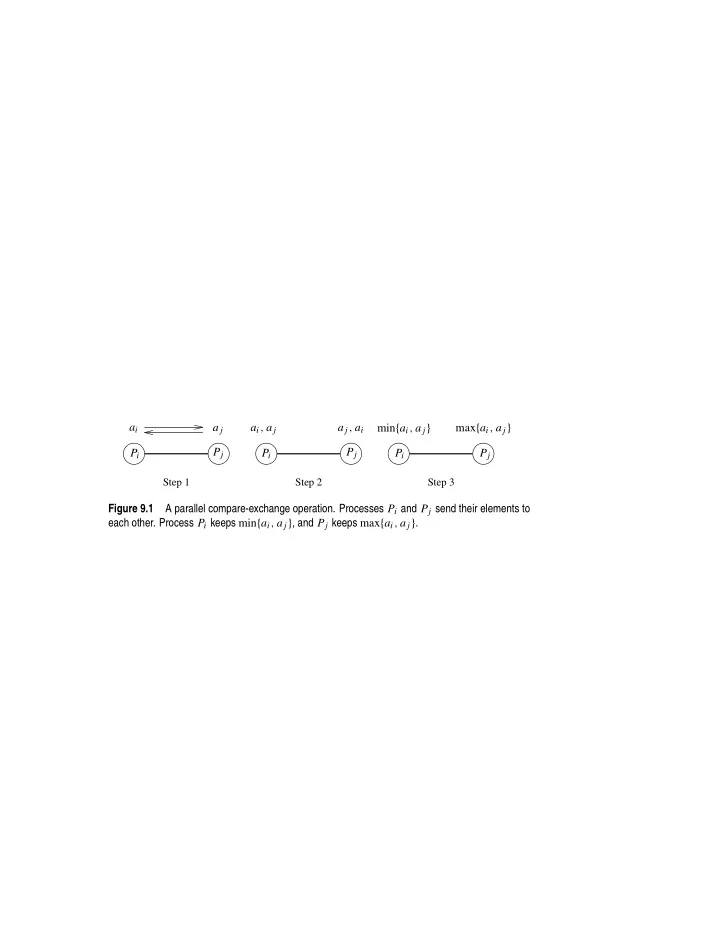
a i a j a i , a j a j , a i min { a i , a j } max { a i , a j } P j P j P i P i P i P j Step 1 Step 2 Step 3 Figure 9.1 A parallel compare-exchange operation. Processes P i and P j send their elements to each other. Process P i keeps min { a i ,


slide-1
SLIDE 1

Step 1 Step 2 Step 3

ai a j Pi Pi Pi Pj Pj Pj max{ai, a j} min{ai, a j} a j, ai ai, a j Figure 9.1 A parallel compare-exchange operation. Processes Pi and Pj send their elements to each other. Process Pi keeps min{ai, a j}, and Pj keeps max{ai, a j}.

slide-2
SLIDE 2

8 6 1 11 13 1 2 6 7 8 2 6 9 12 13 13 11 1 6 9 12 13 7 8 11 10 10 11 8 6 1 13 2 9 7 12 10 8 7 1 8 6 2 11 1 2 9 7 12 2 9 7 12 10 10

Step 2

9 12 13 11 10

Step 4 Step 3 Step 1

Pi Pi Pi Pi Pj Pj Pj Pj Figure 9.2 A compare-split operation. Each process sends its block of size n/p to the other

  • process. Each process merges the received block with its own block and retains only the appropriate

half of the merged block. In this example, process Pi retains the smaller elements and process Pj retains the larger elements.

slide-3
SLIDE 3

(a) (b) x x x x y y y y x′ = min{x, y} y′ = max{x, y} x′ = max{x, y} y′ = min{x, y} x′ = min{x, y} y′ = max{x, y} x′ = max{x, y} y′ = min{x, y}

Figure 9.3 A schematic representation of comparators: (a) an increasing comparator, and (b) a decreasing comparator.

slide-4
SLIDE 4

Columns of comparators Input wires Output wires Interconnection network

Figure 9.4 A typical sorting network. Every sorting network is made up of a series of columns, and each column contains a number of comparators connected in parallel.

slide-5
SLIDE 5

Original sequence 3 5 8 9 10 12 14 20 95 90 60 40 35 23 18 1st Split 3 5 8 9 10 12 14 95 90 60 40 35 23 18 20 2nd Split 3 5 8 10 12 14 9 35 23 18 20 95 90 60 40 3rd Split 3 8 5 10 9 14 12 18 20 35 23 60 40 95 90 4th Split 3 5 8 9 10 12 14 18 20 23 35 40 60 90 95

Figure 9.5 Merging a 16-element bitonic sequence through a series of log 16 bitonic splits.

slide-6
SLIDE 6

18 23 35 40 60 90 95 20 14 12 10 9 8 5 3 95 90 60 40 35 23 20 18 14 12 10 9 8 5 3 90 95 40 60 23 35 20 18 12 14 9 10 5 8 3 40 90 60 95 20 18 23 35 9 12 10 5 8 3 3 5 10 14 8 9 12 14 95 90 40 35 23 20 18 60 0011 1100 1110 1101 1011 1010 1001 1000 0111 0110 0101 0100 0010 0001 0000 Wires 1111

Figure 9.6 A bitonic merging network for n = 16. The input wires are numbered 0, 1 . . . , n − 1, and the binary representation of these numbers is shown. Each column of comparators is drawn separately; the entire figure represents a ⊕BM[16] bitonic merging network. The network takes a bitonic sequence and outputs it in sorted order.

slide-7
SLIDE 7

BM[2] BM[2] BM[2] BM[2] BM[2] BM[2] BM[2] BM[2] BM[16] BM[4] BM[4] BM[4] BM[4] BM[8] BM[8]

0001 0100 0101 0000 0010 0011 0110 0111 1000 1001 1010 1011 1100 1101 1110 1111

Wires

Figure 9.7 A schematic representation of a network that converts an input sequence into a bitonic

  • sequence. In this example, ⊕BM[k] and ⊖BM[k] denote bitonic merging networks of input size k

that use ⊕ and ⊖ comparators, respectively. The last merging network (⊕BM[16]) sorts the input. In this example, n = 16.

slide-8
SLIDE 8

23 90 60 40 3 8 12 14 20 10 9 5 18 23 35 40 60 90 95 20 14 12 10 9 8 18 95 5 3 18 95 35 23 40 60 90 12 14 8 3 5 9 20 10 18 95 35 23 40 60 90 14 12 8 3 9 5 20 10 35 1000 1111 1110 1101 1100 1011 1010 1001 0111 0110 0101 0100 0011 0010 0001 0000 Wires

Figure 9.8 The comparator network that transforms an input sequence of 16 unordered numbers into a bitonic sequence. In contrast to Figure 9.6, the columns of comparators in each bitonic merging network are drawn in a single box, separated by a dashed line.

slide-9
SLIDE 9

Step 2 Step 4 Step 3 Step 1

1101 1100 1010 1110 1111 1011 0000 0001 0101 0100 0110 0011 0111 1000 1001 0010 0100 1100 1101 1110 0000 0001 0101 0010 0110 0111 0011 1001 1000 1010 1011 1111 1100 1101 1010 0100 0000 0001 0101 0010 0110 0111 0011 1000 1001 1011 1111 1110 1100 1101 0100 0000 0001 0101 0010 0110 0111 1000 1001 1011 1111 1110 0011

1010

Figure 9.9 Communication during the last stage of bitonic sort. Each wire is mapped to a hyper- cube process; each connection represents a compare-exchange between processes.

slide-10
SLIDE 10

1110 1100 1101 1011 1001 1000 1010 0110 0101 0111 0100 0011 0010 0001 1111 0000

Stage 3 1 1 1 1 1 1 1 1 2,1 2,1 2,1 2,1 3,2,1 3,2,1 4,3,2,1 Processors Stage 4 Stage 2 Stage 1

Figure 9.10 Communication characteristics of bitonic sort on a hypercube. During each stage of the algorithm, processes communicate along the dimensions shown.

slide-11
SLIDE 11

1101 1001 1010 0100 1000 1011 1100 1110 1111 0101 0110 0111 0000 0001 0010 0011 1110 1001 0010 1010 1101 1100 0000 0001 0011 0111 0110 0101 0100 1000 1011 1111 1000 1110 1100 1111 0000 0001 0100 0101 0010 0011 0110 0111 1001 1101 1010 1011

(a) (b) (c)

Figure 9.11 Different ways of mapping the input wires of the bitonic sorting network to a mesh

  • f processes: (a) row-major mapping, (b) row-major snakelike mapping, and (c) row-major shuffled

mapping.

slide-12
SLIDE 12

Step 1 Step 2 Step 3 Step 4

Stage 4

Figure 9.12 The last stage of the bitonic sort algorithm for n = 16 on a mesh, using the row- major shuffled mapping. During each step, process pairs compare-exchange their elements. Arrows indicate the pairs of processes that perform compare-exchange operations.

slide-13
SLIDE 13

3 3 4 5 6 8 Phase 6 (even) 2 1 5 3 2 8 6 4 2 3 8 5 6 4 5 4 8 6 2 3 3 5 8 4 6 3 5 4 8 6 3 4 5 6 8 Phase 1 (odd) Unsorted Phase 2 (even) Phase 3 (odd) Phase 4 (even) Phase 5 (odd) 3 1 1 3 3 1 1 2 2 2 3 3 3 1 1 Sorted 3 3 4 5 6 8 3 3 4 5 6 8 1 2 1 2 Phase 8 (even) Phase 7 (odd)

Figure 9.13 Sorting n = 8 elements, using the odd-even transposition sort algorithm. During each phase, n = 8 elements are compared.

slide-14
SLIDE 14

1 2 3 4 5 6 7 1 2 3 4 5 6 7 1 2 3 4 5 6 7

Figure 9.14 An example of the first phase of parallel shellsort on an eight-process array.

slide-15
SLIDE 15

1 2 3 3 4 5 8 7 1 2 3 3 4 5 7 8 3 2 1 5 8 4 3 7 (a) (b) (c) (d) (e) 1 2 3 5 8 4 3 7 1 2 3 3 4 5 7 8 Final position Pivot

Figure 9.15 Example of the quicksort algorithm sorting a sequence of size n = 8.

slide-16
SLIDE 16

3 5 3 7 1 2 4 8

Figure 9.16 A binary tree generated by the execution of the quicksort algorithm. Each level of the tree represents a different array-partitioning iteration. If pivot selection is optimal, then the height of the tree is (log n), which is also the number of iterations.

slide-17
SLIDE 17

1 2 3 4 5 6 7 8 1 2 3 4 5 6 7 8 1 2 3 4 5 6 7 8 2 6 7 3 5 8 2 3 6 7 3 7 8 1 2 3 4 5 6 7 8 [4] {54} [1] {33} [6] {33} [5] {82} [2] {21} [3] {13} [7] {40} [8] {72} 54 82 40 72 13 21 33 33

(a) (b) (c)

1 5

(f) (d) (e)

2 6 1 5 8 2 6 3 1 5 8 7 leftchild rightchild leftchild rightchild leftchild rightchild 1

root = 4

Figure 9.17 The execution of the PRAM algorithm on the array shown in (a). The arrays leftchild and rightchild are shown in (c), (d), and (e) as the algorithm progresses. Figure (f) shows the binary tree constructed by the algorithm. Each node is labeled by the process (in square brackets), and the element is stored at that process (in curly brackets). The element is the pivot. In each node, processes with smaller elements than the pivot are grouped on the left side of the node, and those with larger elements are grouped on the right side. These two groups form the two partitions of the

  • riginal array. For each partition, a pivot element is selected at random from the two groups that form

the children of the node.

slide-18
SLIDE 18

after global rearrangement pivot=7 pivot selection after local rearrangement First Step after local rearrangement Fourth Step pivot=5 pivot=17 after local rearrangement after global rearrangement after local rearrangement after global rearrangement Second Step pivot selection Third Step pivot selection pivot=11 Solution

7 2 1 6 3 4 5 18 13 17 14 20 10 15 9 19 16 12 11 8 1 3 13 10 14 9 20 17 7 4 18 15 2 19 6 11 16 12 5 8 3 14 9 20 7 15 19 6 2 18 13 1 17 10 4 16 5 11 12 8 10 9 8 12 11 13 17 15 14 16 7 2 1 6 3 4 5 18 13 17 14 20 10 15 9 19 16 12 11 8 2 6 3 4 5 7 1 13 20 10 15 9 19 16 12 11 8 17 14 18 2 1 13 17 14 3 4 5 6 7 10 15 9 16 12 11 8 18 20 19 10 9 8 12 11 13 17 15 14 16 2 1 13 17 14 3 4 5 6 7 10 15 9 16 12 11 8 18 20 19 2 1 3 4 5 6 7 18 19 20 13 17 15 9 12 11 14 10 8 16 2 1 3 4 5 6 7 18 19 20 13 14 15 16 17 9 10 8 11 12

P0 P0 P0 P0 P0 P0 P0 P1 P1 P1 P1 P1 P1 P1 P2 P2 P2 P2 P2 P2 P2 P2 P3 P3 P3 P3 P3 P3 P3 P3 P4 P4 P4 P4 P4 P4 P4

Figure 9.18 An example of the execution of an efficient shared-address-space quicksort algorithm.

slide-19
SLIDE 19

pivot=7 pivot selection after local rearrangement after global rearrangement

1 3 13 10 14 9 20 17 7 4 18 15 2 19 6 11 16 12 5 8 3 14 9 20 7 15 19 6 2 18 13 1 17 10 4 16 5 11 12 8 2 1 6 3 4 5 18 13 17 14 20 10 15 9 19 16 12 11 8 7

1 2 3 4 5 6 7 8 9 10 11 12 13 14 15 16 17 18 19

2 1 1 2 1 2 3 3 2 3 2 5 8 10 2 3 4 6 7 13

P0 P0 P1 P1 P2 P2 P3 P3 P4 P4 |Si| |Li| Prefix Sum Prefix Sum

Figure 9.19 Efficient global rearrangement of the array.

slide-20
SLIDE 20

Initial element distribution Local sort & sample selection Global splitter selection Final element assignment Sample combining

1 13 10 14 20 17 18 2 6 7 22 24 3 19 16 15 23 4 11 12 5 8 21 9 1 2 13 18 17 14 22 3 6 9 24 10 15 20 21 4 5 8 11 12 16 23 19 7 7 17 9 20 8 16 7 8 9 16 17 20 1 2 3 4 5 6 7 8 9 10 11 12 13 14 15 16 17 18 20 21 22 23 24 19

P0 P0 P0 P1 P1 P1 P2 P2 P2

Figure 9.20 An example of the execution of sample sort on an array with 24 elements on three processes.

slide-21
SLIDE 21

Sequence of Elements (a) (b) (c) Hypercube

  • dimension. Partitions

Split along the third the sequence into two and one larger than the pivot. Split along the second

  • dimension. Partitions each

subblock into two smaller subblocks. Split along the first

  • dimension. The elements

are sorted according to

  • nto the hypercube.

big blocks−one smaller the global ordering imposed

100 001 110 0** 1** 01* 11* 10* 00* 100 001 100 001 010 110 001 000 101 111 011 010 000 101 010 110 111 011 000 101 111 011 010 011 100 101 110 111 000

by the processors’ labels

Figure 9.21 The execution of the hypercube formulation of quicksort for d = 3. The three splits –

  • ne along each communication link – are shown in (a), (b), and (c). The second column represents

the partitioning of the n-element sequence into subcubes. The arrows between subcubes indicate the movement of larger elements. Each box is marked by the binary representation of the process labels in that subcube. A ∗ denotes that all the binary combinations are included.
slide-22
SLIDE 22

(a) (b)

Root

Figure 9.22 (a) An arbitrary portion of a mesh that holds part of the sequence to be sorted at some point during the execution of quicksort, and (b) a binary tree embedded into the same portion

  • f the mesh.