Linked Lists Fundamentals of Computer Science Outline Sequential - - PowerPoint PPT Presentation

linked lists
SMART_READER_LITE
LIVE PREVIEW

Linked Lists Fundamentals of Computer Science Outline Sequential - - PowerPoint PPT Presentation

Linked Lists Fundamentals of Computer Science Outline Sequential vs. Linked Linked List Building a Linked List Traversing a Linked List Implementation (Circular) Sequential vs. Linked Sequential data structures Put one


slide-1
SLIDE 1

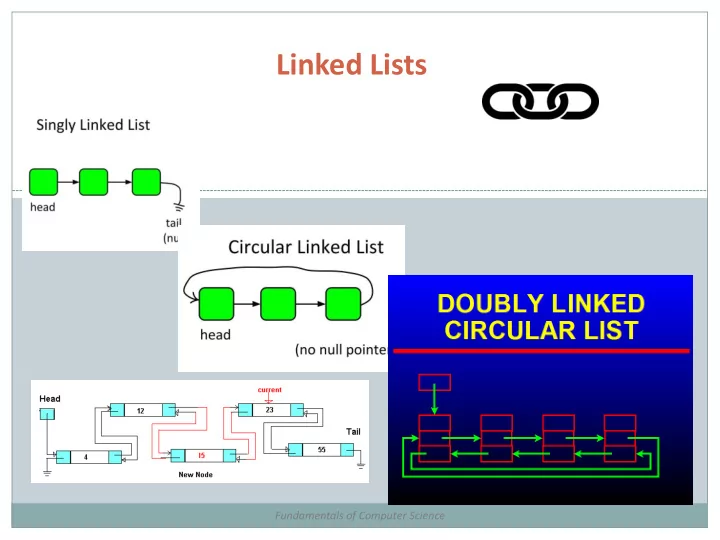
Linked Lists

Fundamentals of Computer Science
slide-2
SLIDE 2

Outline

 Sequential vs. Linked  Linked List  Building a Linked List  Traversing a Linked List  Implementation (Circular)

slide-3
SLIDE 3

Sequential vs. Linked

 Sequential data structures

 Put one object next to another  A block of consecutive memory in the computer  Python: list of objects  Arbitrary access, "get me the ith object"  Fixed size, or dynamic but less efficient

 Linked data structures

 Each object has link to another (or perhaps several)  Python: link is a reference to another object  Dynamic size  Flexible and widely-used way of organizing data  More challenging to code and debug

slide-4
SLIDE 4

Sequential vs. Linked

4 Memory address Value C0 "The" C1 "cat" C2 "sat" C3

  • C4
  • C5
  • C6
  • C7
  • C8
  • C9
  • Memory

address Value C0 "cat" C1 C8 C2

  • C3
  • C4

"The" C5 C0 C6

  • C7
  • C8

"sat" C9 null

Python list linked list

slide-5
SLIDE 5

Linked List

 Linked list

 Simplest linked data structure  Node is a recursive data structure  Each node contains:  An item (some data)  A pointer to next node in the list

5 class Node: def __init__(self, s): self.item = s self.next = None

"The" "cat" "sat" Three Node objects hooked together to form a linked list

Special pointer value null (None in Python) terminates the list. We denote with a dot.

slide-6
SLIDE 6

Building a linked list

6

"The"

Memory address Value C0

  • C1
  • C2
  • C3
  • C4

"The" C5 None/null C6

  • C7
  • C8
  • C9
  • first = Node()

first.item = "The"

first first

slide-7
SLIDE 7

Building a linked list

7

"The" "cat"

Memory address Value C0 "cat" C1 null C2

  • C3
  • C4

"The" C5 null C6

  • C7
  • C8
  • C9
  • first = Node()

first.item = "The" second = Node() second.item = "cat"

first second first second

slide-8
SLIDE 8

Building a linked list

8

"The" "cat"

Memory address Value C0 "cat" C1 null C2

  • C3
  • C4

"The" C5 null C6

  • C7
  • C8

"sat" C9 null

"sat"

first = Node() first.item = "The" second = Node() second.item = "cat" third = Node() third.item = "sat"

first second third first second third

slide-9
SLIDE 9

Building a linked list

9

"The" "cat" "sat"

Memory address Value C0 "cat" C1 null C2

  • C3
  • C4

"The" C5 C0 C6

  • C7
  • C8

"sat" C9 null

first = Node() first.item = "The" second = Node() second.item = "cat" third = Node() third.item = "sat" first.next = second

first second third first second third

slide-10
SLIDE 10

Building a linked list

10

first = Node() first.item = "The" second = Node() second.item = "cat" third = Node() third.item = "sat" first.next = second second.next = third

"The" "cat" "sat"

Memory address Value C0 "cat" C1 C8 C2

  • C3
  • C4

"The" C5 C0 C6

  • C7
  • C8

"sat" C9 null first second third first second third

slide-11
SLIDE 11

Traversing a List

 Iterate over all elements in a linked list

 Assume list is null terminated  Assume first instance variable points to start of list  Print all the strings in the list

11

"The" "cat" "sat"

first

current = first while current != None: print(current.item) current = current.next

slide-12
SLIDE 12

Traversing a list

12

current = first while current != None: print(current.item) current = current.next

"The" "cat" "sat"

first current

slide-13
SLIDE 13

Traversing a list

13

current = first while current != None: print(current.item) current = current.next

"The" "cat" "sat"

first current

The

slide-14
SLIDE 14

Traversing a list

14

current = first while current != None: print(current.item) current = current.next

"The" "cat" "sat"

first current

The

slide-15
SLIDE 15

Traversing a list

15

current = first while current != None: print(current.item) current = current.next

"The" "cat" "sat"

first current

The cat

slide-16
SLIDE 16

Traversing a list

16

current = first while current != None: print(current.item) current = current.next

"The" "cat" "sat"

first current

The cat

slide-17
SLIDE 17

Traversing a list

17

current = first while current != None: print(current.item) current = current.next

"The" "cat" "sat"

first current

The cat sat

slide-18
SLIDE 18

Traversing a list

18

current = first while current != None: print(current.item) current = current.next

"The" "cat" "sat"

first current

The cat sat

null

slide-19
SLIDE 19

Playing with a Linked List

 What things might we want to do with a list?

 Construct a node  Add a node to the end  Insert a node at a certain position  Remove a node from a position  Print out the list of nodes

slide-20
SLIDE 20

Playing with a Linked List

 The definition of the class:

class LinkedList: # # Constructor for an empty linked list. # def __init__(self): self.length = 0 self.start = None

slide-21
SLIDE 21

Playing with a Linked List

 What things might we want to do with a list?

 Construct a linked list

slide-22
SLIDE 22

Playing with a Linked List

 What things might we want to do with a list?

 Add a node to the end

slide-23
SLIDE 23

Playing with a Linked List

 What things might we want to do with a list?

 Insert a node at a certain position

slide-24
SLIDE 24

Playing with a Linked List

 What things might we want to do with a list?

 Remove a node from a position

slide-25
SLIDE 25

Playing with a Linked List

 What things might we want to do with a list?

 Print out the list of nodes

slide-26
SLIDE 26

Summary

 Sequential vs. Linked  Linked List  Building a Linked List  Traversing a Linked List  Implementation (Circular)

slide-27
SLIDE 27

Your Turn

 Open Moodle, go to CSCI 136, Section 01  Open the dropbox for today: Activity 1  Drag and drop your program file to the Moodle

dropbox

 You get: 1 point if you turn in something, 2 points if

you turn in something that is correct.

 On the class website is a file, Quote.py. There are three blank

lines in the method insertWord that you need to fill in with real code to make it work. If you have done it correctly, when you run it, the output should be:

A rose is a rose. 5 rose A rose is just a rose. 6