Lesson 1 Android Development Introduction Victor Matos Cleveland - - PDF document

lesson 1 android development introduction
SMART_READER_LITE
LIVE PREVIEW

Lesson 1 Android Development Introduction Victor Matos Cleveland - - PDF document

Lesson 1 Lesson 1 Android Development Introduction Victor Matos Cleveland State University Cleveland State University Portions of this page are reproduced from work created and shared by Google and used according to terms described in the


slide-1
SLIDE 1

Lesson 1

Lesson 1 Android Development Introduction

Victor Matos Cleveland State University Cleveland State University

Portions of this page are reproduced from work created and shared by Google and used according to terms described in the Creative Commons 3.0 Attribution License.

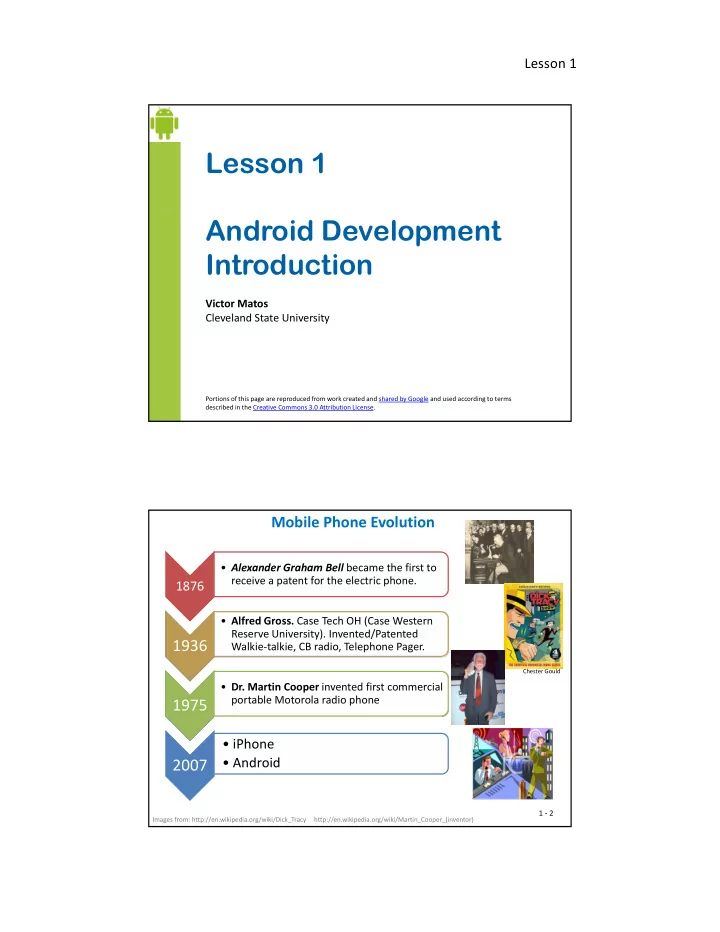
Mobile Phone Evolution

1876

  • Alexander Graham Bell became the first to

receive a patent for the electric phone.

1936

  • Alfred Gross. Case Tech OH (Case Western

Reserve University). Invented/Patented Walkie-talkie, CB radio, Telephone Pager.

1975

  • Dr. Martin Cooper invented first commercial

portable Motorola radio phone

Chester Gould

2007

  • iPhone
  • Android

Images from: http://en.wikipedia.org/wiki/Dick_Tracy http://en.wikipedia.org/wiki/Martin_Cooper_(inventor)

1 - 2

slide-2
SLIDE 2

Lesson 1

Hardware: What is inside a Smart Cellular Phone?

Oversimplifying…

Smart cellular phone ≥ radio + computer* = +

Industries ⟵ ∑ Software Telecom Semiconductor Marketing

1 - 3

Hardware: Reusing Cell Phone Frequencies

Base stations of the world, unite!

The main idea behind cellular The main idea behind cellular communications is the division of a large city into small areas called cells each hosting a Base-Station. Base-Stations operate with just enough power to reach only the users inside their individual cells. Each hexagonal cell covers

  • approx. 10 sq miles (26 km2)

Base stations use low-power transmitters, therefore the same frequencies can be reused in non-contiguous cells.

1 - 4

slide-3
SLIDE 3

Lesson 1

Software: What is Android?

  • Android OS is an open-source Linux-based operating system for mobile

devices.

  • It is being developed by the Open Handset Alliance and Google Inc.

It is being developed by the Open Handset Alliance and Google Inc.

  • The operating system has a number of native applications supporting

telephony, messaging, emailing, contact management, calendar, entertainment, multimedia experience, location services, mapping, social interaction, etc.

  • Third party Java developers can use the Android API to extend the
  • Third party Java developers can use the Android API to extend the

functionality of the devices.

  • Google provides an on-line electronic market for third-party developers to

sell-distribute their custom applications.

1 - 5

Why Android?

Listen from the project creators/developers (2.19 min)

  • Nick Sears. Co-founder of Android
  • Steve Horowitz. Engineering Director
  • Dam Morrill. Developer
  • Peisun Wu Engineering Project Manager
  • Peisun Wu. Engineering Project Manager
  • Erick Tseng. Project Manager
  • Iliyan Malchev. Engineer
  • Mike Cleron. Software Manager
  • Per Gustafsson. Graphics Designer.

Link accessed on Sept 1, 2014: http://www.youtube.com/watch?v=6rYozIZOgDk&eurl=http://www.android.com/abo ut/&feature=player embedded

1 - 6

/ p y _ You will hear statements such as: “…currently it is too difficult to make new products … open software brings more innovation … choices … lower costs … enables the industry to create….more applications such as family planner, my taxes, … understand my wife better, … ”

slide-4
SLIDE 4

Lesson 1

What is the Open Handset Alliance?

A consortium of 80+ technology and mobile business companies. Quoting from www.OpenHandsetAlliance.com site (2/25/2012)

“ … Today, there are 1.5 billion television sets in use around the

  • world. 1 billion people are on the Internet. But nearly 3 billion people

have a mobile phone, making it one of the world’s most successful consumer products… Building a better mobile phone would enrich the lives of countless people across the globe. The Open Handset Alliance™ is a group of mobile and technology leaders who share this vision for changing the mobile experience for consumers …”

1 - 7

Open Handset Alliance Members

Operators Software Co. Commercializat. Semiconductor Handset Manf

Bouygues Tele China Mobile Ascender Corp. Borqs Accenture Aplix ARM Atheros ACER ASUS China Mobile China Telec. China Unicom KDDI Corp. NTT DoCoMo Softbank Sprint Nextel Telecom Italia Telefónica Telus Borqs eBay Esmertec Google LivingImage NMS Comm. Nuance Comm. PacketVideo SkyPop … Aplix Astonishing Tribe Noser Engineering Omron Software Sasken Teleca … Wind River Systems Atheros Audience Broadcom Corp. CSR Plc. Cypress Freescale Gemalto Intel Corp. Marvell Tech MediaTek ASUS

Dell

Garmin HTC Kyocera Lenovo Mobile LG Motorola NEC T-Mobile ... Vodafone SONiVOX MIPS Techn. Nvidia Corp Qualcomm Renesas Corp ST-Ericsson Synaptics Texas Instrum. Via Telecom Samsung Sharp … Sony Ericsson … Toshiba

1 - 8

slide-5
SLIDE 5

Lesson 1

Android Developers Talk

Short video (4 min.) Dave Bort and Dan Borstein, Two members of the Android Open Source Project talk about their experience.

Link accessed on Sept 1, 2014 http://www.youtube.com/watch?v=7Y4thikv-OM

1 - 9

The Mobile Revolution Not so long ago … Today

Electronic tools commonly carried by a typical business warrior

  • 1. Phone
  • 2. Pager
  • 3. PDA Organizer
  • 4. Laptop
  • 5. MP3 Portable music player

6 Wired modem

  • 1. Smartphone
  • 2. Laptop (perhaps!)
  • 6. Wired modem
  • 7. No Internet access / limited

access Tomorrow ?

1 - 10

slide-6
SLIDE 6

Lesson 1

Dreaming aloud I want my 2015 Smartphone to be …

1. Phone 2. Pager

The Mobile Revolution

g 3. PDA Organizer 4. High Quality Camera (still & video) 5. Portable music player 6. Portable TV / Video Player / Radio 7. Laptop 8. Play Station 9. GPS / Compass / Navigation (road & inside buildings)

  • 10. Golf Caddy (ball retriever too)
  • 11. Book Reader (I don’t read, It reads to me with passion!)

12 El i k (C / H / Offi )

  • 12. Electronic key (Car / Home / Office)
  • 13. Remote Control (Garage, TV, …)
  • 14. Credit Card / Driver’s License / Passport / Airplane Ticket
  • 15. Cash
  • 16. Cook, house chores
  • 17. Psychologist / Mentor / Adviser
  • 18. Personal trainer
  • 19. Dance instructor
  • 20. ????

1 - 11

Android vs. OS Competitors

1.Apple Inc. 2 Microsoft 2.Microsoft 3.Nokia Symbiam 4.Palm & webOS 5.Research In Motion

vs.

1 - 12

slide-7
SLIDE 7

Lesson 1

Android Software/Hardware Components

  • Dalvik virtual machine (soon to be replaced by ART )
  • Integrated browser (WebKit)
  • Graphic Capabilities (hardware acceleration)
  • SQLite for structured data storage
  • Media support (audio/video)
  • GSM Telephony (hardware dependent)
  • Bluetooth, EDGE, 3G, 4G, NFC, and Wi-Fi (hardware manufacturer

dependent)

  • Camera, GPS, compass, accelerometer, gyroscope, proximity/ambient

light, barometric pressure, fingerprint reader, heart rate sensor light, barometric pressure, fingerprint reader, heart rate sensor (hardware dependent)

  • Software Development Tools & Application framework

(device emulator, debugging, profiling, plugin for the Eclipse IDE, resource managers, Android Studio)

1 - 13

Android’s Software Architecture

1 - 14

slide-8
SLIDE 8

Lesson 1

Video 1/3:

Software Layers

Presented by Mike Cleron, Google Corp. (13 min) Available at: http://wwwyoutube com/watch?v=QBGfUs9mQYY

Android’s Software Architecture

Available at: http://www.youtube.com/watch?v=QBGfUs9mQYY

1 - 15

Video 2/3:

Application’s Life Cycle

Presented by Mike Cleron, Google Corp. (7 min) Available at: http://wwwyoutube com/watch?v=fL6gSd4ugSI&feature=channel

Android’s Software Architecture

Available at: http://www.youtube.com/watch?v=fL6gSd4ugSI&feature=channel

1 - 16

slide-9
SLIDE 9

Lesson 1

Video 3/3: Android’s API

Presented by Mike Cleron, Google Corp. (8 min) Video available at:

Android’s Software Architecture

Video available at: http://www.youtube.com/watch?v=MPukbH6D-lY&feature=channel

1 - 17

Android Application Framework

Video: Inside the Android Application Framework

( b t 52 i ) (about 52 min)

Presented by Dan Morrill – Google At Google Developer Conference San Francisco – 2008 Available at: http://sites.google.com/site/io/inside-the-android-application-framework

Android is designed to be fast, powerful, and easy to develop for. This session will discuss the Android application framework in depth, showing you the machinery behind the application framework. explains the life-cycle of an android apk. very good!

1 - 18

slide-10
SLIDE 10

Lesson 1

Video: Android Development Tools

(about 60 min)

Android Support - Education

Google 2011 Developer Conference San Francisco Presented by

  • Xavier Ducrohet, tech-lead for the Android SDK and Developer Tools.
  • Tor Norbye, engineer on the Android SDK team working on visual tools for

y , g g Android development. LINK:

http://www.google.com/events/io/2011/sessions/android-development-tools.html

1 - 19

An Introduction to Android

Video: An Introduction to Android

(about 52 min)

Presented by Jason Chen – Google At Google Developer Conference San Francisco - 2008 Video available at: http://www.youtube.com/watch?v=x1ZZ-R3p_w8

1 - 20

slide-11
SLIDE 11

Lesson 1

The Dalvik Virtual Machine

Video (61 min) Dalvik VM Internals

Presented by Dan Borstein At Google Developer – 2008 San francisco Video available at: http://www.youtube.com/watch?v=ptjedOZEXPM

1 - 21

Android Intents

  • An Intent is a request for services offered by an Android based device.
  • An Intent is made up of various pieces including:

– desired action or service, – data, and – category of component that should handle the intent and instructions

  • n how to launch a target activity.

Action Data The general action to be performed, such as: The data to operate on, such as a person record in the contacts

1 - 22

such as: ACTION_VIEW ACTION_EDIT ACTION_MAIN etc. person record in the contacts database, expressed as a Uri.

slide-12
SLIDE 12

Lesson 1

Some examples of Intent’s action/data pairs are: ACTION_VIEW content://contacts/1 -- Display information about the person whose identifier is "1".

Android Intents

ACTION_DIAL content://contacts/1 -- Display the phone dialer with the person filled in. ACTION_VIEW tel:123 -- Display the phone dialer with the given number filled in ACTION_DIAL tel:123 -- Display the phone dialer with the given number filled in in. ACTION_EDIT content://contacts/1 -- Edit information about the person whose identifier is "1". ACTION_VIEW content://contacts/ -- Display a list of people, which the user can browse through.

1 - 23

Example1: Java + Built-in Intent

The following code fragment calls an Intent whose job is to invoke a built-in task (ACTION_VIEW) and explore the Contacts available in the phone. Intent myIntent = new Intent( Intent.ACTION_VIEW, Uri.parse("content://contacts/people") ); startActivity(myIntent);

1 - 24

slide-13
SLIDE 13

Lesson 1

Intent uses ACTION_VIEW to see Contacts.

Example1: Java + Built-in Intent

1 - 25

Java class including invocation to an Intent to display Contacts.

public class AndDemo1 extends Activity { /** show contact list */

Example1: Java + Built-in Intent

/ show contact list / @Override public void onCreate(Bundle savedInstanceState) { super.onCreate(savedInstanceState); setContentView(R.layout.main); Intent myIntent = new Intent( Intent.ACTION_VIEW,Uri.parse( "content://contacts/people")); startActivity(myIntent); } }

1 - 26

slide-14
SLIDE 14

Lesson 1

Dissecting an Android Application

Structure of a typical Android Application (Shown by Eclipse’s Project Explorer)

1 - 27

Dissecting an Android Application

Structure of a typical Android Application (Android Studio)

1 - 28

slide-15
SLIDE 15

Lesson 1

Android Manifest XML File

  • Every application must have an

AndroidManifest.xml file in its root directory.

  • The manifest presents essential information

about the application to the Android system, for instance it has an entry for each activity, library request, and special permissions needed to assemble the app.

1 - 29

<action> <activity> <permission> <permission-group> This is a list of the <XML-elements> allowed in the Manifest file.

Android Manifest XML File

<activity> <activity-alias> <application> <category> <data> <grant-uri-permission> <instrumentation> <permission group> <permission-tree> <provider> <receiver> <service> <uses-configuration> <uses-library> <intent-filter> <manifest> <meta-data> <uses-permission> <uses-sdk>

1 - 30

slide-16
SLIDE 16

Lesson 1

<?xml version="1.0" encoding="utf-8"?> <manifest xmlns:android="http://schemas.android.com/apk/res/android" package="matos.earthquake" android:versionCode="1" android:versionName="1.0.0"> <application android:icon="@drawable/yellow_circle" android:label="@string/app_name"> <activity android:name=".AndQuake"

Android Manifest XML File

android:label="@string/app_name"> <intent-filter> <action android:name="android.intent.action.MAIN" /> <category android:name="android.intent.category.LAUNCHER" /> </intent-filter> </activity> <activity android:name=".SatelliteMapping"> </activity> <service android:name="AndQuakeService" android:enabled="true" > </service> <receiver android:name="AndQuakeAlarmReceiver" > <receiver android:name="AndQuakeAlarmReceiver" > <intent-filter> <action android:name = "ALARM_TO_REFRESH_QUAKE_LIST"/> </intent-filter> </receiver> </application> <uses-library android:name="com.google.android.maps" /> <uses-permission android:name="android.permission.INTERNET" /> </manifest>

1 - 31

Implementing a currency converter: USD ⟶ Euro ⟶ Colon (CR)

  • Example2. Currency converter

Note. Naive implementation using a fixed exchange rate: 1 Costa Rican Colon = 0.0019 U.S. dollars 1 Euro = 1.35 U.S. dollars

1 - 32

slide-17
SLIDE 17

Lesson 1

package csu.matos.currencyconverter; import android.app.Activity; import android.os.Bundle; import android.view.View; import android.view.View.OnClickListener; import android widget Button;

  • Example2. Currency converter

import android.widget.Button; import android.widget.EditText; public class Currency1 extends Activity { //USA money format (12 digits, 2 decimals) DecimalFormat usaDf = new DecimalFormat("###,###,###,###.##"); // naive currency converter (USD to Euros & Colones)

private final double EURO2USD = 1.35; private final char EUROSYM = '\u20AC'; private final double COLON2USD = 0.0019; p ; private final char COLONSYM = '\u20A1';

// GUI widgets Button btnConvert; Button btnClear; EditText txtUSDollars; EditText txtEuros; EditText txtColones; 1 - 33 @Override public void onCreate(Bundle savedInstanceState) { super.onCreate(savedInstanceState); setContentView(R.layout.activity_main_linear); // bind local controls to GUI widgets txtUSDollars = (EditText)findViewById(R.id.txtUSDollars);

  • Example2. Currency converter

( ) y ( ) // make ‘Euros’ box not-editable (no user input) txtEuros = (EditText)findViewById(R.id.txtEuros); txtEuros.setInputType(EditorInfo.TYPE_NULL); // No user input. See layout: android:editable=“false” txtColones = (EditText)findViewById(R.id.txtColones); // attach click behavior to buttons btnClear = (Button)findViewById(R.id.btnClear); btnClear.setOnClickListener(new OnClickListener() { // clear the text boxes @Override @Override public void onClick(View v) { txtColones.setText(""); txtEuros.setText(""); txtUSDollars.setText(""); } }); 1 - 34

slide-18
SLIDE 18

Lesson 1

// do the conversion from USD to Euros and Colones

btnConvert = (Button) findViewById(R.id.btnConvert); btnConvert.setOnClickListener(new OnClickListener() { @Override public void onClick(View v) { try { String usdStr = txtUSDollars.getText().toString();

  • Example2. Currency converter

g g () g() double usd = Double.parseDouble(usdStr); String euros = EUROSYM + String.valueOf(usaDf.format(usd / EURO2USD)); String colones = COLONSYM + String.valueOf(usaDf.format(usd / COLON2USD)); txtEuros.setText(euros); txtColones.setText(colones); } catch (NumberFormatException e) { // ignore errors } } });// setOnClick... }// onCreate }// class 1 - 35

  • Example2. Currency converter

1 -36

1 - 36

slide-19
SLIDE 19

Lesson 1

LAYOUT: res/layout/activity_main_linear.xml (1 of 3)

<?xml version="1.0" encoding="utf-8"?> <LinearLayout xmlns:android="http://schemas.android.com/apk/res/android" android:layout_width="match_parent" android:layout_height="match_parent" android:orientation="vertical" android:padding="2dp" >

  • Example2. Currency converter

android:padding= 2dp > <LinearLayout android:layout_width="match_parent" android:layout_height="wrap_content" > <TextView android:id="@+id/textView2" android:layout_width="wrap_content" android:layout_height="wrap_content" android:ems="5" android:gravity="right" android:text="US Dollars" /> <EditText android:id="@+id/txtUSDollars" android:layout_width="wrap_content" android:layout_height="wrap_content" android:layout_weight="2" android:hint="Enter US Dollars amount" android:inputType="numberDecimal" /> <requestFocus /> </LinearLayout>

1 - 37

LAYOUT: res/layout/activity_main_linear.xml (2 of 3)

<LinearLayout android:layout_width="match_parent" android:layout_height="wrap_content" > <TextView android:id="@+id/textView3" d id l t idth " t t"

  • Example2. Currency converter

android:layout_width="wrap_content" android:layout_height="wrap_content" android:ems="5" android:gravity="right" android:text="Euros" /> <EditText android:id="@+id/txtEuros" android:layout_width="wrap_content" android:layout_height="wrap_content" android:layout_weight="2" /> </LinearLayout> <LinearLayout android:layout_width="match_parent" android:layout_height="wrap_content" > <TextView android:id="@+id/textView4" android:layout_width="wrap_content" android:layout_height="wrap_content" android:ems="5" android:gravity="right" android:text="Colon CR" />

1 - 38

slide-20
SLIDE 20

Lesson 1

LAYOUT: res/layout/activity_main_linear.xml

(3 of 3)

<EditText android:id="@+id/txtColones" android:layout_width="wrap_content" android:layout_height="wrap_content" android:layout_weight="2" android:editable="false" />

  • Example2. Currency converter

android:editable= false /> </LinearLayout> <LinearLayout android:layout_width="match_parent" android:layout_height="wrap_content" > <Button android:id="@+id/btnClear" android:layout_width="wrap_content" android:layout_height="wrap_content" android:layout_weight="1" android:text="Clear" /> <Button android:id="@+id/btnConvert" android:layout_width="wrap_content" android:layout_height="wrap_content" android:layout_weight="2" android:text="Convert" /> </LinearLayout> </LinearLayout>

1 - 39

APPENDIX A.

The Size of the Mobile Market Year 2009

Reference:

http://gizmodo.com/5489 036/cellphone-overshare Accessed on April 2010

40 40

slide-21
SLIDE 21

Lesson 1

The Size of the Mobile Market – 2009

Extracted from: http://gizmodo.com/5489036/cellphone-overshare Accessed on April 2010

1 4bn 480 m

Papers

2009 Mobile market compared to other h l

4 bn

Mobile Phone worldwide (half the population of the planet)

1.5bn

Televisions worlwide

1.4bn

Internet users worldwide

technologies

7.13% Traded Stocks and Financial 6.69% Movie information 5.33% Business Directory

48.7% News and Sport Information 20.21% Social Networking 11.94% Entertainment News

Content accessed from mobile phones

1 - 41

2009 Mobile Revenue

The Size of the Mobile Market – 2009

Revenue Year 2009 Mi ft

Extracted from: http://gizmodo.com/5489036/cellphone-overshare http://www.microsoft.com/investor/reports/ar09/10k_fr_bal.html Exxon Mobil 2009 Summary Annual Report 2010 Toyota Annual Report (pp 12)

$600 bn Voice

$130 bn Messaging

$70 bn Non-messaging

Microsoft $78bn Toyota Motors $204bn Exxon Mobil Exxon Mobil $301bn

Revenue is the collective amount of income made by a company (usually from the sales of goods & services)

1 - 42

slide-22
SLIDE 22

Lesson 1

2009 Mobile Search Market

The Size of the Mobile Market – 2009

Extracted from: http://gizmodo.com/5489036/cellphone-overshare Accessed on April 2010

97.57% Google

1.94% Yahoo 0.63% Other

2.43%

0.25% Ask 0.11% MSM

1 - 43

2009 How SMS compares as a text communication

The Size of the Mobile Market – 2009

Extracted from: http://gizmodo.com/5489036/cellphone-overshare Accessed on April 2010

3.05 bn

SMS users worldwide 2.6 SMS per day per person world average the most used written

600 m

IM users worldwide

application

communication tool of the planet

1.3 bn

Email users worldwide 1 - 44

slide-23
SLIDE 23

Lesson 1

13%

2009 Mobile Operating System Market Share Worldwide

The Size of the Mobile Market – Fourth Quarter 2009-Q4

Extracted from: http://gizmodo.com/5489036/cellphone-overshare Accessed on April 2010

19% RIM 13% iPhone 9% Windows 6% Other 2% 51% Symbian 2% Android

1 - 45

Google Microsoft 5% Others 5%

The Size of the Mobile Market – Second Quarter 2010-Q2

Extracted from: http://gizmodo.com/5489036/cellphone-overshare Accessed on April 2010

Google 17% RIM 18% Nokia 41% Apple 14%

1 - 46

slide-24
SLIDE 24

Lesson 1

RIM Microsoft 3.1% Others, 2.9%

The Size of the Mobile Market – Fourth Quarter 2010-Q4

Extracted from: http://gizmodo.com/5489036/cellphone-overshare Accessed on April 2010

Google 32.9% Apple 16.0% RIM 14.6%

Combined sales in Q4 300 million units

Nokia 30.6%

1 - 47

Windows, WebOs, 5% Others, 3%

The Size of the Mobile Market – Second Quarter 2011-Q2

Extracted from: http://gizmodo.com/5489036/cellphone-overshare Accessed on April 2010

Android, 52% iPhone , 29% RIM, 11% ,

1 - 48

slide-25
SLIDE 25

Lesson 1

The Size of the Mobile Market – First Quarter 2014-Q1

Taken on Sept 2014, from:

http://techcrunch.com/2014/05/06/android-still-growing-market-share-by-winning-first-time-smartphone-users/

1 - 49

Number of new devices sold in the indicated periods.

AOSP = Android Open Source Project

The Size of the Mobile Market – First Quarter 2014-Q3

Obtained on Dec 2014 from: http://www.gartner.com/document/2911618

1 - 50

slide-26
SLIDE 26

Lesson 1

Some New Products-Ideas for 2011 -15

Open Automotive Alliance

http://www.openautoalliance.net/#members

Wearable devices Flex screen phones Large screen smartphones Wearable devices

1 - 51

Some New Products-Ideas for 2011 -15 Open Automotive Alliance

http://www.openautoalliance.net/#members

"The OAA is a global alliance of technology and auto industry leaders committed to bringing h d d l f “ the Android platform to cars starting in 2015 “ Founding members Audi, GM, Google, Honda, Hyundai and NVIDIA New Members

  • Alpine
  • Bentley

Cl i

  • FUJITSU TEN
  • HARMAN

I fi iti

  • Nissan
  • Panasonic

P t

  • Subaru
  • Suzuki

S h

1 - 52

  • Clarion
  • CloudCar
  • Delphi
  • FIAT Chrysler
  • Ford
  • Freescale
  • Infiniti
  • JVCKENWOOD
  • LG
  • Maserati
  • Mazda
  • Mitsubishi
  • Parrot
  • Pioneer
  • Renault
  • Renesas
  • SEAT
  • Škoda
  • Symphony

Teleca

  • Volkswagen
  • Volvo
slide-27
SLIDE 27

Lesson 1

Cell-Phone Diffusion

  • Dr. Lyza Lyth

Mma Justine & her children Mount Kilimanjaro Tanzania, October 2010 1 - 53

Cell-Phone Diffusion

Taken from Determinants of Mobile Phone Penetration Rates in Asia and Africa: A Panel Data Analysis. By Kokila P. Doshi and Andrew Narwold

Figure 1. Mobile subscription per 100 inhabitants

and Andrew Narwold. Proceedings of 9th International Business and Social Science Research Conference January, 2014, Dubai, UAE, ISBN: 978-1-922069-41-2

1 - 54 Figure 2. Fixed lines per 100 inhabitants

slide-28
SLIDE 28

Lesson 1

Thanks for being here

Questions?

1 - 55