Learning objectives Distinguish system and acceptance testing How - - PowerPoint PPT Presentation

learning objectives
SMART_READER_LITE
LIVE PREVIEW

Learning objectives Distinguish system and acceptance testing How - - PowerPoint PPT Presentation

Learning objectives Distinguish system and acceptance testing How and why they differ from each other and from System, Acceptance, and Regression unit and integration testing Understand basic approaches for quantitative


slide-1
SLIDE 1

(c) 2007 Mauro Pezzè & Michal Young Ch 22, slide 1

System, Acceptance, and Regression Testing

(c) 2007 Mauro Pezzè & Michal Young Ch 22, slide 2

Learning objectives

  • Distinguish system and acceptance testing

– How and why they differ from each other and from unit and integration testing

  • Understand basic approaches for quantitative

assessment (reliability, performance, ...)

  • Understand interplay of validation and

verification for usability and accessibility

– How to continuously monitor usability from early design to delivery

  • Understand basic regression testing approaches

– Preventing accidental changes

(c) 2007 Mauro Pezzè & Michal Young Ch 22, slide 3

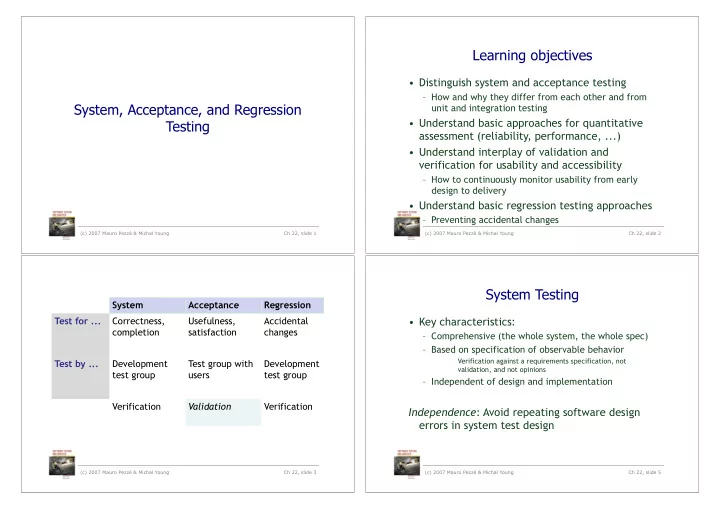
System Acceptance Regression Test for ... Correctness, completion Usefulness, satisfaction Accidental changes Test by ... Development test group Test group with users Development test group Verification Validation Verification

System Testing

  • Key characteristics:

– Comprehensive (the whole system, the whole spec) – Based on specification of observable behavior

Verification against a requirements specification, not validation, and not opinions

– Independent of design and implementation

Independence: Avoid repeating software design errors in system test design

(c) 2007 Mauro Pezzè & Michal Young Ch 22, slide 5

slide-2
SLIDE 2

Independent V&V

  • One strategy for maximizing independence:

System (and acceptance) test performed by a different organization

– Organizationally isolated from developers (no pressure to say “ok”) – Sometimes outsourced to another company or agency

  • Especially for critical systems
  • Outsourcing for independent judgment, not to save money
  • May be additional system test, not replacing internal V&V

– Not all outsourced testing is IV&V

  • Not independent if controlled by development organization

(c) 2007 Mauro Pezzè & Michal Young Ch 22, slide 6

Independence without changing staff

  • If the development organization controls

system testing ...

– Perfect independence may be unattainable, but we can reduce undue influence

  • Develop system test cases early

– As part of requirements specification, before major design decisions have been made

  • Agile “test first” and conventional “V model” are both

examples of designing system test cases before designing the implementation

  • An opportunity for “design for test”: Structure system for

critical system testing early in project

(c) 2007 Mauro Pezzè & Michal Young Ch 22, slide 7

Incremental System Testing

  • System tests are often used to measure

progress

– System test suite covers all features and scenarios of use – As project progresses, the system passes more and more system tests

  • Assumes a “threaded” incremental build plan:

Features exposed at top level as they are developed

(c) 2007 Mauro Pezzè & Michal Young Ch 22, slide 8

Global Properties

  • Some system properties are inherently global

– Performance, latency, reliability, ... – Early and incremental testing is still necessary, but provide only estimates

  • A major focus of system testing

– The only opportunity to verify global properties against actual system specifications – Especially to find unanticipated effects, e.g., an unexpected performance bottleneck

(c) 2007 Mauro Pezzè & Michal Young Ch 22, slide 9

slide-3
SLIDE 3

Context-Dependent Properties

  • Beyond system-global: Some properties depend
  • n the system context and use

– Example: Performance properties depend on environment and configuration – Example: Privacy depends both on system and how it is used

  • Medical records system must protect against unauthorized

use, and authorization must be provided only as needed

– Example: Security depends on threat profiles

  • And threats change!
  • Testing is just one part of the approach

(c) 2007 Mauro Pezzè & Michal Young Ch 22, slide 10

Establishing an Operational Envelope

  • When a property (e.g., performance or real-

time response) is parameterized by use ...

– requests per second, size of database, ...

  • Extensive stress testing is required

– varying parameters within the envelope, near the bounds, and beyond

  • Goal: A well-understood model of how the

property varies with the parameter

– How sensitive is the property to the parameter? – Where is the “edge of the envelope”? – What can we expect when the envelope is exceeded?

(c) 2007 Mauro Pezzè & Michal Young Ch 22, slide 11

Stress Testing

  • Often requires extensive simulation of the

execution environment

– With systematic variation: What happens when we push the parameters? What if the number of users

  • r requests is 10 times more, or 1000 times more?
  • Often requires more resources (human and

machine) than typical test cases

– Separate from regular feature tests – Run less often, with more manual control – Diagnose deviations from expectation

  • Which may include difficult debugging of latent faults!

(c) 2007 Mauro Pezzè & Michal Young Ch 22, slide 12

Estimating Dependability

  • Measuring quality, not searching for faults

– Fundamentally different goal than systematic testing

  • Quantitative dependability goals are statistical

– Reliability – Availability – Mean time to failure – ...

  • Requires valid statistical samples from
  • perational profile

– Fundamentally different from systematic testing

(c) 2007 Mauro Pezzè & Michal Young Ch 22, slide 14

slide-4
SLIDE 4

Statistical Sampling

  • We need a valid operational profile (model)

– Sometimes from an older version of the system – Sometimes from operational environment (e.g., for an embedded controller) – Sensitivity testing reveals which parameters are most important, and which can be rough guesses

  • And a clear, precise definition of what is being

measured

– Failure rate? Per session, per hour, per operation?

  • And many, many random samples

– Especially for high reliability measures

(c) 2007 Mauro Pezzè & Michal Young Ch 22, slide 15

Is Statistical Testing Worthwhile?

  • Necessary for ...

– Critical systems (safety critical, infrastructure, ...)

  • But difficult or impossible when ...

– Operational profile is unavailable or just a guess

  • Often for new functionality involving human interaction

– But we may factor critical functions from overall use to

  • btain a good model of only the critical properties

– Reliability requirement is very high

  • Required sample size (number of test cases) might require

years of test execution

  • Ultra-reliability can seldom be demonstrated by testing

(c) 2007 Mauro Pezzè & Michal Young Ch 22, slide 16

Process-based Measures

  • Less rigorous than statistical testing

– Based on similarity with prior projects

  • System testing process

– Expected history of bugs found and resolved

  • Alpha, beta testing

– Alpha testing: Real users, controlled environment – Beta testing: Real users, real (uncontrolled) environment – May statistically sample users rather than uses – Expected history of bug reports

(c) 2007 Mauro Pezzè & Michal Young Ch 22, slide 17

Usability

  • A usable product

– is quickly learned – allows users to work efficiently – is pleasant to use

  • Objective criteria

– Time and number of operations to perform a task – Frequency of user error

  • blame user errors on the product!
  • Plus overall, subjective satisfaction

(c) 2007 Mauro Pezzè & Michal Young Ch 22, slide 19

slide-5
SLIDE 5

Verifying Usability

  • Usability rests ultimately on testing with real

users — validation, not verification

– Preferably in the usability lab, by usability experts

  • But we can factor usability testing for process

visibility — validation and verification throughout the project

– Validation establishes criteria to be verified by testing, analysis, and inspection

(c) 2007 Mauro Pezzè & Michal Young Ch 22, slide 20

Factoring Usability Testing

Validation (usability lab)

  • Usability testing

establishes usability check-lists

– Guidelines applicable across a product line or domain

  • Early usability testing

evaluates “cardboard prototype” or mock-up

– Produces interface design

Verification (developers, testers)

  • Inspection applies

usability check-lists to specification and design

  • Behavior objectively

verified (e.g., tested) against interface design

(c) 2007 Mauro Pezzè & Michal Young Ch 22, slide 21

Varieties of Usability Test

  • Exploratory testing

– Investigate mental model of users – Performed early to guide interface design

  • Comparison testing

– Evaluate options (specific interface design choices) – Observe (and measure) interactions with alternative interaction patterns

  • Usability validation testing

– Assess overall usability (quantitative and qualitative) – Includes measurement: error rate, time to complete

(c) 2007 Mauro Pezzè & Michal Young Ch 22, slide 22

Typical Usability Test Protocol

  • Select representative sample of user groups

– Typically 3-5 users from each of 1-4 groups – Questionnaires verify group membership

  • Ask users to perform a representative sequence
  • f tasks
  • Observe without interference (no helping!)

– The hardest thing for developers is to not help. Professional usability testers use one-way mirrors.

  • Measure (clicks, eye movement, time, ...) and

follow up with questionnaire

(c) 2007 Mauro Pezzè & Michal Young Ch 22, slide 23

slide-6
SLIDE 6

Accessibility Testing

  • Check usability by people with disabilities

– Blind and low vision, deaf, color-blind, ...

  • Use accessibility guidelines

– Direct usability testing with all relevant groups is usually impractical; checking compliance to guidelines is practical and often reveals problems

  • Example: W3C Web Content Accessibility

Guidelines

– Parts can be checked automatically – but manual check is still required

  • e.g., is the “alt” tag of the image meaningful?

(c) 2007 Mauro Pezzè & Michal Young Ch 22, slide 24

Regression

  • Yesterday it worked, today it doesn’t

– I was fixing X, and accidentally broke Y – That bug was fixed, but now it’s back

  • Tests must be re-run after any change

– Adding new features – Changing, adapting software to new conditions – Fixing other bugs

  • Regression testing can be a major cost of

software maintenance

– Sometimes much more than making the change

(c) 2007 Mauro Pezzè & Michal Young Ch 22, slide 26

Basic Problems of Regression Test

  • Maintaining test suite

– If I change feature X, how many test cases must be revised because they use feature X? – Which test cases should be removed or replaced? Which test cases should be added?

  • Cost of re-testing

– Often proportional to product size, not change size – Big problem if testing requires manual effort

  • Possible problem even for automated testing, when the test

suite and test execution time grows beyond a few hours

(c) 2007 Mauro Pezzè & Michal Young Ch 22, slide 27

Test Case Maintenance

  • Some maintenance is inevitable

– If feature X has changed, test cases for feature X will require updating

  • Some maintenance should be avoided

– Example: Trivial changes to user interface or file format should not invalidate large numbers of test cases

  • Test suites should be modular!

– Avoid unnecessary dependence – Generating concrete test cases from test case specifications can help

(c) 2007 Mauro Pezzè & Michal Young Ch 22, slide 28

slide-7
SLIDE 7

Obsolete and Redundant

  • Obsolete: A test case that is not longer valid

– Tests features that have been modified, substituted,

  • r removed

– Should be removed from the test suite

  • Redundant: A test case that does not differ

significantly from others

– Unlikely to find a fault missed by similar test cases – Has some cost in re-execution – Has some (maybe more) cost in human effort to maintain – May or may not be removed, depending on costs

(c) 2007 Mauro Pezzè & Michal Young Ch 22, slide 29

Selecting and Prioritizing Regression Test Cases

  • Should we re-run the whole regression test

suite? If so, in what order?

– Maybe you don’t care. If you can re-rerun everything automatically over lunch break, do it. – Sometimes you do care ...

  • Selection matters when

– Test cases are expensive to execute

  • Because they require special equipment, or long run-times,
  • r cannot be fully automated
  • Prioritization matters when

– A very large test suite cannot be executed every day

(c) 2007 Mauro Pezzè & Michal Young Ch 22, slide 30

Code-based Regression Test Selection

  • Observation: A test case can’t find a fault in

code it doesn’t execute

– In a large system, many parts of the code are untouched by many test cases

  • So: Only execute test cases that execute

changed or new code

(c) 2007 Mauro Pezzè & Michal Young Ch 22, slide 31

New or changed Executed by test case

Control-flow and Data-flow Regression Test Selection

  • Same basic idea as code-based selection

– Re-run test cases only if they include changed elements – Elements may be modified control flow nodes and edges, or definition-use (DU) pairs in data flow

  • To automate selection:

– Tools record elements touched by each test case

  • Stored in database of regression test cases

– Tools note changes in program – Check test-case database for overlap

(c) 2007 Mauro Pezzè & Michal Young Ch 22, slide 32

slide-8
SLIDE 8

Specification-based Regression Test Selection

  • Like code-based and structural regression test

case selection

– Pick test cases that test new and changed functionality

  • Difference: No guarantee of independence

– A test case that isn’t “for” changed or added feature X might find a bug in feature X anyway

  • Typical approach: Specification-based

prioritization

– Execute all test cases, but start with those that related to changed and added features

(c) 2007 Mauro Pezzè & Michal Young Ch 22, slide 33

Prioritized Rotating Selection

  • Basic idea:

– Execute all test cases, eventually – Execute some sooner than others

  • Possible priority schemes:

– Round robin: Priority to least-recently-run test cases – Track record: Priority to test cases that have detected faults before

  • They probably execute code with a high fault density

– Structural: Priority for executing elements that have not been recently executed

  • Can be coarse-grained: Features, methods, files, ...

(c) 2007 Mauro Pezzè & Michal Young Ch 22, slide 34 (c) 2007 Mauro Pezzè & Michal Young Ch 22, slide 35

Summary

  • System testing is verification

– System consistent with specification? – Especially for global properties (performance, reliability)

  • Acceptance testing is validation

– Includes user testing and checks for usability

  • Usability and accessibility require both

– Usability testing establishes objective criteria to verify throughout development

  • Regression testing repeated after each change

– After initial delivery, as software evolves