
SLIDE 1
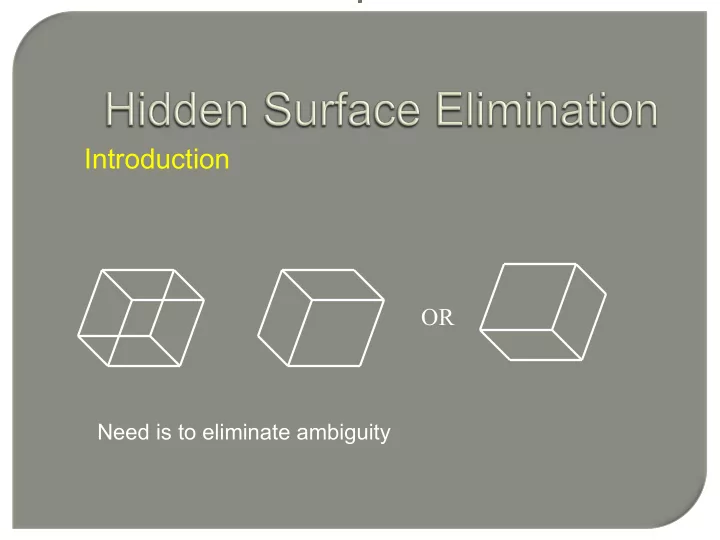
Introduction OR Need is to eliminate ambiguity Introduction Wire - - PowerPoint PPT Presentation
Introduction OR Need is to eliminate ambiguity Introduction Wire frame Hidden Line Elimination Hidden Surface Elimination Introduction Approaches Image Space Through pixel Object Space Through primitive Image Space Approach for (
Wire frame Hidden Line Elimination Hidden Surface Elimination
Through primitive
for (each pixel in the image) { determine the object closest to the viewer that is intercepted by the projector through the pixel; draw the pixel in the appropriate color; }
for (each object in the world) { determine those parts of the object whose view is unobstructed by other parts of it or any other object; draw those parts in the appropriate color; }
Surface Function F(x,y,z)=0
x z z1= constant z2 z3 x y z z1= constant z2 z3 z4 z5
With z=constant plane closest to the viewpoint, the curve in each plane is generated (for each x coordinate in image space the appropriate y value is found).
x y z1 z2 z3 z4 z5 Projection on z=0 plane
Algorithm: If at any given value of x the y value
larger than the y value for any previous curve at that x value, then the curve is visible,
x y z1 z2 z3 z4 z5 Projection on z=0 plane
Algorithm: If at any given value of x the y value
larger than the y value or smaller than the minimum y value for any previous curve at that x value, then the curve is visible,
P
np
If a surface’s normal is pointing away from the eye (viewer), then this is a back face
backface then V n If
p
< ⋅
V
z x
z x
Zb(x, y) C(x, y) (x, y)
(x, y)
Initialize all d[i,j]=1.0 (max depth), c[i,j]=background color. for (each polygon) for (each pixel in polygon’s projection) { Find depth-z of polygon at (x,y) corresponding to pixel (i,j); If z < d[i,j] d[i,j] = z; p[i,j] = color; end }
1) x ( C A z x C A z z x C A z z C D By x) x A z x x At C C D By Ax z x At D Cz By Ax = − = − = − = − + + + − = + ≠ + + − = = + + + Δ Δ Δ ) Δ ( ( Δ , ) (
1 1 1
∵
∞
T h e i∞
T he i m∞
T h e i m∞
T he i m ag∞
T h e i m∞
T he i m ag∞
T h e i∞
T he i m∞
T h e i∞
T he i m∞
T h e i m∞
T he i m ag∞
T h e i m∞
T he i m ag∞
T h e i∞
T he i m∞
T h e i∞
T he i m∞
T h e i m∞
T he i m ag∞
T h e i m∞
T he i m ag∞
T h e i∞
T he i m∞
T h e i∞
T he i m∞
T h e i m∞
T he i m ag∞
T h e i m∞
T he i m ag∞
T h e i m T he i m ag T h e i m T he i m agZ-buffer Screen
[0,1,5] [0,7,5] [6,7,5]
5
T h e i5
T h e i∞
T h e i m5
T he i m ag5
T h e i m∞
T h e i m∞
T h e i5
T he i m∞
T h e i∞
T h e i∞
T h e i m∞
T he i m ag∞
T h e i m∞
T h e i m∞
T h e i∞
T he i m∞
T h e i∞
T h e i∞
T h e i m∞
T he i m ag∞
T h e i m∞
T h e i m∞
T h e i∞
T he i m∞
T h e i∞
T h e i∞
T h e i m∞
T he i m ag∞
T h e i m∞
T h e i m∞ Z-buffer
[0,1,2] [0,6,7] [5,1,7]
5
T he i m5
T h e i5
T h e i5
T h e i m5
T he i m ag5
T h e i m5
T h e i m5
T h e i5
T he i m5
T h e i5
T h e i5
T h e i m5
T he i m ag5
T h e i m5
T h e i m5
T h e i4
T he i m5
T h e i5
T h e i7
T h e i m3
T he i m ag4
T h e i m5
T h e i m6
T h e i2
T he i m3
T h e i4
T h e i5
T h e i m∞
T he i m ag∞
T h e i m∞
T h e i m∞
T h e i5
T he i m5
T h e i5
T he i m∞
T h e i m5
T he i m ag5
T h e i m∞
T he i m ag∞
T h e i5
T he i m∞
T h e i∞
T he i m∞
T h e i m∞
T he i m ag∞
T h e i m∞
T he i m ag∞
T h e i∞
T he i m∞
T h e i∞
T he i m∞
T h e i m7
T he i m ag∞
T h e i m∞
T he i m ag∞
T h e i6
T he i m7
T h e i∞
T he i m∞
T h e i m∞
T he i m ag∞
T h e i m∞
T he i m ag∞ Z-buffer Screen
Screen display
P Q R z P > Q > R P Q z P > Q
Draw first P then Q and then R Draw first P then Q
P Q
3 5 5b 5a 2 1 4 3 4 5b front back 1 2 5a
3 5 5b 5a 2 1 4 3 4 5b front back 2 5a 1
3 3 5 5b 5a 2 1 4 front back 2 5a 1 4 5b
3 3 5 5b 5a 2 1 4 front back 2 5a 1 4 5b
3 5 2 1 4 5 front back 1 2 3 4
3 5 2 1 4 5 front back 1 2 3 4
Polygon Area of interest Surrounding Intersecting Contained Disjoint
If it is easy to decide which polygons are visible in the area, display Else the area is subdivided into smaller areas and the decision is made recursively
filled first by background color, then the polygon part contained in the area.
polygons): The area is filled with the color of the surrounding polygon.
surrounding the area, with surrounding polygon in front: Fill the area with the color of the surrounding polygon.
Each scan line is subdivided into several "spans" Determine which polygon the current span belongs to Shade the span using the current polygon’s color Exploit "span coherence" : For each span, a visibility test may need to be done
A scan line is subdivided into a sequence of spans Each span can be "inside" or "outside" polygon areas
If a span is inside one polygon, the pixels in the span will
If a span is inside more than one polygon, then compare
When a scan line intersects an edge of a polygon
A flag "in/out" for each polygon is used to keep track of the
Initially, the in/out flag is set to be "outside" (value = 0 for
Each polygon will have its own in/out flag There can be more than one polygon having the in/out
Keep track of polygons the scan line is currently in If there are more than one polygon "in", perform z value
Edge Table (ET) Polygon Table (PT)
x ymax Δx poly-ID ET PT poly-ID A,B,C,D color in/out flag
a b c 1 2 3 X0 I III II IV XN
Y AET IPL I x0, ba, bc, xN
BG, BG+S, BG
II x0, ba, bc, 32, 13, xN
BG, BG+S, BG, BG+T, BG
III x0, ba, 32, ca, 13, xN
BG, BG+S, BG+S+T, BG+T, BG
IV x0, ba, ac, 12, 13, xN
BG, BG+S, BG, BG+T, BG
a b c 1 2 3 X0 I III II IV XN
Y AET IPL I x0, ba, bc, xN BG, BG+S, BG
Y AET IPL II x0, ba, bc, 32, 13, xN
BG, BG+S, BG, BG+T, BG
a b c 1 2 3 X0 I III II IV XN
Y AET IPL III x0, ba, 32, ca, 13, xN
BG, BG+S, BG+S+T, BG+T, BG
a b c 1 2 3 X0 I III II IV XN
Y AET IPL IV x0, ba, ac, 12, 13, xN
BG, BG+S, BG, BG+T, BG
a b c 1 2 3 X0 I III II IV XN
I
a 2
b c 3 d e 1