Image Morphing Application: Movie Special Effects First movies - - PowerPoint PPT Presentation

image morphing
SMART_READER_LITE
LIVE PREVIEW

Image Morphing Application: Movie Special Effects First movies - - PowerPoint PPT Presentation

Image Morphing Application: Movie Special Effects First movies with morphing Morphing is turning one image into another (through a seamless transition) Willow , 1988 Indiana Jones and the Last Crusade , 1989 First music video with


slide-1
SLIDE 1

1

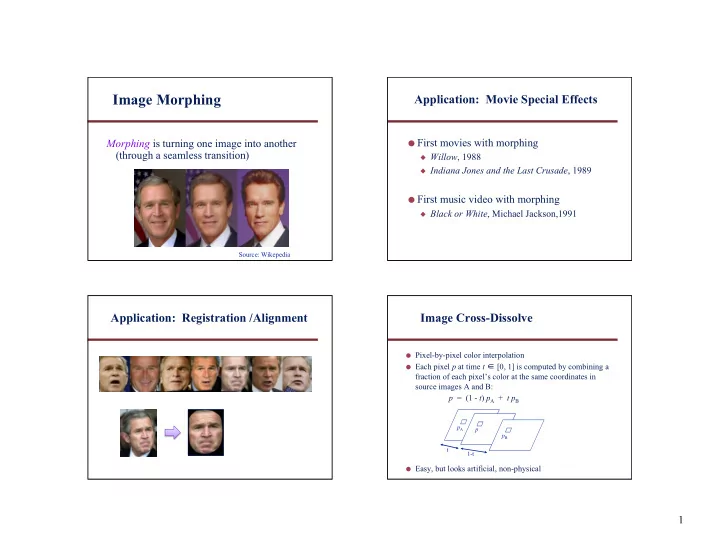
Image Morphing

Morphing is turning one image into another (through a seamless transition)

Source: Wikepedia

Application: Movie Special Effects

  • First movies with morphing

◆ Willow, 1988 ◆ Indiana Jones and the Last Crusade, 1989

  • First music video with morphing

◆ Black or White, Michael Jackson,1991

Application: Registration /Alignment

  • Pixel-by-pixel color interpolation
  • Each pixel p at time t ∈ [0, 1] is computed by combining a

fraction of each pixel’s color at the same coordinates in source images A and B: p = (1 - t) pA + t pB

  • Easy, but looks artificial, non-physical

Image Cross-Dissolve

pA pB p t 1-t

slide-2
SLIDE 2

2 Jason Salavon: “The Late Night Triad”

http://www.salavon.com/

Jason Salavon: “100 Special Moments”

Align, then Cross-Disolve

  • Alignment of rigid object using global warp okay – picture

still valid

  • But we have different objects, so transformation is non-rigid

Image Morphing = Object Averaging

  • The aim is to find “an average” between two objects

◆ Not an average of two images of objects ◆ …but an image of the average object ◆ How can we make a smooth transition in time?

◆ Do a “weighted average” over time

  • How do we know what the average object looks like?

◆ We haven’t a clue! ◆ But we can often fake something reasonable

slide-3
SLIDE 3

3

Averaging Points

P Q

v = Q - P

P + 0.5v = P + 0.5(Q – P) = 0.5P + 0.5Q P + 1.5v = P + 1.5(Q – P) = -0.5P + 1.5Q (extrapolation)

Linear Interpolation (Affine Combination): New point aP + bQ, defined only when a+b = 1 So, aP+bQ = aP+(1-a)Q

  • P and Q can be anything:

◆ points on a plane (2D) or in space (3D) ◆ Colors in RGB or HSV (3D) ◆ Whole images (m-by-n D)… etc.

What’s the average

  • f P and Q?

Dog Averaging

  • What to do?

◆ Cross-dissolve doesn’t work ◆ Global alignment doesn’t work

◆ Cannot be done with a global transformation (e.g., affine)

  • Feature matching!

◆ Nose to nose, tail to tail, etc. ◆ This is a local, non-parametric, warp

Image Morphing

Morphing = warping + cross-dissolving

shape (geometric) color (photometric) Warp = feature specification + warp generation

Idea: Local Warp, then Cross-Dissolve

Morphing procedure:

for every t

1.

Find the average shape (the “mean dog” )

◆ local warping 2.

Find the average color

◆ Cross-dissolve the warped images

slide-4
SLIDE 4

4

Local (Non-Parametric) Image Warping

  • Need to specify a more detailed warp function

◆ Global warps are functions of a few (e.g., 2, 4, 8)

parameters

◆ Non-parametric warps u(x, y) and v(x, y) can be

defined independently for every single location x, y

◆ Once we know vector field u, v we can easily warp

each pixel (use backward warping with interpolation)

Mesh-based Warp Specification

  • How can we specify the warp?

Specify corresponding spline control points

  • Interpolate to a complete warping function

Image Morphing

  • Mesh-based image morphing

◆ G. Wolberg, Digital Image Warping, 1990 ◆ Warp between corresponding grid points in source and

destination images

◆ Interpolate between grid points, e.g., linearly using three

closest grid points

◆ Fast, but hard to control so as to avoid unwanted distortions

Sparse Warp Specification

  • How can we specify the warp?

2.

Specify corresponding line segments (vectors)

◆ Interpolate to a complete warping function

slide-5
SLIDE 5

5

Feature-based Image Morphing

  • T. Beier and S. Neely, Proc. SIGGRAPH 1992
  • Distort color and shape

⇒ image warping + cross-dissolving

  • Warping transformation partially defined by user interactively

specifying corresponding pairs of vectors in the source and destination images; only a sparse set is required (but carefully chosen)

  • Compute dense pixel correspondences, defining continuous

mapping function, based on weighted combination of displacement vectors of a pixel from all of the input vectors

  • Interpolate pixel positions and colors (2D linear interpolation)

Beier and Neely Algorithm

  • Given: 2 images, A and B, and their corresponding sets of

line segments, LA and LB, respectively

  • Foreach intermediate frame time t ∈ [0, 1] do

◆ Linearly interpolate the position of each line

◆ L t[i] = Interpolate(LA[i], LB[i], t)

◆ Warp image A to destination shape

◆ WA = Warp(A, LA, Lt)

◆ Warp image B to destination shape

◆ WB = Warp(B, LB, Lt)

◆ Cross-dissolve by fraction t

◆ MorphImage = CrossDissolve(WA, WB, t)

Example: Translation

  • Consider images where there is one line segment pair, and

it is translated from image A to image B:

  • First, linearly interpolate position of line segment in M
  • Second, for each pixel (x, y) in M, find corresponding

pixels in A(x-a, y) and B(x+a, y), and average them A B M.5

Line Feature-based Warping

  • Goal: Define a continuous function that warps a source

image to a destination image from a sparse set of corresponding, oriented, line segment features - each pixel’s position defined relative to these line segments

  • Warping with one line pair:

foreach pixel pB in destination image B do

find dimension-less coordinates (u,v) relative to oriented line segment qBrB find pA in source image A using (u,v) relative to qArA copy color at pA to pB

qA rA pA

u v

qB rB pB

u v Source Image A Destination Image B
slide-6
SLIDE 6

6

Single Line-Pair Examples Feature-based Warping (cont.)

  • Warping with multiple line pairs

◆ Use a weighted combination of the points defined by

the same mapping

p1 q1 p2 q2 u1 u2 v1 v2

X

p´1 q´1 u1 v1

X

q´2 p´2 u2 v2 Destination Image Source Image

X´ X´ = weighted average of D1 and D2, where Di = X´i - X, and weight = (length(piqi)c / (a + |vi|))b , for constants a, b, c

X´2 X´1

Resulting Warp

2 Input Images with Line Correspondences

slide-7
SLIDE 7

7 Images Warped to Same “Shape” Warped Shapes without Grid Lines Cross-Dissolved Result

Sparse Warp Specification

  • How can we specify the warp?

Specify corresponding points

  • Interpolate to a complete warping function

How do we go from feature points to pixels?

slide-8
SLIDE 8

8

Point Feature Morphing: Triangular Mesh

1.

Input correspondences at landmark/fiducial feature points

2.

Define a triangular mesh over the points

◆ Same mesh in both images ◆ Now we have triangle-to-triangle correspondences 3.

Warp each triangle separately from source to destination

◆ How do we warp a triangle? ◆ 3 points = affine warp ◆ Just like texture mapping

Morphing between Two Image Sequences

  • Goal: Given two animated sequences of images, create a

morph sequence

  • User defines corresponding line segments in pairs of key

frames in the two sequences

  • At frame i, compute the two sets of line segments by

interpolating between the nearest bracketing key frames’ line sets

  • Apply 2-image morph algorithm for t = 0.5 only to obtain

morph frame i

Geometrically-Correct Pixel Reprojection

  • What geometric information is needed to generate
  • ptically-correct virtual camera views?

◆ Dense pixel correspondences between two input

views

◆ Known geometric relationship between the two

cameras

◆ Epipolar geometry

slide-9
SLIDE 9

9

View Morphing

  • Seitz and Dyer, Proc. SIGGRAPH 1995
  • Given: Two views of an unknown rigid scene,

with no camera information known, compute new views from a virtual camera at viewpoints in- between two input views

Photograph Photograph Morphed View Virtual Camera

slide-10
SLIDE 10

10

  • 1. Prewarp

align views

  • 1. Prewarp

align views

  • 2. Morph

move camera

  • 1. Prewarp

align views

  • 2. Morph

move camera

  • 3. Postwarp

point camera

Application: Pose Correction

  • Image Postprocessing

◆ Alter image perspective in the lab

  • Image Databases

◆ Normalize images for better indexing ◆ Simplify face recognition tasks

slide-11
SLIDE 11

11

Frontal Poses Original Photographs

Another Example

slide-12
SLIDE 12

12

A Morphable Model for the Synthesis of 3D Faces

  • V. Blanz and T. Vetter
  • Proc. SIGGRAPH 1999

Synthesis of Faces

Input Image

Modeler

Result Database Face Analyzer 3D Head Morphable Face Model

Approach: Example-based Modeling of Faces

2D Image 3D Face Models = w1* + w2* + w3* + w4* +. . .

Linear combination of exemplar face models (all exemplar faces are in full correspondence) 200 exemplar faces

Face Representation using Cylindrical Coordinates

red(h,f) green(h,f) blue(h,f) f h radius(h,f) h f

Texture, T Shape, S

70,000 points per image

slide-13
SLIDE 13

13

Morphing 3D Faces

3D Blend 3D Morph 1 __ 2 1 __ 2 + = Dense point correspondences across all exemplar faces

=

a1 * + a2 * + a3 * + a4 * + . . . b1 * +b2 * +b3* +b4* + . . .

Vector Space of 3D Faces

  • A Morphable Model can generate new faces

Modeling the Appearance of Faces

A face is represented as a point in a “face space”

  • Which directions code for specific attributes?

Modeling in Face Space

Caricature Original Average

slide-14
SLIDE 14

14

3D Shape from Images

Face Analyzer

3D Head Input Image

Matching a Morphable 3D Face Model

= R

Optimization problem over the range of values

  • f ai and bi delimited by the training faces, plus

rendering parameters, ρ, such as camera pose and illumination

a1 * + a2 * + a3 * + a4 * + . . . b1 * + b2 * + b3 * + b4 * + . . .

More Fun with Faces

slide-15
SLIDE 15

15

The Average Face

  • 1. Warp to mean shape
  • 2. Average pixels

http://graphics.cs.cmu.edu/courses/15-463/2004_fall/www/handins/brh/final/

Slide credit: A. Efros

Subpopulation Means

  • 250 control points per face manually specified

Average male (32 faces) Average female (64 faces)

http://www.beautycheck.de

Manipulating Faces

  • How can we make a face look more male/female, young/old,

happy/sad, etc.?

1.

Obtain two prototypes spanning the desired axis (gender, age, expression, etc.) and find the difference vector between them

2.

Add scaled versions of this vector to a given image

Prototype 1 Prototype 2 Current face

  • D. Rowland and D. Perrett,

“Manipulating Facial Appearance through Shape and Color,” IEEE CG&A, September 1995

Changing Gender

Deform shape or color of an input face in the direction

  • f “more female”
  • original

shape

  • color

both

  • D. Rowland and D. Perrett,

“Manipulating Facial Appearance through Shape and Color,” IEEE CG&A, September 1995

Slide credit: A. Efros

slide-16
SLIDE 16

16

Changing Age

Face becomes “rounder” and “more textured” and “grayer”

  • original

shape

  • color

both

  • D. Rowland and D. Perrett,

“Manipulating Facial Appearance through Shape and Color,” IEEE CG&A, September 1995

Slide credit: A. Efros

Data-Driven Enhancement of Facial Attractiveness

  • T. Leyvand, D. Cohen-Or, G. Dror, and D. Lischinski

SIGGRAPH 2008

System Overview Which Face is More Attractive?

  • riginal

beautified

slide-17
SLIDE 17

17

Which Face is More Attractive?

  • riginal

beautified

Face Swapping: Automatically Replacing Faces in Photographs

  • D. Bitouk, N. Kumar, S. Dhillon, P. Belhumeur, S. K. Nayar

SIGGRAPH 2008

Face Replacement Results Face Replacement Results

slide-18
SLIDE 18

18

More Results Example-Based Cosmetic Transfer

W.-S. Tong, C.-K. Tang, M. Brown, Y.-Q. Xu Pacific Graphics 2007