ICSI Abstract, Full-Paper and Presentation submissions 1.0 Sign up - - PDF document

icsi abstract full paper and presentation submissions
SMART_READER_LITE
LIVE PREVIEW

ICSI Abstract, Full-Paper and Presentation submissions 1.0 Sign up - - PDF document

ICSI Abstract, Full-Paper and Presentation submissions 1.0 Sign up / Register 2.0 Sign in 3.0 Manage submissions 3.1 New Submission 3.2 List Submission 3.3 Edit Submission 3.4 Upload Abstract/Full Paper/Presentation File Example for Upload


slide-1
SLIDE 1

ICSI Abstract, Full-Paper and Presentation submissions

1.0 Sign up / Register 2.0 Sign in 3.0 Manage submissions 3.1 New Submission 3.2 List Submission 3.3 Edit Submission 3.4 Upload Abstract/Full Paper/Presentation File Example for Upload Abstract fjle step by step 3.5 View Abstract/Full Paper/Presentation File Example for View Abstract fjle step by step

1.0 Sign up / Register

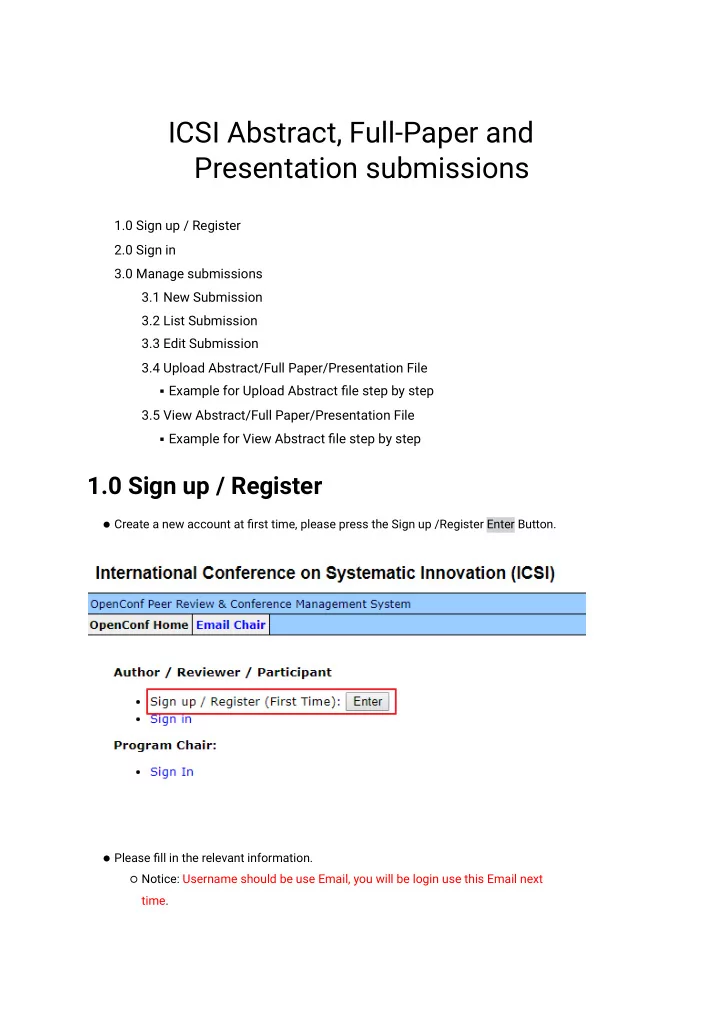
Create a new account at fjrst time, please press the Sign up /Register Enter Button. Please fjll in the relevant information. Notice: Username should be use Email, you will be login use this Email next time.

slide-2
SLIDE 2

After submit, you will get a success message and system mail about your commit information.

slide-3
SLIDE 3

2.0 Sign in

Sign in use Email Please fjll in the username(Email) and password, then press the Sign In button.

slide-4
SLIDE 4

3.0 Manage submissions

3.1 New Submission

Submit a new abstract, full paper or presentation fjle. A complete submission includes one of the below: An abstract then full paper. An abstract then presentation. An abstract, full paper and presentation.

After submit, you will get a success message and system mail about your commit information.

  • 1. Please click the New Submission link.
  • 2. Fill in all information.

Notice: Username is your login account(Email).

  • 4. Then press the Make Submission button under bottom.
slide-5
SLIDE 5
slide-6
SLIDE 6

After submit, you will get a success message and system mail about your commit information.

3.2 List Submission

Check your submissions

Notice: That Paper ID is Submission ID.

slide-7
SLIDE 7

3.3 Edit Submission

When you decide to change/update an abstract, full paper or presentation fjle(s). Relevant submission ID, username, password and required.

  • 1. Please click the Edit Submission link.
  • 2. Fill in the Submission ID, Username(Email) and Password.
  • 3. Then press the Edit Submission button under bottom.

3.4 Upload Abstract/Full Paper/Presentation File

You only want to upload or update an abstract/full paper/ presentation fjle. Relevant submission ID, username, password and required.

Example for upload abstract fjle step by step

  • 1. Please click the Upload Abstract link.
  • 2. Fill in the Submission ID and Password, press the Choose File button for upload your

abstract fjle, then you need select your upload fjle format. Microsoft Word(97-2003), fjle extension name: DOC Microsoft Word(2010-2016), fjle extension name: DOCX

slide-8
SLIDE 8

PDF Microsoft PowerPoint(97-2003), fjle extension name: PPT Microsoft PowerPoint(2010-2016), fjle extension name: PPTX

  • 2. Then press the Upload Abstract button under bottom.

After upload, you will get a success message and system mail about your upload.

3.5 sView Abstract/Full Paper/Presentation File

Download your abstract/full paper/presentation fjle.

Example for View Abstract fjle step by step

  • 1. Please click the View Abstract link.
  • 2. Fill in the Submission ID and Password.
  • 3. Then press the View Abstract button under bottom.
slide-9
SLIDE 9

your will begin for download a fjle, about you upload submission fjle format.