I total = k s I ambient + I i ( I specular = k s I light ( v r ) n - - PowerPoint PPT Presentation

i total k s i ambient i i i specular k s i light v r n
SMART_READER_LITE
LIVE PREVIEW

I total = k s I ambient + I i ( I specular = k s I light ( v r ) n - - PowerPoint PPT Presentation

University of British Columbia Reading for Today Reading for Next Time Review: Light Source Placement CPSC 314 Computer Graphics FCG Chap 9 Surface Shading FCG Chap 10 Ray Tracing geometry: positions and directions Jan-Apr 2007


slide-1
SLIDE 1

University of British Columbia CPSC 314 Computer Graphics Jan-Apr 2007 Tamara Munzner http://www.ugrad.cs.ubc.ca/~cs314/Vjan2007

Lighting/Shading III Week 7, Mon Feb 26

2

Reading for Today

  • FCG Chap 9 Surface Shading
  • RB Chap Lighting

3

Reading for Next Time

  • FCG Chap 10 Ray Tracing
  • only 10.1-10.7, 10.9, 10.11.2
  • FCG Chap 22 Image-Based Rendering

4

Review: Light Source Placement

  • geometry: positions and directions
  • standard: world coordinate system
  • effect: lights fixed wrt world geometry
  • alternative: camera coordinate system
  • effect: lights attached to camera (car headlights)

5

Review: Reflectance

  • specular: perfect mirror with no scattering
  • gloss: mixed, partial specularity
  • diffuse: all directions with equal energy

+ + = specular + glossy + diffuse = reflectance distribution

6

Review: Reflection Equations

Idiffuse = kd Ilight (n • l)

n l θ 2 ( N (N · L)) – L = R

Ispecular = ksIlight(v•r)nshiny

7

Lighting II

8

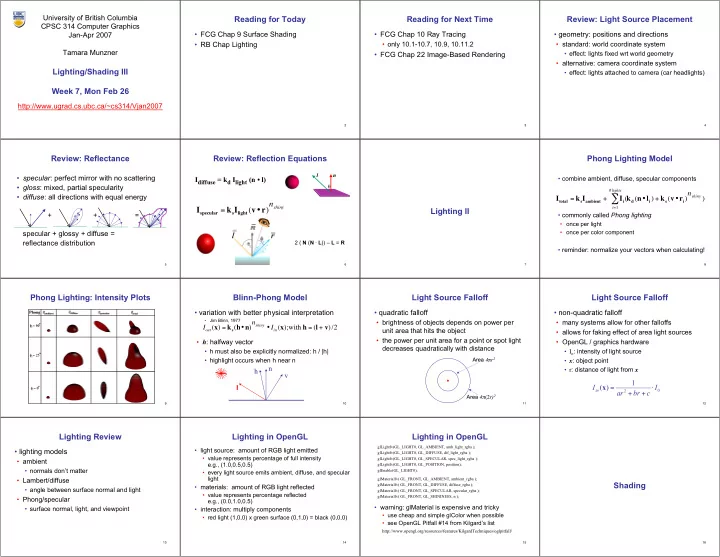
Phong Lighting Model

  • combine ambient, diffuse, specular components
  • commonly called Phong lighting
  • once per light
  • once per color component
  • reminder: normalize your vectors when calculating!

Itotal = ksIambient + Ii(

i=1 #lights

kd(n•li) + ks(v•ri)nshiny )

9

Phong Lighting: Intensity Plots

10

Blinn-Phong Model

  • variation with better physical interpretation
  • Jim Blinn, 1977
  • h: halfway vector
  • h must also be explicitly normalized: h / |h|
  • highlight occurs when h near n

l l n n v v h h Iout(x) = ks(h•n)nshiny • Iin(x);with h = (l + v)/2

11

Light Source Falloff

  • quadratic falloff
  • brightness of objects depends on power per

unit area that hits the object

  • the power per unit area for a point or spot light

decreases quadratically with distance

Area Area 4 4π πr r2

2

Area Area 4 4π π(2 (2r) r)2

2

12

Light Source Falloff

  • non-quadratic falloff
  • many systems allow for other falloffs
  • allows for faking effect of area light sources
  • OpenGL / graphics hardware
  • Io: intensity of light source
  • x: object point
  • r: distance of light from x

2

1 ) ( I c br ar Iin ⋅ + + = x

13

Lighting Review

  • lighting models
  • ambient
  • normals don’t matter
  • Lambert/diffuse
  • angle between surface normal and light
  • Phong/specular
  • surface normal, light, and viewpoint

14

Lighting in OpenGL

  • light source: amount of RGB light emitted
  • value represents percentage of full intensity

e.g., (1.0,0.5,0.5)

  • every light source emits ambient, diffuse, and specular

light

  • materials: amount of RGB light reflected
  • value represents percentage reflected

e.g., (0.0,1.0,0.5)

  • interaction: multiply components
  • red light (1,0,0) x green surface (0,1,0) = black (0,0,0)

15

Lighting in OpenGL

glLightfv(GL_LIGHT0, GL_AMBIENT, amb_light_rgba ); glLightfv(GL_LIGHT0, GL_DIFFUSE, dif_light_rgba ); glLightfv(GL_LIGHT0, GL_SPECULAR, spec_light_rgba ); glLightfv(GL_LIGHT0, GL_POSITION, position); glEnable(GL_LIGHT0); glMaterialfv( GL_FRONT, GL_AMBIENT, ambient_rgba ); glMaterialfv( GL_FRONT, GL_DIFFUSE, diffuse_rgba ); glMaterialfv( GL_FRONT, GL_SPECULAR, specular_rgba ); glMaterialfv( GL_FRONT, GL_SHININESS, n );

  • warning: glMaterial is expensive and tricky
  • use cheap and simple glColor when possible
  • see OpenGL Pitfall #14 from Kilgard’s list

http://www.opengl.org/resources/features/KilgardTechniques/oglpitfall/

16

Shading

slide-2
SLIDE 2

17

Lighting vs. Shading

  • lighting
  • process of computing the luminous intensity

(i.e., outgoing light) at a particular 3-D point, usually on a surface

  • shading
  • the process of assigning colors to pixels
  • (why the distinction?)

18

Applying Illumination

  • we now have an illumination model for a point
  • n a surface
  • if surface defined as mesh of polygonal facets,

which points should we use?

  • fairly expensive calculation
  • several possible answers, each with different

implications for visual quality of result

19

Applying Illumination

  • polygonal/triangular models
  • each facet has a constant surface normal
  • if light is directional, diffuse reflectance is

constant across the facet

  • why?

20

Flat Shading

  • simplest approach calculates illumination at a

single point for each polygon

  • obviously inaccurate for smooth surfaces

21

Flat Shading Approximations

  • if an object really is faceted, is

this accurate?

  • no!
  • for point sources, the direction to

light varies across the facet

  • for specular reflectance, direction

to eye varies across the facet

22

Improving Flat Shading

  • what if evaluate Phong lighting model at each pixel
  • f the polygon?
  • better, but result still clearly faceted
  • for smoother-looking surfaces

we introduce vertex normals at each vertex

  • usually different from facet normal
  • used only for shading
  • think of as a better approximation of the real surface

that the polygons approximate

23

Vertex Normals

  • vertex normals may be
  • provided with the model
  • computed from first principles
  • approximated by

averaging the normals

  • f the facets that

share the vertex

24

Gouraud Shading

  • most common approach, and what OpenGL does
  • perform Phong lighting at the vertices
  • linearly interpolate the resulting colors over faces
  • along edges
  • along scanlines

C1 C2 C3 edge: mix of c1, c2 edge: mix of c1, c3 interior: mix of c1, c2, c3

does this eliminate the facets?

25

Gouraud Shading Artifacts

  • often appears dull, chalky
  • lacks accurate specular component
  • if included, will be averaged over entire

polygon

C1 C2 C3 this interior shading missed! C1 C2 C3 this vertex shading spread

  • ver too much area

26

Gouraud Shading Artifacts

  • Mach bands
  • eye enhances discontinuity in first derivative
  • very disturbing, especially for highlights

27

Gouraud Shading Artifacts

C1 C2 C3 C4 Discontinuity in rate

  • f color change
  • ccurs here
  • Mach bands

28

Gouraud Shading Artifacts

  • perspective transformations
  • affine combinations only invariant under affine,

not under perspective transformations

  • thus, perspective projection alters the linear

interpolation!

Z – into the scene Image plane

29

Gouraud Shading Artifacts

  • perspective transformation problem
  • colors slightly “swim” on the surface as objects

move relative to the camera

  • usually ignored since often only small difference
  • usually smaller than changes from lighting

variations

  • to do it right
  • either shading in object space
  • or correction for perspective foreshortening
  • expensive – thus hardly ever done for colors

30

Phong Shading

  • linearly interpolating surface normal across the facet,

applying Phong lighting model at every pixel

  • same input as Gouraud shading
  • pro: much smoother results
  • con: considerably more expensive
  • not the same as Phong lighting
  • common confusion
  • Phong lighting: empirical model to calculate illumination at

a point on a surface

31

Phong Shading

  • linearly interpolate the vertex normals
  • compute lighting equations at each pixel
  • can use specular component

N1 N2 N3 N4

Itotal = kaIambient + Ii kd n⋅ li

( ) + ks v⋅ ri ( )

nshiny

( )

i=1 #lights

remember: normals used in diffuse and specular terms discontinuity in normal’s rate of change harder to detect

32

Phong Shading Difficulties

  • computationally expensive
  • per-pixel vector normalization and lighting

computation!

  • floating point operations required
  • lighting after perspective projection
  • messes up the angles between vectors
  • have to keep eye-space vectors around
  • no direct support in pipeline hardware
  • but can be simulated with texture mapping
slide-3
SLIDE 3

33

Gouraud Phong

Shading Artifacts: Silhouettes

  • polygonal silhouettes remain

34

A D C B

Interpolate between AB and AD

ι B A D C

Interpolate between CD and AD

Rotate -90o and color same point

Shading Artifacts: Orientation

  • interpolation dependent on polygon orientation
  • view dependence!

35

B A C vertex B shared by two rectangles

  • n the right, but not by the one on

the left E D F H G first portion of the scanline is interpolated between DE and AC second portion of the scanline is interpolated between BC and GH a large discontinuity could arise

Shading Artifacts: Shared Vertices

36

Shading Models Summary

  • flat shading
  • compute Phong lighting once for entire

polygon

  • Gouraud shading
  • compute Phong lighting at the vertices and

interpolate lighting values across polygon

  • Phong shading
  • compute averaged vertex normals
  • interpolate normals across polygon and

perform Phong lighting across polygon

37

Shutterbug: Flat Shading

38

Shutterbug: Gouraud Shading

39

Shutterbug: Phong Shading

40

Non-Photorealistic Shading

  • cool-to-warm shading

http://www.cs.utah.edu/~gooch/SIG98/paper/drawing.html kw = 1+ n⋅ l 2 ,c = kwcw + (1− kw)cc

41

Non-Photorealistic Shading

  • draw silhouettes: if , e=edge-eye vector
  • draw creases: if

(e⋅ n0)(e⋅ n1) ≤ 0 http://www.cs.utah.edu/~gooch/SIG98/paper/drawing.html (n0 ⋅ n1) ≤ threshold

42

Computing Normals

  • per-vertex normals by interpolating per-facet

normals

  • OpenGL supports both
  • computing normal for a polygon

c b a

43

Computing Normals

  • per-vertex normals by interpolating per-facet

normals

  • OpenGL supports both
  • computing normal for a polygon
  • three points form two vectors

c b a c-b a-b

44

Computing Normals

  • per-vertex normals by interpolating per-facet

normals

  • OpenGL supports both
  • computing normal for a polygon
  • three points form two vectors
  • cross: normal of plane

gives direction

  • normalize to unit length!
  • which side is up?
  • convention: points in

counterclockwise

  • rder

c b a c-b a-b (a-b) x (c-b)

45

Specifying Normals

  • OpenGL state machine
  • uses last normal specified
  • if no normals specified, assumes all identical
  • per-vertex normals

glNormal3f(1,1,1); glVertex3f(3,4,5); glNormal3f(1,1,0); glVertex3f(10,5,2);

  • per-face normals

glNormal3f(1,1,1); glVertex3f(3,4,5); glVertex3f(10,5,2);