GUI-Hanger syndrome Jyrki Nummenmaa University of Tampere, CS - - PDF document

gui hanger syndrome
SMART_READER_LITE
LIVE PREVIEW

GUI-Hanger syndrome Jyrki Nummenmaa University of Tampere, CS - - PDF document

GUI-Hanger syndrome Jyrki Nummenmaa University of Tampere, CS Department Jyrki Nummenmaa University of Tampere, CS Department SOFTWARE ARCHITECTURES FuncX() An architecture contains the information on how the FuncX() FuncX()


slide-1
SLIDE 1

1

Software Engineering – http://www.cs.uta.fi/se University of Tampere, CS Department Jyrki Nummenmaa

SOFTWARE ARCHITECTURES

An architecture contains the information on how the software devides into building blocks.

Software Engineering – http://www.cs.uta.fi/se University of Tampere, CS Department Jyrki Nummenmaa

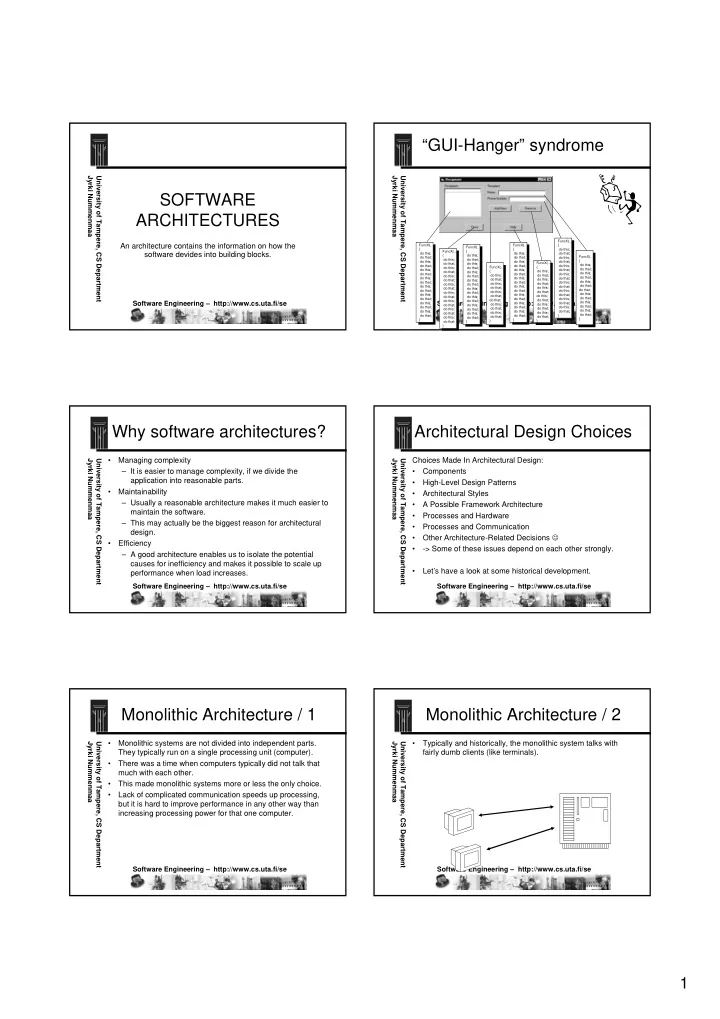
“GUI-Hanger” syndrome

FuncX(…) { do this; do that; do this; do that; do this; do that; do this; do that; do this; do that; do this; do that; do this; do that; do this; do that; } FuncX(…) { do this; do that; do this; do that; do this; do that; do this; do that; do this; do that; do this; do that; do this; do that; do this; do that; } FuncX(…) { do this; do that; do this; do that; do this; do that; do this; do that; do this; do that; do this; do that; do this; do that; do this; do that; } FuncX(…) { do this; do that; do this; do that; do this; do that; do this; do that; do this; do that; do this; do that; do this; do that; do this; do that; } FuncX(…) { do this; do that; do this; do that; do this; do that; do that; do this; do that; do this; do that; do this; do that; } FuncX(…) { do this; do that; do this; do that; do this; do that; do this; do that; do this; do that; do this; do that; do this; do that; do this; do that; } FuncX(…) { do this; do that; do this; do that; do this; do that; do that; do this; do that; do this; do that; } FuncX(…) { do this; do that; do this; do that; do this; do that; do this; do that; do this; do that; do this; do that; }

Software Engineering – http://www.cs.uta.fi/se University of Tampere, CS Department Jyrki Nummenmaa

Why software architectures?

  • Managing complexity

– It is easier to manage complexity, if we divide the application into reasonable parts.

  • Maintainability

– Usually a reasonable architecture makes it much easier to maintain the software. – This may actually be the biggest reason for architectural design.

  • Efficiency

– A good architecture enables us to isolate the potential causes for inefficiency and makes it possible to scale up performance when load increases.

Software Engineering – http://www.cs.uta.fi/se University of Tampere, CS Department Jyrki Nummenmaa

Architectural Design Choices

Choices Made In Architectural Design:

  • Components
  • High-Level Design Patterns
  • Architectural Styles
  • A Possible Framework Architecture
  • Processes and Hardware
  • Processes and Communication
  • Other Architecture-Related Decisions ☺
  • > Some of these issues depend on each other strongly.
  • Let’s have a look at some historical development.

Software Engineering – http://www.cs.uta.fi/se University of Tampere, CS Department Jyrki Nummenmaa

Monolithic Architecture / 1

  • Monolithic systems are not divided into independent parts.

They typically run on a single processing unit (computer).

  • There was a time when computers typically did not talk that

much with each other.

  • This made monolithic systems more or less the only choice.
  • Lack of complicated communication speeds up processing,

but it is hard to improve performance in any other way than increasing processing power for that one computer.

Software Engineering – http://www.cs.uta.fi/se University of Tampere, CS Department Jyrki Nummenmaa

Monolithic Architecture / 2

  • Typically and historically, the monolithic system talks with

fairly dumb clients (like terminals).

slide-2
SLIDE 2

2

Software Engineering – http://www.cs.uta.fi/se University of Tampere, CS Department Jyrki Nummenmaa

Client/Server Architecture /1

  • When terminals were replaced by microcomputers, they

started to have processing power.

  • To use this power just to run a terminal program was a waste
  • f processing capabilities.
  • Consequently, the microcomputers were used to run a client

program, which talked with the mainframe server.

Software Engineering – http://www.cs.uta.fi/se University of Tampere, CS Department Jyrki Nummenmaa

Client/Server Architecture /2

  • Fat clients contained more functionalities and data.
  • Thin clients contained more or less terminal-type

functionalities.

  • Client/Server (C/S) computing was the first step towards

multi-tier (multi-layer) architectures on processing unit level.

  • It allowed a better division of work.
  • However, fat clients also needed maintenance and

installations to keep up with current versions.

Software Engineering – http://www.cs.uta.fi/se University of Tampere, CS Department Jyrki Nummenmaa

Three-tier architecture / 1

  • The server side was still monolithic in a basic C/S

architecture, which created a performance bottleneck.

  • As the applications usually had a database, multiplying the

database is hard in many cases, which makes it hard to multiply the servers.

  • However, by having a separate database server it was

possible to have multiple application servers.

DATABASE SERVER APPLI CATI ON SERVERS

Software Engineering – http://www.cs.uta.fi/se University of Tampere, CS Department Jyrki Nummenmaa

Three-tier architecture / 2

  • The database server only runs the database, as having

several of them is difficult.

  • If there are database server performance problems, get a

more powerful server!

  • You may use several servers for backup to always have a

backup server on-line ready for action.

  • The three-tier architecture is fairly common.
  • To make client installation easier, it is possible to have a

client server (or UI server), from which the client is software is loaded for execution (like an applet to be executed in the browser).

Software Engineering – http://www.cs.uta.fi/se University of Tampere, CS Department Jyrki Nummenmaa

Using multiple database servers

  • If data is replicated to several databases, updating them

correctly is a problem – in particular if the replicas must be consistent.

  • If data is replicated, then it should be easily found somehow.

Like assume a library keeps books with title starting with ”A”

  • n one data server, ”B” on a second server, and so on.
  • Queries based on other selection criteria or data from several

servers are problematic.

A B C Z . . . Software Engineering – http://www.cs.uta.fi/se University of Tampere, CS Department Jyrki Nummenmaa

Some application architectures

Min=0 Max=400 Value=50 Abstraction Control Presentation PAC (J.Coutaz) Controller View Model MVC Model (Reenskaug) Application User interface Simple Separation (N.N) Frame View Docu ment Docu ment View MDI (MFC)

Slide by Ari Jaaksi.

slide-3
SLIDE 3

3

Software Engineering – http://www.cs.uta.fi/se University of Tampere, CS Department Jyrki Nummenmaa

MVC

  • Model

– Often uses a database. – Could include ”basic rules” about the domain.

  • View

– User interface – Typical implementation is graphical (GUI, graphical user interface)

  • Controller

– Understands user interface requests. – Uses the model to fulfill them. Software Engineering – http://www.cs.uta.fi/se University of Tampere, CS Department Jyrki Nummenmaa

MVC - web development examples

  • Model

– Typically uses an SQL database – Objects to manage the database according to the rules of the model

  • View

– HTML forms – Applets – JSP (Java Server Pages, an XML-like description from which HTML is generated)

  • Controller (”application programs using M and V”)

– Java servlets, perl programs, etc... Software Engineering – http://www.cs.uta.fi/se University of Tampere, CS Department Jyrki Nummenmaa

MVC++ triad

Controller

  • knows how this particular

application works

  • controls the view and the model

Model

  • "real world"
  • works when the controller

asks it to work

View

  • user interface
  • knows how to communicate

with the end user MVC++ is an MVC variant developed at Nokia. Slide by Ari Jaaksi. Software Engineering – http://www.cs.uta.fi/se University of Tampere, CS Department Jyrki Nummenmaa

MVC++ application in action

Actions of the End User =Manipulation Observations of the End User =Feedback

End User View Controller Model Decisions Interpreted actions Results Actions Action requests Action requests User Interface

From a slide by Ari Jaaksi. Software Engineering – http://www.cs.uta.fi/se University of Tampere, CS Department Jyrki Nummenmaa

Working together

Balance: 7800:- Model Controller View

controller::BalanceWanted() { b = model->GetBalance(); view->ShowBalanceFM(b); };

7800.00 Balance Get

view::GetPressedMM() { controller->BalanceWanted(); }; view::ShowBalanceFM(int b) { TextField.WriteInt(b); }; int model::GetBalance() { return(balance); };

Slide by Ari Jaaksi. Software Engineering – http://www.cs.uta.fi/se University of Tampere, CS Department Jyrki Nummenmaa

Peer-To-Peer Computing

  • The above processing architectures have assumed that we have

separate servers and clients and the configuration of the system is controlled in a centralised fashion.

  • In Peer-To-Peer computing, each computer (node) is equal, and

the nodes may ask each other for processing services.

  • The nodes may contact each other flexibly and forward processing

requests, which removes a fixed configuration for processing.

  • Grid computing (”a software infrastructure enabling flexible, secure

and coordinated resource sharing”)

slide-4
SLIDE 4

4

Software Engineering – http://www.cs.uta.fi/se University of Tampere, CS Department Jyrki Nummenmaa

Processing Unit vs. Software Architecture

  • If an architecture divides processing into different types of

processing units (clients and various servers), then of course this division implies also a division of the software functionalities.

  • However, there is also architectural structural decisions,

which do not need to be based on the processing unit architecture.

Software Engineering – http://www.cs.uta.fi/se University of Tampere, CS Department Jyrki Nummenmaa

Dividing the tiers

  • As an example, we may divide the

application server functionalities into domain tier and control (application) tier. Typically it is the domain tier, which talks to the database.

  • It makes a big difference, how the layers

talk with each other.

  • It is typically seen as a good thing, if the

layers call each other in top-down fashion and the calls do not pass-by layers (e.g. application layer does not call database layer).

  • Makes maintenance easier.
  • Performance may suffer.

Database tier Domain tier Application tier Client tier Software Engineering – http://www.cs.uta.fi/se University of Tampere, CS Department Jyrki Nummenmaa

Issues with multi-layer architectures

  • Number of layers
  • Error/exception management (what to pass on, what to

process)

  • Callback from lower layers.
  • Interfaces between layers / encapsulation of layers.
  • Maintenance knock-on effects (do changes of one layer imply

changes in other layers?)

Software Engineering – http://www.cs.uta.fi/se University of Tampere, CS Department Jyrki Nummenmaa

Components - What?

  • Component technologies can be seen as packaging

technologies

  • Independent
  • Can be used as a building block to build larger systems –

dynamic, ”plug & play” linking

  • Have a well-defined interface, which hides the implementation

completely

  • Can be treated as a product of its own
  • Can be installed separately
  • Can be implemented with any language, as long as it

implements the necessary interfaces

Software Engineering – http://www.cs.uta.fi/se University of Tampere, CS Department Jyrki Nummenmaa

Components - Why?

  • Object-oriented source-level re-use of code requires same

source code language.

  • Object-oriented source-level re-use may require

understanding of the implementation.

  • Building the system from source-level pieces requires that

these pieces compile happily with each other.

  • We want to avoid the above problems and build binary

components with well-defined interfaces.

Software Engineering – http://www.cs.uta.fi/se University of Tampere, CS Department Jyrki Nummenmaa ComponentZ ComponentY InterfaceX

Component Diagram

implements uses I nterface – this may also be represented with stereotype < < interface> > for a class. component

slide-5
SLIDE 5

5

Software Engineering – http://www.cs.uta.fi/se University of Tampere, CS Department Jyrki Nummenmaa

Component - Interfaces

  • An interfaces defines a set of services, which semantically

belong together.

  • An interface is a contract between the user and the

implementor.

  • A componenent may implement many interfaces and an

interface may be implemented by many components.

  • Once an interface is released, it does not change.
  • If changes are necessary, a new interface is released.
  • As a matter of fact, you should know all this.

Software Engineering – http://www.cs.uta.fi/se University of Tampere, CS Department Jyrki Nummenmaa

Component Technologies

  • Microsoft COM & DCOM (distributed COM)
  • CORBA standard

– several vendors – heavyweight system

  • Java Beans

Software Engineering – http://www.cs.uta.fi/se University of Tampere, CS Department Jyrki Nummenmaa GameGUI Game Controller GameModel GameModelInterface GameControllerInterface

Component Diagram For The Game Application

Software Engineering – http://www.cs.uta.fi/se University of Tampere, CS Department Jyrki Nummenmaa

User Choose to take card Show funds Card Value

  • Seq. Diagram for ”Take

Card”, Component Level

Pay (1) Updated funds Turn Card Show card value Add Funds (Value) Show funds GameView GameController GameModel Take card Show funds Show card value Updated funds Show funds

Software Engineering – http://www.cs.uta.fi/se University of Tampere, CS Department Jyrki Nummenmaa : GameClient : GameServer : GameModel : GameController : GUI

<<TCP/IP>>

Deployment Diagram

Processing resource (a device, not a device type) Component instance Object – ok, this was a component in an earlier slide, this is just for example Software Engineering – http://www.cs.uta.fi/se University of Tampere, CS Department Jyrki Nummenmaa

FRAMEWORKS

  • A an application framework contains core parts for an

application.

  • The framework serves as a starting-point for application

development.

  • We add new things to the core.
  • In case of OO software development, a framework may

contain a set of core classes.

  • Naturally, the new system inherits the basic architecture from

the framework.

slide-6
SLIDE 6

6

Software Engineering – http://www.cs.uta.fi/se University of Tampere, CS Department Jyrki Nummenmaa

Black-box vs. white-box frameworks

  • In black-box frameworks, we just build things on top of the

framework without a need to see the implementation details in the framework.

  • Easy to use
  • In white-box frameworks, we typically implement new

subclasses based on the classes in the framework.

  • More flexible

Software Engineering – http://www.cs.uta.fi/se University of Tampere, CS Department Jyrki Nummenmaa

Frameworks vs. components

  • When you use components, you typically write the “main

programs” yourself and call the services from the components.

  • When you use frameworks, the framework includes the “main

programs” and you implement the application-specific special services, which the framework calls.

  • The so-called Hollywood principle: “Don’t call us, we call

you”.

Software Engineering – http://www.cs.uta.fi/se University of Tampere, CS Department Jyrki Nummenmaa

Frameworks – conclusions

  • It is harder to write a good application framework than it is to

write a good application.

  • However, if it succeeds, a lot of effort can be saved in

producing future applications based on the framework.

  • In particular, it is possible to get the products out earlier (a

time-to-market improvement).

Software Engineering – http://www.cs.uta.fi/se University of Tampere, CS Department Jyrki Nummenmaa

Design Patterns

  • The idea is to copy an existing design idea and modify it to
  • ur needs.
  • The idea of copying designs like this is the basic idea behind

design patterns.

  • It has been difficult to reuse code. The idea of design patterns

is to reuse ideas.

  • In a way, applying the MVC model is reusing the idea.

However, there have been efforts to give a fixed format for presenting design patterns.

  • Design patterns can be used at architectural design as well as

in more detailed design.

Software Engineering – http://www.cs.uta.fi/se University of Tampere, CS Department Jyrki Nummenmaa

Design Pattern Description

  • Name
  • Problem
  • Solution

– Static: E.g. Class Diagram – Dynamic: E.g. Sequence Diagram

  • Strategy

– How to implement the pattern

  • Consequences

– Results and trade-offs

Software Engineering – http://www.cs.uta.fi/se University of Tampere, CS Department Jyrki Nummenmaa

Design Pattern ”Observer”

  • Problem: We want to keep a number of objects (observers)

aware of the state of an object (subject)

  • This is done by making the observers subscribe to the

subject.

  • Whenever the subjects state changes, it will publish

information about that to all subscribed observers.

slide-7
SLIDE 7

7

Software Engineering – http://www.cs.uta.fi/se University of Tampere, CS Department Jyrki Nummenmaa

Subject {abstract} Object {abstract} update() {abstract} ConcreteSubject ConcereteObserver update()

  • bserves

* registers for all g in observes { g.update() } attach(x:Observer) detach(x: Observer) notify()

Class Diagram for Observer Design Pattern

Software Engineering – http://www.cs.uta.fi/se University of Tampere, CS Department Jyrki Nummenmaa

:ConcreteSubject t1:ConcreteObserver attach(t1) update() t2:ConcereteObserver attach(t2) notify() update() Changes State

A Sequence Diagram For Observer Design Pattern

Software Engineering – http://www.cs.uta.fi/se University of Tampere, CS Department Jyrki Nummenmaa

Some observations

  • A subject and the respective observers need minimal

information on each other.

  • In fact, they need to implement the required operations

(attach, detach, notify, update), but that’s about that.

  • This way, we get a high level of independence in their

implementations.

Software Engineering – http://www.cs.uta.fi/se University of Tampere, CS Department Jyrki Nummenmaa

Subject {abstract} Object {abstract} update() {abstract} GameModel GameGUI update()

  • bserves

* registers for all g in observes { g.update() } attach(x:Observer) detach(x: Observer) notify()

Applying The Observer Design Pattern

Controller?