Gray-Level Interpolation (1) Gray levels in f are defined only at - - PDF document

gray level interpolation 1
SMART_READER_LITE
LIVE PREVIEW

Gray-Level Interpolation (1) Gray levels in f are defined only at - - PDF document

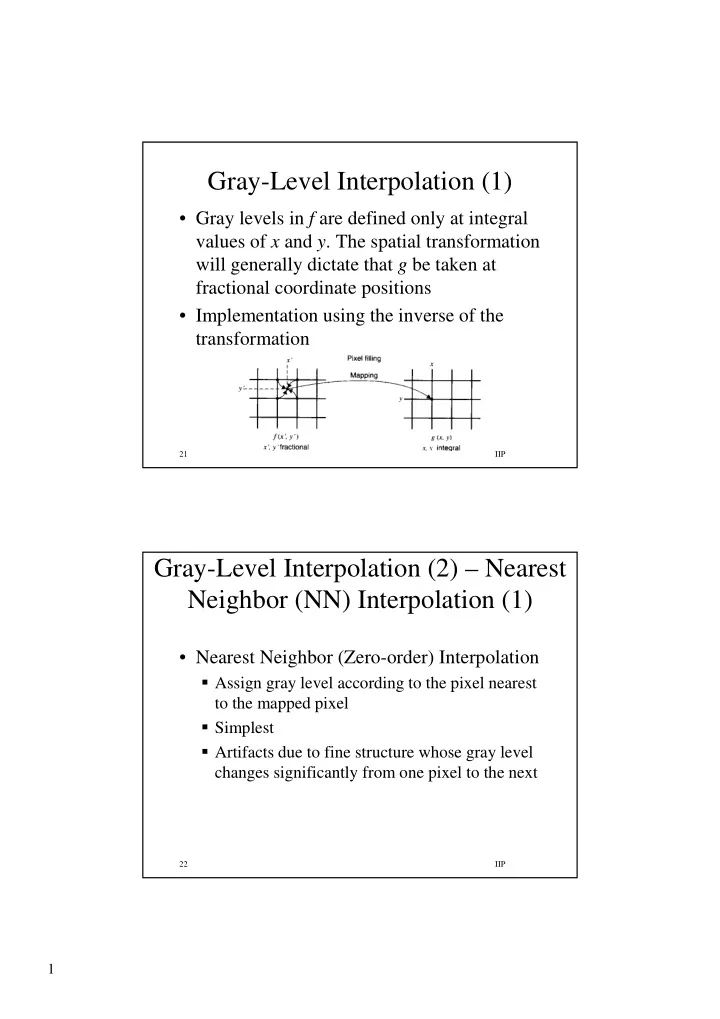
Gray-Level Interpolation (1) Gray levels in f are defined only at integral values of x and y . The spatial transformation will generally dictate that g be taken at fractional coordinate positions Implementation using the inverse of the


slide-1
SLIDE 1

1

IIP 21

Gray-Level Interpolation (1)

  • Gray levels in f are defined only at integral

values of x and y. The spatial transformation will generally dictate that g be taken at fractional coordinate positions

  • Implementation using the inverse of the

transformation

IIP 22

Gray-Level Interpolation (2) – Nearest Neighbor (NN) Interpolation (1)

  • Nearest Neighbor (Zero-order) Interpolation

Assign gray level according to the pixel nearest to the mapped pixel Simplest Artifacts due to fine structure whose gray level changes significantly from one pixel to the next

slide-2
SLIDE 2

2

IIP 23

Gray-Level Interpolation (3) – Bilinear Interpolation (1)

  • Bilinear (First order ) Interpolation

Better than zero order with moderate increase in programming complexity

  • is known at the vertices of the unit square

and we wish to interpolate the value of at an arbitrary point inside the square We do that by fitting a hyperbolic paraboloid defined by the bilinear equation through the four known values at the vertices. The coefficients are chosen so that fits the values at the vertices

d cxy by ax y x f + + + = ) , (

( , ) f x y ( , ) f x y ( , ) f x y

IIP 24

Gray-Level Interpolation (4) – Bilinear Interpolation (2)

  • A simple algorithm for bilinear interpolation:

[ ] [ ] [ ]

linearly interpolate between upper two points ( ,0) (0,0) (1,0) (0,0) and similarly for lower two points ( ,1) (0,1) (1,1) (0,1) and then vertically ( , ) ( ,0) ( ,1) ( ,0) yielding ( , ) (1 f x f x f f f x f x f f f x y f x y f x f x f x y f = + − = + − = + − =[

] [ ] [ ]

,0) (0,0) (0,1) (0,0) (1,1) (0,0) (0,1) (1,0) (0,0) bilinear f x f f y f f f f xy f − + − + + − − +

slide-3
SLIDE 3

3

IIP 25

Gray-Level Interpolation (5)

  • Zero (NN) vs. first order interpolation

first zero

Castleman, 1996

IIP 26

Geometric Operations – Applications

  • Geometric calibration (removal of camera-

induced geometric distortion, e.g., airborne & satellite)

  • Image registration (of similar images before

comparison due, e.g., to different viewing angles)

  • Image rectification (transformation of non-

rectangular pixel coordinates to rectangular coordinates)

  • Image morphing (transform one object gradually

into another)

slide-4
SLIDE 4

4

IIP 27

Image Rectification – Example

  • Fish-eye lens

for robots

Castleman, 1996

IIP 28

Image Morphing – Example

(a) initial (b) 40% points (c) 70% points (d) final

Castleman, 1996

slide-5
SLIDE 5

5

IIP 29

Image Enhancement in the Spatial Domain by Filtering

  • Reminder: procedures (operators) operating
  • n pixels
  • Performed by moving a mask (also called

window, filter, template), centered at the current pixel, over the image and applying the

  • perator on mask’s pixels to obtain the
  • perator value at the current pixel. Practically,

the operator is specified by the mask coefficients

IIP 30

Image Enhancement by Filtering – The Mechanism (1)

x mask and 2 1, 2 1, , nonnegative integers (i.e., mask of odd size) m n m a n b a b = + = + ( 1, 1) ( 1, 1) ( 1,0) ( 1, ) ... (0,0) ( , ) ... (1,0) ( 1, ) (1,1) ( 1, 1) and linear filtering of an image of size x with a filter mask of size x is ( R w f x y w f x y w f x y w f x y w f x y f M N m n g x = − − − − + − − + + + + + + + + , ) ( , ) ( , ) also called "convolution of a mask with an image"

a b s a t b

y w s t f x s y t

=− =−

= + +

∑ ∑

slide-6
SLIDE 6

6

IIP 31

Image Enhancement by Filtering – The Mechanism (2)

  • Or for 3x3 mask, the response is
  • What about the edges?

1) Limit range 2) Partial mask 3) Padding

9 1 i i i

R w z

=

= ∑

IIP 32

Smoothing (1)

  • Used for:

Blurring (removal of small details or bridging small gaps in lines or curves) Noise reduction (however affects also edges)

  • Implemented by averaging gray levels

within the mask

( , ) ( , ) ( , ) ( , )

a b s a t b a b s a t b

w s t f x s y t g x y w s t

=− =− =− =−

+ + = ∑ ∑

∑ ∑

slide-7
SLIDE 7

7

IIP 33

Smoothing (or Low-Pass Filter) (2)

  • 1D image example

[ ] [ ] [ ] 3

1 * 6,26,8,9 10,16,22,2 3,7,11,11, b * a 3 1 * 1,1,1 b 4,9,9,8,9 3,4,4,3,3, a = = =

edge~0.55 smoothed edge~0.09 low-pass filter

IIP 34

Smoothing (3)

weighted average mask average mask

slide-8
SLIDE 8

8

IIP 35

Smoothing (4)

Gonzalez & Woods, 2002

IIP 36

Smoothing (5)

Gonzalez & Woods, 2002

slide-9
SLIDE 9

9

IIP 37

Median Filter (1)

One of order-statistics filter Neighborhood (local) operation Nonlinear Slow process due to ranking

IIP 38

Median Filter (2)

  • Simple example

20 10 15 20 250 15 5 20 10

brightness values in a 3x3 image section 5 10 10 15 15 20 20 20 250 1st 2nd 3rd 4th 5th 6th 7th 8th 9th ^ ^ ^

  • min. median max.

brightness values in ascending order (in comparison to average of 40)

slide-10
SLIDE 10

10

IIP 39

Median Filter (3)

  • Example

1 2 3 4 5 1 2 3 4 5 6 7 8 9 10 1 2 3 4 1 2 3 4 5 6 7 8 9 10

1D image (edge + sinusoid) filtered with 3x1 median

IIP 40

Median Filter (4)

Gonzalez & Woods, 2002