Getting Social YOUR WEBSITE About me: Elizabeth has almost 20 - - PowerPoint PPT Presentation

getting social
SMART_READER_LITE
LIVE PREVIEW

Getting Social YOUR WEBSITE About me: Elizabeth has almost 20 - - PowerPoint PPT Presentation

Getting Social YOUR WEBSITE About me: Elizabeth has almost 20 years* of experience working with professional service firms, associations, recording artists and government projects in creating impactful relationships throughs social media,


slide-1
SLIDE 1

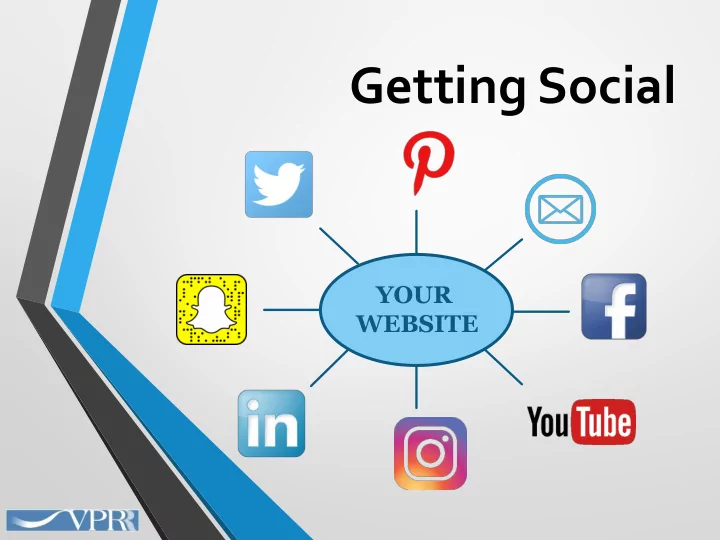
Getting Social

YOUR WEBSITE
slide-2
SLIDE 2

About me:

Elizabeth has almost 20 years* of experience working with professional service firms, associations, recording artists and government projects in creating impactful relationships throughs social media, content marketing and public relations. Elizabeth recently completed the Digital Marketing Masters Class, furthering her knowledge of SEO, SEM, social and email marketing. Elizabeth will celebrate her 9th year with Varallo Public Relations in a few weeks. As an account executive, she assists clients with social media and website content, email marketing, and traditional PR such as press releases and media advisories. Her Lebanon, TN farm is home to two dogs, 3 chickens, 4 horses and 2 extremely well- fed stray cats.

@ElizabethHowePR | linkedin.com/in/ElizabethHowe | @yankeecowgirlEli Elizabeth@varallopr.com www.varallopr.com *Trivia fact: That’s a year before Google was founded!

slide-3
SLIDE 3

As of September 2017, the top 5 social media platforms are:

  • #1 – Facebook
  • #2 –YouTube
  • #3 –Twitter
  • #4 – Instagram
  • #5 – LinkedIn

* Based on monthly visitors in the US as ranked by eBiz.

slide-4
SLIDE 4

You should not feel like you need to use every social media outlet.

Pick the one (s) that fit your company and your audience.

Focus your time on those!

slide-5
SLIDE 5

Steps to better social media use

1.

Define your goals

  • 2. Gather your materials (photos, videos, content)

3.

Be consistent across all platforms

  • 4. Keep a calendar (when to post, when to tweet, when to run

contests or offers)

  • 5. Be personal – it’s a conversation!
  • 6. Be responsive!

7.

Be sociable! Follow back, retweet, share!

slide-6
SLIDE 6

Account Set-Up Best Practices

  • Use or create a “catch all” email address for use with social media

accounts (*YouTube is a Google product! – Gmail is free & easy)

  • Share password/s with staff member/s who will post information
  • Keep a file with social media access information in your network
  • Change passwords if an employee with access leaves your company
  • Be consistent with username (i.e. “YourClinic”) and profile photo (your

logo, your headshot, or similar) across platforms.

slide-7
SLIDE 7
slide-8
SLIDE 8

Best Practices: Account Set-up

  • 1. Choose a relevant “handle” (@username) – 15 characters or less
  • 2. Complete your profile / bio

A good profile includes photo, header image, location, company, and link to your website (or Facebook page).

slide-9
SLIDE 9

Best Practices: Hashtag Use

#hashtags are Twitter’s keywords How do I know what #hashtag to use?

  • 1. “Trends” – most-used hashtags of the moment
  • 2. What are others in your industry using?
  • 3. AVMA “Pet Awareness Days” Calendar (avma.org)
  • 4. Partners for Healthy Pets initiatives
  • 5. Days of the week: #WhiskerWednesday, #Caturday, #TBT,

#marecrushMonday Ask yourself: What is the key point of this post? Your answer is your hashtag (IE, #petobesity, #pethealth,#wellness, #horsehealth, #cathealth, etc.)

slide-10
SLIDE 10

“Good Tweet, Bad Tweet”

Post like this Not like this!

slide-11
SLIDE 11

Best Practices: following and followers

  • It is considered good Twitter etiquette to follow back those who follow

you.

  • I tend to avoid those who don’t have a profile photo, don’t have more than
  • ne or 2 posts, or individuals whose follower/following numbers are

skewed.

  • A “follow” is not an endorsement of content.
  • Accounts to Follow: Individuals, associations, businesses, media, town/city
  • rganizations
  • Following people connects you (and gives you a source of content to

share).

slide-12
SLIDE 12

Questions?

slide-13
SLIDE 13
slide-14
SLIDE 14

Best Practices for Business Pages

  • 1. Complete all steps when setting up your profile, making sure your

company and contact information is accurate.

slide-15
SLIDE 15
  • 2. Try to make your page name the same as your practice and/or website.

(www.facebook.com/youranimalclinic)

  • 3. Be sure to get permission from clients before posting photos of their pets!
  • 4. “Follow” related pages such as TVMA, AVMA, UT, magazines/websites, your

local newspaper, local Chamber of Commerce

  • You can ‘share’ their posts and they might share yours
  • Sharing posts allows you to post more often without always creating
  • riginal content.
slide-16
SLIDE 16
  • 5. Imagine your ideal client and craft your posts as a conversation with that

person.

  • 6. It is perfectly fine to pre-schedule posts, but be sure to check in occasionally

to respond to any questions!

slide-17
SLIDE 17

A brief look at Facebook’s Settings –

granting access to a member of your team

slide-18
SLIDE 18

Perfect posts, perfect times

  • Posts with photos and videos get the most views
  • Posts that ‘tag’ people or organizations will be seen by

more viewers.

  • Posts with links perform better than plain text.
  • The ‘perfect time’ to post…depends!
slide-19
SLIDE 19

Questions?

slide-20
SLIDE 20
slide-21
SLIDE 21
  • YouTube has 1.5 billion active monthly users
  • Videos can be shared across social media and showcased on

your website

slide-22
SLIDE 22
  • Videos can be educational and/or humorous
  • Keep them short – 3 minutes or less in most cases!
  • Try to answer a single question or give one helpful health/care tip
  • iPhone video is perfectly fine
  • Hold the phone horizontally
  • Try to shoot on a day with little to no wind if outside
  • Be aware of background noises, background images and shadows
  • Be sure to get client’s permission for animals you don’t own!
  • Voiceover can be added/background noise removed with software

such as Windows MovieMaker

Video Best Practices:

slide-23
SLIDE 23

Account Best Practices:

  • Upload a header and profile image
  • Fill out the about section
  • Upload at least one video and share it!
  • Subscribe to related channels for inspiration
slide-24
SLIDE 24

AVMA’s YouTube - Examples

slide-25
SLIDE 25

Questions?

slide-26
SLIDE 26

Closing Thoughts: Your website is the “hub” of a “wheel of information” that exists about you on the internet. Social media is like “spokes” in the wheel, providing essential connections, driving conversation, and directing interest back to your website for additional information/inquiries. (Both are important!) @ElizabethHowePR | linkedin.com/in/ElizabethHowe | @yankeecowgirlEli Elizabeth@varallopr.com www.varallopr.com