Finite Mathematics MAT 141: Chapter 2 Notes Solutions to Linear - - PowerPoint PPT Presentation

finite mathematics mat 141 chapter 2 notes
SMART_READER_LITE
LIVE PREVIEW

Finite Mathematics MAT 141: Chapter 2 Notes Solutions to Linear - - PowerPoint PPT Presentation

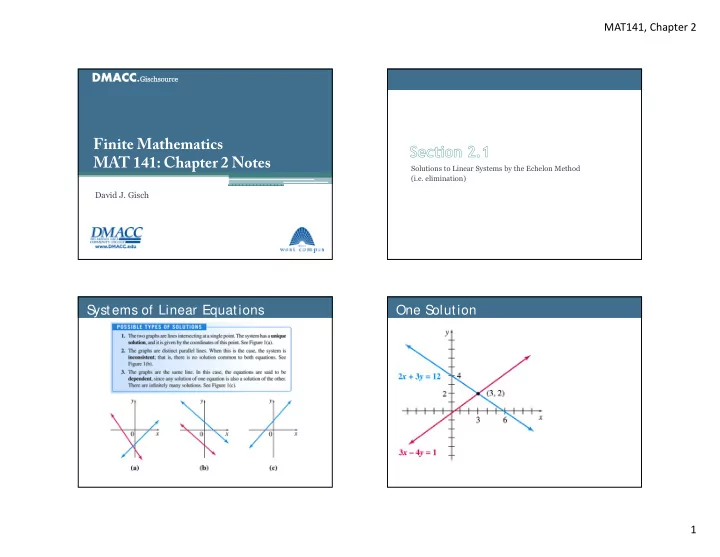
MAT141, Chapter 2 Finite Mathematics MAT 141: Chapter 2 Notes Solutions to Linear Systems by the Echelon Method (i.e. elimination) David J. Gisch S ystems of Linear Equations One S olution 1 MAT141, Chapter 2 No S olution Infinite S


slide-1
SLIDE 1

MAT141, Chapter 2 1

Finite Mathematics MAT 141: Chapter 2 Notes

David J. Gisch

Solutions to Linear Systems by the Echelon Method (i.e. elimination)

S ystems of Linear Equations One S

  • lution
slide-2
SLIDE 2

MAT141, Chapter 2 2

No S

  • lution

Infinite S

  • lutions

S

  • lving a S

ystem Using Elimination

  • Rule 1 seems clear.
  • Rule 2 seems clear.
  • Rule 3 is ok?

Investigating Rule 3

  • Lets look at the following system.

▫ 4 1 2 2

  • Below is the graph of these equations. They do intersect

and have a solution of 2, 4 .

  • Try some different combinations using rule 3 and graph

your results.

For Example, I will take 2(1)+(2) which results in 2 8 2 3 10 1 3 10 3

slide-3
SLIDE 3

MAT141, Chapter 2 3

Using Transformations to S

  • lve
  • Using these transformation rules we solve using a

process called elimination.

▫ You try to eliminate a variable to solve for another. ▫ Then you substitute that answer back into an equation to find the

  • ther.

Example: Solve the system using elimination. 4 7 1 2 2

Using Transformations to S

  • lve

Example: Solve the system using elimination. 2 3 12 1 3 4 1 2

Using Transformations to S

  • lve

Example: Solve the system using elimination. 3 2 5 1 6 4 7 2

X _Y (Solution), 111 (Infinite), 000 (None)

Using Transformations to S

  • lve

Example: Solve the system using elimination. 3 2 5 1 6 4 10 2

slide-4
SLIDE 4

MAT141, Chapter 2 4

Echelon Form

  • Solving using elimination is essentially the technique

called the “echelon method” in the book.

▫ Rather than number the equations we refer to them as rows. ▫ Our goal is to “triangulate” a system, allowing us to work backwards to find solutions.

S

  • lving Applications

Example: Some grocery store receipts from 1950 were found in a desk

  • drawer. One order listed three gallons of milk and two loaves of bread

with a total of $2.70. A second order listed two gallons of milk and three loaves of bread with a total price of $2.05. Determine the price

  • f each item.

S

  • lving Applications (Infinite S
  • lutions)

Example: A student production sells tickets at a cost of $5 for students and $8 for non-students. They sold a total of $68 worth of tickets. How many of each type did they sell?

S

  • lving Applications (S

upply & Demand)

Example: A company sells Star Wars collectible action figures to nerds that still live in their mother’s basements or have tolerant

  • wives. They have found after collecting data over the past 2 years that

they have the following trends for monthly supply and demand. What is their equilibrium point? 0.1105 100 0.0895 100

slide-5
SLIDE 5

MAT141, Chapter 2 5

Solutions of Linear Equations and Matrices

Parts of a Matrix

  • There is this guy named Morpheus and another named

Neo, JK.

  • Matrices are a way of organizing data into rows and

columns.

  • We can also take equations, organize them, and put them

into matrices.

  • We like to separate the constants. In doing so we create

what is called an augmented matrix.

System Matrix Augmented Matrix

Creating Augmented Matrices

Example: Turn each system into an augmented matrix. (a) 2 3 10 4 (b) 2 7 4 12 (c) 2 2 3 5 1

S

  • lving using Gauss-Jordan Method
  • The rules are very similar to elimination.
  • We need to be a little more systematic

about it though.

Carl Friedrich Gauss 1777-1855 German Wilhelm Jordan 1842-1899 German

slide-6
SLIDE 6

MAT141, Chapter 2 6

Elimination and Gauss-Jordan

Replace the second row with itself minus the first row.

Elimination and Gauss-Jordan

Solution is

  • and
  • S

pecial Note

  • When combining two rows to replace one, you should

not put a negative with the row you are replacing.

1 1 4 2 3 1

4 →

1 1 4 41 2 41 3 1 43 1 1 6 3 11 1 1 4 2 3 1

4 →

1 1 4 41 2 41 3 1 43 1 1 6 3 11 This is OK This is NOT OK It makes the term negative, which is actually ok for now but later this will cause a problem.

Gauss-Jordan Method

Example: Solve the system using Gauss-Jordan. 2 3 12 3 4 1

slide-7
SLIDE 7

MAT141, Chapter 2 7

Gauss-Jordan Method

Example: Solve the system using Gauss-Jordan. 3 2 5 6 4 7

Gauss-Jordan Method

Example: Solve the system using Gauss-Jordan. 3 2 5 6 4 10

Gauss-Jordan Method (On the TI)

Example: Solve the system using Gauss-Jordan.

  • 1

2 10 3 2 3 1

  • 1. 2nd, Matrix () Edit, Enter
  • 2. Fill in matrix
  • 3. 2nd, Quit (MODE)
  • 4. 2nd, Matrix ()Math
  • 5. rref( , enter

6. 2nd, Matrix (), select your matrix, enter

  • 7. Enter

Solution is 3, 2, 2

Gauss-Jordan Method (On the TI)

Example: A convenience store sells 23 sodas one summer afternoon in 12-, 16-, and 20-oz cups (small, medium, and large). The total volume of soda sold was 376 oz. Suppose the price for a small, medium, and larger were $1, $1.25, and $1.40, respectively, with a total amount of sales of $28.45. How many of each did the store sell?

slide-8
SLIDE 8

MAT141, Chapter 2 8

Gauss-Jordan Method (On the TI)

Example: Suppose the price for a small, medium, and large were $1, $2, and $3, respectively, with a total amount of sales of $28.45. How many of each did the store sell?

To TI or not to TI?

  • I will ask you to perform the Gauss-Jordan method by

hand on a system with 2 equations and two variables.

  • For 3 or more, you only need to write the augmented

matrix and your results obtained from the TI.

Addition and Subtraction of Matrices

Matrices

  • Recall that matrices are described by their rows and

columns.

  • We say the size of a matrix is # #
slide-9
SLIDE 9

MAT141, Chapter 2 9

Matrices

2 1 1 0 and 2 1 1 0 are not equal. 3 1 1 and 3 1 1 are equal.

2 1 1 1 1 1 2 1 1 0 1 1 0 1 3 1 2 1

Matrices

2 3 1 1 1 1 2 1 3 0 1 1 0 1 3 3 2 1

Matrices

Example: Find the value of each variable. (a)

  • 1

0 3 3

  • (a)

2 3 1 8 5 3 7

  • 6

3 (b) 1 2 4 1 3 1

  • 2

1 4 1 7 1 1

  • 8

5 3 1 4 4

  • Matrices

Example: Perform each operation. (a) 1 1 0 3 3 2 (a) 2 3 1 1 1 (b) 1 4 1 3 1

  • 2

1 4 1 7 2 1

slide-10
SLIDE 10

MAT141, Chapter 2 10

Multiplication of Matrices

S calar Multiplication

k

  • 3 1

2 1 3 6 3 Order of operations is also preserved. For example, 3 1 2 1 2 1 1 4 3 6 3 2 1 1 4 1 1 7 1

Labeling Parts of a Matrix

  • We label each element of a matrix by its row and column.
  • Row 2

Column 1

Multiplying Matrices

Example: The given matrices can be multiplied.

1 1 1 ∙ 1 2 1 1 2 1 2 1 2

2 2 2 3 2 3

Match

slide-11
SLIDE 11

MAT141, Chapter 2 11

  • Let the result matrix guide you!

1 2 1 ∙ 1 1 2

  • You get by “multiplying” row 1 by column 2.

1 1 2 0 1

Multiplying Matrices

Example: Multiply the given matrices.

(a) 2 1 1 ∙ 4 2 (b) 0 2 1 1 ∙ 1 2 1 1

Multiplying Matrices

  • Note, the product of matrices is not commutative.

  • Show this with the following matrices.

▫ 2 1 1 , 1 1 1

Book Practice

  • Let’s look at some more practice from the book.
  • P. 83 (16, 20, 29, 44)

(16) 1 5 7 0 ∙ 6 2 (20) 6 4 1 2 5 10 1 3 ∙ 1 2

slide-12
SLIDE 12

MAT141, Chapter 2 12

Book Practice

(29) 2 2 1 1 ∙ 4 3 1 2 7 1 5

Book Practice

(44)

Review: S

  • lve Using Gauss-Jordan

2 5 3 2 12

Review: S

  • lve Using Gauss-Jordan

2 5 26 4 19

slide-13
SLIDE 13

MAT141, Chapter 2 13

Review: S

  • lve Using Gauss-Jordan

2 6 8 5 15 20

Using Infinite S

  • lutions
  • The solution from the previous problem was

▫ 4 3,

  • What if x represented bowls and y represented

plates.

▫ Your company can only make up to 10 plates in an hour. Matrix Inverses

S

  • lving Equations with Matrices
  • A system of equations.
  • 3 2 4

2 7 3 8 3 8 5 4

  • Turn this system of equations into a matrix equation.

1 3 2 2 7 3 3 8 5

  • 4

8 4 Note that if you performed matrix multiplication you would get the equations from above. 3 2 4

slide-14
SLIDE 14

MAT141, Chapter 2 14

S

  • lving Equations with Matrices
  • Turn this system of equations into a matrix equation.

1 3 2 2 7 3 3 8 5

  • 4

8 4 We label the matrices as such 1 3 2 2 7 3 3 8 5 ,

  • ,

4 8 4 Giving us the following matrix equation.

Matrix Equations

Example: Write each of the following into matrix equations.

(a) 2 3 12 3 4 1 (b) 2 15 2 20

S

  • lving Equations
  • How do you solve the equation

2 10

  • How do you solve the equation

4 3 10

  • So you can solve by multiplying by the inverse.

Inverse and Identity

  • Recall that the inverse of any number can be written as

▫ Given 3, its inverse is 3

  • ▫ Given

, its inverse is

  • The Identity.

▫ For the real number system we call the number 1 the identity.  2 1 1 2 2 ▫ Also, if you multiply any number and its inverse you get the identity. 

  • 1
slide-15
SLIDE 15

MAT141, Chapter 2 15

S

  • lving Equations with Matrices
  • Just like we can solve the following using inverses

4 3

  • ∙ 4

3 4 3

  • ∙ 10

3 4 ∙ 4 3 3 4 ∙ 10 3 4 ∙ 10 15 2

  • We can solve matrix equations with inverse matrices.
  • So how do we find the inverse matrix?

▫ We will learn how to find it for the 2x2 case but use the calculator thereafter.

Find the Inverse

  • For example lets look at the following:

2 15 2 20 1 2 2 1

  • 15

20 1. We take the coefficient matrix and add to it the identity matrix. 1 2 2 1 1 1

  • 2. Perform the Gauss-Jordan method on this matrix.

1 2 2 1 1 1 1 1 2 2 1 1 1 2 1 2 5 1 2 1 1 5 1 2 1 1 2 5

  • 1 5
  • 2

1 1 1 5

  • 2 5
  • 2 5
  • 1 5
  • S
  • lve Using the Inverse
  • For example lets look at the following:

2 15 2 20 1 2 2 1

  • 15

20

  • Therefore we could solve using matrix multiplication

with the inverse. 1 5

  • 2 5
  • 2 5
  • 1 5
  • 15

20

Matrix Equations

Example: Find the inverse of A given the following system.

(a) 2 5 15 4 9

slide-16
SLIDE 16

MAT141, Chapter 2 16

Finding Inverses on the Calculator

  • Use the calculator to find the inverse of

4 1 2

  • 1. Input the Matrix in the TI
  • 2. 2nd, Quit (Mode)
  • 3. 2nd, Matrix ()
  • 4. Select your Matrix, Enter

5. , enter To solve the system.

  • 1. Follow steps 1-5 but do not push
  • enter. Then hit the multiplication

button.

  • 2. Input your Constants into Matrix B
  • n the TI
  • 3. Select Matrix B, enter

4 20 2 10

Matrix Equations

Example: Use your calculator to answer the following.

(a) Write the appropriate A, X, and B matrices for

  • 2 1

3 8 4 3 8

(b) State (c) Find the solution using the inverse.

Matrix Equations

Example: Use your calculator to answer the following.

(a) Write the appropriate A, X, and B matrices for

  • 2 1

3 8 4 3 8

(b) State (c) Find the solution using the inverse.

Options

  • Given a system of equations you could

▫ Solve using substitution. ▫ Solve using Elimination (Echelon Method) ▫ Solve using Gauss-Jordan (rref()) ▫ Solve using Inverse Matrices.

  • Other ways we have not covered.

▫ Using determinants of matrices. ▫ Using Cramer’s rule.

  • Certain methods are better than others in certain

circumstances.

▫ If you have equations with “nice” numbers, substitution and elimination are quick and easy. ▫ Gauss-Jordan and inverses are systematic and can therefore be programmed into computers. ▫ With larger systems Gauss-Jordan and inverses are less prone to error. ▫ In physics and advanced math you have variables so you cannot use a calculator and the Gauss-Jordan is your only option.