Extreme Sliding Base Jumping with the Radix 2/10 Binary/Decimal - - PDF document

extreme sliding base jumping with the radix 2 10 binary
SMART_READER_LITE
LIVE PREVIEW

Extreme Sliding Base Jumping with the Radix 2/10 Binary/Decimal - - PDF document

Extreme Sliding Base Jumping with the Radix 2/10 Binary/Decimal Slide Rule C Tombeur, July 2014 What is in a scale? This article describes the inspiration, design and operation of the Radix 2/10 System Leibniz slide rule, and the


slide-1
SLIDE 1
  • 1 -

Extreme Sliding – Base Jumping with the Radix 2/10 Binary/Decimal Slide Rule

C Tombeur, July 2014

What is in a scale?

This article describes the inspiration, design and

  • peration of the ‘Radix 2/10 – System Leibniz’ slide

rule, and the broader idea of the Radix model series. The rule, and then later the concept of a model series using the scale design, is my brainchild, inspired by my research into understanding how slide rule scales work. Soon after my first encounter with slide rules my interest in them extended to creating my own novel designs, from the theoretical concept and mathematical solution through to the practical design and construction

  • f

working quasi- professional examples. This article also attempts to demonstrate the complexities and challenges involved and how they were overcome from the perspective of creating this new binary/decimal model slide rule. In addition, this project once again raised the question of the precision expected from slide rules, but unexpectedly and in a rather novel and refreshing way.

Summary

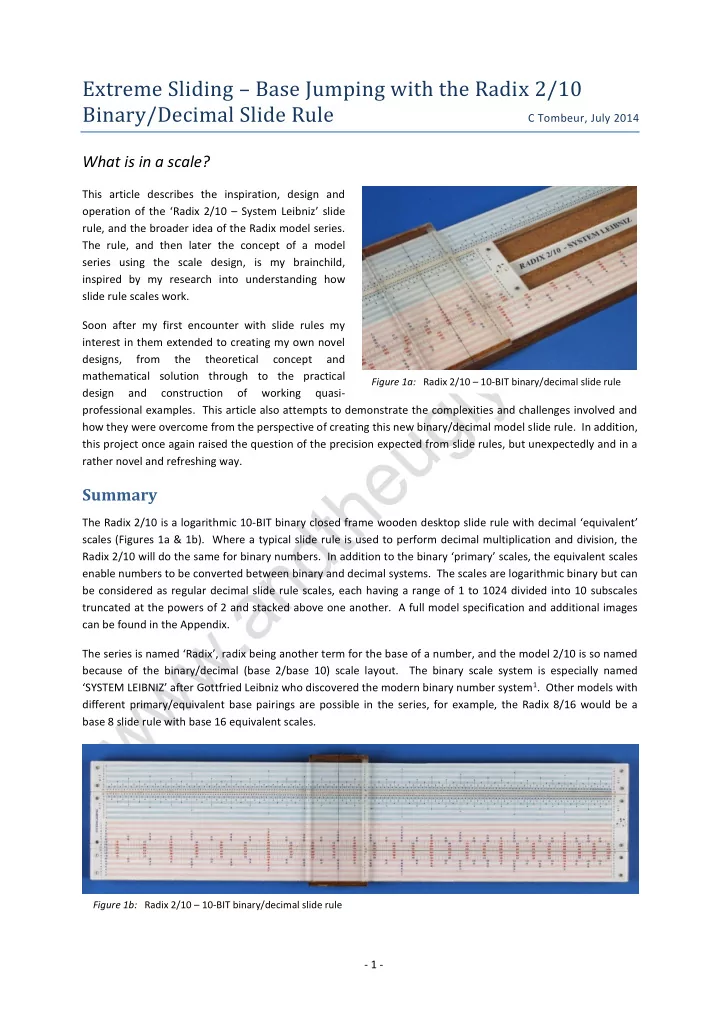
The Radix 2/10 is a logarithmic 10-BIT binary closed frame wooden desktop slide rule with decimal ‘equivalent’ scales (Figures 1a & 1b). Where a typical slide rule is used to perform decimal multiplication and division, the Radix 2/10 will do the same for binary numbers. In addition to the binary ‘primary’ scales, the equivalent scales enable numbers to be converted between binary and decimal systems. The scales are logarithmic binary but can be considered as regular decimal slide rule scales, each having a range of 1 to 1024 divided into 10 subscales truncated at the powers of 2 and stacked above one another. A full model specification and additional images can be found in the Appendix. The series is named ‘Radix’, radix being another term for the base of a number, and the model 2/10 is so named because of the binary/decimal (base 2/base 10) scale layout. The binary scale system is especially named ‘SYSTEM LEIBNIZ’ after Gottfried Leibniz who discovered the modern binary number system1. Other models with different primary/equivalent base pairings are possible in the series, for example, the Radix 8/16 would be a base 8 slide rule with base 16 equivalent scales.

Figure 1a: Radix 2/10 – 10-BIT binary/decimal slide rule Figure 1b: Radix 2/10 – 10-BIT binary/decimal slide rule

slide-2
SLIDE 2

Extreme Sliding – Base Jumping with the Radix 2/10 Binary/Decimal Slide Rule

  • 2 -

Background and Development

When my eyes were first fully opened to the fascinating and diverse subject of slide rules in mid-2011, one of the first things I wanted to find out was how slide rules worked. This involved considerable reading around the subject, refreshing my schoolboy knowledge of logarithms, and significant work with paper and scissors. The next obvious step was designing scales for my own interests, and then designing actual physical slide rules that I would be able to make relatively easily and to a reasonable standard with my limited home facilities. While revising my knowledge of logarithms I began experimenting with logarithmic scales in different bases. This led me to toy with the idea that perhaps a slide rule could be designed to convert numbers between many different bases. The obvious place to start was converting between the familiar base 10 and the simplest base of all, base 2. Then perhaps the design could be modified to work for additional bases. This idea ultimately proved fruitless, but it did cause me to wonder how a logarithmic binary scale could be easily represented on a slide rule. The problem gave me an idea for some light relief and a little bit of fun at the expense of slide rule enthusiasts – a binary ‘logarithmic’ 1- BIT slide rule (Figure 2). This working example with just two marks

  • n each scale is a fantastic introduction to the concept of binary scale

slide rules! Technically the binary value labels should be binary 1 and 10, but that would be a little confusing given its intended purpose. A few months later around spring 2012, I revisited the logarithmic binary scale problem and developed a workable layout for a linear slide rule. This might have been the end of the story but for David Rance’s presentation of his paper ‘Slide Rules for Computer Programmers’2 in the autumn of 2012 at The International Meeting of Collectors of Historical Calculating Instruments in the UK. David’s paper immediately chimed with my ideas for binary slide rules. The most fundamental form of computer programming is machine code, or binary code, which is programming in the hardware language of the computer using ‘1’s and ‘0’s. A little tongue-in-cheek, I thought that ‘real computer programmers would have used machine code in the early days, and what they needed was a binary slide rule’. Since I had already designed a binary scale layout, I decided to make a prototype. Initially I refined the design of the binary scales. Then, given that a linear slide rule has a pair of sliding edges, I considered what other scales could be added that may be useful. Thinking back to my investigations into base conversion scales, I realised that I could easily add a pair of decimal scales equivalent to the binary pair. This would enable the users to calculate in binary or decimal, and allow them to read the values and results in either

  • base. Over the next few months I developed a prototype binary/decimal slide rule which I showed to David

Rance in mid-2013. David is an enthusiast of unusual slide rules and was very complimentary of the idea and

  • design. He offered some welcome and insightful suggestions3, such as naming the binary scale layout SYSTEM

LEIBNIZ, and encouraged me to take the idea to its logical conclusion – to finalise the design, build some examples and write a paper. By the end of September 2013 the design was complete and I had a finished Radix 2/10 model. During this last phase of development I realised that the scale design and the layout of a primary pair of logarithmic scales in

  • ne base with an equivalent pair in another base could be used for other combinations of bases. I could have a

slide rule model series in which any particular combination of two bases for the scale pairs would be a model. I decided to call the model series Radix after the term for the base of a number, and the model numbers would be a combination of the primary/equivalent base numbers of each variant.

Figure 2: Binary slide rule

slide-3
SLIDE 3

Extreme Sliding – Base Jumping with the Radix 2/10 Binary/Decimal Slide Rule

  • 3 -

Primary and Equivalent Scale Design

A slide rule in the Radix model series is designed to be used as a typical decimal slide rule, using the pair of primary scales. However, while the structure of the primary scales is similar to the familiar decimal scales, they are formatted in a different base. The equivalent scales then show the values for the positions on the primary scales in an alternative base. The format of the binary primary and decimal equivalent scales of the Radix 2/10 are detailed here, however the design can be applied to scales of any two different bases.

Binary Primary Scales

The design and labelling of the logarithmic binary slide rule scale system described here is especially named SYSTEM LEIBNIZ after Gottfried Leibniz who invented the modern binary number system in 1679. His system is described in his article ‘Explication de l'Arithmétique Binaire’1. Binary Numbers A number in any base can be stated using general notation, where b is the base, n is the number of digits and a is the digit value at position k from least to most significant digit, as: a1 x b0 + a2 x b1 + … + an x b(n-1)

  • r

∑ 𝑏𝑙𝑐𝑙−1

𝑜 𝑙=1

e.g. The 6-digit decimal number 142857 comprises 7x100 + 5x101 + 8x10² + 2x10³ + 4x10⁴ + 1x10⁵

DECIMAL BINARY Sig.: most least Sig.: most least digits: 3 2 1 BITs: 7 6 5 4 3 2 1 100's 10's 1's 64's 32's 16's 8's 4's 2's 1's 1 1 2 1 3 1 1 4 1 … … 9 1 1 1 1 1 1 1 1 1 1 1 2 1 1 … … 9 9 1 1 1 1 1 1 1 1 1 1 1 1 1 1 … …

Table 1: Decimal numbers and their binary equivalents

Numbers are made up of a string of the digits available to the base, where each digit to the left of the point is an

  • rder of magnitude greater than the last, from least to most significant digit. The number of available digits

determines the order of magnitude and characterises the base. In decimal (base 10) there are 10 digits available; 0, 1, 2, 3, 4, 5, 6, 7, 8 and 9. The order of magnitude is therefore 10, with the digits successively to the left of the point representing units, tens, hundreds, thousands and so on. Binary, or base 2, is the simplest of all bases in that numbers are made up using the two binary digits, or BITs, ‘0’ and ‘1’. The order of magnitude is 2, so the BITs successively to the left of the point represent units, twos, fours, eights, sixteens and so on from least to most significant BIT. Table 1 shows some decimal numbers with their binary equivalents. It can be seen that binary numbers quickly become very long compared to their decimal

  • equivalents. For example, the base 10 2-digit number 99 is 1100011 in base 2, 7-BITs long.

Conversions between binary and decimal numbers are relatively simple but laborious. Using the above algorithm it can be seen that the binary number 1011 comprises 1x20 + 1x21 + 0x22 + 1x23 = 1x1 + 1x2 + 0x4 + 1x8 = 11 in decimal. Simple processes based on the algorithm enable conversion between binary and decimal

  • numbers. A decimal number can be converted to binary by successively dividing it by 2 until the quotient
slide-4
SLIDE 4

Extreme Sliding – Base Jumping with the Radix 2/10 Binary/Decimal Slide Rule

  • 4 -

becomes zero. The remainder of each division becomes the next least significant BIT (Table 2). The process is reversed to convert a binary number to decimal. Each BIT from most to least significant BIT is added to double the previous value, starting with zero (Table 3). Performing mathematical operations in binary is similar to decimal but more laborious and is not discussed here. Further information on binary and other number systems can be found in many online or text resources. Scale Structure & Precision The initial problem with binary scales was how to represent numbers on a scale where there are only two digits, 0 and 1. However the approach becomes clear when a typical logarithmic C scale of a linear base 10 slide rule is examined to understand how values are represented (Figure 3). The tick marks and value labels in this example are slightly different to normal in order to demonstrate the principles involved, and integers are represented for ease of explanation. The scale can be seen to have three distinct levels defined by the tick mark heights and value labels. The highest level has logarithmic tick marks labelled 1 to 9 to represent a single digit number with the final tick mark representing the zero digit of the 2-digit number 10. Thus 10 digits are represented on 1 line (where 101=10). This level can be said to be the 1-digit line. The 2-digit line has 9 tick marks logarithmically subdividing each of the intervals between the 1-digit line tick marks into 10. This allows all of the 2-digit numbers 10 to 99, and 100, to be represented in addition to the 1- digit numbers. The tick marks previously used for units now represent tens, with the 2-digit line tick marks representing units. 100 integers are represented by 2 digit lines (where 102=100), using 91 tick marks. Note that 10 is represented at both ends but only counted once. The 3-digit line further subdivides each interval on the 2-digit line into 10. On a typical 250mm C scale this is usually achieved with a combination of tick marks, by-eye and estimation. All of the 3-digit numbers from 100 to 999, and 1000, are represented here in addition to the 1 and 2-digit numbers, so 1000 integers are represented (where 103=1000), using 901 tick marks. Table 4 shows how magnitudes are represented by the digit lines for 1, 2 and 3-digit numbers. The 1-digit line (highest level) always represents the most significant digit and the lowest level always represents the least significant digit in a number. The number of digit lines (or levels) is the depth of the scale, which is also the number of significant digits that can be represented by the scale. If the scale base (b) is raised to the power

  • f its depth (n), the result is the possible number of integers (i) that can be represented, if they all had tick

marks: i = bn e.g. A decimal scale with a 3-digit line depth could represent 103 = 1000 integers.

DECIMAL 11 BINARY divided by 2 = 5 remainder 1 (read down) 1 + 2 x 0 = 1 divided by 2 = 2 remainder 1 + 2 x 1 = 2 divided by 2 = 1 remainder (read up) 1 + 2 x 2 = 5 divided by 2 = remainder 1 BINARY 1 + 2 x 5 = 11 DECIMAL

Table 2: Converting decimal 11 to binary Table 3: Converting binary 1011 to decimal Figure 3: Typical base 10 C scale with 3 digit lines representing 1000 integers (not all tick marks shown)

1 2 3 4 5 6 7 8 9 10 2 3 4 5 6 7 8 9 1 2 3 ... ... ... ... 1 1-digit line 2-digit line 3-digit line

slide-5
SLIDE 5

Extreme Sliding – Base Jumping with the Radix 2/10 Binary/Decimal Slide Rule

  • 5 -

Digits in digit line Number 1 2 3 1 units 2 tens units 3 hundreds tens units

Table 4: Representation of 3-digit decimal integers

This also indicates the absolute precision of the scale where all integers have tick marks. Absolute precision is the minimum precision of the scale that can be attained from the tick marks, without by-eye or other estimation. In the above example 1000 integers are represented, so the absolute precision is 1 in 1000, or 1/1000. If the scale does not have all possible values in the range represented with tick marks, then the absolute precision ratio, where m is the minimum tick mark value interval, is given by: m / i

  • r

m / bn e.g. The absolute precision of a 3-digit line decimal scale where the minimum tick mark value interval is 5 (between 995 and 1000) is 5/103 = 1/200. The number of tick marks (t) required to represent all the integers is given by the following formula, where b is the base and n is the scale depth or number of digit lines in the scale: t = bn - b (n-1) + 1 e.g. 103 – 10(3-1) + 1 = 901 tick marks for a 3-digit line base 10 scale. The same approach can be used to represent binary numbers on a scale. A BIT line is the equivalent of a digit line, where each subsequent level logarithmically subdivides the previous BIT line intervals into 2 rather than into 10 for decimal scales. The scale depth is now the number of BIT lines, which is the power to which 2 is raised to give the possible number of integers that can be represented. Figure 4 shows a 3-BIT line logarithmic binary scale representing the integers 12 to 10002 (binary), or 110 to 810 (decimal). As with the decimal scale, the highest level, the 1-BIT line, represents the most significant BIT and the lowest level, the 3-BIT line, represents the least significant BIT. The 1-BIT line comprises 2 tick marks, where 21=2, representing the 1-BIT binary number 12, and 102 (110 and 210). The 2-BIT line has an additional tick mark subdividing the single 1-BIT line interval logarithmically into two. This BIT line represents the 2-BIT numbers 102 to 112, and 1002, (210 to 310 and 410) in addition to the single 1-BIT value on the 1-BIT line. Thus 4 integers are represented by 2 BIT lines (where 22=4), using 3 tick marks. The 3- BIT line logarithmically subdivides each of the 2 intervals in the 2-BIT line in half. In addition to the 1 and 2-BIT numbers, the 3-BIT values 1002 to 1112, and 10002, (410 to 710 and 810) are represented. The 3-BIT scale depth represents 8 integers (where 23=8), using 5 tick marks. The tick mark interval is 1, so the absolute precision of the scale with 3-BIT lines is 1/8. Table 5 shows how magnitudes are represented by the BIT lines for 1, 2 and 3-BIT numbers. Further BIT lines can be added by continually subdividing the intervals logarithmically in half, enabling longer binary numbers to be represented. Each additional BIT line, and hence BIT, doubles the number of integers represented, and so doubles the absolute precision of the scale if all integers are represented with tick marks.

BITs in BIT line Number 1 2 3 1 1’s 2 2’s 1’s 3 4’s 2’s 1’s

Table 5: Representation of 3-BIT binary integers Figure 4: 3-BIT line binary scale representing 8 integers 1 1-BIT line 2-BIT line 3-BIT line 1 1 1 10

slide-6
SLIDE 6

Extreme Sliding – Base Jumping with the Radix 2/10 Binary/Decimal Slide Rule

  • 6 -

Tick Mark Position On a linear base 10 logarithmic slide rule scale, the lower level tick marks are positioned logarithmically within a higher level interval. The formula for the linear position (d) of a tick mark within an interval, where l is the length of the interval and x is the ordinal, is: d = l.log10(x) e.g. On a typical 250mm scale length linear rule, the ‘2’ tick mark is positioned at 250 x log10(2) = 75.3mm. A similar formula, d = l.log2(x), is used to position the single tick mark dividing an interval into two on the logarithmic binary scale. Calculating logarithms in base 2 is relatively simple since logb(x) = log10 (x)/ log10 (b), where b is the required base. Therefore, the formula for the position of the tick mark becomes: d = l. log10 (x) / log10 (b) Since the single lower level tick mark divides an interval numerically in half on the binary scale, the value for x is 1.5, halfway between 1 and 2. Therefore the tick mark is always at log10 (1.5)/ log10 (2) = 0.585 of the interval width. When the tick marks on a scale are drawn (Figures 3 & 4), it can be seen that in fact only the tick marks for the lowest significant digit/BIT line are actually drawn. However, the tick marks are drawn to different heights, as appropriate, into the higher levels where they are effectively re-used. If n is the scale depth (or number of BITs/digits/levels) and b the base, then the range of integers x that need to be drawn is: b(n-1) <= x <= bn e.g. The 3-BIT line scale in Figure 4 only needs the 5 tick marks for the range 4 to 8 to be drawn to appropriate heights for all 8 integers to be represented. Using the range defined above, the formula below will give the position d from the left end, of all the tick marks in a scale of base b, depth n and physical length l. This range and formula can be used to draw any tick mark on a linear scale in any base. d = l. log10 (x / b(n-1)) / log10 (b) e.g. The 1.11 tick mark on a typical 250mm decimal C scale can also be seen as integer 111 of 1000. 1000=103, so the scale depth is 3. The position of the tick mark can then be calculated as:

  • 250. log10 (111 / 10(3-1)) / log10 (10) = 11.3mm.

Tick Mark Format and Labelling On a typical decimal slide rule scale the tick mark lengths and numeric labels are designed so that values can be read easily. Variation of tick mark length within line similar to a decimal scale, for example where units and multiples of 5 are different lengths, is nonsensical on a binary scale where subsequent BIT lines subdivide intervals into 2 rather than into 10. In addition, the length of binary numbers can get very large, very quickly, because they are only represented using the digits 0 and 1. The challenge was to design tick marks and a method of labelling where binary numbers could be read relatively easily, without all the lines becoming too confusing with excessive ones and zeroes. The solution eventually found is two-fold (Figure 5). On a conventional linear slide rule scale, the tick mark heights are an indicator of the order of magnitude of the

  • digit. In the example described above (Figure 3), tick marks representing hundreds are longer than those

representing tens, which are longer than those representing units. The binary scale follows this rule strictly. Tick lines for the 1-BIT line (most significant BIT) are longer than those of the 2-BIT line, which are longer than those

Figure 5: Left end of 10-BIT binary primary scale

10 9 8 7 6 5 4 3 2 1 B I T

slide-7
SLIDE 7

Extreme Sliding – Base Jumping with the Radix 2/10 Binary/Decimal Slide Rule

  • 7 -
  • f the 3-BIT line, and so on down to the last BIT line (least significant BIT). Each BIT line has an alternating

coloured background, where the high end of the tick mark stops in the middle, and is labelled at both ends with the BIT number from most to least significant BIT. This approach makes it clear which level the tick mark ‘belongs’ to. In addition, the high end of each tick mark terminates with a blob, ‘•’, indicating that it is a ‘1’ BIT in the BIT line that it belongs to. A plain tick mark (the stalk supporting the •) passing through a BIT line indicates a ‘0’ BIT in that level. To avoid confusion due to the way the scale is read, the extreme right-hand end tick mark is used

  • nly as an index and so has no terminating •. Values that are usually read at either end of a conventional scale

(whole powers of the base) are only read at the left-hand end of the binary scale. The combination of these properties makes it possible to build a binary number, or string of BITs, by reading down and across the BIT lines. The number begins at the • at the left-hand end of the 1-BIT line and ends at the appropriate tick mark in the BIT line corresponding to the number of BITs in the binary number. This process is fully described later in this article.

Decimal Equivalent Scales

The equivalent scales on the Radix 2/10 show decimal values for the binary number positions on the primary scales, so their fundamental structure is the same as the binary primary scales. They are the binary scales repeated with decimal number labelling and some small formatting differences (Figure 6). The decimal scales have the same number of BIT lines as the binary scales, and are similarly labelled with the BIT line numbers at each

  • end. Every tick mark on the primary scale has a corresponding tick

mark in the same position on the equivalent scales. This means that when the scales are aligned and a tick mark representing a number on one scale is located, the equivalent tick mark on the other scale is simultaneously found. Because the decimal values are sited on a logarithmic base 2 scale rather than the usual logarithmic base 10 scale, the scale appears similar to a long decimal scale that is broken at the powers of two and stacked. This means the location of the values is not immediately familiar, so the differences in the decimal scales compared to the binary scales are primarily features designed to make the values easier to locate and read:  The tick marks do not run always continuously across the BIT lines. Instead they can be broken across them so that a decimal-type scale hierarchy of orders of magnitude and sub-divisions is maintained by the tick marks within individual BIT lines. For example, tick marks representing tens are longer than tick marks representing fives, which are longer than those representing units within each line.  There are no terminating •’s on the tick marks, instead the tick marks are labelled with the decimal value in the BIT lines. A single tick mark on the binary scale may have multiple value labels on different BIT lines in the decimal scale.  To avoid overcrowding not all tick marks are labelled, but the powers of two on the left-hand index end are always labelled.  Where decimal value labels that are multiples of 10 appear, they are coloured differently.  The colour of the alternating background of the BIT lines is different so that the two types of scale are easily distinguished.

Figure 6: Left end of 10-BIT decimal equivalent scale

1 2 4 8 16 17 32 33 34 64 66 68 128 130 135 256 260 270 512 520 540

10 9 8 7 6 5 4 3 2 1

slide-8
SLIDE 8

Extreme Sliding – Base Jumping with the Radix 2/10 Binary/Decimal Slide Rule

  • 8 -

Slide Rule Design

Having achieved a workable design for the scales, the next stage was to apply the scales in a practical slide rule

  • design. Binary numbers tend to be precise in their construction and usage in that all BITs are explicitly stated

with no rounding or shortening. Consequently some fundamental design decisions were made which had a significant impact on the final design of the slide rule. Over the entire range of the scale depth, all of the possible values in the range should be represented with tick marks for maximum absolute precision. For example, an 8-BIT rule would have tick marks representing all 256 values in its range (28=256). This is in contrast to a typical 250mm linear decimal C scale where the tick mark increments vary; for example between 9.00 to 10.00 (900 to 1000) they usually increment by 0.05 (5). For readability the minimum tick mark spacing should not be less than 0.5mm. Subsequent binary scale BIT lines are only divided into two using progressively shorter tick marks with a terminating •. The effect of these features is that tick marks can be positioned closer together than a typical linear C scale without causing significantly more confusion. The binary primary scales can be used to represent and calculate floating point numbers containing fractional BITs after the radix point in a similar way to a normal scale. However, the decimal equivalent scales would focus

  • n representing integer values for the range with no further subdivision, and be labelled accordingly. This is

primarily to avoid unnecessarily further complicating the decimal scales with additional tick marks, but means that decimal floating point calculations and conversions cannot be achieved easily.

Scale Length and Precision

All of the integers in the binary scale range are represented by tick marks, so the range gives the absolute precision for the scale. A 4-BIT scale depth gives a precision of 1/16, since 24=16, and an 8-BIT depth gives a precision of 1/256 (28=256). The initial idea was that the scale depth should be either 8, 16 or 32-BITs. These lengths of binary strings are significant in computer architecture and machine code programming, which was the

  • riginal (if redundant) inspiration for an actual binary slide rule.

As seen in the scale design section, the ratio for the absolute precision of a scale is m / bn, where m is the minimum tick mark value interval, b is the base and n the depth of the scale. Using this ratio a typical 3-digit depth decimal linear C scale with a minimum tick mark interval from 9.95 to 10 has an absolute precision of 1/200. However, an experienced operator can achieve a workable precision of 1/1000 from such a scale. Against this an 8-BIT scale with an absolute precision of 1/256 was not appealing. Every extra BIT added to the scale depth results in an approximate doubling of the number of tick marks required to represent all values. Because the desired 8, 16 or 32-BIT depths are each double their predecessor, an investigation of practical scale length was necessary. The formula t = bn - b (n-1) + 1, also previously identified, gives the number of tick marks (t) for a base (b) and scale depth (n). The following formula on the left gives the minimum (right-hand most) tick mark interval width (w) for a scale length (l), base (b) and scale depth (n), where all integers are represented by tick marks. On the right this formula has been rearranged to give the scale length for these variables: w = l.(log10(bn) - log10(bn-1)) / log10(b) l = w. log10(b) / (log10(bn) - log10(bn-1)) Table 6 shows calculations of the number of tick marks, the minimum tick mark interval width for a 250mm scale length, and the scale length for a minimum interval width of 0.5mm, for the preferred binary scale depths. Clearly with the exception of an 8-BIT depth, the number of tick marks required is completely impractical and results in unfeasibly small minimum interval widths, or huge scale lengths. (For 64-BIT computing the scale length for a minimum interval width of 0.5mm would be over half a light-year!)

slide-9
SLIDE 9

Extreme Sliding – Base Jumping with the Radix 2/10 Binary/Decimal Slide Rule

  • 9 -

Scale Depth (p) No of tick marks (t) Min tick width (w) Scale Length (l) for 250mm scale for 0.5mm width 8-BIT 129 1.4mm 88.5mm 16-BIT 32,769 5.5 x 10⁻³mm 22.7m 32-BIT 2,147,483,649 8.4 x 10⁻⁸mm 1,489km 10-BIT 513 0.35mm 374.7mm

Table 6: Specifications for preferred scale depths

However, a 10-BIT scale depth with 513 tick marks gives a scale length of 354.7mm for a 0.5mm minimum tick mark width (Table 6). This order of magnitude is perhaps not too surprising given the scale length (250mm) and precision (1/200) of a typical decimal linear C scale. 10-BITs is not a preferred scale depth and it is not a power

  • f two as are other ‘computer friendly’ binary string lengths, but it does have several positive and appealing

points:  The scale length would make a practical desktop rule.  A 10-BIT depth with conversion scales to the familiar base 10 gives a pleasing symmetry.  The absolute precision is 210=1024 when all integers are represented with tick marks, which is approximately equal to the familiar workable precision of 1/1000 for a typical decimal 250mm linear C scale.  With 513 tick marks the 10-BIT scale is significantly more detailed than the relatively simple 8-BIT depth, but not overly long and confusing that it becomes too difficult to read. For these reasons 10-BITs was chosen as the optimum depth of the binary scales. Calculations involving binary numbers with more than 10-BITs can still be performed in a similar way to those on a decimal slide rule where the number of digits exceeds the precision.

Slide Rule Layout, Construction & Appearance

Since I began making my own slide rules in 2011 I have honed a design and method of construction for single sided closed frame linear slide rules that optimises my practical skills and the resources available to me. The actual construction method and its evolution are not detailed in this article, but the key features of the design as well as scale positioning, rule size and appearance are described here. Primary and Equivalent Scale Position The binary primary scale pair are positioned on the top rail of the stock and adjacent upper half of the slide, ‘BIN1’ and ‘BIN2’ respectively (Figure 7). The decimal equivalent scale pair, ‘DEC1’ and ‘DEC2’, are positioned on the lower half of the slide and bottom rail of the stock respectively. Therefore the BIN1 and DEC2 scales are fixed relative to each other on the stock with their index ends precisely aligned, and the BIN2 and DEC1 scales are similarly fixed and aligned on the slide. As is usual with scale pairs on linear slide rules, the two scales in each pair are mirror images of each

  • ther. The upper binary scale is read top to bottom, most to least

significant BIT, whereas the lower binary scale is read bottom to top, most to least significant BIT. The order of the BIT lines is similarly reversed between the upper and lower decimal equivalent scales. The main reason for positioning the binary scales above the decimal scales is that it is marginally easier to read the binary scales working downwards from most to least significant BIT, rather than

  • upwards. Usually in a single multiplication or division operation on

Figure7 : Radix 2/10 scale layout

1 2 4 8 16 17 32 33 34 35 64 66 68 70 128 130 135 140 256 260 270 280 512 520 540 560 1 2 4 8 16 17 32 33 34 35 64 66 68 70 128 130 135 140 256 260 270 280 512 520 540 560

10 9 8 7 6 5 4 3 2 1 10 9 8 7 6 5 4 3 2 1 10 9 8 7 6 5 4 3 2 1 10 9 8 7 6 5 4 3 2 1 B I T B I T

SYSTEM LEIBNIZ Stock Top Rail Slide Stock Bottom Rail

BIN1 BIN2 DEC1 DEC2

slide-10
SLIDE 10

Extreme Sliding – Base Jumping with the Radix 2/10 Binary/Decimal Slide Rule

  • 10 -

a linear slide rule, the fixed scale is read twice (first factor or dividend and then the answer) and the sliding scale is read once (second factor or divisor). Therefore the easier to read binary primary scale should be on the top rail where it can be read top to bottom. The two equivalent scales are of secondary importance and therefore of secondary consideration in terms of position, but regardless, there is no real difference between them when locating decimal values. Slide Rule Size and Construction The stock and slide are fashioned from hardwood, either walnut or mahogany, with printed paper scales faced with Perspex for protection. The final size of the slide rule was governed largely by practical limitations imposed by home construction, the main considerations being:  Equipment and skills available for accurate construction.  Availability of sizes of hardwood required.  The largest paper size economically printable to produce the scales. My aim is to make slide rules to a reasonably high, albeit non-professional standard, using my limited home equipment and artisan skills. To achieve this, the construction method I developed involves laminating pieces of hardwood strip-wood to form the stock, slide and cursor, including the tongues and grooves necessary for the device to work properly. The strip-wood used must be purchased in the appropriate thicknesses, and consequently the width of the rule is limited by the width of the strip-wood economically and readily available to me, which is 100mm. Due to the machining required to make the rule, the actual finished width is a little narrower at 92mm. Each scale is approximately 21mm high, with each BIT line approximately 2mm high. Thanks to huge advances in computer hardware and software, scales can be created on a PC relatively easily. With care, good results can be achieved using standard office applications with drawing capabilities. To facilitate this process I have designed and written a program to build scales in one such application. The program calculates and draws scales from individual design parameters as accurately as possible ready for printing, taking into account subtleties such as tick mark line width and the resolution of both the software application and print

  • utput. The scales are then printed onto paper using a standard laser or ink jet printer. However, experience

has shown that to achieve good quality results considerable care must be taken with actual print configuration and paper used. I avoid printing scales over more than one piece of paper and then joining them together because of potential problems with accuracy and alignment. The maximum paper size I can economically print is A3, which would make a compact desktop size slide rule. This size is also close to the maximum length I can practically work using my equipment and still achieve the desired accuracy and precision of construction. The longest dimension of A3 paper is 420mm. In order to maximise the scale length, and hence maximise the minimum tick mark width and readability, I set the scale length at 390mm leaving 15mm at each end of the scale. This scale length of 390mm gives a minimum tick mark interval width of 0.55mm for the 10-BIT binary scale. Scale Colours and Labels As previously described, both pairs of scales have all integers from 1 to 1024 represented by tick marks (10-BITs = 210 = 1024), with the binary scale tick marks indicating a 1 BIT value by a terminating • in the appropriate BIT

  • line. All tick mark lines and terminating •’s are black.

The decimal equivalent scale tick marks are labelled as follows: all 1 to 6-BIT integers (1-63); even 7-BIT integers (64-127); 8-BIT integers divisible by 5 (128-255); 9-BIT integers divisible by 10 (256-511); 10-BIT integers divisible by 20 (512-1023). All powers of 2 at the start of each BIT line are also labelled on the decimal scales. Integer value labels are blue, except multiples of 10 which are red for ease of location. The background of alternate BIT lines on both scale pairs is shaded for ease of tracking along the lines. To help distinguish between the scales, the alternate lines are coloured blue for the primary scales and red for the

slide-11
SLIDE 11

Extreme Sliding – Base Jumping with the Radix 2/10 Binary/Decimal Slide Rule

  • 11 -

equivalent scales. BIT lines on each scale are labelled in black from 1 (most significant) to 10 (least significant) at both ends. Cursor The size of the rule and the way the binary scales are read by constructing the number across and down the levels, means that a single hairline cursor is essential for place-holding, alignment and tracking between the primary and equivalent scales. The free view4 style cursor is made from hardwood runners with a Perspex pane, and features a wire tension spring. An extremely useful addition suggested by David Rance3 is the labelling of the BIT lines on the underside of the cursor pane at the right end. This labelling is across all of the four scales and provides an immediate reference point on the long scales. Other Text On the front of the slide at the left and right-hand ends are printed SYSTEM LEIBNIZ and my maker logo

  • respectively. Rebated into the well is a Perspex faced label featuring the model name in the centre and the

maker’s name and logo at the right-hand end. The back of the slide rule features a paper label with summary instructions for conversions and mathematical operations. The label is rebated into the stock to protect it when the slide rule is placed on a surface.

Slide Rule Operation

The Radix 2/10 initially appears somewhat unfamiliar, complicated and confusing, so special care must be taken to avoid errors when reading the scales!

Reading the Scales and Conversions

Conversions between binary and decimal numbers effectively demonstrate how the scales are read. Either of the fixed scale pairs, BIN1/DEC2 on the stock or BIN2/DEC1 on the slide, can be used for conversions (Figure 7). Both pairs have their advantages; the scales on the slide are closer together, but the binary scale on the stock is slightly easier to read scanning downwards from most to least significant BIT. In either case the cursor hairline can be used to accurately track from one scale to the other. Note that while fractional BITs can be read on the binary scales, there are no tick marks for fractional components on the decimal scales, which should be estimated if required. Building a Binary Number and Converting to Decimal The process for building a binary number is described here and demonstrated by the following example. To convert a binary number to decimal, first construct the binary number on the BIN1 scale. Position the cursor hairline over the • at the left-hand index end of the 1-BIT line. This represents the most significant ‘1’ BIT of the binary number; any leading ‘0’ BITs are ignored. Consider each remaining BIT in the number. If the BIT is a ‘0’ move on to the next BIT. If the BIT is a ‘1’ move the cursor hairline to the right from its last position, along the corresponding BIT line until it reaches a •, and position the hairline over the supporting tick mark. When complete, note the number of integer BITs in the original binary number, ignoring any leading ‘0’ BITs. Refer to the DEC2 scale. On the BIT line corresponding to the noted number of integer BITs, read the decimal value at the tick mark under (or immediately to the left of) the cursor hairline. With practice it is possible to build the binary number moving the cursor only once across to its final position. If the binary number has more than 10-BITs, only the first 10-BITs from the first ‘1’ BIT can be built on the BIN

  • scales. The equivalent value found on the 10-BIT line of the decimal scale must be factored by 2 for each

additional BIT.

slide-12
SLIDE 12

Extreme Sliding – Base Jumping with the Radix 2/10 Binary/Decimal Slide Rule

  • 12 -

Example 1: Convert 000010102 to base 10 (Figure 8). Set the cursor hairline over the left-hand index end of the BIN1 scale on the stock upper rail. Ignore the leading ‘0’ BITs. The • under the hairline on the 1-BIT line represents the first ‘1’ BIT in the binary number. The second BIT is a ‘0’ and so is ignored. The third BIT is a ‘1’, so move the cursor hairline to the right along the 3-BIT line of the BIN1 scale until a • is reached, and align the hairline over the supporting tick mark. The fourth and final BIT is a ‘0’ and so is also ignored. In the original binary number, 00001010, ignoring the leading ‘0’s there are 4 integer BITs. Refer now to the DEC2 scale on the stock lower rail. Under the cursor hairline on the 4-BIT line, read the answer of ‘10’. Therefore 10102 = 1010. Decimal Number Location As described previously, decimal values on the equivalent scales are simply decimal integer labels on a logarithmic binary formatted scale. As such, the values in each BIT line are not organised as a range of a power

  • f 10 as on a decimal slide rule, but rather as a range of a power of 2. This makes locating decimal values a little

difficult at first. To assist in locating a value, labels for multiples of 10 are coloured red, and tick marks between these follow a conventional height hierarchy within the BIT line. Not all tick marks are labelled due to space limitations. A decimal value can be found by simply scanning the decimal scale and locating the value label and tick mark. If the required value is in a range where not all tick marks are labelled, locating the nearest value label and counting to the appropriate tick mark. Alternatively the left-hand end of the scale, where all of the powers of 2 are situated and labelled, can be studied to determine the BIT line containing the required decimal value (Figure 6). The value label on the left- hand end of a BIT line indicates the start of the range of the BIT line, with the left-hand end label on the next least significant BIT line indicating the end of the range. Once the appropriate BIT line has been determined it is simply a matter of scanning along the BIT line, using value labels as a guide, to locate the tick mark representing the value. Numbers with a binary length of more than 10-BITs can be approximated, but the process is complicated. First the range of the 10-BIT line of the DEC scale must be successively doubled until the required value is in the range; for example 11-BITs is a number in the range 102410 to 204810, 12 BITs is 204810 to 409610 etc. Next the tick mark (or approximate) representing the value on the 10-BIT line is located by factoring up the value labels by the same amount; x 2 for 11-BITs, x 4 for 12-BITs etc.

Figure 8: Converting 10102 to decimal (note BIN1 and DEC2 scales are shown adjacent).

1 2 4 5 8 9 10 16 17 18 19 20 32 33 34 35 36 37 38 39 40 64 66 68 70 72 74 76 78 80 128 130 135 140 145 150 155 160 256 260 270 280 290 300 310 320 512 520 540 560 580 600 620 640

10 9 8 7 6 5 4 3 2 1 10 9 8 7 6 5 4 3 2 1 B I T 1 1 Binary 10 Decimal

slide-13
SLIDE 13

Extreme Sliding – Base Jumping with the Radix 2/10 Binary/Decimal Slide Rule

  • 13 -

Converting a Decimal Number to Binary As with converting a binary number to decimal, it is easier to understand the process by following the example, but a general description is also given here. To convert a decimal number to binary, first locate the integer tick mark for the value on the DEC2 scale and position the cursor hairline over it (approximate any fractional component). Refer to the BIN1 scale. Scrutinise each of the BIT lines in turn starting from the 1-BIT line (most significant BIT), and ending at either the 10-BIT line

  • r a BIT line where there is a • with a supporting tick mark directly under the hairline. For each BIT line, examine

the range starting from beneath the hairline and ending to the left, either at the nearest • on the BIT line or a tick mark that crosses it and extends to a lower BIT line, whichever comes first. If there is a • with a tick mark directly under the hairline, this is both the start and end of the range. At the left end of each BIT line range scrutinised, if there is a • write a ‘1’ BIT or if there is a crossing tick mark write a ‘0’ BIT. When complete, note the number of the BIT line on the DEC2 scale in which the decimal number is located. This indicates the number

  • f integer BITs in the equivalent binary number. Append trailing 0’s to the binary string written as required so

that its length is equal to the number of integer BITs noted (or insert a point after the noted number of BITs if appropriate). The string of BITs written is the equivalent binary of the decimal number. Note that the first BIT will always be ‘1’ from the leftmost end of the 1-BIT line. For numbers with a binary length greater than 10-BITs, the value is located as described above and the first 10- BITs of the binary equivalent built. An appropriate number of ‘0’s are appended to make the binary length string correct. Example 2: Convert 15410 to base 2 (Figure 9). Find the tick mark representing ‘154’ on the 8-BIT line of the DEC2 scale and position the cursor hairline over the tick mark. Refer to the BIN1 scale. Look at the 1-BIT line from beneath the hairline and to the left. There is no • under the hairline and no tick marks cross the BIT line before the • at the left-hand end, so write a ‘1’ as represented by the •. Next look at the 2-BIT line, there is no • under the hairline nor to the left before the tick mark from the first bit crosses it at the left end, so write a ‘0’. Similarly, the 3-BIT line has no • under the hairline nor to the left before the tick mark from the first and second bit crosses it, so again write a ‘0’. The 4-BIT line is clear under the hairline, but there is a • to the left of it before a crossing tick mark, so write a ‘1’. The 5-BIT line has nothing under the hairline but to the left of it there is a • before a crossing tick mark, so write a ‘1’. The 6- BIT line has no • under the hairline nor to the left before the tick mark from the fifth bit crosses it, so write a ‘0’. The 7-BIT line has a tick mark with a • under the hairline which means this is the last BIT line that needs to be scrutinised, so write a final ‘1’. The original value ‘154’ was found on the 8-BIT line of the DEC2 scale, meaning there are 8 integer bits in the equivalent binary number. The binary string written is ‘1001101’ which has seven bits, so an additional ‘0’ must be appended to give it the required 8 integer bits. Therefore 15410 = 10011010 in binary.

1 2 4 5 8 9 10 16 17 18 19 20 32 33 34 35 36 37 38 39 40 64 66 68 70 72 74 76 78 80 128 130 135 140 145 150 155 160 256 260 270 280 290 300 310 320 512 520 540 560 580 600 620 640

10 9 8 7 6 5 4 3 2 1 10 9 8 7 6 5 4 3 2 1 B I T 1 1 Binary 154 Decimal 1 1

Figure 9: Converting 15410 to binary (note BIN1 and DEC2 scales are shown adjacent).

slide-14
SLIDE 14

Extreme Sliding – Base Jumping with the Radix 2/10 Binary/Decimal Slide Rule

  • 14 -

Performing Multiplication and Division

Multiplication and division are performed in similar way to using the C and D scales on a standard logarithmic linear slide rule. Either of the binary primary, decimal equivalent or a combination of both scale pairs can be used for the calculations, and conversions read if required. When calculating with binary numbers greater than 10-BITs, only the first 10 BITs from the first ‘1’ BIT are used. The full count of BITs in each number is then used to determine the magnitude of the final answer. Answers with more than 10-BITs are padded with trailing ‘0’s to the required length. Decimal values and equivalents must be factored as described above if they are beyond the 10-BIT range. Multiplication To multiply two numbers, construct the first factor on the BIN1 scale (or locate it on the DEC2 scale) and position the cursor hairline over the tick mark. Move the slide so that either the left or right-hand index end is underneath the hairline, as appropriate to enable the answer to be read in the stock scale range. Construct the second factor on the BIN2 scale (or locate it on the DEC1 scale) and position the hairline over the tick mark. Read the answer on the BIN1 scale (or the DEC2 scale), determining the number of integer BITs as follows: (No. of integer BITs in answer) = (No. of integer BITs in first factor) + (No. of integer BITs in second factor) - (0 if the slide protrudes to the left, or 1 if the slide protrudes to the right). Example 3: What is 1000112 multiplied by 10012 in binary, and what is the completed sum in decimal? Construct the 6-BIT first factor, 100011, on the BIN1 scale (Figure 10a). The • on the left-hand end of the 1- BIT line represents the first ‘1’ BIT in the factor, so position the cursor hairline over it. Ignore the second, third and fourth BITs as they are ‘0’s. The fifth BIT is a ‘1’ so move the hairline to the right along the 5-BIT line until it is over a •. The last (sixth) BIT is also a ‘1’, so continue moving the hairline until it is over a • on the 6- BIT line. Refer to the 6-BIT line on the DEC2 scale and read the decimal equivalent of the first factor to be ‘35’. Next, move the slide so that the left-hand index end is under the hairline (Figure 10b). Now construct the second factor, 1001, on the BIN2 scale. The • on the 1- BIT line under the hairline represents the first ‘1’ BIT. The second and third BITs can be ignored as they are ‘0’s. The fourth (last) BIT is a ‘1’, so move the hairline to the right along the 4-BIT line until it is over a •. Refer to the 4-BIT line on the DEC1 scale, and under the hairline read the decimal equivalent of the second factor to be ‘9’. Read the answer to the multiplication on the BIN1 scale (Figure 10c). The first BIT is a ‘1’, represented by the • to the left of the hairline at the left-hand end of the 1-BIT line. The 2-BIT and 3-BIT lines do not have a • under the hairline, and there are no •’s to the left of the hairline before the tick mark from the first BIT crosses them, so write ‘00’. The 4, 5 and 6-BIT lines are clear under the hairline, and each have a • to the left of the hairline, so write ‘111’. To the left of the hairline on the 7-BIT line is the tick mark crossing from the sixth BIT, indicating a ‘0’ in this position. The 8-BIT line is clear under the hairline and has a • to the left of the hairline, so write a ‘1’ for the eighth BIT. On the 9-BIT line there is a • under the hairline, so write a final ‘1’. The first factor has 6 BITs, the second factor has 4 BITs and the slide protrudes to the right, so there are 6 + 4 – 1 = 9 integer BITs in the result. The binary string written, ‘100111011’, is 9 BITs long and so is the final answer. Refer to the DEC2 scale to read the decimal equivalent of the answer to be ‘315’ under the hairline on the 9-BIT line. The decimal sum is therefore 35 x 9 = 315.

Figure 10a: Constructing 1000112 (note BIN1 and DEC2 scales are shown adjacent).

1 2 4 8 16 17 32 33 34 35 64 66 68 70 128 130 135 140 256 260 270 280 512 520 540 560

10 9 8 7 6 5 4 3 2 1 10 9 8 7 6 5 4 3 2 1 B I T 1 Binary 35 Decimal 1 1

slide-15
SLIDE 15

Extreme Sliding – Base Jumping with the Radix 2/10 Binary/Decimal Slide Rule

  • 15 -

Figure 10b: Constructing 10012 on BIN2.

10 9 8 7 6 5 4 3 2 1 B I T 1 1 Binary 9 Decimal

1 2 4 8 9 16 17 18 32 33 34 35 36 64 66 68 70 72 128 130 135 140 145 256 260 270 280 290 512 520 540 560 580

10 9 8 7 6 5 4 3 2 1 10 9 8 7 6 5 4 3 2 1 B I T

Figure 10c: Reading answer 1001110112 on BIN1.

1 2 4 5 8 9 10 16 17 18 19 20 32 33 34 35 36 37 38 39 40 64 66 68 70 72 74 76 78 80 128 130 135 140 145 150 155 160 256 260 270 280 290 300 310 320 512 520 540 560 580 600 620 640

10 9 8 7 6 5 4 3 2 1 10 9 8 7 6 5 4 3 2 1 B I T

1 2 4 8 9 16 17 18 32 33 34 35 36 37 64 66 68 70 72 74 128 130 135 140 145 256 260 270 280 290 512 520 540 560 580

10 9 8 7 6 5 4 3 2 1 10 9 8 7 6 5 4 3 2 1 B I T 1 1 Binary 1 1 1 1 315 Decimal

slide-16
SLIDE 16

Extreme Sliding – Base Jumping with the Radix 2/10 Binary/Decimal Slide Rule

  • 16 -

Division To divide two numbers, construct the dividend on the BIN1 scale (or locate it on the DEC2 scale) and position the cursor hairline over the tick mark. Construct the divisor on the BIN2 scale (or locate it on the DEC1 scale) by moving the slide under the cursor hairline until the appropriate tick mark is underneath the hairline. Position the hairline over the index end of the slide that is inside the stock scale range. Read the answer on the BIN1 scale (or the DEC2 scale), determining the number of integer BITs as follows: (No. of integer BITs in answer) = (No. of integer BITs in dividend) - (No. of integer BITs in divisor) + (0 if the slide protrudes to the left, or 1 if the slide protrudes to the right). Example 4: what is 1001011002 divided by 1012 in binary? First construct the dividend 100101100 on the BIN1 scale (Figure 11a). Set the cursor hairline over the • at the left-hand end of the 1-BIT line, representing the first ‘1’ BIT. The second and third BITs are ‘0’ so ignore them. The fourth BIT is a ‘1’ so move the cursor to the right along the 4-BIT line until the hairline is over a •. Ignore the fifth BIT as it is a ‘0’. The sixth BIT is a ‘1’ so move the cursor to the right until the hairline is over the next • on the 6-BIT line. The seventh BIT is also a ‘1’, so again move the hairline to the right along the 7-BIT line until it is

  • ver a •. The last two BITs can be ignored as they are both ‘0’.

Next, construct the divisor, 101, on BIN2 scale on the slide by moving the slide rather than the cursor hairline (Figure 11a). Move the slide under the cursor so that the • on the left-hand end of the 1-BIT line is under the hairline, representing the first BIT. The second BIT is ‘0’ so ignore it. The last BIT is a ‘1’ so move the slide to the left until there is a • on the 3-BIT line under the hairline.

Figure 11b: Reading answer 1111002 on BIN1 (most significant ‘1’ BIT at left end of 1-BIT line not shown).

10 9 8 7 6 5 4 3 2 1 B I T 10 9 8 7 6 5 4 3 2 1 B I T 1 1 1 1 Binary

Figure 11a: Constructing 1001011002 divided by 1012 on BIN1 and BIN2.

10 9 8 7 6 5 4 3 2 1 B I T 1 10 9 8 7 6 5 4 3 2 1 B I T Binary 1 1 1 1 Binary 1 1

slide-17
SLIDE 17

Extreme Sliding – Base Jumping with the Radix 2/10 Binary/Decimal Slide Rule

  • 17 -

Now move the hairline over the right-hand index end of the slide and refer to the BIN1 scale to read the answer (Figure 11b). There is a • to the left of the hairline at the far end of the 1-BIT line, so write a ‘1’. Both of the 2 and 3-BIT lines are clear under the hairline, and there is a • to the left of it so write ‘11’. Under the hairline on the 4-BIT line there is a •, so finish by writing ‘1’. The dividend has 9-BITs, the divisor has 3-BITs and the slide protrudes to the left, so the answer has 9 – 3 + 0 = 6 integer BITs. The number of BITs written out is 4, so 2 ‘0’s must be appended, giving the answer as 1111002. Example 5: What is 35510 divided by 11310 in binary (Figure 12)? First, locate the tick mark for 355 on the 9-BIT line of the DEC2 scale and position the cursor hairline over it. Next, locate the tick mark for 113 on the 7-BIT line of the DEC1 scale and move the slide so that the hairline is

  • ver it, thus aligning 355 on DEC2 with 113 on DEC1.

Now move the cursor so the hairline is over the right-hand index end of the slide. Refer to the BIN1 scale to read the binary answer. On the 1-BIT line there is a • to the left of the hairline at the extreme left-hand end, so write a ‘1’. On the 2-BIT line there is also a • to the left of the hairline, so write another ‘1’. The 3-BIT and 4-BIT lines have the tick mark from the second BIT crossing them to the left of the hairline, so write ‘00’. The 5-BIT line has a • to the left of the hairline, so write a ‘1’. The 6-BIT and 7-BIT lines both have the tick mark from the fifth BIT crossing them to the left of the hairline, so again write ‘00’. The 8-BIT line has a • to the left of the hairline so write a ‘1’. Finally the 9-BIT and 10-BIT lines both have the tick mark from the eighth BIT crossing them to the left of the hairline, so write ‘00’. At no stage is there a • under the hairline and there are no more BIT lines to

  • scrutinise. The 10-BIT binary string written is ‘1100100100’. The number of integer BITs in the dividend is 9 (355

is on the 9-BIT line of DEC2), the number of integer BITs in the divisor is 7 (113 is on the 7-BIT line of DEC1) and the slide protrudes to the left. The number of integer BITs in the answer is therefore 9 – 7 + 0 = 2 BITs, so a point must be placed after the second BIT in the binary string, making the answer 11.0010012.

Figure 12: 35510 / 11310 = 11.001001002 (note scales shortened).

3 6 11 12 22 23 24 25 44 45 46 47 48 49 50 51 88 92 94 96 98 100 102 90 175 185 190 195 200 180 350 370 380 390 400 360 700 740 760 780 800 720 5 10 20 21 40 41 42 43 80 82 84 86 160 165 170 320 330 340 640 660 680 15 30 31 59 60 61 62 63 118 120 122 124 126 235 240 245 250 255 470 480 490 500 510 940 960 980 1000 1020 7 13 14 26 27 28 29 51 52 53 54 55 56 57 58 102 104 106 108 110 112 114 116 205 210 215 220 225 230 410 420 430 440 450 460 820 840 860 880 900 920

10 9 8 7 6 5 4 3 2 1 10 9 8 7 6 5 4 3 2 1 B I T 113 Decimal

1 2 4 8 16 32 64 128 130 256 260 512 520

10 9 8 7 6 5 4 3 2 1 10 9 8 7 6 5 4 3 2 1 B I T

5 10 20 40 41 80 82 160 165 320 330 640 660

1 1 Binary 1 1 Decimal 355

slide-18
SLIDE 18

Extreme Sliding – Base Jumping with the Radix 2/10 Binary/Decimal Slide Rule

  • 18 -

Radix Model Series

The scale layout and slide rule design can be used to create Radix series slide rules with other combinations of bases for the primary and equivalent scales. The logarithmic primary scales in one base are designed in a similar way to the base 2 scales, but using digit lines and value labels rather than the SYSTEM LEIBNIZ markings. The equivalent scales in another base would have the same structure as the primary scales, but the values are labelled according to the alternative base. Reading the scales, multiplication and division in the primary base are performed in the same way as using a typical decimal linear slide rule, but with base conversions possible between the primary and equivalent scales. Figure 13 shows a simple example of how the layout would work for a base 4 primary and base 7 equivalent scale slide rule with a 3-digit depth scale. In this example, the scales span the integer range 14 to 10004 (base 4) and 17 to 1217 (base 7), which is 110 to 6410 (decimal). Each of the three digit lines has a range as follows: 1-digit: 14 to 104 and 17 to 47 (110 to 410) 2-digit: 104 to 1004 and 47 to 227(410 to 1610) 3-digit: 1004 to 10004 and 227 to 1217 (1610 to 6410) The scale depth and tick marks on a finished model would be determined by the required specification of precision and physical size. A model with this base configuration would be a Radix 4/7 according to the naming convention.

Conclusion

The idea behind the Radix 2/10 and then a model series based on the design was born while trying to broaden my understanding of the workings of slide rules. Developing the scale design certainly achieved this as well as presenting new avenues for investigation. Taking the design to its conclusion in building semi-professional working examples was perhaps a little excessive, but even that process posed new challenges concerning the practical design of the slide rule and its physical construction. I suspect that the binary/decimal slide rule would not have been a must-have for the computer programmer if it had been around when digital electronic computing started and low level programming was more widespread than it is today. In fact, it probably would not have been used at all. However, I now have a device that, with a little practice and care, can be used to convert between binary and decimal numbers and perform binary multiplication and division relatively quickly and accurately. The design also has the potential to be used to create linear logarithmic slide rules with these functions in other dual base configurations. The Radix 2/10 slide rule may be of limited practical use, but neither this nor whether it would have been used by programmers is really the point - it has been an interesting exercise.

Figure 13: Scale layout for 3-digit depth base 4 / base 7 slide rule

1 2 3 1 2 3 1 2 3 1 2 3 1 2 3 1 2 3 1 2 3 1 2 3 1 2 3 1 2 3 1 2 3 1 2 3 1 2 3 12 3 12 3 123 1 2 3 5 6 10 12 14 16 20 21 23 24 25 30 32 34 36 35 31 50 60 100 110 4 15 11 22 26 40 33 13 1 2 3 1 2 3 1 2 3 1 2 3 1 2 3 1 2 3 1 2 3 1 2 3 1 2 3 1 2 3 1 2 3 1 2 3 1 2 3 12 3 12 3 123 1 2 3 5 6 10 12 14 16 20 21 23 24 25 30 32 34 36 35 31 50 60 100 110 4 15 11 22 26 40 33 13 1 2 3 3 2 1 1 2 3 3 2 1 1 2 3 2 1 1 2 3 2 1 3 3 DIGIT DIGIT DIGIT DIGIT

slide-19
SLIDE 19

Extreme Sliding – Base Jumping with the Radix 2/10 Binary/Decimal Slide Rule

  • 19 -

Addendum - Final Thought on Precision

A typical 250mm scale length base 10 linear slide rule with an absolute precision from tick marks of 1/200 has a minimum tick mark interval of 0.54mm between 9.95 and 10.00. A binary slide rule of the same scale length and minimum tick mark interval width would have a theoretical absolute precision of 1/663 (29.37), which is 3.32 times more precise. Looking at it another way, a base 10 linear slide rule with a minimum tick mark interval of 1mm and absolute precision of 1/1000 would have a 2.3 metre scale length. This is about half as long again as an Otis King scale5 which has the same absolute precision. The binary scale with the same minimum tick mark interval and precision would be only 0.693m long, or 3.32 times shorter than the linear decimal scale. In terms of absolute precision a binary scale would be 3.32 times more precise than a decimal scale for the same scale length and minimum interval width, or 3.32 times more compact for the same absolute precision and interval width. Accepting that an experienced user can achieve the usual quoted working precision of 1/1000 from a typical 250mm decimal scale, then it is not unreasonable that the user could accurately determine a single further unmarked BIT. With the same scale length and minimum tick interval width of 0.54mm, the binary scale would have a theoretical working precision of about 1/1326 (210.37). This is still 33% more precise than a decimal scale for the same scale length. The greater precision is achieved due to the greater efficiency of the binary scale over the decimal scale in its re- use of tick marks. The binary scale re-uses every other tick mark for each additional BIT, whereas a decimal scale re-uses only one in ten for each additional digit. Perhaps what a logarithmic binary slide rule really provides is a scale that can achieve a much greater precision for its length than a base 10 scale. Maybe those obsessed with precision, making ever longer decimal scales, should really have been looking to binary scales?

slide-20
SLIDE 20

Extreme Sliding – Base Jumping with the Radix 2/10 Binary/Decimal Slide Rule

  • 20 -

Acknowledgements and Bibliography

Special thanks to David Rance for his interest and enthusiasm for this project without which it may not have seen the light of day, and also for his insight and thoughtful suggestions which have enhanced the final design. Thanks also to Otto van Poelje and Rod Lovett for their suggestions and editorial work on this paper.

  • 1. Wikipedia: ‘Binary Number’, online encyclopaedia http://en.wikipedia.org/wiki/Binary_number,

‘History’.

  • 2. Rance, David: ‘Slide rules for Computer Programmers’, Proceedings of the 18th International Meeting
  • f Slide Rule Collectors, September 2012, England, ISBN 978-0-9560254-3-2, P54.
  • 3. Rance, David: Private communication.
  • 4. von Jezerski, Dieter: ‘Slide Rules A Journey Through Three Centuries’, Astragal Press, 2000, ISBN 1-

879335-94-8, P23

  • 5. Hopp, Peter M: ‘Slide Rules Their History, Models, and Makers’, Astragal Press, 1999, ISBN 1-879335-

86-7, P112.

  • 6. Tombeur, Colin: ‘RADIX 2/10 - SYSTEM LEIBNIZ’, online

http://www.countbelmiro.com/slides/radix/rad.html#docs, October 2013.

  • 7. Hoyer, Dave: ‘Slide Rule Precision, Accuracy and Significant Digits’, online

http://www.encoreconsulting.com.au/sr/accuracy.html , July 2012.

  • 8. Pasquale, Joseph: ‘Mathematical Foundations of the Slide Rule’, online

https://cseweb.ucsd.edu/~pasquale/, June 2011.

  • 9. The European Mathematical Society: ‘Encyclopedia of Mathematics’, online resource

http://www.encyclopediaofmath.org/

  • 10. Faber-Castell: ‘Instructions Precision Slide Rules’, A.W. Faber-Castell, Stein bei Nürnberg, Germany,

October 1968.

  • 11. Kvint, John: ‘Design and Printing of Scales’, Proceedings of the 9th International Meeting of Slide Rule

Collectors, September, 2003, P29

  • 12. Kvint, John: ‘UTO Manufacturing Process’, Proceedings of the 9th International Meeting of Slide Rule

Collectors, September, 2003, P68

slide-21
SLIDE 21

Extreme Sliding – Base Jumping with the Radix 2/10 Binary/Decimal Slide Rule

  • 21 -

Appendix – Radix 2/10 Specification and Images

Specifications

Summary System: System Leibniz Specialization: Binary calculation Type: Closed frame, single sided Material: Mahogany laminate Facings: Perspex/paper Scale Length: 390mm No of Scales: 4 Front Length: 420mm Front Width: 92mm Language: English Origin: England Date: 2013, October Features/Notes: Desktop logarithmic 10 bit binary rule with decimal conversion. Scales (colours as shown) Front: § [ §, § ] § Labels Left: BIT 1 2 3 4 5 6 7 8 9 10 [ BIT 10 9 8 7 6 5 4 3 2 1, 1 2 3 4 5 6 7 8 9 10 ] 10 9 8 7 6 5 4 3 2 1 Labels Right: BIT 1 2 3 4 5 6 7 8 9 10 [ BIT 10 9 8 7 6 5 4 3 2 1, 1 2 3 4 5 6 7 8 9 10 ] 10 9 8 7 6 5 4 3 2 1 Style: Multi-line 10 BIT Typeface: Serif Extensions:

  • Decimals:
  • Gauge Marks:
  • Rulers:
  • Features/Notes:

Printed on paper with Perspex facing. § scale on upper stock rail is a specialist 10 bit logarithmic binary scale, comprising 10 lines (1 for each bit) where a '1' bit is indicated with a '•', ordered most to least significant bit. § scale on upper edge of slide is a specialist 10 bit logarithmic binary scale, comprising 10 lines (1 for each bit) where a '1' bit is indicated with a '•', ordered least to most significant bit. § scale on upper edge of slide is a specialist equivalent decimal scale, comprising 10 lines of integer tick marks, ordered most to least significant bit. § scale on lower stock rail is a specialist equivalent decimal scale, comprising 10 lines of integer tick marks, ordered least to most significant bit. Alternate lines of the binary scales are shaded light blue for ease of reading. Alternate lines of the decimal scales are shaded light red for ease of reading. Numbers on the decimal scales are blue, with multiples of 10 in red for ease of location. Integers are labelled as follows: all 1-6 bit integers (1-63); even 7-BIT integers (64-127); 8-BIT integers divisible by 5 (128- 255); 9-BIT integers divisible by 10 (256-511); 10-BIT integers divisible by 20 (512-1023); all powers of two. Construction Stock: Solid stock constructed from laminated 3.2mm and 6.4mm thick mahogany strip to make well, slide and cursor grooves. Upper and lower rails equal widths - 24mm. 12mm wide rebate in well with paper/Perspex facing. Front and well rebate faced with 1mm Perspex. Paper scales and Perspex fixed with clear double-sided tape and anchored with M1.2 machine screws, two each at left & right ends of upper and lower rails (8 in total). High cursor grooves. No bevel to top and bottom edges. Shallow rebate in back for paper tables. Varnished excluding sliding contact surfaces and Perspex. Length x Width x Height (mm) - 420 x 92 x 14 Slide: Single sided Constructed from laminated 3.2mm mahogany strip to form locating tongue. Shallow rebate in back to reduce friction. Front faced with 1mm Perspex. Paper scales and Perspex fixed with clear double- sided tape and anchored with M1.2 machine screws, two each at left & right ends (4 in total). Varnished exc. sliding contact surfaces / Perspex. Front face width – 44mm. Cursor: Single central black hairline. 3mm thick Perspex pane attached to separate top and bottom runners. Runners fashioned from laminated 3.2mm mahogany strip. Varnished excluding sliding contact surfaces and Perspex. Steel spring on top runner, mounted at left end with a M1.2 machine screw. Width x Height (mm) - 45 x 100 Printing (colours as shown) Stock: “RADIX 2/10 - SYSTEM LEIBNIZ” in centre of well. “MADE IN ENGLAND BY C TOMBEUR” + juggling pattern logo at right end of well. Slide: “SYSTEM TOMBEUR” vertically at left end. Juggling pattern logo at right end. Cursor:

  • Labels:

On back, summary instructions, with footer “www.countbelmiro.com” On cursor, “1 2 3 4 5 6 7 8 9 10 10 9 8 7 6 5 4 3 2 1 1 2 3 4 5 6 7 8 9 10 10 9 8 7 6 5 4 3 2 1” line number reference sticker

  • n right edge of underside of pane.
slide-22
SLIDE 22

Extreme Sliding – Base Jumping with the Radix 2/10 Binary/Decimal Slide Rule

  • 22 -

Front & Back

slide-23
SLIDE 23

Extreme Sliding – Base Jumping with the Radix 2/10 Binary/Decimal Slide Rule

  • 23 -

Scale Detail

slide-24
SLIDE 24

Extreme Sliding – Base Jumping with the Radix 2/10 Binary/Decimal Slide Rule

  • 24 -