Extension: Combiner Functions Recall earlier discussion about - - PDF document

extension combiner functions
SMART_READER_LITE
LIVE PREVIEW

Extension: Combiner Functions Recall earlier discussion about - - PDF document

10/6/2011 Extension: Combiner Functions Recall earlier discussion about combiner function Pre-reduces mapper output before transfer to reducers Does not change program semantics Usually (almost) same as reduce function, but has to


slide-1
SLIDE 1

10/6/2011 1

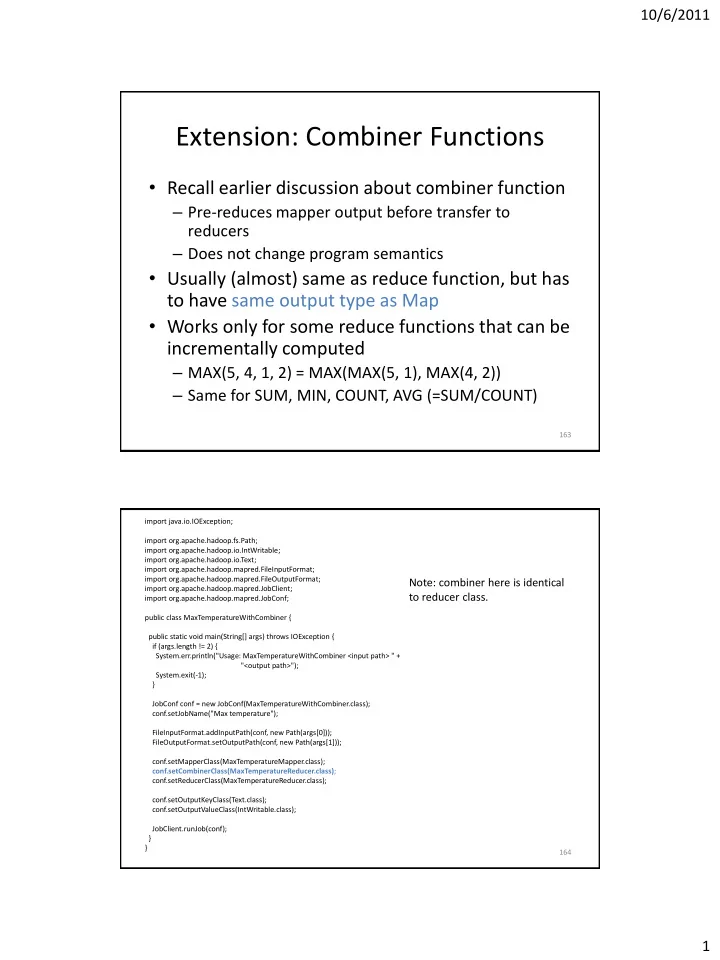
Extension: Combiner Functions

  • Recall earlier discussion about combiner function

– Pre-reduces mapper output before transfer to reducers – Does not change program semantics

  • Usually (almost) same as reduce function, but has

to have same output type as Map

  • Works only for some reduce functions that can be

incrementally computed

– MAX(5, 4, 1, 2) = MAX(MAX(5, 1), MAX(4, 2)) – Same for SUM, MIN, COUNT, AVG (=SUM/COUNT)

163 164 import java.io.IOException; import org.apache.hadoop.fs.Path; import org.apache.hadoop.io.IntWritable; import org.apache.hadoop.io.Text; import org.apache.hadoop.mapred.FileInputFormat; import org.apache.hadoop.mapred.FileOutputFormat; import org.apache.hadoop.mapred.JobClient; import org.apache.hadoop.mapred.JobConf; public class MaxTemperatureWithCombiner { public static void main(String[] args) throws IOException { if (args.length != 2) { System.err.println("Usage: MaxTemperatureWithCombiner <input path> " + "<output path>"); System.exit(-1); } JobConf conf = new JobConf(MaxTemperatureWithCombiner.class); conf.setJobName("Max temperature"); FileInputFormat.addInputPath(conf, new Path(args[0])); FileOutputFormat.setOutputPath(conf, new Path(args[1])); conf.setMapperClass(MaxTemperatureMapper.class); conf.setCombinerClass(MaxTemperatureReducer.class); conf.setReducerClass(MaxTemperatureReducer.class); conf.setOutputKeyClass(Text.class); conf.setOutputValueClass(IntWritable.class); JobClient.runJob(conf); } }

Note: combiner here is identical to reducer class.

slide-2
SLIDE 2

10/6/2011 2

Extension: Custom Partitioner

  • Partitioner determines which keys are

assigned to which reduce task

  • Default HashPartitioner essentially assigns

keys randomly

  • Create custom partitioner by implementing

Partitioner interface in

  • rg.apache.hadoop.mapred

– Write your own getPartition() method

165

Extension: MapFile

  • Sorted file of (key, value) pairs with an index

for lookups by key

  • Must append new entries in order

– Can create MapFile by sorting SequenceFile

  • Can get value for specific key by calling

MapFile’s get() method

– Found by performing binary search on index

  • Method getClosest() finds closest match to

search key

166

slide-3
SLIDE 3

10/6/2011 3

Extension: Counters

  • Useful to get statistics about the MapReduce

job, e.g., how many records were discarded in Map

  • Difficult to implement from scratch

– Mappers and reducers need to communicate to compute a global counter

  • Hadoop has built-in support for counters
  • See ch. 8 in Tom White’s book for details

167

Hadoop Job Tuning

  • Choose appropriate number of mappers and

reducers

  • Define combiners whenever possible

– But see also later discussion about local aggregation

  • Consider Map output compression
  • Optimize the expensive shuffle phase (between

mappers and reducers) by setting its tuning parameters

  • Profiling distributed MapReduce jobs is

challenging.

168

slide-4
SLIDE 4

10/6/2011 4

Hadoop and Other Programming Languages

  • Hadoop Streaming API to write map and

reduce functions in languages other than Java

– Any language that can read from standard input and write to standard output

  • Hadoop Pipes API for using C++

– Uses sockets to communicate with Hadoop’s task trackers

169

Multiple MapReduce Steps

  • Example: find average max temp for every day
  • f the year and every weather station

– Find max temp for each combination of station and day/month/year – Compute average for each combination of station and day/month

  • Can be done in two MapReduce jobs

– Could also combine it into single job, which would be faster

170

slide-5
SLIDE 5

10/6/2011 5

Running a MapReduce Workflow

  • Linear chain of jobs

– To run job2 after job1, create JobConf’s conf1 and conf2 in main function – Call JobClient.runJob(conf1); JobClient.runJob(conf2); – Catch exceptions to re-start failed jobs in pipeline

  • More complex workflows

– Use JobControl from

  • rg.apache.hadoop.mapred.jobcontrol

– We will see soon how to use Pig for this

171

MapReduce Coding Summary

  • Decompose problem into appropriate workflow
  • f MapReduce jobs
  • For each job, implement the following

– Job configuration – Map function – Reduce function – Combiner function (optional) – Partition function (optional)

  • Might have to create custom data types as well

– WritableComparable for keys – Writable for values

172

slide-6
SLIDE 6

10/6/2011 6

173

Let’s see how we can create complex MapReduce workflows by programming in a high-level language.

The Pig System

  • Christopher Olston, Benjamin Reed, Utkarsh

Srivastava, Ravi Kumar, Andrew Tomkins: Pig Latin: a not-so-foreign language for data

  • processing. SIGMOD Conference 2008: 1099-

1110

  • Several slides courtesy Chris Olston and

Utkarsh Srivastava

  • Open source project under the Apache

Hadoop umbrella

174

slide-7
SLIDE 7

10/6/2011 7

Overview

  • Design goal: find sweet spot between

declarative style of SQL and low-level procedural style of MapReduce

  • Programmer creates Pig Latin program, using

high-level operators

  • Pig Latin program is compiled to MapReduce

program to run on Hadoop

175

Why Not SQL or Plain MapReduce?

  • SQL difficult to use and debug for many

programmers

  • Programmer might not trust automatic optimizer

and prefers to hard-code best query plan

  • Plain MapReduce lacks convenience of readily

available, reusable data manipulation operators like selection, projection, join, sort

  • Program semantics hidden in “opaque” Java code

– More difficult to optimize and maintain

176

slide-8
SLIDE 8

10/6/2011 8

Example Data Analysis Task

User Url Time

Amy cnn.com 8:00 Amy bbc.com 10:00 Amy flickr.com 10:05 Fred cnn.com 12:00

Find the top 10 most visited pages in each category

Url Category PageRank

cnn.com News 0.9 bbc.com News 0.8 flickr.com Photos 0.7 espn.com Sports 0.9

Visits Url Info

177

Data Flow

Load Visits Group by url Foreach url generate count Load Url Info Join on url Group by category Foreach category generate top10 urls

178

slide-9
SLIDE 9

10/6/2011 9

In Pig Latin

visits = load ‘/data/visits’ as (user, url, time); gVisits = group visits by url; visitCounts = foreach gVisits generate url, count(visits); urlInfo = load ‘/data/urlInfo’ as (url, category, pRank); visitCounts = join visitCounts by url, urlInfo by url; gCategories = group visitCounts by category; topUrls = foreach gCategories generate top(visitCounts,10); store topUrls into ‘/data/topUrls’;

179

Pig Latin Notes

  • No need to import data into database

– Pig Latin works directly with files

  • Schemas are optional and can be assigned

dynamically

– Load ‘/data/visits’ as (user, url, time);

  • Can call user-defined functions in every

construct like Load, Store, Group, Filter, Foreach

– Foreach gCategories generate top(visitCounts,10);

180

slide-10
SLIDE 10

10/6/2011 10

Pig Latin Data Model

  • Fully-nestable data model with:

– Atomic values, tuples, bags (lists), and maps

  • More natural to programmers than flat tuples

– Can flatten nested structures using FLATTEN

  • Avoids expensive joins, but more complex to

process

yahoo , finance email news

181

Pig Latin Operators: LOAD

  • Reads data from file and optionally assigns

schema to each record

  • Can use custom deserializer

queries = LOAD ‘query_log.txt’ USING myLoad() AS (userID, queryString, timestamp);

182

slide-11
SLIDE 11

10/6/2011 11

Pig Latin Operators: FOREACH

  • Applies processing to each record of a data set
  • No dependence between the processing of

different records

– Allows efficient parallel implementation

  • GENERATE creates output records for a given

input record expanded_queries = FOREACH queries GENERATE userId, expandQuery(queryString);

183

Pig Latin Operators: FILTER

  • Remove records that do not pass filter

condition

  • Can use user-defined function in filter

condition real_queries = FILTER queries BY userId neq `bot‘;

184

slide-12
SLIDE 12

10/6/2011 12

Pig Latin Operators: COGROUP

  • Group together records from one or more

data sets

185

queryString url rank Lakers nba.com 1 Lakers espn.com 2 Kings nhl.com 1 Kings nba.com 2 queryString adSlot amount Lakers top 50 Lakers side 20 Kings top 30 Kings side 10 Lakers, (Lakers, nba.com, 1) (Lakers, espn.com, 2) (Lakers, top, 50) (Lakers, side, 20) Kings, (Kings, nhl.com, 1) (Kings, nba.com, 2) (Kings, top, 30) (Kings, side, 10) , ,

COGROUP results BY queryString, revenue BY queryString

results revenue

Pig Latin Operators: GROUP

  • Special case of COGROUP, to group single data

set by selected fields

  • Similar to GROUP BY in SQL, but does not

need to apply aggregate function to records in each group grouped_revenue = GROUP revenue BY queryString;

186

slide-13
SLIDE 13

10/6/2011 13

Pig Latin Operators: JOIN

  • Computes equi-join

join_result = JOIN results BY queryString, revenue BY queryString;

  • Just a syntactic shorthand for COGROUP followed

by flattening temp_var = COGROUP results BY queryString, revenue BY queryString; join_result = FOREACH temp_var GENERATE FLATTEN(results), FLATTEN(revenue);

187

Other Pig Latin Operators

  • UNION: union of two or more bags
  • CROSS: cross product of two or more bags
  • ORDER: orders a bag by the specified field(s)
  • DISTINCT: eliminates duplicate records in bag
  • STORE: saves results to a file
  • Nested bags within records can be processed

by nesting operators within a FOREACH

  • perator

188

slide-14
SLIDE 14

10/6/2011 14

Transform to (user, Canonicalize(url), time) Join url = url Group by user Transform to (user, Average(pagerank) as avgPR) Filter avgPR > 0.5 Load Pages(url, pagerank) Load Visits(user, url, time) (Amy, 0.65) (Amy, 0.65) (Fred, 0.4) (Amy, { (Amy, www.cnn.com, 8am, 0.9), (Amy, www.snails.com, 9am, 0.4) }) (Fred, { (Fred, www.snails.com, 11am, 0.4) }) (Amy, www.cnn.com, 8am, 0.9) (Amy, www.snails.com, 9am, 0.4) (Fred, www.snails.com, 11am, 0.4) (Amy, cnn.com, 8am) (Amy, http://www.snails.com, 9am) (Fred, www.snails.com/index.html, 11am) (Amy, www.cnn.com, 8am) (Amy, www.snails.com, 9am) (Fred, www.snails.com, 11am) (www.cnn.com, 0.9) (www.snails.com, 0.4)

Pig Latin workflow and example records

189

MapReduce in Pig Latin

map_result = FOREACH input GENERATE FLATTEN(map(*)); key_groups = GROUP map_result BY $0;

  • utput = FOREACH key_groups GENERATE reduce(*);
  • Map() is a UDF, where * indicates that the entire input

record is passed to map()

  • $0 refers to first field, i.e., the intermediate key here
  • Reduce() is another UDF

190

slide-15
SLIDE 15

10/6/2011 15

Implementation

cluster Hadoop Map-Reduce Pig SQL

automatic rewrite +

  • ptimize
  • r
  • r

user

191

execution plan

Pig Compiler

Pig System

cluster

parsed program

Parser user

cross-job

  • ptimizer

Pig Latin program

Map-Reduce

map-red. jobs

MR Compiler

join

  • utput

filter

X

f( )

Y

192

slide-16
SLIDE 16

10/6/2011 16

Compilation into Map-Reduce

Load Visits Group by url Foreach url generate count Load Url Info Join on url Group by category Foreach category generate top10(urls) Map1 Reduce1 Map2 Reduce2 Map3 Reduce3

Every group or join operation forms a map-reduce boundary Other operations pipelined into map and reduce phases

193

Is Pig a DBMS?

DBMS Pig

Bulk and random reads & writes; indexes, transactions Bulk reads & writes only System controls data format Must pre-declare schema Pigs eat anything System of constraints Sequence of steps Custom functions second- class to logic expressions Easy to incorporate custom functions workload data representation programming style customizable processing

194

slide-17
SLIDE 17

10/6/2011 17

195

Now let’s go back to plain Hadoop and look at important program “design patterns”.

MapReduce Design Patterns

  • This section is based on the book by Jimmy Lin

and Chris Dyer

  • Programmer can control program execution
  • nly through implementation of mapper,

reducer, combiner, and partitioner

  • No explicit synchronization primitives
  • So how can a programmer control execution

and data flow?

196

slide-18
SLIDE 18

10/6/2011 18

Taking Control of MapReduce

  • Store and communicate partial results through

complex data structures for keys and values

  • Run appropriate initialization code at beginning of task

and termination code at end of task

  • Preserve state in mappers and reducers across multiple

input splits and intermediate keys, respectively

  • Control sort order of intermediate keys to control

processing order at reducers

  • Control set of keys assigned to a reducer
  • Use “driver” program

197

(1) Local Aggregation

  • Reduce size of intermediate results passed

from mappers to reducers

– Important for scalability: recall Amdahl’s Law

  • Various options using combiner function and

ability to preserve mapper state across multiple inputs

  • Illustrated with word count example

– Will use document-based version of Map

198

slide-19
SLIDE 19

10/6/2011 19

Word Count Baseline Algorithm

  • Problem: frequent terms are emitted many

times with count 1

199

map(docID a, doc d) for all term t in doc d do Emit(term t, count 1) reduce(term t, counts [c1, c2,…]) sum = 0 for all count c in counts do sum += c Emit(term t, count sum);

Tally Counts Per Document

  • Same Reduce function as before
  • Limitation: only aggregates counts within

document

  • Map task usually receives split containing many

documents

  • Can we aggregate across all documents in the

same task?

200

map(docID a, doc d) H = new hashMap for all term t in doc d do H{t} ++ for all term t in H do Emit(term t, count H{t})

slide-20
SLIDE 20

10/6/2011 20

Tally Counts Across Documents

  • Data structure is private

member of mapper

  • Initialize is called once before

all map invocations

– Configure() in old API – Setup() in new API

  • Close is called after last

document from split has been processed

– Close() in old API – Cleanup() in new API

201

Class Mapper initialize() H = new hashMap map(docID a, doc d) for all term t in doc d do H{t} ++ close() for all term t in H do Emit(term t, count H{t})

Design Pattern for Local Aggregation

  • In-mapper combining

– Done by preserving state across map calls in same task

  • Advantages over using combiners

– Combiner does not guarantee if, when or how often it is executed – Combiner combines data after it was generated, in- mapper combining avoids generating it!

  • Drawbacks

– Introduces complexity, e.g., result might depend on order

  • f map executions (order-dependent bugs possible!)

– Higher memory consumption for managing state

  • Might have to write memory-management code to page data to

disk

202

slide-21
SLIDE 21

10/6/2011 21

(2) Counting of Combinations

  • Needed for computing correlations,

associations, confusion matrix (how many times does a classifier confuse Yi with Yj)

  • Co-occurrence matrix for a text corpus: how

many times do two terms appear near each

  • ther
  • Compute partial counts for some

combinations, then aggregate them

– At what granularity should Map work?

203