Display hardware Cathode Ray Tube vector displays Main - - PowerPoint PPT Presentation

display hardware cathode ray tube
SMART_READER_LITE
LIVE PREVIEW

Display hardware Cathode Ray Tube vector displays Main - - PowerPoint PPT Presentation

Display hardware Cathode Ray Tube vector displays Main applications 1963 modified oscilloscope Oscilloscope 1974 Evans and Sutherland Picture System raster displays TV 1975 Evans and Sutherland frame


slide-1
SLIDE 1

1

1

Display hardware

  • vector displays

– 1963 – modified oscilloscope – 1974 – Evans and Sutherland Picture System

  • raster displays

– 1975 – Evans and Sutherland frame buffer – 1980s – cheap frame buffers  bit-mapped PCs – 1990s – liquid-crystal displays  laptops – 2000s – micro-mirror projectors  digital cinema – 2010s – high dynamic range displays?

  • other

– stereo, head-mounted displays – autostereoscopic displays

2

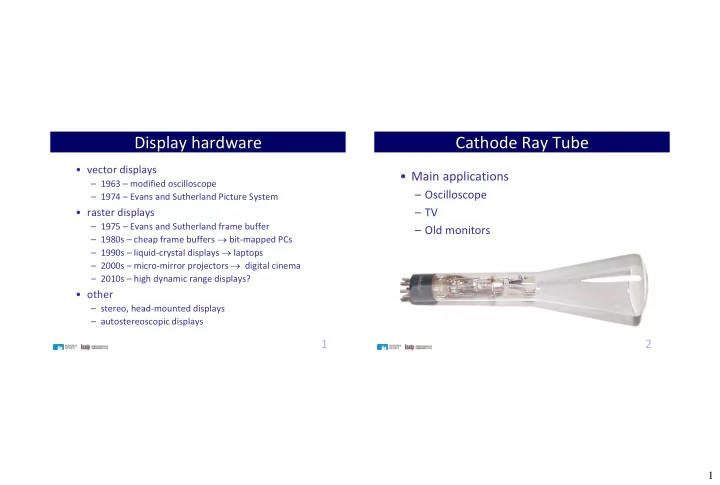
Cathode Ray Tube

  • Main applications

– Oscilloscope – TV – Old monitors

slide-2
SLIDE 2

2

3

CRT

  • Electron Gun creates an electron beam with controllable intensity.
  • The deflection system moves the electron beam vertically and

horizontally.

  • When the electron beam strikes the phosphor, it produces visible

light on the fluorescent screen.

  • Only one point is lighted.

beam Electron gun Deflection system Light

4

Electrostatic Deflection

  • Small deflections
  • Used in Osciloscopes
slide-3
SLIDE 3

3

5

Magnetic Deflection

  • Greater deflections
  • Used in TVs

6

Deflection Signals

t t Vd Hd

slide-4
SLIDE 4

4

7

Vector Displays or random scan display

– The electron beam is directed only to the parts of the screen where a picture is to be drawn. – Like plotters it draws a picture one line at a time – Used in line drawing and wireframe displays – Picture is stored as a set of line-drawing commands stored in a refresh display file. – Refresh rate depends on number of lines – Typicaly:

  • Refresh cycle is 30 to 60 times each second
  • 100 000 short lines at this refresh rate

8

Vector Displays

slide-5
SLIDE 5

5

9

Vector Display

10

Vector Displays

Advantages

  • Generates higher resolution than other (Raster) systems
  • Produces smooth line drawings

Disadvantage

  • Not usable for realistic shaded scenes
slide-6
SLIDE 6

6

11

Raster Scan

t t Vd Hd TH TV

TH = Horizontal Scanning Period TV = Vertical Scanning Period

12

Frame / Line Rate

V Vd Vsinc L H Hd Hsinc

Frame Rate: Line Rate:

Frames / sec. Quadros / seg. Hz Lines / sec. Linhas / seg. Hz

Nº de linhas de um quadro: Nº de linhas visíveis: V

T FR 1 

H H V

T FR T T L N     1 ' NL NL L N FR T LR

H

    1

slide-7
SLIDE 7

7

13

Color CRT

14

Shadow Masks

slide-8
SLIDE 8

8

15 16

Monitor Example

40VM9H 9” B&W Monitor

Screen Size 8.74” Diagonal Resolution >1000 TVL Scanning Frequency Horizontal 15,750Hz / Vertical 60Hz (EIA) Horizontal 15,625Hz / Vertical 50Hz (CCIR) Video Input Composite 1Vp-p 75 Ohm loop through BNC via impedance switch Video Output Composite 1Vp-p CVBS 75 ohms Power Source 90V ~ 120VAC (60/50Hz) Power Consumption <25W (EIA/CCIR) Environmental Operating Temperature 10°C ~ +40°C (14°F ~ 105°F) Operating Humidity 30% ~ 80% (no condensation) Mechanical Dimensions (H x W x D) 222.25mm x 215.9mm x 254mm (8.75” x 85” x 10”) Weight 6.8 kg (15 lbs) Safety Standards UL, LVD, CE, RoHS

slide-9
SLIDE 9

9

17

Monitor example

5” CRT Monitor 01

SPECIFICATION Standard: CCIR 625 Line 50Hz and RS 170 60Hz interlaced. Aspect ratio: Switchable between 4:3 and 4:1.77 Video impedance: 75 ohms ±2%. Input type: Differential Grey levels: 16 at 100 cd/m2 Video bandwidth: >12MHz -3dB Gain control: Contrast control on front panel Black level control: Brightness control on front panel Warm up time: 15 seconds after power Power requirements: 28V to MIL-STD-1275B Power consumption total: <20 watts (at 450cd/m2)

June 2006

18

Monitor Example

Model SMT-3222 SMT4022 General

Screen Size 32" 40" Resolution (HxV) 1366 x 768 1920 x 1080 Pixel Pitch (mm) 0.511 x 0.511 (HxV) 0.46125 x 0.46125 (HxV) Brightness(cd/m2) 450 Contrast Ratio 4,000:1 (Dynamic Contrast Ratio 40,000:1) Response Time (ms) 8 (G-to-G) Viewing Angle (H/V) 178° / 178° Panel Lamp Life 50,000HR Display Colors 16.7M Horizontal Frequency 30 ~ 81KHz Vertical Frequency 56 ~ 85Hz Horizontal Resolution 600TV Lines Comb Filter 3D Sync Format NTSC : 3.5 / PAL : 4.43 / Secam

Feature

Screen Aspect Ratio 4:3 / 16:9 Language English / French / German / Italian / Portuguese / Russian / Spanish / Swedish / Chinese / Japanese / Korean / Turkish / Taiwanese

Professional Large LCD Monitor
slide-10
SLIDE 10

10

19

Raster CRT

  • Raster CRT pros:

– Allows solids, not just wire frames – Low-cost technology (i.e., TVs) – Bright! Display emits light

  • Cons:

– Requires screen-size memory array – Discrete sampling (pixels) – Practical limit on size

20

Graphics Card

DAC DAC DAC

RAM

RD 1 Counter Counter Osc DotCLK R G B Hsinc Vsinc D0 D3 D4 D7 A

15

A

8

D8 D11 A -A

7

slide-11
SLIDE 11

11

21

Graphics Card

DACs’ resolution

Exemple: 4 bits => Nr. of colors = 2(3*4) = 4096 visible colors

Memory

M = NC * NL * PS Exemple: 256 columns * 256 lines * 12 bits/pixel = 768 kbits = 96 kBytes

DotCLK

DotCLK = FR * NL’ * NC = LR * NC Exemple: 60 frames/second* 256 lines/frame * 256 pixels/line = 4 MHz

22

Color Map

slide-12
SLIDE 12

12

23

Color Table

Nr of simulataneous colors = 2 bits/pixel Exemple: 8 bits/pixel => 28 = 256 visible colores

24

Page RAM

Address A0 - A12 8192 x 1024 x 8 x 13 x 13 x 10 x 10

slide-13
SLIDE 13

13

25

VRAM IBM 4MB

26

3D-RAM

slide-14
SLIDE 14

14

27

Graphic Computer

28

Dual Buffer + Z

slide-15
SLIDE 15

15

29

RGB

B R G

30

CMY Models

  • Used in electrostatic and ink-jet plotters that deposit

pigment on paper

  • Cyan, magenta, and yellow are complements of red,

green, and blue, respectively

  • White (0, 0, 0), black (1, 1, 1)

                                B G R Y M C 1 1 1

Magenta Red Yellow Green Cyan Blue Black (minus green) (minus blue) (minus red)

CMYK Model: K (black) is used as a primary color to save ink deposited on paper => dry quicker

  • popularly used by printing press
slide-16
SLIDE 16

16

31

YUV

Y – luma, brightness, luminance U, V – chrominance

Variations: Y’UV, YCbCr, YPbPr

Ideia:

Y = R + G + B

  • >

monochromatic image

U = Y-B V = Y-R R = Y-V B = Y-U G = Y-R-B

Advantages:

  • A monochromatic receptor can use only the Y channel
  • Resolution for U and V channels can be reduced ….

32

Y’UV

Y’ – gamma corrected Y

slide-17
SLIDE 17

17

33

HSL

H S L

branco preto azul verde vermelho

HSL - Hue, Saturation, Lightness

H – Hue: Cor percebida por humanos S – Saturation: 100%=cor pura 0%=level of gray L – Lightness: 100%=white 0%=black

34

  • Many application programs allow the user to specify colors of areas, lines,

text, and so on.

  • Interactive selection:
  • Perception of color is affected by surrounding colors and the sizes of colored areas

Interactive Specification of Color

slide-18
SLIDE 18

18

35

Analogue Television

  • How much bandwidth would we need for uncompressed digital television?
  • European TV format has

625 scan lines, 25 interlaced frames per second, 4:3 aspect ratio

  • It uses interlacing to reduce the

vertical resolution to 312.5 lines

  • Horizontal resolution is

312.5*(4/3) = 417 columns

  • Bandwidth required

625*417*25 =

6.5MHz

  • Analogue colour information was quite cleverly added without increasing

bandwidth (NTSC, PAL and SECAM standards)

http://www.answers.com/topic/interlace?cat=technology http://en.wikipedia.org/wiki/PAL

36

Interlaced lines

slide-19
SLIDE 19

19

37

Composite Video

V Vd Vsinc L H Hd Hsinc

Monitor

Video Source

Video decoder Video encoder

L Vsync Hsync

Composite video

38

Composite Video

http://en.wikipedia.org/wiki/Composite_video

slide-20
SLIDE 20

20

39

Composite Video

40

Color TV

http://en.wikipedia.org/wiki/Pal

slide-21
SLIDE 21

21

41

Composite Video

Monitor

Video decoder Video encoder

R Vsync Hsync

Composite video

G B

RGB to YUV

Y U V Y U V

YUV to RGB

R G B Vsync Hsync

Source

42

CVBS

Color, Video, Blanking, Sync

slide-22
SLIDE 22

22

43

PAL

http://en.wikipedia.org/wiki/DVB-T

44

PAL

slide-23
SLIDE 23

23

45

SECAM - Sequential Couleur Avec Memoire

  • France, 1 October 1967
  • developed in France (predominantly a political decision).
  • used in France and territories, C.I.S., much of Eastern Europe,

the Middle East and northern Africa.

  • Line Frequency - 15.625 kHz
  • Scanning Lines – 625 (same as PAL)
  • Field Frequency - 50 Hz
  • Color Signal Modulation System FM Conversion System
  • Color Signal Frequency - 4.40625 MHz/4.250 MHz
  • Burst Signal Phase settled
  • Video bandwidth - B,G,H: 5.0 MHz; D,K,K1,L: 6.0 MHz
  • Sound Carrier - B,G,H: 5.5 MHz; D,K,K1,L: 6.5 MHz

46

HSync On Green

slide-24
SLIDE 24

24

47

Sync On Green

48

Resolutions

http://en.wikipedia.org/wiki/Display_resolution

slide-25
SLIDE 25

25

49

Flat Panel Displays

Volatile

  • Pixels are periodically refreshed to retain their state
  • Refresh many times a second
  • Otherwise image will fade from the screen
  • Plasma, LCD, OLED, LED, ELD, SED and FED-displays

Static

  • Material with bistable color states
  • No energy needed to maintain image, only to change it.
  • Slow refresh state
  • Deployment in limited applications
  • Cholesteric displays, outdoor advertising, e-book products

50

Liquid Crystal Displays (LCDs)

  • LCDs: organic molecules, naturally in crystalline

state, that liquefy when excited by heat or E field

  • Crystalline state twists polarized light 90º.
slide-26
SLIDE 26

26

51

Liquid Crystal Displays (LCDs)

52

Color Filters (RGB)

Conventional color displays use a specific sub-pixel arrangement.

  • at high pixel densities, RGB or RGB Delta arrangement is adequate.
  • when the number of pixels is limited, the GRGB arrangement can be used.
slide-27
SLIDE 27

27

53

Passive Matrix LCD Problems

  • Pixel is ON only during scan access.
  • More Rows => shorter on-voltage time
  • Reduced bright,
  • poor contrast ratio,
  • narrow viewing angle,
  • fewer gray levels.
  • Higher voltages => more crosstalk between neighbor pixels
  • Scan frequency is limited by LC response delay.
  • Flicker

Solution

  • placing an active element at each pixel
  • switch and memory
  • transistor and capacitor

54

Thin Film Transistor

Basic FET MISFET TFT TFT (Thin film transistor): a special kind of FET http://www.wikipedia.org

slide-28
SLIDE 28

28

55

TFT Active Matrix

56

TFT Active Matrix

slide-29
SLIDE 29

29

57

Display Technology: LCDs

  • LCDs act as light valves, not light emitters, and

thus rely on an external light source.

  • Transmissive & reflective LCDs:

– Laptop screen: backlit, transmissive display – Palm Pilot/Game Boy: reflective display

58

CCFL Backlight

  • Driving Voltage: 100 ~ 400Vac, 30 ~ 50KHz

– (DC/AC Inverter required)

  • Brightness (Min):

– 1 000 cd/m2 (direct application) – 450 cd/m2 (side application)

  • Luminous Color: White
  • Life Time: 15 000 ~ 20 000 Hrs
  • Operating Temperature: 0 ° ~ +60° c
  • Storage Temperature: -20 ° ~ +70° c

Cold-Cathode Fluorescent Lamp

slide-30
SLIDE 30

30

59

CCFL Backlight

Backlight Structure Direct Side Lightguide

60

CCFL Backlight

Advantages Disadvantages

Simple Design Narrow Drive Temperature Good for Color LCD High Frequency & AC Signal Operation Good Uniformity Needs DC/AC inverter High Brightness Long Life Low Heat Generation

Cold-Cathode Fluorescent Lamp

slide-31
SLIDE 31

31

61

LED Backlight

  • Driving Voltages: 2.1V ~ 8Vdc
  • Brightness (Min): 70 cd/m2 5 ~ 30 cd/m2
  • Luminous Color:

Yellow-Green, White, Green, Blue, Amber, Red

  • Life Time: 100 000 Hrs
  • Operating Temperature: -20° ~ +70° C
  • Storage Temperature: -20° ~ +85° C

62

LED Backlight

LED Backlight structure Side Lightguide Direct

slide-32
SLIDE 32

32

63

LED Backlight

Advantages Disadvantages

Very Long Life Low Uniformity Wide Temperature Less brightness than CCFL DC Single Operation Price Various Colors Lower thickness Low Power Comsumption

64

Plasma Panel

  • Similar in principle to fluorescent light tubes.
  • Each element is a small gas-filled capsule.
  • When excited by electric field, emits UV light.
  • UV excites phosphor.
  • Phosphor relaxes, emits some other color.
slide-33
SLIDE 33

33

65

Plasma Panel

66

Plasma Panel

  • Plasma Display Panel Pros

– Large viewing angle – Good for large-format displays – Fairly bright

  • Cons

– Expensive – Large pixels (~1 mm versus ~0.2 mm) – Phosphors gradually deplete – Less bright than CRTs, using more power

slide-34
SLIDE 34

34

67

Field Emission Display

  • Developed by Motorola and others during the 1990s
  • Very similar to a CRT matrix
  • Utilizes an electron emitter which activates phosphors on a screen
  • In CRT an electron gun scatters the charged particles
  • Each FED pixel has its own corresponding electron source
  • At first conical electron emitters (known as a "Spindt tip")

– nowdays carbon nanotubes

  • Electrons in a FED are not produced by heat

68

FED

slide-35
SLIDE 35

35

69

FED

Advantages

  • More power efficient than LCD
  • Less weight that same size LCD
  • Fewer total components

and processes involved

Disadvantages

  • Erosion of the emitters
  • Extremely high vacuum

required in order to operate

  • Hard to manufacture for

commercial use

  • Production difficulties

70

FED

First models 2007

  • 19.2-inches.
  • 1 280 x 960 resolution
  • brightness of 400cd/m2
  • 20 000:1 contrast ratio
  • Sony’s Field Emission

Technologies, whose purpose was to develop the displays closed it doors in 2009.

  • Reason mainly due to

difficulty in raising funds for manufacturing.

slide-36
SLIDE 36

36

71

Surface-conduction Electron-emitter Display

  • Co-developed by Canon and Toshiba Corporation
  • Very similar to a CRT matrix
  • Utilizes an electron emitter which activates

phosphors on a screen

  • The electron emission element is made from few

nanometers thick electron emission film

  • No electron beam deflector required
  • Separate emitter for each color phosphor, 3/pixel
  • r 1/sub-pixel

72

SED

Source: http://www.oled-display.info/what-means-sed-tv

slide-37
SLIDE 37

37

73

SED

Advantages

  • The overall power efficiency about ten times better than a LCD
  • f the same size.
  • Less complex than LCD.
  • Fast response time and high contrast ratio.
  • Wide viewing angle advantages over the FED in manufacturing state.

Disadvantages

  • Potential screen burn-in.
  • Mass production difficulties.

74

SED

Prototype 2006

  • 1080p 55-inch models
  • 450 nits of brightness
  • 50 000:1 contrast ratio
  • 1ms response time

Mass production delayed due to lawsuits between Canon and Nano-Proprietary Inc concerning SED panel patent license agreement. In 2010 Canon announced project shut down.

slide-38
SLIDE 38

38

75

Organic Light-emitting Diode

  • Developed by Eastman-Kodak
  • Two types: small molecule OLED and polymer OLED
  • A Layer of organic material is sandwiched between

two conductors (an anode and a cathode) which are between seal and subsrate

  • Electro-luminescent bright light is produced from the
  • rganic material when current is applied to the conductors

76

OLED color

  • Only pure colors expressed when an electric current

stimulates the relevant pixels

  • Primary color matrix arranged in red, green, and blue

pixels, mounted directly to a printed circuit board

  • Ambient light interference reduced with "micro-cavity”

structure -> improves overall color contrast

  • Organic layer adjusted for each color for strongest light
  • Colors purified with color filter without the need for

polarizer -> outstanding color purity.

slide-39
SLIDE 39

39

77

OLED

78

How OLED is built

OLED production VS. LCD production

slide-40
SLIDE 40

40

79

PLED

Source: http://www.educypedia.be/electronics/pled.htm

80

Different OLED technologies

  • AM OLED = Active Matrix OLED device
  • FOLED = Flexible Organic Light Emitting Diode (UDC)
  • OLED = Organic Light Emitting Diode/Device/Display
  • PhOLED = Phosphorescent Oragnic Light Emitting Diode (UDC)
  • PLED = Polymer Light Emitting Diode (CDT)
  • PM OLED = Passive Matrix OLED device
  • POLED = Polymer Oragnic Light Emitting Diode (CDT)
  • RCOLED = Resonant Coloe Oragnic Light Emitting Diode
  • SmOLED = Small Molecule Ogranic Light Emitting Diode (Kodak)
  • SOLED = Stacked Oragnic Light Emitting Diode (UDC)
  • TOLED = Transparent Oragnic Light Emitting Diode (UDC)
slide-41
SLIDE 41

41

81

OLED

Advantages

  • Can be printed onto any suitable substrate with inkjet (PLED)
  • Flexible displays Great artificial contrast ratio and color potential
  • No need for a backlight
  • Great viewing angle
  • Fast response times

Disadvantages

  • Lifespan (especially blue)
  • Color balance issues (due to lifespan issues)
  • Water damage
  • Outdoor performance
  • Power consumption
  • Possible screen burn-in

82

OLED

  • Samsung SDI exhibited a 40-inch OLED

panel at the FPD International 2008

  • full HD resolution of 1920 x 1080
  • contrast ratio of 1,000,000:1
  • color gamut of 107% NTSC
  • luminance of 200cd/m2 (peak luminance
  • f 600cd/m2)
  • At CES-2010 (Consumer Electronics Show):
  • Samsung showed several OLED 3D

Panels.

  • Sony showed 24.5-inch prototype

OLED 3D television.

slide-42
SLIDE 42

42

83

OLED

Source: DisplaySearch Q2,09 Quarterly OLED Shipment and Forecast Report

84

3LCD Projectors

slide-43
SLIDE 43

43

85

DMD

DMD: Digital Micromirror Devices

  • Microelectromechanical (MEM) devices
  • fabricated with VLSI techniques

86

DLP - Digital Light Processing

  • DMD implementation by Texas Instruments.
  • Used in projectors and also back-projected displays.
  • The image is created by a matrix of microscopic

moving mirrors mounted in an integrated circuit (DMD).

  • Each mirror creates one pixel in the projected image.

http://www.dlp.com DMD – Digital Mirror Device

slide-44
SLIDE 44

44

87

Future

  • Some of the technologies have faded after the

prototype phase

  • OLEDs are the most promising
  • Flexible displays
  • Printing technology
  • Printed vs non printed
  • Rigid vs flexible
  • Inorganic vs organic,
  • Cost of materials vs process
  • New technologies still in development

88

Projection

x W d W=2  d  tan(x/2) H=2d tan(y/2)

slide-45
SLIDE 45

45

89

Throw ratio

Throw = distance from projector to screen (d) Throw ratio (TR):

90

Projector Example