Dawn Song dawnsong@cs.berkeley.edu 1 TightLip False Negative - - PDF document

dawn song
SMART_READER_LITE
LIVE PREVIEW

Dawn Song dawnsong@cs.berkeley.edu 1 TightLip False Negative - - PDF document

Analysis and Defense against Stealth Malware Dawn Song dawnsong@cs.berkeley.edu 1 TightLip False Negative Analysis (I) Doppleganger processes Doppelganger & original run in parallel As long as outputs are same, output does not


slide-1
SLIDE 1

1

Analysis and Defense against Stealth Malware

Dawn Song

dawnsong@cs.berkeley.edu

2

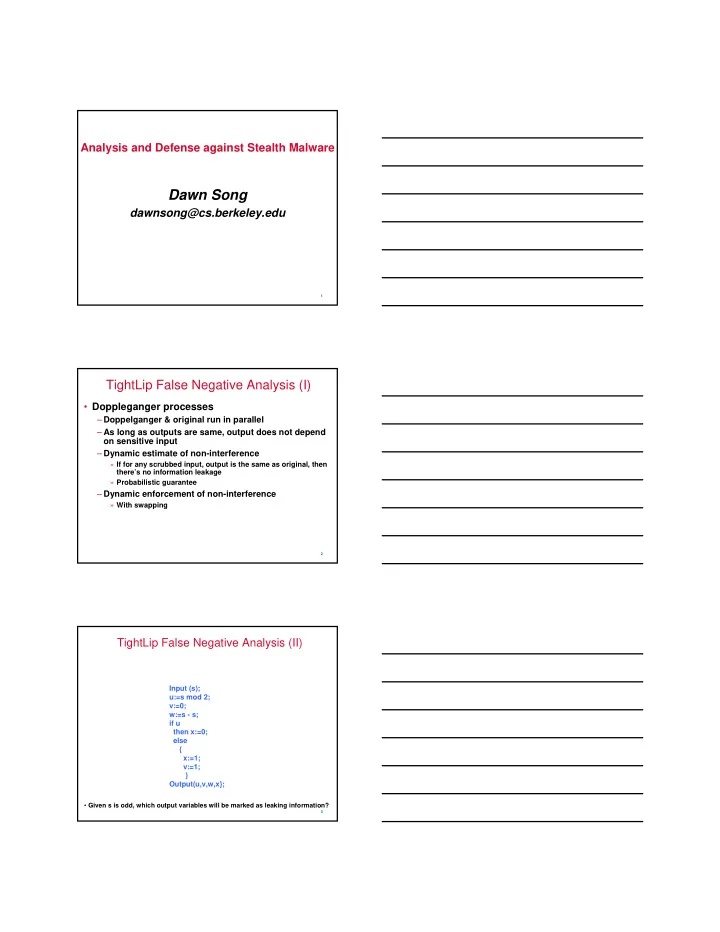
TightLip False Negative Analysis (I)

  • Doppleganger processes

– Doppelganger & original run in parallel – As long as outputs are same, output does not depend

  • n sensitive input

– Dynamic estimate of non-interference

» If for any scrubbed input, output is the same as original, then there’s no information leakage » Probabilistic guarantee

– Dynamic enforcement of non-interference

» With swapping

3

TightLip False Negative Analysis (II)

Input (s); u:=s mod 2; v:=0; w:=s - s; if u then x:=0; else { x:=1; v:=1; } Output(u,v,w,x};

  • Given s is odd, which output variables will be marked as leaking information?
slide-2
SLIDE 2

4

Class Project Proposal

  • Project proposal: Oct 1 (with extension to Oct 8 if

needed)

– Two page max – Content

» Problem to be addressed » Motivation: Why important & Why previous approaches insufficient » Proposed approach » Evaluation for success

  • Hand-in

– Hardcopy in class – Electronic copy

  • Project milestone report: Nov 7

– Current status and plan for action for the remaining time

  • Final project report due: Dec 3
  • Final project presentation: Dec 3 & 5

5

Stealth Malware

  • After malware gains control, malware wants to

hide

– Robust: anti-removal

» Anti-AV » Avoid clean re-install

– Anti-analysis

» Make it hard to find malware footprint

6

What does Malware Need to Hide?

  • Resources

– Files – Registry entries – Process/module info – Memory footprint – Network (stealth backdoor)

  • Ultimately, “Has my system been compromised?”
slide-3
SLIDE 3

7

Historical View of Stealth Malware Evolution (I)

  • Lie to the instrument
  • First generation:

– Replace/modify key system files on victim

» ls, ps, etc.

– Counter measure?

» File system integrity checkers: e.g., Tripwire

  • Second generation:

– Hooking techniques to alter execution paths of key system functions in memory

» E.g., VICE

– Counter measure?

» Identify anomalous hooks

8

Historical View of Stealth Malware Evolution (II)

  • Third generation:

– Direct Kernel Object Manipulation (DKOM)

» E.g., FU rootkit

– Counter measures?

» Try to find other data structures that may not have been modified

  • N generation:

– Hiding memory footprint

» Memory cloaking, e.g., ShadowWalker

– Counter measures?

» Look at physical memory directly, etc.

9

Stealth Malware & Detection

  • Arms race

– Malware & AV program have same level of privilege

  • How to break the race?

– Control a lower layer than opponent – Malware’s attempt: VMBR – AV program’s attempt:

  • ut-of-box view, e.g., GhostBuster
slide-4
SLIDE 4

10

VMBR

  • Move target OS into VM
  • VMBR sits below
  • Advantages

– Target OS sees a completely different view

» Definition of virtualization

– Much easier to implement malicious services

» Just to use resources, no communication with target OS » Observe data/events from target system » Deliberately modify execution of target system » Virtual machine introspection (VMI) to the rescue

11

VMBR Realization (I): SubVirt

  • Runs on x86, based on VMWare and Virtual PC
  • How does SubVirt take control?

– During boot phase

  • Drawbacks & limitations of SubVirt

– Rely on commercial VMM

» Large footprint » Easy to detect?

– Can be detected off-line

» How? » How to defend against off-line detection?

  • Faking power-down

– What about on-line detection

» Detect running in a VM (later in class) » Is this an issue?

12

VMBR Realization (II): Blue Pill

  • Relies on AMD SVM (also applicable to Intel VT)
  • On-the-fly

– No reboot nor any modifications in BIOS or boot sectors

  • Cannot be detected off-line
  • Uses ultra thin hypervisor and all the hardware is

natively accessible w/o performance penalty

  • Does not survive system reboot by default

– Not an issue in many cases

  • Detection?
slide-5
SLIDE 5

13

Break Time

14

Defense against Stealth Malware (I)

  • Do not allow arbitrary third-party kernel

modules to load

– Vista: all drivers have to be signed – Issues?

» GlobalSign: takes $200 & 2hrs to get a certificate » Signed drivers may still have vulnerabilities » Make a driver with an embedded vulnerability & signed

  • Statically analyze kernel modules to make sure

they don’t overwrite sensitive areas before loading

– Issues?

» Static binary analysis, ouch! » Kernel injections may happen involuntarily

15

Defense against Stealth Malware (II)

  • Try to find how malware tries to hide

– Issues?

» Arms race: Malware tries to hide in different ways; have to know where to look » Anomaly-based heuristics cause false positives

  • Try to detect the fact that malware tries to hide

– Discrepancy from different views

» GhostBuster

slide-6
SLIDE 6

16

GhostBuster

  • Compare high-level scans with “truth”
  • How to get “truth”?

– Inbox low-level scans

» Issues?

  • Vulnerable to low-level attacks
  • Attacker can simply change your answer

– Out-of-box scans

» Issues?

  • Inconvenient, can’t do it often
  • Not necessarily two views of the same thing: cross-time view

» Solutions?

  • Hardware solution: e.g., co-pilot