Databases are books, demographic records, student Production - - PDF document

databases are
SMART_READER_LITE
LIVE PREVIEW

Databases are books, demographic records, student Production - - PDF document

Material in course textbook Programmerade system Computer Science: An Overview TDA143, 2012-2013 9 th /10 th /11 th Edition, J. Glenn Brookshear Lecture on Databases Chapter 9 Graham Kemp kemp@chalmers.se Room 6475, EDIT Building


slide-1
SLIDE 1

1

Programmerade system TDA143, 2012-2013 Lecture on Databases

Graham Kemp kemp@chalmers.se Room 6475, EDIT Building http://www.cse.chalmers.se/~kemp/

Material in course textbook

“Computer Science: An Overview” 9th /10th /11th Edition, J. Glenn Brookshear Chapter 9

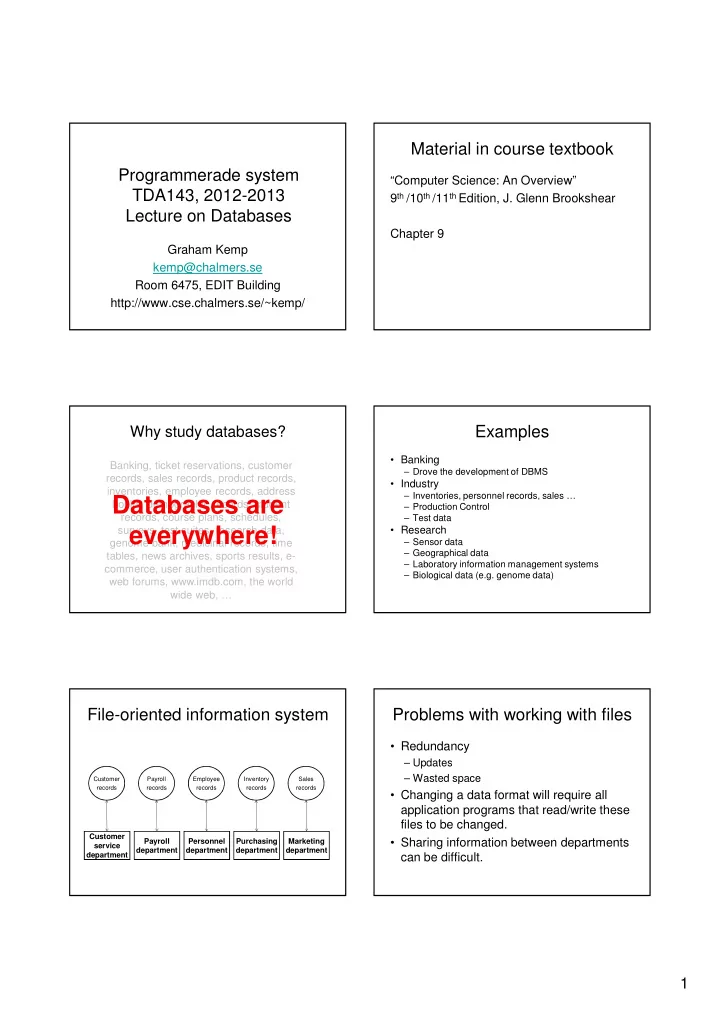
Banking, ticket reservations, customer records, sales records, product records, inventories, employee records, address books, demographic records, student records, course plans, schedules, surveys, test suites, research data, genome bank, medicinal records, time tables, news archives, sports results, e- commerce, user authentication systems, web forums, www.imdb.com, the world wide web, …

Why study databases?

Databases are everywhere!

Examples

  • Banking

– Drove the development of DBMS

  • Industry

– Inventories, personnel records, sales … – Production Control – Test data

  • Research

– Sensor data – Geographical data – Laboratory information management systems – Biological data (e.g. genome data)

File-oriented information system

Payroll records Customer records Employee records Inventory records Sales records

Customer service department Payroll department Personnel department Marketing department Purchasing department

Problems with working with files

  • Redundancy

– Updates – Wasted space

  • Changing a data format will require all

application programs that read/write these files to be changed.

  • Sharing information between departments

can be difficult.

slide-2
SLIDE 2

2

Database-oriented information system

Integrated database

Customer service department Payroll department Personnel department Marketing department Purchasing department

A database is …

  • a collection of data
  • managed by specialised software called a

database management system (DBMS) (or, informally, a “database system”)

  • needed for large amounts of persistent,

structured, reliable and shared data

Using a DBMS: an overview

Database Management System Application Program

Centralised control of data

  • amount of redundancy can be reduced

– less inconsistency in the stored data

  • stored data can be shared
  • standards can be enforced
  • security restrictions can be applied
  • data integrity can be maintained

– validation done in one place

  • conflicting requirements can be balanced
  • provides data independence

– can change storage structure without affecting applications

Motivation for database systems

Needed for large amounts of persistent, structured, reliable and shared data (Ted Codd, 1973)

  • Large amounts:

– needs indexing for fast access – needs a load utility

  • Persistent:

– needs schema definition of types which evolves

  • Structured:

– storage schema held with data – query language (e.g. SQL) independent of storage

  • Shared:

– locking mechanism for concurrent update – access control via DBMS – centralised integrity checking

  • Reliable:

– changes to disc pages are logged – commit protects against program of disc crash – can undo (rollback) uncommitted updates

Traditional File Structures

A short digression …

slide-3
SLIDE 3

3

UNIX file management Actual organisation is hidden

  • Just as the file management system in an
  • perating system gives the users the

illusion that a text file is stored on disc as a long consecutive sequence of characters …

  • … a database management system gives

the users the illusion that their data are stored on disc in accordance with a data model.

Data models

  • Storing data in a computer system

requires describing the data according to some data model, in a form which can be represented directly within the computer.

  • A data model specifies the rules

according to which data are structured and also the associated operations that are permitted.

Data models: brief overview

  • “No data model”

– Flat files

  • “Classical” data models

– Hierarchical (tree) – Network (e.g. CODASYL) (graph) – Relational (Codd, 1970) (tables)

  • Semantic data models, e.g.

– Entity-Relationship model (Chen, 1976) – Functional Data Model (Shipman, 1981) – SDM (Hammer and McLeod, 1981)

Relational DBMSs

  • Very simple model
  • Familiar tabular structure
  • Has a good theoretical foundation from

mathematics (set theory)

  • Industrial strength implementations, e.g.

– Oracle, Sybase, MySQL, PostgreSQL, Microsoft SQL Server, DB2 (IBM mainframes)

  • Large user community

Relation Schemas

  • In the relational data model, a design

consists of a set of relation schemas.

  • A relation schema has

– a name, and – a set of attributes (+ types):

Courses(code, name, teacher)

name attributes

slide-4
SLIDE 4

4

Schema vs Instance

  • Schema (or intension or a relation)

– name and attributes of a relation

Courses(code, name, teacher)

  • Instances (or extension of a relation)

– the actual data – a set of tuples:

{ (’TDA357’, ’Databases’, ’Niklas Broberg’), (’TIN090’, ’Algorithms’, ’Devdatt Dubhashi’) }

tuples

From schema to database

  • The relations of the database schema become

the tables when we implement the database in a

  • DBMS. The tuples become the rows:

Courses(code, name, teacher) code name teacher ’TDA357’ ’Databases’ ’Niklas Broberg’ ’TIN090’ ’Algorithms’ ’Devatt Dubhashi’

relation schema table instance

Keys

  • Relations have keys – attributes whose

values uniquely determine the values of all

  • ther attributes in the relation.

Courses(code, name, teacher)

{(’TDA357’, ’Databases’, ’Niklas Broberg’), (’TDA357’, ’Algorithms’, ’Devdatt Dubhashi’)}

key

Composite keys

  • Keys can consist of several attributes

Courses(code, period, name, teacher)

{(’TDA357’, 2, ’Databases’, ’Graham Kemp’), (’TDA357’, 3, ’Databases’, ’Niklas Broberg’)}

Schemas and subschemas

  • A schema is a description of the entire

database structure.

  • A subschema is a description of only a

part of the database structure.

– Tailored to the needs of a user group – Controls access to data

Database design

  • We design the conceptual model for our

database using a high-level data model like the Enitity-Relationship model …

  • … then we translate this design to the

relational model (for implementation in an RDBMS).

slide-5
SLIDE 5

5

Example:

  • A course has lectures in a room.
  • A course is related to a room by the fact that the course has lectures

in that room.

  • A relationship is often named with a verb (e.g. HasLecturesIn)

Course

name code teacher

Room

name #seats

LecturesIn

Enitity-Relationship Diagram Translation to relations

  • A relationship between two entities is

translated into a relation, where the attributes are the keys of the related entities.

Course

name code teacher

Room

name #seats LecturesIn

Courses(code, name, teacher) Rooms(name, #seats) LecturesIn(code, name)

What?

Translation to relations

  • A relationship between two entities is

translated into a relation, where the attributes are the keys of the related entities.

Course

name code teacher

Room

name #seats LecturesIn

Courses(code, name, teacher) Rooms(name, #seats) LecturesIn(code, name)

Relational operators (1)

  • Selection

– Choose rows from a relation – State condition that rows must satisfy Examples: σseats>100(Rooms) σ(code=”TDA143” AND day=”Friday”)(Lectures)

σcondition(T)

Relational operators (2)

  • Projection

– Choose columns from a relation – State which columns (attributes) Examples: πcode(Courses) πname,seats(Rooms)

πA(T)

Relational operators (3)

R1 x R2

– Cartesian product – Combine each row of R1 with each row of R2

R1 ⋈ ⋈ ⋈ ⋈condition R2

– join operator – Combine row of R1 with each row of R2 if the condition is true R1 ⋈ ⋈ ⋈ ⋈condition R2 = σcondition(R1 x R2)

slide-6
SLIDE 6

6

SQL

  • SQL = Structured Query Language
  • A very high-level declarative language.

– Specify what information you want, not how to get that information (like you would in e.g. Java).

  • Based on Relational Algebra

SELECT-FROM-WHERE

  • Basic structure of an SQL query:

SELECT attributes FROM tables WHERE tests over rows SELECT A FROM T WHERE C

πA(σC(T))

Example:

GivenCourses = SELECT * FROM GivenCourses WHERE course = ’TDA357’; Result =

course per teacher

TDA357 2 Niklas Broberg TDA357 4 Rogardt Heldal TIN090 1 Devdatt Dubhashi

course per teacher

TDA357 2 Niklas Broberg TDA357 4 Rogardt Heldal

What?

Example:

GivenCourses = SELECT * FROM GivenCourses WHERE course = ’TDA357’; Result =

course per teacher

TDA357 2 Niklas Broberg TDA357 4 Rogardt Heldal TIN090 1 Devdatt Dubhashi

course per teacher

TDA357 2 Niklas Broberg TDA357 4 Rogardt Heldal

Example:

GivenCourses = SELECT course, teacher FROM GivenCourses WHERE course = ’TDA357’; Result =

course per teacher

TDA357 2 Niklas Broberg TDA357 4 Rogardt Heldal TIN090 1 Devdatt Dubhashi

course teacher

TDA357 Niklas Broberg TDA357 Rogardt Heldal

What?

Example:

GivenCourses = SELECT course, teacher FROM GivenCourses WHERE course = ’TDA357’; Result =

course per teacher

TDA357 2 Niklas Broberg TDA357 4 Rogardt Heldal TIN090 1 Devdatt Dubhashi

course teacher

TDA357 Niklas Broberg TDA357 Rogardt Heldal

slide-7
SLIDE 7

7

Example:

SELECT code, name, period FROM Courses, GivenCourses WHERE teacher = ’Niklas Broberg’ AND code = course;

course per teacher

TDA357 2 Niklas Broberg TDA357 4 Rogardt Heldal TIN090 1 Devdatt Dubhashi

code name

TDA357 Databases TIN090 Algorithms

Courses GivenCourses

πcode,name,period (σteacher=’Niklas Broberg’ & code = course (Courses x GivenCourses))

Example:

SELECT code, name, period

FROM Courses, GivenCourses

WHERE teacher = ’Niklas Broberg’ AND code = course; code name course per teacher

TDA357 Databases TDA357 2 Niklas Broberg TDA357 Databases TDA357 4 Rogardt Heldal TDA357 Databases TIN090 1 Devdatt Dubhashi TIN090 Algorithms TDA357 2 Niklas Broberg TIN090 Algorithms TDA357 4 Rogardt Heldal TIN090 Algorithms TIN090 1 Devdatt Dubhashi

πcode,name,period(σteacher=’Niklas Broberg’ & code = course( ( ( (Courses x GivenCourses

Courses x GivenCourses Courses x GivenCourses Courses x GivenCourses)

) ) ))

Example:

SELECT code, name, period FROM Courses, GivenCourses

WHERE teacher = ’Niklas Broberg’ AND code = course;

code name course per Teacher

TDA357 Databases TDA357 2 Niklas Broberg TDA357 Databases TDA357 4 Rogardt Heldal TDA357 Databases TIN090 1 Devdatt Dubhashi TIN090 Algorithms TDA357 2 Niklas Broberg TIN090 Algorithms TDA357 4 Rogardt Heldal TIN090 Algorithms TIN090 1 Devdatt Dubhashi

πcode,name,period( ( ( (σ σ σ σteacher=’Niklas Broberg’ & code = course

teacher=’Niklas Broberg’ & code = course teacher=’Niklas Broberg’ & code = course teacher=’Niklas Broberg’ & code = course(Courses x GivenCourses))

) ) )

code name course per teacher

TDA357 Databases TDA357 2 Niklas Broberg

Example:

SELECT code, name, period

FROM Courses, GivenCourses WHERE teacher = ’Niklas Broberg’ AND code = course;

π π π πcode,name,period

code,name,period code,name,period code,name,period(σteacher=’Niklas Broberg’ & code = course(Courses x GivenCourses))

code name course per teacher

TDA357 Databases TDA357 2 Niklas Broberg

code name per

TDA357 Databases 2

Inserting data

INSERT INTO tablename VALUES (values for attributes); INSERT INTO Courses VALUES (’TDA357’, ’Databases’);

code name TDA357 Databases

Deletions

DELETE FROM tablename WHERE test over rows; DELETE FROM Courses WHERE code = ’TDA357’; DELETE FROM Courses;

slide-8
SLIDE 8

8

Updates

UPDATE tablename SET attribute = ... WHERE test over rows UPDATE GivenCourses SET teacher = ’Rogardt Heldal’ WHERE code = ’TDA357’ AND period = 4;

Database system architecture More about Databases

TDA357 - Databases

  • 7,5 Higher education credits
  • Runs twice each year, periods 2 and 3