Database Optimization say about 97% of the time: premature - - PowerPoint PPT Presentation

database optimization
SMART_READER_LITE
LIVE PREVIEW

Database Optimization say about 97% of the time: premature - - PowerPoint PPT Presentation

"We should forget about small efficiencies, Database Optimization say about 97% of the time: premature optimization is the root of all evil Indexes Non-natural keys - Donald Knuth, 1974 Denormalization 1 2 Quiz! Quiz! How costly


slide-1
SLIDE 1

1

Database Optimization

Indexes Non-natural keys Denormalization

1

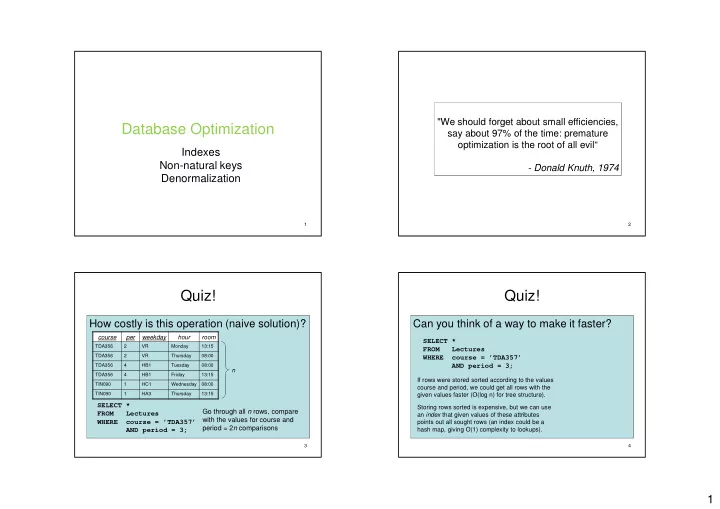
"We should forget about small efficiencies, say about 97% of the time: premature

  • ptimization is the root of all evil“
  • Donald Knuth, 1974

2

Quiz!

How costly is this operation (naive solution)?

SELECT * FROM Lectures WHERE course = ’TDA357’ AND period = 3;

course per weekday hour room

TDA356 2 VR Monday 13:15 TDA356 2 VR Thursday 08:00 TDA356 4 HB1 Tuesday 08:00 TDA356 4 HB1 Friday 13:15 TIN090 1 HC1 Wednesday 08:00 TIN090 1 HA3 Thursday 13:15

n

Go through all n rows, compare with the values for course and period = 2n comparisons

3

Quiz!

Can you think of a way to make it faster?

SELECT * FROM Lectures WHERE course = ’TDA357’ AND period = 3;

If rows were stored sorted according to the values course and period, we could get all rows with the given values faster (O(log n) for tree structure). Storing rows sorted is expensive, but we can use an index that given values of these attributes points out all sought rows (an index could be a hash map, giving O(1) complexity to lookups).

4

slide-2
SLIDE 2

2

Index

  • When relations are large, scanning all

rows to find matching tuples becomes very expensive.

  • An index on an attribute A of a relation is a

data structure that makes it efficient to find those tuples that have a fixed value for attribute A.

– Example: a hash table gives amortized O(1) lookups.

5

Quiz!

Asymptotic complexity (O(x) notation) is misleading here. Why?

The asymptotic complexity works for data structures in main

  • memory. But when working with stored persistent data, the

running time of the data structure, once in main memory, is negligible compared to the time it takes to read data from

  • disk. What really matters to get fast lookups in a database is

to minimize the number of disk blocks accessed (could use asymptotic complexity over disk block accessing though). Indexes help here too though. If a relation is stored over a number of disk blocks, knowing in which of these to look is helpful.

6

Disk and main memory

x = y = Program Main memory input()

  • utput()

read() write() Disk Costly! Cheap!

7

Typical costs

  • Some (over-simplified) typical costs of disk

accessing for database operations on a relation stored over n blocks:

– Query the full relation: n (disk operations) – Query with the help of index: k, where k is the number of blocks pointed to (1 for key). – Access index: 1 – Insert new value: 2 (one read, one write) – Update index: 2 (one read, one write)

8

slide-3
SLIDE 3

3

Example:

SELECT * FROM Lectures WHERE course = ’TDA357’ AND period = 3;

Assume Lectures is stored in n disk blocks. With no index to help the lookup, we must look at all rows, which means looking in all n disk blocks for a total cost of n. With an index, we find that there are 2 rows with the correct values for the course and period attributes. These are stored in two different blocks, so the total cost is 3 (2 blocks + reading index).

9

Quiz!

How costly is this operation?

SELECT * FROM Lectures, Courses WHERE course = code;

Go through all n blocks in Lectures, compare the value for course from each row with the values for code in all rows of Courses, stored in all m

  • blocks. The total cost is thus n * m

accessed disk blocks.

Lectures: n disk blocks Courses: m disk blocks

Index on code in Courses: No index: Go through all n blocks in Lectures, compare the value for course from each row with the index. Since course is a key, each value will exist at most once, so the cost is 2 * n + 1 accessed disk blocks (1 for fetching the index once).

10

CREATE INDEX

  • Most DBMS support the statement

CREATE INDEX index name ON table (attributes); – Example: – Statement not in the SQL standard, but most DBMS support it anyway. – Primary keys are given indexes implicitly (by the SQL standard).

CREATE INDEX courseIndex ON Courses (code);

11

Important properties

  • Indexes are separate data stored by itself.

Can be created

  • n newly created relations
  • n existing relations
  • will take a long time on large relations.

Can be dropped without deleting any table data.

  • SQL statements do not have to be

changed

– a DBMS automatically uses any indexes.

12

slide-4
SLIDE 4

4

Quiz!

Why don’t we have indexes on all (combinations

  • f) attributes for faster lookups?

– Indexes require disk space. – Modifications of tables are more expensive.

  • Need to update both table and index.

– Not always useful

  • The table is very small.
  • We don’t perform lookups over it (Note: lookups queries).

– Using an index costs extra disk block accesses.

13

Rule of thumb

  • Mostly queries on tables – use indexes for

key attributes.

  • Mostly updates – be careful with indexes!

14

Quiz!

Assume we have an index on Lectures for (course, period, weekday) which is the key. How costly are these queries?

SELECT * FROM Lectures WHERE course = ’TDA357’ AND period = 3; Lectures: n disk blocks SELECT * FROM Lectures WHERE weekday = ’Monday’ AND room = ’VR’;

A multi-attribute index is typically organized hierarchically. First the rows are indexed according to the first attribute, then according to the second within each group, and so on. Thus the left query costs at most k + 1 where k is the number of rows matching the values. The right query can’t use the index, and thus costs n, where n is the size of the relation in disk blocks.

15

Example: Suppose that the Lectures relation is stored in 20 disk blocks, and that we typically perform three operations on this table:

– insert new lectures (Ins) – list all lectures of a particular course (Q1) – list all lectures in a given room (Q2)

Let’s assume that in an average week there are:

– 2 lectures for each course, and – 10 lectures in each room.

Let’s also assume that

– each course has lectures stored in 2 blocks, and – each room has lectures stored in 7 (some lectures are stored in the same block).

16

slide-5
SLIDE 5

5

Lectures example: blocks

Index on (course, period, weekday) Index on room

17

Costs

Case A Case B Case C Case D No index Index on (course, period, weekday) Index on room Both indexes Ins 2 4 4 6 Q1 20 3 20 3 Q2 20 20 8 8 Ins Q1 Q2 Case A Case B Case C Case D 0.2 0.4 0.4 16.4 10 12 5.6 0.8 0.1 0.1 5.6 5.5 6 5.9 0.1 0.6 0.3 18.2 8.2 14.8 4.8 Insert new lectures (Ins) List all lectures of a particular course (Q1) List all lectures in a given room (Q2) The amortized cost depends on the proportion of operations of each kind.

18

Real world

  • The examples given here are very simplified! In

reality, many more factors matter:

– Data layout on disk, storage schemes – Size of disk blocks – Size of main memory – Disk latency, bus speed, …

  • Indexes can be arbitrarily large!

– Not uncommon for index to be larger than the data set. – Different index schemes also matter.

19

Dense index on sequential file

KBB056 KMB017 TDA357 TMS145 UMF012 UMF018 KBB056 KC Monday 08 KMB017 MVH12 Tuesday 08 KMB017 MVH12 Wednesday 15 TDA357 HA4 Monday 10 TDA357 HB1 Thursday 10 TMS145 KC Friday 08 UMF012 MVF23 Friday 13 UMF012 MVF23 Monday 13 UMF018 MVF23 Tuesday 10

20

slide-6
SLIDE 6

6

Sparse index on sequential file

KBB056 TDA357 UMF012 KBB056 KC Monday 08 KMB017 MVH12 Tuesday 08 KMB017 MVH12 Wednesday 15 TDA357 HA4 Monday 10 TDA357 HB1 Thursday 10 TMS145 KC Friday 08 UMF012 MVF23 Friday 13 UMF012 MVF23 Monday 13 UMF018 MVF23 Tuesday 10

21

Multi-level indexes

Outer index Inner index index block 0 index block 1 data block 0 data block 1

22

Secondary index on room name

HA4 HB1 KC MVF23 MVH12

KBB056 KC Monday 08 KMB017 MVH12 Tuesday 08 KMB017 MVH12 Wednesday 15 TDA357 HA4 Monday 10 TDA357 HB1 Thursday 10 TMS145 KC Friday 08 UMF012 MVF23 Friday 13 UMF012 MVF23 Monday 13 UMF018 MVF23 Tuesday 10

23

Quiz!

  • Indexes are incredibly useful (although they are

not part of the SQL standard).

  • Doing it wrong is costly.
  • Requires knowledge about the internals of a

DBMS.

– How is data stored? How large is a block?

  • A DBMS should be able to decide better than

the user what indexes are needed, from usage analysis. So why don’t they??

24

slide-7
SLIDE 7

7

Summary – indexes

  • Indexes make certain lookups and joins more

efficient.

– Disk block access matters. – Multi-attribute indexes

  • CREATE INDEX
  • Usage analysis

– What are the expected operations? – How much do they cost? (cost of operation)x(proportion of operations of that kind)

25

Non-natural keys

  • A natural key is a key consisting of

attributes in the domain model.

  • In some cases, no suitable natural key

exists.

– No suitably unique natural candidate key. – Natural candidate key ”too large”. – Natural candidate key ”not stable”. – …

26

Quiz!

Listed is a personal number and a car registration number, both Swedish, as well as a post ID and a comment ID from Wordpress. Can you tell which is which?

861218-9324 AKW965 4126 1253

27

Artificial key

  • Extra attribute added to a table with the

purpose of being the key.

– Does not exist in ”reality” – Can be verified for correctness – Can be distinguished from artificial keys on

  • ther tables in database.
  • Examples:

– Personal numbers, car registration numbers, course codes, etc.

28

slide-8
SLIDE 8

8

Surrogate key

  • System-generated key to replace the actual key

behind the covers.

– AUTO_INCREMENT, SEQUENCE, IDENTITY, … – Totally unrelated to domain. – NOT exposed to user modification – database consistency would be at great risk!

  • Remember: From the database perspective, application

programmers count as users!

– Example: post/comment IDs managed by Wordpress.

29

Exposed locators

  • Unholy mix of artificial and surrogate keys:

– System-generated, non-verifiable value with no relation to data model (like a surrogate key). – … but exposed to user (like an artificial key). ”[Exposed locators] are handy for lazy, non-RDBMS programmers who do not want to research or think! This is the worst way to program in SQL.” Joe Celko, SQL programming guru

http://www.informationweek.com/software/business-intelligence/celko-on-sql-natural-artificial-and-surr/201806814

30

BEWARE!

  • In parts of industry, there is an exaggerated belief in

using surrogates, or even exposed locators.

  • Don’t believe it! There is no one-size-fits-all solution to

picking keys. Think for yourselves! You are better than them! ”In the real world, outside of school, it is considered insanity to have more than an integer as key.” Old student

31

Advantages

  • Non-natural keys can be more compact.

– Smaller references, smaller indexes. – Faster comparisons, faster joins.

  • Non-natural keys are immutable.

– Not tied to data in domain, so changes of the data will not cause key to change.

  • (Recall: Oracle does not support ON UPDATE CASCADE)

– Applications never lose their reference to a particular row in the database.

32

slide-9
SLIDE 9

9

Disadvantages

  • Non-natural keys may degrade performance.

– An extra key on a table requires an extra index to handle external lookups on the natural key

  • extra disk space to store index
  • modifications become more costly

– Reference to non-natural key means external lookups on the natural key in referencing table requires one or more extra joins.

  • Non-natural keys may make maintenance harder.

– Harder to spot errors, in keys and in references.

33

Quiz!

Find all lectures for course TDA357 in period 3. How costly is this operation?

Indexes for primary keys

Courses(code, …) GivenCourses(course, period, …) course -> Courses.code Lectures(course, period, weekday, …) (course, period) -> GivenCourses.(course, period)

SELECT * FROM Lectures WHERE course = ’TDA357’ AND period = 3;

Costs k + 1 where

  • k is the number of blocks holding

rows matching the values

  • 1 for reading index

34

Quiz!

Find all lectures for course TDA357 in period 3. How costly is this operation?

Indexes for primary and natural keys

Courses(cid, code, …) GivenCourses(gcid, course, period, …) course -> Courses.cid Lectures(lid, gcourse, weekday, …) gcourse -> GivenCourses.gcid

SELECT * FROM Lectures, GivenCourses, Courses WHERE gcourse = gcid AND course = cid AND code = ’TDA357’ AND period = 3;

Costs k + m + 1 + 3 where

  • k is the number of blocks holding

matching lectures

  • m is the number of blocks holding

matching given courses

  • 1 is the block holding the matching

code (natural key so only one)

  • 3 for reading three separate indexes

35

Quiz!

If surrogate keys can lead to more joins, but due to them being smaller, each join is faster – which has the bigger effect?

x = y = Program Main memory input()

  • utput()

read() write() … but more joins mean more blocks read! Faster comparisons mean faster joins…

In general, the number of disk block operations has much more impact than the speed of the comparisons! Beware!

36

slide-10
SLIDE 10

10

Words of (my) advice

  • 1. Use natural keys.
  • 2. If none available, find or create an artificial key.

– For (strong and weak) entities only: all tables representing relationships will have natural (composite) keys. – Also do this if natural key not suitably immutable.

  • 3. If, and ONLY if, you notice a performance

problem, surrogate keys might help.

– Remember to mark natural keys unique. – Remember to create index for natural key lookups, if needed. – Use views to hide the surrogate keys from users. Avoid exposed locators. – Never include surrogates in e.g. E-R diagram – they are an implementation detail.

37

Denormalization

  • ”Re-compose” decomposed tables or

attributes, to avoid joining.

– Can think of this as pre-computing joins – Trade-off: query speed vs. redundancy – Are updates frequent? – ”NULLs approach” for sub-entities and many- to-at-most-one is a special case – both composed tables have the same key, so less data will be stored.

38

Summary – optimization

  • Indexes

– (often) speed up queries and joins – make modifications more costly

  • Natural keys, artificial keys, surrogate keys

– Avoid exposed locators! – Know when to use what.

  • Denormalization

– Can be a worthwhile trade-off.

39

Next lecture

Semi-structured data XML

40