DAQ Office Space Is ProtoDUNE a good analog? Partly: Yes: - - PowerPoint PPT Presentation

daq office space
SMART_READER_LITE
LIVE PREVIEW

DAQ Office Space Is ProtoDUNE a good analog? Partly: Yes: - - PowerPoint PPT Presentation

DAQ Office Space Is ProtoDUNE a good analog? Partly: Yes: initial installation and commissioning has a similar onsite profile No: was a big rush, and remote control was not in the immediate plans so everyone came to CERN over


slide-1
SLIDE 1

DAQ Office Space

  • Is ProtoDUNE a good analog? Partly:

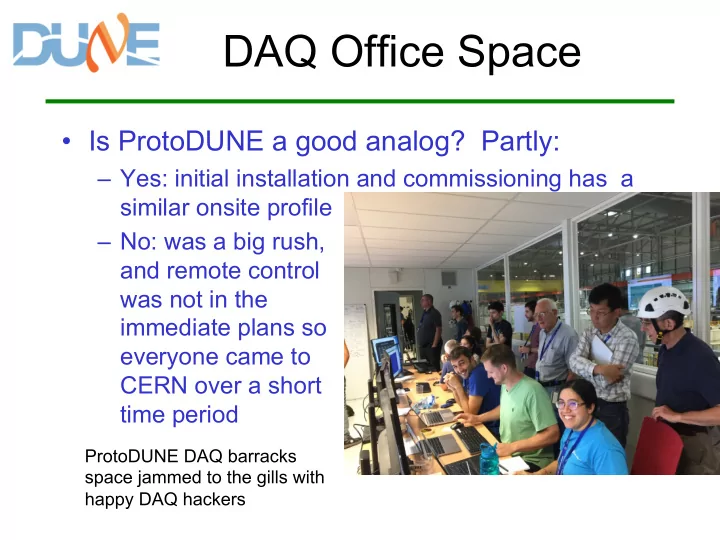
– Yes: initial installation and commissioning has a similar onsite profile – No: was a big rush, and remote control was not in the immediate plans so everyone came to CERN over a short time period

ProtoDUNE DAQ barracks space jammed to the gills with happy DAQ hackers

slide-2
SLIDE 2

ProtoDUNE space

  • ProtoDUNE barracks were fairly small: most

work was done by people sitting in B892

  • Barracks plus B892 was O(100) desks (!)

– But at a lab, people will expand to fill the available

  • space. We have to plan more carefully for a

remote site

  • Some of those many people from the

ProtoDUNE example can probably continue to work remotely, so what follows is an estimate of minimum stuff onsite

slide-3
SLIDE 3

So, what’s needed at SURF?

  • For DAQ space, there are five major sub-

systems, all getting debugged at once

  • We can work with three main workstations:

– Monitoring, run control, debugging – But also need space for experts with their laptops

  • Goal is to have as few hands onsite as we can

– Supported by people back home or at CERN or FNAL – Ideally not underground, working over network – …but on-site, as they might have to venture underground for physical connections etc

slide-4
SLIDE 4

What about non-DAQ

  • perational space?
  • For run control etc, as non-DAQ people take

runs to commission their APAs or whatnot

– During Commissioning. For physics data, DAQ RC work won’t be happening, so we might be able to repurpose some of those previous three stations from the last slide – Figure one Run Control plus one Monitoring workstation for commissioning work in parallel to DAQ work – That’s five double-monitor workstations

  • Other controls (eg, CISC) should be in same

room, for easier coordination

slide-5
SLIDE 5

Really Rough Layout

  • 3 DAQ, 2 Commissioning, back-to-back with

5 other workstations, 2m clearances, solely to give order-of-magnitude space

slide-6
SLIDE 6

Remote Control

  • MINOS, MINERvA, and especially NOvA

have done a lot to make remote control rooms work well

– If those 5-10 workstations become the main control stations for an operational DUNE, simply mirroring them to remote desktops works well – NOvA uses VNC sessions shared by dozens(!) of remote sites, to reduce shift-taking travel costs – Ask a friendly NOvA collaborator to give you a tour

  • f the instance in ROCW (in the FNAL Atrium) to

see it in action

slide-7
SLIDE 7

What about other space?

  • If we’re trying to keep people offsite, we will

need (more than one!) meeting rooms (with videoconferencing) near the previous space: So those offsite experts can meet with their

  • nsite minions to get stuff done
  • Likely also need offices for quiet work or
  • thinking. 2 small offices w/ 2 people each?
  • Other groups also likely to need these same

two things, so how many in total?

slide-8
SLIDE 8

Comparison

  • CMS’s control room at CERN’s main site, and the

smaller one at FNAL is probably not a bad reference point: similarly scaled detectors!

– Worked up in detail here: https://lss.fnal.gov/archive/test-tm/2000/fermilab-tm- 2393-e.pdf – Note that we’re not requesting the luxury-car grade accoutrements in the FNAL room – … but alsp note that it’s public outreach components probably are important: linking to a visitor’s center keeps coming up – … and unlike CMS @ FNAL, we will actually have (a lot of) humans there to occupy it