CSE 326: Data Structures B-Trees Hal Perkins Weiss Sec. 4.7 - - PowerPoint PPT Presentation

cse 326 data structures b trees
SMART_READER_LITE
LIVE PREVIEW

CSE 326: Data Structures B-Trees Hal Perkins Weiss Sec. 4.7 - - PowerPoint PPT Presentation

B-Trees CSE 326: Data Structures B-Trees Hal Perkins Weiss Sec. 4.7 Spring 2007 Lecture 14-15 TIme to access Trees so far (conservative) CPU (has registers) 1 ns per instruction BST SRAM Cache Cache 8KB - 4MB 2-10 ns Main


slide-1
SLIDE 1

1

CSE 326: Data Structures B-Trees

Hal Perkins Spring 2007 Lecture 14-15

B-Trees

Weiss Sec. 4.7

3

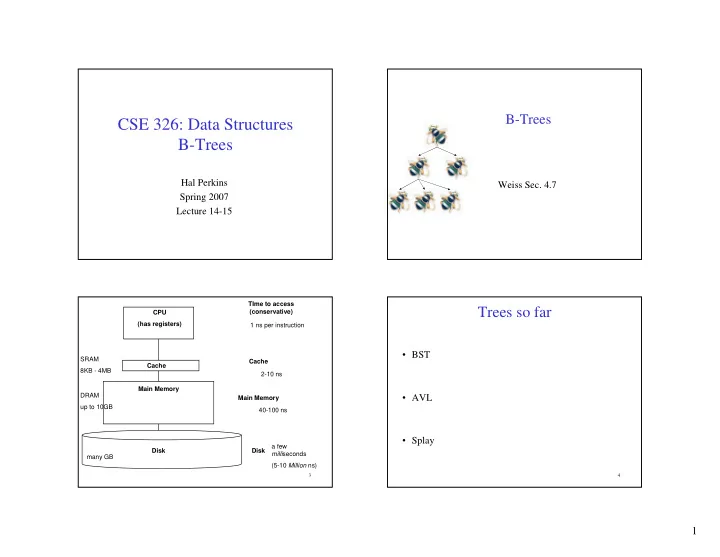
CPU (has registers) Cache Main Memory Disk TIme to access (conservative) 2-10 ns 40-100 ns a few milliseconds (5-10 Million ns) SRAM 8KB - 4MB DRAM up to 10GB many GB Cache Main Memory Disk 1 ns per instruction

4

Trees so far

  • BST
  • AVL
  • Splay
slide-2
SLIDE 2

2

5

M-ary Search Tree

  • Maximum branching factor of M
  • Complete tree has height =

# disk accesses for find: Runtime of find:

6

Solution: B-Trees

  • specialized M-ary search trees
  • Each node has (up to) M-1 keys:

– subtree between two keys x and y contains leaves with values v such that x ≤ v < y

  • Pick branching factor M

such that each node takes one full {page, block}

  • f memory

3 7 12 21 x<3 3≤x<7 7≤x<12 12≤x<21 21≤x

7

B-Trees

What makes them disk-friendly?

  • 1. Many keys stored in a node
  • All brought to memory/cache in one access!
  • 2. Internal nodes contain only keys;

Only leaf nodes contain keys and actual data

  • The tree structure can be loaded into memory

irrespective of data object size

  • Data actually resides in disk

8

B-Tree: Example

B-Tree with M = 4 (# pointers in internal node) and L = 4 (# data items in leaf)

1 AB 2 xG 3 5 6 9 10 11 12 15 17 20 25 26 30 32 33 36 40 42 50 60 70 10 40 3 15 20 30 50

Note: All leaves at the same depth! Data objects, that I’ll ignore in slides

slide-3
SLIDE 3

3

9

B-Tree Properties ‡

– Data is stored at the leaves – All leaves are at the same depth and contains between ⎡L/2⎤ and L data items – Internal nodes store up to M-1 keys – Internal nodes have between ⎡M/2⎤ and M children – Root (special case) has between 2 and M children (or root could be a leaf)

‡These are technically B+-Trees

10

Example, Again

B-Tree with M = 4 and L = 4

1 2 3 5 6 9 10 11 12 15 17 20 25 26 30 32 33 36 40 42 50 60 70 10 40 3 15 20 30 50

(Only showing keys, but leaves also have data!)

11

B-trees vs. AVL trees

Suppose we have 100 million items (100,000,000):

  • Depth of AVL Tree
  • Depth of B+ Tree with M = 128, L = 64

12

Building a B-Tree

The empty B-Tree

M = 3 L = 2

3

Insert(3)

3 14

Insert(14) Now, Insert(1)?

slide-4
SLIDE 4

4

13

Splitting the Root

And create a new root

1 3 14 1 3 14 14 1 3 14 3 14

Insert(1)

Too many keys in a leaf! So, split the leaf.

M = 3 L = 2

14

Overflowing leaves

Insert(59)

14 1 3 14 59 14 1 3 14

Insert(26)

14 1 3 14 26 59 14 59 1 3 14 26 59

And add a new child

Too many keys in a leaf! So, split the leaf.

M = 3 L = 2

15

Propagating Splits

14 59 1 3 14 26 59 14 59 14 26 59 1 3 5

Insert(5)

5 14 14 26 59 1 3 5 59 5 1 3 5 14 26 59 59 14

Add new child Create a new root

Split the leaf, but no space in parent! So, split the node.

M = 3 L = 2

16

Insertion Algorithm

  • 1. Insert the key in its leaf
  • 2. If the leaf ends up with L+1

items, overflow!

– Split the leaf into two nodes:

  • riginal with ⎡(L+1)/2⎤ items
  • new one with ⎣(L+1)/2⎦ items

– Add the new child to the parent – If the parent ends up with M+1 items, overflow!

  • 3. If an internal node ends up

with M+1 items, overflow!

– Split the node into two nodes:

  • original with ⎡(M+1)/2⎤ items
  • new one with ⎣(M+1)/2⎦ items

– Add the new child to the parent – If the parent ends up with M+1 items, overflow!

  • 4. Split an overflowed root in two

and hang the new nodes under a new root This makes the tree deeper!
slide-5
SLIDE 5

5

17

After More Routine Inserts

5 1 3 5 14 26 59 59 14 5 1 3 5 14 26 59 79 59 89 14 89

Insert(89) Insert(79)

M = 3 L = 2

18

Deletion

5 1 3 5 14 26 59 79 59 89 14 89 5 1 3 5 14 26 79 79 89 14 89

Delete(59) What could go wrong?

  • 1. Delete item from leaf
  • 2. Update keys of ancestors if necessary

M = 3 L = 2

19

Deletion and Adoption

5 1 3 5 14 26 79 79 89 14 89

Delete(5)

? 1 3 14 26 79 79 89 14 89 3 1 3 3 14 26 79 79 89 14 89

A leaf has too few keys! So, borrow from a sibling

M = 3 L = 2

20

Does Adoption Always Work?

  • What if the sibling doesn’t have enough for you to

borrow from? e.g. you have ⎡L/2⎤-1 and sibling has ⎡L/2⎤ ?

slide-6
SLIDE 6

6

21

Deletion and Merging

3 1 3 14 26 79 79 89 14 89

Delete(3)

? 1 14 26 79 79 89 14 89 1 14 26 79 79 89 14 89

A leaf has too few keys! And no sibling with surplus! So, delete the leaf But now an internal node has too few subtrees!

M = 3 L = 2

22

Adopt a neighbor

1 14 26 79 79 89 14 89 14 1 14 26 79 89 79 89

Deletion with Propagation (More Adoption)

M = 3 L = 2

23

Delete(1) (adopt a sibling)

14 1 14 26 79 89 79 89

A Bit More Adoption

26 14 26 79 89 79 89

M = 3 L = 2

24

Delete(26)

26 14 26 79 89 79 89

Pulling out the Root

14 79 89 79 89

A leaf has too few keys! And no sibling with surplus!

14 79 89 79 89

So, delete the leaf; merge A node has too few subtrees and no neighbor with surplus!

14 79 79 89 89

Delete the node But now the root has just one subtree!

M = 3 L = 2

slide-7
SLIDE 7

7

25

Pulling out the Root (continued)

14 79 79 89 89

The root has just one subtree!

14 79 79 89 89

Simply make the one child the new root!

M = 3 L = 2

26

Deletion Algorithm

  • 1. Remove the key from its leaf
  • 2. If the leaf ends up with fewer

than ⎡L/2⎤ items, underflow!

– Adopt data from a sibling; update the parent – If adopting won’t work, delete node and merge with neighbor – If the parent ends up with fewer than ⎡M/2⎤ items, underflow!

27

Deletion Slide Two

  • 3. If an internal node ends up with

fewer than ⎡M/2⎤ items, underflow!

– Adopt from a neighbor; update the parent – If adoption won’t work, merge with neighbor – If the parent ends up with fewer than

⎡M/2⎤ items, underflow!

  • 4. If the root ends up with only one

child, make the child the new root

  • f the tree

This reduces the height of the tree!

28

Thinking about B-Trees

  • B-Tree insertion can cause (expensive) splitting and

propagation

  • B-Tree deletion can cause (cheap) adoption or

(expensive) deletion, merging and propagation

  • Propagation is rare if M and L are large

(Why?)

  • If M = L = 128, then a B-Tree of height 4 will

store at least 30,000,000 items

slide-8
SLIDE 8

8

29

Tree Names You Might Encounter

FYI:

– B-Trees with M = 3, L = x are called 2-3 trees

  • Nodes can have 2 or 3 keys

– B-Trees with M = 4, L = x are called 2-3-4 trees

  • Nodes can have 2, 3, or 4 keys