
SLIDE 1
Computing CS 7 : Introduction to Programming and Computer Science - - PowerPoint PPT Presentation
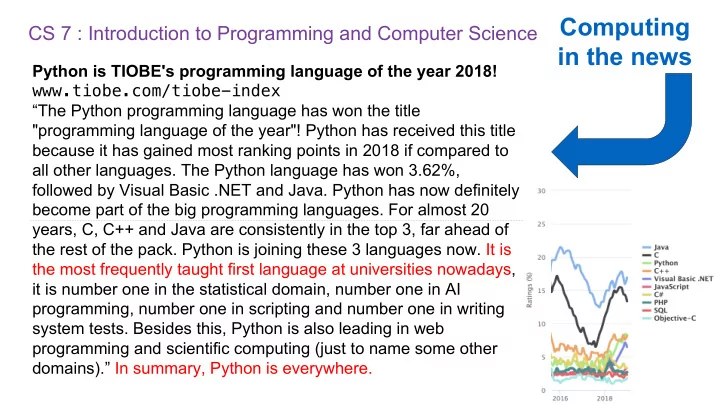
Computing CS 7 : Introduction to Programming and Computer Science in the news Python is TIOBE's programming language of the year 2018! www.tiobe.com/tiobe-index The Python programming language has won the title "programming language of
Lecture: Lecture is on Mon and Tues Lab section: The most important part of this course Staff office hours: The most important part of this course Online textbook: http://composingprograms.com Optional Discussion section: The most important part of this course Weekly lab, homework assignments, three programming projects (hopefully) Lots of optional special events to help you complete all this work
3
Everything is posted to erickhumalo.com/cs7
Systems Artificial Intelligence Graphics Security Networking Programming Languages Theory Scientific Computing ...
5
Decision Making Robotics Machine Learning ... What problems can be solved using computation, How to solve those problems, and What techniques lead to effective solutions The study of Training Models Classification ...
A course about managing complexity Mastering abstraction Programming paradigms An introduction to programming Full understanding of Python fundamentals Combining multiple ideas in large projects How computers interpret programming languages A challenging course that will demand a lot of you
6
8
Details... http://erickhumalo.com/cs7/about.html
Sheesh! (rolls eyes)
unwelcome
Here, let me help!
family!
9
The limits of collaboration Asking questions is highly encouraged Build good habits now
10
12
An expression describes a computation and evaluates to a value
All expressions can use function call notation (Demo 1)
13
14
Evaluation procedure for call expressions:
add ( 2 , 3 ) Operator Operand Operand
Operators and operands are also expressions
to the arguments that are the values of the operands So they evaluate to values
224 mul(add(4, mul(4, 6)), add(3, 5)) add(4, mul(4, 6))
15
28 mul add 4 mul(4, 6) mul 4 6 24 add(3, 5) add 3 5 8
224 mul(add(4, mul(4, 6)), add(3, 5)) add(4, mul(4, 6)) 28 mul add 4 mul(4, 6) mul 4 6 24 add(3, 5) add 3 5 8
16
Expression tree Operand subexpression 1st argument to mul Value of the whole expression Value of subexpression
(Demo)
(Goal: Get you to have a correct understanding of the Notational Machine of Python, the “set of abstractions that define the structure and behavior of a computing device” –Guzdial)
(Demo 2)
computinged.wordpress.com/2016/03/07/notional-machines-and-misconceptions-in-cs-developing-a-research-agenda-at-dagstuhl/
Primitive expressions: Call expressions: 2 add 'hello' max ( 2 , 3 ) Operator Operand Operand max(min(pow(3, 5), -4), min(1, -2)) Number or Numeral Name String
19
An operand can also be a call expression
What is the value of the final expression in this sequence? >>> f = min >>> f = max >>> g, h = min, max >>> max = g >>> max(f(2, g(h(1, 5), 3)), 4)
20
(Demo 3) Name Value Import statement Each name is bound to a value Within a frame, a name cannot be repeated Statements and expressions Arrows indicate evaluation order Frames (right): Code (left): Environment diagrams visualize the interpreter’s process.
22
Just executed Next to execute Assignment statement
http://pythontutor.com/composingprograms.html#code=from%20math%20import%20pi%0Atau%20%3D%202%20*%20pi&cumulative=false&curInstr=1&mode=display&origin=composingprograms.js&py=3&rawInputLstJSON=%5 B%5D
Execution rule for assignment statements:
23
Just executed Just executed Next to execute
http://pythontutor.com/composingprograms.html#code=a%20%3D%201%0Ab%20%3D%202%0Ab,%20a%20%3D%20a%20%2B%20b,%20b&cumulative=false&curInstr=0&mode=display&origin=composingprograms.js&py=3&rawInputLstJSON=%5B%5D
24
func min(...) 4 3 f(2, g(h(1, 5), 3)) 3 g(h(1, 5), 3) 3 func max(...) 2 3 h(1, 5) func min(...) 5 5 func max(...) 1
(Demo 4)
http://pythontutor.com/composingprograms.html#code=f%20%3D%20min%0Af%20%3D%20max%0Ag,%20h%20%3D%20min,%20max%0Amax%20%3D%20g%0Amax%28f%282,%20g%28h%281,%205%29,%203%29%29,%204%29&cumulative=false&curInstr=0&mode=display&origin=composingprograms.js&py=3&rawInputLstJSON=%5B%5D
Assignment is a simple means of abstraction: binds names to values Function definition is a more powerful means of abstraction: binds names to expressions <name>(<formal parameters>): return <return expression> >>> def Execution procedure for def statements:
Function signature indicates how many arguments a function takes Function body defines the computation performed when the function is applied
26
Procedure for calling/applying user-defined functions (version 1):
Local frame Original name of function called Formal parameter bound to argument Return value (not a binding!) Built-in function User-defined function
27
http://pythontutor.com/composingprograms.html#code=from%20operator%20import%20mul%0Adef%20square%28x%29%3A%0A%20%20%20%20return%20mul%28x,%20x%29%0Asquare%28-2%29&cumulative=true&curInstr=0&mode=display&origin=composingprograms.js&py=3&rawInputLstJSON=%5B%5D
(Demo 5)
A function’s signature has all the information needed to create a local frame
28
Procedure for calling/applying user-defined functions (version 1):
http://pythontutor.com/composingprograms.html#code=from%20operator%20import%20mul%0Adef%20square%28x%29%3A%0A%20%20%20%20return%20mul%28x,%20x%29%0Asquare%28-2%29&cumulative=true&curInstr=0&mode=display&origin=composingprograms.js&py=3&rawInputLstJSON=%5B%5D
Every expression is evaluated in the context of an environment. So far, the current environment is either:
Most important two things I’ll say all day: An environment is a sequence of frames. A name evaluates to the value bound to that name in the earliest frame of the current environment in which that name is found. E.g., to look up some name in the body of the square function:
(Built-in names like “max” are in the global frame too, but we don’t draw them in environment diagrams.) (Demo5)
29
(Demo1)
The special value None represents nothing in Python A function that does not explicitly return a value will return None Careful: None is not displayed by the interpreter as the value of an expression
31
>>> def does_not_return_square(x): ... x * x ... >>> does_not_return_square(4) >>> sixteen = does_not_return_square(4) >>> sixteen + 4 Traceback (most recent call last): File "<stdin>", line 1, in <module> TypeError: unsupported operand type(s) for +: 'NoneType' and 'int' The name sixteen is now bound to the value None No return None value is not displayed
abs
2
None print Python displays the output “-2” 2, 100 1267650600228229401496703205376 pow Pure Functions just return values Non-Pure Functions have side effects Argument Return value A side effect isn't a value; it's anything that happens as a consequence of calling a function Returns None!
32
2 Arguments
None print(print(1), print(2)) func print(...) print(...): 1 None display “1” print(...): 2 None display “2” print(...): None, None None display “None None” print(1) func print(...) 1 None print(2) 2 None
33
Does not get displayed func print(...)
Def statement: Call expression: square( x ): return mul(x, x) >>> def square(2+2) Calling/Applying: square( x ): Def statement Formal parameter Body Return expression (return statement) A new function is created! Name bound to that function in the current frame
argument: 4 Operator & operands evaluated Function (value of operator) called on arguments (values of operands) What happens?
function: func square(x) Signature 4 16 A new frame is created! Parameters bound to arguments Body is executed in that new environment Argument Return value Name
35
square(square(3)) square(3) 3 func square(x)
36
func square(x)
http://pythontutor.com/composingprograms.html#code=from%20operator%20import%20mul%0Adef%20square%28x%29%3A%0A%20%20%20%20return%20mul%28x,%20x%29%0Asquare%28square%283%29%29&cumulative=true&curInstr=0&mode=display&origin=composingprograms.js&py=3&rawInputLstJSON=%5B%5D
square(square(3)) square(3) 9 3 func square(x)
37
func square(x)
http://pythontutor.com/composingprograms.html#code=from%20operator%20import%20mul%0Adef%20square%28x%29%3A%0A%20%20%20%20return%20mul%28x,%20x%29%0Asquare%28square%283%29%29&cumulative=true&curInstr=0&mode=display&origin=composingprograms.js&py=3&rawInputLstJSON=%5B%5D
An environment is a sequence of frames.
1 2 1 2 1
38
square(square(3)) square(3) 9 3 func square(x) func square(x) 81
http://pythontutor.com/composingprograms.html#code=from%20operator%20import%20mul%0Adef%20square%28x%29%3A%0A%20%20%20%20return%20mul%28x,%20x%29%0Asquare%28square%283%29%29&cumulative=true&curInstr=0&mode=display&origin=composingprograms.js&py=3&rawInputLstJSON=%5B%5D
An environment is a sequence of frames.
39
Every expression is evaluated in the context
A name evaluates to the value bound to that name in the earliest frame of the current environment in which that name is found.
1 2 1 2 1
http://pythontutor.com/composingprograms.html#code=from%20operator%20import%20mul%0Adef%20square%28x%29%3A%0A%20%20%20%20return%20mul%28x,%20x%29%0Asquare%28square%283%29%29&cumulative=true&curInstr=0&mode=display&origin=composingprograms.js&py=3&rawInputLstJSON=%5B%5D
40
1 2 1
A call expression and the body of the function being called are evaluated in different environments Every expression is evaluated in the context
A name evaluates to the value bound to that name in the earliest frame of the current environment in which that name is found.
http://pythontutor.com/composingprograms.html#code=from%20operator%20import%20mul%0Adef%20square%28square%29%3A%0A%20%20%20%20return%20mul%28square,%20square%29%0Asquare%284%29&cumulative=true&curInstr=0&mode=display&origin=composingprograms.js&py=3&rawInputLstJSON=%5B%5D
Division Multiple Return Values Source Files Doctests Default Arguments (Demo2)
<header>: <statement> <statement> ... <separating header>: <statement> <statement> ... ... Compound statements:
Statement Suite Clause The first header determines a statement’s type The header of a clause “controls” the suite that follows def statements are compound statements
43
A statement is executed by the interpreter to perform an action
Compound statements: <header>: <statement> <statement> ... <separating header>: <statement> <statement> ... ... Execution Rule for a sequence of statements:
Suite A suite is a sequence of statements To “execute” a suite means to execute its sequence of statements, in order
44
1 statement, 3 clauses, 3 headers, 3 suites Each clause is considered in order.
execute the suite & skip the remaining clauses.
45
Syntax Tips:
always at the end. (Demo3) def my_abs(x): """Return the absolute value of x.""" if x < 0: return -x elif x == 0: return 0 else: return x Execution Rule for Conditional Statements:
def my_abs(x): """Return the absolute value of x.""" if x < 0: return -x elif x == 0: return 0 else: return x
False values in Python: False, 0, '', None True values in Python: Anything else (True) (more to come)
George Boole
Read Section 1.5.4!
46
Two boolean contexts
Reading: http://composingprograms.com/pages/15-control.html#conditional-statements
George Boole
execute the (whole) suite, then return to step 1. 1 2 3 1 3 6
48
(Demo4) Execution Rule for While Statements:
fib n pred curr k 5 def fib(n): """Compute the nth Fibonacci number, for N >= 1.""" pred, curr = 0, 1 # 0th and 1st Fibonacci numbers k = 1 # curr is the kth Fibonacci number while k < n: pred, curr = curr, pred + curr k = k + 1 return curr
0, 1, 1, 2, 3, 5, 8, 13, 21, 34, 55, 89, 144, 233, 377, 610, 987
49
The next Fibonacci number is the sum of the current one and its predecessor 1 2 3 4 5
A function's domain is the set of all inputs it might possibly take as arguments. A function's range is the set of output values it might possibly return. A pure function's behavior is the relationship it creates between input and output.
51
def square(x): """Return X * X.""" x is a number square returns a non- negative real number square returns the square of x
Give each function exactly one job, but make it apply to many related situations
52
Don’t repeat yourself (DRY). Implement a process just once, but execute it many times. >>> round(1.23, 1) 1.2 >>> round(1.23, 0) 1 >>> round(1.23, 5) 1.23 >>> round(1.23) 1
Shape:
Regular geometric shapes relate length and area. Area: Finding common structure allows for shared implementation
54
(Demo1)
The common structure among functions may be a computational process, rather than a number.
56
(Demo2)
Function of a single argument (not called "term") A formal parameter that will be bound to a function The function bound to term gets called here The cube function is passed as an argument value 0 + 1 + 8 + 27 + 64 + 125
57
(Demo3)
"""Return a function that takes one argument k and returns k + n. >>> add_three = make_adder(3) >>> add_three(4) 7 """ def adder(k): return k + n return adder
A function that returns a function A def statement within another def statement The name add_three is bound to a function Can refer to names in the enclosing function Functions defined within other function bodies are bound to names in a local frame
59
make_adder( n ):
make_adder(1) ( 2 ) Operator Operand An expression that evaluates to a function An expression that evaluates to its argument
60
2 3 make_adder(1) func adder(k) func make_adder(n) 1 func adder(k)
(Demo4)
>>> x = 10 >>> square = x * x >>> square = lambda x: x * x >>> square(4) 16 An expression: this one evaluates to a number Also an expression: evaluates to a function that returns the value of "x * x" with formal parameter x A function Lambda expressions are not common in Python, but important in general Important: No "return" keyword! Must be a single expression
62
Lambda expressions in Python cannot contain statements at all!
square = lambda x: x * x def square(x): return x * x
environment diagrams but doesn't affect execution (unless the function is printed). The Greek letter lambda
63