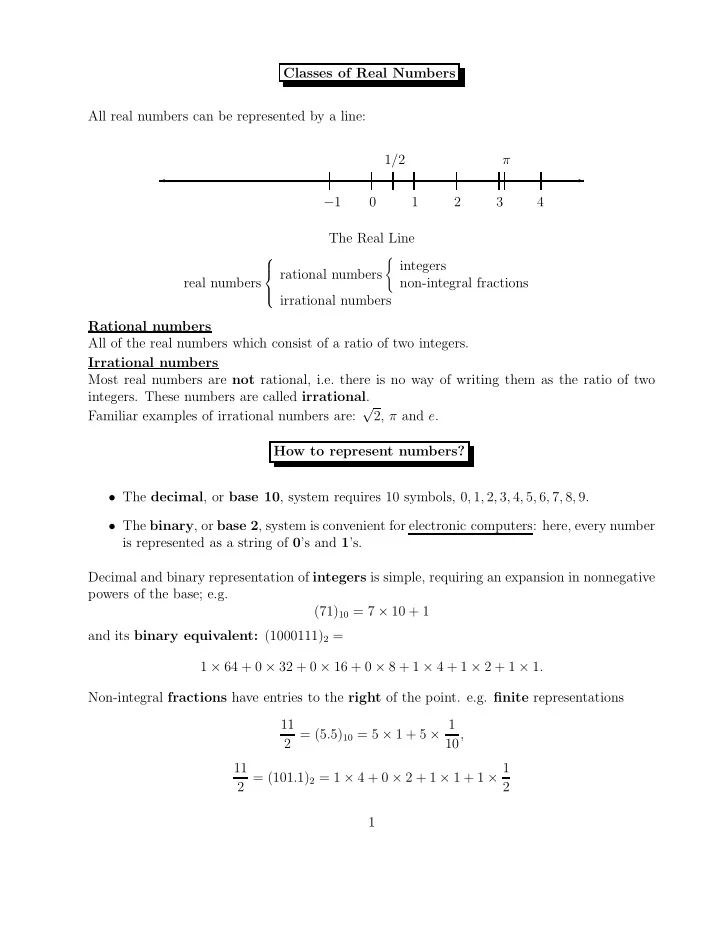
SLIDE 1 Classes of Real Numbers All real numbers can be represented by a line:
✲ ✛
−1 1/2 1 2 3 π 4 The Real Line real numbers
rational numbers
non-integral fractions irrational numbers Rational numbers All of the real numbers which consist of a ratio of two integers. Irrational numbers Most real numbers are not rational, i.e. there is no way of writing them as the ratio of two
- integers. These numbers are called irrational.
Familiar examples of irrational numbers are: √ 2, π and e. How to represent numbers?
- The decimal, or base 10, system requires 10 symbols, 0, 1, 2, 3, 4, 5, 6, 7, 8, 9.
- The binary, or base 2, system is convenient for electronic computers: here, every number
is represented as a string of 0’s and 1’s. Decimal and binary representation of integers is simple, requiring an expansion in nonnegative powers of the base; e.g. (71)10 = 7 × 10 + 1 and its binary equivalent: (1000111)2 = 1 × 64 + 0 × 32 + 0 × 16 + 0 × 8 + 1 × 4 + 1 × 2 + 1 × 1. Non-integral fractions have entries to the right of the point. e.g. finite representations 11 2 = (5.5)10 = 5 × 1 + 5 × 1 10, 11 2 = (101.1)2 = 1 × 4 + 0 × 2 + 1 × 1 + 1 × 1 2 1
SLIDE 2 Infinitely Long Representations But 1/10, with finite decimal expansion (0.1)10, has the binary representation 1 10 = (0.0001100110011 . . .)2 = 1 16 + 1 32 + 0 64 + 128 + 1 256 + 1 512 + · · · . This, while infinite, is repeating. 1/3 has both representations infinite and repeating: 1/3 = (0.333 . . .)10 = (0.010101 . . .)2. If the representation of a rational number is infinite, it must be repeating. e.g. 1/7 = (0.142857142857 . . .)10. Irrational numbers always have infinite, non-repeating expansions. e.g. √ 2 = (1.414213...)10, π = (3.141592 . . .)10, e = (2.71828182845 . . .)10. Converting between binary & decimal.
→ decimal:
- Easy. e.g. (1001.11)2 is the decimal number
1 × 23 + 0 × 22 + 0 × 21 + 1 × 20 + 1 × 2−1 + 1 × 2−2 = 9.75
→ binary: Convert the integer and fractional parts separately. e.g. if x is a decimal integer, we want coefficients a0, a1, . . . , an, all 0 or 1, so that an × 2n + an−1 × 2n−1 + · · · + a0 × 20 = x, has representations (anan−1 · · · a0)2 = (x)10. Clearly dividing x by 2 gives remainder a0, leaving as quotient an × 2n−1 + an−1 × 2n−2 + · · · + a1 × 20, and so we can continue to find a1 then a2 etc. Q: What is a similar approach for decimal fractions? 2
SLIDE 3 Computer Representation of Numbers
- Integers — three ways:
- 1. sign-and-modulus — a simple approach.
Use 1 bit to represent the sign, and store the binary representation of the magnitude
- f the integer. e.g. decimal 71 is stored as the bitstring
- 00. . . 01000111
If the computer word size is 32 bits, 231 − 1 is the largest magnitude which will fit.
- 2. 2’s complement representation (CR)
more convenient, & used by most machines. (i) The nonnegative integers 0 to 231 − 1 are stored as before, e.g., 71 is stored as the bitstring
(ii) A negative integer −x, where 1 ≤ x ≤ 231, is stored as the positive integer 232 − x. e.g. −71 is stored as the bitstring
Converting x to its 2’s CR 232 − x of −x: 232 − x = (232 − 1 − x) + 1, 232 − 1 = (111 . . .111)2. Chang all zero bits of x to ones, one bits to zero and adding one. Q: What is the quickest way of deciding if a number is negative or nonnegative using 2’s CR ?? An advantage of 2’s CR: Form y + (−x), where 0 ≤ x, y ≤ 231 − 1. 2’s CR of y is y ; 2’s CR of −x is 232 − x Adding these two representations gives y + (232 − x) = 232 + y − x = 232 − (x − y). 3
SLIDE 4 – If y ≥ x, the LHS will not fit in a 32-bit word, and the leading bit can be dropped, giving the correct result, y − x. – If y < x, the RHS is already correct, since it represents −(x − y). Thus, no special hardware is needed for integer subtraction. The addition hardware can be used, once −x has been represented using 2’s complement.
- 3. 1’s complement representation:
a negative integer −x is stored as 232 − x − 1. This system was used, but no longer.
- Non-integral real numbers.
Real numbers are approximately stored using the binary representation of the number. Two possible methods: . fixed point and floating point. Fixed point: the computer word is divided into three fields, one for each of:
- the sign of the number
- the number before the point
- the number after the point.
In a 32-bit word with field widths of 1,15 and 16, the number 11/2 would be stored as: 000000000000101 1000000000000000 The fixed point system has a severe limitation on the size of the numbers to be stored. e.g. Q: smallest to largest magnitudes above? Inadequate for most scientific computing. Normalized Exponential Notation In (normalized) exponential notation, a nonzero real number is written as ±m × 10E, 1 ≤ m < 10,
- m is called the significand or mantissa,
- E is an integer, called the exponent.
4
SLIDE 5 For the computer we need binary, write x = 0 as x = ±m × 2E, where 1 ≤ m < 2. The binary expansion for m is m = (b0.b1b2b3 . . .)2, with b0 = 1. IEEE Floating Point Representation Through the efforts of W. Kahan & others, a binary floating point standard was developed: IEEE 754-1985. It has now been adopted by almost all computer manufacturers. Another standard, IEEE 854-1987 for radix independent floating point arithmetic, is devoted to both binary (radix-2) and decimal (radix- 10) arithmetic. The current version is IEEE 754-2008, including nearly all of the original IEEE 754-1985 and IEEE 854-1987 We write
✞ ✝ ☎ ✆
IEEE FPS for the binary standard. Three important requirements:
- consistent representation of floating point numbers across machines
- correctly rounded arithmetic
- consistent and sensible treatment of
exceptional situations (e.g. division by 0). IEEE Single format There are 3 standard types in IEEE FPS: single, double, and extended format. Single format numbers use 32-bit words. A 32-bit word is divided into 3 fields:
- sign field: 1 bit ( 0 for positive, 1 for negative).
- exponent field: 8 bits for E.
- significand field: 23 bits for m.
In the IEEE single format system, the 23 significand bits are used to store b1b2 . . . b23. Do not store b0, since we know b0 = 1. This idea is called hidden bit normalization. The stored bitstring b1b2 . . . b23 is now the fractional part of the significand, the significand field is also referred to as the fraction field. It may not be possible to store x with such a scheme, because 5
SLIDE 6
- either E is outside the permissible range (see later).
- or b24, b25, . . . are not all zero.
- Def. A number is called a (computer) floating point number if it can be stored exactly
this way. e.g 71 = (1.000111)2 × 26 can be represented by E = 6 0001110000000000000000 . If x is not a floating point number, it must be rounded before it can be stored on the computer. Special Numbers
Zero cannot be normalized. A pattern of all 0s in the fraction field of a normalized number represents the significand 1.0, not 0.0.
−0 and 0 are two different representations for the same value
This allows e.g. 1.0/0.0 → ∞, instead of terminating with an overflow message.
−∞ and ∞ represent two very different numbers.
- NaN, or “Not a Number”, and is an error pattern.
- Subnormal numbers (see later)
All special numbers are represented by a special bit pattern in the exponent field. Precision, Machine Epsilon
The number of bits in the significand (including the hidden bit) is called the precision of the floating point system, denoted by p. In the single format system, p = 24.
The gap between the number 1 and the next larger floating point number is called the machine epsilon of the floating point system, denoted by ǫ. In the single format system, the number after 1 is b0.b1 . . . b23 = 1.00000000000000000000001, so ǫ = 2−23. 6
SLIDE 7 IEEE Single format ± a1a2a3 . . . a8 b1b2b3 . . . b23 If exponent a1 . . . a8 is Then value is (00000000)2 = (0)10 ±(0.b1..b23)2 × 2−126 (00000001)2 = (1)10 ±(1.b1..b23)2 × 2−126 (00000010)2 = (2)10 ±(1.b1..b23)2 × 2−125 (00000011)2 = (3)10 ±(1.b1..b23)2 × 2−124 ↓ ↓ (01111111)2 = (127)10 ±(1.b1..b23)2 × 20 (10000000)2 = (128)10 ±(1.b1..b23)2 × 21 ↓ ↓ (11111100)2 = (252)10 ±(1.b1..b23)2 × 2125 (11111101)2 = (253)10 ±(1.b1..b23)2 × 2126 (11111110)2 = (254)10 ±(1.b1..b23)2 × 2127 (11111111)2 = (255)10 ±∞ if b1, , b23 = 0; NaN otherwise. The ± refers to the sign, 0 for positive, 1 for negative.
- All lines except the first and the last refer to the normalized numbers, i.e. not special.
The exponent representation a1a2 . . . a8 uses biased representation: this bitstring is the binary representation of E + 127. 127 is the exponent bias. e.g. 1 = (1.000 . . .0)2 × 20 is stored as 01111111 00000000000000000000000 Exponent range for normalized numbers is 00000001 to 11111110 (1 to 254), representing actual exponents Emin = −126 to Emax = 127 The smallest normalized positive number is (1.000 . . .0)2 × 2−126 : 00000001 00000000000000000000000 approximately 1.2 × 10−38. The largest normalized positive number is (1.111 . . .1)2 × 2127 : 11111110 11111111111111111111111 approximately 3.4 × 1038. 7
SLIDE 8
If exponent a1 . . . a8 is Then value is (11111111)2 = (255)10 ±∞ if b1, . . ., b23 = 0; NaN otherwise This shows an exponent bitstring of all ones is a special pattern for ±∞ or NaN, depending on the value of the fraction.
(00..00)2 = (0)10 ±(0.b1..b23)2 × 2−126 shows zero requires a zero bitstring for the exponent field as well as for the fraction: 00000000 0000000000000000000000 Initial unstored bit is 0, not 1, in line 1. If exponent is zero, but fraction is nonzero, the number represented is subnormal. Although 2−126 is the smallest normalized positive number, we can represent smaller numbers called subnormal numbers. e.g. 2−127 = (0.1)2 × 2−126: 00000000 10000000000000000000000 and 2−149 = (0.0000 . . .01)2 × 2−126: 00000000 00000000000000000000001 This is the smallest positive number we can store. Subnormal numbers cannot be normalized, as this gives exponents which do not fit. Subnormal numbers are less accurate, (less room for nonzero bits in the fraction). e.g. (1/10) × 2−133 = (0.11001100 . . .)2 × 2−136 is 00000000 00000000001100110011001 Q: IEEE single format: (i) How is 2. represented ?? 10000000 00000000000000000000000 (ii) What is the next smallest IEEE single format number larger than 2 ?? 10000000 00000000000000000000001 8
SLIDE 9 (iii) What is the gap between 2 and the first IEEE single format number larger than 2? 2−23 × 2 = 2−22. General Result: Let x = m × 2E be a normalized single format number, with 1 ≤ m < 2. The gap between x and the next smallest single format number larger than x is ǫ × 2E. IEEE Double format Each double format floating point number is stored in a 64-bit double word. Ideas the same; field widths (1, 11 & 52) and exponent bias (1023) different. b1, . ., b52 can be stored instead of b1, . ., b23. ± a1a2a3 . . . a11 b1b2b3 . . . b52 If exponent is a1..a11 Then value is (000..0000)2 = (0)10 ±(0.b1..b52)2 × 2−1022 (000..0001)2 = (1)10 ±(1.b1..b52)2 × 2−1022 (000..0010)2 = (2)10 ±(1.b1..b52)2 × 2−1021 (000..0011)2 = (3)10 ±(1.b1..b52)2 × 2−1020 ↓ ↓ (01..111)2 = (1023)10 ±(1.b1..b52)2 × 20 (10..000)2 = (1024)10 ±(1.b1..b52)2 × 21 ↓ ↓ (11..100)2 = (2044)10 ±(1.b1..b52)2 × 21021 (11..101)2 = (2045)10 ±(1.b1..b52)2 × 21022 (11..110)2 = (2046)10 ±(1.b1..b52)2 × 21023 (11..111)2 = (2047)10 ±∞ if b1, , b52 = 0; NaN otherwise Single versus Double
- Single format is required.
- Double format is optional, but is provided by almost all machines implementing the
standard.
- Support for the requirements may be provided by hardware or software.
- But almost all machines have hardware support for both single and double format.
9
SLIDE 10 Extended format IEEE FPS recommends support for extended format:
- exponent: at least 15 bits;
- fractional part of the significand: at least 63 bits.
Intel microprocessors: 80-bit word, with 1 bit sign, 15 bit exponent and 64 bit significand, with leading bit of a normalized number not hidden. The arithmetic is implemented in hardware. Machine Epsilon of the 3 Formats Single ǫ = 2−23 ≈ 1.2 × 10⁻⁷ Double ǫ = 2−52 ≈ 2.2 × 10⁻¹⁶ Extended (Intel) ǫ = 2−63 ≈ 1.1 × 10⁻¹⁹ Significant Digits
- In single format, the significand of a normalized has 24 bits of accuracy. This corre-
sponds to approximately 7 significant decimal digits, since 2−24 ≈ 10−7.
- In double format, the significand has 53 bits of accuracy. This corresponds to approx-
imately 16 significant decimal digits, since 2−53 ≈ 10−16. 10
SLIDE 11 Rounding We use Floating Point Numbers (FPN) to include ±0, subnormal & normalized FPNs, & ±∞ in a given format, e.g. single. These form a finite set. Notice NaN is not included. Nmin: the minimum positive normalized FPN; Nmax: the maximum positive normalized FPN; A real number x is in the “normalized range” if Nmin ≤ |x| ≤ Nmax. Q: Let x be a real number and |x| ≤ Nmax. If x is not a floating point number, what are two
- bvious choices for the floating point approximation to x ??
x− the closest FPN less than x; x+ the closest FPN greater than x. Using IEEE single format, if x is positive with x = (b0.b1b2 . . . b23b24b25 . . .)2 × 2E, b0 = 1 (normalized), or b0 = 0, E = −126 (subnormal) then discarding b24, b25, . . . gives. x− = (b0.b1b2 . . . b23)2 × 2E, An algorithm for x+ is more complicated since it may involve some bit “carries”. x+ = [(b0.b1b2 . . . b23)2 + (0.00 . . .1)2] × 2E. If x is negative, the situation is reversed: x+ is obtained by dropping bits b24, b25, etc. Correctly Rounded Arithmetic The IEEE standard defines the correctly rounded value of x,
✞ ✝ ☎ ✆
round(x) . If x is a floating point number, round(x) = x. Otherwise round(x) depends on the rounding mode in effect:
round(x) = x−.
round(x) = x+.
round(x) is either x− or x+, whichever is between zero and x. 11
SLIDE 12
round(x) is either x− or x+, whichever is nearer to x. In the case
- f a tie, the one with its least significant bit equal to zero is chosen.
This rounding mode is almost always used. If x is positive, then x− is between zero and x, so round down and round towards zero have the same effect. Round towards zero simply requires truncating the binary expansion, i.e. discarding bits. “Round” with no qualification usually means “round to nearest”. Absolute Rounding Error
- Def. The absolute rounding error associated with x:
|round(x) − x|. Its value depends on mode. For all modes |round(x) − x| < |x+ − x−|. Suppose Nmin ≤ x ≤ Nmax, x = (b0.b1b2 . . . b23b24b25 . . .)2 × 2E, b0 = 1. IEEE single x− = (b0.b1b2 . . . b23)2 × 2E. IEEE single x+ = x− + (0.00 . . .01)2 × 2E. So for any mode |round(x) − x| < 2−23 × 2E. In general for any rounding mode: |round(x) − x| < ǫ × 2E. (∗) Q: (i) For round towards zero, could the absolute rounding error equal ǫ × 2E ?? (ii) Does (∗) hold if 0 < x < Nmin, i.e. E = −126 and b0 = 0 ?? 12
SLIDE 13
Relative Rounding Error, x = 0 The relative rounding error is defined by |δ|, δ ≡ round(x) x − 1 = round(x) − x x . Assuming x is in the normalized range, x = ±m × 2E, where m ≥ 1, so |x| ≥ 2E. Since |round(x) − x| < ǫ × 2E, we have, for all rounding modes, |δ| < ǫ × 2E 2E = ǫ. (∗) Q: Does (∗) necessarily hold if 0 < |x| < Nmin, i.e. E = −126 and b0 = 0 ?? Why ?? Note for any real x in the normalized range, round(x) = x(1 + δ), |δ| < ǫ. An Important Idea From the definition of δ we see round(x) = x(1 + δ), so the rounded value of an arbitrary number x in the normalized range is equal to x(1+δ), where, regardless of the rounding mode, |δ| < ǫ. This is very important, because you can think of the stored value of x as not exact, but as exact within a factor of 1 + ǫ. IEEE single format numbers are good to a factor of about 1 + 10−7, which means that they have about 7 accurate decimal digits. 13
SLIDE 14
Special Case of Round to Nearest For round to nearest, the absolute rounding error can be no more than half the gap between x− and x+. This means in IEEE single, for all |x| ≤ Nmax: |round(x) − x| ≤ 2−24 × 2E, and in general |round(x) − x| ≤ 1 2ǫ × 2E. The previous analysis for round to nearest then gives for x in the normalized range: round(x) = x(1 + δ), |δ| ≤
1 2ǫ × 2E
2E = 1 2ǫ. Operations on Floating Point Numbers There are very few: standard arithmetic operations: +, −, ∗, /, plus comparison, square root, etc. The operands must be available in the processor memory. But combining two floating point numbers may not give a floating point number, e.g. multiplication of two 24-bit significands generally gives a 48-bit significand. When the result is not a floating point number, the IEEE standard requires that the computed result be the correctly rounded value of the exact result Q: Using round to nearest, which of 1 + 10−5, 1 + 10−10, 1 + 10−15 round to 1 in IEEE single format and double format, respectively ?? IEEE Rule for Rounding Let x and y be floating point numbers, and let ⊕,⊖,⊗,⊘ denote the implementations of +,−,∗,/ on the computer. Thus x ⊕ y is the computer’s approximation to x + y. The IEEE rule is then precisely: x ⊕ y = round(x + y), x ⊖ y = round(x − y), x ⊗ y = round(x × y), x ⊘ y = round(x/y). From our discussion of relative rounding errors, when x + y is in the normalized range, 14
SLIDE 15 ✞ ✝ ☎ ✆
x ⊕ y = (x + y)(1 + δ), |δ| < ǫ, for all rounding modes. Similarly for ⊖, ⊗ and ⊘. Note that |δ| ≤ ǫ/2 for round to nearest. Implementing Correctly Rounded FPS Consider adding two IEEE single format FPNs: x = m × 2E and y = p × 2F. First (if necessary) shift one significand, so both numbers have the same exponent G = max{E, F}. The significands are then added, and if necessary, the result normalized and
- rounded. e.g. adding 3 = (1.100)2 × 21 to 3/4 = (1.100)2 × 2−1:
( 1.1000000000000000000000 )2 × 21 + ( 0.0110000000000000000000 )2 × 21 = ( 1.1110000000000000000000 )2 × 21. Further normalizing & rounding is not needed. Now add 3 to 3 × 2−23. We get ( 1.1000000000000000000000 )2 × 21 + ( 0.0000000000000000000001|1 )2 × 21 = ( 1.1000000000000000000001|1 )2 × 21 Result is not an IEEE single format FPN, and so must be correctly rounded. Guard Bits Correctly rounded floating point addition and subtraction is not trivial even the result is a
x = (1.0)2 × 20, y = (1.1111 . . .1)2 × 2−1. Aligning the significands: ( 1.00000000000000000000000| )2 × 20 − ( 0.11111111111111111111111|1 )2 × 20 = ( 0.00000000000000000000000|1 )2 × 20 an example of cancellation — most bits in the two numbers cancel each other. The result is (1.0)2 × 2−24, a floating point number, but to obtain this we must carry out the subtraction using an extra bit, called a guard bit. Without it, we would get a wrong answer. 15
SLIDE 16 More than one guard big may be needed. e.g., consider computing x − y where x = 1.0 and y = (1.000 . . .1)2 × 2−25. Using 25 guard bits: ( 1.00000000000000000000000| )2 × 20 − ( 0.00000000000000000000000|0100000000000000000000001 )2 × 20 = ( 0.11111111111111111111111|1011111111111111111111111 )2 × 20 Normalize: (1.11111111111111111111111|0111111111111111111111110 )2 × 2−1 Round to nearest: (1.11111111111111111111111 )2 × 2−1 If we use only 2 guard bits, we will get a wrong result: ( 1.00000000000000000000000| )2 × 20 −( 0.00000000000000000000000|01 )2 × 20 = ( 0.11111111111111111111111|11 )2 × 20 Normalize: ( 1.11111111111111111111111|1 )2 × 2−1 Round to nearest: ( 10.00000000000000000000000 )2 × 2−1 Renormalize: ( 1.00000000000000000000000 )2 × 20 We would still get the same wrong result even if 3, 4, or as many as 24 guard bits. Machines that implement correctly rounded arithmetic take such possibilities into account, and it turns out that correctly rounded results can be achieved in all cases using only two guard bits + sticky bit, where the sticky bit is used to flag a rounding problem of this kind. For the previous example, we use two guard bits and “turn on” a sticky bit to indicates that at least one nonzero extra bit was discarded when the bits of y were shifted to the right past the 2nd guard bit (the bit is called “sticky” because once it is turned on, it stays on, regardless
- f how many bits are discarded):
( 1.00000000000000000000000| )2 × 20 − ( 0.00000000000000000000000|011 )2 × 20 = ( 0.11111111111111111111111|101 )2 × 20 Normalize: ( 1.11111111111111111111111|01 )2 × 2−1 Round to nearest: ( 1.11111111111111111111111 )2 × 2−1 Multiplication and Division If x = m × 2E and y = p × 2F, then x × y = (m × p) × 2E+F Three steps: 16
SLIDE 17
- multiply the significands,
- add the exponents,
- normalize and correctly round the result.
Division requires taking the quotient of the significands and the difference of the exponents. Multiplication and division are substantially more complicated than addition and sub- traction. In principle it is possible, by using enough space on the chip, to implement the operations so that they are all equally fast. In practice, chip designers build the hardware so that multiplication is approximately as fast as addition. However, the division operation, the most complicated to implement, generally takes signifi- cantly longer to execute than addition or multiplication. Exceptional Situations When a reasonable response to exceptional data is possible, it should be used. The simplest example is division by zero. Two earlier standard responses:
- generate the largest FPN as the result.
Rationale: user would notice the large number in the output and conclude something had gone wrong. Disaster: e.g. 2/0 − 1/0 would then have a result of 0, which is completely meaning-
- less. In general the user might not even notice that any error had taken place.
- generate a program interrupt, e.g.
“fatal error — division by zero”. The burden was on the programmer to make sure that division by zero would never
Example: Consider computing the total resistance in an electrical circuit with two resistors (R1 and R2 ohms) connected in parallel:
R2 R1
17
SLIDE 18
The formula for the total resistance is T = 1
1 R1 + 1 R2
. What if R1 = 0? If one resistor offers no resistance, all the current will flow through that and avoid the other; therefore, the total resistance in the circuit is zero. The formula for T also makes perfect sense mathematically: T = 1
1 0 + 1 R2
= 1 ∞ +
1 R2
= 1 ∞ = 0. The IEEE FPS Solution Why should a programmer have to worry about treating division by zero as an exceptional situation here? In IEEE floating point arithmetic, if the initial floating point environment is set properly: division by zero does not generate an interrupt but gives an infinite result, program execution continuing normally. In the case of the parallel resistance formula this leads to a final correct result of 1/∞ = 0, following the mathematical concepts exactly: T = 1
1 0 + 1 R2
= 1 ∞ +
1 R2
= 1 ∞ = 0. Other uses of ∞ We used some of the following: a > 0 : a/0 → ∞ a ∗ ∞ → ∞, a finite : a + ∞ → ∞ a − ∞ → −∞ a/∞ → 0 ∞ + ∞ → ∞. But ∞ ∗ 0, 0/0, ∞/∞, ∞ − ∞ 18
SLIDE 19
make no sense. Computing any of these is called an invalid operation, and the IEEE standard sets the result to NaN (Not a Number). Any arithmetic operation on a NaN also gives a NaN result. Whenever a NaN is discovered in the output, the programmer knows something has gone wrong. (An ∞ in the output may or may not indicate an error, depending on the context). Overflow and Underflow Overflow is said to occur when Nmax < | true result | < ∞, where Nmax is the largest normalized FPN. Two pre-IEEE standard treatments: (i) Set the result to (±) Nmax, or (ii) Interrupt with an error message. In IEEE arithmetic, the standard response depends on the rounding mode: Suppose that the overflowed value is positive. Then rounding model result round up ∞ round down Nmax round towards zero Nmax round to nearest ∞ Round to nearest is the default rounding mode and any other choice may lead to very misleading final computational results. Underflow is said to occur when 0 < | true result | < Nmin, where Nmin is the smallest normalized floating point number. Historically the response was usually: replace the result by zero. In IEEE arithmetic, the result may be a subnormal number instead of zero. This allows results much smaller than Nmin. But there may still be a significant loss of accuracy, since subnormal numbers have fewer bits of precision. 19
SLIDE 20 IEEE Standard Response to Exceptions Invalid Opn. Set result to NaN Division by 0 Set result to ±∞ Overflow Set result to ±∞ or ±Nmax Underflow Set result to ±0, ±Nmin or subnormal Inexact Set result to correctly rounded value
- The IEEE FPS requires that an exception must be signaled by setting an associated
status flag,
- The IEEE FPS highly recommends that the programmer should have the option of
either trapping the exception — providing special code to be executed when the exception occurs,
- r masking the exception — the program continues with the response of the table.
- A high level language may not allow trapping.
- It is usually best to rely on these standard responses.
20
SLIDE 21 Floating Point in C In C, the type float refers to a single precision floating point variable. e.g. read in a floating point number, using the standard input routine scanf, and print it out again, using printf: main () /* echo.c: echo the input */ { float x; scanf("%f", &x); printf("x = %f", x); } The 2nd argument &x to scanf is the address of x. The routine scanf needs to know where to store the value read. The 2nd argument x to printf is the value of x. The 1st argument "%f" to both routines is a control string. The two standard formats used for specifying floating point numbers in these control strings are:
- %f , for fixed decimal format
- %e , for exponential decimal format
%f and %e have identical effects in scanf, which can process input in a fixed decimal format (e.g. 0.666) or an exponential decimal format (e.g. 6.66e-1, meaning 6.66 × 10⁻¹. The following results were for a Sun 4. With input 0.66666666666666666666 : #cc -o echoinput echo.c #echoinput 0.66666666666666666666 (typed in) x= 0.666667 (printed out) Using Different Output Formats in printf : Output format Output %f 0.666667 %e 6.666667e-01 %8.3f 0.667 %8.3e 6.667e-01 %20.15f 0.666666686534882 %20.15e 6.666666865348816e-01 21
SLIDE 22
The input is correctly rounded to about 6 or 7 digits of precision, so %f and %e print, by default, 6 digits after the decimal point. The next two lines print to less precision. The 8 refers to the total field width, the 3 to the number of digits after the point. In the last two lines about half the digits have no significance. Regardless of the output format, the floating point variables are always stored in the IEEE formats. Double or Long Float Double precision variables are declared in C using double or long float. But changing float to double above: {double x; scanf("%f",&x); printf("%e",x);} gives -6.392091e-236. Q: Why ?? scanf reads the input and stores it in single precision format in the first half of the double word allocated to x, but when x is printed, its value is read assuming it is stored in double precision format. When scanf reads a double precision variable we must use the format %lf (for long float), so that it stores the result in double precision format. printf expects double precision, and single precision variables are automatically converted to double before being passed to it. Since it always receives long float arguments, it treats %e and %le identically; likewise %f and %lf, %g and %lg. A program to “test” if x is “zero” main() /* loop1.c: generate small numbers*/ { float x; int n; n = 0; x = 1; /* x = 2^0 */ while (x != 0){ n++; x = x/2; /* x = 2^(-n) */ printf("\n n= %d x=%e", n,x); } } Initializes x to 1 and repeatedly divides by 2 until it rounds to 0. Thus x becomes 1/2, 1/4, 1/8, . . . , thru subnormal 2−127, . . . , 2−128, to the smallest subnormal 2−149. The last value is 0, since 2−150 is not representable, and rounds to zero. 22
SLIDE 23
n= 1 x=5.000000e-01 n= 2 x=2.500000e-01 . . . n= 149 x=1.401298e-45 n= 150 x=0.000000e+00 Another “test” if x is “zero” main() /* loop2.c: this loop stops sooner*/ { float x,y; int n; n = 0; y = 2; x = 1; /* x = 2^0 */ while (y != 1) { n++; x = x/2; /* x = 2^(-n) */ y = 1 + x; /* y = 1 + 2^(-n) */ printf("\n n= %d x= %e y= %e",n,x,y); } } Initializes x to 1 and repeatedly divides by 2, terminating when y = 1 + x is 1. This occurs much sooner, since 1 + 2−24 is not a floating point number. 1 + 2−23 does not round to 1. n= 1 x= 5.000000e-01 y= 1.500000e+00 . . . n= 23 x= 1.192093e-07 y= 1.000000e+00 n= 24 x= 5.960464e-08 y= 1.000000e+00 Yet another “test” if x is “zero” Now instead of using the variable y, change the test while (y != 1) to while (1 + x != 1). n=0; x=1; /* x = 2^0 */ while(1 + x != 1){ ... /* same as before */} The loop now runs until n = 53 (cc on Sun 4). n= 1 x= 5.000000e-01 y=1.500000e+00 n= 2 x= 2.500000e-01 y=1.250000e+00 . . . n= 52 x= 2.220446e-16 y=1.000000e+00 n= 53 x= 1.110223e-16 y=1.000000e+00 23
SLIDE 24
1 + x is computed in a register and is not stored to memory: the result in the register is compared directly with the value 1 and, because it uses double precision, 1 + x > 1 for values of n up to 52. This stops at n = 64 on the Pentium both by cc and gcc, which uses extended precision registers. But it still stops at n = 24 on the Sun 4 by gcc. 24
SLIDE 25 The Mean Value Theorem The mean value theorem (MVT): Let f(x) be differentiable. For some z in [x, x + h]: f ′(z) = f(x + h) − f(x) h . This is intuitively clear from:
f x x+h z f(x+h) f(x)
We can rewrite the MV formula as: f(x + h) = f(x) + hf ′(z). A generalization if f is twice differentiable is f(x + h) = f(x) + hf ′(x) + h2 2 f ′′(z), for some z in [x, x + h]. Taylor Series Taylor’s Theorem: Let f have continuous derivative of order 0, 1, . . ., (n + 1), then f(x + h) =
n
f (k)(x) k! hk + En+1, where the error (remainder) En+1 = f(n+1)(z)
(n+1)! hn+1, z ∈ [x, x + h].
Taylor series. If f has infinitely many derivatives, f(x + h) = f(x) + hf ′(x) + h2 2! f ′′(x) + h3 3! f ′′′(x) + · · · , 25
SLIDE 26
where we assume limn→∞ En+1 = 0, e.g. f(x) = sin x: sin(x + h) = sin(x) + h sin′(x) + h2 2! sin′′(x) + h3 3! sin′′′(x) + h4 4! sin′′′′(x) + · · · , Letting x = 0, we get sin(h) = h − h3 3! + h5 5! − · · · . Numerical Approximation to f ′(x) If h is small, f ′(x) is nearly the slope of the line through (x, f(x)) and (x + h, f(x + h)). We write f ′(x) ≈ f(x + h) − f(x) h , the forward difference approximation. How good is this approximation? Using the truncated Taylor series: f(x + h) = f(x) + hf ′(x) + h2 2 f ′′(z), we get f(x + h) − f(x) h − f ′(x) = h 2f ′′(z), the discretization error: the difference between what we want and our approximation. Using the discretization size h. We say the discretization error is O(h). Computing the Approximation to f’(x) main() /* diff1.c: approx. deriv. */ {int n; double x,h,approx,exact,error; x=1.0; h=1.0; n=0; printf("\n h exact approx error"); while(n<20) { n++; h=h/10; /* h=10^(-n) */ approx=(sin(x+h)-sin(x))/h;/*app.deriv.*/ exact=cos(x); /*exact derivative */ error=approx - exact; /*disczn error */ printf("\n ... ,h,exact,apprx,err); } } 26
SLIDE 27 We want to approximate the deriv of f(x) = sin(x) at x = 1. Knowing sin′(x) = cos(x), we can compute the exact discretization error. The program uses double precision, and displays (sin(x + h) − sin(x))/h, with the error, for h from 0.1 to 10−20. Convergence of Approximation h exact approx error e-03 5.403023e-01 5.398815e-01 -4.20825e-04 e-04 5.403023e-01 5.402602e-01 -4.20744e-05 e-05 5.403023e-01 5.402981e-01 -4.20736e-06 e-06 5.403023e-01 5.403019e-01 -4.20746e-07 e-07 5.403023e-01 5.403023e-01 -4.18276e-08 e-08 5.403023e-01 5.403023e-01 -2.96988e-09 e-09 5.403023e-01 5.403024e-01 5.25412e-08 e-10 5.403023e-01 5.403022e-01 -5.84810e-08 e-11 5.403023e-01 5.403011e-01 -1.16870e-06 e-12 5.403023e-01 5.403455e-01 4.32402e-05 e-13 5.403023e-01 5.395684e-01 -7.33915e-04 e-14 5.403023e-01 5.440093e-01 3.70697e-03 e-15 5.403023e-01 5.551115e-01 1.48092e-02 e-16 5.403023e-01 0.000000e+00 -5.40302e-01 Discretization error reduced by ∼ 10 when h is reduced by 10, so the error is O(h). But when h gets too small, the approximation starts to get worse! Q: Why ?? Explanation of Accuracy Loss If x = 1, and h < ǫ/2 ≈ 10−16 the machine epsilon, x + h has the same numerical value as x, and so f(x + h) and f(x) cancel to give 0: the answer has no digits of precision. When h is a little bigger than ǫ, the values partially cancel. e.g. suppose that the first 10 digits
- f f(x + h) and f(x) are the same. Then, even though sin(x + h) and sin(x) are accurate to
16 digits, the difference has only 6 accurate digits In summary, using h too big means a big discretization error, while using h too small means a big cancellation error. For the function f(x) = sin(x), for example, at x = 1, the best choice of h is about 10−8, or ∼ √ǫ. Numerical cancellation, which results when subtraction of nearly equal values occurs, should always be avoided when possible. 27
SLIDE 28 Numerical Cancellation One of the main causes for deterioration in precision is numerical cancellation. Suppose x and y are exact values of two numbers and x = y. But in many situations we may
- nly have the approximate values
ˆ x = x(1 + δx), ˆ y = y(1 + δy), where δx and δy are the ralative errors in ˆ x and ˆ y, respectively. These values may be obtained from some computations or physical experiments. Suppose we want to compute x − y. But we can only compute ˆ x − ˆ
- y. Is it a good approximation of x − y?
- (ˆ
x − ˆ y) − (x − y) x − y
x − y
|x| |x − y||δx| + |y| |x − y||δy| ≤ max{|δx|, |δy|}|x| + |y| |x − y| This suggests when |x − y| ≪ |x| + |y|, it is possible that the relative error may be very large. More accurate numerical differentiation
x-h x+h x f(x) f(x+h) f(x-h)
As h decreases, the line through (x − h, f(x − h)) and (x + h, f(x + h)) gives a better approximation to the slope of the tangent to f at x than the line through (x, f(x)) and (x + h, f(x + h)). This observation leads to the approximation: f ′(x) ≈ f(x + h) − f(x − h) 2h , the central difference formula. 28
SLIDE 29
Analyzing Central Difference Formula f ′(x) ≈ f(x + h) − f(x − h) 2h Its superiority can be justified as follows. From the truncated Taylor series: f(x + h) = f(x) + hf ′(x) + h2 2 f ′′(x) + h3 6 f ′′′(z1), (with z1 between x and x + h). But also f(x − h) = f(x) − hf ′(x) + h2 2 f ′′(x) − h3 6 f ′′′(z2), (with z2 between x and x − h). Subtracting the 2nd from the 1st: f(x + h) − f(x − h) 2h = f ′(x) + h2 12(f ′′′(z1) + f ′′′(z2)) Discretization error h2 12(f ′′′(z1) + f ′′′(z2)) is O(h2) instead of O(h). 29