Class Two c++ is a typed language what a thing is matters. A - - PowerPoint PPT Presentation

class two
SMART_READER_LITE
LIVE PREVIEW

Class Two c++ is a typed language what a thing is matters. A - - PowerPoint PPT Presentation

The Code Liberation Foundation Lecture 2 : Loops, Strings, Arrays + std Class Two c++ is a typed language what a thing is matters. A thing is a variable in programing terms. there are several basic types of variables: strings (a


slide-1
SLIDE 1

The Code Liberation Foundation

Lecture 2 : Loops, Strings, Arrays + std

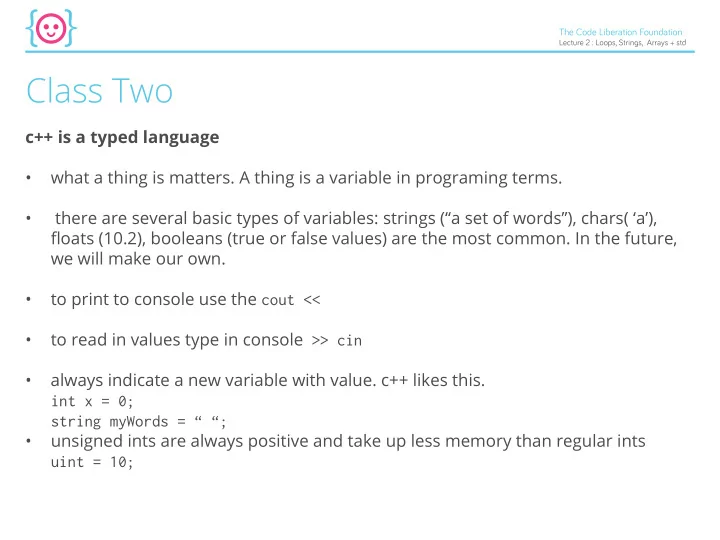
Class Two

c++ is a typed language

  • what a thing is matters. A thing is a variable in programing terms.
  • there are several basic types of variables: strings (“a set of words”), chars( ‘a’),

fmoats (10.2), booleans (true or false values) are the most common. In the future, we will make our own.

  • to print to console use the cout <<
  • to read in values type in console >> cin
  • always indicate a new variable with value. c++ likes this.

int x = 0; string myWords = “ “;

  • unsigned ints are always positive and take up less memory than regular ints

uint = 10;

slide-2
SLIDE 2

The Code Liberation Foundation

Lecture 2 : Loops, Strings, Arrays + std

  • If you set a value to const it will never change. If you try and change it, the

compiler will complain. Think of it as a constant value. Like your biological mom

  • r dad, will always be the same person.

aka string myBestFriend = “Stacey”; const string myBiologicalDad = “David”; string myBestFriend = “Terri” //because Stacey is lame! She made fun of me for being smart. myBiologicalDad = “Tom”; //just doesn’t work! Tom can’t be your biological dad. You only get one of these.

  • Enums or Enumerators are cool.

Enums are lists of unsigned conts that match up to real words. They can make game programing way less painful.

slide-3
SLIDE 3

The Code Liberation Foundation

Lecture 2 : Loops, Strings, Arrays + std

For now let’s look at it like a data type for the diffjcultly level of a game. A data type is a type of data or a type of thing or an object aka a variable. Data types must be

  • defjned. When we use an int, string, char, bool we are using a predefjned data type

by the c++ language. Here we are making our very fjrst one we can defjne! It’s a enum. Data Types (or objects) must be defjned fjrst Data Types must be instantiated (created) second. With int, c++ has taken care of step one for you. That’s why we call an int and primitive data type. Enums are primitive data types that have yet to be defjned. You have to do that like so: //fjrst ofg defjne the enumerator enum difficulty { NOVICE, EASY, HARD};

slide-4
SLIDE 4

The Code Liberation Foundation

Lecture 2 : Loops, Strings, Arrays + std

Next up, instantiate the enum.

  • So what is instantiate? Instantiate means to create an instance of an object.
  • An object, or data type, is a conceptual blueprint. Think of it like the blueprint for

a car or house

  • to instantiate it means to create an instance of it - aka to build the actual car.

There multiple 1969 racing porches out there, however, only one blue print. You can create both these things in c++. difficulty myDifficulty = EASY; why caps? It’s a language convention in C++ to make const values all caps for clarity.

slide-5
SLIDE 5

The Code Liberation Foundation

Lecture 2 : Loops, Strings, Arrays + std

Now we can use enum to test for states.

enums

** NOTE YOU CAN NOT REASSIGN mydifg now.... It’s a constant data type. If you try, you will get an error

enum difficulty {NOVICE, EASY, HARD}; difficulty myDiff = EASY; if(difficulty == EASY) { //only fire 2 rockets; } /* Because enums are equal to a list of numbers, NOVICE == 0 EASY == 1 HARD == 2. */ // this also works. if(difficulty == 1) { //only fire 2 rockets; } mydiff = HARD; // NO GOOD!

slide-6
SLIDE 6

The Code Liberation Foundation

Lecture 2 : Loops, Strings, Arrays + std

(Pseudo) Random numbers baby!

Random is functionality coming from our <stdlib.h> library. Our preprocessor puts it all before our code so we can have access to it, even though we don’t see it in our

  • IDE. Do do that we need a include statement though

#include <stdlib.h> //note no semi colon rand(); returns a val between 0 - 32767 One snag - it will always go get the same values. DOH! We have to seed it to get difgerent values each time. srand(time(0)); this seeds the random number with a difgerent value every time the app runs and it is from the system’s clock. Time is a lib you must include #include <time.h>

slide-7
SLIDE 7

The Code Liberation Foundation

Lecture 2 : Loops, Strings, Arrays + std

Question time!!

What is a data type? What are some data types of c++? What is an unsigned int? What is a const? What is an enum? How do you use an enum? What is an object? What is an instance of an object? How do you deal with the fact rand() is always the same?

slide-8
SLIDE 8

The Code Liberation Foundation

Lecture 2 : Loops, Strings, Arrays + std

What is %? When would you use a %? How do I check for equality of two variables? What is a game loop? And who read the book *very* carefully? Defjne && || and != and when we’d use them.

slide-9
SLIDE 9

The Code Liberation Foundation

Lecture 2 : Loops, Strings, Arrays + std

loopy girl -- or for loops!

A simple loop that runs while a condition is true. for (int i=0; i< 10; i++) { //run this code on loop. //each time you hit the end //increment i and start again //until i is 10 } int count = 0; for (; count< 10) { //run this code on loop. count++; //increment count } //there had best be a break

  • somewhere. This is scary

for(;;) { } for loops are extremely useful. They let you run a block of code a cer- tain number of times. As we are about to see, they are really handy for going through a list of items in a collection. just don’t get stuck on the carousel

slide-10
SLIDE 10

The Code Liberation Foundation

Lecture 2 : Loops, Strings, Arrays + std

Strings

a regular string string myString = “hello!”; std give you some nice string functionality. One is a way to create strings with the same number of a certain character. string word(3, ‘!’); this will give you !!! How do you fjnd out how many letters are in a string int howManyLettersInAString = mystring.size(); How to fjnd out where a certain word starts string mystring = “game over”; int location = mystring.find(“over”);

slide-11
SLIDE 11

The Code Liberation Foundation

Lecture 2 : Loops, Strings, Arrays + std

How to fjgure out if a certain word is not in a string int location = myString.find(“over”); if(myString.find(“eggplant”) == string::npos){ cout<< “eggplant is not in mySting”<<endl; } How to erase characters string myString = “this is my phrase”; myString.erase (4,5); //myString.erase(where to start, how many to erase); How to start searching a string at a certain point myString.find(“over”, 5); How to add strings (concatenate them) string myPhrase = “hello” + myString;

slide-12
SLIDE 12

The Code Liberation Foundation

Lecture 2 : Loops, Strings, Arrays + std

Questions:

What is a for loop? Why would you use it? What must all loops have? How do you fjnd a phrase in a string? How to do you fjnd out how long a string is? What library is giving you this functionality?

slide-13
SLIDE 13

The Code Liberation Foundation

Lecture 2 : Loops, Strings, Arrays + std

Arrays

Arrays are collections of data. Arrays in c++ are dumb as dirt for people from javascript. They do not check bounds.... What are bound? If you go out of bounds this happens. AKA if you try and access an element in an array past the max number of elements (the bounds) chaos can ensue.

slide-14
SLIDE 14

The Code Liberation Foundation

Lecture 2 : Loops, Strings, Arrays + std

Arrays are collections of data that are FIXED IN SIZE. If you try and go past their size -- oh not nice. the syntax looks like this. arrayType name [number of elements] = {element0, element1, element 2}; Arrays in c++ have a const number of elements. What does this mean? they can’t change in size. You can however change the elements in the array itself. int myArrayOfInts[3] = {0,1,2}; int myInt = myArrayOfInts[2]; cout << myInt; the [ ] allows you to access an element of your array. myInt[4] // out of bounds!!!

slide-15
SLIDE 15

The Code Liberation Foundation

Lecture 2 : Loops, Strings, Arrays + std

MultiDimentional Arrays

arrays that have rows and columns of data. const int ROWS = 3; const int COLUMNS = 3; (note arrays count 0 as 1) string board [ROWS] [COLUMNS] = { { “x”, “x”, “o”}, { “o”, “x”, “o”}, { “o”, “x”, “x”}, } we can iterate through an array using a for loop... In fact this is what they are used for all of the time....

slide-16
SLIDE 16

The Code Liberation Foundation

Lecture 2 : Loops, Strings, Arrays + std

const int ROWS = 3; const int COLUMNS = 3; string board [ROWS] [COLUMNS] = { { “x”, “x”, “o”}, { “o”, “x”, “o”}, { “o”, “x”, “x”}, } for(int i =0; i < ROWS; i++){ for(int j = 0; j < COLUMNS; j ++) { cout<< board[i][j]; } }

slide-17
SLIDE 17

The Code Liberation Foundation

Lecture 2 : Loops, Strings, Arrays + std

More on Objects

A quick review Arrays are just another type of object. Remember objects from a few minutes ago? What are they again? int myArrayOfInts[3] = {0,1,2}; Object are collections of data and functionality. the data is called the member element (I think of them as member variables.) Each bit of functionality is called the member function

slide-18
SLIDE 18

The Code Liberation Foundation

Lecture 2 : Loops, Strings, Arrays + std

Let’s get alien

If you have an alien space ship

  • bject *this will be called a class in the

future*, the amount of energy would be a data member and the ability to fjre the weapons system would be a member function. Class Spaceship() { int energy =10; public void fireWeapons(){ //fire! } } //if you created an instance of this Spaceship myShip = Spaceship(); you could use the .syntax to access data members and data functions

Hint: Objects as I defjned them in class are actually called classes in c++. We will get to them in a few weeks and I’ll clarify more the, Instances of object will become refereed to just as objects in this language.

slide-19
SLIDE 19

The Code Liberation Foundation

Lecture 2 : Loops, Strings, Arrays + std

Dot Syntax

we already used this with myString.size(); size is simply a member function of the string object. Guess what? Arrays are object with functionality we can use!!

slide-20
SLIDE 20

The Code Liberation Foundation

Lecture 2 : Loops, Strings, Arrays + std

Std library

Vectors are my favorite thing in the std library... They are basically very smart, fmexible containers of data we can add and remove items from at will!!! Let’s take a look at them First ofg you need add this to the top of main #include <vector> then this makes the vector vector <string> inventory (10); adding elements is simple. inventory.push_back(“axe”); inventory.pop_back(); //bye bye last element inventory.empty();

slide-21
SLIDE 21

The Code Liberation Foundation

Lecture 2 : Loops, Strings, Arrays + std

//clears the vector You can not use the subscriptors [] to add elements to a vector like you can with an array. inventory[0] = “axe”; this will crash if you are trying to add an element. Instead use push_back();

Iterators

values that identify a particular element in an container. Given an iterator you can ac- cess elements in the container. Say WHAT?!?!

  • k - think of them like stickies on objects telling you where an object is located.

the sticky is not the object but it does tell you where it is at.

slide-22
SLIDE 22

The Code Liberation Foundation

Lecture 2 : Loops, Strings, Arrays + std

vector <string> :: const_iterator iter; iter.begin(); //returns first element in a container iter.end(); //returns last element in a container this kind of iterator lets you dereference the iterator and get to the thing it’s pointing

  • at. All of the sudden, you’ll now have access to all of the functionality of the object

through the iterator! here comes the magic sauce vector <string> :: iterator iter; for(iter = list.begin(); iter!=list.end(); ++iter){ cout << *iter << endl; }

slide-23
SLIDE 23

The Code Liberation Foundation

Lecture 2 : Loops, Strings, Arrays + std

HOLY HOT SAUCE WHAT THE *

In c++ you are dealing with very low level programming. Everything is stored in Memory. An iterator is a kind of REFERENCE to that location in memory.... It’s not what is in the memory itself. To get to the object in memo- ry you have to DEREFERENCE IT... * means let me really use that thing in mem-

  • ry please. Go get it. I want it aka

DEREFERENCE IT

slide-24
SLIDE 24

The Code Liberation Foundation

Lecture 2 : Loops, Strings, Arrays + std

So - Final questions.

What’s an object? What is the functionality of an object referred to as? What’s an array? What’s a vector? What’s an iterator? Homework: You are writing a scifj game. Inform your player they are about to join Dr Who for a year on the tardis. They are allowed to fjll a suitcase with items for the trip. This case is capable of fabricating and storing any item of any size. Create game play in the console that allows users to add and remove elements from the container. Have 10

  • turns. Display the list at the start of the turn. Each turn, ask the player what item to

add to the case. Save the new item. Next ask if they want to remove an item. Remove that item from the case. At the end of each turn, tell the player how many elements they currently have and how many turns are left.