Citizens Advisory Committee of the Regional Transit Authority - - PDF document

citizens advisory committee of the regional transit
SMART_READER_LITE
LIVE PREVIEW

Citizens Advisory Committee of the Regional Transit Authority - - PDF document

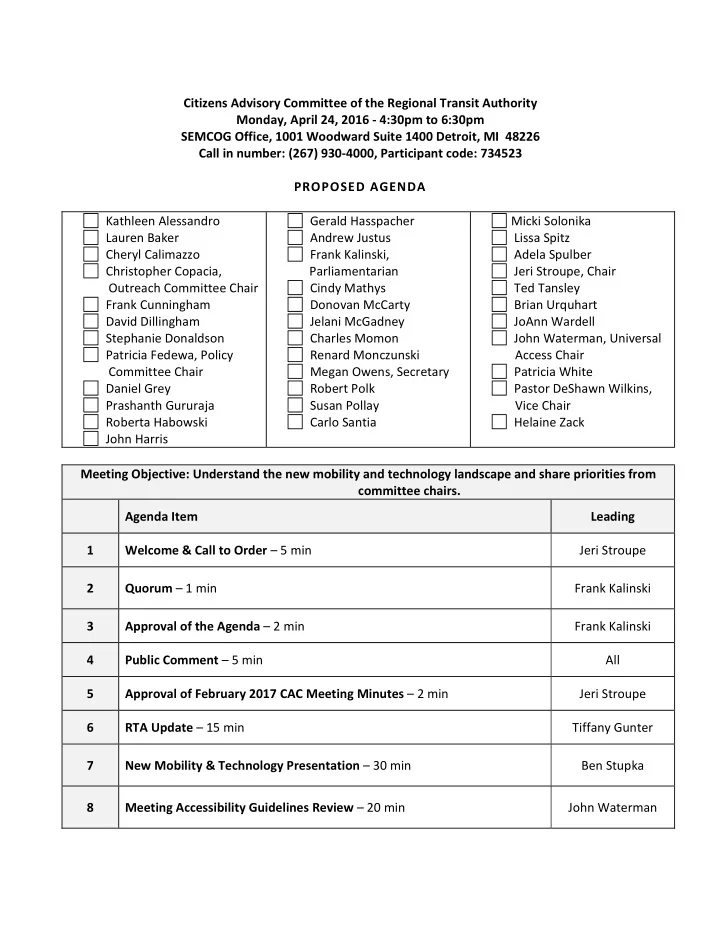
Citizens Advisory Committee of the Regional Transit Authority Monday, April 24, 2016 - 4:30pm to 6:30pm SEMCOG Office, 1001 Woodward Suite 1400 Detroit, MI 48226 Call in number: (267) 930-4000, Participant code: 734523 PROPOSED AGENDA Kathleen


slide-1
SLIDE 1

Citizens Advisory Committee of the Regional Transit Authority Monday, April 24, 2016 - 4:30pm to 6:30pm SEMCOG Office, 1001 Woodward Suite 1400 Detroit, MI 48226 Call in number: (267) 930-4000, Participant code: 734523 PROPOSED AGENDA Kathleen Alessandro Lauren Baker Cheryl Calimazzo Christopher Copacia, Outreach Committee Chair Frank Cunningham David Dillingham Stephanie Donaldson Patricia Fedewa, Policy Committee Chair Daniel Grey Prashanth Gururaja Roberta Habowski John Harris Gerald Hasspacher Andrew Justus Frank Kalinski, Parliamentarian Cindy Mathys Donovan McCarty Jelani McGadney Charles Momon Renard Monczunski Megan Owens, Secretary Robert Polk Susan Pollay Carlo Santia Micki Solonika Lissa Spitz Adela Spulber Jeri Stroupe, Chair Ted Tansley Brian Urquhart JoAnn Wardell John Waterman, Universal Access Chair Patricia White Pastor DeShawn Wilkins, Vice Chair Helaine Zack Meeting Objective: Understand the new mobility and technology landscape and share priorities from committee chairs. Agenda Item Leading 1 Welcome & Call to Order – 5 min Jeri Stroupe 2 Quorum – 1 min Frank Kalinski 3 Approval of the Agenda – 2 min Frank Kalinski 4 Public Comment – 5 min All 5 Approval of February 2017 CAC Meeting Minutes – 2 min Jeri Stroupe 6 RTA Update – 15 min Tiffany Gunter 7 New Mobility & Technology Presentation – 30 min Ben Stupka 8 Meeting Accessibility Guidelines Review – 20 min John Waterman

slide-2
SLIDE 2

9 Committee Reports & Tentative 2017 Goals – 20 min Committee Chairs 10 Final Comments – 10 min Other Announcements All 11 Did we accomplish our purpose for today’s meeting – 5 min Meeting Adjourned All Next CAC Meeting: Monday, May 22, 2016 at 4:30pm UM Detroit Center, 3663 Woodward Ave., Detroit, MI 48201 Call in number: (267) 930-4000, Participant code: 734523 Decisions/Action Items Assigned Due Date Status 1 2 3 4 5

slide-3
SLIDE 3

Citizens Advisory Committee of the Regional Transit Authority Monday, March 27, 2016 - 4:30pm to 6:30pm SEMCOG Office, 1001 Woodward Suite 1400 Detroit, MI 48226 Call in number: (267) 930-4000, Participant code: 734523 DRAFT MINUTES Kathleen Alessandro Lauren Baker (phone) Cheryl Calimazzo Christopher Copacia Frank Cunningham David Dillingham

Stephanie Donaldson

Patricia Fedewa (part) Daniel Grey Prashanth Gururaja Roberta Habowski John Harris Gerald Hasspacher Andrew Justus Frank Kalinski Cindy Mathys Donovan McCarty Jelani McGadney Charles Momon Renard Monczunski Megan Owens Robert Polk Susan Pollay Carlo Santia (phone) Micki Solonika Lissa Spitz (phone) Adela Spulber Jeri Stroupe Ted Tansley Brian Urquhart JoAnn Wardell John Waterman Patricia White Pastor DeShawn Wilkins Helaine Zack Guests: Tiffany Gunter, RTA CEO Nicole Brown, M-1 Rail Meeting Objective: Determine 2017 goals and committees; learn about M-1 Rail launch in May. Agenda Item Leading 1 Welcome & Call to Order – at 4:33pm Jeri Stroupe 2 Public Comment None, as of 4:35 n/a 3 Quorum Not at quorum as of 4:36 (20/35 quorum as of 4:45) Frank Kalinski 4 Approval of the Agenda Moved by J. Waterman, seconded D. Wilkins, approved unanimously Jeri Stroupe 5 Approval of February 2017 CAC Meeting Minutes Moved by D. Wilkins, seconded by K. Alessandro, approved unanimously Jeri Stroupe

slide-4
SLIDE 4

6 RTA Update

  • 1. RTA Staff & Board Update

From T. Gunter:

  • At last board meeting, decision made to terminate Michael Ford’s

contract at CEO. Tiffany is Interim CEO. No timeline in place for next CEO.

  • Lots of work to do in interim. Tiffany’s been very busy meeting with

regional leaders about concerns and interests. Generally positive.

  • Need to understand what happened in 2016 ballot initiative. Common

concerns include funding mechanism (property tax), rural communities, outreach strategy, effective ways to counter misinformation, and innovation (how transit fits with new mobility technologies and services)

  • 2. Q & A
  • S. Donaldson shared for the record that seniors weren’t effectively

engaged; T. Gunter committed to better engage in future efforts.

  • K. Alessandro shared “crazy idea” – explore opportunity to concurrent

transit millage votes with AAATA, SMART, and RTA. T. Gunter will

  • consider. Discussions noted different ballot schedules, opt-out

communities, etc.

  • S. Pollay asked about Trump’s budget proposal impact and ways to

make people more aware of impact. T. Gunter said the staff is exploring potential impact and will consider was to explain/promote.

  • A. Spulber asked about opt-out communities. T. Gunter acknowledged

it remains a problem.

  • C. Mathys asked about revisiting Transit Plan and need to address

different needs in different communities. T. Gunter said that yes, they will revisit it and maybe looking through a very different lens. Will definitely look to better address “what’s in it for me”

  • R. Monczunski asked about public engagement. T. Gunter thinks it

would be wise to improve toolkit before going out to public. In latter 2017, will be out in the community more. Time has been an enemy in the past.

  • J. Waterman reminded of just 1% loss, urged not to lose all the great

things that were in the plan. T. Gunter said board retreat discussions will decide level of plan adjustment.

  • M. Owens offered the CAC to be ambassadors on behalf of the RTA,

who can’t be everywhere. T. Gunter said more time will allow for more

  • pportunities for partnership.
  • D. Dillingham wondered whether opt-out communities have to be

included, without it would likely have won. T. Gunter said everything is

  • n the table, but that she prefers to focus not on excluding

communities instead on ensuring all communities understand how Tiffany Gunter & Jeri Stroupe

slide-5
SLIDE 5

they’ll benefit. 7 CAC Goals & Committees

  • 1. Survey Results

Top priorities: 1) Advise RTA on policy/projects 2) Equipping CAC members to be effective ambassadors 3) Shift social norms & promote transit as socially acceptable 4) Discussions between RTA Board & CAC by county Lower priorities:

  • Discussions btn PAC-CAC
  • CAC visits to local council meetings
  • Tour transit facilities
  • Advising RTA on staffing/communications
  • CAC business cards

Other suggestions:

  • ADA services
  • Interesting presentations from places where transit has worked
  • Learn more about Uber and how it will intersect with transit
  • 2. Recommend Committees

Some interested in all recommendations Exec reviewed and recommended: 1) Seniors & ADA -> amend to Universal Accessibility & Design 2) Outreach (include ambassadorship, communications and PR) 3) Policy (include transit operations and new mobility) Comments:

  • Don’t lose focus on basic quality bus service and stops when thinking

about new mobility. Should think more about blending and learning best of both.

  • Discussion about what “operations” means and how to best

incorporate

  • Importance of CAC getting opportunity for input on RTA decisions

before they are finalized

  • 3. Vote on Committees & Chairs

Maintaining the committees already in bylaws (no vote needed) Chairs to be decided by committees

  • Universal Design – 5 ppl interested
  • Chair - John Waterman, Frank C.
  • Outreach – 5 ppl interested (incl L. Spitz, K. Alessandro, T. Tansley)

Jeri Stroupe

slide-6
SLIDE 6
  • Chair – C. Copacia, VC – M. Owens
  • First meeting Thurs April 13, 6pm, 500 Griswold, Suite 1650,

focused on developing priorities, workplan, and assignments for the year

  • Regular meetings will be immediately following CAC mtgs
  • Policy – 8 ppl interested
  • Chair Patty Fedewa

8 M – 1 Rail Presentation Clarifying names

  • M-1 Rail is nonprofit org who developed and own the streetcar
  • QLINE is project name (Quicken purchased naming rights)
  • TransDev North America is contracted to manage staff and daily
  • perations

All 6 streetcars now in here. Concluding testing in April. Launching May 12. Stay safe! Woodward has changed; everyone needs to remember to share the road to keep everyone safe.

  • Use crosswalks. Look up, look both ways! Streetcars are quiet.
  • Step over tracks, as tracks may be slippery
  • When crossing tracks with wheels, cross at right angle to not get stuck
  • Cyclists should walk across street and consider alternative routes
  • Drivers – remember to NOT block the tracks, park inside white lines
  • Remember that streetcar is shared traffic lane
  • In 3 places, streetcar must cross traffic lanes. Watch for and honor

new “transit-only” traffic light.

  • Remember, streetcar is 87,000 pounds and takes 66 feet and 5 full

seconds to stop!! Don’t try to beat the streetcar. Operation facts:

  • Fare will be $1.50 for 3-hour timeframe. $0.75 for seniors and anyone
  • n Medicare or Medicaid. Will sell annual passes too.
  • “Trust but verify” fare policy (common across country)
  • Can buy ticket ahead of time with credit card or ap
  • Can purchase with cash on vehicle
  • Staff will periodically check everyone’s passes
  • Hours of operation M-Th 6a-10p, Fri 6a-12m, Sat 8am-12m, Sun 8a-8p
  • Working with Safety & Security Taskforce to develop passenger bill of

rights M-1 worked to ensure workforce represents the community (52% Detroiters, 77% African-Americans) Nicole Brown

slide-7
SLIDE 7

Looking for volunteers during Grand Opening May 12 – www.M1rail.com/volunteer Q&A

  • Will ppl with disabilities who don’t have medicare or Medicaid get a

discounted fare – Nicole will check

  • Any Park&Ride? Nope, not for free. Will link to bestparkingoption.com

from website

  • Annunciators? Yes, John Mason will be voice of streetcar announcing

stops and other reminders. Kiosks will also have brail.

  • How long for full trip? Appx 25 minutes. Not faster, but additional
  • ption. Want to really integrate with existing transit
  • Will map show transit connections and parking? Yes, still developing.

9 Final Comments (done between items 6 & 7) Other Announcements

  • Ferndale/Royal Oak is exploring a shuttle service around those areas,

including zoo and parts of Detroit. Seeking funding from each community.

  • Hearing interest in the community in exploring very new ideas

collaborating between personal/para/public transit Everyone 10 Did we accomplish our purpose for today’s meeting? Meeting Adjourned – 6:31pm Everyone Next CAC Meeting: Monday, April 24, 2016 at 4:30pm SEMCOG Office, 1001 Woodward Suite 1400 Detroit, MI 48226 Call in number: (267) 930-4000, Participant code: 734523

slide-8
SLIDE 8

RTA CAC Executive Meeting Monday, April 10, 2017 at 4:00 pm – 5:00 pm TechTown, 440 Burroughs St., Detroit MI 48202 Participants: Tiffany Gunter, RTA Interim CEO (by phone) Frank Kalinski, Parliamentarian (by phone) Megan Owens, Secretary Jeri Stroupe, Co-Chair of Policy DeShawn Wilkins, Vice Chair Patty Fedewa, Chair of Policy Committee (by phone) John Waterman, Chair of Universal Access Committee (by phone) Christopher Copacia, Chair of Outreach & Ambassadors Committee Next Meeting: Monday, May 8 at 4:00 pm at TechTown or by phone Meeting Objective: Set agenda for April CAC meeting and draft 2017 meeting themes Agenda Item Leading

  • 1. RTA update from Tiffany Gunter
  • a. Working with Board members to consider various next steps
  • i. Need concrete analysis on each idea proposed, identify fatal
  • flaws. Board retreat being planned for late May
  • b. Tiffany drafting a public letter to update the region, “anti-obituary”,

tentatively scheduled to go out 4/17.

  • c. Roy Rose resigned from board for personal reasons, no replacement

named yet

  • d. Ben Stupka will be leaving in May, joining Parson Brinkerhoff. Can still

work on behalf of RTA in contract role

  • e. Working to fill financial shortfall for FY2018
  • 2. Agenda of next CAC meeting April 24
  • a. Will include RTA update from Tiffany
  • b. Do regular review of agenda, minutes
  • c. Need to decide whether/how to utilize RTA committee liaisons this year
  • i. Important for liaisons to be clear when they are speaking on

behalf of the CAC and when they are expressing their own

  • pinions
  • ii. Consider challenge of frequently cancelled meetings (i.e. PAC

meetings cancelled in July, Oct and Nov of 2016, often with little advance notice)

  • iii. Less need now that corridor projects completed
  • iv. **Outreach will discuss and develop ideas/proposal
  • 1. Include proposal in next CAC meeting
  • d. Include Committee updates

Tiffany Gunter All

slide-9
SLIDE 9
  • i. Strive for each committee to have some tentative goals for the

year

  • e. Ben will provide mobility innovation presentation (**Tiffany will confirm

with him)

  • i. 15 minute presentation, 10 minute Q&A
  • f. Revisit meeting accessibility guidelines
  • i. John/Universal Access Committee to make 5-10 minute

presentation

  • g. Meeting Objectives – start developing committee goals for the year,

learn more about mobility innovation and accessibility

  • 3. Themes/Topics for the rest of the year
  • a. Purpose/goals of having topics for each meeting
  • i. Build our transit IQ
  • ii. Partially to educate and empower current CAC members
  • iii. Educate others by videotaping and sharing online as educational

series

  • 1. **Outreach will explore this
  • iv. Where possible, identify action items as topics relate to

current/future transit

  • b. Topic ideas
  • i. QLINE
  • ii. Detroit Bike Share and greenways (Lisa N, Todd) – May?
  • iii. Complete Streets
  • iv. Transit system comparisons (Neil Greenberg and Hannah Kelly)
  • v. Shared-use mobility and equity (SUMC)
  • vi. Transit funding – details on current, options, pros/cons
  • vii. Universal Design / ADA Accessibility
  • viii. New Trolley services of Grosse Pointe, Troy, Ferndale/RO
  • ix. New mobility and future technology – confirmed for April
  • x. Current transit, including strengths and limitations of each

system – June?

  • c. March was M-1 Rail QLINE launch/safety
  • d. April will include New Mobility and Technology Innovation
  • e. May - Detroit Bike Share and greenways
  • f. June
  • i. Current transit, including strengths/limitations of each system
  • ii. M-1 Rail QLINE – feedback on effectiveness, next steps
  • g. **Jeri and Megan will develop recommendation for calendar for the year
  • 4. Next Exec mtg
  • a. Will review priorities we developed and make sure each are assigned to

a committee

  • b. Plan for the Monday afternoon two weeks before each CAC mtg
  • i. May 8, 4pm
  • ii. June 12, 4pm

Jeri

slide-10
SLIDE 10
  • 5. Other

Concern voiced about how CAC email should be used, whether there is a conflict of interest when members send info from groups they work for

  • a. Discussion of value of sharing transit info
  • b. Concerns about solicitation, risk of getting too many emails
  • c. **Frank will write up a policy recommendation on CAC email usage to be

discussed at next CAC Exec mtg Frank Decisions/Action Items Assigned Status 1 Tiffany drafting “anti-obituary” for CAC to share with members All Distribute once posted (4/17ish) 2 Outreach Committee to consider/develop recommendations on whether/how CAC should utilize board committee liaisons Chris Due 4/24 3 Outreach Committee to consider/develop recommendations on whether/how we can stream or tape and share presentations

  • nline

Chris Due 4/24 4 Finalize agenda and meeting materials for distribution by 3/21 Jeri Due 4/17 5 Develop draft calendar themes for the year Jeri & Megan Due 4/17 6 Frank will write up a policy recommendation on CAC email usage to

be discussed at next CAC Exec mtg

Frank Due 5/8 7

We’ll plan to have CAC Exec mtgs the Monday afternoon two weeks before each CAC mtg, including May 8 and June 12, 4pm

Jeri In progress

slide-11
SLIDE 11

Citizens Advisory Committee of the Regional Transit Authority 2017 DRAFT AGENDA Objectives:

  • 1. Educate and empower CAC members and our communities; and
  • 2. Identify action items to create the best transit plan.

Month Themes Guest Speakers March M-1 Rail/QLINE Launch Nicole Brown April New Mobility & Future Technologies Ben Stupka May Detroit Bike Share & Greenways Lisa Nuzkowski/Adriel Thornton, Todd Scott June Current State of Transit SEMCOG, Neil Greenberg, Hannah Kelly July n/a (potentially cancelling meeting) n/a August Shared-Use Mobility & Equity Sharon Feigon September Transit Funding & Finance TBD October Universal Design / ADA Access TBD November New Trolley Service (Troy, GP) Jordan Twardy December n/a (potentially cancelling meeting) n/a

slide-12
SLIDE 12

Regional Transit Authority – Citizens Advisory Committee’s Recommendations for Accessible Meetings

The Citizens Advisory Committee (CAC) serves as a voice of the citizens of Wayne, Macomb, Oakland, and Washtenaw Counties for the Regional Transit Authority. The legislation forming the RTA emphasized the importance of representation of people with disabilities in the CAC by dedicating a percentage of slots for individuals with disabilities. The ability to hold a meeting in which everyone has an equal opportunity to participate will make the voice of the CAC stronger and more complete. Planning a fully accessible meeting can quickly become overwhelming without support or guidance from persons with disabilities, organizations that support individuals with disabilities, and ADA National Network

  • Centers. The challenge for planners is the diversity of individuals with disabilities and the various and

sometimes conflicting accommodations needed for full inclusion in a meeting. Most barriers to full participation can be removed without great expense or effort. The simplest and most effective way to accommodate individuals with disabilities is to ask what accommodations they need to participate in the meeting. Individuals will share simple things that will make the meeting fully accessible and successful. Knowing the accommodations needed for every member without communicating with members is nearly impossible. The checklists in this document are designed to form a foundation of support to make the meeting accessible for the majority of individuals with disabilities. A section of some temporary solutions from the Department of Justice and members of the Citizens Advisory Council has also been included to demonstrate acceptable ways to overcome barriers. The document is based on input from members of the CAC’s Senior and ADA Committee, Planning Accessible Meeting and Events Toolkit by the American Bar Association’s Commission on Disability Rights and Accessible Information Exchange: Meeting on a Level Playing Field by US Department of Justice/Civil Rights Division/Disability Rights Section.

slide-13
SLIDE 13

Meeting Location

The location of the meeting was identified as the greatest barrier faced by members of the CAC to participate in any

  • meeting. The proximity of public transportation was considered a mandatory requirement to any meeting held by the

Citizens Advisory Committee. Beyond the public transportation is the experience of individuals with disabilities getting into the building, traveling around the building, locating the meeting space, and feeling comfortable in the meeting

  • space. Checklists for Exterior Features, Interior Features and Meeting Space are included.

Meeting Location Exterior Features Checklist

The meeting location should have: ____ Accessible public transportation, fixed-route or paratransit, in close proximity to and from the meeting location ____ Passenger drop-off and pick-up points adjacent to the main accessible entrance that are clearly marked (Braille and tactile/raised signage), covered, and with curb cuts ____Accessible parking spaces that are clearly marked (symbol of accessibility), adequate (min. 1 space for every 25 spaces) and located on the shortest accessible route of travel from adjacent parking to an accessible entrance The meeting location should have at least one accessible main entrance/exit doorway that is: ____ Well-illuminated and clearly marked with symbol of accessibility, signage regarding CAC meeting ____Minimum 32 inches wide (with the door open 90 degrees) to accommodate users of wheelchairs and scooters ____ At street level or accessible by ramps or lifts ____Easy-to-open (automatic/push button door openers, lever handles), light (no more than 5 pounds) doors; no revolving doors ____With contrasting door frames, stickers, or bright signs, if glass door ____ Connected by an accessible route (see below) to public transportation stops, accessible parking spaces, accessible passenger drop-off and pick-up points, and public streets or sidewalks Accessible routes should have: ____Directional signs along the route to the main accessible entrance ____ Slip-resistant, level surfaces along the exterior accessible route to the main entrance of the meeting location ____Curb ramps/cuts so that persons who use mobility devices are not traveling in the street ____Visual and audible signals at any street crosswalks ____Barrier-free/step-free paths of travel ____Ramps for inaccessible areas, equipped with handrails on both sides if the rise is greater than 6 inches, and level landings ____Stairs with continuous handrails on both sides; no open risers (space between steps) ____Tactile ground surface indicators that signal stairs and ramps for people who are blind or have visual impairments ____Toileting area for service animals

slide-14
SLIDE 14

Meeting Location Interior Features Checklist The meeting location should have:

____ A greeter (receptionist, security guard, or CAC member) at the primary accessible entrance for support to direct members to the meeting room ____ Seating along corridors for longer travel distances inside of building to meeting room/restrooms ____ Automatic/push button openers or easy-to-open, light (no more than 5 pounds) doors with lever handles that are easy to grasp with one hand ____ Wide (32 inches minimum with the door open 90 degrees) doorways for users of wheelchairs/scooters to enter/exit ____ Clearly marked (Braille and tactile signage), accessible exits ____Sufficiently wide (64 inches for two-way traffic), barrier-free hallways and corridors to allow everyone to move about freely ____Even, stable, regular, slip-resistant, non-sloped path of travel from the main accessible entrance to the meeting room ____Clearly marked (Braille and tactile signage) accessible restrooms located on an accessible route ____Emergency procedures for persons with disabilities (audio and visual alarms in halls and sleeping rooms) ____ Procedures to respond to medical issues and emergencies ____ Well-lit areas; with optional adjustable lighting Elevators, if necessary for accessible interior circulation, should have: ____ Close proximity to meeting rooms and along an accessible route ____ Elevator call buttons with visual and audio signals, reachable by users of wheelchairs and scooters ____Clearly marked (Braille and tactile) signage located on both sides of the door and along an accessible route ____Elevator control buttons that are designated by Braille and raised characters or symbols and are reachable by wheelchair/scooter users ____Elevator interiors adequately illuminated and wide enough for wheelchairs/scooters to enter, maneuver within reach of controls, and exit ____Elevator voice and visual display two-way emergency communication Additionally, the meeting location may have: ____Registration/concierge desks, at a height that is accessible by people using wheelchairs/scooters and allowing for a forward approach with adequate knee clearance under the desk ____ Accessible space for walking service animals ____ Availability of TTY, hearing-aid compatible, and volume-control telephones reachable by wheelchair/scooter users ____ Signs (with Braille and tactile characters, sans serif or simple serif large type, sentence case, and good contrast) that direct attendees to all rooms, including the meeting room

slide-15
SLIDE 15

Meeting Space Checklist

The meeting space should have: ____ Doors wide enough (32 inches minimum with door open 90 degrees) for users of wheelchairs/scooters to enter/exit ____ Easy-to-open, light doors (no more than 5 pounds) with lever handles or automatic/push button openers ____ Adequate space to allow all participants to move about freely ____ Seating aisles that are wide enough (36 inches minimum) to accommodate wheelchairs/scooters ____ Well secured and covered cables, wires and cords placed outside of paths of travel to prevent trip hazards ____ Accessible, integrated seating throughout the room, with preferred seating for persons with visual and hearing impairments in the front rows ____ Good lighting, acoustics and a functioning auxiliary sound system for participants with visual and hearing impairments ____ Roving microphones for audience questions ____ Proper air circulation with temperature controls Additionally, the meeting room may have: ____ Speaker podium at ground level or on a platform that is accessible by ramp or lift ____ All audio visual equipment located in an area that does not block paths of travel ____ Multiple sets of accessible outlets for laptops and other electronic aids ____ Assistive listening devices, hearing or induction loops, and Communication Access Realtime Translation (CART) for participants who are deaf or hard of hearing ____ Accessible bathrooms in close proximity to meeting room(s) ____ Quiet break space in close proximity to meeting room(s) ____ Toileting space and water for service animals If using sign language interpreters and CART, then the meeting space should have: ____ Prominent, well-lit, visible space for interpreters to stand (e.g., raised platform with a dark, solid color background) ____ Clear line of sight to interpreters and real-time CART

slide-16
SLIDE 16

Materials

Promotional/Registration Materials Checklist

Recommendations for media, handouts, websites, and communications before the meeting/presentation ____ Include a statement that meeting/event is accessible ____ Include a request for accommodations statement ____ Designate a contact person to handle accommodation requests ____ Identify any barrier that cannot be eliminated ____ Ensure that the website is accessible ____ Include an accessibility link for meeting/event on your website in a prominent place ____ Offer materials in alternative formats ____ Provide alternative registration options (online, telephone, text phone, email) _____ Attachment for emails and flyers should have a text/word based format (.txt, etc.) ____ Provide electronic versions of documents one-working day prior to meeting

Presentations Checklist

Recommendations for presenters and individuals running the meeting: ____ Before speaking, make sure to state your own name ____ Before addressing others, make sure to state their name ____ Announce when the meeting begins and ends ____ At the start of the meeting, orally describe the room layout and location of emergency exits, food/beverages, and restrooms ____ At the start of the meeting, introduce the interpreter(s) and other service providers, and other key staff to contact for assistance (e.g., in finding the exit, restrooms, drinking fountain) ____ Be visible to everyone; stand in good light ____ Be audible to everyone; use a microphone ____ Provide an overview of the presentation at the start and a summary of the key points at the end ____ Verbalize the agenda and refer to agenda and documents throughout presentation so all individuals can follow along ____ Keep the presentation clear, simple, concise, and organized ____ Use simple language; avoid acronyms, jargon, and idioms ____ Make presentation text and visuals large enough to be read from back of the room ____ Avoid using gestures and visual points of reference ____ Face the audience; avoid turning away when speaking

slide-17
SLIDE 17

____ Keep hands and other objects away from your mouth when speaking ____ Give people time to process information by pausing between topics ____ Use multiple communication methods for different learning styles (verbal information, pictures and diagrams, text, auditory) ____ Describe verbally all visual materials (e.g., slides, charts, overheads, videos) in detail ____ Provide audio descriptions (i.e., describe facial expressions, body language, actions, and costumes) and captioning

  • r CART for all videos

____ Allow participants extra time to look at visual materials (for instance, individuals who use interpreters cannot look at both the interpreter and the materials simultaneously and persons with learning disabilities and cognitive impairments need time to process the information) ____ Check in with participants to ensure that presentation is understood and clarify if needed ____ Allow persons with visual or learning disabilities to record meetings ____ When reading directly from text, provide an advance copy and pause slightly when interjecting information not in the text If interpreters are being used: ____ Do not walk while speaking or presenting ____ Speak to the person for whom the interpreter is working, not the interpreter ____ Speak in well-modulated tones and at a pace that allows interpreters to interpret accurately and persons with learning and cognitive impairments to process Recommendations for Participant Interaction ____ Inform attendees of the presentation about any writing or reading activities during the meeting at the start so people with visual, cognitive, or motor impairments can fully and equally participate ____ Instruct participants to wait to be called on, not to interrupt, speak one at a time, and speak clearly into the microphone) ____ Repeat questions posed by people in the audience before responding ____ Allow for written questions ____ Make available time for participants to ask questions or to provide feedback ____ Allow for regular breaks (about every 45 minutes) for questions and answers; people/service animals restroom; access service providers such as interpreters, CART providers, note takers, readers Recommendations for Presentation Materials Required During the Meeting ____ Make materials (documents, PowerPoints, agendas, slides) available in advance of the meeting to allow persons with learning and other cognitive impairments, as well as interpreters and other support personnel, to familiarize themselves with the materials and ask any questions ____ Make electronic versions of documents available in plain text, rich text, or Microsoft Word ____ If background documents are not made available before meeting, ensure speakers summarize their main points.

slide-18
SLIDE 18

____ Ensure that visual aids are printed in large font and make print copies available ____ Provide a verbal overview of information in printed textual materials ____ Provide a written description of all images Recommendations for making printed materials accessible to persons with visual impairments Text Format ____ Use a 16-point font size, but if not practical, at least 14 point ____ Avoid using highly stylized typefaces ____ Use easy-to-read fonts with clearly defined letters and clear spacing between the letters, such as sans-serif fonts (e.g., Helvetica, Verdana, Arial) ____ Avoid using blocks of capital letters for more than a couple of words ____ Avoid underlining or italicizing large volumes of text ____ Spell out numbers, as persons with visual impairments often have trouble distinguishing between the numbers 3, 5, 8, and 0 Layout ____ Align all text on the left, rather than centered or right justified ____ Do not hyperlink URLs because underlining reduces readability ____ Do not place text directly over or wrap text around an image ____ Use at least 1.5 spacing between lines of text paragraphs ____ Print on one side Contrast and Color ____ Ensure good contrast between the font (preferable black) and background colors ____ Use a single solid color for documents with a colored background ____ Use pastel blue or yellow, not pink, red, or green, if color paper is required

slide-19
SLIDE 19

Effective, Respectful Communication

Communication with individuals with disabilities should be no different than the respectful, clear communication given to others. This is especially important to remember when considering that the majority of disabilities are “hidden” or “invisible,” i.e., not obvious. Here are some general guidelines: Every Person

  • Treat the person with the same respect that you extend to every person
  • Focus on the person, not his or her disability
  • Ask each person what will make him or her most comfortable
  • Always ask the person if he or she needs assistance and how you can assist; do not assume he or she needs help
  • Do not make decisions for the person
  • Address the person directly rather than the sign language interpreter, reader, or other access provider

Persons Who Use Wheelchairs/Scooters

  • When speaking for more than a few minutes, bend to eye level or pull up a chair
  • Never lean on, push, move, or touch the mobility device

Persons Who Are Blind or Have Visual Impairments

  • Introduce yourself and others if present
  • Ask the person his or her name
  • Identify your job or role
  • Be descriptive when giving directions
  • Avoid using visually-oriented references
  • Do not pet or distract service animals
  • Walk on the opposite side of the service animal
  • Offer your arm if person needs to be guided
  • Describe where you are going and any obstacles if you are serving as a guide
  • With permission, guide the person’s hand to the back of a chair if you offer someone a seat
  • Let the person know when you are leaving
  • Find a place with good lighting, but not too bright

Persons Who Are Deaf or Hard of Hearing

  • Ask the person how he or she prefers to communicate (e.g., sign language, gesturing, writing, or speaking)
  • Advise the person if you have trouble understanding the person
  • Face the person when talking
  • Find a well-lit room, but avoid glare
  • Speak clearly, avoiding gum chewing or obscuring your mouth with your hand
slide-20
SLIDE 20
  • Use your normal tone of voice and volume
  • Avoid spaces with background noise
  • Have pen or paper or device to text on hand as alternative communication method
  • In groups, request that people speak one at a time
  • Address the person rather than his or her interpreter
  • When communicating with a person who reads lips, speak clearly in a normal way that does not over exaggerate

words, use short and simple sentences, avoid blocking your face, and stand in a well-lit place

  • Ensure that the venue has an induction loop that stops background noise interfering if the person is wearing a hearing

aid

  • Ask, if you have any doubts, if the person understood you
  • Do not pretend to understand when you do not
  • Be aware of situations involving announcements or calling out names so you can notify persons who are deaf or have
  • ther hearing impairments

Persons with Speech Difficulties

  • Ask each person what will make him or her most comfortable
  • Listen carefully
  • Do not pretend to understand when you do not
  • Give the person your full attention
  • Find a quiet space
  • If you do not understand, ask the person to repeat; if you still are unable to understand, ask the person to write the

information or to recommend an alternative method of communicating

  • Do not finish sentences for the person or interrupt
  • Consider writing as an alternative means of communicating

Persons with Learning/Cognitive Difficulties

  • Ask each person what will make him or her most comfortable
  • Listen carefully
  • Speak clearly
  • Check for understanding
  • Use clear, concrete language, avoiding abstractions
  • Allow the person extra time to process the information and ask questions
  • Ask the person how he or she prefers to communicate (e.g., written or verbal)
  • Chunk in information into digestible pieces to avoid overload and losing valuable contributions.
  • Find a quiet place without distractions

Persons with Developmental Disabilities

  • Ask each person what will make him or her most comfortable
slide-21
SLIDE 21
  • Speak clearly
  • Use simple words and concrete (not abstract) concepts
  • Break down complex concepts into small parts
  • Do not use “baby” talk
  • Ask neutral questions
  • Verify responses by repeating questions in a different way
  • Allow time for decision-making
  • Keep to the person’s schedule and routine
  • Model your pace of speech and vocabulary on that of the person
  • If you are not sure if the person understood you, ask him or her to repeat the information for your benefit

Persons with Psychosocial Conditions

  • Ask if there is a preferred time to communicate
  • Keep the pressure of the situation to a minimum
  • Use automated reminders to highlight times and locations of meetings
  • Provide written instructions
  • Allow for breaks
slide-22
SLIDE 22

Temporary Barrier Removal Suggestions for Accessible Features

Accommodations listed below are directly from the Department of Justice and serve as examples of how to temporarily remove barriers. Feature 1 - Temporary Barrier Removal, Parking and Passenger Drop-Off Areas

Barrier Modification Parking is available, but no accessible parking is provided or there are not enough accessible parking or van-accessible spaces. Find a level parking area near the accessible entrance and designate that area for accessible

  • parking. Use a group of three standard parking

spaces to make two accessible parking spaces that are located on either side of an access aisle (which is created from the middle standard space). Traffic cones or other temporary elements may be used to mark the spaces and keep cars from parking in the access aisles. Provide a sign to designate each accessible parking space and make sure the access aisle of each space is connected to the accessible route that leads to the accessible entrance. Accessible parking is provided, but spaces do not have a marked access aisle next to them. Restripe the accessible parking spaces to provide an access aisle. As a temporary solution for the meeting day, use traffic cones to mark off the access aisle and curb ramp area. The first accessible parking space provided should be a van accessible parking space with an access aisle that is at least 96 inches wide to accommodate a van's wheelchair lift or ramp. Accessible parking spaces, passenger drop-off areas, or access aisles are on sloped surfaces. Find a level parking area that is close to the accessible entrance. Provide accessible parking spaces and access aisles in that area. Use one parking space next to the accessible parking spaces to serve as an accessible drop-off area. Make sure the accessible parking spaces and drop-off area connect to an accessible route to the entrance. Provide a sign designating each accessible parking space. No sign with the international symbol of Provide a temporary sign in front of each

slide-23
SLIDE 23

accessibility is installed at each accessible parking space. accessible parking space. There is insufficient vertical clearance of at least 98 inches (8 feet - 2 inches) for the vehicle route to the parking space, the parking space, the access aisle, and along the vehicle route to the exit for high-top or large vans. Remove or raise low objects along the route or relocate each van accessible space.

Feature 2 - Temporary Barrier Removal for Routes to the Building Entrance

Barrier Modification The sidewalk connecting parking to the meeting site entrance is too steep to be accessible. Find another route that can serve as the accessible route or provide parking services or parking in another location (e.g., valet parking). The accessible route crosses a curb and no curb ramp is provided. Install a portable ramp that has an incline with a slope no steeper than 1:12 (8.33%) with edge protection. One or two steps are part of the walkway leading to the accessible entrance. Install a portable ramp that has an incline with a slope no steeper than 1:12 (8.33%) with edge protection and handrails, if needed. Branches or other objects over a walkway or pedestrian route are less than 80 inches above the walk. Prune the branches or remove the items that are hanging below 80 inches. Another approach is to install a detectable barrier under the item that is too low. The detectable barrier must be within the range of 27 inches or lower above the route. One or more objects protrude too far from the side into the circulation path causing a hazard for people who are blind or who have low vision. When people who are blind or who have low vision use a cane to detect hazards, objects located at 27 inches or lower are detectable. When an object is located more than 27 inches

  • ff the ground, it is a hazard if the object

protrudes into the circulation path. To make a protruding object detectable: Place an object or a barrier below the protruding

  • bject in the cane-detectable area not more than
slide-24
SLIDE 24

27 inches above the ground. If the protruding object can be moved, lower the

  • bject so its bottom is within the cane-detectable

area (not more than 27 inches above the ground). Prune or alter the protruding object so it does not protrude into the path. The undersides of exterior stairs are not enclosed or protected with a cane-detectable barrier. Add a barrier or enclosure below the stair or relocate the route away from the stair. Enclosing the area below the stair or installing a cane- detectable barrier helps a person who is blind or has low vision stop before hitting her head.

Feature 3 - Temporary Barrier Removal for the Building Entrance

Barrier Modification One or two steps at the main entrance prevent access. If another entrance is accessible and on an accessible route from accessible parking, install a directional sign at the main entrance directing participants to the accessible entrance. Keep the accessible entrance unlocked during meeting

  • hours. If another accessible entrance is not

available, install a temporary ramp with edge protection and handrails. There is a small step at the entrance. Install a short temporary ramp to provide a smooth transition, with a slope no steeper than 1:12 (8.33%) and edge protection and handrails, if needed. The entrance door threshold has an abrupt change in level of more than 1/4 inch and no beveled sides. If the threshold is between 1/4 and 1/2 inch high, add beveled surfaces to both sides of the

  • threshold. Or, replace with a new threshold that

is no more than 1/2 inch high and has beveled sides. The entrance door to the building is heavy and difficult to open. Keep the door propped open or station volunteers near the door to open it for participants.

slide-25
SLIDE 25

The entrance door does not have at least 18 inches of maneuvering clearance on the latch side of the door. Move whatever is blocking the maneuvering clearance, keep the door propped open, or station volunteers near the door to open it for participants. The door or one side of a double-leaf door at the accessible entrance provides less than 32 inches clear-passage width when the door is

  • pen 90 degrees.

Find another entrance with an accessible door,

  • r prop both doors open during meeting times.

The door handle and/or latch at the entry door is not accessible. There are four typical solutions: 1) add an accessible pull or handle to the outside of the door and leave the door unlatched; 2) install an accessible door handle and hardware; 3) leave the door propped in an open position; or 4) have someone open the door.

Feature 4 - Temporary Barrier Removal for Routes to the Meeting Space

Barrier Modification One or more steps along the hallway to the meeting space block access. Install a portable ramp that has an incline with a slope no steeper than 1:12 (8.33%) with edge protection and handrails, if needed. Or, relocate the accessible meeting to another area that is on an accessible route. The meeting space is not on an accessible route and cannot be made accessible. Look for another area where an accessible meeting may be presented. Pedestrian routes that lead to or serve the meeting space have objects that protrude from the side more than four inches into the route with the bottom of the object more than 27 inches above the floor. Note: These objects may be wall mounted or freestanding. Items to check include wall-mounted fire extinguishers, light fixtures, coat hooks, shelves, drinking fountains, and display cases. Place a detectable object on the floor below each object to remove the hazard.

slide-26
SLIDE 26

Pedestrian routes leading to or serving the meeting space have overhead objects with the bottom edge less than 80 inches above the floor. Place a detectable object on the floor below each object to remove the hazard.

Feature 5 - Temporary Barrier Removal for Meeting Space

Barrier Modification Routes within the meeting space have objects that protrude from the side into the route with the bottom of the object more than 27 inches above the floor. Place a detectable object on the floor below each object to remove the hazard. Pedestrian routes leading to or serving the meeting space have overhead objects with the bottom edge less than 80 inches above the floor. Place a detectable object on the floor below each object to remove the hazard. The room has a fixed stage or platform with one

  • r more steps leading up to it.

Install a portable ramp with edge protection and handrails or a portable lift next to the stage. Or, have all presenters speak from the main floor.

Feature 6 - Temporary Barrier Removal for Restrooms

Barrier Modification There is no accessible public restroom near the meeting space. Find the nearest accessible public restroom in the building. Determine the shortest accessible route to that restroom from the meeting space and offer specific directions to participants. Dispensers and hand dryers in the restroom are not within reach of someone who uses a wheelchair or scooter. Place toilet paper, soap, and paper towels on a clean, horizontal surface that is within reach. Hand dryers and dispensers with a bottom edge higher than 27 inches above the floor protrude more than four inches into the route. Place a detectable object on the floor below each dryer and dispenser to remove the hazard for the meeting day.

slide-27
SLIDE 27
slide-28
SLIDE 28

Conclusion

This is a living document that should be reviewed each year by the Senior and ADA committee. Recommendations from individuals with disabilities as well the organizations that support them, is essential for maintaining and keeping this document current. Information provided in this document will increase the involvement of individuals with disabilities in the Regional Transportation Authority. The diversity of individuals with disabilities also requires openness and willingness to work together to ensure accessibility for all committee members.

References

American Bar Association (n.d.). Planning Accessible Meetings and Events: A Toolkit. American Bar Association, Commission on Disability Rights. Available at http://www.americanbar.org/content/dam/aba/administrative/mental_physical_disability/Accessible_Meetings_Toolkit .authcheckdam.pdf Accessible Information Exchange: Meeting on a Level Playing Field by US Department of Justice/Civil Rights Division/Disability Rights Section. Available at: http://www.ada.gov/business/accessiblemtg.htm

slide-29
SLIDE 29

New Mobility Overview!

slide-30
SLIDE 30

2 2

!

!

Purpose and Outline


!

Purpose:!

  • 1. Provide a Broad Overview of New Mobility!
  • focus on how transit provides are using New Mobility

nationally!

  • 2. Develop Common Terms and Understanding!
  • 3. Generate Ongoing Discussion and (hopefully) Service

Pilot Proposals! ! Outline:!

  • 1. Define New Mobility!
  • 2. Identify Key Focus Areas from a Transit Perspective!
  • 3. Case Studies!
slide-31
SLIDE 31

New Mobility Defined

slide-32
SLIDE 32

4 4

!

!

New Mobility Trends


!

  • Transformative Technology (e.g. the Internet of Things)!
  • Increasingly Connected, Integrated, Data-driven, Autonomous!
  • Sharing Economy!
  • Everything On-Demand!
  • User Needs and Desires!
  • Higher Expectations!
  • Mobile Seniors!
  • Connected Culture!
  • Urban Form and Built Environment!
  • Urban Revitalization vs. Suburbanization!
  • New Government Roles!
  • Adapting to Mobility-as-Service Models vs. Service Provider!
  • Data as currency !

! !

slide-33
SLIDE 33

5 5

!

!

New Mobility 


!

  • Services that take advantage of rapidly changing technology to

address the growing challenges of urban transportation!

  • Services lumped together:!
  • Shared-use Mobility (Carshare, Bikeshare, Rideshare, Shuttles,

Microtransit, Ride-Hailing)!

  • Shared Use Mobility Center: http://sharedusemobilitycenter.org/!
  • Ride-Hailing (Uber, Lyft)!
  • Micro Transit (Bridj, MagicBus, Chariot, Private Shuttles)!
  • Shuttles (Private and Public)!
  • Connected/Autonomous Vehicles!
  • Mobility Management!
  • National Center for MM:

http://nationalcenterformobilitymanagement.org/!

  • Mobility as Service!
  • UM SMART: http://www.um-smart.org/!
  • Real Time Information!
  • New Fuel Technology!
  • TDM (Commuter Benefits, Work from Home Programs)!

!

slide-34
SLIDE 34

6 6

!

!

New Mobility Research


!

!

  • Shared Mobility and the Transformation of Public Transit (March

2016), prepared for APTA, conducted by the Shared Use Mobility Center!

  • https://www.apta.com/resources/reportsandpublications/

Documents/APTA-Shared-Mobility.pdf!

  • Key Findings:!
  • The more people used shared modes, the more likely they are to

use public transit, own fewer cars, and spend less on transportation overall!

  • Shared modes complement public transit, enhancing mobility!
  • Shared modes will continue to grow in significance, and public

entities should engage with them to ensure that benefits are widely and equitably shared!

  • The public sector and private mobility operators are eager to

collaborate to improve paratransit using emerging approaches and technology!

! !

slide-35
SLIDE 35

7 7

!

!

New Mobility in the Region


!

  • Shared-use Mobility (Carshare, Bikeshare, Rideshare)!
  • MiRideshare!
  • MichiVan!
  • Zagster Bikeshare, Detroit Bikeshare, Ann Arbor Bikeshare!
  • SPLT (Techstars)!
  • Zipcar (Detroit and Ann Arbor)!
  • Ride-Hailing !
  • Uber/Lyft!
  • Taxis !
  • Micro Transit !
  • MagicBus!
  • Shuttles!
  • Opportunity Detroit Shuttles!
  • Midtown Connection Shuttles!
  • SMART Shuttles (CPP, Mall Shuttles)!
slide-36
SLIDE 36

8 8

!

!

New Mobility in the Region


!

  • Connected/Autonomous Vehicles!
  • Center for Automotive Research C/AV Committee!
  • American Mobility Center – Willow Run Test Facility!
  • PlanetM – Overarching C/AV Collective!
  • MCity – UM Test Facility!
  • Mobility Management!
  • AAATA - MyRide!
  • AAA1B – MyRide2!
  • DAAA/DDOT – Rides to Wellness Grant!
  • MDOT/MTC – Rides to Wellness Grant!
  • Mobility as a Service!
  • Real Time Information!
  • All providers have apps!
  • New Fuel Technology!

!

!

slide-37
SLIDE 37

9 9

!

!

New Mobility in the Region


!

!

  • Ford!
  • Smart Mobility LLC!
  • GoDetroit Mobility Challenge: 15 Semi-Finalists!
  • Purchased Chariot!
  • Partnered with KCATA!
  • Partnered with Motivate to expand Bay Area Bikeshare!
  • GM!
  • Maven Carsharing (piloting one-way to DTW)!
  • Partnered with Lyft to develop AVs!
  • BOOK by Cadillac!
  • Chrysler!
  • Partnered with Waymo (Alphabet (Google)) to develop AVs!

! !

slide-38
SLIDE 38

Focus Areas for Public Transit

slide-39
SLIDE 39

11 11

!

!

Focus Areas for Public Transit


!

  • Context of current New Mobility projects!
  • What leads an agency to enter into these partnerships? !

!

  • Equity and Accessibility!
  • Secretary Foxx’s Dear Colleague Letter (December 2016)!
  • Distinction between conditions when Fed $ are used (Title VI), and

conditions independent of funding (ADA)!

  • ADA 1: must provide accessible vehicles, TNC can provide, a paired

accessible service, existing paratransit fleet!

  • ADA 2: service must be equivalent based on several factors !

!

  • Funding and Implementation!
  • How are the pilots funded?!

!

  • FTA Shared Mobility Info!
  • FAQs:

https://www.transit.dot.gov/regulations-and-guidance/shared-mobility-frequently- asked-questions!

  • Mobility Sandbox:

https://www.transit.dot.gov/research-innovation/mobility-demand-mod-sandbox- program.html!

slide-40
SLIDE 40

Case Studies

slide-41
SLIDE 41

13 13

!

!

Case Studies


!

  • Pinellas Suncoast Transit Authority (PTSA) !
  • Direct Connect!
  • Alameda-Contra Costa Transit District (AC

Transit) !

  • Flex !
  • Kansas City Area Transportation Authority

(KCATA) !

  • Bridj Partnership !
  • Massachusetts Bay Transportation Authority

(MBTA)!

  • On-Demand Paratransit!
slide-42
SLIDE 42

14 14

!

!

PSTA Direct Connect


!

  • Service provider for Pinellas County (westside of Florida, St.

Petersburg, Clearwater)!

  • Direct Connect: http://www.psta.net/directconnect/index.php!
  • Provides subsidized Uber and/or Taxi trips within an established

geographic zone for customers with trips beginning or ending at designated transit stops; 6 AM – 11 PM, 7 days/week!

slide-43
SLIDE 43

15 15

!

!

PTSA Direct Connect Details


!

!

  • Born out of a lost millage

and service reduction!

  • Started in Feb 2016!
  • PTSA pays the first $5 of

the Uber/Taxi trip (bus fare not included); Free Bus Promotion!

  • Customer chooses

provider based on need (ADA is available)!

  • Can use app or call center!
  • Pilot used funding re-

directed from cutting an unproductive route!

  • Taxi inclusion helped with

driver eligibility issues!

!

slide-44
SLIDE 44

16 16

!

!

AC Transit Flex


!

!

! !

  • Service provider for Alameda and Contra Costa Counties (Bay

Area, Oakland, Berkeley!

  • Flex: http://www.actransit.org/flex/!
  • Provides on-demand service to selected stops within a dedicated

service zone; 6 AM – 8 PM, weekdays!

!

slide-45
SLIDE 45

17 17

!

!

AC Transit Flex Details


!

!

  • Born out of a desire to

replace under-performing routes (Route 275)!

  • Started in July 2016 paired

with existing, March 2017 elimination of the fixed route!

  • Scheduled stops at BART

Station, on-demand for the former Route 275 stops!

  • Standard fare structure!
  • Uses AC Transit buses and
  • perators!
  • DemandTrans is tech

vendor!

! !

slide-46
SLIDE 46

18 18

!

!

KCATA Bridj Partnership!

!

! !

  • Service provider for Kansas City metro area!
  • Bridj: http://ridekc.org/rider-guide/bridj!
  • Provides on-demand service, with trip aggregation, for residents
  • f downtown and River Market to commute to the KU Medical

Center and other nearby employment centers; peak period weekday!

slide-47
SLIDE 47

19 19

!

!

KCATA Bridj Partnership Details


!

!

  • Ford provided 10 Transit vans!
  • Uses KCATA operators!
  • Started in March 2016!
  • Standard bus fare!
  • Berkley TSRC Analysis:

http://www.kcata.org/documents/uploads/ TSRC_Bridj.pdf!

slide-48
SLIDE 48

20 20

!

!

MBTA On-Demand Paratransit Pilot!

!

! !

  • Service provider for Boston metro area!
  • On-Demand Paratransit Pilot:

http://www.mbta.com/riding_the_t/accessible_services/ default.asp?id=6442456760!

  • On-demand booking for eligible ADA paratransit customers!

!

slide-49
SLIDE 49

21 21

!

!

MBTA On-Demand Paratransit Pilot


!

!

! !

  • Started in September 2016!
  • Uber uses UberACCESS vehicles, Lyft created a new

partnership and created access to rental vehicles for drivers!

  • 30% increase in all trips, average trip is 70% less!
  • Self-funded, $1 million budget, trending towards less

with trip transfers!

slide-50
SLIDE 50

22 22

!

!

Lessons Learned


!

!

! !

!

  • Context!
  • Balance between agency finances and customer needs

for increased mobility options!

  • Willing private sector partners!
  • Equity and Accessibility!
  • Develop as an additional service, provide full options

within the network of services!

  • Multiple options for trip booking and payment!
  • Funding and Implementation!
  • Use local funding for the pilot!
  • Develop service with a goal of off-setting cost!

! !

slide-51
SLIDE 51

23 23

!

!

Next Steps


!

!

! !

!

  • Presentations and Further Information Gathering!
  • Ford SMART Mobility, SPLT (Techstars), AAATA

MyRide/Michigan Transportation Connection, AAA1b MyRide2, DAAA/DDOT, and CAR!

  • Develop a web home for regional information!
  • Assess mobility management on a regional scale!
  • Integrate New Mobility concepts into ongoing Fare

Integration efforts!

  • Work on Unified Terminology (e.g. Paratransit, ADA

Paratransit, Mobility, Mobility Management)!

  • Develop concepts for pilot services!
  • Low productivity routes!
  • Paratransit service expansion (geographic and service
  • fferings)!
  • Unified/Expanded Rideshare!

!

!

slide-52
SLIDE 52

Questions?

slide-53
SLIDE 53

25 25

!

!

Connected/Autonomous Vehicles


!

!

  • Recent Legislation – SB 995 – 998 !
  • SB 995 – amends Vehicle Code to allow for AVs, no local gov

regulation until 12/31/2022, creates the Michigan Council on Future Mobility!

  • SB 996 – amends Vehicle Code to allow for eligibility standards for

a motor vehicle manufacturer to participate in a SAVE project (an initiative that authorizes eligible manufacturers to make on- demand AV networks available to the public)!

  • SB 997 – amends Vehicle Code to grant immunity from civil liability

for third-party modifications to AVs!

  • SB 998 – amends Revised Judicature Act to grant exemption from

liability for repairs made in accordance with vehicle specifications!

! !