Chapter 12 Network Organization and Architecture 2 12.4 Network - - PowerPoint PPT Presentation

chapter 12
SMART_READER_LITE
LIVE PREVIEW

Chapter 12 Network Organization and Architecture 2 12.4 Network - - PowerPoint PPT Presentation

Chapter 12 Objectives Learn the basic physical components of networks. Become familiar with routing protocols. Chapter 12 Network Organization and Architecture 2 12.4 Network Protocols I 12.6 Network Organization ISO/OSI Reference


slide-1
SLIDE 1

Chapter 12

Network Organization and Architecture

2

Chapter 12 Objectives

  • Learn the basic physical components of networks.
  • Become familiar with routing protocols.

3

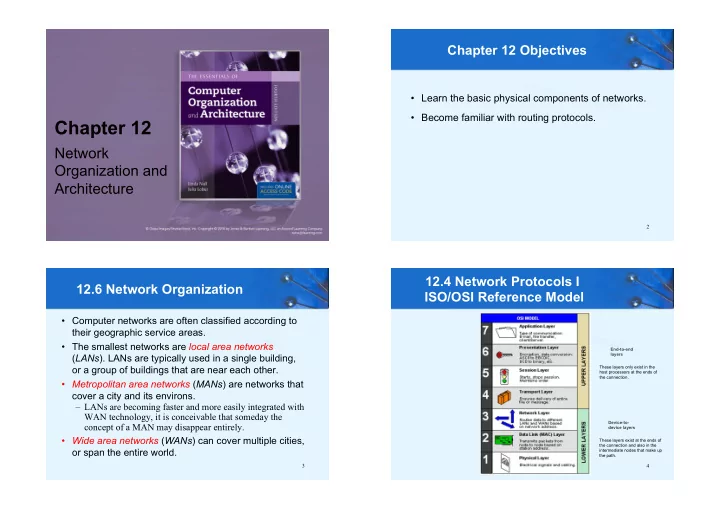
  • Computer networks are often classified according to

their geographic service areas.

  • The smallest networks are local area networks

(LANs). LANs are typically used in a single building,

  • r a group of buildings that are near each other.
  • Metropolitan area networks (MANs) are networks that

cover a city and its environs. – LANs are becoming faster and more easily integrated with WAN technology, it is conceivable that someday the concept of a MAN may disappear entirely.

  • Wide area networks (WANs) can cover multiple cities,
  • r span the entire world.

12.6 Network Organization 12.4 Network Protocols I ISO/OSI Reference Model

4

End-to-end layers Device-to- device layers These layers only exist in the host processors at the ends of the connection. These layers exist at the ends of the connection and also in the intermediate nodes that make up the path.

slide-2
SLIDE 2

5

  • In this section, we examine the physical network

components common to LANs, MANs and WANs.

  • We start at the lowest level of network organization,

the physical medium level, Layer 1.

  • There are two general types of communications

media: Guided transmission media and unguided transmission media.

  • Unguided (wireless) media broadcast data over the

airwaves using infrared, microwave, satellite, or broadcast radio carrier signals.

12.6 Network Organization

6

  • Guided media are physical connectors such as

copper wire or fiber optic cable that directly connect to each network node.

  • The electrical phenomena that work against the

accurate transmission of signals are called noise.

  • Signal and noise strengths are both measured in

decibels (dB).

  • Cables are rated according to how well they convey

signals at different frequencies in the presence of noise.

12.6 Network Organization

7

  • The bandwidth of a medium is technically the range of

frequencies that it can carry, measured in Hertz (cycles per second).

  • In digital communications, bandwidth is the general

term for the information-carrying capacity of a medium, measured in bits per second (bps).

  • Another important measure is bit error rate (BER),

which is the ratio of the number of bits received in error to the total number of bits received.

  • The Gigabit Ethernet standard specifies a BER less

than 1/1012. An upcoming wireless base station standard requires a BER of better than 1/1015.

12.6 Network Organization

8

  • Coaxial cable was once the medium of choice for data

communications.

  • It can carry signals up to trillions of cycles per second

with low attenuation (weakening). – Today, it is used mostly for broadcast and closed circuit television applications.

12.6 Network Organization

A: Outer plastic sheath B: Wowen copper shield C: Inner dielectric insulator D: Copper core (central conductor)

slide-3
SLIDE 3

9

  • Twisted pair cabling, containing two twisted wire pairs,

is found in most local area network installations today. One of the wires is used for sending data, the other for receiving.

  • It comes in two varieties: shielded and unshielded.

Unshielded twisted pair (UTP) is the most popular.

12.6 Network Organization

The twists in the cable reduce electromagnetic interference while the shielding protects the cable from outside interference.

10

  • Optical fiber network media can carry signals faster and

farther than either twisted pair or coaxial cable.

  • Fiber-optic cable is theoretically able to support

frequencies in the terahertz range, but transmission speeds are more commonly in the range of about two gigahertz, carried over runs of 10 to 100 Km (without repeaters).

  • Optical cable consists of bundles of thin (1.5 to 125 µm)

glass or plastic strands surrounded by a protective plastic sheath.

12.6 Network Organization

11

  • A fiber-optic strand is a conductor of light, as copper is

a conductor of electricity.

  • Fiber-optic media offer many advantages over copper,

the most obvious being its enormous signal-carrying capacity.

  • Fiber optic is small and lightweight, one fiber being

capable of replacing hundreds of pairs of copper wires.

  • But optical cable is fragile and costly to purchase and
  • install. Because of this, fiber is most often used as

network backbone cable, which bears the traffic of hundreds or thousands of users.

12.6 Network Organization

12

12.6 Network Organization

  • Optical fiber supports three different transmission

modes depending on the type of fiber used.

  • Single-mode fiber provides the fastest data rates over

the longest distances. It passes light at only one wavelength, typically, 850, 1300 or 1500 nanometers.

slide-4
SLIDE 4

13

  • Multimode fiber can carry several different light

wavelengths simultaneously through a larger fiber core.

  • The laser light waves bounce off the sides of the

fiber core, causing greater attenuation (weakening) than single-mode fiber.

12.6 Network Organization

14

12.6 Network Organization

  • Multimode graded index fiber also supports multiple

wavelengths concurrently, but it does so in a more controlled manner than regular multimode fiber

  • Unlike regular multimode fiber, light waves are confined

to the area of the optical fiber that is suitable to propagating its particular wavelength (using concentric layers of plastic or glass).

  • Thus, different wavelengths concurrently transmitted

through the fiber do not interfere with each other.

15

  • Unguided data communications media transmit bytes
  • ver carrier waves such as those provided by cellular

telephone networks, Bluetooth, and the 802.11 family of wireless local area network standards. – There are others, including free space optical lasers, microwaves, and satellite communications, to name a few.

  • Cellular wireless networks use a cellular telephone

network to transmit data.

  • First generation technology allowed a maximum

transmission rate of around 1 Mbps.

12.6 Network Organization

16

  • Cell network data technology is now in its fourth

generation (4G).

  • Transmission rates up to 150 Mbps are supported.
  • 4G also supports a wide array of equipment,

including the integration of low-Earth-orbiting satellites into a unified system.

12.6 Network Organization

slide-5
SLIDE 5

17

  • Bluetooth was first conceived by Ericsson in 1994.
  • Bluetooth’s purpose is to connect small peripheral

devices with a nearby host. – Examples include mice, keyboards, printers, and cameras.

  • The collection of these devices forms a personal area

network (PAN), or piconet.

12.6 Network Organization

USB Bluetooth adapter 18

  • Wireless local area networks (WLANs) are slower than

their wired counterparts, but they make up for this in their versatility. – A WLAN can be set up just about anywhere.

12.6 Network Organization

19

  • WLANs consist of a collection of wireless access points

(WAPs) that broadcast to nearby computer nodes.

  • Distances are limited by ambient electromagnetic

interference and obstructions such as walls.

  • Connection speeds decrease as distance and
  • bstructions increase.
  • Security continues to be a concern even when the 128

bit encryption mode of wired equivalent protocol (WEP) is employed. – Some security experts believe that it is impossible to make a WLAN as secure as a wired LAN.

12.6 Network Organization

20

  • Transmission media are connected to clients, hosts

and other network devices through network interfaces.

  • Because these interfaces are often implemented on

removable circuit boards, they are commonly called network interface cards, or simply NICs.

  • A NIC usually embodies the lowest three layers of

the OSI protocol stack.

  • NICs attach directly to a system’s main bus or

dedicated I/O bus.

12.6 Network Organization

slide-6
SLIDE 6

21

12.6 Network Organization

  • NIC

22

  • Every network card has a unique 6-byte MAC (Media

Access Control) address burned into its circuits. For example, 00:23:6c:97:38:de. – The first three bytes are the manufacturer’s identification number, which is designated by the IEEE. The last three bytes are a unique identifier assigned to the NIC by the manufacturer.

  • Network protocol layers map this physical MAC

address to at least one logical address.

  • It is possible for one computer (logical address) to

have two or more NICs, but each NIC will have a distinct MAC address.

12.6 Network Organization

23

12.6 Network Organization

Bridges Repeaters

24

  • Signal attenuation (weakening) is corrected by

repeaters that amplify signals in physical cabling.

  • Repeaters are part of the network medium (Layer 1).

– In theory, they are dumb devices functioning entirely without human intervention. However, some repeaters now

  • ffer higher-level services to assist with network

management and troubleshooting.

12.6 Network Organization

slide-7
SLIDE 7

25

12.6 Network Organization

  • Repeater
  • Wireless home repeater
  • Hubs are also Physical layer devices, but they can have

many ports for input and output.

  • They receive incoming packets from one or more

locations and broadcast the packets to one or more devices on the network.

  • Hubs allow computers to be joined to form network

segments.

12.6 Network Organization

26 27

  • Hub

12.6 Network Organization

28

  • A switch is a Layer 2 device that creates a point-to-

point connection between one of its input ports and one

  • f its output ports. In contrast to a hub, a switch can

handle more than one packet at a time.

  • Switches contain buffered input ports, an equal number
  • f output ports, a switching fabric and digital hardware

that interprets address information encoded on network frames as they arrive in the input buffers.

  • Because all switching functions are carried out in

hardware, switches are the preferred devices for interconnecting high-performance network components.

12.6 Network Organization

slide-8
SLIDE 8

29

12.6 Network Organization

  • Switch

30

  • Bridges are Layer 2 devices that join two similar types
  • f networks so they look like one network. All

computers on the network belong to the same subnet.

  • Bridges can connect different media having different

media access control protocols, but the protocol from the MAC layer through all higher layers in the OSI stack must be identical in both segments.

12.6 Network Organization

31

  • Wireless bridge

12.6 Network Organization

32

  • A router is a device connected to at least two networks

that determines the destination to which a packet should be forwarded.

  • Routers are designed specifically to connect two

networks together, typically a LAN to a WAN.

  • Routers are by definition Layer 3 devices, they can

bridge different network media types and connect different network protocols running at Layer 3 and below.

  • Routers are sometimes referred to as intermediate

systems or gateways in Internet standards literature.

12.6 Network Organization

slide-9
SLIDE 9

33

  • Wireless router

12.6 Network Organization

34

  • Routers are complex devices because they contain

buffers, switching logic, memory, and processing power to calculate the best way to send a packet to its destination.

12.6 Network Organization

35

  • Dynamic routers automatically set up routes and

respond to the changes in the network.

  • They explore their networks through information

exchanges with other routers on the network.

  • The information packets exchanged by the routers

reveal their addresses and costs of getting from one point to another.

  • Using this information, each router assembles a table
  • f values in memory.
  • Typically, each destination node is listed along with

the neighboring, or next-hop, router to which it is connected.

12.6 Network Organization

36

  • When creating their tables, dynamic routers consider
  • ne of two metrics. They can use either the distance to

travel between two nodes, or they can use the condition of the network in terms of measured latency (delay).

  • The algorithms using the first metric are distance

vector routing algorithms. Link state routing algorithms use the second metric.

  • Distance vector routing is easy to implement, but it

suffers from high traffic and the count-to-infinity problem where an infinite loop finds its way into the routing tables.

12.6 Network Organization

slide-10
SLIDE 10

12.6 Network Organization

Network with 4 routers and 10 end nodes. Routing tables from Router 1 and Router 3 are used for building the routing table for Router 2.

37

12.6 Network Organization

  • Count-to-infinity example.

Distances from A and B to C are stored in A and B. If the link from B to C breaks down, A informs B about a route to C. So B registers a new (but wrong) route to C. A/2 B/1 C

X

A/2 B/3 C

X

38

12.6 Network Organization

B informs A about a route to C. A/4 B/3 C

X

A informs B about a route to C. A/4 B/5 C

X

And so on ....

39 40

  • In link state routing, each router discovers the speed
  • f the lines between itself and its neighboring routers

by periodically sending out Hello packets.

  • After the Hello replies are received, the router

assembles the timings into a table of link state values.

  • This table is then broadcast to all other routers, except

its adjacent neighbors. Each router tells the world about its neighbors.

  • Eventually, all routers within the routing domain end

up with identical routing tables.

  • All routers then use this information to calculate the
  • ptimal path to every destination in its routing table.

12.6 Network Organization

slide-11
SLIDE 11

41

  • Network organization consists of physical (or wireless)

media, NICs, modems, repeaters, hubs, switches, routers, and computers. Each has its place in the OSI RM.

Chapter 12 Conclusion

42

End of Chapter 12