Ch 13/14/15: Reduce, Embed, Case News Reduce items and attributes - - PowerPoint PPT Presentation

ch 13 14 15 reduce embed case
SMART_READER_LITE
LIVE PREVIEW

Ch 13/14/15: Reduce, Embed, Case News Reduce items and attributes - - PowerPoint PPT Presentation

Ch 13/14/15: Reduce, Embed, Case News Reduce items and attributes Reducing Items and Attributes Reduce Filter Filter Studies presentation days assigned reduce/increase: inverses Items next week papers filter Paper:


slide-1
SLIDE 1

http://www.cs.ubc.ca/~tmm/courses/547-17F

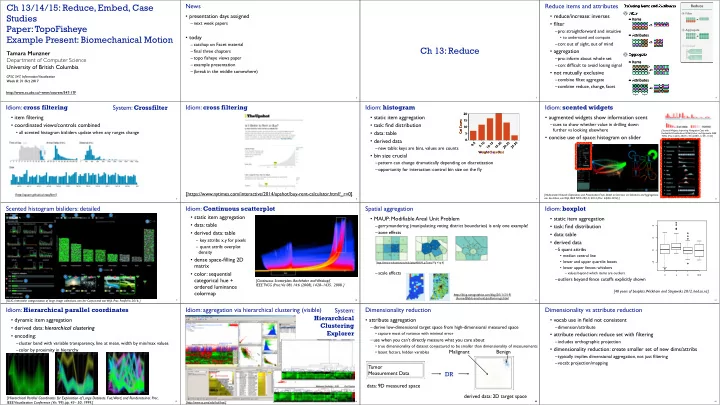
Ch 13/14/15: Reduce, Embed, Case Studies Paper: TopoFisheye Example Present: Biomechanical Motion

Tamara Munzner Department of Computer Science University of British Columbia

CPSC 547, Information Visualization Week 8: 31 Oct 2017

News

  • presentation days assigned

–next week papers

  • today

–catchup on Facet material –final three chapters –topo fisheye views paper –example presentation –(break in the middle somewhere)

2

Ch 13: Reduce

3

Reduce items and attributes

4

  • reduce/increase: inverses
  • filter

–pro: straightforward and intuitive

  • to understand and compute

–con: out of sight, out of mind

  • aggregation

–pro: inform about whole set –con: difficult to avoid losing signal

  • not mutually exclusive

–combine filter, aggregate –combine reduce, change, facet

Reduce

Filter Aggregate Embed

Reducing Items and Attributes Filter Items Attributes Aggregate Items Attributes

Idiom: cross filtering

  • item filtering
  • coordinated views/controls combined
  • all scented histogram bisliders update when any ranges change

5

System: Crossfilter

[http://square.github.io/crossfilter/]

Idiom: cross filtering

6

[https://www.nytimes.com/interactive/2014/upshot/buy-rent-calculator.html?_r=0]

Idiom: histogram

  • static item aggregation
  • task: find distribution
  • data: table
  • derived data

–new table: keys are bins, values are counts

  • bin size crucial

–pattern can change dramatically depending on discretization –opportunity for interaction: control bin size on the fly

7

20 15 10 5 Weight Class (lbs)

Idiom: scented widgets

  • augmented widgets show information scent

–cues to show whether value in drilling down further vs looking elsewhere

  • concise use of space: histogram on slider

8

[Scented Widgets: Improving Navigation Cues with Embedded Visualizations. Willett, Heer, and Agrawala. IEEE TVCG (Proc. InfoVis 2007) 13:6 (2007), 1129–1136.] [Multivariate Network Exploration and Presentation: From Detail to Overview via Selections and Aggregations. van den Elzen, van Wijk, IEEE TVCG 20(12): 2014 (Proc. InfoVis 2014).]

Scented histogram bisliders: detailed

9

[ICLIC: Interactive categorization of large image collections. van der Corput and van

  • Wijk. Proc. PacificVis 2016. ]

Idiom: Continuous scatterplot

  • static item aggregation
  • data: table
  • derived data: table

– key attribs x,y for pixels – quant attrib: overplot density

  • dense space-filling 2D

matrix

  • color: sequential

categorical hue +

  • rdered luminance

colormap

10

[Continuous Scatterplots. Bachthaler and

  • Weiskopf. 


IEEE TVCG (Proc. Vis 08) 14:6 (2008), 1428–1435. 2008. ]

Spatial aggregation

  • MAUP: Modifiable Areal Unit Problem

–gerrymandering (manipulating voting district boundaries) is only one example! –zone effects –scale effects

11

[http://www.e-education.psu/edu/geog486/l4_p7.html, Fig 4.cg.6]

https://blog.cartographica.com/blog/2011/5/19/ the-modifiable-areal-unit-problem-in-gis.html

Idiom: boxplot

  • static item aggregation
  • task: find distribution
  • data: table
  • derived data

–5 quant attribs

  • median: central line
  • lower and upper quartile: boxes
  • lower upper fences: whiskers

– values beyond which items are outliers

–outliers beyond fence cutoffs explicitly shown

12

! ! ! ! ! ! ! ! !

n s k mm !2 2 4

[40 years of boxplots. Wickham and Stryjewski. 2012. had.co.nz]

Idiom: Hierarchical parallel coordinates

  • dynamic item aggregation
  • derived data: hierarchical clustering
  • encoding:

–cluster band with variable transparency, line at mean, width by min/max values –color by proximity in hierarchy

13

[Hierarchical Parallel Coordinates for Exploration of Large Datasets. Fua, Ward, and Rundensteiner. Proc. IEEE Visualization Conference (Vis ’99), pp. 43– 50, 1999.]

Idiom: aggregation via hierarchical clustering (visible)

14

System: Hierarchical Clustering Explorer

[http://www.cs.umd.edu/hcil/hce/]

Dimensionality reduction

  • attribute aggregation

–derive low-dimensional target space from high-dimensional measured space

  • capture most of variance with minimal error

–use when you can’t directly measure what you care about

  • true dimensionality of dataset conjectured to be smaller than dimensionality of measurements
  • latent factors, hidden variables

15 46

Tumor Measurement Data

DR

Malignant Benign data: 9D measured space derived data: 2D target space

Dimensionality vs attribute reduction

16

  • vocab use in field not consistent

–dimension/attribute

  • attribute reduction: reduce set with filtering

–includes orthographic projection

  • dimensionality reduction: create smaller set of new dims/attribs

–typically implies dimensional aggregation, not just filtering –vocab: projection/mapping

slide-2
SLIDE 2

Dimensionality reduction & visualization

  • why do people do DR?

–improve performance of downstream algorithm

  • avoid curse of dimensionality

–data analysis

  • if look at the output: visual data analysis
  • abstract tasks when visualizing DR data

– dimension-oriented tasks

  • naming synthesized dims, mapping synthesized dims to original dims

– cluster-oriented tasks

  • verifying clusters, naming clusters, matching clusters and classes

17

[Visualizing Dimensionally-Reduced Data: Interviews with Analysts and a Characterization of Task

  • Sequences. Brehmer, Sedlmair, Ingram, and Munzner. Proc. BELIV 2014.]

Dimension-oriented tasks

  • naming synthesized dims: inspect data represented by lowD points

18

[A global geometric framework for nonlinear dimensionality reduction. Tenenbaum, de Silva, and Langford. Science, 290(5500):2319–2323, 2000.]

Cluster-oriented tasks

  • verifying, naming, matching to classes

19

no discernable clusters clearly discernable clusters partial match
 cluster/class clear match 
 cluster/class no match 
 cluster/class [Visualizing Dimensionally-Reduced Data: Interviews with Analysts and a Characterization of Task

  • Sequences. Brehmer, Sedlmair, Ingram, and Munzner. Proc. BELIV 2014.]

Idiom: Dimensionality reduction for documents

20

Task 1 In HD data Out 2D data Produce In High- dimensional data Why? What? Derive In 2D data Task 2 Out 2D data How? Why? What? Encode Navigate Select Discover Explore Identify In 2D data Out Scatterplot Out Clusters & points Out Scatterplot Clusters & points Task 3 In Scatterplot Clusters & points Out Labels for clusters Why? What? Produce Annotate In Scatterplot In Clusters & points Out Labels for clusters

wombat

Interacting with dimensionally reduced data

21

[https://uclab.fh-potsdam.de/projects/probing-projections/]

[Probing Projections: Interaction Techniques for Interpreting Arrangements and Errors of Dimensionality Reductions. Stahnke, Dörk, Müller, and Thom. IEEE TVCG (Proc. InfoVis 2015) 22(1):629-38 2016.]

Linear dimensionality reduction

  • principal components analysis (PCA)

–finding axes: first with most variance, second with next most, … –describe location of each point as linear combination of weights for each axis

  • mapping synthesized dims to original dims

22

[http://en.wikipedia.org/wiki/File:GaussianScatterPCA.png]

Nonlinear dimensionality reduction

  • pro: can handle curved rather than linear structure
  • cons: lose all ties to original dims/attribs

–new dimensions often cannot be easily related to originals

– mapping synthesized dims to original dims task is difficult

  • many techniques proposed

–many literatures: visualization, machine learning, optimization, psychology, ... –techniques: t-SNE, MDS (multidimensional scaling), charting, isomap, LLE,… –t-SNE: excellent for clusters – but some trickiness remains: http://distill.pub/2016/misread-tsne/ –MDS: confusingly, entire family of techniques, both linear and nonlinear – minimize stress or strain metrics – early formulations equivalent to PCA

23

VDA with DR example: nonlinear vs linear

  • DR for computer graphics reflectance model

–goal: simulate how light bounces off materials to make realistic pictures

  • computer graphics: BRDF (reflectance)

–idea: measure what light does with real materials

24

[Fig 2. Matusik, Pfister, Brand, and McMillan. A Data-Driven Reflectance Model. SIGGRAPH 2003]

Capturing & using material reflectance

  • reflectance measurement: interaction of light with real materials (spheres)
  • result: 104 high-res images of material

–each image 4M pixels

  • goal: image synthesis

–simulate completely new materials

  • need for more concise model

–104 materials * 4M pixels = 400M dims –want concise model with meaningful knobs

  • how shiny/greasy/metallic
  • DR to the rescue!

25

[Figs 5/6. Matusik et al. A Data-Driven Reflectance Model. SIGGRAPH 2003]

Linear DR

  • first try: PCA (linear)
  • result: error falls off sharply after ~45 dimensions

–scree plots: error vs number of dimensions in lowD projection

  • problem: physically impossible intermediate

points when simulating new materials

–specular highlights cannot have holes!

26

[Figs 6/7. Matusik et al. A Data-Driven Reflectance Model. SIGGRAPH 2003]

Nonlinear DR

  • second try: charting (nonlinear DR technique)

–scree plot suggests 10-15 dims –note: dim estimate depends on 
 technique used!

27

[Fig 10/11. Matusik et al. A Data-Driven Reflectance Model. SIGGRAPH 2003]

Finding semantics for synthetic dimensions

  • look for meaning in scatterplots

–synthetic dims created by algorithm but named by human analysts –points represent real-world images (spheres) –people inspect images corresponding to points to decide if axis could have meaningful name

  • cross-check meaning

–arrows show simulated images (teapots) made from model –check if those match dimension semantics

28

row 4

[Fig 12/16. Matusik et al. A Data-Driven Reflectance Model. SIGGRAPH 2003]

Understanding synthetic dimensions

29 [Fig 13/14/16. Matusik et al. A Data-Driven Reflectance Model. SIGGRAPH 2003]

Specular-Metallic Diffuseness-Glossiness

Ch 14: Embed

30

Embed: Focus+Context

31

  • combine information

within single view

  • elide

–selectively filter and aggregate

  • superimpose layer

–local lens

  • distortion design choices

–region shape: radial, rectilinear, complex –how many regions: one, many –region extent: local, global –interaction metaphor Embed Elide Data Superimpose Layer Distort Geometry

Idiom: DOITrees Revisited

32

  • elide

–some items dynamically filtered out –some items dynamically aggregated together –some items shown in detail

[DOITrees Revisited: Scalable, Space-Constrained Visualization of Hierarchical Data. Heer and Card. Proc. Advanced Visual Interfaces (AVI), pp. 421–424, 2004.]

slide-3
SLIDE 3

Idiom: Fisheye Lens

33

  • distort geometry

–shape: radial –focus: single extent –extent: local –metaphor: draggable lens

http://tulip.labri.fr/TulipDrupal/?q=node/351
 http://tulip.labri.fr/TulipDrupal/?q=node/371

Idiom: Fisheye Lens

34

[D3 Fisheye Lens](https://bost.ocks.org/mike/fisheye/)

System: D3 Idiom: Stretch and Squish Navigation

35

  • distort geometry

–shape: rectilinear –foci: multiple –impact: global –metaphor: stretch and squish, borders fixed

[TreeJuxtaposer: Scalable Tree Comparison Using Focus+Context With Guaranteed

  • Visibility. Munzner, Guimbretiere,

Tasiran, Zhang, and Zhou. ACM Transactions on Graphics (Proc. SIGGRAPH) 22:3 (2003), 453– 462.]

System: TreeJuxtaposer Distortion costs and benefits

  • benefits

–combine focus and context information in single view

  • costs

–length comparisons impaired

  • network/tree topology

comparisons unaffected: connection, containment

–effects of distortion unclear if

  • riginal structure unfamiliar

–object constancy/tracking maybe impaired

36

[Living Flows: Enhanced Exploration of Edge-Bundled Graphs Based on GPU-Intensive Edge Rendering. Lambert, Auber, and Melançon. Proc. Intl. Conf. Information Visualisation (IV), pp. 523–530, 2010.]

fisheye lens magnifying lens neighborhood layering Bring and Go

Ch 15: Case Studies

37

Analysis Case Studies

38

Scagnostics VisDB InterRing HCE PivotGraph Constellation

Graph-Theoretic Scagnostics

  • scatterplot diagnostics

–scagnostics SPLOM: each point is one original scatterplot

39

[Graph-Theoretic Scagnostics Wilkinson, Anand, and Grossman. Proc InfoVis 05.]

Scagnostics analysis

40

VisDB

  • table: draw pixels sorted, colored by relevance
  • group by attribute or partition by attribute into multiple views

41

relevance factor dimension 1 dimension 2 dimension 3 dimension 4 dimension 5

  • ne data item

fulfilling the query

  • ne data item

approximately fulfilling the query

  • relevance
  • dim. 1
  • dim. 2
  • dim. 3
  • dim. 4
  • dim. 5

factor

[VisDB: Database Exploration using Multidimensional Visualization, Keim and Kriegel, IEEE CG&A, 1994]

VisDB Results

  • partition into many small

regions: dimensions grouped together

42

[VisDB: Database Exploration using Multidimensional Visualization, Keim and Kriegel, IEEE CG&A, 1994]

VisDB Results

  • partition into small number
  • f views

–inspect each attribute

43

[VisDB: Database Exploration using Multidimensional Visualization, Keim and Kriegel, IEEE CG&A, 1994]

VisDB Analysis

44

Hierarchical Clustering Explorer

  • heatmap, dendrogram
  • multiple views

45

[Interactively Exploring Hierarchical Clustering Results. Seo and Shneiderman, IEEE Computer 35(7): 80-86 (2002)]

HCE

  • rank by

feature idiom

–1D list –2D matrix

46

A rank-by-feature framework for interactive exploration of multidimensional data. Seo and Shneiderman. Information Visualization 4(2): 96-113 (2005)

HCE

47

A rank-by-feature framework for interactive exploration of multidimensional data. Seo and Shneiderman. Information Visualization 4(2): 96-113 (2005)

HCE Analysis

48

slide-4
SLIDE 4

InterRing

49

[InterRing: An Interactive Tool for Visually Navigating and Manipulating Hierarchical Structures. Yang, Ward, Rundensteiner. Proc. InfoVis 2002, p 77-84.]

  • riginal hierarchy

blue subtree expanded tan subtree expanded

InterRing Analysis

50

PivotGraph

  • derived rollup network

51

[Visual Exploration of Multivariate Graphs, Martin Wattenberg, CHI 2006.]

PivotGraph

52

[Visual Exploration of Multivariate Graphs, Martin Wattenberg, CHI 2006.]

PivotGraph Analysis

53

Analysis example: Constellation

  • data

–multi-level network

  • node: word
  • link: words used in same

dictionary definition

  • subgraph for each definition

– not just hierarchical clustering

–paths through network

  • query for high-weight paths

between 2 nodes – quant attrib: plausibility

54

[Interactive Visualization of Large Graphs and Networks. Munzner. Ph.D. Dissertation, Stanford University, June 2000.] [Constellation: A Visualization Tool For Linguistic Queries from

  • MindNet. Munzner, Guimbretière and Robertson. Proc. IEEE Symp.

InfoVis1999, p.132-135.]

Using space: Constellation

  • visual encoding

–link connection marks between words –link containment marks to indicate subgraphs –encode plausibility with horiz spatial position –encode source/sink for query with vert spatial position

  • spatial layout

–curvilinear grid: more room for longer low-plausibility paths

55

[Interactive Visualization of Large Graphs and Networks. Munzner. Ph.D. Dissertation, Stanford University, June 2000.]

Using space: Constellation

  • edge crossings

–cannot easily minimize instances, since position constrained by spatial encoding –instead: minimize perceptual impact

  • views: superimposed layers

–dynamic foreground/background layers on mouseover, using color –four kinds of constellations

  • definition, path, link type, word

– not just 1-hop neighbors

56

[Interactive Visualization of Large Graphs and Networks. Munzner. Ph.D. Dissertation, Stanford University, June 2000.]

https://youtu.be/7sJC3QVpSkQ

Constellation Analysis

57

What-Why-How Analysis

  • this approach is not the only way to analyze visualizations!

–one specific framework intended to help you think –other frameworks support different ways of thinking

  • following: one interesting example

58

Algebraic Process for Visualization Design

  • which mathematical structures in data are preserved and reflected in vis

–negation, permutation, symmetry, invariance

59

[Fig 1. An Algebraic Process for Visualization Design. Carlos Scheidegger and Gordon

  • Kindlmann. IEEE

TVCG (Proc. InfoVis 2014), 20(12):2181-2190.]

Algebraic process: Vocabulary

  • invariance violation: single dataset, many visualizations

–hallucinator

  • unambiguity violation: many datasets, same vis

–data change invisible to viewer

  • confuser
  • correspondence violation:

–can’t see change of data in vis

  • jumbler

–salient change in vis not due to significant change in data

  • misleader

–match mathematical structure in data with visual perception

  • we can X the data; can we

Y the image?

–are important data changes well-matched with obvious visual changes?

60

Paper: TopoFisheye

61

Topological Fisheye Views

  • derived data

–input: laid-out network (spatial positions for nodes) –output: multilevel hierarchy from graph coarsening

  • interaction

–user changed selected focus point

  • visual encoding

–hybrid view made from cut through several hierarchy levels

62

[Fig 4,8. Topological Fisheye Views for Visualizing Large Graphs. Gansner, Koren and North, IEEE TVCG 11(4), p 457-468, 2005]

Coarsening requirements

  • uniform cluster/metanode size
  • match coarse and fine layout geometries
  • scalable

63

[Fig 3. Topological Fisheye Views for Visualizing Large Graphs. Gansner, Koren and North, IEEE TVCG 11(4), p 457-468, 2005]

Coarsening strategy

  • must preserve graph-theoretic properties
  • use both topology and geometry

–topological distance (hops away) –geometric distance - but not just proximity alone!

  • just contracting nodes/edges could create new cycles
  • derived data: proximity graph

64

[Fig 10, 12. Topological Fisheye Views for Visualizing Large

  • Graphs. Gansner, Koren and

North, IEEE TVCG 11(4), p 457-468, 2005]

what not to do!

slide-5
SLIDE 5

Candidate pairs: neighbors in original and proximity graph

  • proximity graph: compromise between larger DT and smaller RNG

–better than original graph neighbors alone

  • slow for cases like star graph
  • maximize weighted sum of

–geometric proximity

  • goal: preserve geometry

–cluster size

  • goal: keep uniform cluster size

–normalized connection strength

  • goal: preserve topology

–neighborhood similarity

  • goal: preserve topology

–degree

  • goal: penalize high-degree nodes to avoid salient artifacts and computational problems

65

Hybrid graph creation

  • cut through coarsening hierarchy to get active nodes

–animated transitions between states

66

[Fig 10, 12. Topological Fisheye Views for Visualizing Large

  • Graphs. Gansner, Koren and

North, IEEE TVCG 11(4), p 457-468, 2005]

Final distortion

  • geometric distortion for uniform density
  • (colorcoded by hierarchy depth just to illustrate algorithm)

–compare to original –compare to simple topologically unaware fisheye distortion

67

[Fig 2,15. Topological Fisheye Views for Visualizing Large Graphs. Gansner, Koren and North, IEEE TVCG 11(4), p 457-468, 2005]

Example Presentation: 
 Biomechanical Motion

68

Presentation expectations

  • 20 minute time slots for presentations

– aim for 18 min presenting and 2 min discussion

  • slides required

– if you’re using my laptop, send to me by 12pm – if you’re using your own, send to me by 6pm (right after class)

  • three goals: up to you whether sequential or interleaved

– explain core technical content to audience – analyze with doing what/why/how framework

  • do scale analysis of data for this system in specific, not for technique in general

– critique strengths/weaknesses of technical paper

  • marking criteria

– Summary 40%, Analysis 15%, Critique 15% – Presentation Style 15%, Materials Preparation 15%

69

Analysis & critique

  • paper type dependent

–required for design studies and technique papers –some possible for algorithm papers

  • but more emphasis on presenting algorithm clearly

–minimal for evaluation papers

  • but can discuss study design and statistical analysis methods
  • please distinguish: their analysis (future work, limitations) from your own

thoughts/critiques

–good to present both

70

Beyond paper itself

  • check for author paper page

–may have video –may have talk slides you could borrow as a base

  • do acknowledge if so!

–may have demo or supplemental material –include paper page URL in slides if it exists

  • if using video, consider when it’s most useful to show

–at very start for overview of everything –after you’ve explained some of background –after you’ve walked us through most of interface, to show interaction in specific

71

Slides

  • do include both text and images
  • text

–font must be readable from back of room

  • 24 point as absolute minimum
  • use different type sizes to help guide eye, with larger title font
  • avoid micro text with macro whitespace

–bullet style not sentences

  • sub-bullets for secondary points
  • Compare what it feels like to read an entire long sentence on a slide; while complex structure

is a good thing to have for flow in writing, it’s more difficult to parse in the context of a slide where the speaker is speaking over it.

  • legibility

–remember luminance contrast requirements with colors!

72

Slide images

  • figures from paper

–good idea to use figures from paper, especially screenshots

  • judgement call about some/many/all
  • new images

–you might make new diagrams –you might grab other images, especially for background or if comparing to prev work –avoid random clip art

  • images alone often hard to follow

–images do not speak for themselves, you must walk us through them

  • text bullets to walk us through your highest-level points

– hard to follow if they’re only made verbally

  • judgement call on text/image ratio, avoid extremes

73

Style

  • face audience, not screen

–pro tip: your screen left/right matches audience left/right in this configuration

  • project voice so we can hear you

–avoid muttered comments to self, volume drop-off at end of slide –avoid robot monotone, variable emphasis helps keep us engaged

  • avoid reading exactly what the slide says

–judgement call: how much detail to have in presenter notes

  • use laser pointer judiciously

–avoid constant distracting jiggle

  • practice, practice, practice

–for flow of words and for timing

  • question handling: difficult to practice beforehand…

74

Technical talks advice

  • How To Give An Academic Talk

–Paul N. Edwards

  • How To Give a Great Research Talk

–Simon L Peyton Jones, John Hughes, and John Launchbury

  • How To Present A Paper

–Leslie Lamport

  • Things I Hope Not To See or Hear at SIGGRAPH

–Jim Blinn

  • Scientific Presentation Planning

–Jason Harrison

75

Daniel F. Keefe, Marcus Ewert, William Ribarsky, Remco Chang. IEEE Trans. Visualization and Computer Graphics (Proc. Vis 2009), 15(6):1383-1390, 2009.

Interactive Coordinated Multiple-View Visualization of Biomechanical Motion Data

76

http://ivlab.cs.umn.edu/generated/pub-Keefe-2009-MultiViewVis.php

https://youtu.be/OUNezRNtE9M

Biomechanical motion design study

  • large DB of 3D motion data

–pigs chewing: high-speed motion at joints, 500 FPS w/ sub-mm accuracy

  • domain tasks

–functional morphology: relationship between 3D shape of bones and their function –what is a typical chewing motion? –how does chewing change over time based on amount/type of food in mouth?

  • abstract tasks

–trends & anomalies across collection of time-varying spatial data –understanding complex spatial relationships

  • pioneering design study integrating infovis+scivis techniques
  • let’s start with video showing system in action

77

Multiple linked spatial & non-spatial views

  • data: 3D spatial, multiple attribs (cyclic)
  • encode: 3D spatial, parallel coords, 2D line (xy) plots
  • facet: few large multiform views, many small multiples (~100)

–encode: color by trial for window background –view coordination: 
 line in parcoord == 
 frame in small mult

78

[Fig 1. Interactive Coordinated Multiple-View Visualization of Biomechanical Motion Data. Daniel F. Keefe, Marcus Ewert, William Ribarsky, Remco Chang. IEEE Trans. Visualization and Computer Graphics (Proc. Vis 2009), 15(6):1383-1390, 2009.]

3D+2D

  • change

–3D navigation

  • rotate/translate/zoom
  • filter

–zoom to small subset of time

  • facet

–select for one large detail view –linked highlighting –linked navigation

  • between all views
  • driven by large detail view

79

[Fig 3. Interactive Coordinated Multiple-View Visualization of Biomechanical Motion Data. Daniel F. Keefe, Marcus Ewert, William Ribarsky, Remco Chang. IEEE Trans. Visualization and Computer Graphics (Proc. Vis 2009), 15(6):1383-1390, 2009.]

Derived data: traces/streamers

  • derived data: 3D motion tracers

from interactively chosen spots –generates x/y/z data over time –streamers –shown in 3D views directly –populates 2D plots

80

[Fig 4. Interactive Coordinated Multiple-View Visualization of Biomechanical Motion Data. Daniel F. Keefe, Marcus Ewert, William Ribarsky, Remco Chang. IEEE Trans. Visualization and Computer Graphics (Proc. Vis 2009), 15(6):1383-1390, 2009.]

slide-6
SLIDE 6

Small multiples for overview

  • facet: small multiples for overview

–aggressive/ambitious, 100+ views

  • encode: color code window bg by trial
  • filter:

–full/partial skull –streamers

  • simple enough to be useable at 


low information density

81

[Fig 2. Interactive Coordinated Multiple-View Visualization of Biomechanical Motion Data. Daniel F. Keefe, Marcus Ewert, William Ribarsky, Remco Chang. IEEE Trans. Visualization and Computer Graphics (Proc. Vis 2009), 15(6):1383-1390, 2009.]

Derived data: surface interactions

  • derived data

–3D surface interaction patterns

  • facet

–superimposed overlays in 3D view

  • encoding

–color coding

82

[Fig 5. Interactive Coordinated Multiple-View Visualization of Biomechanical Motion Data. Daniel F. Keefe, Marcus Ewert, William Ribarsky, Remco Chang. IEEE Trans. Visualization and Computer Graphics (Proc. Vis 2009), 15(6):1383-1390, 2009.]

Side by side views demonstrating tooth slide

83

[Fig 6. Interactive Coordinated Multiple-View Visualization of Biomechanical Motion Data. Daniel F. Keefe, Marcus Ewert, William Ribarsky, Remco Chang. IEEE Trans. Visualization and Computer Graphics (Proc. Vis 2009), 15(6):1383-1390, 2009.]

  • facet: linked navigation w/ same 3D viewpoint for all
  • encode: coloured by vertical distance separating teeth (derived surface interactions)

–also 3D instantaneous helical axis showing motion of mandible relative to skull

Cluster detection

  • identify clusters of motion cycles

–from combo: 2D xy plots & parcoords –show motion itself in 3D view

  • facet: superimposed layers

–foreground/background layers in parcoord view itself

84

[Fig 7. Interactive Coordinated Multiple-View Visualization of Biomechanical Motion Data. Daniel F. Keefe, Marcus Ewert, William Ribarsky, Remco Chang. IEEE Trans. Visualization and Computer Graphics (Proc. Vis 2009), 15(6):1383-1390, 2009.]

Analysis summary

  • what: data

–3D spatial, multiple attribs (cyclic)

  • what: derived

–3D motion traces –3D surface interaction patterns

  • how: encode

–3D spatial, parallel coords, 2D plots –color views by trial, surfaces by interaction patterns

  • how: change

–3D navigation

  • how: facet

–few large multiform views –many small multiples (~100) –linked highlighting –linked navigation –layering

  • how: reduce

–filtering

85

[Interactive Coordinated Multiple-View Visualization of Biomechanical Motion Data. Daniel F. Keefe, Marcus Ewert, William Ribarsky, Remco Chang. IEEE Trans. Visualization and Computer Graphics (Proc. Vis 2009), 15(6):1383-1390, 2009.]

Critique

  • many strengths

–carefully designed with well justified design choices –explicitly followed mantra “overview first, zoom and filter, then details-on-demand” –sophisticated view coordination –tradeoff between strengths of small multiples and overlays, use both

– informed by difficulties of animation for trend analysis – derived data tracing paths

  • weaknesses/limitations

–(older paper feels less novel, but must consider context of what was new) –scale analysis: collection size of <=100, not thousands (understandably) –aggressive about multiple views, arguably pushing limits of understandability

86

Next time

  • deadlines

–meetings due by Thu Nov 2, 5pm

  • reminder that I’m not available Fri Nov 3 through Mon Nov 6

–proposals due by Mon Nov 6, 10pm

  • next week

–presentations 1 –guest lecture from Steve Franconeri

87