CCM CCMDD/ DD/ Da Dablamed meds Tr Training Septem Sep ember - - PDF document

ccm ccmdd dd da dablamed meds tr training septem sep
SMART_READER_LITE
LIVE PREVIEW

CCM CCMDD/ DD/ Da Dablamed meds Tr Training Septem Sep ember - - PDF document

10/2/20 CCM CCMDD/ DD/ Da Dablamed meds Tr Training Septem Sep ember er 2020 Jhb Health District 1 1. Enrolment criteria for CCMDD during COVID-19 pandemic Identify stable patients eligible for registration onto the CCMDD programme


slide-1
SLIDE 1

10/2/20 1

Jhb Health District

CCM CCMDD/ DD/ Da Dablamed meds Tr Training Sep Septem ember er 2020

1

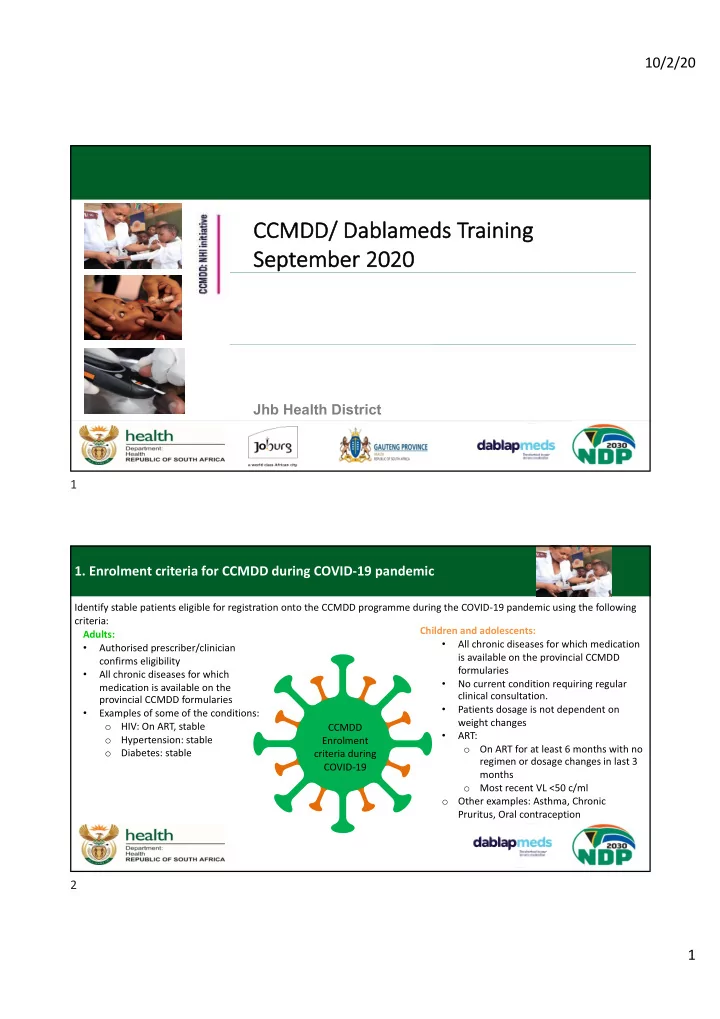
  • 1. Enrolment criteria for CCMDD during COVID-19 pandemic

Identify stable patients eligible for registration onto the CCMDD programme during the COVID-19 pandemic using the following criteria: CCMDD Enrolment criteria during COVID-19 Adults:

  • Authorised prescriber/clinician

confirms eligibility

  • All chronic diseases for which

medication is available on the provincial CCMDD formularies

  • Examples of some of the conditions:
  • HIV: On ART, stable
  • Hypertension: stable
  • Diabetes: stable

Children and adolescents:

  • All chronic diseases for which medication

is available on the provincial CCMDD formularies

  • No current condition requiring regular

clinical consultation.

  • Patients dosage is not dependent on

weight changes

  • ART:
  • On ART for at least 6 months with no

regimen or dosage changes in last 3 months

  • Most recent VL <50 c/ml
  • Other examples: Asthma, Chronic

Pruritus, Oral contraception

2

slide-2
SLIDE 2

10/2/20 2

  • 2. REGULATION 43260
  • a. Extension of existing prescription at SP -1

Eligible prescriptions for extension The following patients will be eligible for a prescription extension from 6 months to 12 months from the SP:

  • Prescriptions dated from 30 October 2019

to 30 April 2020 and

  • Prescriptions with a remaining repeat to be

dispensed from the SP, and

  • Patients with a valid cell phone number and
  • ne of the following:

ü Prescriptions containing medication for NCD conditions and are schedule 2, 3 and 4 items or, ü Prescriptions containing 2nd line ART or, ü Prescriptions containing TLD or, ü Prescriptions for WOCP on TEE (<40 years) Prescriptions that will not be extended × Any prescription containing a schedule 5 item × Patients receiving TEE prescriptions that are not WOCP × Patients that do not have a valid cell phone number

3

  • 2. REGULATION 43260
  • a. Extension of existing prescription at SP -2

4

slide-3
SLIDE 3

10/2/20 3

External Pick-up Points will be responsible for the following:

  • Identify PMPs with extension alert sticker
  • Notify and inform all patients collecting PMPs with an extension alert sticker about the automatic

extension

  • Continue to remind patients with a last supply and no extension alert sticker to return to facility
  • Inform all patients to return to facility if they feel unwell

Internal Pick-up Points will be responsible for the following:

  • Identify PMPs with extension alert sticker
  • Notify and inform all patients collecting PMPs with an extension alert sticker about the automatic

extension

  • Continue to remind patients with a last supply and no extension alert sticker to return to facility for

prescription renewal

  • Promote external PuPs to all patients collecting from facility PuPs and complete mid-cycle

switching form (refer to CCMDD SOP-24 & Mid-cycle switching slide)

  • 2. REGULATION 43260
  • a. Extension of existing prescription at SP -4

5

How to identify patients that have received extensions on their prescriptions:

  • 2. REGULATION 43260
  • a. Extension of existing prescription at SP -4 Stationary examples

Gauteng

  • The PMP patient label will have the words

*Script Extended* on as shown below as well as the updated repeat count. Informing the patient on where to find the collection dates for the extended deliveries: Gauteng

  • The collection dates can be found inside the PMP on a

new printed patient card as illustrated below. The patient can place this in the CCMDD collection card.

CCMDD Patient Card Name: John Smith Next scheduled dates: 2020/06/01 ID/Passport: 6010025110080 2020/07/27 Patient Code: 123234 2020/09/21 Facility: Germiston Clinic PUP: Clicks Eastgate

6

slide-4
SLIDE 4

10/2/20 4

  • 2. REGULATION 43260
  • b. Renewal of prescription under the new guidelines

Synch: Extend

  • n synch

Manual: Extend

  • n Excel

7

  • 2. REGULATION 43260
  • b. Important things to remember

12 Month Rx

  • 1. The patient is required to present at the public health facility for their annual

blood on the original anniversary date. Do not change blood due date! A 12-month prescription can be given to a patient with a VL test done >6 and < 11 months ago. Only call the patient back and deactivate the 12-month prescription if blood results are abnormal.

  • 2. The following should be done by the facility:
  • Tier.Net should be updated according to 12-month collection dates by

selecting the 12-month option instead of the 6-month option.

  • All 12 collection dates must be given to the patient in the collection card.
  • Patients should be provided with a minimum of 2 months of treatment

8

slide-5
SLIDE 5

10/2/20 5

  • 3. PATIENT DECANTING
  • a. Mid-cycle switching

If districts have identified facilities with a high number of patients collecting from an internal facility PuP and rapid decanting is needed, patients can be offered to switch to an alternative PuP at collection of PMP in the middle of their collection cycle. The following should be done: Patients should be provided with the list of external PuPs for them to choose a convenient PuP SOP 24 - Annexure B should be completed for each patient that would like to switch to an alternative external PuP The patient collection card must be reviewed, and the new PuP must be indicated The correct cell phone number of the patient must be recorded to ensure successful communication to the patient SOP 24 - Annexure B should be submitted to the SP helpdesk daily A patient can also change his/her PuP by:

  • Contacting the SP call centre, inform the helpdesk agent of the change of PuP
  • The patient should indicate till when the change is needed,
  • The helpdesk agent will indicate whether the change is possible and when the first parcel can

be expected at the changed PuP.

9

  • Upliftment period changed from 7 to 14 days
  • Upliftment will take place after 14 days if PMP is not collected
  • Phone SP to make arrangement for upliftment and follow SOP as normal
  • Allows patients more time to collect
  • SyNCH – updated to allow for a 14-day collection period

U p l i f t m e n t

  • f

N

  • n
  • c
  • l

l e c t e d P M P s

  • 4. UPLIFTMENT OF UNCOLLECTED PMPs

10

slide-6
SLIDE 6

10/2/20 6

Log Upliftment via Helpdesk

  • Upliftments are logged via the Helpdesk contact number or the Helpdesk e-mail address
  • The Helpdesk agent would log all the details pertaining to the Upliftment on the system,

raise the claim and generate a Reference number that will be given to the caller.

  • This information will be forwarded via e-mail to the various Hubs by the end of each day.

Log Upliftment via SyNCH

  • SyNCH upliftments work in a similar way;
  • Uncollected PMP’s will move to an UPLIFMENT status if not collected in 7days
  • This Upliftment would have to be actioned by the prescriber
  • Once the UPLIFTMENT is actioned, it pulls through to the DSV system in the form of a

weekly report

  • This report is distributed to Helpdesk agents on a daily basis and the Upliftment will be

raised before the end of the day

DSV Process of Upliftment

11

Rejections

The main reasons for rejections are:

  • Prescriber details
  • Patient details
  • Item not on formulary
  • Prescriber Level
  • ARV related errors
  • Dosage/ Directions/ Strength

12

12

slide-7
SLIDE 7

10/2/20 7

Rejections – Prescriber Details

Rejections due to prescriber details:

  • Details is blank, incomplete or

unclear

  • No prescriber signature
  • Prescriber not on authorised

prescriber list that was submitted

  • Prescriber not registered with

professional body

13

To avoid these rejections, please ensure:

  • All fields are completed
  • Always sign prescription
  • Update authorised prescriber

list monthly and submit to SP

  • You must be registered with

your professional body and remember to pay your fees

Name & Surname: Signature: Prescriber Information: ( Use St amp if available) Date Prescribed: Designation: HPCSA/ SANC: Persal nr:

13

Rejections – Prescriber Level

Rejections due to prescriber level:

  • Dr initiated item prescribed

without co-signature

  • S5 medicine prescribed by nurse

without permit

  • Psych medication prescribed by

nurse without needed qualification

  • Clinical Associates
  • Enrolled Nurses prescribing

14

To avoid these rejections, please ensure:

  • Ensure you are authorised to

prescribe the medicine

  • Get permit from district
  • Ensure there is indication that

item was initiated by a Dr 14

slide-8
SLIDE 8

10/2/20 8

Rejections – Patient Details

Rejections due to patient details:

  • ID number is invalid
  • No DOB
  • Name & Surname is not written in

full

15

To avoid these rejections, please ensure:

  • ID has 13 digits
  • Transcribe from ID book where

possible

  • Complete name and surname

as per ID book 15

Rejections – ARV relates

Rejections due to patient details:

  • Incomplete ARV regimen
  • Incorrect ARV regimen
  • Pt was on 2nd line and now 1st line
  • 2 prescriptions – different

regimens for the same patient on the same day

16

To avoid these rejections, please ensure:

  • Ensure the correct and

complete regimen is prescribed

  • Ensure correct prescribing of

ARV’s on SyNCH 16

slide-9
SLIDE 9

10/2/20 9

  • 5. SyNCH: REJECTIONS

Did you know that SyNCH originated prescription rejections are communicated via SyNCH?

  • A list of rejections are made available on the landing screen for prescribers to view
  • Prescribers can amend the prescriptions from the landing screen

17

  • 5. SyNCH : Duplicate patient prevention

The following changes were made to SyNCH: Prevention of duplicate patients

  • After the authorised prescriber creates and submits a prescription (see SyNCH SOP-4) and patient profile to the

CCMDD SP, the Identification/Passport/Asylum seeker number, Date of Birth, First Name, and Surname fields cannot be edited. When the patient profile is retrieved thereafter, these fields will be uneditable. (See below dummy profile example with greyed out fields). Notes:

  • The reason for this is to ensure that multiple profiles are not created for a single patient.
  • If any of these fields need to be edited, the user must contact the relevant SyNCH Provincial Helpdesk.

18

slide-10
SLIDE 10

10/2/20 10

  • 5. SyNCH: SUBMIT VS SAVE PRESCRIPTIONS

SyNCH

One of the most often made mistakes on SyNCH is: Prescribers saving a prescription and not submitting it! Prescriptions must be submitted to reach the SP!

  • 1. At the bottom of the prescription page, there is a “Save” and

“Submit”) button. Only save if you want to go out and attend to the prescription later. Submit immediately if prescription is complete!

  • 2. If prescription was saved and not submitted an alert message

will be displayed.

  • 3. On the home screen/ landing page saved

prescriptions will be shown. Saved prescriptions can also be managed from here and should be submitted within 7 days!

  • 4. Always check for saved prescriptions

and ensure it is submitted!

19

  • 5. SyNCH: NEW DEVELOPMENTS

SyNCH

Some new developments were needed on SyNCH to assist with new regulations etc.

  • 1. Regulation 43260 – 12 Months repeat option.

At the bottom of the prescription creation page, the prescription validity period must be selected. 12 month option has been added.

  • 2. ONLY 2 MONTH DISPENSES ALLOWED FOR JHB DISTRICT

20

slide-11
SLIDE 11

10/2/20 11

  • 7. WHAT HAVE WE LEARNED FROM PRESCRIPTION REJECTIONS?

1. Maximum Dose Exceeded:

a) Metformin frequently

Prescribed as 1000mg tds = 3000mg. Maximum dose is 2550mg per day

b.) Glibenclamide > 7.5mg & Glimepiride > 4mg

21

  • 2. INH related errors:

a) INH is prescribed without Pyridoxine b) INH is prescribed for longer than 12 months

  • 7. WHAT HAVE WE LEARNED FROM PRESCRIPTION REJECTIONS? 2

22

slide-12
SLIDE 12

10/2/20 12

  • 3. ARV related errors:

a) ARV regimen incomplete – only 2 items are prescribed b) ARV regimen incorrect – wrong combination of items prescribed

  • 7. WHAT HAVE WE LEARNED FROM PRESCRIPTION REJECTIONS? 3

1 2 To prevent this error – use the protocol option on SyNCH. 3

23

Number: Error: Correction: 1) TLD & TEE prescribed TLD is the alternative to TEE and cannot be prescribed together. If patient is failing on TEE, the algorithm should be followed to switch the patient to 2nd line 2.) TLD & Metformin > 1000mg daily prescribed together The maximum Metformin dose in combination with TLD is 500 mg bd or 1000mg daily 3.) TLD & Carbamazepine without extra 50mg booster DTG prescribed If an alternative to Carbamazepine can’t be used, DTG needs to be boosted to 50 mg DTG bd. 4.) TLD is used as a stand-alone abbreviation without dosage/strength (Tenofovir 300mg + Lamivudine 300mg + Dolutegravir 50mg) or, (TDF 300mg/ DTG 50mg/ 3TC 300mg), or TLD 300/300/50 5.) You have to be on TLD for 6 months before you can be registered onto CCMDD A patient can be switched to TLD and enrolled onto CCMDD at the same time if the patient has a VL<50 c/mL in the last 6 months

  • 7. WHAT HAVE WE LEARNED FROM PRESCRIPTION REJECTIONS? - TLD

24

slide-13
SLIDE 13

10/2/20 13

Prescription timeline & rejections (2-months/ 56-day supply)

SLA determines: SP must reject prescription with ≥ 21 days to NSD, that will allow facilities 7 days for prescription amendment

  • Rejections can occur any time prior to NSD – 21 days, facility will have 7 days to correct and resubmit
  • SyNCH will allow rejections of prescriptions up until 21 days before NSD
  • Once rejected, SyNCH will allow amendment for 7 days from rejection date

25

25

Dormant reports will still be distributed to all facilities and can be utilised to work on the dormant patient list. Regulation 43260 will not have an effect on Dormant patients.

  • 8. DORMANT PATIENTS DURING COVID

Registered Active Closed Deactivated Dormant Closed Deregistered

All patients need to be reviewed for CCMDD

  • eligibility. Ensure all patients that qualify

according to the new enrolment criteria are identified and registered on CCMDD. This will result in:

  • New registrations will increase
  • Active patients will increase
  • Dormant patients will be placed back into

CCMDD and therefore decrease

26

slide-14
SLIDE 14

10/2/20 14

Registered Closed

Deactivated

Dormant Closed

Deregistered

CCMDD SOP 8

Deactivation/Deregistration Patients – Dormant & Closed

Active

All patients that has had the opportunity to be on the program Patients that currently has an active prescription with the SP Last PMP was dispatched more than 11 weeks ago and no new prescription has been received by the SP Patient has been temporarily removed from the

  • program. Patient can re-join the program!

Reasons: Dormant > 6 months. Pregnancy, Viral Failure, Treatment change, etc. Patient has been permanently removed from the program! Reasons: Demised or Duplicate profile

27

CCMDD SOP 8

Deactivation/Deregistration Patients

Patients may be deactivated from the programme if:

  • Patient defaults in collecting medicine and needs facility monitoring and adherence

counselling

  • Patient has viremia (increase in viral load)
  • Patient has virologic failure i.e. a VL of > 999 copies/mL
  • Patient develops opportunistic infections
  • Patient becomes pregnant and chooses not to stay in her current decanting modality
  • Side effects/adverse event (including hospitalisation)
  • Change in drug regimen that requires clinical monitoring
  • Patient transferred to another province/district
  • Patient`s choice to be de-activated on programme
  • SP will automatically deactivate a patient’s profile if the patient has been dormant for 6

months without feedback from the health facility

ONLY patients who demise or have been identified as a duplicate profile should be deregistered. Patients identified as a duplicate profile must be indicated as closed – duplicate profile. STOP

  • 1. Complete and submit

deactivation/deregistrati

  • n form.
  • 2. Always complete the

patient clinical records.

28

slide-15
SLIDE 15

10/2/20 15

CCMDD SOP 8

Deactivation/Deregistration- Completing the form

CCMDD SOP 8 ANNEXURE A: DEACTIVATION/ DEREGISTRATION FORM Province: District: Facility: Date: Submitted by: Submitted to: No Patient Identification /Unique identifier Patient Surname Patient Name Clinic File Nr: Deactivation : Deregistration: Reason: Staff member confirming: No Patient Identification /Unique identifier Patient Surname Patient Name Clinic File Nr: Deactivation : Deregistration: Reason: Staff member confirming: No Patient Identification /Unique identifier Patient Surname Patient Name Clinic File Nr: Deactivation : Deregistration: Reason: Staff member confirming:

Li Limpopo Wa Waterb erberg erg Th Thabazi zimbi Cl Clinic PD PD 14 14/08/2020 Sr.

  • Sr. K

Kno now A All 14 14/08/2020 Ma Mayf yflo lower Spri Spring ng TB TBZ 1234 Sr.

  • Sr. V

Very ery Wi Wise se X Pa Patients Choice 1

We made the form easier in the following ways:

  • Excel version is available for electronic completion
  • Multiple patients information can be completed per sheet (Old version was 1 patient per sheet)
  • Reasons reference added to each page

Once completed, submit to the SP helpdesk or manually with prescriptions.

29

CCMDD SOP 8

Deactivation/Deregistration- SyNCH

Deactivation/ deregistration can be done using SyNCH:

  • Select “Prescriptions” then “Manage prescriptions”. Click in “Search” input box and

enter patient’s surname or SA ID/Passport/Asylum Seeker number.

  • Select correct patient by clicking on the patient details.
  • Click on the “Deactivate/Deregister” tab.
  • Three options are available for the prescriber to choose:

qCancel Prescription qPatient Deactivation qPatient Deregistration

  • Select the “Patient Deactivation” option
  • Select one of the reasons for patient deactivation

30

slide-16
SLIDE 16

10/2/20 16

CCMDD SOP 8

Managing dormant & closed-deactivated patients

Action 1.Dormant report to be distributed to all facilities

  • 2. Facilities to

work through Dormant reports

  • 3. Dormant report

deadline for submission

  • 4. SP action

dormant report feedback

  • 5. SP provide

Dormant actioned report to districts/ facilities

  • 6. Districts recon

action report and follow up where needed

Q1 07 April 08 April – 14 May 15 May 18 May – 5 June 8 June Before 30 June Q2 07 July 08 July – 13 August 14 August 17 August – 4 September 7 September Before 30 September Q3 07 October 08 October – 12 November 13 November 16 November – 4 December 7 December Before 31 December Q4 07 January 08 January – 11 February 12 February 15 February – 5 March 8 March Before 31 March

31

CCMDD SOP 8

Managing dormant & closed-deactivated patients

32

slide-17
SLIDE 17

10/2/20 17

CCMDD SOP 8

Managing dormant & closed-deactivated patients

33

Province District Sub District Originatin g Health Facility PUP First Name Surname ID No/ Passport number Cell phone Number Last NSD Clinic file Feedback Reason Gauteng West Rand Sub-district Facility 1 Spaza 1 Joe Doe 76**98* * 071**7361 06/12/19 234 De Deac activat ate De Defau aulter Gauteng West Rand Sub-district Facility 1 Spaza 1

Peter Pan 830209228 *

071**4422 24/12/19 567 De Deregister De Demised Gauteng West Rand Sub-district Facility 1 Clicks AB

Suzie Hill 878300398 *

076**4321 05/01/20 891 Ac Active – Ne New RX RX su submitted

CCMDD SOP 8

Managing dormant & closed-deactivated patients

Facility to complete Dormant report:

  • Will be received quarterly to ensure improved focus, and avoid timing issues of actions
  • Electronically on excel format, or hard copy
  • Facility can complete actions on form and return
  • Actions will be measured by SP and report of actions will be distributed as control measure

34

slide-18
SLIDE 18

10/2/20 18

CCMDD SOP 8

Managing dormant & closed-deactivated patients

Closed - deactivated report:

  • Will be received quarterly to ensure improved focus, and avoid timing issues of actions
  • Electronically on excel format, or hard copy
  • Facility can use report to identify patients that might be illegible to return to CCMDD

Date of deactivation will be on report

  • Reason for deactivation will be on report

Province District Sub District Originati ng Health Facility PUP First Name Surnam e ID No/ Passport number Cell phone Number Clinic File Closed/ Deactivation date Reason for deactivati

  • n

Province 1 District 1 Sub- district 1 Facility 1 Spaza 1 Joe Doe 76**98** 071**736 1 1234 03/03/2019 Pregnant Gauteng West Rand Sub- district Facility 1 Spaza 1 Peter Pan 8302092 28* 071**442 2 4556 01/06/2020 Dormant > 6 months Gauteng West Rand Sub- district Facility 1 Clicks AB Suzie Hill 8783003 98* 076**432 1 345 04/08/2020 Viral failure

35

36

Service Errors are any errors that occurred – inclusive of medication error. All facilities/ PUP’s should report service errors.

  • When service errors are reported, the needed information must be given through to ensure proper

investigation.

  • Complete Annexure A of CCMDD SOP 13
  • 9. REPORTING ANY CCMDD RELATED ERROR

An easy way to remember which form to complete – If something bad happens, like an error, it is unlucky… so like unlucky number 13….SOP 13 form to be completed and sent!

Y Y M M D D

CCMDD SOP13 ANNEXURE A: SERVICE ERROR NOTIFICATION FORM Date: Facility/ PUP: Submitted by:

PuP & Originating Facility NSD Parcel reference Photo Error Code Type of error Description of error Extra:

Province:

Patient Identification /Unique identifier

District:

1 Patient Surname Patient Name

Submitted to:

36

slide-19
SLIDE 19

10/2/20 19

NSD Calendar

37

Next

N

Schedule

S

Date

D

Next Scheduled Date: This is the next scheduled date the patient must collect its PMP.

37

NSD Calendar

38

  • Each facility will be receiving a few NSD tent calendars
  • This should be used to determine the NSD of patients on the manual

prescriptions

  • The 1 side of the NSD Calendar will have the 13 months of dates
  • The 2nd side of the NSD Calendar summarizes the most important things a

prescriber should remember upon completing a prescription for CCMDD

  • The Calendar indicates public holidays

38

slide-20
SLIDE 20

10/2/20 20

NSD Calendar

39

39

NSD Calendar

40

The calendar should be used as follows:

  • If the supply cycle is 2 months/ 56 days the prescription date and all NSD’s

should be in the same colour columns Example: 1. If prescription date is 6 Jan 2020 and the patient is on a 2 months cycle, the NSD will be 2 March 2020 If the NSD falls on a public holiday:

  • Move the NSD to the 1st working day before the public holiday

40

slide-21
SLIDE 21

10/2/20 21

NSD Calendar

41

– Essentials of CCMDD 41

External PUP’s

42

  • Why External PUP’s

– Provide the patient with a more convenient option to collect medication – Ensure the patients left at facility are the patients that need clinical intervention

  • What about your HEADCOUNT?

– An external PUP patient still remains the patient of the facility – Decanting patients to external PUP’s will not affect your budget

  • External PUP usage should remain the choice of the

patient, remember to inform the patient about this

  • ption

42

slide-22
SLIDE 22

10/2/20 22

External PUP’s

43

  • Always have the latest PUP list for your facility

– This can be downloaded from the SyNCH system

  • Make sure you follow the correct procedure when you register

External PUP, Adherence Club, or Fast Lane (CCMDD SOP 9)

  • Market your PUP’s to your patients that they are aware
  • If you are in need of more PUP’s, please contact your District

Support Partner or the PLM representative

  • Explain to the patients where the PuPs are located as it is

sometimes difficult to visualize the location from a printed address

  • Ensure the correct PuP name are recorded on the prescription as

well as the collection card 43

Collect & Go Smartlockers

Locker PuPs – Gauteng:39 sites in COJ – Site agents - rotational – Operational & technical support via REP

44

slide-23
SLIDE 23

10/2/20 23

How to use the Collect & Go Smartlockers

45

Videos

Free State Collect&go Facility Support Patient Support

46

slide-24
SLIDE 24

10/2/20 24

The End – Thank you!

47