Campus Marketplace StaplesAdvantage Ordering Placing an order with - - PowerPoint PPT Presentation

campus marketplace staplesadvantage ordering
SMART_READER_LITE
LIVE PREVIEW

Campus Marketplace StaplesAdvantage Ordering Placing an order with - - PowerPoint PPT Presentation

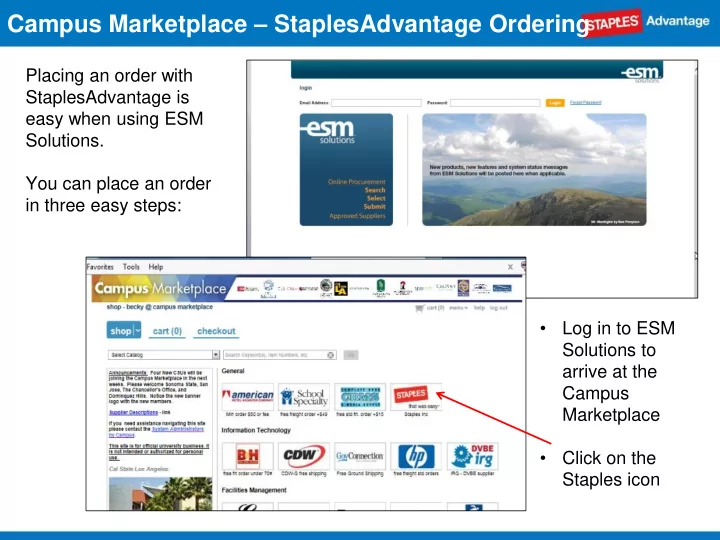
Campus Marketplace StaplesAdvantage Ordering Placing an order with StaplesAdvantage is easy when using ESM Solutions. You can place an order in three easy steps: Log in to ESM Solutions to arrive at the Campus Marketplace


slide-1
SLIDE 1

Campus Marketplace – StaplesAdvantage Ordering

Placing an order with StaplesAdvantage is easy when using ESM Solutions. You can place an order in three easy steps:

  • Log in to ESM

Solutions to arrive at the Campus Marketplace

  • Click on the

Staples icon

slide-2
SLIDE 2

Step 1 - SHOP

  • To begin your order,

click on the Staples icon under “shop”

  • This will bring you to

the StaplesAdvantage catalog

Campus Marketplace – StaplesAdvantage Ordering

slide-3
SLIDE 3

Once in the StaplesAdvantage catalog, there are many easy ways to quickly find the items you need

  • The StaplesAdvantage catalog includes:
  • Dashboard to quickly find your previously placed orders, shopping lists and a link to

My Ink and Toner

  • Recently Purchased item access throughout the site once you begin placing orders
  • My Lists allow you to create personal shopping lists of frequently ordered items
  • Search for key words or item numbers to find what you need
  • Browse Categories to narrow down your search quickly, find eco-conscious and

diversity items and access the Ink & Toner Finder

  • My Ink & Toner to easily find the right cartridge or toner; add your printer to My

Printers

  • Compare items, use filters to narrow your search and change the sort option to find

what you need

  • Review order history, check package tracking and place online returns
  • Customer Service contact information is available under the Help link on the home

page

Campus Marketplace – StaplesAdvantage Ordering

slide-4
SLIDE 4

Campus Marketplace – StaplesAdvantage Ordering

Search or browse to quickly find items; review item detail and add to cart

  • r to a personal shopping

list easily

slide-5
SLIDE 5

Step 2 - CART

  • Click Submit Order to

return your cart to the Marketplace

  • Review your cart and

click Continue when ready to convert cart into a transaction

Campus Marketplace – StaplesAdvantage Ordering

slide-6
SLIDE 6
  • You’ll receive email confirmations from

ESM Solutions and StaplesAdvantage

  • You can track your order status through

StaplesAdvantage under the Dashboard

  • Should you have additional questions,

please reference your PO and account # 1826707LA when contacting Staples customer service Step 3 - CHECKOUT

  • Review your

shipping and order information; click Prepare / Continue to submit your order

  • A PO # is issued

with every transaction

Campus Marketplace – StaplesAdvantage Ordering