C/C++ review bits & bytes Same bits, different interpretation - - PowerPoint PPT Presentation

c c review bits bytes same bits different interpretation
SMART_READER_LITE
LIVE PREVIEW

C/C++ review bits & bytes Same bits, different interpretation - - PowerPoint PPT Presentation

CSC209 Fall 2001 C/C++ review bits & bytes Same bits, different interpretation What is the value of 11111111 ? it depends on the type (unsigned) char 1 byte = 8 bits, (unsigned) Unsigned: 255 short int 2 bytes =


slide-1
SLIDE 1

CSC209 Fall 2001 Karen Reid 1

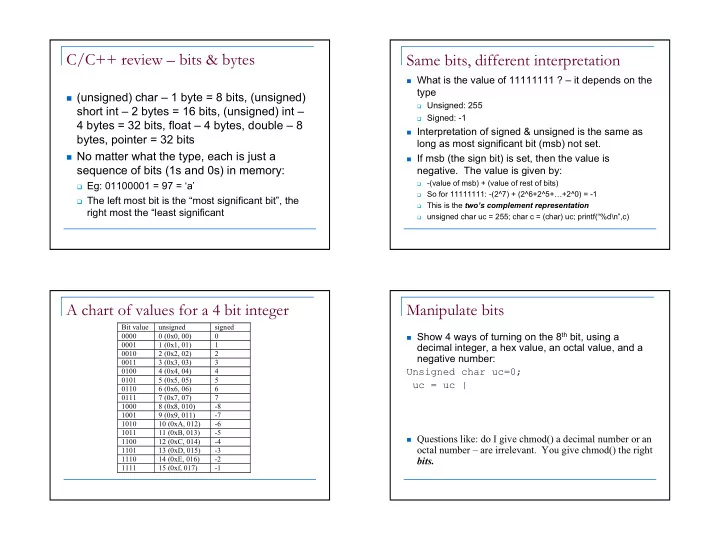
C/C++ review – bits & bytes

(unsigned) char – 1 byte = 8 bits, (unsigned)

short int – 2 bytes = 16 bits, (unsigned) int – 4 bytes = 32 bits, float – 4 bytes, double – 8 bytes, pointer = 32 bits

No matter what the type, each is just a

sequence of bits (1s and 0s) in memory:

Eg: 01100001 = 97 = ‘a’ The left most bit is the “most significant bit”, the

right most the “least significant

Same bits, different interpretation

What is the value of 11111111 ? – it depends on the

type

Unsigned: 255 Signed: -1

Interpretation of signed & unsigned is the same as

long as most significant bit (msb) not set.

If msb (the sign bit) is set, then the value is

  • negative. The value is given by:
  • (value of msb) + (value of rest of bits)

So for 11111111: -(2^7) + (2^6+2^5+…+2^0) = -1 This is the two’s complement representation unsigned char uc = 255; char c = (char) uc; printf(“%d\n”,c)

A chart of values for a 4 bit integer

Bit value unsigned signed 0000 0 (0x0, 00) 0001 1 (0x1, 01) 1 0010 2 (0x2, 02) 2 0011 3 (0x3, 03) 3 0100 4 (0x4, 04) 4 0101 5 (0x5, 05) 5 0110 6 (0x6, 06) 6 0111 7 (0x7, 07) 7 1000 8 (0x8, 010)

  • 8

1001 9 (0x9, 011)

  • 7

1010 10 (0xA, 012)

  • 6

1011 11 (0xB, 013)

  • 5

1100 12 (0xC, 014)

  • 4

1101 13 (0xD, 015)

  • 3

1110 14 (0xE, 016)

  • 2

1111 15 (0xf, 017)

  • 1

Manipulate bits

Show 4 ways of turning on the 8th bit, using a

decimal integer, a hex value, an octal value, and a negative number: Unsigned char uc=0; uc = uc |

Questions like: do I give chmod() a decimal number or an

  • ctal number – are irrelevant. You give chmod() the right

bits.

slide-2
SLIDE 2

CSC209 Fall 2001 Karen Reid 2

Assignment

Those that contain less bits can be assigned

to those that contain more bits.

  • Eg. Assign char to int, short to int

Assign more bits less bits (eg. int to char)

leads to data loss. Takes least significant bits:

unsigned short ushort=0xeeff;

unsigned char c = (char)ushort; c=0xff

strings

Is an array of characters. The string “777” is 3 bytes (not counting null terminator)

  • ----------------------

| ‘7’ | ‘7’ | ‘7’| 0 |…

  • unsigned int uint=“777” is clearly nonsense.

strtol(“777”,&stopstr,8) gives 511 Does it make sense? Is it ok to turn off the user read permission by:

mode= mode – 0400;

Systems Programming

How user programs interact with the Operating System.

Layers of System Software

cat less date gcc grep ddd vi nedit csh (or bash or ksh) Unix system services Unix kernel (in C) computer libc – C Interface to Unix system services

slide-3
SLIDE 3

CSC209 Fall 2001 Karen Reid 3

Compiler vs. Interpreter

Somehow we need to convert a program into

machine code (object code).

A compiler passes over a whole program

before translating it into object code.

An interpreter reads one line of code at a

time.

An interpreter is a compiled program (often

written in C).

C/C++ compiler

1.

Preprocessor does text replacement

  • #include replaced by the text of the included file.
  • #define macros replaced throughout each file.

2.

Compiler parses the program, performs

  • ptimization, and produces assembly code.

3.

Assembler translates assembly code into machine code.

4.

Linker combines object files and libraries into an executable file. It resolves any remaining symbol references.

Java Compiler/Interpreter

Compiler translates program to byte code. The JVM is a byte code interpreter that

translates byte code to machine code.

Byte codes implement fine grain primitives.

They are generic enough that other languages may be compiled to Java byte code.

Shell Interpreter

The interpreter is a C program! The shell interpreter is the program executed

when you write #!/bin/sh

Each line of a shell script is input to a C

program that parses the line, and determines how to execute it.

slide-4
SLIDE 4

CSC209 Fall 2001 Karen Reid 4

Standard Libraries

System calls are not part of the C language

definition.

System calls are defined in libraries (.a .so) Libraries typically contain many .o object

files.

To create your own library archive file:

ar crv mylib.a *.o

Look in /usr/lib and /usr/local/lib

for system libraries.

Shared Libraries

.a libraries are not shared. The functions used are

copied into the executable of your program.

size bloat when lots of processes use the same libraries performance and portability are the wins

.so libraries are shared. One copy exists in

memory, and all programs using that library link to it to access library functions.

reduces total memory usage when multiple processes use

the shared library.

small performance hit as extra work must be done either

when a library function is called, or at the beginning.

Shared vs. Non-Shared Libraries

printf printf copy libc.a main(){ printf() } myprog

Non-shared

printf libc.so main(){ printf() } myprog

Shared

link

System calls

Perform a subroutine call directly to the Unix

kernel.

libc provides the C interface to system calls 3 main categories

File management Process management Error handling

slide-5
SLIDE 5

CSC209 Fall 2001 Karen Reid 5

Error Handling

All system calls return -1 if an error occurs. errno – global variable that holds the numeric code

  • f the last system call.

Every process has errno assigned to zero at

process creation time.

When a system call error occurs, errno is set. A successful system call never affects the current

value of errno.

An unsuccessful system call always overwrites the

current value of errno.

Always check the return value of system calls!

perror()

Library routine: void perror( char *str ) perror displays str, then a colon(:), then an

English description of the last system call error as defined in errno.h.

Protocol

check system calls for a return value of -1 call perror() for an error description.

Ch 2.4

Process vs. program

A program is a set of machine instruction that

when executed, does something useful

A process is a running instance of a program. There can be many processes running the

same program

  • Eg. 2 instances of netscape

Effective user and group ids

Real user-id (ruid), group id (rgid) = uid and gid of

user who initiated process

Sometimes (very rarely) a process can acquire the

privilege of another user: get effective user id (euid) and effective group id.

S_ISUID bit in 12th bit of st_mode (regular

permissions occupy lower 9 bits)

If set, then process assumes euid taken from the file

  • wner

Example: passwd program Normally ruid=euid, rgid=egid

slide-6
SLIDE 6

CSC209 Fall 2001 Karen Reid 6

Process State

running blocked/sleeping ready Only one process can be running on a uniprocessor A process is blocked if it waiting for an event (I/O, signal) A process is ready if it could use the CPU immediately. The scheduler decides which of the ready processes to run.

Create new processes: fork

The ONLY way to create a new process The fork system call creates a duplicate of the currently

running program.

The duplicate (child process) and the original (parent

process) both proceed from the point of the fork with exactly the same data.

The only difference is the return value from the fork call.

Process A Process A1

fork Ch 5.2

Welcome to the INCREDIBLE matter replicator!

Fork: PIDs and PPIDs

System call: int fork() If fork() succeeds it returns the child PID to

the parent and returns 0 to the child;

If fork() fails, it returns -1 to the parent (no

child is created)

Related system calls:

int getpid() – returns the PID of current

process

int getppid() – returns the PID of parent

process (ppid of 1 is 1)

slide-7
SLIDE 7

CSC209 Fall 2001 Karen Reid 7

When fork() fails

There is limit to the maximum number of

processes a user can create.

Once this limit is reached, subsequent calls

to fork() return -1.

fork() properties

Properties of parent inherited by child:

UID, GID controlling terminal CWD, root directory signal mask, environment, resource limits Memory File descriptors

Differences between parent and child

PID, PPID, return value from fork() pending alarms cleared for child pending signals are cleared for child

Fork example

int i, pid; i = 5; printf(“%d\n”, i); pid = fork(); if(pid != 0) i = 6; /* only parent gets here */ else i = 4; /* only child gets here */ printf(“%d\n”, i);

Fork example

int i, pid; i = 5; printf(“%d\n”, i); /* prints 5 */ pid = fork(); /* pid == 677 */ if(pid != 0) i = 6; else i = 4; printf(“%d\n”, i); /* prints 6 */

Original process (parent)

int i, pid; i = 5; printf(“%d\n”, i); pid = fork(); /*pid == 0 */ if(pid != 0) i = 6; else i = 4; printf(“%d\n”, i); /* prints 4 */

child process

slide-8
SLIDE 8

CSC209 Fall 2001 Karen Reid 8

PID/PPID Example

#include <stdio.h> int main(void) { int pid; printf(“ORIG: PID=%d PPID=%d\n”, getpid(), getppid()); pid = fork(); if(pid != 0) printf(“PARENT: PID=%d PPID=%d\n”, getpid(), getppid()); else printf(“CHILD: PID=%d PPID=%d\n”, getpid(), getppid()); return(1); }

Process Termination

When a process terminates, its parent must accept

its return value

Orphan process:

a process whose parent is the init process (PID 1) because

its original parent died before it did.

Terminating a process: exit() Every normal process is a child of some parent, a

terminating process sends its parent a SIGCHLD signal and waits for its termination status to be accepted.

The Bourne shell stores the termination code of the

last command in $?.

Ch 5.6

Zombies

A zombie process:

a process that is “waiting” for its parent to accept

its return code

a parent accepts a child’s return code by

executing wait()

shows up as Z in ps –a A terminating process may be a (multiple) parent;

the kernel ensures all of its children are orphaned and adopted by init.

wait()

System call to wait for a child

int wait(int *status)

A process that calls wait() can:

block (if all of its children are still running) return immediately with the termination status of a

child (if a child has terminated and is waiting for its termination status to be fetched)

return immediately with an error (if it doesn’t have

any child processes.)

Ch 5.7

slide-9
SLIDE 9

CSC209 Fall 2001 Karen Reid 9

wait and waitpid

wait() can

block return with termination status return with error

If there is more than one child wait()

returns on termination of any children

waitpid can be used to wait for a specific

child pid.

waitpid also has an option to block or not

to block

wait and waitpid

waitpid has an option to block or not to

block

pid_t waitpid(pid, &status, option); if pid == -1

wait for any child

if option == NOHANG non-blocking if option == 0

blocking

waitpid(-1, &status, 0); equivalent to

wait(&status);

Example of wait

#include <sys/types.h> #include <sys/wait.h> int main(void) { int status; if(fork() == 0) exit(7); /*normal*/ wait(&status); prExit(status); if(fork() == 0) abort(); /*SIGABRT*/ wait(&status); prExit(status); if(fork() == 0) status /= 0; /*FPE*/ wait(&status) prExit(status); }

prExit.c

#include <sys/types.h> void prExit(int status) { if(WIFEXITED( status ) ) printf(“normal termination\n”); else if(WIFSTOPPED( status )) printf(“child stopped, signal no.= %d\n”, WSTOPSIG(status)); else if(WIFSIGNALLED( status ) ) printf(“abnormal termination, ” “signal no.= %d\n”,WTERMSIG(status)); }

slide-10
SLIDE 10

CSC209 Fall 2001 Karen Reid 10

Exec

The exec system call replaces the program being run by

a process by a different one.

The memory, code…everything is replaced by those of

new program

The new program starts executing from the beginning. On success, exec never returns, on failure, exec returns

  • 1.

Process A running Program X Process A running Program Y exec(“Y”); Ch 5.3

Exec example

Program X int i = 5; printf(“%d\n”, i); exec(“Y”); printf(“%d\n”, i); Program Y printf(“hello\n”);

exec properties

New process inherits from calling process:

PID and PPID, real UID, GID controlling terminal CWD, root directory, resource limits pending signals pending alarms

exec()

Six versions exec():

execl(char *path, char *arg0, …, (char *)0); execv(char *path, char *argv[]); execle(char *path, char *arg0, …,(char *)0, char *envp[]); execve(char *pathname, char *argv[], char *envp[]); execlp(char *file, char *arg0, …,(char *)0); execvp(char *file, char *argv[]);

slide-11
SLIDE 11

CSC209 Fall 2001 Karen Reid 11

More on exec

execl and execv expect exact path, relative or

full

execlp and execvp searches the PATH

environment variable for the executable

execle and execve allow specification of

environment for process to be executed

Using fork() and exec()

pid_t pid; Switch(pid = fork()) { case –1: exit(1); //fork failed break; case 0: execl(“/bin/ls”,”ls”,”-1”,NULL); exit(1); //exec failed break; default: wait(NULL); printf(“ls completed\n”); exit(0); }

Processes and File Descriptors

File descriptors are handles to open files. They belong to processes not programs. They are a process’ link to the outside world.

FDs preserved across fork and exec

Process B Process C fork() Process A running Program X Process A running Program Y exec(“Y”); /u/reid/foo /u/reid/bar

fd=3 fd=3 fd=8 fd=8

Ch 5.5

slide-12
SLIDE 12

CSC209 Fall 2001 Karen Reid 12

Initializing Unix

See “top”, “ps –aux” to see what’s running The only way to create a new process is to

duplicate and existing process. Therefore the ancestor of all processes is init with pid = 1

Process 0 = scheduler, pid 2 = pageout daemon

init init init init getty init login csh

fork exec fork and exec fork and exec

How csh runs commands

When a command is typed, csh forks and then

execs the typed command.

After the fork, file descriptors 0, 1, and 2 still refer to

stdin, stdout, and stderr in the new process.

By convention, the executed program will use these

descriptors appropriately.

csh csh csh csh date csh Time fork exec

How csh runs

Process running shell PID 34 child process running shell: PID 35 child process running utility: PID 35 child process terminated: PID 35 parent process running shell PID 34, waiting for awakening parent process running shell PID 34, waiting for child duplicate: fork() differentiate: exec() terminate: exit() signal wait for child: wait()