Applications Lecture goal: Overview: conceptual + implementation - - PDF document

applications
SMART_READER_LITE
LIVE PREVIEW

Applications Lecture goal: Overview: conceptual + implementation - - PDF document

Applications Lecture goal: Overview: conceptual + implementation specific protocols: aspects of network o http --- Web application protocols o ftp --- File transfer learn about protocols by examining popular o smtp --- Mail


slide-1
SLIDE 1

1

16/9-02 Datorkommunikation & Internet, Anders Broberg, Umu - Applikationslagret 1

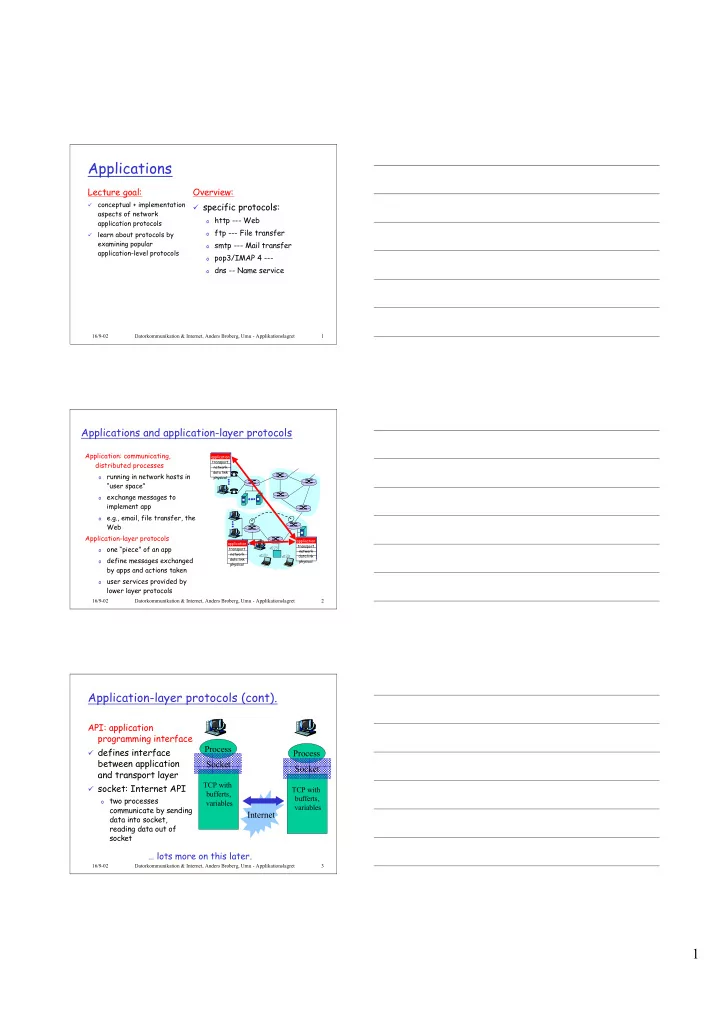
Applications

Lecture goal:

¸

conceptual + implementation aspects of network application protocols

¸

learn about protocols by examining popular application-level protocols

Overview:

¸ specific protocols:

  • http --- Web
  • ftp --- File transfer
  • smtp --- Mail transfer
  • pop3/IMAP 4 ---
  • dns -- Name service

16/9-02 Datorkommunikation & Internet, Anders Broberg, Umu - Applikationslagret 2

Applications and application-layer protocols

Application: communicating, distributed processes

  • running in network hosts in

“user space”

  • exchange messages to

implement app

  • e.g., email, file transfer, the

Web Application-layer protocols

  • ne “piece” of an app
  • define messages exchanged

by apps and actions taken

  • user services provided by

lower layer protocols

application transport network data link physical application transport network data link physical application transport network data link physical

16/9-02 Datorkommunikation & Internet, Anders Broberg, Umu - Applikationslagret 3

Application-layer protocols (cont).

API: application programming interface

¸ defines interface

between application and transport layer

¸ socket: Internet API

  • two processes

communicate by sending data into socket, reading data out of socket

… lots more on this later. Process

TCP with bufferts, variables

Socket Process

TCP with bufferts, variables

Socket Internet

slide-2
SLIDE 2

2

16/9-02 Datorkommunikation & Internet, Anders Broberg, Umu - Applikationslagret 4

What transport service does an app need?

Data loss

¸

some apps (e.g., audio) can tolerate some loss

¸

  • ther apps (e.g., file transfer,

telnet) require 100% reliable data transfer

Timing

¸

some apps (e.g., Internet telephony, interactive games) require low delay to be “effective”

Bandwidth

¸ some apps (e.g., multimedia)

require minimum amount of bandwidth to be “effective”

¸ other apps (“elastic apps”)

make use of whatever bandwidth they get

16/9-02 Datorkommunikation & Internet, Anders Broberg, Umu - Applikationslagret 5

Transport service requirements of common apps

Application file transfer e-mail Web documents real-time audio/video stored audio/video interactive games financial apps Data loss no loss no loss loss-tolerant loss-tolerant loss-tolerant loss-tolerant no loss Bandwidth elastic elastic elastic audio: 5Kb-1Mb video:10Kb-5Mb same as above few Kbps up elastic Time Sensitive no no no yes, 100’s msec yes, few secs yes, 100’s msec yes and no

16/9-02 Datorkommunikation & Internet, Anders Broberg, Umu - Applikationslagret 6

Services provided by Internet transport protocols

TCP service:

¸

connection-oriented: setup required between client, server

¸

reliable transport between sending and receiving process

¸

flow control: sender won’t

  • verwhelm receiver

¸

congestion control: throttle sender when network overloaded

¸

does not providing: timing, minimum bandwidth guarantees

UDP service:

¸

unreliable data transfer between sending and receiving process

¸

does not provide: connection setup, reliability, flow control, congestion control, timing, or bandwidth guarantee Q: why bother? Why is there a UDP?

slide-3
SLIDE 3

3

16/9-02 Datorkommunikation & Internet, Anders Broberg, Umu - Applikationslagret 7

Internet apps: their protocols and transport protocols

Application e-mail remote terminal access Web file transfer streaming multimedia remote file server Internet telephony Application layer protocol smtp [RFC 821] telnet [RFC 854] http [RFC 2068] ftp [RFC 959] proprietary (e.g. RealNetworks) NSF proprietary (e.g., Vocaltec) Underlying transport protocol TCP TCP TCP TCP TCP or UDP TCP or UDP typically UDP

16/9-02 Datorkommunikation & Internet, Anders Broberg, Umu - Applikationslagret 8

The Web: some jargon

¸ Web page:

  • consists of “objects”
  • addressed by a URL

¸ Most Web pages consist

  • f:
  • base HTML page, and
  • several referenced
  • bjects.

¸ URL has two components:

host name and path name: ¸ User agent for Web is

called a browser:

  • MS Internet Explorer
  • Netscape Communicator

¸ Server for Web is

called Web server:

  • Apache (public domain)
  • MS Internet

Information Server www.someSchool.edu/someDept/pic.gif

16/9-02 Datorkommunikation & Internet, Anders Broberg, Umu - Applikationslagret 9

The Web: the http protocol

http: hypertext transfer protocol

¸

Web’s application layer protocol

¸

client/server model

  • client: browser that

requests, receives, “displays” Web objects

  • server: Web server sends
  • bjects in response to

requests

¸

http1.0: RFC 1945

¸

http1.1: RFC 2068 PC running Explorer Server running NCSA Web server Mac running Navigator http request http request h t t p r e s p

  • n

s e h t t p r e s p

  • n

s e

slide-4
SLIDE 4

4

16/9-02 Datorkommunikation & Internet, Anders Broberg, Umu - Applikationslagret 10

The http protocol: more

http: TCP transport service:

¸

client initiates TCP connection (creates socket) to server, port 80

¸

server accepts TCP connection from client

¸

http messages (application- layer protocol messages) exchanged between browser (http client) and Web server (http server)

¸

TCP connection closed

¸

Has nothing to do with the

  • utlook or presentation

http is “stateless”

¸

server maintains no information about past client requests

Protocols that maintain “state” are complex!

¸ past history (state) must

be maintained

¸ if server/client crashes,

their views of “state” may be inconsistent, must be reconciled

aside

16/9-02 Datorkommunikation & Internet, Anders Broberg, Umu - Applikationslagret 11

http example

Suppose user enters URL www.someSchool.edu/someDepartment/home.index

  • 1a. http client initiates TCP

connection to http server (process) at www.someSchool.edu. Port 80 is default for http server.

  • 2. http client sends http request

message (containing URL) into TCP connection socket

  • 1b. http server at host

www.someSchool.edu waiting for TCP connection at port 80. “accepts” connection, notifying client

  • 3. http server receives request

message, forms response message containing requested

  • bject

(someDepartment/home.index), sends message into socket

time

(contains text, references to 10 jpeg images)

16/9-02 Datorkommunikation & Internet, Anders Broberg, Umu - Applikationslagret 12

http example (cont.)

  • 5. http client receives response

message containing html file, displays html. Parsing html file, finds 10 referenced jpeg objects

  • 6. Steps 1-5 repeated for each
  • f 10 jpeg objects
  • 4. http server closes TCP

connection.

time

slide-5
SLIDE 5

5

16/9-02 Datorkommunikation & Internet, Anders Broberg, Umu - Applikationslagret 13

Non-persistent and persistent connections

Non-persistent

¸ HTTP/1.0 ¸ server parses request,

responds, and closes TCP connection

¸ 2 RTTs to fetch each

  • bject

¸ Each object transfer

suffers from slow start

Persistent ¸ default for HTTP/1.1 ¸ on same TCP

connection: server, parses request, responds, parses new request,..

¸ Client sends requests

for all referenced

  • bjects as soon as it

receives base HTML.

¸ Fewer RTTs and less

slow start. But most 1.0 browsers use parallel TCP connections.

16/9-02 Datorkommunikation & Internet, Anders Broberg, Umu - Applikationslagret 14

http message format: request

¸ two types of http messages: request, response ¸ http request message:

  • ASCII (human-readable format)

GET /somedir/page.html HTTP/1.0 User-agent: Mozilla/4.0 Accept: text/html, image/gif,image/jpeg Accept-language:fr (extra carriage return, line feed) request line (GET, POST, HEAD commands) header lines Carriage return, line feed indicates end

  • f message

16/9-02 Datorkommunikation & Internet, Anders Broberg, Umu - Applikationslagret 15

http request message: general format

slide-6
SLIDE 6

6

16/9-02 Datorkommunikation & Internet, Anders Broberg, Umu - Applikationslagret 16

http message format: respone

HTTP/1.0 200 OK Date: Thu, 06 Aug 1998 12:00:15 GMT Server: Apache/1.3.0 (Unix) Last-Modified: Mon, 22 Jun 1998 …... Content-Length: 6821 Content-Type: text/html data data data data data ... status line (protocol status code status phrase) header lines data, e.g., requested html file

16/9-02 Datorkommunikation & Internet, Anders Broberg, Umu - Applikationslagret 17

http response status codes

200 OK

  • request succeeded, requested object later in this message

301 Moved Permanently

  • requested object moved, new location specified later in

this message (Location:)

400 Bad Request

  • request message not understood by server

404 Not Found

  • requested document not found on this server

505 HTTP Version Not Supported In first line in server->client response message. A few sample codes:

16/9-02 Datorkommunikation & Internet, Anders Broberg, Umu - Applikationslagret 18

Trying out http (client side) for yourself

  • 1. Telnet to your favorite Web server:

Opens TCP connection to port 80 (default http server port) at www.eurecom.fr. Anything typed in sent to port 80 at www.eurecom.fr telnet www.eurecom.fr 80

  • 2. Type in a GET http request:

GET /~ross/index.html HTTP/1.0 By typing this in (hit carriage return twice), you send this minimal (but complete) GET request to http server

  • 3. Look at response message sent by http server!
slide-7
SLIDE 7

7

16/9-02 Datorkommunikation & Internet, Anders Broberg, Umu - Applikationslagret 19

User-server interaction: authentication

Authentication goal: control access to server documents

¸

stateless: client must present authorization in each request

¸

authorization: typically name, password

  • authorization: header line

in request

  • if no authorization

presented, server refuses access, sends WWW authenticate: header line in response

client server

usual http request msg 401: authorization req. WWW authenticate: usual http request msg + Authorization:line usual http response msg usual http request msg + Authorization:line usual http response msg

time Browser caches name & password so that user does not have to repeatedly enter it.

16/9-02 Datorkommunikation & Internet, Anders Broberg, Umu - Applikationslagret 20

User-server interaction: cookies

¸

server sends “cookie” to client in response mst Set-cookie: 1678453

¸

client presents cookie in later requests cookie: 1678453

¸

server matches presented- cookie with server-stored info

  • authentication
  • remembering user

preferences, previous choices

client server

usual http request msg usual http response +

Set-cookie: #

usual http request msg

cookie: #

usual http response msg usual http request msg

cookie: #

usual http response msg

cookie- spectific action cookie- spectific action

16/9-02 Datorkommunikation & Internet, Anders Broberg, Umu - Applikationslagret 21

User-server interaction: conditional GET

¸

Goal: don’t send object if client has up-to-date stored (cached) version

¸

client: specify date of cached copy in http request If-modified-since: <date>

¸

server: response contains no

  • bject if cached copy up-to-

date: HTTP/1.0 304 Not Modified

client server

http request msg If-modified-since: <date> http response HTTP/1.0 304 Not Modified

  • bject

not modified

http request msg If-modified-since: <date> http response HTTP/1.1 200 OK …

<data>

  • bject

modified

slide-8
SLIDE 8

8

16/9-02 Datorkommunikation & Internet, Anders Broberg, Umu - Applikationslagret 22

Web Caches (proxy server)

¸

user sets browser: Web accesses via web cache

¸

client sends all http requests to web cache

  • if object at web cache,

web cache immediately returns object in http response

  • else requests object

from origin server, then returns http response to client

Goal: satisfy client request without involving origin server

client

Proxy server

client http request http request h t t p r e s p

  • n

s e h t t p r e s p

  • n

s e http request h t t p r e s p

  • n

s e http request h t t p r e s p

  • n

s e

  • rigin

server

  • rigin

server

16/9-02 Datorkommunikation & Internet, Anders Broberg, Umu - Applikationslagret 23

Why Web Caching?

Assume: cache is “close” to client (e.g., in same network)

¸ smaller response time:

cache “closer” to client

¸ decrease traffic to distant

servers

  • link out of

institutional/local ISP network often bottleneck

  • rigin

servers

public Internet institutional network 10 Mbps LAN 1.5 Mbps access link institutional cache

16/9-02 Datorkommunikation & Internet, Anders Broberg, Umu - Applikationslagret 24

Content Distribution Networks (CDN)

¸

A CDN offers a service to content providers (Yahoo, …)

¸

A service that guarantees to get their content to their requesting users I a short delay

¸

Uses DNS redirect a reuest to nearest CDN-server

CDN

slide-9
SLIDE 9

9

16/9-02 Datorkommunikation & Internet, Anders Broberg, Umu - Applikationslagret 25

ftp: the file transfer protocol

¸

transfer file to/from remote host

¸

client/server model

  • client: side that initiates transfer (either to/from remote)
  • server: remote host

¸

ftp: RFC 959

¸

ftp server: port 21 file transfer FTP server FTP user interface FTP client local file system remote file system user at host

16/9-02 Datorkommunikation & Internet, Anders Broberg, Umu - Applikationslagret 26

ftp: separate control, data connections

¸

ftp client contacts ftp server at port 21, specifying TCP as transport protocol

¸

two parallel TCP connections

  • pened:
  • control: exchange commands,

responses between client, server. “out of band control”

  • data: file data to/from

server

¸

ftp server maintains “state”: current directory, earlier authentication

FTP client FTP server

TCP control connection port 21 TCP data connection port 20

16/9-02 Datorkommunikation & Internet, Anders Broberg, Umu - Applikationslagret 27

ftp commands, responses

Sample commands:

¸

sent as ASCII text over control channel

¸

USER username

¸

PASS password

¸

LIST return list of file in current directory

¸

RETR filename retrieves (gets) file

¸

STOR filename stores (puts) file onto remote host

Sample return codes

¸

status code and phrase (as in http)

¸

331 Username OK, password required

¸

125 data connection already open; transfer starting

¸

425 Can’t open data connection

¸

452 Error writing file

slide-10
SLIDE 10

10

16/9-02 Datorkommunikation & Internet, Anders Broberg, Umu - Applikationslagret 28

Electronic Mail

Three major components:

¸

user agents

¸

mail servers

¸

simple mail transfer protocol: smtp User Agent

¸

a.k.a. “mail reader”

¸

composing, editing, reading mail messages

¸

e.g., Eudora, Outlook, elm, Netscape Messenger

¸

  • utgoing, incoming messages

stored on server user mailbox

  • utgoing

message queue mail server user agent user agent user agent mail server user agent user agent mail server user agent

SMTP SMTP SMTP

16/9-02 Datorkommunikation & Internet, Anders Broberg, Umu - Applikationslagret 29

Electronic Mail: mail servers

Mail Servers

¸

mailbox contains incoming messages (yet to be read) for user

¸

message queue of outgoing (to be sent) mail messages

¸

smtp protocol between mail servers to send email messages

  • client: sending mail server
  • “server”: receiving mail

server mail server user agent user agent user agent mail server user agent user agent mail server user agent

SMTP SMTP SMTP

16/9-02 Datorkommunikation & Internet, Anders Broberg, Umu - Applikationslagret 30

Electronic Mail: smtp [RFC 821]

¸

uses tcp to reliably transfer email msg from client to server, port 25

¸

direct transfer: sending server to receiving server

¸

three phases of transfer

  • handshaking (greeting)
  • transfer of messages
  • closure

¸

command/response interaction

  • commands: ASCII text
  • response: status code and phrase

¸ messages must be in 7-bit ASCII

slide-11
SLIDE 11

11

16/9-02 Datorkommunikation & Internet, Anders Broberg, Umu - Applikationslagret 31

Sample smtp interaction

S: 220 hamburger.edu C: HELO crepes.fr S: 250 Hello crepes.fr, pleased to meet you C: MAIL FROM: <alice@crepes.fr> S: 250 alice@crepes.fr... Sender ok C: RCPT TO: <bob@hamburger.edu> S: 250 bob@hamburger.edu ... Recipient ok C: DATA S: 354 Enter mail, end with "." on a line by itself C: Do you like ketchup? C: How about pickles? C: . S: 250 Message accepted for delivery C: QUIT S: 221 hamburger.edu closing connection

16/9-02 Datorkommunikation & Internet, Anders Broberg, Umu - Applikationslagret 32

try smtp interaction for yourself:

¸ telnet servername 25 ¸ see 220 reply from server ¸ enter HELO, MAIL FROM, RCPT TO, DATA, QUIT

commands above lets you send email without using email client (reader)

16/9-02 Datorkommunikation & Internet, Anders Broberg, Umu - Applikationslagret 33

smtp: final words

¸

smtp uses persistent connections

¸

smtp requires that message (header & body) be in 7-bit ascii

¸

certain character strings are not permitted in message (e.g., CRLF.CRLF). Thus message has to be encoded (usually into either base-64 or quoted printable)

¸

smtp server uses CRLF.CRLF to determine end of message

Comparison with http

¸

http: pull

¸

email: push

¸

both have ASCII command/response interaction, status codes

¸

http: each object is encapsulated in its own response message

¸

smtp: multiple objects message sent in a multipart message

slide-12
SLIDE 12

12

16/9-02 Datorkommunikation & Internet, Anders Broberg, Umu - Applikationslagret 34

Mail message format

smtp: protocol for exchanging email msgs RFC 822: standard for text message format:

¸

header lines, e.g.,

  • To:
  • From:
  • Subject:

different from smtp commands! ¸ body

  • the “message”, ASCII

characters only

header body

blank line

16/9-02 Datorkommunikation & Internet, Anders Broberg, Umu - Applikationslagret 35

Message format: multimedia extensions

¸ MIME: multimedia mail extension, RFC 2045, 2056 ¸ additional lines in msg header declare MIME content

type

From: alice@crepes.fr To: bob@hamburger.edu Subject: Picture of yummy crepe. MIME-Version: 1.0 Content-Transfer-Encoding: base64 Content-Type: image/jpeg base64 encoded data ..... ......................... ......base64 encoded data

multimedia data type, subtype, parameter declaration method used to encode data MIME version encoded data

16/9-02 Datorkommunikation & Internet, Anders Broberg, Umu - Applikationslagret 36

MIME types

Content-Type: type/subtype; parameters

Text

¸

example subtypes: plain, html

Image

¸

example subtypes: jpeg, gif

Audio

¸

exampe subtypes: basic (8- bit mu-law encoded), 32kadpcm (32 kbps coding)

Video

¸

example subtypes: mpeg, quicktime

Application

¸

  • ther data that must be

processed by reader before “viewable”

¸

example subtypes: msword,

  • ctet-stream
slide-13
SLIDE 13

13

16/9-02 Datorkommunikation & Internet, Anders Broberg, Umu - Applikationslagret 37

Multipart Type

From: alice@crepes.fr To: bob@hamburger.edu Subject: Picture of yummy crepe. MIME-Version: 1.0 Content-Type: multipart/mixed; boundary=98766789

  • -98766789

Content-Transfer-Encoding: quoted-printable Content-Type: text/plain Dear Bob, Please find a picture of a crepe.

  • -98766789

Content-Transfer-Encoding: base64 Content-Type: image/jpeg base64 encoded data ..... ......................... ......base64 encoded data

  • -98766789--

16/9-02 Datorkommunikation & Internet, Anders Broberg, Umu - Applikationslagret 38

Mail access protocols

¸

SMTP: delivery/storage to receiver’s server

¸

Mail access protocol: retrieval from server

  • POP: Post Office Protocol [RFC 1939]
  • authorization (agent <-->server) and download
  • IMAP: Internet Mail Access Protocol [RFC 1730]
  • more features (more complex)
  • manipulation of stored msgs on server
  • HTTP: Hotmail , Yahoo! Mail, etc.

user agent sender’s mail server user agent

SMTP SMTP POP3 or IMAP

receiver’s mail server

16/9-02 Datorkommunikation & Internet, Anders Broberg, Umu - Applikationslagret 39

POP3 protocol

authorization phase

¸

client commands:

  • user: declare username
  • pass: password

¸

server responses

  • +OK
  • -ERR

transaction phase, client:

¸

list: list message numbers

¸

retr: retrieve message by number

¸

dele: delete

¸

quit

C: list

S: 1 498 S: 2 912 S: . C: retr 1 S: <message 1 contents> S: . C: dele 1 C: retr 2 S: <message 1 contents> S: . C: dele 2 C: quit S: +OK POP3 server signing off S: +OK POP3 server ready C: user alice S: +OK C: pass hungry S: +OK user successfully logged on

slide-14
SLIDE 14

14

16/9-02 Datorkommunikation & Internet, Anders Broberg, Umu - Applikationslagret 40

DNS: Domain Name System

People: many identifiers:

  • SSN, name, Passport #

Internet hosts, routers:

  • IP address (32 bit) -

used for addressing datagrams

  • “name”, e.g.,

gaia.cs.umass.edu - used by humans

Q: map between IP addresses and name ?

Domain Name System:

¸

distributed database implemented in hierarchy of many name servers

¸

application-layer protocol host, routers, name servers to communicate to resolve names (address/name translation)

  • note: core Internet function

implemented as application- layer protocol

  • complexity at network’s

“edge”

16/9-02 Datorkommunikation & Internet, Anders Broberg, Umu - Applikationslagret 41

DNS name servers

¸ no server has all name-to-IP

address mappings local name servers:

  • each ISP, company has local

(default) name server

  • host DNS query first goes to

local name server

authoritative name server:

  • for a host: stores that host’s

IP address, name

  • can perform name/address

translation for that host’s name

Why not centralize DNS?

¸ single point of failure ¸ traffic volume ¸ distant centralized

database

¸ maintenance

doesn’t scale!

16/9-02 Datorkommunikation & Internet, Anders Broberg, Umu - Applikationslagret 42

DNS: Root name servers

¸ contacted by local

name server that can not resolve name

¸ root name server:

  • contacts

authoritative name server if name mapping not known

  • gets mapping
  • returns mapping to

local name server

¸ ~ dozen root name

servers worldwide

slide-15
SLIDE 15

15

16/9-02 Datorkommunikation & Internet, Anders Broberg, Umu - Applikationslagret 43

Simple DNS example

host surf.eurecom.fr wants IP address of gaia.cs.umass.edu

  • 1. Contacts its local DNS server,

dns.eurecom.fr

  • 2. dns.eurecom.fr contacts

root name server, if necessary

  • 3. root name server contacts

authoritative name server, dns.umass.edu, if necessary requesting host surf.eurecom.fr gaia.cs.umass.edu root name server authorititive name server dns.umass.edu local name server dns.eurecom.fr 1 2 3 4 5 6

16/9-02 Datorkommunikation & Internet, Anders Broberg, Umu - Applikationslagret 44

DNS example

Root name server:

¸

may not know authoratiative name server

¸

may know intermediate name server: who to contact to find authoritative name server requesting host surf.eurecom.fr gaia.cs.umass.edu root name server local name server dns.eurecom.fr 1 2 3 4 5 6 authoritative name server dns.cs.umass.edu intermediate name server dns.umass.edu 7 8

16/9-02 Datorkommunikation & Internet, Anders Broberg, Umu - Applikationslagret 45

DNS: iterated queries

recursive query:

¸

puts burden of name resolution on contacted name server

¸

heavy load?

iterated query:

¸

contacted server replies with name of server to contact

¸

“I don’t know this name, but ask this server” requesting host surf.eurecom.fr gaia.cs.umass.edu root name server local name server dns.eurecom.fr 1 2 3 4 5 6 authoritative name server dns.cs.umass.edu intermediate name server dns.umass.edu 7 8 iterated query

slide-16
SLIDE 16

16

16/9-02 Datorkommunikation & Internet, Anders Broberg, Umu - Applikationslagret 46

DNS: caching and updating records

¸ once (any) name server learns mapping, it caches

mapping

  • cache entries timeout (disappear) after some

time

¸ update/notify mechanisms under design by IETF

  • RFC 2136
  • http://www.ietf.org/html.charters/dnsind-charter.html

16/9-02 Datorkommunikation & Internet, Anders Broberg, Umu - Applikationslagret 47

DNS records

DNS: distributed db storing resource records (RR)

¸ Type=NS

  • name is domain (e.g.

foo.com)

  • value is IP address of

authoritative name server for this domain

RR format: (name, value, type,ttl)

¸ Type=A

  • name is hostname
  • value is IP address

¸ Type=CNAME

  • name is an alias name

for some “cannonical” (the real) name

  • value is cannonical

name ¸ Type=MX

  • value is hostname of

mailserver associated with name

16/9-02 Datorkommunikation & Internet, Anders Broberg, Umu - Applikationslagret 48

DNS protocol, messages

DNS protocol : query and repy messages, both with same message format

msg header

¸ identification: 16 bit # for

query, repy to query uses same #

¸ flags:

  • query or reply
  • recursion desired
  • recursion available
  • reply is authoritative
slide-17
SLIDE 17

17

16/9-02 Datorkommunikation & Internet, Anders Broberg, Umu - Applikationslagret 49

DNS protocol, messages

Name, type fields for a query RRs in reponse to query records for authoritative servers additional “helpful” info that may be used

16/9-02 Datorkommunikation & Internet, Anders Broberg, Umu - Applikationslagret 50

Peer-to-Peer file sharing

¸ Napster ¸ Gnutella ¸ Freenet ¸ FastTrack

P2P -clients:

¸ Napster ¸ AudioGalaxy ¸ LimeWire ¸ KaZaA ¸ Direct Connect

  • DC++

More P2P at next lecture!