Addition about Prototypes - - PDF document

addition about prototypes
SMART_READER_LITE
LIVE PREVIEW

Addition about Prototypes - - PDF document

Vorlesung Mensch-Maschine-Interaktion Evaluation Ludwig-Maximilians-Universitt Mnchen LFE Medieninformatik Heinrich Humann & Albrecht Schmidt WS2003/2004 http://www.medien.informatik.uni-muenchen.de/ 29/01/04 LMU Mnchen


slide-1
SLIDE 1

29/01/04 LMU München … Mensch-Maschine-Interaktion … WS03/04 … Schmidt/Hußmann 1

Vorlesung Mensch-Maschine-Interaktion Evaluation

Ludwig-Maximilians-Universität München LFE Medieninformatik Heinrich Hußmann & Albrecht Schmidt WS2003/2004

http://www.medien.informatik.uni-muenchen.de/

29/01/04 LMU München … Mensch-Maschine-Interaktion … WS03/04 … Schmidt/Hußmann 2

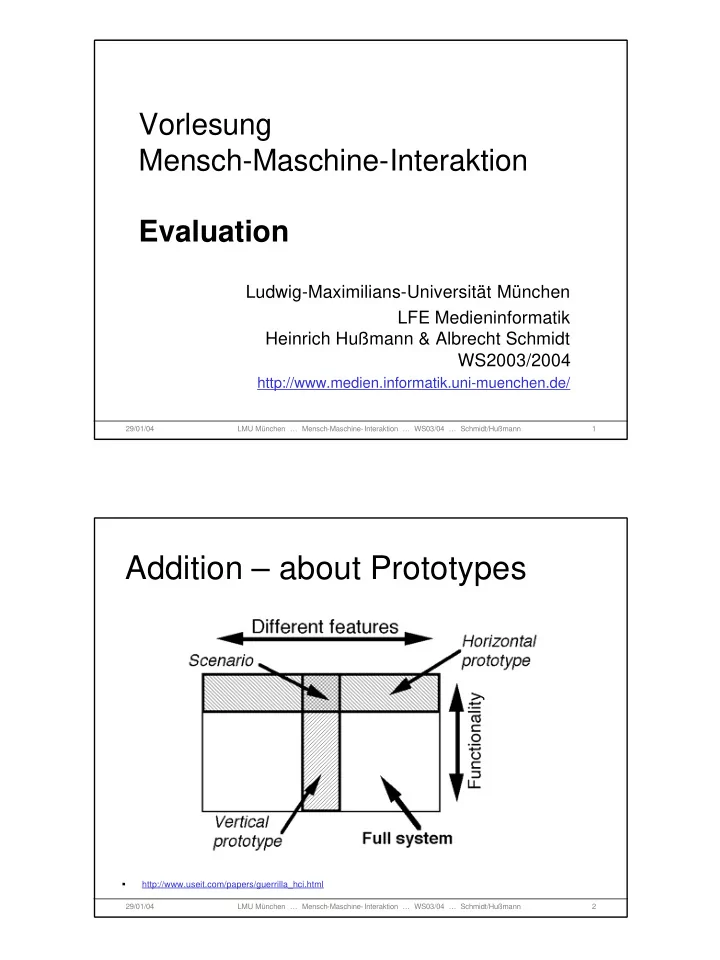
Addition – about Prototypes

  • http://www.useit.com/papers/guerrilla_hci.html
slide-2
SLIDE 2

29/01/04 LMU München … Mensch-Maschine-Interaktion … WS03/04 … Schmidt/Hußmann 3

1984 Olympic Message System A human centered approach

  • A public system to allow athletes at the Olympic Games to send and

receive recorded voice messages (between athletes, to coaches, and to people around the world)

  • Challenges
  • New technology
  • Had to work – delays were not acceptable

(Olympic Games are only 4 weeks long)

  • Short development time
  • Design Principles
  • Early focus on users and tasks
  • Empirical measurements
  • Iterative design

Looks obvious – but it is not!

  • … it worked! But why?

29/01/04 LMU München … Mensch-Maschine-Interaktion … WS03/04 … Schmidt/Hußmann 4

1984 Olympic Message System Methods

  • Scenarios instead of a list of functions
  • Early prototypes & simulation (manual transcription and reading)
  • Early demonstration to potential users (all groups)
  • Iterative design (about 200 iterations on the user guide)
  • An insider in the design team (ex-Olympian from Ghana)
  • On side inspections (where is the system going to be deployed)
  • Interviews and tests with potential users
  • Full size kiosk prototype (initially non-functional) at a public space in

the company to get comments

  • Prototype tests within the company (with 100 and with 2800 people)
  • “free coffee and doughnuts” for lucky test users
  • Try-to-destroy-it test with computer science students
  • Pre-Olympic field trail

The 1984 Olympic Message System: a test of behavioral principles of system design John D. Gould , Stephen J. Boies , Stephen Levy , John T. Richards , Jim Schoonard Communications of the ACM September 1987 Volume 30 Issue 9 http://www.research.ibm.com/compsci/spotlight/hci/p758-gould.pdf
slide-3
SLIDE 3

29/01/04 LMU München … Mensch-Maschine-Interaktion … WS03/04 … Schmidt/Hußmann 5

Table of Content

An example of user centred design What to evaluate? Why Evaluate? Approaches to evaluation Inspection and expert review Model extraction Observations Experiments Ethical Issues

29/01/04 LMU München … Mensch-Maschine-Interaktion … WS03/04 … Schmidt/Hußmann 6

What to evaluate?

The usability of a system! … it depends on the stage of a project

  • Ideas and concepts
  • Designs
  • Prototypes
  • Implementations
  • Products in use

… it also depends on the goals Approaches

  • Formative evaluation – throughout the design, helps to shape a

product

  • Summative evaluation – quality assurance of the finished

product.

slide-4
SLIDE 4

29/01/04 LMU München … Mensch-Maschine-Interaktion … WS03/04 … Schmidt/Hußmann 7

Why evaluate? Goals of user interface evaluation

Ensure functionality (effectiveness)

  • Assess (proof) that a certain task can be performed

Ensure performance (efficiency)

  • Assess (proof) that a certain task can be performed given specific

limitations (e.g. time, resources)

Customer / User acceptance

  • What is the effect on the user?
  • Are the expectations met?

Identify problems

  • For specific tasks
  • For specific users

Improve development life-cycle Secure the investment (don’t develop a product that can

  • nly be used by fraction of the target group – or not at all!)

29/01/04 LMU München … Mensch-Maschine-Interaktion … WS03/04 … Schmidt/Hußmann 8

There is not a single way …

Different approaches

  • Inspections
  • Model extraction
  • Controlled studies
  • Experiments
  • Observations
  • Field trails
  • Usage context

Different results

  • Qualitative assessment
  • Quantitative assessment
slide-5
SLIDE 5

29/01/04 LMU München … Mensch-Maschine-Interaktion … WS03/04 … Schmidt/Hußmann 9

Usability Methods are often not used!

Why

  • Developers are not aware of it
  • The expertise to do evaluation is not available
  • People don’t know about the range of methods available
  • Certain methods are to expensive for a project (or people think

they are to expensive)

  • Developers see no need because the product “works”
  • Teams think their informal methods are good enough

starting points

  • Discount Usability Engineering

http://www.useit.com/papers/guerrilla_hci.html

  • Heuristic Evaluation

http://www.useit.com/papers/heuristic/

29/01/04 LMU München … Mensch-Maschine-Interaktion … WS03/04 … Schmidt/Hußmann 10

Inspections & Expert Review

Throughout the development process Performed by developers and experts External or internal experts Tool for finding problems May take between an hour and a week Structured approach is advisable

  • reviewers should be able to communicate all their issues

(without hurting the team)

  • reviews must not be offensive for developers / designers
  • the main purpose is finding problems
  • solutions may be suggested but decisions are up to the team
slide-6
SLIDE 6

29/01/04 LMU München … Mensch-Maschine-Interaktion … WS03/04 … Schmidt/Hußmann 11

Inspection and Expert Review Methods

Guideline review

  • Check that the UI is according to a given set of guidelines

Consistency inspection

  • Check that the UI is consistent (in itself, within a set of related

applications, with the OS)

  • Birds’s eye view can help (e.g. printout of a web site and put it

up on the wall)

  • Consistency can be enforced by design (e.g. css on the web)

Walkthrough

  • Performing specific tasks (as the user would do them)

Heuristic evaluation

  • Check that the UI violates a set (usually less than 10 point) rules

29/01/04 LMU München … Mensch-Maschine-Interaktion … WS03/04 … Schmidt/Hußmann 12

Informal Evaluation

Expert reviews and inspections are often done informally

  • UIs and interaction is discussed with colleagues
  • People are asked to comment, report problems, and suggest

additions

  • Experts (often within the team) assess the UI for conformance

with guidelines and consistency

Results of informal reviews and inspections are often directly used to change the product … still state of the art in many companies! Informal evaluation is important but in most cases not enough Making evaluation more explicit and documenting the findings can increase the quality significantly Expert reviews and inspections are a starting point for change

slide-7
SLIDE 7

29/01/04 LMU München … Mensch-Maschine-Interaktion … WS03/04 … Schmidt/Hußmann 13

Discount Usability Engineering

Low cost approach Small number of subjects Approximate

  • Get indications and hints
  • Find major problems
  • Discover many issues (minor problems)

Qualitative approach

  • observe user interactions
  • user explanations and opinions
  • anecdotes, transcripts, problem areas, …

Quantitative approach

  • count, log, measure something of interest in user actions
  • speed, error rate, counts of activities

29/01/04 LMU München … Mensch-Maschine-Interaktion … WS03/04 … Schmidt/Hußmann 14

Heuristic Evaluation

http://www.useit.com/papers/heuristic/

Heuristic evaluation is a usability inspection method systematic inspection of a user interface design for usability goal of heuristic evaluation

  • to find the usability problems in the design

As part of an iterative design process. Basic Idea: Small set of evaluators examine the interface and judge its compliance with recognized usability principles (the "heuristics").

slide-8
SLIDE 8

29/01/04 LMU München … Mensch-Maschine-Interaktion … WS03/04 … Schmidt/Hußmann 15

Heuristic Evaluation

http://www.useit.com/papers/heuristic/

How many evaluators? Example: total cost estimate with 11 evaluators at about 105 hours, see

http://www.useit.com/papers/guerrilla_hci.html

29/01/04 LMU München … Mensch-Maschine-Interaktion … WS03/04 … Schmidt/Hußmann 16

Heuristic Evaluation - Heuristics

Heuristics suggested by Nielsen

  • Visibility of system status
  • Match between system and the real world
  • User control and freedom
  • Consistency and standards
  • Error prevention
  • Recognition rather than recall
  • Flexibility and efficiency of use
  • Aesthetic and minimalist design
  • Help users recognize, diagnose, and recover from errors
  • Help and documentation

Depending of the product and goals a different set may be appropriate

slide-9
SLIDE 9

29/01/04 LMU München … Mensch-Maschine-Interaktion … WS03/04 … Schmidt/Hußmann 17

Heuristic Evaluation - Steps

  • Preparation
  • Assessing appropriate ways to use heuristic evaluation
  • Define Heuristics
  • Having outside evaluation expert learn about the domain and scenario
  • Finding and scheduling evaluators
  • Preparing the briefing
  • Preparing scenario for the evaluators
  • Briefing (system expert, evaluation expert, evaluators)
  • Preparing the prototype (software/hardware platform) for the evaluation
  • Evaluation
  • Evaluation of the system by all evaluators
  • Observing the evaluation sessions
  • Analysis
  • Debriefing (evaluators, developers, evaluation expert)
  • compiling list of usability problems (using notes from evaluation sessions)
  • Writing problem descriptions for use in severity-rating questionnaire
  • Severity rating

29/01/04 LMU München … Mensch-Maschine-Interaktion … WS03/04 … Schmidt/Hußmann 18

Heuristic Evaluation – Severity Rating

  • Severity ratings are used to prioritize problems
  • Decision whether to release a system or to do further iterations
  • The severity of a usability problem is a combination of three factors:
  • The frequency with which the problem occurs: Is it common or rare?
  • The impact of the problem if it occurs: Will it be easy or difficult for the

users to overcome?

  • The persistence of the problem: Is it a one-time problem that users can
  • vercome once they know about it or will users repeatedly be bothered by

the problem

  • 0 to 4 rating scale to rate the severity of usability problems:
  • 0 = I don't agree that this is a usability problem at all
  • 1 = Cosmetic problem only: need not be fixed unless extra time is

available on project

  • 2 = Minor usability problem: fixing this should be given low priority
  • 3 = Major usability problem: important to fix, so should be given high

priority

  • 4 = Usability catastrophe: imperative to fix this before product can be

released

slide-10
SLIDE 10

29/01/04 LMU München … Mensch-Maschine-Interaktion … WS03/04 … Schmidt/Hußmann 19

Observations & Protocols

Paper and pencil

  • Cheap and easy but unreliable
  • Make structured observations sheets / tool

Audio/video recording

  • Cheap and easy
  • Creates lots of data, potentially expensive to analyze
  • Good for review/discussion with the user

Computer logging

  • Reliable and accurate
  • Limited to actions on the computer
  • Include functionality in the prototype / product

User notebook

  • Request to user to keep a diary style protocol

29/01/04 LMU München … Mensch-Maschine-Interaktion … WS03/04 … Schmidt/Hußmann 20

Structured observations

Observation sheet

X 14:03 X 14:04 … X 14:02 X X 14:01 X X 14:00 … phoning consulting manual reading screen typing time

Electronic version

slide-11
SLIDE 11

29/01/04 LMU München … Mensch-Maschine-Interaktion … WS03/04 … Schmidt/Hußmann 21

Observations and Protocols

What are observations and Protocols good for?

  • Demonstrating that a product improves productivity
  • Basis for qualitative and quantitative findings

Hint

  • Minimize the chance for human error in observation

and protocols

  • Most people are pretty bad at doing manual protocols
  • Combine with computer logging
  • Log what you get from the system
  • Observer makes a protocol on external events

29/01/04 LMU München … Mensch-Maschine-Interaktion … WS03/04 … Schmidt/Hußmann 22

Video protocol

  • Integrate multiple views
  • Capture screen with pointer
  • View of the person interacting with the

system

  • View of the environment
  • Poor man’s usability lab
  • Computer for the test user,
  • run application to test
  • export the screen (e.g. VNC)
  • Computer for the observer
  • See the screen from the subject
  • Attach 2 web cams and display them on

the screen

  • Have an editor for observer notes
  • Capture this screen (e.g. camtasia)
  • Discuss with the user afterwards
  • Why did you do this?
  • What did you try here?
  • ….

Subjects screen Cam1 Editor Cam2 time Subjects screen Test system Observer system

slide-12
SLIDE 12

29/01/04 LMU München … Mensch-Maschine-Interaktion … WS03/04 … Schmidt/Hußmann 23

Screen video

29/01/04 LMU München … Mensch-Maschine-Interaktion … WS03/04 … Schmidt/Hußmann 24

References

  • Alan Dix, Janet Finlay, Gregory Abowd and Russell Beale. (1998)

Human Computer, Interaction (second edition), Prentice Hall, ISBN 0132398648 (new Edition announced for October 2003)

  • Ben Shneiderman. (1998) Designing the User Interface, 3rd Ed.,

Addison Wesley; ISBN: 0201694972

  • Discount Usability Engineering

http://www.useit.com/papers/guerrilla_hci.html

  • Heuristic Evaluation

http://www.useit.com/papers/heuristic/