Adaptive Polygonization of Implicit Surfaces Ulises - - PDF document

adaptive polygonization of implicit surfaces
SMART_READER_LITE
LIVE PREVIEW

Adaptive Polygonization of Implicit Surfaces Ulises - - PDF document

Presentation.nb 1 Adaptive Polygonization of Implicit Surfaces Ulises Cervantes-Pimentel Introduction Polygonization of surfaces has many practical applications in computer graphics and geometric modeling. It basically consist in


slide-1
SLIDE 1

Adaptive Polygonization of Implicit Surfaces

Ulises Cervantes-Pimentel

Introduction

Polygonization of surfaces has many practical applications in computer graphics and geometric modeling. It basically consist in computing a piecewise linear approximation for a smooth surface f described either by implicit, f(x,y,z)=0, or parametric

  • functions. This procedure involves basically two basic operations: Sampling and Structuring. Sampling generates a set of

points on the surface and structuring links those points to construct a mesh. In general, algorithms can be classified accord- ing to how they implement these operations.

Motivation

Polygonization (or tesselation) of a surface f is implemented in Mathematica by the functions ContourPlot3D and ListCon-

  • tourPlot3D. ContourPlot3D is based on a uniform decomposition of the three-dimensional space into cubes of the same size

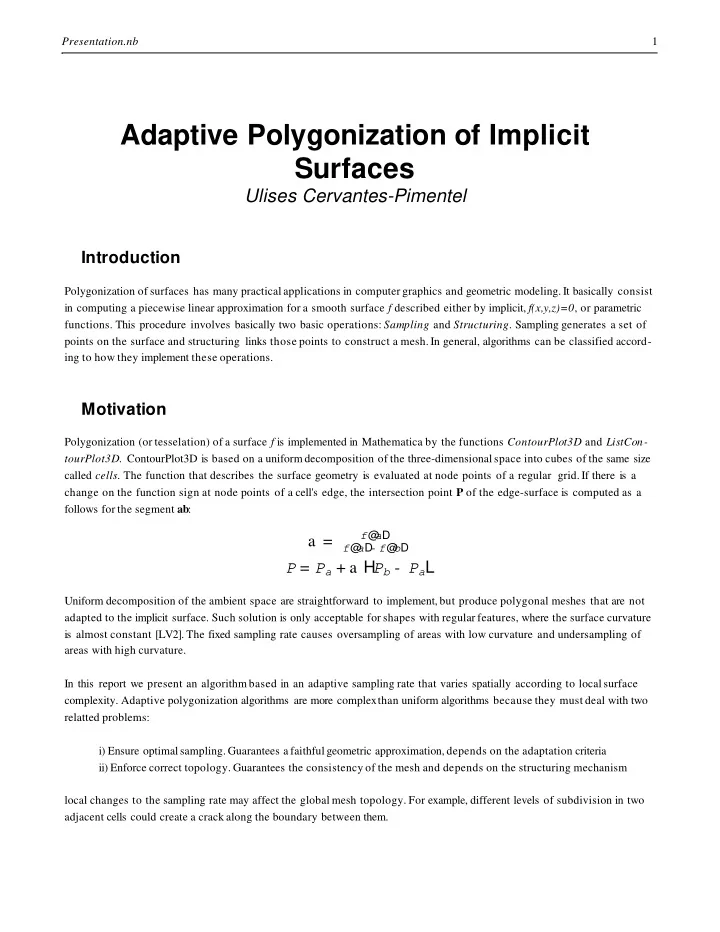
called cells. The function that describes the surface geometry is evaluated at node points of a regular grid. If there is a change on the function sign at node points of a cell's edge, the intersection point P of the edge-surface is computed as a follows for the segment ab :

a =

f@ aD

  • f@

aD- f@ bD

P = Pa + a HPb - PaL

Uniform decomposition of the ambient space are straightforward to implement, but produce polygonal meshes that are not adapted to the implicit surface. Such solution is only acceptable for shapes with regular features, where the surface curvature is almost constant [LV2]. The fixed sampling rate causes oversampling of areas with low curvature and undersampling of areas with high curvature. In this report we present an algorithm based in an adaptive sampling rate that varies spatially according to local surface

  • complexity. Adaptive polygonization algorithms are more complex

than uniform algorithms because they must deal with two relatted problems: i) Ensure optimal sampling. Guarantees a faithful geometric approximation, depends on the adaptation criteria ii) Enforce correct topology. Guarantees the consistency of the mesh and depends on the structuring mechanism local changes to the sampling rate may affect the global mesh topology. For example, different levels of subdivision in two adjacent cells could create a crack along the boundary between them. Presentation.nb 1

slide-2
SLIDE 2

Following are some examples comparing the current implementation of ContourPlot3D and an adaptive polygonization. <<Graphics`ContourPlot3D` << Polygonize`Polygonize3Dtrm` << "D:\Wolfram\Polygonize\Polygonize3Dtrm.m" square@ x_, y_, z_D := 8If@ Abs@ xD £ 1., x, x Abs@ xDD, If@ Abs@ yD£ 1., y, y Abs@ yDD, 0< MyOffset@ r_, x_, y_, z_D := Sqrt@ Apply@ Plus, Map@ #1 ^2 &, 8x, y, z< - square@ x, y, zDDDD- r MySphere@ r_, x_, y_, z_D := x ^2 + y^ 2 + z ^2 - r ^2 Show@ GraphicsArray@ ContourPlot3D@ MyOffset@ 0.5, x, y, zD, 8x, - 1.6, 1.6<, 8y, - 1.6, 1.6<, 8z, - .5, .5<, Boxed fi False, PlotPoints fi 86, 6, 3<, MaxRecursion fi #, DisplayFunction fi IdentityD & 80, 1<DD; Show@ GraphicsArray@ Polygonize3D@ MyOffset@ 0.5, x, y, zD, 8x, - 1.6, 1.6<, 8y, - 1.6, 1.6<, 8z, - .5, .5<, PlotPoints fi 86, 6, 3<, MaxAdaptiveRecursion fi #, ToleranceSize fi 1 5, FlatnessAngle fi 30, PartitionStyle fi 2, Boxed fi False, DisplayFunction fi IdentityD & 80, 10<DD; Presentation.nb 2

slide-3
SLIDE 3

Show@ GraphicsArray@ Polygonize3D@ MySphere@ 1.0, x, y, zD, 8x, - 1, 1<, 8y, - 1, 1<, 8z, - 1, 1<, IntersectionStyle fi #, PlotPoints fi 4, Boxed fi False, DisplayFunction fi IdentityD & 80, 1<DD; ContourPlot3D@ x y z, 8x, - 1.0, 1.0<, 8y, - 1.0, 1.0<, 8z, - 1.0, 1.0<, Contours fi 80.<, Boxed fi False, MaxRecursion fi 1, PlotPoints fi 3D; Polygonize3D@ x y z, 8x, - 1.0, 1.0<, 8y, - 1.0, 1.0<, 8z, - 1.0, 1.0<, CFDecomposition fi 81, 2, 3, 4<, Contours fi 80.<, Boxed fi False, PlotPoints fi 3, MaxAdaptiveRecursion fi 1D; Presentation.nb 3

slide-4
SLIDE 4

Adaptive Polygonization

The present work is based in the paper "A Unified Approach for Hierarchical Adaptive Tesselation of Surfaces", [LV1]. This algorithm combines hierachical curve sampling with simplicial subdivision. It is composed of three independent

  • perations:

Base mesh generation:

A very coarse sampling grid suffices for most implicit shapes of interest. Knowledge about the surface should be used to determine the appropiate uniform sampling rate. For a compact surface of genus 0, the shape should be smaller then the diameter of the largest sphere inscribed in the shape MyTorus@ r_, x_, y_, z_D := Hx ^2 + y^ 2 + z ^2 - r ^2 - 1L^ 2 - 4 r^ 2 H1 - z ^2L; Show@ GraphicsArray@ Polygonize3D@ MyTorus@ 2.1, x, y, zD, 8x, - 3.1, 3.1<, 8y, - 3.1, 3.1<, 8z, - 3.1, 3.1<, PlotPoints fi #, Boxed fi False, DisplayFunction fi IdentityD & 884, 4, 3<, 85, 5, 3<<DD; The base mesh generation decomposes the bounding box of the implicit shape using a simplicial cell complex. It then identi- fies the set of cells that are intersected by the implicit surface and for each of these cells it generates an element of the polygonal mesh approximating the surface. As in [LV2], we use a simplicial decomposition know as Coxeter-Freudenthal subdivision, that is defined as follows: For a cube in R3 with vertices p0, p1,..., p7, it takes the diagonal p0 p7 and projects it

  • nto each face of the cube. This gives a triangulation of the faces of the cube. The 3D simplicial cells are constructed by

adding to each triangle in a face, the vertex of the diagonal p0 p7 that does not belong to it. We obtain: Presentation.nb 4

slide-5
SLIDE 5

CFdecomp = 881, 5, 6, 8<, 81, 5, 7, 8<, 81, 2, 6, 8<, 81, 2, 4, 8<, 81, 3, 7, 8<, 81, 3, 4, 8<<; When a potential hit occurs, the Coxeter-Freudenthal decomposition of the cube is generated and each of its simplices are processed. Note that the choice of the diagonal p0 p7 is arbitrary. We can of course chose any of the other three diagonal as well. During the initial subdivision we can choose to test any of these decompositions and select the one that generates the "best" triangulation. The option CFDecomposition->L, where L is a sublist of {1,2,3,4}, has precisely this effect. cubepermutations = 8 81, 2, 3, 4, 5, 6, 7, 8<, 85, 6, 7, 8, 1, 2, 3, 4<, 83, 4, 1, 2, 7, 8, 5, 6<, 82, 1, 4, 3, 6, 5, 8, 7<<; As an example of the effect of this option, consider the following surface: sigmoid@ d_ ; d £ 1D := 1 - H4 d ^6 - 17 d ^ 4 + 22 d^ 2L 9 sigmoid@ d_ ; d > 1D := 0. Saucer@ x_, y_, z_D := z - sigmoid@ Sqrt@ x^ 2 + y^ 2DD 3 8$CFDecomposition< 881<< Presentation.nb 5

slide-6
SLIDE 6

Show@ GraphicsArray@ Partition@ Polygonize3D@ Saucer@ x, y, zD, 8x, - 1, 1<, 8y, - 1, 1<, 8z, - 0.01, 0.35<, MaxAdaptativeRecursion fi 10, PartitionStyle fi 1, FlatnessAngle fi 20, Boxed fi False, PlotPoints fi 3, CFDecomposition fi #, DisplayFunction fi IdentityD & 881<, 81, 2<, 81, 2, 3<, 81, 2, 3, 4<<, 2DDD; Show@ GraphicsArray@ Partition@ Polygonize3D@ x y z, 8x, - 1, 1<, 8y, - 1, 1<, 8z, - 1, 1<, PartitionStyle fi 1, Boxed fi False, PlotPoints fi 3, CFDecomposition fi #, DisplayFunction fi IdentityD & 881<, 81, 2<, 81, 2, 3<, 81, 2, 3, 4<<, 2DDD; Presentation.nb 6

slide-7
SLIDE 7

Altough it can considerably improve the quality of the mesh, in some cases it may have the effect of producing "cracks", as the next examples shows: Show@ GraphicsArray@ Polygonize3D@ MyTorus@ 2.0, x, y, zD, 8x, - 3.1, 3.1<, 8y, - 3.1, 3.1<, 8z, - 3.1, 3.1<, PlotPoints fi 85, 5, 3<, Boxed fi False, DisplayFunction fi Identity, CFDecomposition fi #D & 881<, 81, 2, 3, 4<<DD; Based on the sign of f, possible intersections of the simplex with the surface are tested. Note that, when the parent cube is intersected by the surfaces only some cells of the simplicial decomposition will be crossed by it. The implicit surface may intersect the edges of a simplex in either three or four points. Orientation of the triangles is asserted by requiring that the normal points in the oposite direction to a negative vertex. tetraedgeslist = 881, 3<, 81, 4<, 81, 2<, 83, 4<, 83, 2<, 82, 4<<; tetraentries = 88<, 884, 6, 2<<, 885, 4, 1<<, 885, 6, 1<, 81, 6, 2<<, 886, 5, 3<<, 885, 3, 2<, 82, 4, 5<<, 886, 4, 3<, 83, 4, 1<<, 882, 1, 3<<, 883, 1, 2<<, 881, 4, 3<, 83, 4, 6<<, 882, 3, 5<, 85, 4, 2<<, 883, 5, 6<<, 881, 2, 6<, 81, 6, 5<<, 881, 4, 5<<, 882, 6, 4<<, 8<<; Intersection of an edge with the surface can be computed in two different ways. It can be estimated as a proportional values as in ContourPlot3D or by bisection. The number of iteration in the last case is controled with the option MaxBisectionIter. The way the intersection is estimated is controled with the option IntersectionStyle->0 for the bisection case and Intersection- Style->1 for the proportional case. Presentation.nb 7

slide-8
SLIDE 8

8$IntersectionStyle< 80< Show@ GraphicsArray@ Polygonize3D@ MySphere@ 1.0, x, y, zD, 8x, - 1, 1<, 8y, - 1, 1<, 8z, - 1, 1<, IntersectionStyle fi #, PlotPoints fi 4, Boxed fi False, DisplayFunction fi IdentityD & 80, 1<DD; Show@ GraphicsArray@ Polygonize3D@ x y z, 8x, - 1, 1<, 8y, - 1, 1<, 8z, - 1, 1<, IntersectionStyle fi #, PlotPoints fi 4, CFDecomposition fi 81, 2, 3, 4<, Boxed fi False, DisplayFunction fi IdentityD & 80, 1<D D; Presentation.nb 8

slide-9
SLIDE 9

Indexing

X = Dim L = ‘ Log nxp, M = ‘ Log nyp, N = ‘ Log nzp Index = - 8L, M, N, X, X, X< Corner Vertex Hl, m, nL 8l, m, n, 0, 0, 0< Middle Point Hl, m, nL, Hp, qL r = p ^q, s = p & q p ' = p^ s, q ' = q^ s 8l + s2, m + s1, n + s0, r, 0, 0< Edges Hl, m, nL, Hp, qL, p < q 8l + s2, m + s1, n + s0, 0, p ', q '<

Edge sampling

The edge representation is constructed using a hierarchical sampling. This scheme generates a multiresolution, adapted, piecewise-linear approximation of the corresponding curve on the surface. This procedure subdivides the edge PQ at its midpoint M, and finds a new sample, the split point T on the surface. It also computes the difference between these two points, the vector D=T-M. Recursion terminates when the maximum sampling density, set by MaxAdaptiveRecursion is reached or an edge is found to be Flat. 8$MaxAdaptiveRecursion< 81< Polygonize3D@ MySphere@ 1.0, x, y, zD, 8x, - 1.1, 0.1<, 8y, - 0.1, 1.1<, 8z, - 1.1, 0.1<, Statistics fi 1, Boxed fi False, FlatnessAngle fi 30, DisplayFunction fi Identity, MultiGrid fi 1, PlotPoints fi 2, MaxAdaptiveRecursion fi 5D;

1.563 Second, 36 Polygons, 762 Function calls, 0.125 WebSizeHKbL, 43.7031 MemoryHKbL, 4 MaxAdaptive Level, 0 Error, 16.8943 Minimal Edge FoundH%L.

Presentation.nb 9

slide-10
SLIDE 10

test2 = Table@ Plot3DWeb@ n, 1, 0.2, 0, DisplayFunction fi Identity, Boxed fi FalseD, 8n, 0, 4<D Transpose Show@ GraphicsArray@ test2@ @ 1DDDD; 88 Graphics3D , Graphics3D , Graphics3D , Graphics3D , Graphics3D <, 852, 2, 8, 28, 36<, 80.384375, 0.384375, 0.13125, 0.0375, 0<< We need to find a point on the implicit surface f- 1H 0L that is closest to the edge midpoint M. The problem amounts to computing the point T such that f(T)=0 and, at the same time minimizes the distance T-M . This can be solved using a numerical technique such as gradient descent. However, we employ a physically-based method [LV1]. In its simplest version, the method is: d=SteepestDescentStep while ¨f(x)¨>Tolerance y‹ f(x) x‹ x-d sign f(y) f(x) if sign(y)!= sign(f(x)) then d‹ d/2 The criteria to classify an edge as FLAT or NOTFLAT is controlled by the option AdaptiveStyle. It can take the values: 0: The surface curvature along an edge is measured by the angle a between the surface normals at the edge endpoints.If the angle is greater than FlatnessAngle, the edge is classified as not flat. Presentation.nb 10

slide-11
SLIDE 11

8$FlatnessAngle, $AdaptiveStyle< 860, 0< Saddle@ x_, y_, z_D := z - Hx y L^ 3 Show@ GraphicsArray@ Polygonize3D@ Saddle@ x, y, zD, 8x, - 1.1, 1.1<, 8y, - 1.1, 1.1<, 8z, - 1, 1<, MaxAdaptiveRecursion fi 10, Boxed fi False, CFDecomposition fi 81, 2, 3, 4<, Statistics fi 1, DisplayFunction fi Identity, FlatnessAngle fi #D & 860, 30, 15<DD; 1.822 Second, 40 Polygons, 523 Function calls, 0.125 WebSizeHKbL, 5.42188 MemoryHKbL, 2 MaxAdaptive Level, 0 Error, 6.71193 Minimal Edge FoundH%L. 4.556 Second, 120 Polygons, 1567 Function calls, 0.125 WebSizeHKbL, 13.5469 MemoryHKbL, 4 MaxAdaptive Level, 0 Error, 4.02737 Minimal Edge FoundH%L. 15.312 Second, 460 Polygons, 3883 Function calls, 0.125 WebSizeH KbL, 48.0156 MemoryHKbL, 6 MaxAdaptive Level, 0 Error, 2.01368 Minimal Edge FoundH%L. 1: If the distance from M to T is greater than TubularPrecision, the edge is classified as not flat. 8$AdaptiveStyle, $TubularPrecision<

90, 1

  • 100

=

Presentation.nb 11

slide-12
SLIDE 12

Polygonize3D@ Saddle@ x, y, zD, 8x, - 1.1, 1.1<, 8y, - 1.1, 1.1<, 8z, - 1, 1<, MaxAdaptiveRecursion fi 10, Boxed fi False, CFDecomposition fi 81, 2, 3, 4<, Statistics fi 1, AdaptiveStyle fi 1D; 11.247 Second, 304 Polygons, 3811 Function calls, 0.125 WebSizeH KbL, 32.1563 MemoryHKbL, 5 MaxAdaptive Level, 0 Error, 2.5845 Minimal Edge FoundH%L. Also, in order to avoid small edges, we can force an edge to be considered Flat if the length of the segment is smaller than a fraction of the coarser cell and is being set by the option ToleranceSize. In order to use this feature, the value of the option PartitionStyle must be 2 or 3. 8$PartitionStyle, $ToleranceSize< 90, 1

  • 6

= Presentation.nb 12

slide-13
SLIDE 13

Show@ GraphicsArray@ Polygonize3D@ MyOffset@ 0.5, x, y, zD, 8x, - 1.6, 1.6<, 8y, - 1.6, 1.6<, 8z, - .5, .5<, PlotPoints fi 86, 6, 3<, MaxAdaptiveRecursion fi 10, ToleranceSize fi 1 #, FlatnessAngle fi 30, PartitionStyle fi 2, Boxed fi False, DisplayFunction fi Identity, Statistics fi 1D & 85, 15<D D; 26.418 Second, 700 Polygons, 11056 Function calls, 0.125 WebSizeHKbL, 68.7188 MemoryHKbL, 4 MaxAdaptive Level, 0 Error, 9.81683 Minimal Edge FoundH%L. 31.886 Second, 848 Polygons, 13808 Function calls, 0.125 WebSizeHKbL, 83.1719 MemoryHKbL, 4 MaxAdaptive Level, 0 Error, 2.5 Minimal Edge FoundH%L. It is also possible to specify a trimming function. Once an edge is classified as Flat, if the option Trimming defines a func- tion, the adaptive edge generation subrutine will generate a vertex by finding the intersection of the segment with the specified function.

8$Trimming< 80< MyPlanes@ x_, y_, z_D := x y z

Presentation.nb 13

slide-14
SLIDE 14

Show@ GraphicsArray@ Polygonize3D@ MySphere@ 1.0, x, y, zD, 8x, - 1, 1<, 8y, - 1, 1<, 8z, - 1, 1<, Boxed fi False, Trimming fi # HMyPlanes@ x, y, zD+ 0.05L, MaxAdaptiveRecursion fi 10, FlatnessAngle fi 30, DisplayFunction fi IdentityD & 8- 1, 1<DD; Show@ GraphicsArray@ Polygonize3D@ MyTorus@ 2.1, x, y, zD, 8x, - 3.1, 3.1<, 8y, - 3.1, 3.1<, 8z, - 3.1, 3.1<, PlotPoints fi 85, 5, 3<, Trimming fi # MySphere@ 2.0, x, y + 1.1, zD, MaxAdaptiveRecursion fi 10, Boxed fi False, DisplayFunction fi Identity, FlatnessAngle fi 30, PartitionStyle fi 2D & 8- 1, 1<DD;

Cell structuring

The cell structuring operation performs a simplicial decomposition. It recursively subdivides a triangular cell into triangular subcells, using information from its edges. For this purpose, new internal edges are created and adaptively sampled. The figure below shows the different cases: Presentation.nb 14

slide-15
SLIDE 15

note that for the cases where two or three edges are not flat, we have different options in subdividing the cell. The Quality criteria is specified with QualityForm. The different options are generated and the best triangulation is selected. Q1 = lmin

  • R

Q2 = r

  • lmax

Q3 = r

  • R

Q4 = lmin

  • lmax

Q5 = A

  • l2max

Q6 = Min@ Cos@ a iDD Q7 = Max@ Cos@ a iDD If PartitionStyle is equal to 1 or 3, the cells structuring will test all possible subdivisions. This can make the method run much slower than needed. Normally it is only necessary considering the first case of the three nonflat edges case. 8$PartitionStyle, $QualityForm< 80, 4< Presentation.nb 15

slide-16
SLIDE 16

Show@ GraphicsArray@ Polygonize3D@ MyTorus@ 2.1, x, y, zD, 8x, - 3.1, 3.1<, 8y, - 3.1, 3.1<, 8z, - 3, 3<, MaxAdaptiveRecursion fi 2 , Boxed fi False, Statistics fi 1, PlotPoints fi 85, 5, 3<, DisplayFunction fi Identity, FlatnessAngle - > 30, PartitionStyle fi #, QualityForm fi 4D & 82, 3<DD; 20.66 Second, 500 Polygons, 13816 Function calls, 0.125 WebSizeH KbL, 49.0313 MemoryHKbL, 2 MaxAdaptive Level, 0 Error, 1.8117 Minimal Edge FoundH%L. 20.459 Second, 500 Polygons, 13816 Function calls, 0.125 WebSizeHKbL, 49.0313 MemoryHKbL, 2 MaxAdaptive Level, 0 Error, 1.8117 Minimal Edge FoundH%L. Show@ GraphicsArray@ Polygonize3D@ Saddle@ x, y, zD, 8x, - 1.1, 1.1<, 8y, - 1.1, 1.1<, 8z, - 1, 1<, MaxAdaptiveRecursion fi 3, Boxed fi False, CFDecomposition fi 81, 2, 3, 4<, FlatnessAngle fi 30, QualityForm fi #, PartitionStyle fi 2, ToleranceSize fi 1 5, DisplayFunction fi IdentityD & 81, 2, 3<DD; Presentation.nb 16

slide-17
SLIDE 17

Show@ GraphicsArray@ Polygonize3D@ Saddle@ x, y, zD, 8x, - 1.1, 1.1<, 8y, - 1.1, 1.1<, 8z, - 1, 1<, MaxAdaptiveRecursion fi 3, Boxed fi False, CFDecomposition fi 81, 2, 3, 4<, FlatnessAngle fi 30, QualityForm fi #, PartitionStyle fi 2, ToleranceSize fi 1 5, DisplayFunction fi IdentityD & 84, 5, 6<DD;

The Algorithm

The basic algoritm is as follows: I) [Initialization] Start with a coarse decomposition of the surface a) Generate the base mesh b) Sample the edges of all cells in the base mesh II) [Refinement] For each cell, test the corresponding surface patch for flatness If the patch is not flat, then recursively subdivide the cell a) Structure new cells by constructing internal edges b) Sample all internal edges The procedures implementing structuring and sampling operations comunicate through a well-defined inyterface: the edge and cell data structures

Data Structures

struct VertexElement={vertexid vid; Attributes attributes {FunctionValue,Region,Contact,Normal vector}; Coordinate p; edgesid*edges;}; Presentation.nb 17

slide-18
SLIDE 18

?? Polygonize`DataHandlingv3`private`vvH Polygonize`DataHandlingv3`private`vvH@

  • 21504D=

8- 21504, 82.63, 1, False, 80.57735, 0.57735, 0.57735<<, 81.1, 1.1, 1.1<, 8<< Polygonize`DataHandlingv3`private`vvH@

  • 20992D=

8- 20992, 81.42, 1, False, 80.707107, 0.707107, 0.0007064<<, 81.1, 1.1, 0.<, 8<< Polygonize`DataHandlingv3`private`vvH@

  • 20480D=

8- 20480, 82.63, 1, False, 80.577735, 0.577735, - 0.57658<<, 81.1, 1.1, - 1.1<, 8<< Polygonize`DataHandlingv3`private`vvH@

  • 19456D=

8- 19456, 81.42, 1, False, 80.707107, 0.0007064, 0.707107<<, 81.1, 0., 1.1<, 8<< Polygonize`DataHandlingv3`private`vvH@

  • 18944D=

8- 18944, 80.21, 1, False, 80.999999, 0.000999, 0.000999<<, 81.1, 0., 0.<, 8<< Polygonize`DataHandlingv3`private`vvH@

  • 18432D=

8- 18432, 81.42, 1, False, 80.707813, 0.000707106, - 0.706399<<, 81.1, 0., - 1.1<, 8<< struct FacetElement={facetid fid; Attributes attributes {Adaptive Level,Child facets,error,aspect ratio,{child aspect ratio},Parent facet ID}; edgesid*edges {Adaptive edges IDs,Index}; vertexid*vertices;}; Presentation.nb 18

slide-19
SLIDE 19

Polygonize`DataHandlingv3`private`ffH Polygonize`DataHandlingv3`private`ffH@ 2D = 82, 81, 8<, 0., 0.756132, 8<, 0<, 881, 2, 3<, 81, 1, 1<<, 8- 8706, - 8195, - 7<< Polygonize`DataHandlingv3`private`ffH@ 3D = 83, 81, 8<, 0., 0.756132, 8<, 0<, 884, 2, 5<, 81, 1, 1<<, 8- 10241, - 8195, - 7<< Polygonize`DataHandlingv3`private`ffH@ 4D = 84, 81, 8<, 0., 0.756132, 8<, 0<, 886, 7, 3<, 81, 1, 1<<, 8- 8706, - 518, - 7<< Polygonize`DataHandlingv3`private`ffH@ 5D = 85, 81, 8<, 0., 0.756132, 8<, 0<, 888, 7, 9<, 81, 1, 1<<, 8- 2564, - 518, - 7<< Polygonize`DataHandlingv3`private`ffH@ 6D = 86, 81, 8<, 0., 0.756132, 8<, 0<, 8810, 11, 5<, 81, 1, 1<<, 8- 10241, - 2053, - 7<< Polygonize`DataHandlingv3`private`ffH@ 7D = 87, 81, 8<, 0., 0.756132, 8<, 0<, 8812, 11, 9<, 81, 1, 1<<, 8- 2564, - 2053, - 7<< Polygonize`DataHandlingv3`private`ffH@ 8D = 88, 81, 8<, 0., 0.853575, 8<, 0<, 8813, 6, 14<, 81, 1, 1<<, 8- 10753, - 8706, - 518<< Polygonize`DataHandlingv3`private`ffH@ 9D = 89, 81, 8<, 0., 0.853575, 8<, 0<, 8815, 8, 14<, 81, 1, 1<<, 8- 10753, - 2564, - 518<< struct AdaptiveEdge={adaptiveid aid; vid p,q; double e; TreeNode*T;} struct TreeNode={vectorid t; Vector d; double e; TreeNode*L, *R;}; Presentation.nb 19

slide-20
SLIDE 20

Polygonize`DataHandlingv3`private`aaH Polygonize`DataHandlingv3`private`aaH@ 1D = 81, - 8706, - 8195, 0.078125, 816, 80.0000934693, - 0.0721992, - 0.0298459<, 0.078125, 8<, 8<<< Polygonize`DataHandlingv3`private`aaH@ 2D = 82, - 8195, - 7, 0.046875, 817, 8- 0.0141765, - 0.0315934, - 0.0315934<, 0.046875, 8<, 8<<< Polygonize`DataHandlingv3`private`aaH@ 3D = 83, - 7, - 8706, 0.125, 818, 8- 0.0405627, - 0.11106, - 0.0405627<, 0.125, 8<, 8<<< Polygonize`DataHandlingv3`private`aaH@ 4D = 84, 16, 17, 0., 8<< Polygonize`DataHandlingv3`private`aaH@ 5D = 85, 17, 18, 0., 8<< Polygonize`DataHandlingv3`private`aaH@ 6D = 86, 18, 16, 0., 8<< Polygonize`DataHandlingv3`private`aaH@ 7D = 87, - 10241, - 8195, 0.078125, 819, 80.0000934693, - 0.0298459, - 0.0721992<, 0.078125, 8<, 8<<< Polygonize`DataHandlingv3`private`aaH@ 8D = 88, - 7, - 10241, 0.125, 820, 8- 0.0405627, - 0.0405627, - 0.11106<, 0.125, 8<, 8<<< Presentation.nb 20

slide-21
SLIDE 21

Examples

Polygonize3D@ MySphere@ 1, x, y, zD, 8x, - 1.1, 1.1<, 8y, - 1.1, 1.1<, 8z, - 1.1, 1.1<, Contours fi 80.0, 0.9<, Boxed - > False, Statistics fi 1, FlatnessAngle fi 15, CFDecomposition fi 81, 2, 3, 4<, MaxAdaptiveRecursion fi 10D; 61.819 Second, 1488 Polygons, 27258 Function calls, 0.125 WebSizeHKbL, 149.133 MemoryHKbL, 3 MaxAdaptive Level, 0 Error, 4.6223 Minimal Edge FoundH%L.

MyTorusxy@ a_, b_, x_, y_, z_D := Hx ^2 + y ^2 + z^2 + a^ 2 - b ^2L^ 2 - 4 a^ 2 Hx^2 + y^ 2L MyTorusxz@ a_, b_, x_, y_, z_D := Hx ^2 + y ^2 + z^2 + a^ 2 - b ^2L^ 2 - 4 a^ 2 Hx^2 + z^ 2L MyTorusyz@ a_, b_, x_, y_, z_D := Hx ^2 + y ^2 + z^2 + a^ 2 - b ^2L^ 2 - 4 a^ 2 Hy^2 + z^ 2L Polygonize3D@ Min@ MyTorusxy@ 2.0, 0.7, x, y, zD, MyTorusxz@ 2, 0.5, x - 1.5, y, zDD, 8x, - 3, 4<, 8 y, - 3, 3<, 8z, - 3, 3<, PlotPoints fi 815, 15, 15<, MaxAdaptiveRecursion fi 1, PartitionStyle fi 0, ToleranceSize fi 1 5, Boxed fi FalseD;

Presentation.nb 21

slide-22
SLIDE 22

Polygonize3D@ Min@ MyTorusxy@ 2.0, 0.7, x, y, zD, MyTorusxz@ 2, 0.5, x - 1.5, y, zDD, 8x, - 3, 4<, 8 y, - 3, 3<, 8z, - 3, 3<, PlotPoints fi 815, 15, 15<, PartitionStyle fi 2, ToleranceSize fi 1 3, Boxed fi False, MaxAdaptiveRecursion fi 1D;

Polygonize3D@ MyTorusxy@ 2.0, 0.7, x, y, zD- MyTorusxz@ 2, 0.5, x - 1.5, y, zD, 8x, - 3, 4<, 8y, - 3, 3<, 8z, - 3, 3<, PlotPoints fi 85, 5, 5<, MaxAdaptiveRecursion fi 10, PartitionStyle fi 2, ToleranceSize fi 1 40, Boxed fi False, FlatnessAngle fi 30, QualityForm fi 2, DisplayFunction fi Identity, MultiGrid fi 1D

Graphics3D

Plot3DWeb@ 5, 1.0, 0, 0, Boxed fi FalseD

8 Graphics3D , 1034, 0.478739<

Presentation.nb 22

slide-23
SLIDE 23

Plot3DWeb@ 1, 1.0, - 0.7, 1, Boxed fi FalseD

8 Graphics3D , 828, 0.627595<

Polygonize3D@ MyTorus@ 1.9, x, y, zD, 8x, - 3.0, 3.0<, 8y, - 3.0, 3.0<, 8z, - 3.0, 0.0<, PlotPoints fi 85, 5, 3<, MaxAdaptiveRecursion fi 10, QualityForm fi 4, PartitionStyle fi 2, CFDecomposition fi 81<, Boxed fi False, FlatnessAngle fi 30, MultiGrid fi 1, ToleranceSize fi 1 6, DisplayFunction fi IdentityD; Plot3DWeb@ 1, 1, 0, 1, Boxed fi FalseD

8 Graphics3D , 92, 0.52251<

Plot3DWeb@ 2, 1, 0, 1, Boxed fi FalseD Timing

81.371 Second, 8 Graphics3D , 280, 0.217938<<

Presentation.nb 23

slide-24
SLIDE 24

Plot3DWeb@ 4, 1, 0, 1, Boxed fi FalseD Timing

82.684 Second, 8 Graphics3D , 620, 0<< Plot3DWeb@ 4, 1, - 0.8, 1, Boxed fi FalseD Timing 86.309 Second, 8 Graphics3D , 1860, 0<<

Performance

Data structures for vertex, facets and adaptive edges have being implemented in three different ways: i) Mathematica Lists. Append[] and Position[] ii) Caching values. See examples above iii) ExpertBags. The following are graphs of running times, function calls and memory requirements: V1: No data structure. Repetive function evaluation. V1c: No data structure. Cachinf function values f[x_]:=f[x]=... V2: Data structure implemented using i) V2c: Data structure implemented using ii) V3: Data structure implemented using iii) Presentation.nb 24

slide-25
SLIDE 25

Running Time (Level 1)

0.00 10.00 20.00 30.00 40.00 Triangles V1 0.19 0.37 0.68 0.98 1.38 1.97 2.44 3.93 4.92 7.11 9.02 26.16 V1 Cached 0.20 0.39 0.72 1.00 1.39 1.95 2.47 3.88 5.16 7.24 9.28 26.24 V2 Cached 0.43 0.82 1.56 2.48 3.38 4.53 5.86 9.73 12.7918.5425.7536.83 V2 0.61 1.24 2.35 4.48 7.17 11.4217.8042.6368.56131.9241.3353.6 V3 1.63 4.53 9.46 16.9830.3448.16 24 48 88 144 200 272 360 600 768 1104 1512 4464

Function Calls, Level 1

20000 40000 60000 Triangles V1 472 928 1692 2316 3324 4700 5864 8848 11772166402090864096 V1c 107 188 320 420 598 834 1025 1544 2017 2868 3583 10487 V2 163 292 504 716 1006 1386 1753 2752 3561 5084 6615 19423 V3 223 428 686 942 1344 1704 24 48 88 144 200 272 360 600 768 1104 1512 4464 Presentation.nb 25

slide-26
SLIDE 26

Memory(K) (Torus, levels 1-4)

0.00 2000.00 4000.00 6000.00 8000.00 10000.00 12000.00 14000.00 16000.00 18000.00 V1 51.80 134.85 366.03 814.41 V1c 204.22 2205.50 7240.05 17990.50 V2 85.85 290.70 709.99 910.86 V2c 171.58 514.07 1179.58 1493.07 1 2 3 4

Running Time (s) (Torus Levels 1-4)

0.00 20.00 40.00 60.00 80.00 100.00 120.00 140.00 160.00 180.00 V1 2.13 9.42 28.76 67.62 V1c 2.05 8.73 26.11 60.41 V2 6.44 33.24 123.60 186.37 V2c 3.34 12.43 28.15 36.39 1 2 3 4

Current and Future work

Parametric Adaptive polygonization Adaptive ListContourPlot Non-Manifold surfaces 4D -Meshes

Polygonize`Polygonize3D`

Polygonize3D is the tetrahedral analog of CountourPlot3D which also includes adaptive refinement. Polygonize3D will plot surfaces showing particular values of f as a function of x, y and z. Polygonize3D works by dividing the three-dimensional space into cubes and deciding if the surface intersect each cube. If the surface does intersect a cube, Polygonize3D will subdivide this cube further, and so on. Presentation.nb 26

slide-27
SLIDE 27

ContourPlot3D@ f,

8x, xmin, xmax< , 8y, ymin, ymax< , 8z, zmin, zmax< D

generate a three-dimensional contour plot f Plot3DWeb@ level, quality, gap, normalsD generates athree - dimensionalplot of This loads the package << Polygonize`Polygonize3Dtrm` << "D:\Wolfram\Polygonize\Polygonize3Dtrm.m" This produces a three-dimentional plot of a zero values of the function. Polygonize3D[Cos[Sqrt[ x^2 + y^2 + z^2 ]], {x,-2,2}, {y,0,2}, {z,-2,2}, PlotPoints->5]; Presentation.nb 27

slide-28
SLIDE 28
  • ption name

default value Contours 80.< the list of values for the contours to be plotted ContourStyle 8< the list of styles for the contours to be plotted MaxRecursion 1 the number of levels of recursion used in each cube PlotPoints 83,5< the number of evaluation points to use in each direction MaxProjectionIter $MaxProjectionIter = 10 maximumnumberof iterations forprojectionstep MaxBisectionIter $MaxBisectionIter = 10 maximumnumberof iterations forbisectionstep FlatnessAngle $FlatnessAngle = 60 Adaptive criteriaforAdaptiveStyle - > 0 Tolerance $Tolerance = 10- 2 Tolerance forprojectionand bisection steps SteepestDescentStep $SteepestDescentStep = 0.125 Initialstep forthe steepestdescent step GradientStep $GradientStep = 10- 3 delta value forfinitedifference approximation ToleranceAR $ToleranceAR = - 1.0 Triangle aspect ratiotolerance foradaptive style > 1 ToleranceSize $ToleranceSize = 1

  • 6

Triangle size toleranceforadaptive style > 1 TubularPrecision $TubularPrecision = 10- 2 Adaptive criteriaforAdaptiveStyle fi 1 Gap $Gap = 0 Plotting gap, range@

  • 1, 1D

CFDecomposition $CFDecomposition = 81< Coxeter- Freudenthaldecomposition IntersectionStyle $IntersectionStyle = 0 Segment - surface intersection, 0: Bisection subdivision 1: Proportionalscaling QualityForm $QualityForm= 4 Factorformcriteria PartitionStyle $PartitionStyle = 0 Adaptive Subdivision : 0: AdaptiveStyle $AdaptiveStyle = 0 Adaptive Criteria : 0: Flatness angle 1: Tubularprecision MultiGrid $MultiGrid = 0 Data stored : 0: Justhigherlevel, initialreset data 1: Alllevels, initialreset data 2: Alllevels, no initialreset data Statistics $Statistics = 0 Verbosereport Trimming $Trimming = 0 Trimmingfunction

Options for Polygonize3D

Each value specified in Contours generates a different surface. ContourStyle colors each surface. To use this option, you must set Lighting -> False. MaxAdaptiveRecursion sets the number of times you subdivide each initial

  • triangle. However, if the surface does not intersect the cube, the cube is not subdivided into tetrahedrals and no initial

triangles are generated. If MaxAdaptiveRecursion is greater than 0, adaptive recursion takes place. Polygonize3D and Plot3DWeb return a Graphics3D object. This means the functions will accept any option that can be specified for a Graphics3D object.

Here is another plot showing a contour value of -0.2 and 0.0.

Presentation.nb 28

slide-29
SLIDE 29

Polygonize3D@ x y z, 8x, - 1, 1<, 8y, - 1, 1<, 8z, - 1, 1<, Contours fi 80., - 0.2<, CFDecomposition fi 81, 2, 3, 4<, MaxAdaptiveRecursion fi 10, FlatnessAngle fi 30, SteepestDescentStep fi 0.125 4.0, Boxed fi FalseD ;

  • ption name

default value Contours 80.< level plotted, 0- >All levels ContourStyle 8< Cuttoff criteria foraspect ratio MaxRecursion 1 Plotting gap PlotPoints 83,5< Include triangle normals in plotting

Parameters for Plot3DWeb

Polygonize`DataHandlingv3`

Presentation.nb 29

slide-30
SLIDE 30

Bibliography

[LV1] Luiz Velho & Luiz Henrique de Figueiredo, "A Unified Approach for Hierarchical Adaptive Tesellation of Surfaces", ACM Transactions on Graphics, Vol. 18, No. 4, October 1999, pp 329-360. [LV2] Luis Velho, "Simple and efficient polygonization of implicit surfaces", J. Graph. Tools 1,2,5-24, 1996. [JB1] Jules Bloomenthal, "Polygonization of Implicit Surfaces", Xerox Corporation, CSL-87-2 May 1987 [JB2] Jules Bloomenthal & K. Ferguson, "Polygonization of Non-Manifold Surfaces", Research Rep. 94-541-10, Dept. of Computer Science, The University of Calgary, June 1994. Presentation.nb 30