3 Data Link Layer Data Link Layer Internet checksum (review) Next - - PDF document

3
SMART_READER_LITE
LIVE PREVIEW

3 Data Link Layer Data Link Layer Internet checksum (review) Next - - PDF document

Data Link Layer Data Link Layer How much redundancy? Hamming Distance In information theory, the Hamming distance between two strings of equal length Given a K-bit string data, how many is the number of positions at which the redundant bits


slide-1
SLIDE 1

3

Data Link Layer

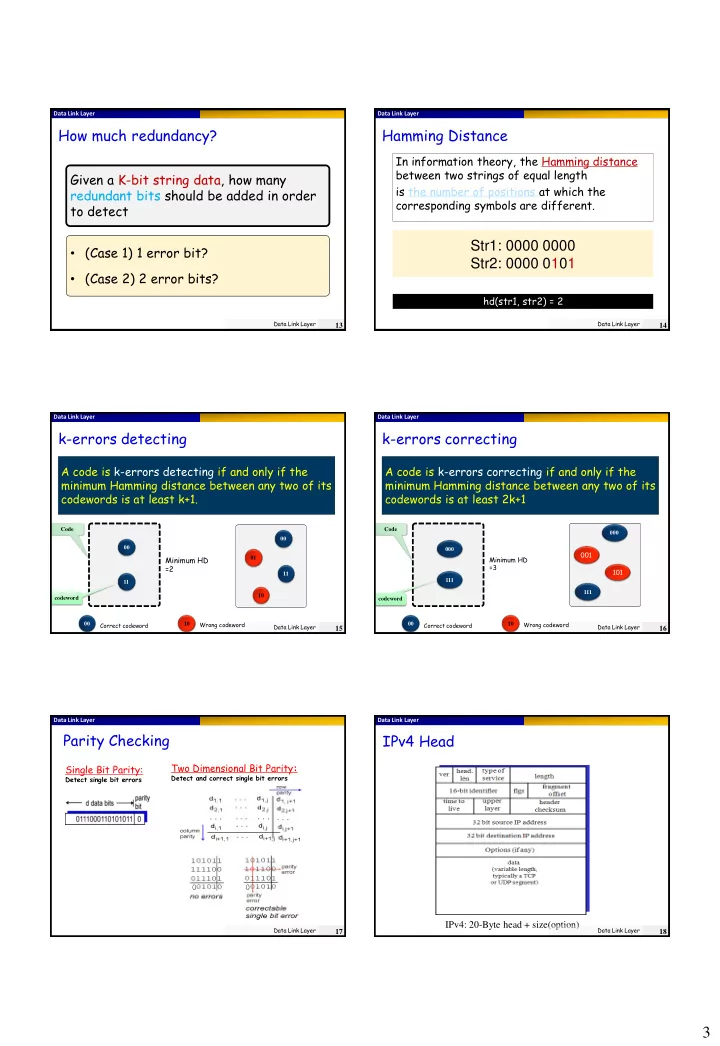
How much redundancy?

Data Link Layer

13

Given a K-bit string data, how many redundant bits should be added in order to detect

  • (Case 1) 1 error bit?
  • (Case 2) 2 error bits?

Data Link Layer

Hamming Distance

Data Link Layer

14

In information theory, the Hamming distance between two strings of equal length is the number of positions at which the corresponding symbols are different.

Str1: 0000 0000 Str2: 0000 0101

hd(str1, str2) = 2

Data Link Layer

k-errors detecting

Data Link Layer

15

A code is k-errors detecting if and only if the minimum Hamming distance between any two of its codewords is at least k+1.

00 01 10 11 00 Correct codeword Wrong codeword 10 00 11

Minimum HD =2

codeword Code

Data Link Layer

codeword Code

k-errors correcting

Data Link Layer

16

A code is k-errors correcting if and only if the minimum Hamming distance between any two of its codewords is at least 2k+1

00 Correct codeword Wrong codeword 10 000 111 000

001 101

111

Minimum HD =3 Data Link Layer

Parity Checking

Single Bit Parity:

Detect single bit errors

Two Dimensional Bit Parity:

Detect and correct single bit errors

Data Link Layer

17

Data Link Layer

IPv4 Head

IPv4: 20-Byte head + size(option)

Data Link Layer

18

slide-2
SLIDE 2

4

Data Link Layer

Internet checksum (review)

Sender:

 treat segment contents

as sequence of 16-bit integers

 checksum: addition (1’s

complement sum) of segment contents

 sender puts checksum

value into UDP checksum field

Receiver:

 compute checksum of

received segment

 check if computed checksum

equals checksum field value:

 NO - error detected  YES - no error detected.

But maybe errors nonetheless?

Goal: detect “errors” (e.g., flipped bits) in transmitted packet (note: used at transport layer only)

Data Link Layer

19

Data Link Layer

Next talk about CRC

Data Link Layer

20

CRC is a popular error detecting code! Widely used in Ethernet

Data Link Layer

Polynomial representation

Data Link Layer

21  :

B=bn-1bn-2…b2b1b0

 Polynomial:

B(x)=bn-1xn-1 + bn-2xn-2 + … + b2x2 + b1x1 + b0

3 2 1 3

1 1 1 x x x x x         

1001

Example:

Bit stream:

Data Link Layer

Foundation: Remainder computation

13 2 3 5  

( ) ( ) ( ) ( ) A x Q x R x G x    

6 5 2 2 4 2 4 2

1 1 1 1 x x x x x x x x x x x            

Data Link Layer

22

Numerical remainder: Polynomial remainder: Example:

Data Link Layer

CRC: Basic Idea

( ) ( ) ( ) ( ) A x Q x G x R x    ( ) ( ) ( ) ( ) A x R x Q x G x   

 

6 5 2 2 4 2 4 2

1 1 1 1 x x x x x x x x x x x            

     

6 5 2 2 4 2

1 1 1 x x x x x x x x          Example:

Data Link Layer

23

No remainder!

Data Link Layer

CRC: Overview

( ) ( ) ( ) ( )

r

B x x R x Q x G x    

Given B(x) compute R(x) B(X) R(X) Using B’(x) compute R*(x) B’(X) R’(X) R’(x)?=R*(x) Sender Receiver

Noisy channel

Data Link Layer

24

Shared knowledge: G(x)

slide-3
SLIDE 3

5

Data Link Layer

How to compute R(x)?

R = remainder[ ] D.2r G

Data Link Layer

25

Data Link Layer

CRC Example

Data Link Layer

26

 R(x): 011

Data plus redundancy to send

101110011

Data: 101110 Generator: 1001

Data Link Layer

Link Layer

 1 Link Layer and

services

 2 Error detection

and correction

 3 Multiple access

protocols

 4 Link-layer

addressing

 5 Ethernet  6 Link-layer switches  7 PPP  8 Link virtualization:

ATM

Data Link Layer

27

Data Link Layer

Multiple Access Links and Protocols

Two types of “links”:

 Type 1: point-to-point

 PPP for dial-up access  point-to-point link between Ethernet switch and host

 Type 2: broadcast (shared wire or medium)

 old-fashioned Ethernet  Upstream TV Cable  802.11 wireless LAN shared wire (e.g., cabled Ethernet) shared RF (e.g., 802.11 WiFi) shared RF (satellite) humans at a cocktail party (shared air, acoustical) Data Link Layer

28

Data Link Layer

Multiple Access Protocols

Model:

(1) single shared broadcast channel (2) two or more simultaneous transmissions by nodes: interference

collision if node receives two or more signals at the same time

multiple access protocol (MAC)

 Distributed algorithm that determines how nodes

share channel, i.e., determine when node can transmit

 Assumption: communication about channel sharing must

use channel itself!

 no out-of-band channel for coordination Data Link Layer

29

Data Link Layer

Ideal Multiple Access Protocol

Broadcast channel of rate R bps

  • 1. when one node wants to transmit, it can send at

rate R.

  • 2. when M nodes want to transmit, each can send at

average rate R/M

  • 3. fully decentralized:

 no special node to coordinate transmissions  no synchronization of clocks, slots

  • 4. simple

impossible

Data Link Layer

30

slide-4
SLIDE 4

6

Data Link Layer

MAC Protocols: a taxonomy

Three broad classes:

 Channel Partitioning

 divide channel into smaller “pieces” (time

slots, frequency, code)

 allocate piece to node for exclusive use

 Random Access

 channel not divided, allow collisions  “recover” from collisions

 “Taking turns”

 nodes take turns  nodes with more to send can take longer

turns

static dynamic

Data Link Layer

31

Data Link Layer

Channel Partitioning MAC protocols: TDMA

TDMA: time division multiple access

 access to channel in "rounds"  each station gets fixed length slot (length = pkt

trans time) in each round

 unused slots go idle  example: 6-station LAN, 1,3,4 have pkt, slots 2,5,6

idle

1 3 4 1 3 4 6-slot frame

Data Link Layer

32

Data Link Layer

Channel Partitioning MAC protocols: FDMA

FDMA: frequency division multiple access

 channel spectrum divided into frequency bands  each station assigned fixed frequency band  unused transmission time in frequency bands go idle  example: 6-station LAN, 1,3,4 have pkt, frequency

bands 2,5,6 idle frequency bands FDM cable

Data Link Layer

33

Data Link Layer

FDMA vs. TDMA

Data Link Layer

34

Data Link Layer

Frequency Division Multiplexing

(a) The original bandwidths. (b) The bandwidths raised in frequency. (b) The multiplexed channel.

Data Link Layer

35

Data Link Layer

Wavelength Division Multiplexing

Wavelength division multiplexing.

Data Link Layer

36

slide-5
SLIDE 5

7

Data Link Layer

Random Access Protocols

 When node has packet to send

 transmit at full channel data rate R.  no a priori coordination among nodes

 two or more transmitting nodes ➜ “collision”,  random access MAC protocol specifies:

 how to detect collisions  how to recover from collisions (e.g., via delayed

retransmissions)  Examples of random access MAC protocols:

 ALOHA  slotted ALOHA  CSMA, CSMA/CD, CSMA/CA Data Link Layer

37

Data Link Layer

Pure (unslotted) ALOHA

 unslotted Aloha: simple, no synchronization  when frame first arrives

 transmit immediately

 collision probability increases:

 frame sent at t0 collides with other frames sent in [t0-1,t0+1] Data Link Layer

38

Data Link Layer

Pure Aloha efficiency

P(success by given node) = P(node transmits) . P(no other node transmits in [p0-1,p0] . P(no other node transmits in [p0-1,p0] = p . (1-p)N-1 . (1-p)N-1 = p . (1-p)2(N-1) … choosing optimum p and then letting n -> infty ...

= 1/(2e) = 0.18

Data Link Layer

39

Data Link Layer

Slotted ALOHA

Assumptions:

 all frames same size  time divided into equal

size slots (time to transmit 1 frame)

 nodes start to transmit

  • nly slot beginning

 nodes are synchronized  if 2 or more nodes

transmit in slot, all nodes detect collision Operation:

 when node obtains fresh

frame, transmits in next slot

 if no collision: node can

send new frame in next slot

 if collision: node

retransmits frame in each subsequent slot with prob. p until success

Data Link Layer

40

Data Link Layer

Slotted ALOHA

Pros

 single active node can

continuously transmit at full rate of channel

 highly decentralized:

  • nly slots in nodes

need to be in sync

 simple

Cons

 collisions, wasting slots  idle slots  nodes may be able to

detect collision in less than time to transmit packet

 clock synchronization

Data Link Layer

41

Data Link Layer

Slotted Aloha efficiency

 suppose: N nodes with

many frames to send, each transmits in slot with probability p

 prob that given node

has success in a slot =

p(1-p)N-1  prob that any node has

a success = Np(1-p)N-1

 max efficiency: find

p* that maximizes Np(1-p)N-1

 for many nodes, take

limit of Np*(1-p*)N-1 as N goes to infinity, gives:

Max efficiency = 1/e = 0.37

Efficiency : long-run fraction of successful slots (many nodes, all with many frames to send) At best: channel used for useful transmissions 37%

  • f time!

!

Data Link Layer

42

slide-6
SLIDE 6

8

Data Link Layer

Throughput Comparison

Throughput versus offered traffic for ALOHA systems

Data Link Layer

43

Data Link Layer

CSMA (Carrier Sense Multiple Access)

CSMA: listen before transmit:

 If channel sensed idle: transmit entire frame  If channel sensed busy, defer transmission  human analogy: don’t interrupt others!

Problem with Aloha: a node’s transmission decision is independent of other nodes’ activities

Data Link Layer

44

Data Link Layer

CSMA collisions

Data Link Layer

45

propagation delay means two nodes may not hear each other’s transmission collision: entire packet transmission time wasted

spatial layout of nodes

note: role of distance & propagation delay in determining collision probability

Data Link Layer

CSMA/CD (Collision Detection)

CSMA/CD: carrier sensing, deferral as in CSMA

 collisions detected within short time  colliding transmissions aborted, reducing channel

wastage  collision detection:

 easy in wired LANs: measure signal strengths,

compare transmitted, received signals

 difficult in wireless LANs: received signal strength

  • verwhelmed by local transmission strength

 human analogy: the polite conversationalist

Data Link Layer

46

Data Link Layer

CSMA/CD collision detection

Data Link Layer

47

Data Link Layer

“Taking Turns” MAC protocols

Channel partitioning MAC protocols:

 share channel efficiently and fairly at high load  inefficient at low load: delay in channel access, 1/N

bandwidth allocated even if only 1 active node!

Random access MAC protocols

 efficient at low load: single node can fully utilize

channel

 high load: collision overhead

“taking turns” protocols look for best of both worlds!

Data Link Layer

48