1 When Julius Caesar sent messages to his generals, he didn't trust - - PDF document

1
SMART_READER_LITE
LIVE PREVIEW

1 When Julius Caesar sent messages to his generals, he didn't trust - - PDF document

1 The Basics of Cryptography 1 When Julius Caesar sent messages to his generals, he didn't trust his messengers. So he replaced every A in his messages with a D, every B with an E, and so on through the alphabet. Only someone who knew the


slide-1
SLIDE 1

1

An Introduction to Cryptography 11

1The Basics of Cryptography

When Julius Caesar sent messages to his generals, he didn't trust his

  • messengers. So he replaced every A in his messages with a D, every B with an

E, and so on through the alphabet. Only someone who knew the “shift by 3” rule could decipher his messages. And so we begin.

Encryption and decryption

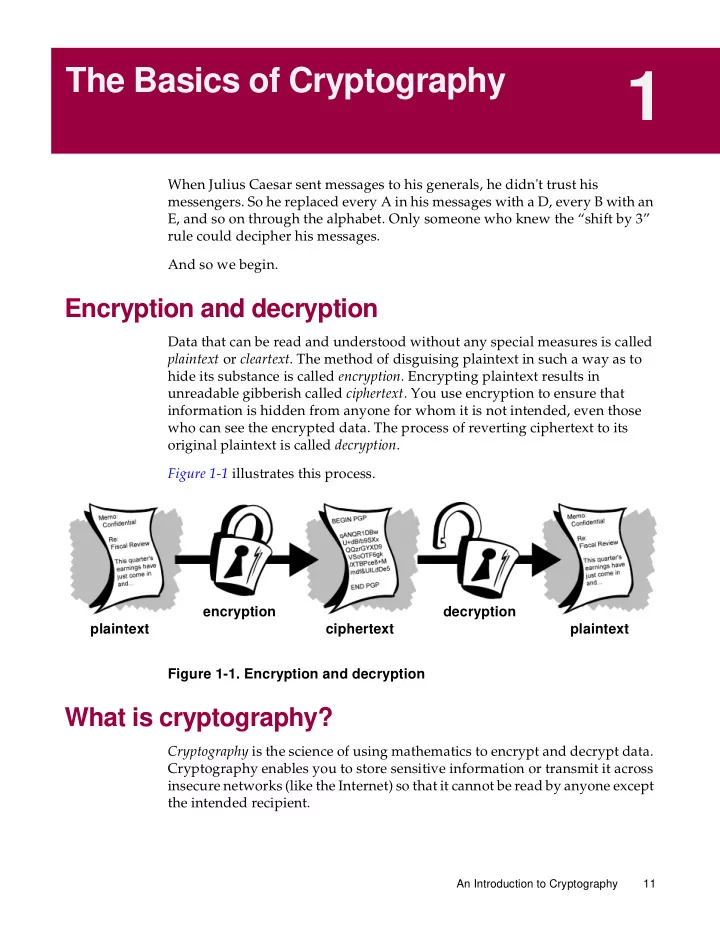
Data that can be read and understood without any special measures is called plaintext or cleartext. The method of disguising plaintext in such a way as to hide its substance is called encryption. Encrypting plaintext results in unreadable gibberish called ciphertext. You use encryption to ensure that information is hidden from anyone for whom it is not intended, even those who can see the encrypted data. The process of reverting ciphertext to its

  • riginal plaintext is called decryption.

Figure 1-1 illustrates this process. Figure 1-1. Encryption and decryption

What is cryptography?

Cryptography is the science of using mathematics to encrypt and decrypt data. Cryptography enables you to store sensitive information or transmit it across insecure networks (like the Internet) so that it cannot be read by anyone except the intended recipient. plaintext ciphertext plaintext decryption encryption

slide-2
SLIDE 2

The Basics of Cryptography 12 An Introduction to Cryptography

While cryptography is the science of securing data, cryptanalysis is the science

  • f analyzing and breaking secure communication. Classical cryptanalysis

involves an interesting combination of analytical reasoning, application of mathematical tools, pattern finding, patience, determination, and luck. Cryptanalysts are also called attackers. Cryptology embraces both cryptography and cryptanalysis.

Strong cryptography

“There are two kinds of cryptography in this world: cryptography that will stop your kid sister from reading your files, and cryptography that will stop major governments from reading your files. This book is about the latter.”

  • -Bruce Schneier, Applied Cryptography: Protocols, Algorithms, and Source

Code in C. PGP is also about the latter sort of cryptography. Cryptography can be strong or weak, as explained above. Cryptographic strength is measured in the time and resources it would require to recover the

  • plaintext. The result of strong cryptography is ciphertext that is very difficult to

decipher without possession of the appropriate decoding tool. How difficult? Given all of today’s computing power and available time—even a billion computers doing a billion checks a second—it is not possible to decipher the result of strong cryptography before the end of the universe. One would think, then, that strong cryptography would hold up rather well against even an extremely determined cryptanalyst. Who’s really to say? No

  • ne has proven that the strongest encryption obtainable today will hold up

under tomorrow’s computing power. However, the strong cryptography employed by PGP is the best available today. Vigilance and conservatism will protect you better, however, than claims of impenetrability.

How does cryptography work?

A cryptographic algorithm, or cipher, is a mathematical function used in the encryption and decryption process. A cryptographic algorithm works in combination with a key—a word, number, or phrase—to encrypt the plaintext. The same plaintext encrypts to different ciphertext with different keys. The security of encrypted data is entirely dependent on two things: the strength of the cryptographic algorithm and the secrecy of the key. A cryptographic algorithm, plus all possible keys and all the protocols that make it work comprise a cryptosystem. PGP is a cryptosystem.

slide-3
SLIDE 3

An Introduction to Cryptography 13 The Basics of Cryptography

Conventional cryptography

In conventional cryptography, also called secret-key or symmetric-key encryption, one key is used both for encryption and decryption. The Data Encryption Standard (DES) is an example of a conventional cryptosystem that is widely employed by the Federal Government. Figure 1-2 is an illustration of the conventional encryption process. Figure 1-2. Conventional encryption

Caesar’s Cipher

An extremely simple example of conventional cryptography is a substitution

  • cipher. A substitution cipher substitutes one piece of information for another.

This is most frequently done by offsetting letters of the alphabet. Two examples are Captain Midnight’s Secret Decoder Ring, which you may have owned when you were a kid, and Julius Caesar’s cipher. In both cases, the algorithm is to

  • ffset the alphabet and the key is the number of characters to offset it.

For example, if we encode the word “SECRET” using Caesar’s key value of 3, we offset the alphabet so that the 3rd letter down (D) begins the alphabet. So starting with ABCDEFGHIJKLMNOPQRSTUVWXYZ and sliding everything up by 3, you get DEFGHIJKLMNOPQRSTUVWXYZABC where D=A, E=B, F=C, and so on. plaintext ciphertext plaintext decryption encryption

slide-4
SLIDE 4

The Basics of Cryptography 14 An Introduction to Cryptography

Using this scheme, the plaintext, “SECRET” encrypts as “VHFUHW.” To allow someone else to read the ciphertext, you tell them that the key is 3. Obviously, this is exceedingly weak cryptography by today’s standards, but hey, it worked for Caesar, and it illustrates how conventional cryptography works.

Key management and conventional encryption

Conventional encryption has benefits. It is very fast. It is especially useful for encrypting data that is not going anywhere. However, conventional encryption alone as a means for transmitting secure data can be quite expensive simply due to the difficulty of secure key distribution. Recall a character from your favorite spy movie: the person with a locked briefcase handcuffed to his or her wrist. What is in the briefcase, anyway? It’s probably not the missile launch code/biotoxin formula/invasion plan itself. It’s the key that will decrypt the secret data. For a sender and recipient to communicate securely using conventional encryption, they must agree upon a key and keep it secret between

  • themselves. If they are in different physical locations, they must trust a courier,

the Bat Phone, or some other secure communication medium to prevent the disclosure of the secret key during transmission. Anyone who overhears or intercepts the key in transit can later read, modify, and forge all information encrypted or authenticated with that key. From DES to Captain Midnight’s Secret Decoder Ring, the persistent problem with conventional encryption is key distribution: how do you get the key to the recipient without someone intercepting it?

Public key cryptography

The problems of key distribution are solved by public key cryptography, the concept of which was introduced by Whitfield Diffie and Martin Hellman in

  • 1975. (There is now evidence that the British Secret Service invented it a few

years before Diffie and Hellman, but kept it a military secret—and did nothing with it.)1 Public key cryptography is an asymmetric scheme that uses a pair of keys for encryption: a public key, which encrypts data, and a corresponding private, or secret key for decryption. You publish your public key to the world while keeping your private key secret. Anyone with a copy of your public key can then encrypt information that only you can read. Even people you have never met.

  • 1. J H Ellis, The Possibility of Secure Non-Secret Digital Encryption, CESG Report, January 1970.

[CESG is the UK’s National Authority for the official use of cryptography.]

slide-5
SLIDE 5

An Introduction to Cryptography 15 The Basics of Cryptography

It is computationally infeasible to deduce the private key from the public key. Anyone who has a public key can encrypt information but cannot decrypt it. Only the person who has the corresponding private key can decrypt the information. Figure 1-3. Public key encryption The primary benefit of public key cryptography is that it allows people who have no preexisting security arrangement to exchange messages securely. The need for sender and receiver to share secret keys via some secure channel is eliminated; all communications involve only public keys, and no private key is ever transmitted or shared. Some examples of public-key cryptosystems are Elgamal (named for its inventor, Taher Elgamal), RSA (named for its inventors, Ron Rivest, Adi Shamir, and Leonard Adleman), Diffie-Hellman (named, you guessed it, for its inventors), and DSA, the Digital Signature Algorithm (invented by David Kravitz). Because conventional cryptography was once the only available means for relaying secret information, the expense of secure channels and key distribution relegated its use only to those who could afford it, such as governments and large banks (or small children with secret decoder rings). Public key encryption is the technological revolution that provides strong cryptography to the adult masses. Remember the courier with the locked briefcase handcuffed to his wrist? Public-key encryption puts him out of business (probably to his relief). public key private key plaintext ciphertext plaintext decryption encryption

slide-6
SLIDE 6

The Basics of Cryptography 16 An Introduction to Cryptography

How PGP works

PGP combines some of the best features of both conventional and public key

  • cryptography. PGP is a hybrid cryptosystem.

When a user encrypts plaintext with PGP, PGP first compresses the plaintext. Data compression saves modem transmission time and disk space and, more importantly, strengthens cryptographic security. Most cryptanalysis techniques exploit patterns found in the plaintext to crack the cipher. Compression reduces these patterns in the plaintext, thereby greatly enhancing resistance to cryptanalysis. (Files that are too short to compress or which don’t compress well aren’t compressed.) PGP then creates a session key, which is a one-time-only secret key. This key is a random number generated from the random movements of your mouse and the keystrokes you type. This session key works with a very secure, fast conventional encryption algorithm to encrypt the plaintext; the result is

  • ciphertext. Once the data is encrypted, the session key is then encrypted to the

recipient’s public key. This public key-encrypted session key is transmitted along with the ciphertext to the recipient. Figure 1-4. How PGP encryption works plaintext is encrypted ciphertext + encrypted session key session key is encrypted with session key with public key

slide-7
SLIDE 7

An Introduction to Cryptography 17 The Basics of Cryptography

Decryption works in the reverse. The recipient’s copy of PGP uses his or her private key to recover the temporary session key, which PGP then uses to decrypt the conventionally-encrypted ciphertext. Figure 1-5. How PGP decryption works The combination of the two encryption methods combines the convenience of public key encryption with the speed of conventional encryption. Conventional encryption is about 1,000 times faster than public key

  • encryption. Public key encryption in turn provides a solution to key

distribution and data transmission issues. Used together, performance and key distribution are improved without any sacrifice in security.

Keys

A key is a value that works with a cryptographic algorithm to produce a specific ciphertext. Keys are basically really, really, really big numbers. Key size is measured in bits; the number representing a 1024-bit key is darn huge. In public key cryptography, the bigger the key, the more secure the ciphertext. However, public key size and conventional cryptography’s secret key size are totally unrelated. A conventional 80-bit key has the equivalent strength of a 1024-bit public key. A conventional 128-bit key is equivalent to a 3000-bit public key. Again, the bigger the key, the more secure, but the algorithms used for each type of cryptography are very different and thus comparison is like that of apples to oranges. encrypted ciphertext encrypted message session key recipient’s private key used to decrypt session key session key used to decrypt ciphertext

  • riginal

plaintext

slide-8
SLIDE 8

The Basics of Cryptography 18 An Introduction to Cryptography

While the public and private keys are mathematically related, it’s very difficult to derive the private key given only the public key; however, deriving the private key is always possible given enough time and computing power. This makes it very important to pick keys of the right size; large enough to be secure, but small enough to be applied fairly quickly. Additionally, you need to consider who might be trying to read your files, how determined they are, how much time they have, and what their resources might be. Larger keys will be cryptographically secure for a longer period of time. If what you want to encrypt needs to be hidden for many years, you might want to use a very large key. Of course, who knows how long it will take to determine your key using tomorrow’s faster, more efficient computers? There was a time when a 56-bit symmetric key was considered extremely safe. Keys are stored in encrypted form. PGP stores the keys in two files on your hard disk; one for public keys and one for private keys. These files are called

  • keyrings. As you use PGP, you will typically add the public keys of your

recipients to your public keyring. Your private keys are stored on your private

  • keyring. If you lose your private keyring, you will be unable to decrypt any

information encrypted to keys on that ring.

Digital signatures

A major benefit of public key cryptography is that it provides a method for employing digital signatures. Digital signatures enable the recipient of information to verify the authenticity of the information’s origin, and also verify that the information is intact. Thus, public key digital signatures provide authentication and data integrity. A digital signature also provides non-repudiation, which means that it prevents the sender from claiming that he

  • r she did not actually send the information. These features are every bit as

fundamental to cryptography as privacy, if not more. A digital signature serves the same purpose as a handwritten signature. However, a handwritten signature is easy to counterfeit. A digital signature is superior to a handwritten signature in that it is nearly impossible to counterfeit, plus it attests to the contents of the information as well as to the identity of the signer. Some people tend to use signatures more than they use encryption. For example, you may not care if anyone knows that you just deposited $1000 in your account, but you do want to be darn sure it was the bank teller you were dealing with.

slide-9
SLIDE 9

An Introduction to Cryptography 19 The Basics of Cryptography

The basic manner in which digital signatures are created is illustrated in Figure 1-6. Instead of encrypting information using someone else’s public key, you encrypt it with your private key. If the information can be decrypted with your public key, then it must have originated with you. Figure 1-6. Simple digital signatures

Hash functions

The system described above has some problems. It is slow, and it produces an enormous volume of data—at least double the size of the original information. An improvement on the above scheme is the addition of a one-way hash function in the process. A one-way hash function takes variable-length input—in this case, a message of any length, even thousands or millions of bits—and produces a fixed-length output; say, 160-bits. The hash function ensures that, if the information is changed in any way—even by just one bit—an entirely different output value is produced. PGP uses a cryptographically strong hash function on the plaintext the user is

  • signing. This generates a fixed-length data item known as a message digest.

(Again, any change to the information results in a totally different digest.)

  • riginal text

signed text verified text verifying signing private key public key

slide-10
SLIDE 10

The Basics of Cryptography 20 An Introduction to Cryptography

Then PGP uses the digest and the private key to create the “signature.” PGP transmits the signature and the plaintext together. Upon receipt of the message, the recipient uses PGP to recompute the digest, thus verifying the

  • signature. PGP can encrypt the plaintext or not; signing plaintext is useful if

some of the recipients are not interested in or capable of verifying the signature. As long as a secure hash function is used, there is no way to take someone's signature from one document and attach it to another, or to alter a signed message in any way. The slightest change in a signed document will cause the digital signature verification process to fail. Figure 1-7. Secure digital signatures Digital signatures play a major role in authenticating and validating other PGP users’ keys. plaintext private key hash function message digest plaintext + signature digest signed with private key used for signing

slide-11
SLIDE 11

An Introduction to Cryptography 21 The Basics of Cryptography

Digital certificates

One issue with public key cryptosystems is that users must be constantly vigilant to ensure that they are encrypting to the correct person’s key. In an environment where it is safe to freely exchange keys via public servers, man-in-the-middle attacks are a potential threat. In this type of attack, someone posts a phony key with the name and user ID of the user’s intended recipient. Data encrypted to— and intercepted by—the true owner of this bogus key is now in the wrong hands. In a public key environment, it is vital that you are assured that the public key to which you are encrypting data is in fact the public key of the intended recipient and not a forgery. You could simply encrypt only to those keys which have been physically handed to you. But suppose you need to exchange information with people you have never met; how can you tell that you have the correct key? Digital certificates, or certs, simplify the task of establishing whether a public key truly belongs to the purported owner. A certificate is a form of credential. Examples might be your driver’s license, your social security card, or your birth certificate. Each of these has some information on it identifying you and some authorization stating that someone else has confirmed your identity. Some certificates, such as your passport, are important enough confirmation of your identity that you would not want to lose them, lest someone use them to impersonate you. A digital certificate is data that functions much like a physical certificate. A digital certificate is information included with a person’s public key that helps

  • thers verify that a key is genuine or valid. Digital certificates are used to

thwart attempts to substitute one person’s key for another. A digital certificate consists of three things:

  • A public key.
  • Certificate information. (“Identity” information about the user, such as

name, user ID, and so on.)

  • One or more digital signatures.

The purpose of the digital signature on a certificate is to state that the certificate information has been attested to by some other person or entity. The digital signature does not attest to the authenticity of the certificate as a whole; it vouches only that the signed identity information goes along with, or is bound to, the public key. Thus, a certificate is basically a public key with one or two forms of ID attached, plus a hearty stamp of approval from some other trusted individual.

slide-12
SLIDE 12

The Basics of Cryptography 22 An Introduction to Cryptography

.

Figure 1-8. Anatomy of a PGP certificate

Certificate distribution

Certificates are utilized when it’s necessary to exchange public keys with someone else. For small groups of people who wish to communicate securely, it is easy to manually exchange diskettes or emails containing each owner’s public key. This is manual public key distribution, and it is practical only to a certain point. Beyond that point, it is necessary to put systems into place that can provide the necessary security, storage, and exchange mechanisms so coworkers, business partners, or strangers could communicate if need be. These can come in the form of storage-only repositories called Certificate Servers, or more structured systems that provide additional key management features and are called Public Key Infrastructures (PKIs). signature signature signature userid userid certificate certification key

slide-13
SLIDE 13

An Introduction to Cryptography 23 The Basics of Cryptography

Certificate servers

A certificate server, also called a cert server or a key server, is a database that allows users to submit and retrieve digital certificates. A cert server usually provides some administrative features that enable a company to maintain its security policies—for example, allowing only those keys that meet certain requirements to be stored.

Public Key Infrastructures

A PKI contains the certificate storage facilities of a certificate server, but also provides certificate management facilities (the ability to issue, revoke, store, retrieve, and trust certificates). The main feature of a PKI is the introduction of what is known as a Certification Authority, or CA, which is a human entity—a person, group, department, company, or other association—that an

  • rganization has authorized to issue certificates to its computer users. (A CA’s

role is analogous to a country’s government’s Passport Office.) A CA creates certificates and digitally signs them using the CA’s private key. Because of its role in creating certificates, the CA is the central component of a PKI. Using the CA’s public key, anyone wanting to verify a certificate’s authenticity verifies the issuing CA’s digital signature, and hence, the integrity of the contents of the certificate (most importantly, the public key and the identity of the certificate holder).

Certificate formats

A digital certificate is basically a collection of identifying information bound together with a public key and signed by a trusted third party to prove its

  • authenticity. A digital certificate can be one of a number of different formats.

PGP recognizes two different certificate formats:

  • PGP certificates
  • X.509 certificates

PGP certificate format

A PGP certificate includes (but is not limited to) the following information:

  • The PGP version number—this identifies which version of PGP was used

to create the key associated with the certificate.

  • The certificate holder’s public key—the public portion of your key pair,

together with the algorithm of the key: RSA, DH (Diffie-Hellman), or DSA (Digital Signature Algorithm).

slide-14
SLIDE 14

The Basics of Cryptography 24 An Introduction to Cryptography

  • The certificate holder’s information—this consists of “identity”

information about the user, such as his or her name, user ID, photograph, and so on.

  • The digital signature of the certificate owner—also called a self-signature,

this is the signature using the corresponding private key of the public key associated with the certificate.

  • The certificate’s validity period—the certificate’s start date/time and

expiration date/time; indicates when the certificate will expire.

  • The preferred symmetric encryption algorithm for the key—indicates the

encryption algorithm to which the certificate owner prefers to have information encrypted. The supported algorithms are CAST, IDEA or Triple-DES. You might think of a PGP certificate as a public key with one or more labels tied to it (see Figure 1-9 ). On these ‘labels’ you’ll find information identifying the owner of the key and a signature of the key’s owner, which states that the key and the identification go together. (This particular signature is called a self-signature; every PGP certificate contains a self-signature.) One unique aspect of the PGP certificate format is that a single certificate can contain multiple signatures. Several or many people may sign the key/identification pair to attest to their own assurance that the public key definitely belongs to the specified owner. If you look on a public certificate server, you may notice that certain certificates, such as that of PGP’s creator, Phil Zimmermann, contain many signatures. Some PGP certificates consist of a public key with several labels, each of which contains a different means of identifying the key’s owner (for example, the

  • wner’s name and corporate email account, the owner’s nickname and home

email account, a photograph of the owner—all in one certificate). The list of signatures of each of those identities may differ; signatures attest to the authenticity that one of the labels belongs to the public key, not that all the labels on the key are authentic. (Note that ‘authentic’ is in the eye of its beholder—signatures are opinions, and different people devote different levels of due diligence in checking authenticity before signing a key.)

slide-15
SLIDE 15

An Introduction to Cryptography 25 The Basics of Cryptography

Figure 1-9. A PGP certificate

X.509 certificate format

X.509 is another very common certificate format. All X.509 certificates comply with the ITU-T X.509 international standard; thus (theoretically) X.509 certificates created for one application can be used by any application complying with X.509. In practice, however, different companies have created their own extensions to X.509 certificates, not all of which work together. A certificate requires someone to validate that a public key and the name of the key’s owner go together. With PGP certificates, anyone can play the role of

  • validator. With X.509 certificates, the validator is always a Certification

Authority or someone designated by a CA. (Bear in mind that PGP certificates also fully support a hierarchical structure using a CA to validate certificates.) An X.509 certificate is a collection of a standard set of fields containing information about a user or device and their corresponding public key. The X.509 standard defines what information goes into the certificate, and describes how to encode it (the data format). All X.509 certificates have the following data: public key

  • PGP version number
  • time when key created
  • the key material itself
  • key type (DH, RSA)
  • how long key is valid

user id

  • string identifying the
  • version number

user id signature signature key’s owner

  • message digest algorithm
  • message digest calculation
  • signed message digest
  • signer key id
  • certification that the userid

and key go together

slide-16
SLIDE 16

The Basics of Cryptography 26 An Introduction to Cryptography

  • The X.509 version number—this identifies which version of the X.509

standard applies to this certificate, which affects what information can be specified in it. The most current is version 3.

  • The certificate holder’s public key—the public key of the certificate

holder, together with an algorithm identifier which specifies which cryptosystem the key belongs to and any associated key parameters.

  • The serial number of the certificate—the entity (application or person)

that created the certificate is responsible for assigning it a unique serial number to distinguish it from other certificates it issues. This information is used in numerous ways; for example when a certificate is revoked, its serial number is placed in a Certificate Revocation List or CRL.

  • The certificate holder’s unique identifier— (or DN—distinguished name).

This name is intended to be unique across the Internet. This name is intended to be unique across the Internet. A DN consists of multiple subsections and may look something like this: CN=Bob Allen, OU=Total Network Security Division, O=Network Associates, Inc., C=US (These refer to the subject's Common Name, Organizational Unit, Organization, and Country.)

  • The certificate’s validity period—the certificate’s start date/time and

expiration date/time; indicates when the certificate will expire.

  • The unique name of the certificate issuer—the unique name of the entity

that signed the certificate. This is normally a CA. Using the certificate implies trusting the entity that signed this certificate. (Note that in some cases, such as root or top-level CA certificates, the issuer signs its own certificate.)

  • The digital signature of the issuer—the signature using the private key of

the entity that issued the certificate.

  • The signature algorithm identifier—identifies the algorithm used by the

CA to sign the certificate. There are many differences between an X.509 certificate and a PGP certificate, but the most salient are as follows:

  • you can create your own PGP certificate; you must request and be issued

an X.509 certificate from a Certification Authority

  • X.509 certificates natively support only a single name for the key’s owner
  • X.509 certificates support only a single digital signature to attest to the

key’s validity

slide-17
SLIDE 17

An Introduction to Cryptography 27 The Basics of Cryptography

To obtain an X.509 certificate, you must ask a CA to issue you a certificate. You provide your public key, proof that you possess the corresponding private key, and some specific information about yourself. You then digitally sign the information and send the whole package—the certificate request—to the CA. The CA then performs some due diligence in verifying that the information you provided is correct, and if so, generates the certificate and returns it. You might think of an X.509 certificate as looking like a standard paper certificate (similar to one you might have received for completing a class in basic First Aid) with a public key taped to it. It has your name and some information about you on it, plus the signature of the person who issued it to you. Figure 1-10. An X.509 certificate Probably the most widely visible use of X.509 certificates today is in web browsers. public key value Certification Authority’s Certification Authority’s digital signature private key (also called the root CA certificate)

  • version of cert. format
  • certificate serial number
  • signature algorithm identifier

(for certificate issuer’s signature) (the Certification Authority)

  • validity period (start/
  • issuer’s unique name
  • certificate issuer’s name
  • cert holder’s unique name (DN)
  • extensions

expiration dates/times)

slide-18
SLIDE 18

The Basics of Cryptography 28 An Introduction to Cryptography

Validity and trust

Every user in a public key system is vulnerable to mistaking a phony key (certificate) for a real one. Validity is confidence that a public key certificate belongs to its purported owner. Validity is essential in a public key environment where you must constantly establish whether or not a particular certificate is authentic. When you’ve assured yourself that a certificate belonging to someone else is valid, you can sign the copy on your keyring to attest to the fact that you’ve checked the certificate and that it’s an authentic one. If you want others to know that you gave the certificate your stamp of approval, you can export the signature to a certificate server so that others can see it. As described in the section, “Public Key Infrastructures.” some companies designate one or more Certification Authorities (CAs) to indicate certificate

  • validity. In an organization using a PKI with X.509 certificates, it is the job of

the CA to issue certificates to users—a process which generally entails responding to a user’s request for a certificate. In an organization using PGP certificates without a PKI, it is the job of the CA to check the authenticity of all PGP certificates and then sign the good ones. Basically, the main purpose of a CA is to bind a public key to the identification information contained in the certificate and thus assure third parties that some measure of care was taken to ensure that this binding of the identification information and key is valid. The CA is the Grand Pooh-bah of validation in an organization; someone whom everyone trusts, and in some organizations, like those using a PKI, no certificate is considered valid unless it has been signed by a trusted CA.

Checking validity

One way to establish validity is to go through some manual process. There are several ways to accomplish this. You could require your intended recipient to physically hand you a copy of his or her public key. But this is often inconvenient and inefficient. Another way is to manually check the certificate’s fingerprint. Just as every human’s fingerprints are unique, every PGP certificate’s fingerprint is unique. The fingerprint is a hash of the user’s certificate and appears as one of the certificate’s properties. In PGP, the fingerprint can appear as a hexadecimal number or a series of so-called biometric words, which are phonetically distinct and are used to make the fingerprint identification process a little easier.

slide-19
SLIDE 19

An Introduction to Cryptography 29 The Basics of Cryptography

You can check that a certificate is valid by calling the key’s owner (so that you

  • riginate the transaction) and asking the owner to read his or her key’s

fingerprint to you and verifying that fingerprint against the one you believe to be the real one. This works if you know the owner’s voice, but, how do you manually verify the identity of someone you don’t know? Some people put the fingerprint of their key on their business cards for this very reason. Another way to establish validity of someone’s certificate is to trust that a third individual has gone through the process of validating it. A CA, for example, is responsible for ensuring that prior to issuing to a certificate, he or she carefully checks it to be sure the public key portion really belongs to the purported owner. Anyone who trusts the CA will automatically consider any certificates signed by the CA to be valid. Another aspect of checking validity is to ensure that the certificate has not been

  • revoked. For more information, see the section, ”Certificate Revocation”.

Establishing trust

You validate certificates. You trust people. More specifically, you trust people to validate other people’ certificates. Typically, unless the owner hands you the certificate, you have to go by someone else’s word that it is valid.

Meta and trusted introducers

In most situations, people completely trust the CA to establish certificates’

  • validity. This means that everyone else relies upon the CA to go through the

whole manual validation process for them. This is fine up to a certain number

  • f users or number of work sites, and then it is not possible for the CA to

maintain the same level of quality validation. In that case, adding other validators to the system is necessary. A CA can also be a meta-introducer. A meta-introducer bestows not only validity on keys, but bestows the ability to trust keys upon others. Similar to the king who hands his seal to his trusted advisors so they can act on his authority, the meta-introducer enables others to act as trusted introducers. These trusted introducers can validate keys to the same effect as that of the meta-introducer. They cannot, however, create new trusted introducers. Meta-introducer and trusted introducer are PGP terms. In an X.509 environment, the meta-introducer is called the root Certification Authority (root CA) and trusted introducers subordinate Certification Authorities.

slide-20
SLIDE 20

The Basics of Cryptography 30 An Introduction to Cryptography

The root CA uses the private key associated with a special certificate type called a root CA certificate to sign certificates. Any certificate signed by the root CA certificate is viewed as valid by any other certificate signed by the root. This validation process works even for certificates signed by other CAs in the system—as long as the root CA certificate signed the subordinate CA’s certificate, any certificate signed by the CA is considered valid to others within the hierarchy. This process of checking back up through the system to see who signed whose certificate is called tracing a certification path or certification chain.

Trust models

In relatively closed systems, such as within a small company, it is easy to trace a certification path back to the root CA. However, users must often communicate with people outside of their corporate environment, including some whom they have never met, such as vendors, customers, clients, associates, and so on. Establishing a line of trust to those who have not been explicitly trusted by your CA is difficult. Companies follow one or another trust model, which dictates how users will go about establishing certificate validity. There are three different models:

  • Direct Trust
  • Hierarchical Trust
  • A Web of Trust

Direct Trust

Direct trust is the simplest trust model. In this model, a user trusts that a key is valid because he or she knows where it came from. All cryptosystems use this form of trust in some way. For example, in web browsers, the root Certification Authority keys are directly trusted because they were shipped by the manufacturer. If there is any form of hierarchy, it extends from these directly trusted certificates. In PGP, a user who validates keys herself and never sets another certificate to be a trusted introducer is using direct trust. Figure 1-11. Direct trust user user

slide-21
SLIDE 21

An Introduction to Cryptography 31 The Basics of Cryptography

Hierarchical Trust

In a hierarchical system, there are a number of “root” certificates from which trust extends. These certificates may certify certificates themselves, or they may certify certificates that certify still other certificates down some chain. Consider it as a big trust “tree.” The “leaf” certificate's validity is verified by tracing backward from its certifier, to other certifiers, until a directly trusted root certificate is found. Figure 1-12. Hierarchical trust

Web of Trust

A web of trust encompasses both of the other models, but also adds the notion that trust is in the eye of the beholder (which is the real-world view) and the idea that more information is better. It is thus a cumulative trust model. A certificate might be trusted directly, or trusted in some chain going back to a directly trusted root certificate (the meta-introducer), or by some group of introducers. meta-introducer (or root CA) trusted introducers (or CAs) users

slide-22
SLIDE 22

The Basics of Cryptography 32 An Introduction to Cryptography

Perhaps you’ve heard of the term six degrees of separation, which suggests that any person in the world can determine some link to any other person in the world using six or fewer other people as intermediaries. This is a web of introducers. It is also the PGP view of trust. PGP uses digital signatures as its form of

  • introduction. When any user signs another’s key, he or she becomes an

introducer of that key. As this process goes on, it establishes a web of trust. In a PGP environment, any user can act as a certifying authority. Any PGP user can validate another PGP user’s public key certificate. However, such a certificate is only valid to another user if the relying party recognizes the validator as a trusted introducer. (That is, you trust my opinion that others’ keys are valid only if you consider me to be a trusted introducer. Otherwise, my opinion on other keys’ validity is moot.) Stored on each user’s public keyring are indicators of

  • whether or not the user considers a particular key to be valid
  • the level of trust the user places on the key that the key’s owner can serve

as certifier of others’ keys You indicate, on your copy of my key, whether you think my judgement

  • counts. It’s really a reputation system: certain people are reputed to give good

signatures, and people trust them to attest to other keys’ validity.

Levels of trust in PGP

The highest level of trust in a key, implicit trust, is trust in your own key pair. PGP assumes that if you own the private key, you must trust the actions of its related public key. Any keys signed by your implicitly trusted key are valid. There are three levels of trust you can assign to someone else’s public key:

  • Complete trust
  • Marginal trust
  • No trust (or Untrusted)

To make things confusing, there are also three levels of validity:

  • Valid
  • Marginally valid
  • Invalid

To define another’s key as a trusted introducer, you 1. Start with a valid key, one that is either

slide-23
SLIDE 23

An Introduction to Cryptography 33 The Basics of Cryptography

  • signed by you or
  • signed by another trusted introducer

and then 2. Set the level of trust you feel the key’s owner is entitled. For example, suppose your key ring contains Alice’s key. You have validated Alice’s key and you indicate this by signing it. You know that Alice is a real stickler for validating others’ keys. You therefore assign her key with Complete trust. This makes Alice a Certification Authority. If Alice signs another’s key, it appears as Valid on your keyring. PGP requires one Completely trusted signature or two Marginally trusted signatures to establish a key as valid. PGP’s method of considering two Marginals equal to one Complete is similar to a merchant asking for two forms

  • f ID. You might consider Alice fairly trustworthy and also consider Bob fairly
  • trustworthy. Either one alone runs the risk of accidentally signing a counterfeit

key, so you might not place complete trust in either one. However, the odds that both individuals signed the same phony key are probably small.

Certificate Revocation

Certificates are only useful while they are valid. It is unsafe to simply assume that a certificate is valid forever. In most organizations and in all PKIs, certificates have a restricted lifetime. This constrains the period in which a system is vulnerable should a certificate compromise occur. Certificates are thus created with a scheduled validity period: a start date/time and an expiration date/time. The certificate is expected to be usable for its entire validity period (its lifetime). When the certificate expires, it will no longer be valid, as the authenticity of its key/identification pair are no longer

  • assured. (The certificate can still be safely used to reconfirm information that

was encrypted or signed within the validity period—it should not be trusted for cryptographic tasks moving forward, however.) There are also situations where it is necessary to invalidate a certificate prior to its expiration date, such as when an the certificate holder terminates employment with the company or suspects that the certificate’s corresponding private key has been compromised. This is called revocation. A revoked certificate is much more suspect than an expired certificate. Expired certificates are unusable, but do not carry the same threat of compromise as a revoked certificate.

slide-24
SLIDE 24

The Basics of Cryptography 34 An Introduction to Cryptography

Anyone who has signed a certificate can revoke his or her signature on the certificate (provided he or she uses the same private key that created the signature). A revoked signature indicates that the signer no longer believes the public key and identification information belong together, or that the certificate’s public key (or corresponding private key) has been compromised. A revoked signature should carry nearly as much weight as a revoked certificate. With X.509 certificates, a revoked signature is practically the same as a revoked certificate given that the only signature on the certificate is the one that made it valid in the first place—the signature of the CA. PGP certificates provide the added feature that you can revoke your entire certificate (not just the signatures on it) if you yourself feel that the certificate has been compromised. Only the certificate’s owner (the holder of its corresponding private key) or someone whom the certificate’s owner has designated as a revoker can revoke a PGP certificate. (Designating a revoker is a useful practice, as it’s often the loss of the passphrase for the certificate’s corresponding private key that leads a PGP user to revoke his or her certificate—a task that is only possible if one has access to the private key.) Only the certificate’s issuer can revoke an X.509 certificate.

Communicating that a certificate has been revoked

When a certificate is revoked, it is important to make potential users of the certificate aware that it is no longer valid. With PGP certificates, the most common way to communicate that a certificate has been revoked is to post it

  • n a certificate server so others who may wish to communicate with you are

warned not to use that public key. In a PKI environment, communication of revoked certificates is most commonly achieved via a data structure called a Certificate Revocation List, or CRL, which is published by the CA. The CRL contains a time-stamped, validated list of all revoked, unexpired certificates in the system. Revoked certificates remain on the list only until they expire, then they are removed from the list—this keeps the list from getting too long. The CA distributes the CRL to users at some regularly scheduled interval (and potentially off-cycle, whenever a certificate is revoked). Theoretically, this will prevent users from unwittingly using a compromised certificate. It is possible, though, that there may be a time period between CRLs in which a newly compromised certificate is used.

slide-25
SLIDE 25

An Introduction to Cryptography 35 The Basics of Cryptography

What is a passphrase?

Most people are familiar with restricting access to computer systems via a password, which is a unique string of characters that a user types in as an identification code. A passphrase is a longer version of a password, and in theory, a more secure

  • ne. Typically composed of multiple words, a passphrase is more secure

against standard dictionary attacks, wherein the attacker tries all the words in the dictionary in an attempt to determine your password. The best passphrases are relatively long and complex and contain a combination of upper and lowercase letters, numeric and punctuation characters. PGP uses a passphrase to encrypt your private key on your machine. Your private key is encrypted on your disk using a hash of your passphrase as the secret key. You use the passphrase to decrypt and use your private key. A passphrase should be hard for you to forget and difficult for others to guess. It should be something already firmly embedded in your long-term memory, rather than something you make up from scratch. Why? Because if you forget your passphrase, you are out of luck. Your private key is totally and absolutely useless without your passphrase and nothing can be done about it. Remember the quote earlier in this chapter? PGP is cryptography that will keep major governments out of your files. It will certainly keep you out of your files, too. Keep that in mind when you decide to change your passphrase to the punchline of that joke you can never quite remember.

Key splitting

They say that a secret is not a secret if it is known to more than one person. Sharing a private key pair poses such a problem. While it is not a recommended practice, sharing a private key pair is necessary at times. Corporate Signing Keys, for example, are private keys used by a company to sign—for example—legal documents, sensitive personnel information, or press releases to authenticate their origin. In such a case, it is worthwhile for multiple members of the company to have access to the private key. However, this means that any single individual can act fully on behalf of the company. In such a case it is wise to split the key among multiple people in such a way that more than one or two people must present a piece of the key in order to reconstitute it to a usable condition. If too few pieces of the key are available, then the key is unusable. Some examples are to split a key into three pieces and require two of them to reconstitute the key, or split it into two pieces and require both pieces. If a secure network connection is used during the reconstitution process, the key’s shareholders need not be physically present in order to rejoin the key.

slide-26
SLIDE 26

The Basics of Cryptography 36 An Introduction to Cryptography

Technical details

This chapter provided a high-level introduction to cryptographic concepts and

  • terminology. In Chapter 2, Phil Zimmermann, the creator of PGP, provides a

more in-depth discussion of privacy, the technical details of how PGP works, including the various algorithms it uses, as well as various attacks and how to protect yourself against them. For more information on cryptography, please refer to some of the books listed in the ”Related reading” section of the Preface.