02267: Software Development of Web Services 1.1 Software - - PDF document

02267 software development of web services
SMART_READER_LITE
LIVE PREVIEW

02267: Software Development of Web Services 1.1 Software - - PDF document

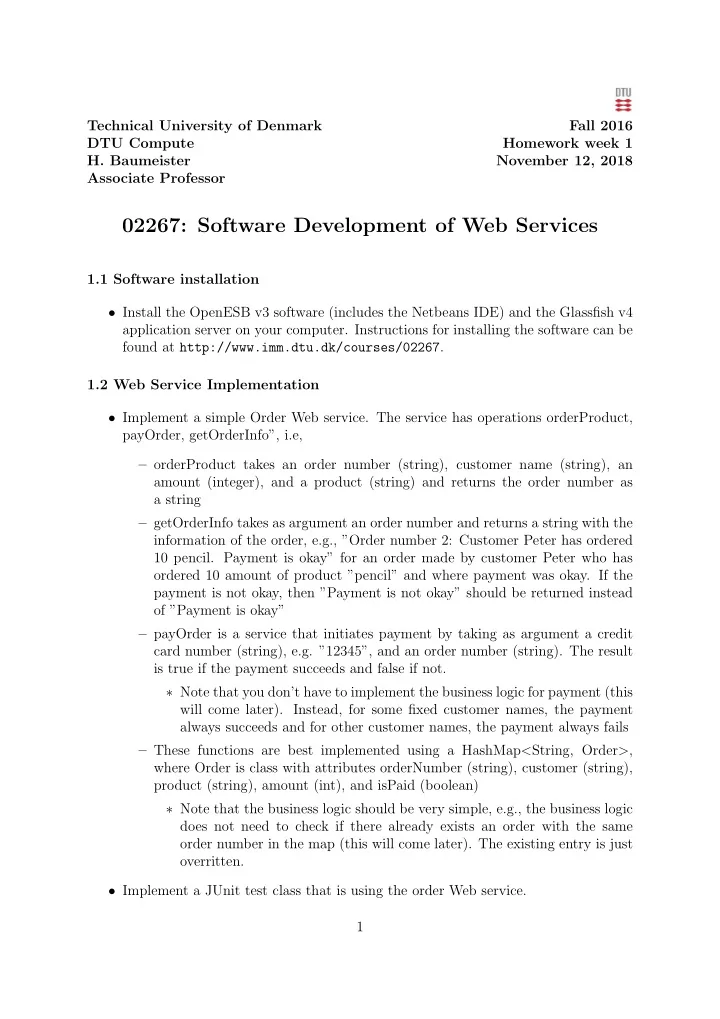
Technical University of Denmark Fall 2016 DTU Compute Homework week 1 H. Baumeister November 12, 2018 Associate Professor 02267: Software Development of Web Services 1.1 Software installation Install the OpenESB v3 software (includes the


slide-1
SLIDE 1

Technical University of Denmark Fall 2016 DTU Compute Homework week 1

  • H. Baumeister

November 12, 2018 Associate Professor

02267: Software Development of Web Services

1.1 Software installation

  • Install the OpenESB v3 software (includes the Netbeans IDE) and the Glassfish v4

application server on your computer. Instructions for installing the software can be found at http://www.imm.dtu.dk/courses/02267. 1.2 Web Service Implementation

  • Implement a simple Order Web service. The service has operations orderProduct,

payOrder, getOrderInfo”, i.e, – orderProduct takes an order number (string), customer name (string), an amount (integer), and a product (string) and returns the order number as a string – getOrderInfo takes as argument an order number and returns a string with the information of the order, e.g., ”Order number 2: Customer Peter has ordered 10 pencil. Payment is okay” for an order made by customer Peter who has

  • rdered 10 amount of product ”pencil” and where payment was okay. If the

payment is not okay, then ”Payment is not okay” should be returned instead

  • f ”Payment is okay”

– payOrder is a service that initiates payment by taking as argument a credit card number (string), e.g. ”12345”, and an order number (string). The result is true if the payment succeeds and false if not. ∗ Note that you don’t have to implement the business logic for payment (this will come later). Instead, for some fixed customer names, the payment always succeeds and for other customer names, the payment always fails – These functions are best implemented using a HashMap<String, Order>, where Order is class with attributes orderNumber (string), customer (string), product (string), amount (int), and isPaid (boolean) ∗ Note that the business logic should be very simple, e.g., the business logic does not need to check if there already exists an order with the same

  • rder number in the map (this will come later). The existing entry is just
  • verritten.
  • Implement a JUnit test class that is using the order Web service.

1

slide-2
SLIDE 2

– Write at least one test method for each operation orderProduct, payOrder, and getOrderInfo testing the operations – Write also a test method for getOrderInfo, where the order number is not a key in the map. ∗ What happens in this case? Note that this is about observing how system errors and exceptions are handled and propagated from the server to the client, not yet about how to avoid these or how to fix them. This will come later.

  • Tip: First implement orderProduct with its tests, then getOrderInfo first with

existing order numbers plus test and then with non-existent order numbers plus tests, and at last payOrder.with its tests. You can skip the implementation of payOrder if you run out of time. 2

slide-3
SLIDE 3

Technical University of Denmark Fall 2016 DTU Compute Homework week 2

  • H. Baumeister

November 12, 2018 Associate Professor

02267: Software Development of Web Services

2.1 Software installation and the Order Web service

  • If you haven’t finished the exercise from last week, do so this week.

2.2 Web Service Monitoring

  • Using tcpmon, check what messages are exchanged between client and server from

previous weeks’ exercise (see instructions on the course Web page).

  • How is the message exchange different from the others when the server throws an

exception that is not caught (e.g. getting the order information for a non-existent

  • rder number)?

2.3 Calling and Monitoring a Web service This exercise gives you another possibility to use JUnit to access a Web service and monitor the message exchange. a) Write a client for the temperature convertion Web service offered by webservicex.net. You find the WSDL of that service here: http://www.webservicex.net/ConvertTemperature.asmx?WSDL. Download the WSDL to generate the client stubs. – You can also use other Web services announced at http://free-web-services.

  • com. Make sure they are SOAP based services. We cover REST based services

later in the lecture. b) Using JUnit, create test methods for testing the use of that Web service. One of the tests should convert 100 degrees Celsius in Fahrenheit; the other 100 degrees Fahrenheit in Celsius. From the services being offered in the WSDL file (and af- ter you have generated the WSDL client stubs) you should be using the SOAP based services, i.e. ConvertTemperatureSoap or ConvertTemperatureSoap2. The temeprature units have corresponding constants defined in the class Temperature- Unit, DEGREE CELSIUS and DEGREE FAHRENHEIT. c) Monitor the communication between your client and the server using tcpmon 3

slide-4
SLIDE 4

Technical University of Denmark Fall 2016 DTU Compute Homework week 3

  • H. Baumeister

November 12, 2018 Associate Professor

02267: Software Development of Web Services

3.1 WSDL Create a WSDL file for a calendar service. The service should offer two operations. One operation stores an appointment (a string) for a specific date (for simplicity, we just consider appointments that take on a whole day) and another operation returns the appointment stored for a specific day.

  • Create a WSDL file calendar.wsdl
  • The Web service should define the namespace http://ws.imm.dtu.dk/calendar
  • The file should contain the port type calendarServicePortType with two operations

– addAppointment that takes a xsd:date and a String and returns nothing ∗ Implement addAppointment as a one-way operation – getAppointment that takes an xsd:date and returns a String

  • The Web service should use SOAP-RPC binding where the parameters are trans-

ported in the SOAP body

  • You can use the NetBeans wizard/editor File>new file>XML>WSDL document to

create a WSDL document 3.2 Web Service from WSDL

  • Create a Web service based on the WSDL file from the previous section.

The appointments can be stored in a HashMap.

  • You can use the NetBeans wizard File>new file>Web Services>Web Services from

WSDL to create the Web service implementation stubs from a WSDL file

  • Implement the correct application logic for the Web service

4

slide-5
SLIDE 5

3.3 Web Service Client

  • Create a client for the Web service in the previous exercise to test the Web service.

– Note, use the WSDL generated by the GlassFish server instead of the original WSDL file. The reason is, that for JAX-WS Web services, GlassFish changes the SOAP address from the one provided in the original WSDL file. 1 Make one test which adds an appointment for a date and then gets the ap- pointment for that date: make sure that the texts are the same 2 Make a second test that adds an appointment for the same date as in the first test, but with a different text for the appointment.

  • Use tcpmon or Wireshark to observe the traffic between client and server

– How do SOAP messages for the one-way operation addAppointment differ from getAppointment? Are they different?

  • Questions

– When you run both tests, what will happen if it takes, e.g., 3 seconds for the Web service to add an appointment? (Discuss with the TA’s or me, what should happen; try it out and explain what really happens :-) – You can wait for three seconds with Thread.sleep(3000);

  • The following code snippet creates a XMLGregorianCalendar for a specific date (i.e.,

15.9.2011): Note that the date has to be of the form yyyy-mm-dd, i.e., two digits for month and day. For example, yyyy-m-dd does not work. import javax.xml.datatype.DatatypeConfigurationException; import javax.xml.datatype.DatatypeFactory; import javax.xml.datatype.XMLGregorianCalendar; ... DatatypeFactory df = DatatypeFactory.newInstance(); XMLGregorianCalendar date = df.newXMLGregorianCalendar("2011-09-15"); ... 5

slide-6
SLIDE 6

Technical University of Denmark Fall 2016 DTU Compute Homework week 4

  • H. Baumeister

November 12, 2018 Associate Professor

02267: Software Development of Web Services

Purpose of the exercise

  • The purpose of this exercise is to learn to precisely control the contents of SOAP

messages through WSDL and XML Schema.

  • Please read all the exercise text before you start implementing.

White Pages Service

  • Write a White Pages Web service that adds a person to a phone book (called

addPerson) and then finds persons in that phone book (called findPerson) given a partly filled person object.

  • For example, if in the query only the last name of the person is known, then the

Web service should return a list of person objects having the same last name and which have all of the information filled (e.g. first name, phone number, address, e.t.c.).

  • The exercise uses the same development process as with last weeks exercise: first, a

WSDL is created from which the Web service implementation stubs are generated. The difference is, that now the Web service uses user defined datatypes, defined as XML schema in the WSDL document, and that the WSDL document completely defines the body of the SOAP message using document style. 4.1 White Pages Service: AddPerson Operation

  • The addPerson operation takes as argument a person and returns a status element

containing the string ”done” when adding the person was successful

  • If there is exists already a person with the same first- and last name in the phone

book, a fault message should be returned An example of a successful message exchange is: Request 6

slide-7
SLIDE 7

<S:Envelope xmlns:S="http://schemas.xmlsoap.org/soap/envelope/"> <S:Body> <ns2:person xmlns:ns2="urn:ws.imm.dtu:whitepages" phone="342" lastName="Rasmussen" firstName="Anita"> <address> <street>Kastrup vej</street> <postcode>1234</postcode> <city>København</city> </address> </ns2:person> </S:Body> </S:Envelope> If everything went okay, the response should be <S:Envelope xmlns:S="http://schemas.xmlsoap.org/soap/envelope/"> <S:Body> <ns2:status xmlns:ns2="urn:ws.imm.dtu:whitepages">done</ns2:status> </S:Body> </S:Envelope> In case there exists a person with the same first- and last name, a SOAP fault should be

  • returned. The SOAP fault should contain an error message and the person object in the

phone book in the detail element. Note that it is okay if the detail element also contains the stack trace. <S:Envelope xmlns:S="http://schemas.xmlsoap.org/soap/envelope/"> <S:Body> <S:Fault xmlns:ns4="http://www.w3.org/2003/05/soap-envelope"> <faultcode>S:Server</faultcode> <faultstring>error</faultstring> <detail> <ns2:wpfault xmlns:ns2="urn:ws.imm.dtu:whitepages"> <errorMessage>Person already exists</errorMessage> <ns2:person firstName="Anita" lastName="Rasmussen" phone="342"> <address> <street>Kastrup vej</street> <postcode>1234</postcode> <city>København</city> </address> </ns2:person> </ns2:wpfault> </detail> </S:Fault> </S:Body> </S:Envelope> 7

slide-8
SLIDE 8

Tasks:

  • Define an XML Schema (i.e. <xsd:schema>...</xsd:schema>) representing a per-

son as XML, where a person has a lastname, phone and address. Note that the XML Schema can go into its own file (e.g. wp.xsd), but can also be included into the type section of the WSDL document. Note: The IDE has some bugs deal- ing with importing XML schema (see the course home page for more details), therefore I recommend for this exercise to inline all schemata in the WSDL document. After you have a working version of your service, you can play around with putting the schema definitions in a file of their own, which is recommended for domain datatypes (WSDL specific datatypes, like definition of messages using Document-style bindings, still go into the type section of the WSDL document). – Use the WSDL editor for this and put the schema as an inlined schema in the type section of the WSDL document – An address should have a street, postcode and city. – Represent firstname, lastname, phone by XML attributes whereas address, street, postcode and city should be represented by elements.

  • Define the XML Schema for WPFault which contains an errorMessage and a Person

as the result (the person that is already in the phone book)

  • Write the remaining XML schemata and the WSDL file, so that it describes the

message exchange above – What binding type should be used: document or rpc?

  • Implement the Web services and deploy it

– Note that the logic does not need to be correctly implemented, but it should be possible to test both outcomes of the add person operation

  • Implement a client using JUnit that tests the Web service
  • Check, using the TCP monitor or Wireshark, that the SOAP messages have the

required form 4.2 White Pages Service: FindPerson Operation The findPerson operation returns for a partially filled person object a list of person

  • bjects matching the argument to the findPerson operation. For example, the request

below finds two entries in the phone book. <S:Envelope xmlns:S="http://schemas.xmlsoap.org/soap/envelope/"> <S:Body> <ns2:personquery xmlns:ns2="urn:ws.imm.dtu:whitepages" firstName="Anita"/> </S:Body> </S:Envelope> 8

slide-9
SLIDE 9

Response: <S:Envelope xmlns:S="http://schemas.xmlsoap.org/soap/envelope/"> <S:Body> <ns2:personArray xmlns:ns2="urn:ws.imm.dtu:whitepages"> <ns2:person phone="23545" lastName="Nielson" firstName="Anita"> <address> <street>Strandvejen</street> <postcode>1234</postcode> <city>Hvidover</city> </address> </ns2:person> <ns2:person phone="342" lastName="Rasmussen" firstName="Anita"> <address> <street>Kastrup vej</street> <postcode>1234</postcode> <city>København</city> </address> </ns2:person> </ns2:personArray> </S:Body> </S:Envelope> The following request, however, finds no matches. <S:Envelope xmlns:S="http://schemas.xmlsoap.org/soap/envelope/"> <S:Body> <ns2:personquery xmlns:ns2="urn:ws.imm.dtu:whitepages" lastName="Hubert"/> </S:Body> </S:Envelope> Response <S:Envelope xmlns:S="http://schemas.xmlsoap.org/soap/envelope/"> <S:Body> <ns2:personArray xmlns:ns2="urn:ws.imm.dtu:whitepages"/> </S:Body> </S:Envelope> Another possible request is to ask for all students living in one city <S:Envelope xmlns:S="http://schemas.xmlsoap.org/soap/envelope/"> <S:Body> <ns2:personquery xmlns:ns2="urn:ws.imm.dtu:whitepages"> <address> <city>København</city> </address> </ns2:personquery> </S:Body> </S:Envelope> 9

slide-10
SLIDE 10

Tasks

  • Add the necessary XML schema declarations to the type section of the WSDL and

add the operation findPerson as part of the whitePagesPortType to the WSDL file from the previous exercise, so that it describes Web services that follow the above message exchange

  • Implement a Web service based on that WSDL file

– Again the correctness of the implementation logic is not important. However, it should be possible to see the various outcomes (one person found, several persons found, and no person found)

  • Implement a client using JUnit that test the Web services
  • Check, using the TCP monitor, that the SOAP messages have the required form

10

slide-11
SLIDE 11

Technical University of Denmark Fall 2016 DTU Compute Homework week 5

  • H. Baumeister

November 12, 2018 Associate Professor

02267: Software Development of Web Services

Exercises week 5 + 6 This weeks and next weeks exercises are designed to take you step by step through the different possibilities BPEL offers, starting with receiving a request and replying to it and ending with calling other Web services concurrently. In week 5, those BPEL features that are needed for 5.1 — 5.3 will be covered; in week 6, the remaining features.

  • Note: The idea of the Ham and Eggs exercises is to change the Ham and Eggs

process/projects through the exercises with the new requirements instead of each time starting from scratch.

  • Note that the next exercises are not a conservative extension of the previous ones in

that the behaviour of the old exercises can change in the requirements for the new

  • exercises. Think of this as an example of an agile software development process,

where you incrementally add new functionality to the system, but also change existing functionality as the system evolves. 5.1 Ham and Eggs in BPEL (part 1: simple BPEL process as a Web service using simple datatypes) Create a BPEL process that offers an operation hamAndEggs with the number of used eggs as a parameter and returning true. 1 Implement and deploy the BPEL process (cf. the instructions on ”Creating a BPEL Process in NetBeans” on the course Web page) 2 Test the process using a JUnit test 5.2 Ham and Eggs in BPEL (part 2: creating and returning complex datatypes from a BPEL processe) Create a BPEL process that offers an operation hamAndEggs as in the previous exercise, but this time return <hamAndEggs> <eggs>n</eggs> </hamAndEggs> where n is the number of eggs used in the preparation of the dish. 1 Implement and deploy the BPEL process 2 Test the process using a JUnit test 11

slide-12
SLIDE 12

5.3 Ham and Eggs in BPEL (part 3: BPEL process that calls other Web services)

  • Create a BPEL process that offers an operation hamAndEggs as in the previ-
  • us exercise.

This time the BPEL process should use two other Web services (Cleaner and Cook) to prepare the dish. The Cleaner Web service offers two oper- ations washDishes and ventilateAir and the Cook Web service offers the operations breakEgg and bake.

  • The washDishes, breakEgg take as argument the number of dishes to wash and

the number of eggs to break, respective. The bake operations takes as an integer argument the number of seconds to bake the omelette. All operations return true when they are done. The ventilateAir operation takes as argument the number of seconds to ventilate and returns immediately (is a one-way operation). Here we assume that the ventilator is switched on for the amount of seconds passed as an argument and then switched off automatically.

  • The process of cooking starts with washing the dishes, then breaking the eggs, then

backing the omelette and finally ventilating the air.

  • Tasks

a) Implement the Web services Cook and Cleaner with their respective oper- ations as Java classes. Each of the operations should write a message to System.out when they are called. The print outs appear in the log file

  • f the Glassfish server. Deploy the Web services.

b) Implement the hamAndEggs process as a BPEL process and deploy it. The process should return true when finished. c) Test your process using a JUnit test. 12

slide-13
SLIDE 13

Technical University of Denmark Fall 2016 DTU Compute Homework week 6

  • H. Baumeister

November 12, 2018 Associate Professor

02267: Software Development of Web Services

6.1 Ham and Eggs in BPEL (part 4: using a for-loop) This is an extension of the exercises of week 5. Instead of breaking all eggs at once, break each egg individually by calling the break egg operation for each egg (i.e. number

  • f egg times).

6.2 Ham and Eggs in BPEL (part 5: using exception handling)

  • Starting from the last exercise, change the break egg operation of the cook service,

so that a fault can be generated when an egg smells bad. The XML for the detail element of the fault message should be <eggSmellsBad/>

  • Implement the break egg operation of the cook service such that the fault that an

egg smells bad is generated every second time

  • Implement a fault handler in the ham and egg process that calls the ventilate
  • peration of the cleaner service each time an egg smells bad
  • Return the number of good eggs used in the omelette in the result, e.g. if one calls

the hamAndEggs operation with 4 eggs and one of them smells bad, return the XML <hamAndEggs> <eggs>3</eggs> </hamAndEggs> 6.3 Ham and Eggs in BPEL (part 6: using the flow construct) Based on the previous exercise, implement the ham and eggs process so that the

  • perations bake and ventilate air are called concurrently

13

slide-14
SLIDE 14

6.4 Ham and Eggs in BPEL (part 7: using correlation sets) The previous process has proved very sucessfull with people, so the idea is to make this a commercial product. The customer will have to pay when the hamAndEggs operation returns successful. This is done by implementing an operation pay which has to be called after the hamAndEggs operation has replied to the customer. In addition, the argument to the hamAndEgg operations contains customer information, i.e., a customer number and an order id (which is specific to each customer). Note that the customer is responsible for managing his own order id’s. The hamAndEggs returns the amount

  • f money the customer has to pay, e.g. 20 ∗ number of good eggs used, and the pay
  • peration includes the customer and oder id plus credit card infomation (to keep things

simple, this is just the card number). The pay operation returns true to indicate that payment was successful. 14

slide-15
SLIDE 15

Technical University of Denmark Fall 2016 DTU Compute Homework week 7

  • H. Baumeister

November 12, 2018 Associate Professor

02267: Software Development of Web Services

7.1 Using Compensation in the Order Process The zip file at http://www2.imm.dtu.dk/courses/02267/files/OrderProcessCompensation.zip con- tains an implementation of a simple order process where the process first receives an order, then receives the payment, and finally starts the shipment with the shipper. During pay- ment, the bank is contacted to debit the credit card. The shipper2 implementation fails when the customer has id 2. In this case the payment should be refunded by sending the refund credit card to the bank. Note, that in contrast to the OrderProcess from the lecture in week 6, the shipping is done as part of the payment process. The reason for this is, that this allows to write test cases that fail when compensation is not implemented. Tasks

  • i. Unpack the zip file, deploy the projects, and run the tests. Make sure that you

have undeployed any previous versions of the order process and that you have refreshed the Web service references of the test client (with copying the original WSDL checked). – Note that the test testShipFailure will fail. Your task is to adapt the BPEL process, so that the test passes in the end. – Note that the shipment Web service always throws an error for the customer with id ”2”.

  • ii. Change the order process such that when the shipper throws an exception, the

credit card is refunded. The execution of the refund operation can be checked in the respective server log. Note that this is not enough to make the test testShipFailure

  • pass. For this you also need to do task iii.
  • iii. Add a fault handler, so that the process does not stop with an exception that an

error is not handled in the BPEL process. Instead the pay Web services returns the status ”shipment failed, payment refunded”. Make sure that the credit card still is

  • refunded. Again, the execution of the refund operation can be checked in the server

log. 15

slide-16
SLIDE 16

7.2 A first REST service Implement the first part of the student registration service as a REST service as described in the lecture. That is, implement a resource .../institute/name: |------------------------------+-------------+--------------------------------| | URI Path = Resource | HTTP Method | Function | |------------------------------+-------------+--------------------------------| | .../institute/name | GET | Return the institute name | | .../institute/name | PUT | Upadte the institute name | |------------------------------+-------------+--------------------------------| Follow the instructions ”A First REST Service” on the course Web page and from the slides. 16

slide-17
SLIDE 17

Technical University of Denmark Fall 2016 DTU Compute Homework week 8

  • H. Baumeister

November 12, 2018 Associate Professor

02267: Software Development of Web Services

8.1 White Pages Service as a REST Service

  • The White Pages Service from week 4 should now be implemented as a RESTful
  • service. At the moment, don’t bother with erronous situations, like that a person

resource has not yet been created, e.t.c. In week 9, we will talk about handling errors in RESTful Web services.

  • 1. The service has as a resource the list of persons (i.e. path is whitepages/persons).

a) One can search for all persons in the whitepages directory that match a given name. The list returned should be a list of URL’s representing the resources for the found persons (c.f. point 2). The search syntax should be whitepages/persons?name=Johan, for a search for a person whose name contains Johan a) One can add a new person to the list of persons

  • 2. A person is represented as a resource whitepages/persons/{id} where id is a

unique id for a person in the white pages. a) Provide access to a specific person resources, returning an XML descrip- tion or a JSON description of that person, depending on MIME Type accepted by the request b) Provide an operation to update a specific person resource. The result should be the string ”OK” c) Provide an operation to delete a specific person resource.

  • Tasks
  • i. Implement a REST Service representing the resources for the list of persons

and for each person. A Person has a name and an Address, and an Address has a city and a street.

  • ii. Implement the operations mentioned in 1. and 2. using the appropriate access

methods for the operations

  • iii. Create a JUnit client to test the Web service using the Jersey RS client li-

braries.

  • iv. Observe the traffic between client and server using the TCP monitor

(v.) If you like, you can test your services also with the Postman Google Chrome plugin. 17

slide-18
SLIDE 18

Tips on using Netbeans

  • Please have a look at the course’s Web page (http://www2.imm.dtu.dk/courses/

02267/) to see how to implement a RESTful service and a client using that service

  • To automatically use JAXB for representing user defined classes (like Person or

Address) in XML, you need to remember to preceded the classes with the annotation @javax.xml.bind.annotation.XmlRootElement().

  • Instead of the datatype Person[], one should use the datatype List<Person> (with

ArrayList<Person> implementation), as this is recognized by the JAXB framework to have an XML representation. The course Web page has more on this.

  • For an example how to implement an application like this, have a look at the second

version of the student registration REST example on the Web site http://www2. imm.dtu.dk/courses/02267/files/StudentRegistrationRESTVersionTwo.zip. 18