Virtual Memory Separate the concept of: address space (name) from - - PowerPoint PPT Presentation

virtual memory separate the concept of address space name
SMART_READER_LITE
LIVE PREVIEW

Virtual Memory Separate the concept of: address space (name) from - - PowerPoint PPT Presentation

Virtual Memory Separate the concept of: address space (name) from physical memory address (location) Most common example today: wireless (cell) phones Phone number is your id or name Location varies as you move Maintain a Map between name


slide-1
SLIDE 1

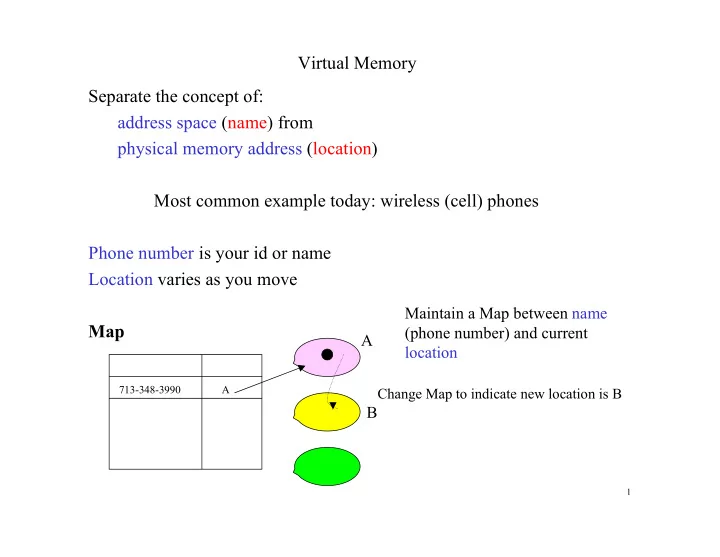
Virtual Memory Separate the concept of: address space (name) from physical memory address (location) Most common example today: wireless (cell) phones Phone number is your id or name Location varies as you move Map

713-348-3990 A

A B

Change Map to indicate new location is B

Maintain a Map between name (phone number) and current location

1

slide-2
SLIDE 2

Virtual Memory

Program Addresses

1000 2000

Physical Memory

1000 2000 5000

CPU generates an address in the program Corresponds to a word in physical memory Name Location

2

slide-3
SLIDE 3

Virtual Memory

  • Decouple program address and physical memory address

Program Addresses

1000 2000

Physical Memory

1000 2000 5000

CPU generates an address in the program Lookup Map to find physical memory address

1000 400 1250 1200 1500 2000 1750

UNMAPPED

MAP

3

slide-4
SLIDE 4

Virtual Memory: Motivation

  • 1. Memory size: Main memory size limited by cost

Many programs too large to fit in main memory Some program addresses do not correspond to physical memory address (Historically: small amounts of DRAM. Today: 64-bit address space) (Historically) Application programmer used overlays to manage memory – Program image stored on cheaper secondary storage (disk) – Only active portions of the program image reside in memory – Programmer explicitly moved required program sections into memory Problems: Ad-hoc, repetitive, non-portable, tedious, error-prone

4

slide-5
SLIDE 5

Virtual Memory: Motivation

  • 2. Multitasking

– Multiple concurrent processes sharing main memory – Partition main memory among the processes

  • Requires processes to have disjoint address spaces

– Collectively exceed the size of main memory today

  • Only a fraction of concurrent processes can execute concurrently
  • 3. Protection:

A runaway (or malicious) task may destroy the memory of a different process Need to prevent a task from accessing address space of others

  • 4. Sharing of code and data in main memory

5

slide-6
SLIDE 6

Virtual Memory

CPU MMU Virtual Address TO Physical Address Map Virtual Address Main Memory Disk Home Location Physical Address MMU: Memory Management Unit

6

slide-7
SLIDE 7

Virtual Memory: Overview

Programs (code+data) reside in a virtual address space Virtual addresses are just like memory addresses (e.g. 32-bit address) Programs written/compiled exactly as if physical memory addresses Program actually stored on disk

  • CPU generates a virtual address Av for some program word
  • Memory management unit (MMU) intercepts virtual address Av
  • MMU translates the virtual address to a physical address:
  • If copy of word is in main memory at address Ap
  • main memory location Ap is accessed
  • else physical location is some disk address Ad
  • word is read from disk to memory in physical address As
  • access word from its new physical address As

7

slide-8
SLIDE 8

Virtual Memory: Details

Virtual address space: Program address space partitioned into fixed-size pages of size P = 2p bytes Virtual space consists of N = 2n pages : 0, 1, 2, …… 2n -1 Virtual address space has addresses in range 0, 1, 2, …., 2n+p -1 Physical address space (Main memory size) is M = 2m+p bytes Main memory partitioned into page frames of size P = 2p bytes Main memory consists of 2m pages: 0, 1, 2, …… 2m -1 Physical memory addresses are in range 0, 1, 2, …., M-1 Page Size: 1KB = 210 bytes = 1024 bytes 4 Pages Address space: 4 x 1024 = 4096 bytes

1023 1024 2047 2048 3071 3072 4095

12-bit address 10-bit offset 2-bit page number

8

slide-9
SLIDE 9

Virtual Memory: Details

Virtual address Av : address of word generated by the CPU VPN: Virtual page number (n bits) Offset: Displacement (offset) within a page (p bits) Physical address Ap : Memory address of word if in main memory PFN: Physical page frame number (m bits) Offset: Displacement (offset) within a page (p bits) If accessed word on disk it has some disk address Ad

n + p bit virtual address p-bit offset n-bit page number m + p bit physical address p-bit offset m-bit page frame number

9

slide-10
SLIDE 10

Av = 14 = 1110 VPN = 11 Offset = 10

Virtual Address

Av

1 2 3 4 5 6 7 8 9 10 11 12 13 14 15

VPN 1 2 3

Virtual address space size N = 16 bytes, n+p = 4 Page size, P = 4 bytes, p = 2 Virtual address space: 2n pages = 4 pages

d VPN n p

Virtual address: Av

d

10

slide-11
SLIDE 11

Ap = 6 = 110 PFN = 1 Offset = 10

Physical Address

Ap

1 2 3 4 5 6 7

PFN 1

Main memory size M = 8 bytes, m+p = 3 Page size, P = 4 bytes, p = 2 Memory space: 2m = 2 page frames

d PFN m p

Physical address: Ap

d

11

slide-12
SLIDE 12

Virtual to Physical Address Translation

Some subset of the virtual pages are in main memory at any time Each such page is stored in some page frame The offset of a byte in a page is the same as that in the page frame

S P Q R A B C D

Av

1 2 3 4 5 6 7 8 9 10 11 12 13 14 15

VPN 1 2 3 P A B C D S Q R

Ap

1 2 3 4 5 6 7

PFN 1 Ad 1 1 2 3 Ad Map VPN PFN 10 10 Map 0 10 Av = 10 Ap = 2

12

slide-13
SLIDE 13

Page Tables

Mapping of virtual address to physical address done by a Page Table (PT) PT is a 1-dimensional array of page descriptors PT has one descriptor for each possible VPN (2n entries in Page Table) Each PT entry (descriptor) contains: Control Bits: P (presence), D (dirty), U (use), Protection bits …. PFN of the page if it is currently in main memory (Indication of) disk address of page if it is not in main memory

0xx-- 1xx-- 1xx-- 0xx-- Ad 1 Ad Index PDU-- PFN

1 2 3 VPN

Page Table

Disk address Memory address Disk address

Page Table stored in main memory: Base address of PT in special Page Table Register (PTR)

13

slide-14
SLIDE 14

Virtual to Physical Address Translation

Av

1 2 3 4 5 6 7 8 9 10 11 12 13 14 15

VPN 1 2 3 P A B C D S Q R

Ap

1 2 3 4 5 6 7

PFN 1 P Q R S A B C D Ad 0xx-- 1xx-- 1xx-- 0xx-- 1 Ad Index PDU-- PFN

1 2 3 VPN

Page Table

0 10 10 10 Map Av = 10 Ap = 2 Protection checks when accessing page descriptor Disk address

14

slide-15
SLIDE 15

Simple Address Translation Scheme

5

d VPN n p

P-- PFN d PFN m p P-- PFN P-- PFN P-- PFN P-- PFN 1

2n-1

Page Table

VPN is an index into the Page Table PTR

15

slide-16
SLIDE 16

Simple Address Translation

CPU: generates (n+p)-bit virtual address Av MMU:

  • 1. Index into the Page Table using the VPN ( n MSBs of Av). The base

address of the PT is available in the Page Table Register (PTR).

  • 2. Read the page descriptor at PageTable[VPN]. Its physical memory

address is PTR + VPN (scaled)

  • 3. If the presence bit (P) of the page descriptor is ON:

/* Required page is currently in main memory */ Get the m-bit PFN stored in the page descriptor Update page descriptor fields U, and W if a write access Concatenate it with the offset field of Av (p LSBs of Av) Access main memory with the (m+p)-bit physical address Return accessed word to CPU else /* P bit OFF: requested page not in main memory*/ Handle Page Fault

16

slide-17
SLIDE 17

Simple Address Translation

MMU: Page Fault Handling 1. Make space in memory by evicting a page to disk ** (a) Select a victim page to evict from main memory LRU replacement policy (approximate LRU based on U bits) (b) Write victim page to disk if it is dirty (D is true) Use Write-back policy for updates: disk writes expensive (c) Update Page Table: victim page descriptor to reflect its transfer to disk ** In practice waiting to do the eviction at the time of fault (synchronous page replacement) is not good for performance. The Operating System maintains a pool of free pages by asynchronously flushing (evicting) the pages to disk as a background activity, whenever the free pool falls below a threshold. So steps 1(a) - (c) are done as backgroundactivities.

  • 1. Get a free page frame from the OS.

17

slide-18
SLIDE 18

Simple Address Translation

MMU: Page Fault Handling

  • 2. Read faulting page into free page frame

(a) Read victim page from disk into freed page frame (b) Update Page Table: descriptor of faulting page updated to reflect new memory location, clear U and D bits, and set P to TRUE. (c) Restart execution of instruction causing the page fault (*) * Since servicing the page fault takes millions of cycles, the CPU does not usually

wait for its completion, but begins executing some other task. At some later point in time the task is rescheduled on the CPU and this instruction is executed again.

18

slide-19
SLIDE 19

Virtual Memory Operation: Example

Av

1 2 3 4 5 6 7 8 9 10 11 12 13 14 15

VPN 1 2 3 P A B C D S Q R

Ap

1 2 3 4 5 6 7

PFN 1 U P V W X Q R S A B C D Ad 0xx-- 1xx-- 1xx-- 0xx-- 1 Ad Index PDU-- PFN

1 2 3 VPN

Page Table

Disk address

Address Trace: 10, 4, 2 (data words C,P and W respectively) Accesses to both C and P are page hits: served from memory directly. Access to W (address 0010): VPN = 00. PT[0] indicates Page Fault!

1

19

slide-20
SLIDE 20

Page Fault Handling: Example (contd …)

Av

1 2 3 4 5 6 7 8 9 10 11 12 13 14 15

VPN 1 2 3 P U V W X S Q R

Ap

1 2 3 4 5 6 7

PFN 1 U P V W X Q R S A B C D 1xx-- 1xx-- 0xx-- 0xx-- 1 Ad Ad Index PDU-- PFN

1 2 3 VPN

Page Table Virtual page 1 (word P) accessed later than page 2 (word C) LRU policy will evict page 2 from memory, freeing up page frame 0 Virtual page 0 (word W) fetched from disk into page frame 0

Disk address 1

20