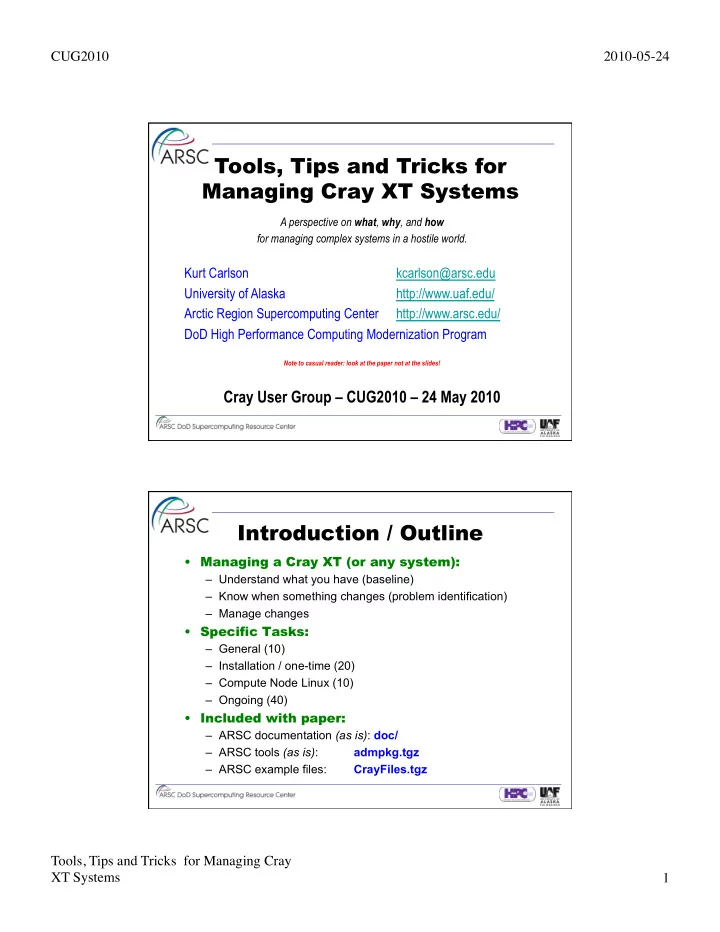
SLIDE 1 CUG2010 2010-05-24 Tools, Tips and Tricks for Managing Cray XT Systems 1
Tools, Tips and Tricks for Managing Cray XT Systems
A perspective on what, why, and how for managing complex systems in a hostile world.
Kurt Carlson kcarlson@arsc.edu University of Alaska http://www.uaf.edu/ Arctic Region Supercomputing Center http://www.arsc.edu/ DoD High Performance Computing Modernization Program
Note to casual reader: look at the paper not at the slides!
Cray User Group – CUG2010 – 24 May 2010
Introduction / Outline
- Managing a Cray XT (or any system):
– Understand what you have (baseline) – Know when something changes (problem identification) – Manage changes
– General (10) – Installation / one-time (20) – Compute Node Linux (10) – Ongoing (40)
– ARSC documentation (as is): doc/ – ARSC tools (as is): admpkg.tgz – ARSC example files: CrayFiles.tgz
SLIDE 2 CUG2010 2010-05-24 Tools, Tips and Tricks for Managing Cray XT Systems 2 Acronyms and Definintions
- ARSC - Arctic Region Supercomputing Center
- UAF - University of Alaska Fairbanks
- HPCMP - DoD High Performance Computing Modernization Program
- DoD - U.S. Department of Defense
- DSRC - DoD Supercomputing Resource Center
- "our peers" (HPCMP DSRCs with Cray XTs) - NAVY, ERDC, ARL, AFRL
ARSC is a department within UAF with primary funding from "our sponsors", the HPCMP. ARSC supports high performance computing research in science and engineering with emphasis on high latitudes and the arctic serving both HPCMP and UAF. CLE - Cray Linux Environment SNL - Service Node Linux CNL - Compute Node Linux SMW - System Management Workstation CMS - Cray Management System (mazama) NHC - Node Health Check HSM - Hierarchical Storage Manager ACL - Access Control List NIC - Network Interface Card TDS - Test and Devlopment System PDU - Power Distribution Unit
Concepts for Managing any System
- Do not change anything in system space directly.
- Maintain a repository with history to recreate local customizations.
- Log actions.
- Avoid working alone and communicate what you are doing.
- Avoid operating directly as root:
Interruptions make mistakes too easy and logging is difficult.
- Establish appropriate auditing processes.
- Automate monitoring and review processes as much as possible.
- Re-use tools and practices from other systems wherever reasonable.
Common practices allows others to fill-in.
- Continually improve processes.
If something breaks once, it is likely to break again. Improve detection and avoidance.
- If you do something more than once you are likely to have to do it again:
Document and automate.
SLIDE 3
CUG2010 2010-05-24 Tools, Tips and Tricks for Managing Cray XT Systems 3 General Tasks
a) Make 'rpm -qa' available to users on login nodes b) Make CNL more Linux-like c) Make tracejob work from login nodes d) Job tools: xtjobs, search_alps, qmap 1) Establish practices for managing system changes 2) Develop reusable tools 3) Manage/log root access 4) Eliminate passwords where possible 5) Baseline configuration, other assets, and peers 6) Responses for bad computer support advice
General: General: Make 'rpm -qa' available to users on login nodes Make 'rpm -qa' available to users on login nodes
boot001: sudo xtopview -m "expose rpm" default/:\w # mv /var/lib/rpm /var.rpm default/:\w # ln -s ../../var.rpm /var/lib/rpm # use relative symlink! default/:\w # exit boot001: export WCOLL=~/SNL # list of service nodes boot001: sudo pdsh \ "mv /var/lib/rpm /var/lib/rpm.org; ln -s /var.rpm /var/lib/rpm” login1: rpm -q curl-devel curl-devel-7.15.1-19.14.2
SLIDE 4 CUG2010 2010-05-24 Tools, Tips and Tricks for Managing Cray XT Systems 4 General: Make CNL more Linux-like General: Make CNL more Linux-like
(the poor user’s DSL+DVS) login1: cat /usr/local/cnl/source.ksh #!/usr/local/cnl/bin/ksh PATH=/usr/local/cnl/bin:/usr/local/cnl/usr/bin:/bin:/usr/bin:/usr/local/bin LD_LIBRARY_PATH=/usr/local/cnl/lib64:/usr/local/cnl/usr/lib64:/usr/local/cnl/lib64/ast export LD_LIBRARY_PATH PATH login1: cat cnl.ksh #!/bin/ksh df -h /usr/local; uals -zZ --newer 1d; uname –rn login1: aprun -b -n 1 /bin/ksh -c ". /usr/local/cnl/source.ksh; ~/cnl.ksh" Filesystem Size Used Avail Use% Mounted on 7@ptl:/smallfs 1.1T 25G 1018G 3% /lustre/small
- 0750 1561 206 64 100501.1401 cnl.ksh
nid00031 2.6.16.60-0.39_1.0102.4784.2.2.48B-cnl Application 66565 resources: utime 0, stime 0
General: General: …managing system changes…reusable tools …managing system changes…reusable tools
e.g., /var/local/CrayFiles/etc/fstab/fstab.boot001 boot001: wc -l /usr/local/adm/etc/CrayFiles.list 308 /usr/local/adm/etc/CrayFiles.list
- /usr/local.adm/bin/push –m boot001 config fstab
/usr/local.adm/etc/machines.list
- /usr/local.adm/bin/chk_sanity.ksh -u
/usr/local.adm/bin/upd_CrayFiles.ksh -u
- /usr/local.adm/bin/cmp_sanity.ksh –b –f fstab –m boot001
Included with CUG paper:
- CrayFiles.tgz – sample files from ARSC
- doc/cri/Cray_xt5.html – directory of ARSC documentation
- admpkg.tgz – collection of tools referenced in this paper
SLIDE 5 CUG2010 2010-05-24 Tools, Tips and Tricks for Managing Cray XT Systems 5 Install Tasks (part 1)
1) Understand boot disk layout 2) Resolve uid|gid collisions (cluster, external NFS) 3) Mount most filesystems nosuid,nodev 4) Reduce exports (no global, ro where appropriate) 5) Reduce memory filesystems (default 1/2 memory) 6) Audit/secure system access points 7) umask management 8) Eliminate unnecessary services: xinetd, chkconfig 9) Eliminate unnecessary services: rpm -e 10) Comments on non-Cray ssh and sudo
Install: Install: Mount most filesystems nosuid,nodev Mount most filesystems nosuid,nodev
smw: cd $V/CrayFiles/opt/xt-boot/default/etc/boot.xt smw: ckbko -2 -diff boot.xt.template | grep '^<’ < mount -o nodev,nosuid,size=512m -t tmpfs none /var/lock < mount -o nodev,nosuid,size=512m -t tmpfs none /var/run < mount -o nodev,nosuid,size=512m -t tmpfs none /var/tmp < mount -o nodev,nosuid,size=512m -n -t tmpfs tmpfs /tmp < rc_status -v -r < echo -n "Re-mounting /dev (nosuid,size=512m)" < mount -o remount,nosuid,size=512m /dev
Also (via CrayFiles):
- /etc/fstab
- /opt/xt-images/templates/default/etc/fstab
SLIDE 6 CUG2010 2010-05-24 Tools, Tips and Tricks for Managing Cray XT Systems 6 Install: Comments on non-Cray ssh … Install: Comments on non-Cray ssh …
– Port 22 – ListenAddress 199.165.85.217 – ListenAddress ::
- sshd-adm for site-wide automation:
– Port 30 – ListenAddress 199.165.85.217 – ListenAddress 172.16.1.238 – AllowUsers backup@admin1.arsc.edu sysmon@admin1.arsc.edu ...
- sshd-xt for cluster operations:
– Port 22 – ListenAddress 192.168.0.4 – ListenAddress 172.16.1.238 – AllowUsers *@boot001 *@nid00003 *@ogman-s.arsc.edu …
One sshd binary symlink’d, see CrayFiles/…/sshd_config* Install Tasks (part 2)
11) sdb and boot node on non-cluster networks 12) Avoid ipforwarding 13) Enable process accounting (and roll files) 14) Raise maximum pid 15) Establish external system trust relationships 16) Audit files Cray wants preserved with upgrades 17) esLogin lnet configuration 18) Customize startup and shutdown auto scripts 19) Shutdown & Startup procedures beyond auto 20) Emergency power off procedure
SLIDE 7 CUG2010 2010-05-24 Tools, Tips and Tricks for Managing Cray XT Systems 7 Install: Install: smw, sdb, boot node on non-cluster networks smw, sdb, boot node on non-cluster networks
– SDB license management – Site backups (smw, boot, and sdb) – Eliminate mazama ipforward
– Nessus kills altair_lm, apsched, mzlogmanagerd, … – Security (erd FN#5653)
– Network ACLs – Use iptables – Open port monitoring (lsof –Pi)
Compute Node Linux Tasks
1) Allow drop_caches for users (benchmarks) 2) Use read-only rootfs and o-w /tmp, and /var 3) Secure ssh: root authorized_keys, shadow 4) Mount lustre nosuid,nodev 5) Establish core_pattern 6) Access to external license server 7) Dump procedures and dump archival 8) Home and /usr/local filesystem access 9) Audit and manage raw image 10) Compute node health checks (NHC)
SLIDE 8
CUG2010 2010-05-24 Tools, Tips and Tricks for Managing Cray XT Systems 8 CNL: Compute node health checks (NHC) CNL: Compute node health checks (NHC)
smw: cd $V/CrayFiles/etc/sysconfig/nodehealth smw: egrep -v '^#|^$' nodehealth.template
runtests: always … Application: Admindown 240 300 Alps: Admindown 30 60 Filesystem: Admindown 60 300 0 0 /lustre/large Filesystem: Admindown 60 300 0 0 /lustre/small Site: Admindown 30 60 0 0 /usr/local/sbin/cnl_nhc
Site /usr/local/sbin/cnl_nhc:
1. gathers /proc/meminfo, buddyinfo, and slabinfo 2. issues drop_caches 3. rolls off /var/logs/alps/apinit* files (out of CNL memory) 4. rolls off any /tmp/lnet-ptltrace* files (out of CNL memory) 5. exits w/error (admin down) only if CNL memory free memory < threshold
Ongoing Tasks (part 1)
1) Audit/reduce suid binaries 2) Audit/reduce other+write files 3) Audit/resolve unowned files 4) Identify dangling symlinks 5) Eliminate other+write in suid filesystems 6) Clean-up old/unusable Cray modules and rpms 7) Audit orphaned process 8) Session life limits 9) Establish process limits 10) Audit open ports (lsof, nessus)
SLIDE 9 CUG2010 2010-05-24 Tools, Tips and Tricks for Managing Cray XT Systems 9 Ongoing: Establish process limits Ongoing: Establish process limits
smw: cd $V/CrayFiles/etc/security/limits.conf; ls backout limits.conf.esl limits.conf.login limits.conf.template smw: egrep -v '^#|^$' *login
… * hard as 2097152 * hard cpu 720 * hard nproc 64
smw: more $V/CrayFiles/etc/profile.local/profile.local.template …
if [ -n "$PBS_JOBID" ]; then # PBS mom ulimit -a | /bin/grep " -v" >/dev/null if [ 0 = $? ]; then ulimit -v 2097152; ulimit -Hv 2097152 # bash else ulimit -M 2097152; ulimit -HM 2097152 # ksh fi fi
…
Ongoing Tasks (part 2)
11) Audit locally created directories 12) Audit all system file changes 13) Audit system state: chkconfig 14) Audit system state: sysctl 15) Audit system state: iptables 16) Audit system state: mtab, lsmod, nework, ppid=1 17) Audit modules state / history 18) Audit rpm state / history 19) Audit filesystem content 20) Audit system state: disk storage
SLIDE 10 CUG2010 2010-05-24 Tools, Tips and Tricks for Managing Cray XT Systems 10 Ongoing: Audit rpm state / history Ongoing: Audit rpm state / history
smw: rpmchk -f rpm.txt.ognipa,rpm.txt.pingob,rpm.txt.pingoc \
#Linux x86_64 2.6.16.60-0.42.9-smp # #o p p : 3 hosts #g i i : 5 total packages #n n n : #i g g : #p o o : #a b c :Name Version Releas #
- i i :kernel-smp 2.6.16.60 0.42.4
i i i :kernel-smp 2.6.16.60 0.42.5 i i i :kernel-smp 2.6.16.60 0.42.7 i i i :kernel-smp 2.6.16.60 0.42.8 i i i :kernel-smp 2.6.16.60 0.42.9 # # 4 of 5 packages installed on all 3 hosts
Ongoing Tasks (part 3)
21) Purge /tmp and lustre scratch 22) Health check and event paging, internal 23) Health check and event paging, external 24) Roll and protect system logs 25) Archive external logs 26) Backup disk storage configuration (LSI) 27) Check L1 and L0 temperature, voltage, health 28) Check node response 29) Usage allocation 30) Audit CNL state (user perspective)
SLIDE 11
CUG2010 2010-05-24 Tools, Tips and Tricks for Managing Cray XT Systems 11 Ongoing: Health check and event paging Ongoing: Health check and event paging
xtp_Compute - Check if too many compute nodes are unavailable xtp_Cron - Check if cron daemon is running and attempt restart xtp_Daemons - Check if critical login node daemons are running and attempt restart xtp_Health - Boot node pdsh initiated xtpage on login nodes xtp_Job - Check qsub and aprun on semi-idle system (xtp_Usage flagged) xtp_Lustre - Check if Lustre healthy and writable xtp_NFS - Check if NFS (archive/u?) writable xtp_PBS_alps - Check PBS, alps, and flexlm daemons and attempt restart xtp_Ping - Check if node is pingable xtp_PingUp - Check if node is pingable, available ssh, and not restricted xtp_Restrict - Check if system is Restricted xtp_Usage - Check if system is busy or if jobs can run
Ongoing: Check L1,L0 temp, voltage, … Ongoing: Check L1,L0 temp, voltage, …
Date: Sun, 18 Apr 2010 10:12:07 -0800 Subject: :>>:chk_L1L0 :piman : 2: 2 warnings: c2-0c0s6 CNL-3 9 PROC1 VDDNB = 1321/ 1200 10.1% !!high c2-0c1s0 CNL-0 4 PROC0 VDDNB = 1324/ 1200 10.3% !!high !! 2 warnings, vsense.20100418.1005 #Date Time:Air c0-0 c1-0 c2-0 c3-0 c4-0 :Fan c0-0 c1-0 … 20100418.1005: 17C 17C 17C 17C 19C : 46Hz 46Hz … 20100418.0255: 17C 17C 17C 17C 19C : 46Hz 46Hz … 20100417.0255: 16C 16C 17C 17C 19C : 46Hz 46Hz … 20100416.0255: 14C 15C 15C 15C 18C : 46Hz 46Hz … 20100415.0255: 16C 15C 16C 16C 18C : 46Hz 46Hz … 20100414.0255: 17C 17C 17C 17C 19C : 46Hz 46Hz … 20100413.0255: 17C 16C 17C 17C 19C : 46Hz 46Hz …
SLIDE 12 CUG2010 2010-05-24 Tools, Tips and Tricks for Managing Cray XT Systems 12 Ongoing: Check node response Ongoing: Check node response
smw: xt_stats -m =2010-02 -d -t -c pingo
# 206.33 | 02-01.00:00 -> 02-09.14:20 | 2010-02-01.000501 1: 443 # 18.75 | 02-09.14:20 -> 02-10.09:05 | 2010-02-09.142001 : 443 572 # 6.86 | 02-10.09:05 -> 02-10.15:56 | 2010-02-10.090501 : -1 # restricted # 40.89 | 02-10.15:56 -> 02-12.08:50 | 2010-02-10.155622 : # unrestricted # 399.17 | 02-12.08:50 -> 03-01.00:00 | 2010-02-12.085001 : 316 # 672.00 2010-02 2010-02:Cluster Node Node Node 28.00 days 672.00 hours 2010-02: Down Best Worst Total 432 compute 24 service nodes 2010-02: 1 0 1 2 #events | All_Up <=2Down <=12 Cluster 2010-02: 6.9 6.9 406.0 3769 #downHrs| 631.11 6.86 6.86 6.86 2010-02: 99.0% 39.6% # up% | 6.09% 98.98% 98.98% 98.98%
- xtresponds script runs every 15 minutes parsing xtprocadmin
- maintenance 2nd Wednesday of month
- ability to quickly resummarize cluster history
Ongoing: Audit CNL (user perspective) Ongoing: Audit CNL (user perspective)
/sbin/drop_caches cat /proc/meminfo >>out.meminfo; cat /proc/cpuinfo > out.cpuinfo; env | sort > out.env; ulimit -aS > out.ulimit; ulimit -aH >>out.ulimit mount > out.mount; df -h > out.df; uaps -p1 > out.uaps; for On in / /var /tmp; do uals -RzZAL --mount \
done > out.uals
- Why?
- CLE 2.2 mounts /tmp, /var
1777 (other+write)
- PBS upgrade voiding locally
customized variables
- presence of lnet_ptrace files
stealing memory (clean-up added to NHC)
variable passed to PBS
- regression of customization
to CNL
SLIDE 13 CUG2010 2010-05-24 Tools, Tips and Tricks for Managing Cray XT Systems 13 Ongoing Tasks (part 4)
31) Audit for unsafe user .files 32) Audit for excessive disk use 33) Synchronize passwords where required 34) Audit passwd, shadow, group files 35) Audit .k5login (or authorized_keys) content 36) Establish system backups 37) Audit cron usage 38) Run external security scans 39) Ongoing system regression tests (benchmarks) 40) Stay aware of what peers are doing
Ongoing: Ongoing: Audit .k5login (or ssh authorized_keys) content Audit .k5login (or ssh authorized_keys) content
– move .k5login files to system directory and audit contents
– sshd_config 'AuthorizedKeysFile /usr/local.adm/keys/%u' system owned keys – locally written ssh-keycopy Adds or appends user authorized_keys adding from="host(s)” directives to ensure access is only coming from approved domains and/or the host which generated the key. – For example, this authorized_keys permits access from one host:
from="plagueis.arsc.edu" ssh-rsa AAAAB3N...xqHlgQ== kcarlson@plagueis.arsc.edu
SLIDE 14 CUG2010 2010-05-24 Tools, Tips and Tricks for Managing Cray XT Systems 14
Ongoing: Stay aware of peers Ongoing: Stay aware of peers
login1: cd /usr/local/etc/modules login1: modchk -f "`ls modules.*`" -name pgi # what pgi is out there?
E A N E A N : 6 hosts R R I R R A : 1 total modules D S C D S V : 18 total versions C C S C C Y : * default; + available; - missing + + + + + + :pgi 10.0.0
- - + - - - :pgi 10.1.0
- - + - - * :pgi 10.2.0
- - + - - + :pgi 10.3.0
- - - - - + :pgi 7.2.2
- + - - + + :pgi 7.2.3
- - + - - - :pgi 7.2.5
- - - - - + :pgi 8.0.1
- - - - + - :pgi 8.0.2
* - + + - + :pgi 8.0.5
- * + - * + :pgi 8.0.6
- - + - + + :pgi 9.0.1
- - + - + + :pgi 9.0.2
- - + - - + :pgi 9.0.3
- + * * + + :pgi 9.0.4
1 of 18 modules installed on all 6 hosts
Questions?
kcarlson@arsc.edu
Are we there yet?
Haggis (the Scottish poodle) & author crossing U.S.
Tools, Tips and Tricks for Managing Cray XT Systems Cr Cray User Gr ay User Group – CUG2010
24 May 2010 24 May 2010