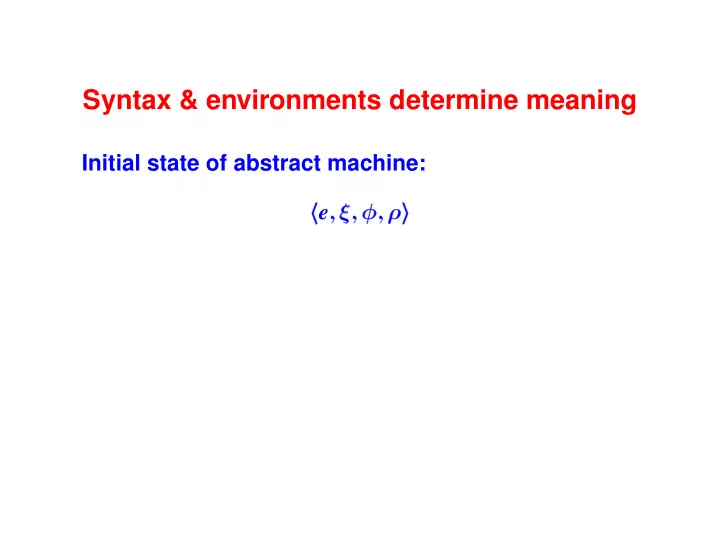
SLIDE 1 Syntax & environments determine meaning
Initial state of abstract machine:
he ;
; i
SLIDE 2 Syntax & environments determine meaning
Initial state of abstract machine:
he ;
; i
State
he ;
; i is
e Expression being evaluated
- Values of global variables
- Definitions of functions
- Values of formal parameters
Three environments make a basis
SLIDE 3 Meaning codified as “Evaluation judgment”
We say
he ;
; i + hv ; ′ ; ; ′ i
A Big-step judgment form. In evaluating e
′ may differ.
– The global environment may change.
′ may differ
– The parameter environment may change.
.
– The function environment cannot change.
SLIDE 4 Impcore atomic form: literal
“Literal” generalizes “numeral”
LITERAL
hLITERAL (v );
; i + hv ;
; i
Nothing changes! (Numeral converted to LITERAL
(v ) in parser)
SLIDE 5 Impcore atomic form: Variable use
FORMALVAR
x
2 dom
(x );
; i + h(x );
; i
GLOBALVAR
x
= 2 dom
2 dom
(x );
; i + h (x );
; i
Parameters hide global variables.
SLIDE 6 Impcore compound form: Assignment
In SET
(x ;e ), e is any expression
FORMALASSIGN
x
2 dom
;
; i + hv ; ′ ; ; ′ i hSET (x ;e );
; i + hv ; ′ ; ; ′ fx 7! v gi
GLOBALASSIGN
x
= 2 dom
2 dom
;
; i + hv ; ′ ; ; ′ i hSET (x ;e );
; i + hv ; ′ fx 7! v g; ; ′ i
Impcore can assign only to existing variables
SLIDE 7
Semantics corresponds to code
Math Code Semantics Interpreter Rule of semantics Case in the interpreter Proof of judgment Computation of result Evaluation judgment Result of evaluation Interpreter succeeds if and only if a proof exists
SLIDE 8 Semantics of variable lookup (VAR)
FORMALVAR
x
2 dom
(x );
; i + h(x );
; i
GLOBALVAR
x
= 2 dom
2 dom
(x );
; i + h (x );
; i
SLIDE 9 Implementation of variable lookup (VAR)
Consult formals
:
switch (e->alt) { case VAR: if (isvalbound(e->var, formals)) return fetchval(e->var, formals); else if (isvalbound(e->var, globals)) return fetchval(e->var, globals); else runerror("unbound variable %n", e->var); ...
Why a third case?
- When no proof, run-time error
SLIDE 10 Semantics of assignment (SET)
Rules we saw earlier:
FORMALASSIGN
x
2 dom
;
; i + hv ; ′ ; ; ′ i hSET (x ;e );
; i + hv ; ′ ; ; ′ fx 7! v gi
GLOBALASSIGN
x
= 2 dom
2 dom
;
; i + hv ; ′ ; ; ′ i hSET (x ;e );
; i + hv ; ′ fx 7! v g; ; ′ i
SLIDE 11
Implementation of assignment (SET)
case VAR: { Value v = eval(e->set.exp, globals, functions, formals); if (isvalbound(e->set.name, formals)) bindval(e->set.name, v, formals); else if (isvalbound(e->set.name, globals)) bindval(e->set.name, v, globals); else runerror("set: unbound variable %n", e->set.name); return v; }
SLIDE 12
Semantics of function call (APPLY):
APPLYUSER
(f ) = USER (hx1 ;x2 i;e )
x1
;x2 distinct he1 ; ; ; i + hv1 ; 1 ; ; 1 i he2 ; 1 ; ; 1 i + hv2 ; 2 ; ; 2 i he ; 2 ; ; fx1 7! v1 ;x2 7! v2 gi + hv ; ′ ; ; ′ i hAPPLY (f ;e1 ;e2 ); ; ; i + hv ; ′ ; ; 2 i
SLIDE 13 Implementation of function call (APPLY)
The math demands these steps:
environment
f = fetchfun(e->apply.name, functions);
0, evaluate actuals
vs = evallist(e->apply.actuals,globals,functions, formals); N.B. actuals evaluated in current environment
- Make a new environment: bind formals to actuals
new_formals = mkValenv(f.userdef.formals, vs);
- Evaluate body in new environment
return eval(f.userdef.body, globals, functions, new_formals);
SLIDE 14 Judgment speaks truth when “derivable”
Special kind of proof: derivation
- It’s a data structure (a derivation tree)
– Leaves are axioms: variables and constants – Nodes are compound expressions
- Valid derivation formed by instantiating
semantic rules
- Spacelike representation of timelike behavior
A form of “syntactic proof”
SLIDE 15 Recursive evaluator constructs derivation
Root of derivation at the bottom (surprise!) Build
- Start on the left, go up
- Cross the
+
- Finish on the right, go down
First let’s see a movie
SLIDE 16 Evaluating
(10 + 1)
1)
10
; : : : ⇓ 10 ; : : :
1;
: : : ⇓ 1 ; : : :
(+ 10 1);
; ⇓ 11 ;
;
: : : ⇓ 10 ; : : :
1
; : : : ⇓ 1 ; : : :
(- 10 1);
; ⇓ 9 ;
;
; ⇓ 99 ;
;
SLIDE 17 Evaluating
(10 + 1)
1)
10
; : : : ⇓ 10 ; : : :
1
; : : : ⇓ 1 ; : : :
(+ 10 1);
; ⇓ 11 ;
;
: : : ⇓ 10 ; : : :
1
; : : : ⇓ 1 ; : : :
(- 10 1);
; ⇓ 9 ;
;
; ⇓ 99 ;
;
SLIDE 18 Evaluating
(10 + 1)
1)
10
; : : : ⇓ 10 ; : : :
1
; : : : ⇓ 1 ; : : :
(+ 10 1);
; ⇓ 11 ;
;
: : : ⇓ 10 ; : : :
1
; : : : ⇓ 1 ; : : :
(- 10 1);
; ⇓ 9 ;
;
; ⇓ 99 ;
;
SLIDE 19 Evaluating
(10 + 1)
1)
10
; : : : ⇓ 10 ; : : :
1
; : : : ⇓ 1 ; : : :
(+ 10 1);
; ⇓ 11 ;
;
: : : ⇓ 10 ; : : :
1
; : : : ⇓ 1 ; : : :
(- 10 1);
; ⇓ 9 ;
;
; ⇓ 99 ;
;
SLIDE 20 Evaluating
(10 + 1)
1)
10
; : : : ⇓ 10 ; : : :
1;
: : : ⇓ 1 ; : : :
(+ 10 1);
; ⇓ 11 ;
;
: : : ⇓ 10 ; : : :
1
; : : : ⇓ 1 ; : : :
(- 10 1);
; ⇓ 9 ;
;
; ⇓ 99 ;
;
SLIDE 21 Evaluating
(10 + 1)
1)
10
; : : : ⇓ 10 ; : : :
1;
: : : ⇓ 1 ; : : :
(+ 10 1);
; ⇓ 11 ;
;
: : : ⇓ 10 ; : : :
1
; : : : ⇓ 1 ; : : :
(- 10 1);
; ⇓ 9 ;
;
; ⇓ 99 ;
;
SLIDE 22 Evaluating
(10 + 1)
1)
10
; : : : ⇓ 10 ; : : :
1;
: : : ⇓ 1 ; : : :
(+ 10 1);
; ⇓ 11 ;
;
: : : ⇓ 10 ; : : :
1
; : : : ⇓ 1 ; : : :
(- 10 1);
; ⇓ 9 ;
;
; ⇓ 99 ;
;
SLIDE 23 Evaluating
(10 + 1)
1)
10
; : : : ⇓ 10 ; : : :
1;
: : : ⇓ 1 ; : : :
(+ 10 1);
; ⇓ 11 ;
;
; : : : ⇓ 10 ; : : :
1
; : : : ⇓ 1 ; : : :
(- 10 1);
; ⇓ 9 ;
;
; ⇓ 99 ;
;
SLIDE 24 Evaluating
(10 + 1)
1)
10
; : : : ⇓ 10 ; : : :
1;
: : : ⇓ 1 ; : : :
(+ 10 1);
; ⇓ 11 ;
;
: : : ⇓ 10 ; : : :
1
; : : : ⇓ 1 ; : : :
(- 10 1);
; ⇓ 9 ;
;
; ⇓ 99 ;
;
SLIDE 25 Evaluating
(10 + 1)
1)
10
; : : : ⇓ 10 ; : : :
1;
: : : ⇓ 1 ; : : :
(+ 10 1);
; ⇓ 11 ;
;
: : : ⇓ 10 ; : : :
1
; : : : ⇓ 1 ; : : :
(- 10 1);
; ⇓ 9 ;
;
; ⇓ 99 ;
;
SLIDE 26 Evaluating
(10 + 1)
1)
10
; : : : ⇓ 10 ; : : :
1;
: : : ⇓ 1 ; : : :
(+ 10 1);
; ⇓ 11 ;
;
: : : ⇓ 10 ; : : :
1
; : : : ⇓ 1 ; : : :
(- 10 1);
; ⇓ 9 ;
;
; ⇓ 99 ;
;
SLIDE 27 Evaluating
(10 + 1)
1)
10
; : : : ⇓ 10 ; : : :
1;
: : : ⇓ 1 ; : : :
(+ 10 1);
; ⇓ 11 ;
;
: : : ⇓ 10 ; : : :
1
; : : : ⇓ 1 ; : : :
(- 10 1);
; ⇓ 9 ;
;
; ⇓ 99 ;
;
SLIDE 28 Evaluating
(10 + 1)
1)
10
; : : : ⇓ 10 ; : : :
1;
: : : ⇓ 1 ; : : :
(+ 10 1);
; ⇓ 11 ;
;
: : : ⇓ 10 ; : : :
1
; : : : ⇓ 1 ; : : :
(- 10 1);
; ⇓ 9 ;
;
; ⇓ 99 ;
;
SLIDE 29 Evaluating
(10 + 1)
1)
10
; : : : ⇓ 10 ; : : :
1;
: : : ⇓ 1 ; : : :
(+ 10 1);
; ⇓ 11 ;
;
: : : ⇓ 10 ; : : :
1
; : : : ⇓ 1 ; : : :
(- 10 1);
; ⇓ 9 ;
;
; ⇓ 99 ;
;
SLIDE 30 Algorithm for building derivations
Want to solve
he ;
; i + ?
What rule can I use to prove it?
- 1. Syntactic form of e narrows to a few choices
(usually 1 or 2)
- 2. Look for form in conclusion
- 3. Now check premises
- 4. When premise is evaluation judgment,
build sub-derivation recursively Derivation is written
D