State-of-the-Art ! 30-85 errors are made per 1000 lines of source CS - - PowerPoint PPT Presentation

state of the art
SMART_READER_LITE
LIVE PREVIEW

State-of-the-Art ! 30-85 errors are made per 1000 lines of source CS - - PowerPoint PPT Presentation

State-of-the-Art ! 30-85 errors are made per 1000 lines of source CS 619 Introduction to OO Design code and Development ! extensively tested software contains 0.5-3 errors per 1000 lines of source code Testing ! error distribution: 60%


slide-1
SLIDE 1

CS 619 Introduction to OO Design and Development Testing

Fall 2013

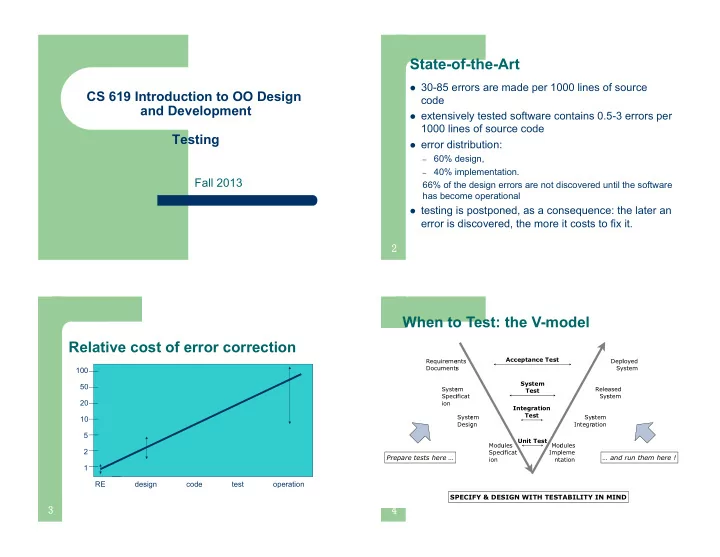
State-of-the-Art

! 30-85 errors are made per 1000 lines of source

code

! extensively tested software contains 0.5-3 errors per

1000 lines of source code

! error distribution:

– 60% design, – 40% implementation.

66% of the design errors are not discovered until the software has become operational

! testing is postponed, as a consequence: the later an

error is discovered, the more it costs to fix it.

  • Relative cost of error correction

1 2 5 10 20 50 100 RE design code test

  • peration
  • SPECIFY & DESIGN WITH TESTABILITY IN MIND

Requi Docum quireme cuments ments nts Depl Syste eployed System Syste Speci ion stem pecificat Relea Syste leased System Syste Design stem sign In Syste Integra System gration Modu Speci ion dules pecificat Modu Impl nta

  • dules

pleme ntation Acceptance Test System Test Integration Test Unit Test

Prepare tests here … … and run them here !

When to Test: the V-model

slide-2
SLIDE 2

When to Test: UP Process

  • What is Testing

Errors/Failures = mismatch between specification & system (found with tests) Surprises (sometimes found with tests) Omissions (not found with tests) SYSTEM SPECIFICATION

Can reveal the presence of errors NOT their absence Error of omission: Neglected specifications: Error of commission: net defined by the specification

  • Terminology

Component

  • A part of the system that can be isolated for testing

+ an object, a group of objects, one or more subsystems Test Case

  • A set of inputs and expected results that exercise a component with the

purpose of causing errors and failures + a predicate method that answers “true” when the component answers with the expected results for the given input and “false”

  • therwise
  • “expected results” includes exceptions, error codes,...

Test Stub

  • A partial implementation of components on which the tested component

depends + dummy code that provides the necessary input values and behaviour to run the test cases Test Driver

  • A partial implementation of a component that depends on the tested

component + a “main()” function that executes a number of test cases

  • Drivers and Stubs

! Driver: simulates a module that calls the module currently being

tested

! Stub: simulates a module called by the module currently being

tested

  • Driver

Unit Under Test Stub procedure call procedure call access to global variables

slide-3
SLIDE 3

Black-box Testing

! A.K.A Functional Test, Specification based ! Focus: I/O behavior. If for any given input, we can

predict the output, then the module passes the test.

– Almost always impossible to generate all possible inputs

("test cases")

! Goal: Reduce number of test cases by equivalence

partitioning:

– Divide input conditions into equivalence classes – Choose test cases for each equivalence class.

E.g. If an object is supposed to accept a negative number, testing one negative number is enough.

  • Equivalence Partitioning : Example

Example: Binary search Check input partitions:

  • Do the inputs satisfy the pre-conditions?
  • Is the key in the array?

➡ leads to (at least) 2x2 equivalence classes Check boundary conditions

  • Is the array of length 1 ?
  • Is the key at the start or end of the array?

➡ leads to further subdivisions (not all combinations make sense)

private int[] _elements; public boolean find(int key) { ... }

  • pre-condition(s)
  • Array has at least one element
  • Array is sorted
  • post-condition(s)

(The element is in _elements and the result is true)

  • r (The element is not in _elements and the result is false)
  • Equivalence Partitioning: Test Data

Generate test data that cover all meaningful equivalence partitions.

Test Cases Input Output Array length 0 key = 17, elements = { } FALSE Array not sorted key = 17, elements = { 33, 20, 17, 18 } exception Array size 1, key in array key = 17, elements = { 17 } TRUE Array size 1, key not in array key = 0, elements = { 17 } FALSE Array size > 1, key is first element key = 17, elements = { 17, 18, 20, 33 } TRUE Array size > 1, key is last element key = 33, elements = { 17, 18, 20, 33 } TRUE Array size > 1, key is in middle key = 20, elements = { 17, 18, 20, 33 } TRUE Array size > 1, key not in array key = 50, elements = { 17, 18, 20, 33 } FALSE … … …

  • White-box Testing

! A.K.A. Structural testing; program-based. ! Treat a component as a “white box”, i.e. you

can inspect its internal structure

! Internal structure is also design specs; e.g.

sequence diagrams, state charts, ...

! Derive test cases to maximize coverage of that

structure, yet minimize number of test cases

slide-4
SLIDE 4

White-box Testing Coverage Criteria

! Coverage metrics

– Statement coverage: all statements in the programs

should be executed at least once

– Branch coverage: all branches in the program should

be executed at least once

– Path coverage: all execution paths in the program

should be executed at lest once

  • Statement vs. Branch Coverage

assignAbsolute(int x) { if (x < 0) x := -x; z := x; } Consider this program segment, the test set T = {x=-1} will give statement coverage, however not branch coverage (x < 0) x := -x z := x B0 B1 B2 Test set {x=-1} does not execute this edge, so it doesn’t give branch coverage true false Control Flow Graph:

  • Path Coverage: Determining the Paths

FindMean (FILE ScoreFile) { float SumOfScores = 0.0; int NumberOfScores = 0; float Mean=0.0; float Score; Read(ScoreFile, Score); while (! EOF(ScoreFile) { if (Score > 0.0 ) { SumOfScores = SumOfScores + Score; NumberOfScores++; } Read(ScoreFile, Score); } /* Compute the mean and print the result */ if (NumberOfScores > 0) { Mean = SumOfScores / NumberOfScores; printf(“ The mean score is %f\n”, Mean); } else printf (“No scores found in file\n”); } 1 ! 2 ! 3 ! 4 ! 5 ! 7 ! 6 ! 8 ! 9 !

  • Start

2 3 4 5 6 7 8 9 Exit 1 b d e g f i j h c k l a (Covered by any data) (Data set must (Data set must contain at least one value be empty) (Total score > 0.0) (Total score < 0.0) (Positive score) (Negative score) (Reached if either f or e is reached)

Finding the test cases

slide-5
SLIDE 5

! Unit testing

Testing of individual components

! Integration testing

Testing to expose problems arising from the combination of components

! System testing

Testing the complete system prior to delivery

! Acceptance testing

Testing by users to check that the system satisfies

  • requirements. Sometimes called alpha testing

Testing stages

  • Integration Testing
  • Why ?

+ The sum is more then its parts, i.e. interfaces (and calls to them) may contain defects too.

  • Who ?

+ Person developing the module writes the tests.

  • When ?

+ Top-down: main module before constituting modules + Bottom-up: constituting modules before integrated module + In practice: a little bit of both ## The distinction between unit testing and integration testing is not that sharp!

Module under Test Driver Module Stub Results Test Cases Test Cases Test Cases Test Cases Black- & White-Box Testing techniques Module

  • Regression Testing

Regression Testing ensures that all things that used to work still work after changes. Regression Test

  • = re-execution of some subset of tests to ensure that changes have not

caused unintended side effects

  • tests must avoid regression (= degradation of results)
  • Regression tests must be repeated often (after every change, every

night, with each new unit, with each fix,...)

  • Regression tests may be conducted manually

+ Execution of crucial scenarios with verification of results + Manual test process is slow and cumbersome ➡ preferably completely automated Advantages

  • Helps during iterative and incremental development

+ during maintenance Disadvantage

  • Up front investment in maintainability is difficult to sell to the customer
  • Acceptance Testing

Acceptance Tests

  • conducted by the end-user (representatives)
  • check whether requirements are correctly implemented

+ borderline between verification (“Are we building the system right?”) and validation (“Are we building the right system?”) Alpha- & Beta Tests

  • acceptance tests for “off-the-shelves” software

(many unidentified users) + Alpha Testing

  • end-users are invited at the developer’s site
  • testing is done in a controlled environment

+ Beta Testing

  • software is released to selected customers
  • testing is done in “real world” setting,

without developers present

slide-6
SLIDE 6

More Testing Strategies

Recovery Testing

  • Test forces system to fail and checks whether it recovers properly

+ For fault tolerant systems Stress Testing (Overload Testing)

  • Tests extreme conditions

+ e.g., supply input data twice as fast and check whether system fails Performance Testing

  • Tests run-time performance of system

+ e.g., time consumption, memory consumption ➡ first do it, then do it right, then do it fast Back-to-Back Testing

  • Compare test results from two different versions of the system

+ requires N-version programming or prototypes

  • Unit-testing Heuristics
  • 1. Create unit tests as soon as
  • bject design is completed:

– Black-box test: Test the use

cases & functional model

– White-box test: Test the

dynamic model

– Data-structure test: Test the

  • bject model
  • 2. Develop the test cases

– Goal: Find the minimal

number of test cases to cover as many paths as possible

  • 3. Cross-check the test cases to

eliminate duplicates

– Don't waste your time!

  • 4. Desk check your source code

– Reduces testing time

  • 5. Create a test harness

– Test drivers and test stubs are

needed for integration testing

  • 6. Describe the test oracle

– Often the result of the first

successfully executed test

  • 7. Execute the test cases

– Don’t forget regression testing – Re-execute test cases every

time a change is made.

  • 8. Compare the results of the test

with the test oracle

– Automate as much as possible

  • Automated Test Infrastructure

Example: JUnit

Test TestCase TestSuite TestResult run(TestResult) setUp() tearDown() testName:String run(TestResult) runTest() run(TestResult) addTest() ConcreteTestCase setUp() tearDown() runTest()

Using JUnit

! Write new test case by subclassing from

TestCase

! Implement setUp() and tearDown() methods

to initialize and clean up

! Implement runTest() method to run the test

harness and compare actual with expected values

! Test results are recorded in TestResult ! A collection of tests can be stored in

TestSuite.

slide-7
SLIDE 7

When to Stop ?

When are we done testing? When do we have enough tests? Cynical Answers (sad but true)

  • You’re never done: each run of the system is a new test

➡ Each bug-fix should be accompanied by a new regression test

  • You’re done when you are out of time/money

➡ Include test in project plan AND DO NOT GIVE IN TO PRESSURE ➡ ... in the long run, tests SAVE time Statistical Testing

  • Test until you’ve reduced failure rate under risk threshold

➡ Testing is like an insurance company calculating risks

Test Time Defects per hour

  • OO Testing

! Research confirms that testing methods

proposed for procedural approach are not adequate for OO approach Ex. Statement coverage

! OO software testing poses additional problems

due to the distinguishing characteristics of OO

  • Ex. Inheritance

! Testing time for OO software found to be

increased compared to testing procedural software

  • OO Unit and Integration testing

! Procedural software

unit = single program, function, or procedure

! Object oriented software

unit = class unit testing = intra-class testing integration testing = inter-class testing cluster of classes

! dealing with single methods separately is usually

too expensive (complex scaffolding), so methods are usually tested in the context of the class they belong to

  • State-based Testing

! Natural representation with finite state machines

– States correspond to certain values of the attributes – Transitions correspond to methods

! FSM can be used as basis for testing

e.g. “drive” the class through all transitions, and verify the response and the resulting state

! Test cases are sequences of method calls that

traverse the state machine

! State machine model can be derived from

specification or code or both.

! Accessing the state, use inspector method. E.g.

getstate();

slide-8
SLIDE 8

Example 1:

  • Example 2: Stack

States:

– Initial: before creation – Empty: number of elements = 0 – Holding: number of elements >0, but less than

the max Capacity

– Full: number elements = max – Final: after destruction

Transitions:

– create, destroy – actions that triggers the transition. E.g. Add,

delete

  • Example of Transitions

! Initial -> Empty: action = “create”

e.g. “s = new Stack()” in Java

! Empty -> Holding: action = “add” ! Empty -> Full:

action = “add” if MAXcapacity=1

! Empty -> Final: action = “destroy”

e.g. destructor call in C++, garbage collection in Java

! Holding -> Empty:

action = “delete” if s.size() = 1

  • Finite State Machine (not UML)
slide-9
SLIDE 9

FSM-based Testing

Writing testcases such that:

– Each state is covered – Each transition is covered – Each path is covered (Often infeasible)

  • Ex. State coverage

– Test1: Create, add, add, add [full] – Test2: Create, destroy [final]

  • FSM-based Testing
  • Each valid transition should be

tested

 Verify the resulting state using a

state inspector that has access to the internals of the class

 e.g., getState()

Each invalid transition should be

tested to ensure that it is rejected and the state does not change

 e.g. Full -> Full is not allowed: we

should call add on a full stack

 Exception “stack is full”

add

Junit Testcase: Valid Transitions

// only three elements ... ! public void testStackFull() {
 Stack aStack = new Stack(); ! assertEqual(“empty”, aStack.getState());! aStack.push(10); ! assertEqual(“holding”, aStack.getState()); ! aStack.push(1);
 aStack.push(7);
 assertEqual(“full”, aStack.getState()); ! } !

  • Junit Testcase: Invalid Transitions

// only three elements ... ! public void testStackFull() { ! Stack aStack = new Stack(); ! aStack.push(10);
 aStack.push(-4);
 aStack.push(7);
 assertEqual(“full”, aStack.getState()); ! try {
 aStack.push(10)
 fail(“method should launch the exception!"); ! } catch(StackFull e){ ! assertTrue(true); // OK ! } } !

slide-10
SLIDE 10

Inheritance

People thought that inheritance will reduce the need for testing Claim 1: “If we have a well-tested superclass, we can reuse its code in subclasses without retesting inherited code” Claim 2: “A good-quality test suite used for a superclass will also be good for a subclass” Both claims are wrong!!!

  • Problem of Inheritance

! Incorrect initialization of superclass attributes

by the subclass

! Missing overriding methods

Typical example: equals() and clone()

! Direct access to superclass fields from the

subclass code

Can create subtle side effects that break unsuspecting superclass methods

! A subclass violates an invariant from the

superclass, or creates an invalid state

  • Testing of Inheritance
  • Principle:

inherited methods should be retested in the context

  • f a subclass

 Example 1: if we change some

method m() in a superclass, we need to retest m() inside all subclasses that inherit it

Superclass

  • m()

Subclass’ Subclass’’ Subclass’’’

changed Retest m()!

Testing of Inheritance

  • Example 2: if we add or change

a subclass, we need to retest all methods inherited from a superclass in the context of the new/changed subclass

28

Superclass

  • m’()

m’’() subclass Subclass’

Retest m’() and m’’()!

slide-11
SLIDE 11

Example 1

  • Example 2
  • verride

Integration Testing

! So far, we talked about testing of individual

classes, but … class testing is not sufficient!

OO design: several classes collaborate to implement the desired functionality

! For interaction test, we base the testing

based on UML sequence diagrams

– There may be several diagrams showing different

variations of the interaction Basic idea:

– run tests that cover all diagrams, and – all messages and conditions inside each diagram

  • Normal Scenarios and Alternatives

! Run enough tests to cover all messages and

conditions

– Normal scenarios – Alternatives

! To cover each one: pick a particular path in

the diagram and “drive” the objects through that path

slide-12
SLIDE 12

Junit Testcase:

public class BankTester extends TestCase { ! public void testTransfer() {
 Bank bank = new Bank();
 Account a = bank.recoverAccount(“a”); ! Account b = bank.recoverAccount(“b”); ! Dollar balanceA = a.getBalance(); ! Dollar balanceB = 45b.getBalance(); ! bank.transfer(50, a, b); ! assertTrue((balanceA-50).! equalTo (a.getBalance())); ! assertTrue((balanceB+50).! equalTo(b.getBalance())); ! } } !