Sliding window - Sender side Cumulative Acknowledgments Not sent - - PDF document

sliding window sender side
SMART_READER_LITE
LIVE PREVIEW

Sliding window - Sender side Cumulative Acknowledgments Not sent - - PDF document

Sliding window - Sender side Cumulative Acknowledgments Not sent Sent, no ACK ACK:ed Free Sending buffer at the sender: Sliding Window New data sent to transport layer by application, but not yet sent Free buffer space where application


slide-1
SLIDE 1

1

Sliding Window Sliding window - Sender side

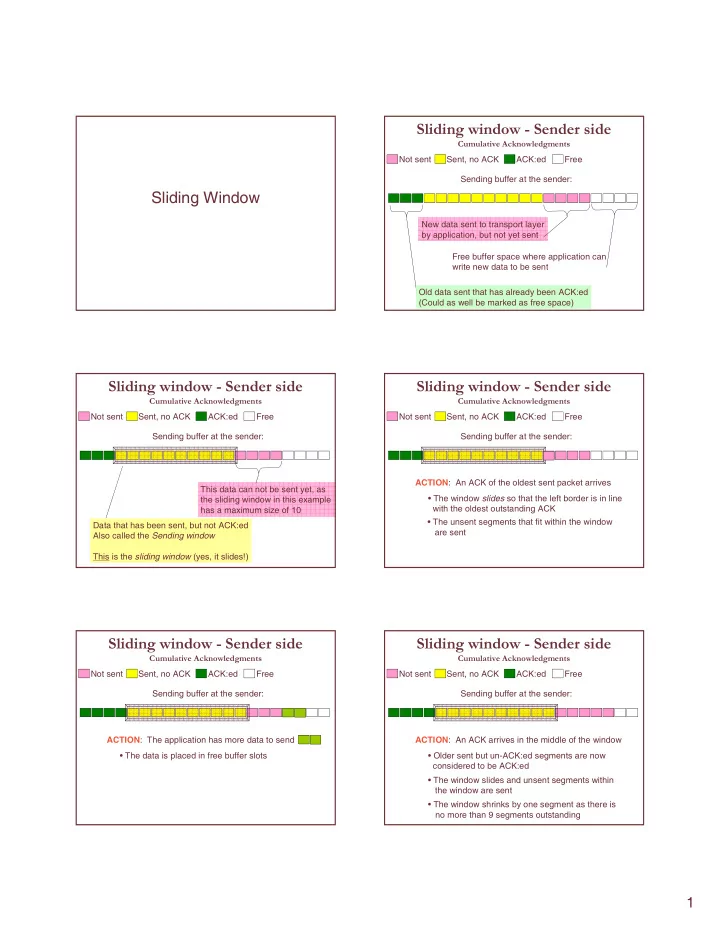
Cumulative Acknowledgments Not sent Sent, no ACK ACK:ed Free Sending buffer at the sender: Old data sent that has already been ACK:ed (Could as well be marked as free space) New data sent to transport layer by application, but not yet sent Free buffer space where application can write new data to be sent

Sliding window - Sender side

Cumulative Acknowledgments Not sent Sent, no ACK ACK:ed Free Sending buffer at the sender: Data that has been sent, but not ACK:ed Also called the Sending window This is the sliding window (yes, it slides!) This data can not be sent yet, as the sliding window in this example has a maximum size of 10

Sliding window - Sender side

Cumulative Acknowledgments Not sent Sent, no ACK ACK:ed Free Sending buffer at the sender: ACTION: An ACK of the oldest sent packet arrives

  • The window slides so that the left border is in line

with the oldest outstanding ACK

  • The unsent segments that fit within the window

are sent

Sliding window - Sender side

Cumulative Acknowledgments Not sent Sent, no ACK ACK:ed Free Sending buffer at the sender:

  • The data is placed in free buffer slots

ACTION: The application has more data to send

Sliding window - Sender side

Cumulative Acknowledgments Not sent Sent, no ACK ACK:ed Free Sending buffer at the sender:

  • Older sent but un-ACK:ed segments are now

considered to be ACK:ed ACTION: An ACK arrives in the middle of the window

  • The window slides and unsent segments within

the window are sent

  • The window shrinks by one segment as there is

no more than 9 segments outstanding

slide-2
SLIDE 2

2

Sliding window - Sender side

Cumulative Acknowledgments Not sent Sent, no ACK ACK:ed Free Sending buffer at the sender:

  • The data is placed in free buffer slots

ACTION: The application has more data to send

  • As the window is currently 9 segments wide,

it can grow by one segment

  • The new data that fits within the window is sent

Sliding window - Sender side

Cumulative Acknowledgments Not sent Sent, no ACK ACK:ed Free Sending buffer at the sender:

  • The ACK is silently ignored

ACTION: An ACK of already ACK:ed segments arrives

  • Must keep track of outstanding data

– Data sent, but not ACK:ed

  • Must not exceed maximum window size

– Configuration parameter – Affects memory consumption

  • Must adjust window size when

– An ACK inside the window arrives – New data that can fit within window arrives from application

Sliding window - Sender side

Cumulative Acknowledgments

Sliding window – Receiver side

Cumulative Acknowledgments Y X Not received Received Read Free Read buffer at the receiver: N/A Data that was previously received and that has been delivered to application Data that was previously received, but not yet delivered to the application Data not yet received

Sliding window – Receiver side

Cumulative Acknowledgments Y X Not received Received Read Free Read buffer at the receiver: N/A Free buffer space where new segments that are received can be stored Space unavailable to new segments The sliding window holds data received but not yet

  • read. Must also be able to

keep ”holes” like segment Y in the segments This sliding window has size 12, max size 14

Sliding window – Receiver side

Cumulative Acknowledgments Y X Not received Received Read Free Read buffer at the receiver:

  • Store in read buffer, register as received

ACTION: Segment X arrives

  • Send cumulative ACK Y to indicate that receiver

is waiting for Y Y N/A

slide-3
SLIDE 3

3

Sliding window – Receiver side

Cumulative Acknowledgments Y X Not received Received Read Free Read buffer at the receiver:

  • Can not fit into the buffer, must be discarded

ACTION: Segment X+2 arrives

  • Send cumulative ACK Y to indicate that receiver

is waiting for Y Y N/A

Sliding window – Receiver side

Cumulative Acknowledgments Y X Not received Received Read Free Read buffer at the receiver:

  • Only two segments are returned, still waiting for Y

ACTION: Applications try to read 5 segments

  • Application is informed of how much data was read
  • The unavailable segment at the end of the buffer

becomes available N/A

Sliding window – Receiver side

Cumulative Acknowledgments Y X Not received Received Read Free Read buffer at the receiver:

  • Store in read buffer, register as received

ACTION: Segment Y arrives

  • Send cumulative ACK (X+1) to indicate that receiver

is waiting for (X+1)

X+1

N/A

Sliding window – Receiver side

Cumulative Acknowledgments

Role of sliding window is different at receiver

– Represents the maximum buffer size for segments received but still not read – If a segment that does not fit inside the window arrives (either too new or too old), it is discarded.

  • However, an ACK is sent

– To avoid running out of buffer space, receiver can inform sender about available buffer space in each ACK