Semantic technologies: the layered approach (by T. Berners-Lee) - - PowerPoint PPT Presentation

semantic technologies the layered approach
SMART_READER_LITE
LIVE PREVIEW

Semantic technologies: the layered approach (by T. Berners-Lee) - - PowerPoint PPT Presentation

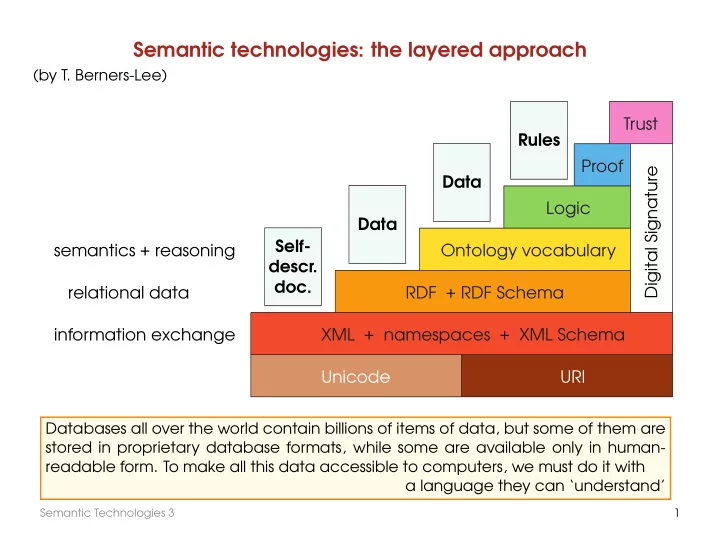
Semantic technologies: the layered approach (by T. Berners-Lee) Trust Rules Proof Digital Signature Data Logic Data Self- semantics + reasoning Ontology vocabulary descr. doc. relational data RDF + RDF Schema information exchange


slide-1
SLIDE 1

Semantic technologies: the layered approach

Unicode URI XML + namespaces + XML Schema RDF + RDF Schema Ontology vocabulary Logic Proof Trust Digital Signature Self- descr. doc. Data Data Rules information exchange relational data semantics + reasoning

(by T. Berners-Lee) Databases all over the world contain billions of items of data, but some of them are stored in proprietary database formats, while some are available only in human- readable form. To make all this data accessible to computers, we must do it with a language they can ‘understand’

Semantic Technologies 3 1

slide-2
SLIDE 2

Why not XML?

XML doesn’t provide any means for talking about the semantics of data

Michael is a lecturer of the Semantic Technologies module <module name=′′Semantic Technologies′′> <lecturer>Michael</lecturer> </module>

  • r

<lecturer name=′′Michael′′> <module>Semantic Technologies</module> </lecturer>

  • r

<teachingOffering> <module>Semantic Technologies</module> <lecturer>Michael</lecturer> </teachingOffering>

How to assign ‘meaning’ to tag nesting?

Let us see how other disciplines represent such data

Semantic Technologies 3 2

slide-3
SLIDE 3

Semantic networks

A semantic network is a graphic notation for representing knowledge in patterns of interconnected nodes and edges:

  • the nodes represent objects or concepts
  • the links represent semantic relations between nodes

t t

Mother Female Father M a l e Homo sapiens Child

Eve Adam

✲ ✻ ✻ ✻ ✻ ✟✟✟✟✟ ✟ ✯ ❍ ❍ ❍ ❍ ❍ ❍ ❨ ✑✑✑✑✑ ✑ ✸ ◗ ◗ ◗ ◗ ◗ ◗ ❦ ◗ ◗ ◗ ◗ ◗ ❦ ✑✑✑✑ ✑ ✸

loves is is is is is is parent parent has has

Eve is a mother Eve loves Adam Every child has a father Every mother is a female Every female is a human being . . .

Semantic networks were first developed for AI and machine translation in the 1960s, but earlier versions have long been used in philosophy, psychology, and linguistics.

Semantic Technologies 3 3

slide-4
SLIDE 4

Grammar: subject, predicate, object

According to a tradition going back to Aristotle, every sentence can be divided into two main constituents, one being the subject and the other its predicate. The subject of a sentence is sometimes defined as the argument that generally refers to the origin of the action or the undergoer of the state shown by the predicate. The predicate is the rest of the sentence apart from the subject. A predicate is an expression that can be true of something. An object in grammar is a sentence element and part of the sentence predicate. It denotes somebody or something involved in the subject’s ‘performance’ of the verb.

  • Adam loves Eve
  • MZ teaches ST
  • MZ is a lecturer

Semantic Technologies 3 4

slide-5
SLIDE 5

Mathematical logic: relations or predicates

In mathematical logic, these sentences are represented by means of relations or predicates: loves(adam, eve), teaches(mz, st), lecturer(mz)

  • A (binary) relation R between sets A and B is some set of ordered pairs

(x, y) such that x ∈ A and y ∈ B. If A = B then R is a relation on A.

e.g., all pairs (person1, person2) such that person1 loves person2

  • The domain of R is the set of all objects x such that (x, y) ∈ R for some y
  • The range of R is the set of all objects y such that (x, y) ∈ R for some x

More generally, an n-ary relation, for n ≥ 1, on some set A (such as: people or numbers or even all things in the universe) is a set of n-tuples (x1, x2, . . . , xn) of elements of A.

  • A 1-ary (unary) relation on A is simply a subset of A.

Unary relations are also called classes

Semantic Technologies 3 5

slide-6
SLIDE 6

RDF (graphs instead of trees) RDF stands for Resource Description Framework

http://www.w3.org/RDF/

  • Resources are identified by IRIs
  • Statements describe properties of resources by means of triples of the form

. .

subject

. .

  • bject

predicate

resource (identified by IRI)

book publisher place person . . . ✻

property (identified by IRI)

written by has title . . . ✻

value (either literal, e.g., data value,

  • r IRI identifying a resource)
  • Properties are identified by IRIs and, therefore, are resources
  • there are also blank nodes that do not identify specific resources

Semantic Technologies 3 7

slide-7
SLIDE 7

RDF Graph

A collection of RDF statements can be represented as a graph, which is:

  • directed (edges have a source and a target)
  • edge-labelled (each edge has one label)
  • a restricted form of multi-graphs (there may be multiple edges between

the same vertices, but only if they have different labels)

  • (partially) vertex-labelled : blank nodes are not labelled by IRIs or literals

Example of such a graph:

Melitta Bentz Dresden Melitta company coffee filter founder named after born in invention inventor produces instance of What does it say? Identify triples, their subject, predicate and object

Semantic Technologies 3 8

slide-8
SLIDE 8

IRIs as labels

But recall that actually subjects, predicates and (some) objects in RDF are IRIs:

  • IRIs define resources that appear as vertices in the graph
  • IRIs are used as arrow (property) labels

So our example RDF graph should look like

https://example .org/Melitta-Bentz https://www. dresden.de/#uri https://example .org/Melitta https://example .org/company https://example .org/coffee-filter https://example .org/founder https://example .org/named-after https://example .org/born-in https://example .org/invention https://example .org/inventor https://example .org/produces http://www.w3.org/1999/ 02/22-rdf-syntax-ns#type

  • NB. It is not always obvious what an IRI is supposed to refer to, and many IRIs may refer

to the same thing — we cannot assume that all RDF data in the world is integrated.

Semantic Technologies 3 9

slide-9
SLIDE 9

Which IRIs to use?

Where do the IRIs that we use in RDF graphs come from?

  • They can be newly created for an application

❀ avoid confusion with resources in other graphs

  • They can be IRIs that are already in common use

❀ support information integration and re-use across graphs Guidelines for creating new IRIs:

  • 1. Check if you could re-use an existing IRI ❀ avoid duplication if feasible
  • 2. Use http(s) IRIs ❀ useful protocols, registries, resolution mechanisms
  • 3. Create new IRIs based on domains that you own ❀ clear ownership; no

danger of clashing with other people’s IRIs

  • 4. Don’t use URLs of existing web pages, unless you want to store data about

pages ❀ avoid confusion between pages and more abstract resources

  • 5. Make your IRIs return some useful content via http(s) ❀ helps others to get

information about your resources

Semantic Technologies 3 10

slide-10
SLIDE 10

Why IRIs?

IRIs may seem a bit complicated

  • They look a bit technical and complex
  • They are hard to display or draw in a graph
  • The guidelines just given may seem quite demanding to newcomers

However, it’s not that hard:

  • RDF can work with any form of IRI (most tools would probably accept any

Latin letter string with a colon inside!)

  • The guidelines help sharing graphs across applications — a strength of RDF
  • Internet domain name registration is a very simple way to define ownership

in a global data space

  • IRIs should not be shown to users (we’ll introduce human-readable labels)

In RDF , IRIs typically look like ‘normal’ URLs, often with fragment identifiers to point at specific parts of a document (such as a section in HTML)

#

http://dublincore.org/usage/documents/principles/#element

Semantic Technologies 3 11

slide-11
SLIDE 11

Data values

IRIs can represent anything, but data values (numbers, strings, times, . . . ) should not be represented by IRIs! Why not use IRIs here too?

  • 1. Data values are the same everywhere

❀ no use in application-specific IRIs

  • 2. Many RDF-based applications need a built-in understanding of

data values (e.g., for sorting content)

  • 3. Data values are usually more ‘interpreted’ than IRIs.

Using a hypothetical scheme ‘integer’ , the IRIs integer:42 and inte- ger:+42 would be different, but intuitively they should represent the same number.

Semantic Technologies 3 12

slide-12
SLIDE 12

Encoding data values

  • Data values in RDF are written as "lexical value"ˆˆdatatype-IRI
  • They are drawn as rectangular nodes in RDF graphs

Example

https://example .org/Melitta-Bentz https://www. dresden.de/#uri "547172"ˆˆxsd:int "Melitta Bentz"ˆˆxsd:string "1873-01-31"ˆˆxsd:date https://example .org/coffee-filter https://example .org/born-in http://www.w3.org/2000/ 01/rdf-schema#label https://example.

  • rg/birthdate

https://example .org/invention https://example .org/inventor https://example.

  • rg/population

RDF supports many datatypes, most of which based on XML Schema (“xsd”): string , boolean , integer , float , dateTime , date , time , gYear , etc.; see https://www.w3.org/TR/2014/REC-rdf11-concepts-20140225/#section-Datatypes

“string”@language: "Pommes Frites"@de, "chips"@en-UK, "French fries"@en-US

Semantic Technologies 3 13

slide-13
SLIDE 13

Blank nodes

RDF also supports vertices that are not identified by an IRI: they are called blank nodes or bnodes

  • Intuitively, bnodes are placeholders for some specific (but unspecified) nodes
  • Their use makes the claim: ‘there is something at this position’
  • Similar to existentially quantified variables (∃x, i.e., ‘there exists an x’)

in logic and maths Example: Blank nodes have historically been used for auxiliary vertices

https://www. dresden.de/#uri "51.049259"ˆˆxsd:decimal "13.73836"ˆˆxsd:decimal https://example .org/coordinates https://example .org/latitude https://example .org/longitude

(represent this graph as a database table)

We’ll discuss other uses of blank nodes later

Semantic Technologies 3 14

slide-14
SLIDE 14

RDF Graphs: definition

We have defined all the necessary types of RDF terms : IRIs, bnodes, literals. An RDF graph is a set of triples consisting of the following parts:

  • a subject, which is an IRI or blank node
  • a predicate, which is an IRI
  • an object, which is an IRI, blank node, or literal

Notes:

  • This view resembles a (labelled) adjacency list encoding (for representing graphs)
  • The restrictions on the use of bnodes and literals in triples are a bit arbitrary
  • RDF graphs are mostly syntactic (rather what we write than what we mean)
  • In particular, literals are not interpreted when defining graphs

❀ multiple ways of writing the same value lead to multiple graphs ❀ ill-formed literals are allowed in graphs

Semantic Technologies 3 15

slide-15
SLIDE 15

RDF Serialisations

What we outlined so far is the abstract syntax of RDF . To exchange RDF graphs, we need concrete representation languages. There are numerous syntactic formats available:

  • N-Triples as a simple line-based format
  • Turtle adds convenient abbreviations to N-Triples
  • JSON-LD for encoding RDF graphs in JSON
  • RDF/XML for encoding RDF graphs in XML
  • RDFa for embedding RDF graphs into HTML (RDF in Attributes)
  • ...

Further historic/unofficial formats exist but are hardly relevant today.

Semantic Technologies 3 16

slide-16
SLIDE 16

N-Triples

N-Triples is almost the simplest format conceivable:

  • Each line encodes one triple:

– IRIs are written in pointy brackets, e.g., <https://www.dresdenrespekt.de/> – Literals are written as usual with a given type IRI, e.g., "2018-10-21"ˆˆ<http://www.w3.org/2001/XMLSchema#date> or "Wir sind mehr"@de – Blank nodes are written as :stringId , where stringId is a string that identifies the blank node within the document (no global meaning!) – Parts are separated by whitespace, and lines end with .

  • Unicode is supported, but various escape sequences also work
  • Comments are allowed after triples (nowhere else); they start with #

Full specification at https://www.w3.org/TR/n-triples/

Semantic Technologies 3 17

slide-17
SLIDE 17

Example

https://example .org/Melitta-Bentz https://www. dresden.de/#uri "547172"ˆˆxsd:int "Melitta Bentz"@en "1873-01-31"ˆˆxsd:date https://example .org/born-in http://www.w3.org/2000/ 01/rdf-schema#label https://example.

  • rg/birthdate

https://example .org/invention https://example .org/inventor https://example.

  • rg/population

could be encoded as the following N-triples:

<https://example.org/Melitta-Bentz> <http://www.w3.org/2000/01/rdf-schema#label> "Melitta Bentz"@en . <https://example.org/Melitta-Bentz> <https://example.org/birthdate> "1873-01-31"ˆˆ<http://www.w3.org/2001/XMLSchema#date> . <https://example.org/Melitta-Bentz> <https://example.org/invention> :1 . <https://example.org/Melitta-Bentz> <https://example.org/born-in> <https://www.dresden.de/#uri> . <https://www.dresden.de/#uri> <https://example.org/population> "547172"ˆˆ<http://www.w3.org/2001/XMLSchema#int> . :1 <https://example.org/inventor> <https://example.org/Melitta-Bentz> . Semantic Technologies 3 18

slide-18
SLIDE 18

N-Triples: Summary

Advantages

  • Very simple
  • Fast and easy to parse
  • Processable even with basic text-processing tools, e.g., grep

Disadvantages:

  • Somewhat inefficient in terms of storage space
  • Not particularly human-friendly (reading and writing)

Semantic Technologies 3 19

slide-19
SLIDE 19

Turtle: Terse RDF Triple Language

The Turtle format extends N-Triples with several convenient abbreviations:

  • Prefix declarations and base namespaces allow us to shorten IRIs
  • If we terminate triples with ; (or with ,) then the next triple is assumed to start

with the same subject (respectively, the same subject and predicate)

  • Blank nodes can be encoded using square brackets; they might contain

predicate-object pairs that refer to the blank node as subject

  • More liberal support for comments (possibly on own line)
  • Simpler forms for some types of data values

There are several other shortcuts and simplifications. Full specification is at https://www.w3.org/TR/turtle/

Semantic Technologies 3 20

slide-20
SLIDE 20

PREFIX and BASE by example

– BASE is used to declare a base IRI, so that we can use relative IRIs – PREFIX is used to declare abbreviations for IRI prefixes A Turtle document for the previous example (on page 18):

BASE <https://example.org/> PREFIX xsd: <http://www.w3.org/2001/XMLSchema#> PREFIX rdfs: <http://www.w3.org/2000/01/rdf-schema#>

<Melitta-Bentz> rdfs:label ”Melitta Bentz”@en . <Melitta-Bentz> <birthdate> "1873-01-31"ˆˆxsd:date . <Melitta-Bentz> <invention> :1 . <Melitta-Bentz> <born-in> <https://www.dresden.de/#uri> . <https://www.dresden.de/#uri> <population> "547172"ˆˆxsd:int . :1 <inventor> <Melitta-Bentz> .

  • NB. Relative IRIs are still written in < and > (e.g., <birthdate>);

prefixed names are written without brackets (e.g., rdfs:label).

Semantic Technologies 3 21

slide-21
SLIDE 21

Use of semicolon by example

If a triple ends with ; the next triple is assumed to start with the same subject If a triple ends with , the next triple is assumed to start with the same subject and predicate We can write the previous example as follows: BASE <https://example.org/> PREFIX xsd: <http://www.w3.org/2001/XMLSchema#> PREFIX rdfs: <http://www.w3.org/2000/01/rdf-schema#> <Melitta-Bentz> rdfs:label "Melitta Bentz"@en ; <birthdate> "1873-01-31"ˆˆxsd:date ; <invention> :1 ; <born-in> <https://www.dresden.de/#uri> ; <https://www.dresden.de/#uri> <population> "547172"ˆˆxsd:int . :1 <inventor> <Melitta-Bentz> .

Semantic Technologies 3 22

slide-22
SLIDE 22

Brackets for bnodes by example

The expression [] represents a bnode (without id) predicate-object pairs within [...] are allowed to give further triples with the bnode as subject We can write the previous example as follows: BASE <https://example.org/> PREFIX xsd: <http://www.w3.org/2001/XMLSchema#> PREFIX rdfs: <http://www.w3.org/2000/01/rdf-schema#> <Melitta-Bentz> rdfs:label "Melitta Bentz"@en ; <birthdate> "1873-01-31"ˆˆxsd:date ; <invention> [ <inventor> <Melitta-Bentz> ] ; <born-in> <https://www.dresden.de/#uri> ; <https://www.dresden.de/#uri> <population> "547172"ˆˆxsd:int .

(more examples will be given later)

Semantic Technologies 3 23

slide-23
SLIDE 23

Abbreviating numbers and Booleans

Numbers can be written without quotes and type for literals in default types (integer, decimal, or double) Booleans can also be written as true or false directly We can write the previous example as follows: BASE <https://example.org/> PREFIX xsd: <http://www.w3.org/2001/XMLSchema#> PREFIX rdfs: <http://www.w3.org/2000/01/rdf-schema#> <Melitta-Bentz> rdfs:label "Melitta Bentz"@en ; <birthdate> "1873-01-31"ˆˆxsd:date ; <invention> [ <inventor> <Melitta-Bentz> ] ; <born-in> <https://www.dresden.de/#uri> ; <https://www.dresden.de/#uri> <population> 547172 .

Semantic Technologies 3 24

slide-24
SLIDE 24

Turtle: Summary

Advantages:

  • Still quite simple
  • Not hard to parse
  • Human-readable (if formatted carefully)

Disadvantages:

  • Not safely processable with grep and similar tools

Semantic Technologies 3 25

slide-25
SLIDE 25

RDF: four different views of RDF

(1) N-Triples

http://dcs.bbk.ac.uk/#st http://dcs.bbk.ac.uk/#name “Semantic Technologies” . http://dcs.bbk.ac.uk/#st http://dcs.bbk.ac.uk/#isTaughtBy http://dcs.bbk.ac.uk/#MZ . http://dcs.bbk.ac.uk/#st http://dcs.bbk.ac.uk/#homepage http://www.dcs.bbk.ac.uk/∼michael/st/st.html . http://dcs.bbk.ac.uk/#MZ http://dcs.bbk.ac.uk/#name “Michael Zakharyaschev” .

(2) RDF Graph . . st . . MZ “Semantic Technologies”

“Michael Zakharyaschev”

. . http://www.dcs.bbk.ac.uk/∼michael/st/st.html

❅ ❅ ❅ ❘

homepage

isTaughtBy

name

name

Semantic Technologies 3 26

slide-26
SLIDE 26

RDF: four different views of RDF (cont.)

(3) Turtle

(see http://www.w3.org/TR/turtle/)

# this is a complete turtle document @prefix dcs: <http://dcs.bbk.ac.uk/#> . dcs:st dcs:name ”Semantic Technologies” . dcs:st dcs:isTaughtBy dcs:MZ . dcs:st dcs:homepage <http://www.dcs.bbk.ac.uk/∼michael/st/st.html> . dcs:MZ dcs:name ”Michael Zakharyaschev” .

Abbreviating groups of triples with the same subject:

dcs:st dcs:name ”Semantic Technologies” ; dcs:isTaughtBy dcs:MZ .

Abbreviating groups of triples with the same subject & predicate:

dcs:MZ dcs:teaches ”Semantic Technologies” , ”Fundamentals of Computing” .

Semantic Technologies 3 27

slide-27
SLIDE 27

RDF: four different views of RDF (cont.)

(4) XML syntax: An RDF document is represented by an XML element with tag rdf:RDF The content of this element is a number of descriptions, which use rdf:Description tags

<?xml version=′′1.0′′ encoding=′′UTF-8′′?> <rdf:RDF xmlns:rdf=′′http://www.w3.org/1999/02/22-rdf-syntax-ns#′′ xmlns:dcs=′′http://dcs.bbk.ac.uk/#′′ xml:base=′′http://dcs.bbk.ac.uk/′′> <rdf:Description rdf:about=′′#st′′> <dcs:isTaughtBy rdf:resource=′′#MZ′′/> <dcs:name>Semantic Technologies</dcs:name> <dcs:homepage rdf:resource=′′http://www.dcs.bbk.ac.uk/∼michael/st/′′/> </rdf:Description> <rdf:Description rdf:about=′′#MZ′′> <dcs:name>Michael Zakharyaschev</dcs:name> </rdf:Description> </rdf:RDF>

  • NB. The order of descriptions or resources is not important!

Semantic Technologies 3 28

slide-28
SLIDE 28

RDF: XML-based syntax

  • An RDF document consists of an rdf:RDF element

the content of which is a number of descriptions

  • The content of rdf:Description elements are called property elements

<rdf:Description rdf:about=′′#st′′> <dcs:isTaughtBy>Michael Zakharyaschev</dcs:isTaughtBy> <dcs:name>Semantic Technologies</dcs:name> </rdf:Description>

  • both define

property-value pairs

  • Resource references: rdf:resource and rdf:ID

<rdf:Description rdf:ID=′′st′′> <dcs:isTaughtBy rdf:resource=′′#MZ′′/> <dcs:name>Semantic Technologies</dcs:name> </rdf:Description> <rdf:Description rdf:ID=′′MZ′′> <dcs:name>Michael Zakharyaschev</dcs:name> </rdf:Description>

#

NB: rdf:ID defines the resource

(#MZ is appended to the base URI) For details see http://www.ibm.com/developerworks/library/x-tiprdfai/

Semantic Technologies 3 29

slide-29
SLIDE 29

RDF: XML-based syntax (cont.)

  • Nested descriptions

<rdf:Description rdf:ID=′′st′′> <dcs:name>Semantic Technologies</dcs:name> <dcs:isTaughtBy> <rdf:Description rdf:ID=′′MZ′′> <dcs:name>Michael Zakharyaschev</dcs:name> </rdf:Description> </dcs:isTaughtBy> </rdf:Description>

  • The rdf:type element allows us to classify resources according to their types

<rdf:Description rdf:ID=′′st′′> <rdf:type rdf:resource=′′#module′′/> <dcs:name>Semantic Technologies</dcs:name> <dcs:isTaughtBy rdf:resource=′′#MZ′′/> </rdf:Description> <rdf:Description rdf:ID=′′MZ′′> <rdf:type rdf:resource=′′#lecturer′′/> <dcs:name>Michael Zakharyaschev</dcs:name> </rdf:Description> ✛ st is of type module ✛ MZ is of type lecturer The same resource may be of different types; e.g., MZ can also be a taxpayer

Semantic Technologies 3 30

slide-30
SLIDE 30

RDF: abbreviated syntax

  • childless property elements may be replaced by XML attributes;
  • for description elements with a typing element we can use

the name specified in rdf:type instead of rdf:Description Example:

(all three are equivalent) (i) <rdf:Description rdf:ID=′′st′′> <rdf:type rdf:resource=′′#module′′/> <dcs:name>Semantic Technologies</dcs:name> <dcs:isTaughtBy rdf:resource=′′#MZ′′/> </rdf:Description> (ii) <rdf:Description rdf:ID=′′st′′ dcs:name=′′Semantic Technologies′′> <rdf:type rdf:resource=′′#module′′/> <dcs:isTaughtBy rdf:resource=′′#MZ′′/> </rdf:Description> (iii) <dcs:module rdf:ID=′′st′′ dcs:name=′′Semantic Technologies′′> <dcs:isTaughtBy rdf:resource=′′#MZ′′/> </dcs:module>

. . module . . st . . MZ “Semantic Technologies”

isTaughtBy

❳ ❳ ❳ ❳ ❳ ❳ ❳ ②

name

✟✟✟✟✟✟ ✯

rdf:type

Semantic Technologies 3 31

slide-31
SLIDE 31

Blank nodes (for n-ary relations)

  • RDF uses only binary relations:

what can be done about the ternary relation referee(X, Y, Z): ‘X is a referee in a chess game between Y and Z’? Solution: introduce an anonymous auxiliary resource . . X . . . . Y . . Z

✲ referee ✘✘✘✘✘✘ ✘ ✿ player1 ❳❳❳❳❳❳ ❳ ③ player2 <rdf:Description rdf:ID=′′X′′> <referee> <rdf:Description> <player1 rdf:resource=′′#Y′′/> <player2 rdf:resource=′′#Z′′/> </rdf:Description> </referee> </rdf:Description>

A blank node (or bnode) is a node in an RDF graph representing a resource for which an IRI or literal is not given. The resource represented by a blank node is called anonymous. A blank node can only be used as subject or object in an RDF triple

Exercise: give a Turtle document for the RDF graph above

Semantic Technologies 3 32

slide-32
SLIDE 32

Using blank nodes

Blank nodes indicate the existence of a thing, without using an IRI to identify any particular thing

(not the same as assuming that the blank node indicates an ‘unknown’ IRI)

Anonymous resources in RDF are used to:

– describe multi-component structures, like the RDF containers – describe reification (i.e., provenance information) – represent complex attributes without having to name explicitly auxiliary nodes

(e.g., the address of a person consisting of the street, number, postal code, and city)

– offer protection of the inner information

(e.g., protecting the sensitive information of the customers from the browsers)

Semantic Technologies 3 33

slide-33
SLIDE 33

Blank nodes: examples (1)

@prefix foaf: <http://xmlns.com/foaf/0.1/> . # There exist two people who know each other :alice foaf:knows :bob . :bob foaf:knows :alice .

blank nodes are expressed as : followed by a label

also using [ ]

@prefix foaf: <http://xmlns.com/foaf/0.1/> . # Someone knows someone else, who has the name ”Bob” [] foaf:knows [ foaf:name ”Bob” ] . @prefix foaf: <http://xmlns.com/foaf/0.1/> . [ foaf:name ”Alice” ] foaf:knows [ foaf:name ”Bob” ; foaf:knows [ foaf:name ”Eve” ] ; foaf:mbox <bob@example.com> ] . :a foaf:name ”Alice” . :a foaf:knows :b . :b foaf:name ”Bob” . :b foaf:knows :c . :c foaf:name ”Eve” . :b foaf:mbox <bob@example.com> .

Semantic Technologies 3 34

slide-34
SLIDE 34

Blank nodes: examples (2)

<http://www.csd.uoc.gr/∼hy561/> dc:title ”Web Data Management” ; ex:professor :b ; ex:students :students ; prov:generatedBy :a1 . :b ex:fullName ”Adam Smith” ;

(complex attribute)

ex:homePage <http://www.csd.uoc.gr/∼smith/> ; ex:hasAddress :ad . :ad rdf:type ex:Address ;

(complex attribute)

ex:street ”Knossou” ; ex:number ”122” ; ex:postalcode ”71409” ; ex:city ”Heraklion” . :students rdf:type rdf:Bag ;

(Bag RDF container)

dc:hasMember :s1 ; dc:hasMember :s2 . :a1 rdf:type prov:Event ;

(event in the lifecycle)

prov:creator :b ; prov:atTime ”Tuesday 11 February, 06:51:00 CST”. :a2 rdf:type prov:Event; rdf:type prov:Update ; prov:ActionOver :a1 ; prov:creator :b ; prov:atTime ”Monday 17 February, 08:12:00 CST”.

Semantic Technologies 3 35

slide-35
SLIDE 35

RDF: container elements

  • are used to collect a number of resources or attributes

about which we want to make statement as a whole rdf:Bag an unordered container, which may contain multiple occurrences rdf:Seq an ordered container, which may contain multiple occurrences rdf:Alt a set of alternatives

  • Ex.:

<rdf:Description rdf:about=′′#X′′> <referee> <rdf:Bag> <rdf: 1 rdf:resource=′′#Y′′/> <rdf: 2 rdf:resource=′′#Z′′/> </rdf:Bag> </referee> </rdf:Description>

  • r

<rdf:Description rdf:about=′′#X′′> <referee> <rdf:Bag> <rdf:li rdf:resource=′′#Y′′/> <rdf:li rdf:resource=′′#Z′′/> </rdf:Bag> </referee> </rdf:Description>

. . X . . . . rdf:Bag . . Y . . Z

referee

rdf:type

✘✘✘✘✘✘ ✘ ✿

rdf: 1

❳❳❳❳❳❳ ❳ ③

rdf: 2

NB: Containers define anonymous auxiliary resources

(see also prev. slide)

NB: There is no way to close the containers, i.e., to say ‘these are all the members of the container’

Semantic Technologies 3 36

slide-36
SLIDE 36

RDF: container elements (cont.)

  • To describe groups containing only the specified members, use list structures

<rdf:Description rdf:about=′′#B′′> <contains> <rdf:List> <rdf:first> <rdf:Description rdf:about=′′#X′′/> </rdf:first> <rdf:rest> <rdf:List> <rdf:first> <rdf:Description rdf:about=′′#Y′′/> </rdf:first> <rdf:rest> <rdf:Description rdf:about=′′&rdf;nil′′/> </rdf:rest> </rdf:List> </rdf:rest> </rdf:List> </contains> </rdf:Description>

. . B . . . .

rdf:List

. . X . . . .

rdf:List

. . Y . .

rdf:nil

❄ contains ✏✏✏✏✏ ✏ ✶ r d f : t y p e PPPPP P q r d f : fi r s t ❄ rdf:rest ✏✏✏✏✏ ✏ ✶ r d f : t y p e PPPPP P q r d f : fi r s t ❄ rdf:rest

OR

<rdf:Description rdf:about=′′#B′′> <contains rdf:parseType=′′Collection′′> <rdf:Description rdf:about=′′#X′′/> <rdf:Description rdf:about=′′#Y′′/> </contains> </rdf:Description>

Semantic Technologies 3 37

slide-37
SLIDE 37

Reification: statements about statements

‘MZ says that http://www.dcs.bbk.ac.uk/˜michael/st is the homepage for st

  • statement

’ . . MZ . .

rdf:Statement

. . S . . st . .

homepage

. .

http://. . . ❄ homepage ✻ rdf:type ✲ says ✘✘✘✘✘✘✘✘✘✘✘✘ ✘ ✿ rdf:subject ✲ rdf:predicate ❳❳❳❳❳❳❳❳❳❳❳❳ ❳ ③ rdf:object <rdf:Description rdf:about=′′#MZ′′> <dcs:says rdf:resource=′′#S′′/> </rdf:Description> <rdf:Description rdf:about=′′#st′′> <dcs:homepage rdf:resource=′′http://www.dcs.bbk.ac.uk/∼michael/st′′/> </rdf:Description> <rdf:Statement rdf:ID=′′S′′> <rdf:subject rdf:resource=′′#st′′/> <rdf:predicate rdf:resource=′′#homepage′′/> <rdf:object rdf:resource=′′http://www.dcs.bbk.ac.uk/∼michael/st′′/> </rdf:Statement> Exercise: give a Turtle document for the RDF graph above

Semantic Technologies 3 38

slide-38
SLIDE 38

Criminal story

Translate into English

ex:?x ex:hasKilled ex:?y ex:?z rdf:Statement ex:discovers rdf:object rdf:predicate rdf:subject ex:wantsToPrevent rdf:object rdf:subject rdf:type rdf:type rdf:predicate

Semantic Technologies 3 39

slide-39
SLIDE 39

RDF: a quick summary

RDF 1.1 Turtle: official W3C document

  • Example 1
  • Note in 2.4
  • Example 9 and Note after it
  • Examples 11, 12, 14, 15

Semantic Technologies 3 40

slide-40
SLIDE 40

RDF and RDF Schema

Consider the RDF document

(rewrite it in the Turtle syntax) <dcs:academicStaff rdf:ID=′′PTW′′ dcs:name=′′Peter Wood′′/> <dcs:professor rdf:ID=′′MZ′′ dcs:name=′′Michael Zakharyaschev′′/> <dcs:module rdf:ID=′′st′′ dcs:name=′′Semantic Technologies′′> <dcs:isTaughtBy rdf:resource=′′#MZ′′/> </dcs:module>

How can we collect all academicStaff members? What about − professors are academic staff members − modules are taught by academic staff members only

?

We need statements not only about individual objects (such as MZ, PTW, st) but also about classes of objects (such as professors, academic staff, etc.) RDF Schema

Semantic Technologies 3 41

slide-41
SLIDE 41

What do we need?

How about the following triples?

MZ professor academicStaff rdf:type rdfs:subClassOf

(1) MZ is in relation rdf:type with professor (2) professor is in relation rdfs:subClassOf with academicStaff

However, rdf:type and subClassOf are not ordinary properties. What we actually want to say is that

(1′) MZ is an instance of the class professor (2′) every instance of professor is also an instance of academicStaff In particular, (1) and (2) should imply that (3) MZ is in relation rdf:type with academicStaff

MZ professor academicStaff rdf:type r d f s : s u b C l a s s O f rdf:type

Semantic Technologies 3 42

slide-42
SLIDE 42

RDF Schema

  • RDF Schema defines a ‘schema vocabulary’

that supports definition of ontologies – gives ‘extra meaning’ to particular RDF predicates and resources

(such as type, subClassOf)

– this ‘extra meaning’, or semantics , specifies how a term should be interpreted

RDF Schema fixes the semantics

  • Example. Is there any implicit knowledge in the RDF graph?

professor staff academicStaff rdfs:subClassOf rdfs:subClassOf

It should follow that every instance of professor is also an instance of staff

professor staff academicStaff r d f s : s u b C l a s s O f r d f s : s u b C l a s s O f rdfs:subClassOf

Semantic Technologies 3 43

slide-43
SLIDE 43

Reasoner to extract implicit knowledge

  • ntology

(RDFS, OWL, ...) reasoner

implicit knowledge accesses

application The RDFS reasoner uses entailment rules such as

  • if such and such triples are in the RDFS graph, then

add this and that triples to the graph

  • do that recursively until the graph does not change

(≈ 30 rules are specified in the RDFS Semantics document)

These rules are supposed to capture the intended semantics

Semantic Technologies 3 44

slide-44
SLIDE 44

RDF Schema: the language

  • Core classes (predefined in RDF/S and carrying a fixed meaning)

– rdfs:Resource, the class of all resources

(everything is a resource)

– rdfs:Class, the class of all classes

(and so it contains itself as an element) rdfs:Class rdf:type rdfs:Class . is always valid

– rdfs:Literal, the class of all literals

(strings)

– rdf:Property, the class of all properties – rdf:Statement, the class of all statements Example:

<rdfs:Class rdf:ID=′′lecturer′′> . . . </rdfs:Class> <rdf:Property rdf:ID=′′isTaughtBy′′> . . . </rdf:Property> Thus, ‘lecturer’ is a class and ‘isTaughtBy’ is a property

Semantic Technologies 3 45

slide-45
SLIDE 45

RDF Schema: the language

  • Core properties for defining relationships

– rdf:type, which relates resource to its class

(see slide 30)

(the resource is declared to be an instance of that class) – rdfs:subClassOf, which relates a class to one of its superclasses all instances of a class are instances of its superclass

(note that a class may be a subclass of more than one class)

– rdfs:subPropertyOf, which relates a property to one of its superproperties P is a subproperty of Q if Q(x, y) whenever P (x, y) Example:

<rdfs:Class rdf:about=′′#lecturer′′> <rdfs:subClassOf rdf:resource=′′#academicStaff′′/> </rdfs:Class> <rdf:Property rdf:about=′′#isTaughtBy′′> <rdfs:subPropertyOf rdf:resource=′′#involves′′/> </rdf:Property> Thus, ‘lecturer’ is a subclass of ‘academicStaff’ and ‘isTaughtBy’ a subproperty of ‘involves’

Semantic Technologies 3 46

slide-46
SLIDE 46

RDF Schema: the language

  • Core properties for restricting properties

– rdfs:domain, which specifies the domain of a property, (the class of those resources that may appear as subjects in a triple with that predicate) – rdfs:range, which specifies the range of a property, (the class of those resources that may appear as objects in a triple with that predicate) Example:

<rdf:Property rdf:ID=′′isTaughtBy′′> <rdfs:domain rdf:resource=′′#module′′/> <rdfs:range rdf:resource=′′#academicStaff′′/> </rdf:Property> Thus, the domain of ‘isTaughtBy’ is a subset of ‘module’ and the range of ‘isTaughtBy’ is a subset of ‘academicStaff’

Semantic Technologies 3 47

slide-47
SLIDE 47

Impact of domain and range restrictions

Example:

<rdf:Property rdf:ID=′′authourOf′′> <rdfs:range rdf:resource=′′#textBook′′/> <rdfs:range rdf:resource=′′#crimeFiction′′/> </rdf:Property>

According to the RDFS semantics, for every triple x, authorOf, y,

  • bject y is both a textbook and a crime fiction book

because the range of authourOf belongs to textBook and also to crimeFiction Example: suppose

<rdf:Property rdf:ID=′′isMarriedTo′′> <rdfs:domain rdf:resource=′′#person′′/> <rdfs:range rdf:resource=′′#person′′/> </rdf:Property>

is merged with

<rdf:Description rdf:about=′′#ML′′> <dcs:isMarriedTo rdf:resource=′′#BBK′′/> </rdf:Description> <rdf:Description rdf:about=′′#BBK′′> <rdf:type rdf:resource=′′#college′′/> </rdf:Description>

Then, according to the RDFS semantics, BBK must be of type person

Semantic Technologies 3 48

slide-48
SLIDE 48

RDF vs. RDFS layers RDF RDF Schema

. .

sw

. .

MZ

✲ isTaughtBy

. .

module

✻ rdf:type

. .

professor

✻ rdf:type

. .

academicStaff

❍ ❍ ❍ ❍ ❍ ❍ ❨

rdfs:subClassOf

. .

isTaughtBy

. .

involves

rdfs:subPropertyOf

r d f s : d

  • m

a i n

✡ ✡ ✡ ✡ ✡ ✡ ✡ ✡ ✡ ✡ ✢

rdfs:domain

❳❳❳❳❳❳ ③

r d f s : r a n g e

❍❍❍❍❍❍❍ ❍ ❥

rdfs:range

What ‘implicit knowledge’ is missing in the picture?

Semantic Technologies 3 49

slide-49
SLIDE 49

RDFS Semantics: example

. .

sw

. .

MZ

✲ isTaughtBy

. .

module

✻ rdf:type

. .

professor

✻ rdf:type

. .

academicStaff

❍ ❍ ❍ ❍ ❍ ❍ ❨

rdfs:subClassOf

. .

isTaughtBy

. .

involves

rdfs:subPropertyOf

r d f s : d

  • m

a i n

✡ ✡ ✡ ✡ ✡ ✡ ✡ ✡ ✡ ✡ ✢

rdfs:domain

❳❳❳❳❳❳ ③

r d f s : r a n g e

❍❍❍❍❍❍❍ ❍ ❥

rdfs:range

. .

rdf:Property

. .

rdfs:Class

. .

rdfs:Resource

Semantic Technologies 3 50

slide-50
SLIDE 50

RDFS Semantics: rdfs:subClassOf and rdfs:Class

  • If x, rdf:type, C then C, rdf:type, rdfs:Class

‘If C is a type of something then C is a class’

  • If C, rdf:type, rdfs:Class then C, rdfs:subClassOf, rdfs:Resource

‘Every class is a subclass of rdfs:Resource’

  • If C1, rdfs:subClassOf, C2 then

C1, rdf:type, rdfs:Class and C2, rdf:type, rdfs:Class

‘C1 is a subclass of C2 then both C1 and C2 are classes’

  • If C, rdf:type, rdfs:Class then C, rdfs:subClassOf, C

‘rdfs:subClassOf is a reflexive relation on classes’

  • If C1, rdfs:subClassOf, C2 and C2, rdfs:subClassOf, C3 then

C1, rdfs:subClassOf, C3

‘rdfs:subClassOf is a transitive relation’

Semantic Technologies 3 51

slide-51
SLIDE 51

RDFS Semantics: rdfs:subClassOf and rdfs:Class (cont.)

rdf:type

✁ ✁ ✁ ✁ ✁ ✁ ✁ ✁ ✁ ✁ ✁ ✕

rdf:type

✑✑✑✑✑✑✑✑✑✑✑✑✑✑✑✑✑✑✑✑✑✑✑✑✑✑ ✑ ✸

rdf:type

. .

sw

. .

MZ

✲ isTaughtBy

. .

module

✻ rdf:type

. .

professor

✻ rdf:type

. .

academicStaff

❍ ❍ ❍ ❍ ❍ ❍ ❨

rdfs:subClassOf

. .

isTaughtBy

. .

involves

rdfs:subPropertyOf

r d f s : d

  • m

a i n

✡ ✡ ✡ ✡ ✡ ✡ ✡ ✡ ✡ ✡ ✢

rdfs:domain

❳❳❳❳❳❳ ③

r d f s : r a n g e

❍❍❍❍❍❍❍ ❍ ❥

rdfs:range

. .

rdfs:Class

rdf:type

rdf:subClassOf

rdf:subClassOf

rdf:subClassOf

rdf:subClassOf

. .

rdfs:Resource

✟✟✟✟ ✯

rdfs:subClassOf

❳ ❳ ❳ ❳ ❳ ❳ ❳ ❳ ❳ ❳ ❳ ❳ ❳ ②

rdfs:subClassOf

✏ ✏ ✏ ✏ ✮rdfs:subClassOf ❆ ❆ ❆ ❆ ❆ ❆ ❆ ❆ ❑

rdf:type

P P P P P P P P P P P P P P P P P ✐

r d f : t y p e

rdf:type

✟✟✟✟✟✟✟✟✟✟✟✟✟✟ ✟✡ ✡ ✡ ✡ ✡ ✡ ✡ ✣

rdf:type

rdfs:subClassOf

What arrows are missing here?

Semantic Technologies 3 52

slide-52
SLIDE 52

RDFS Semantics: rdfs:subClassOf and rdfs:Class (cont.)

Summary of subclass and membership relations:

  • professor is a subclass of professor, academicStaff, rdfs:Resource
  • academicStaff is a subclass of academicStaff, rdfs:Resource
  • module is a subclass of module, rdfs:Resource
  • rdfs:Class is a subclass of rdfs:Class, rdfs:Resource
  • rdfs:Resource is a subclass of rdfs:Resource

rdfs:subClassOf

means

‘⊆ ⊆ ⊆’

  • MZ is an instance of professor, academicStaff, rdfs:Resource
  • sw is an instance of module, rdfs:Resource
  • professor is an instance of rdfs:Class, rdfs:Resource
  • academicStaff is an instance of rdfs:Class, rdfs:Resource
  • module is an instance of rdfs:Class, rdfs:Resource
  • rdfs:Class is an instance of rdfs:Class, rdfs:Resource
  • rdfs:Resource is an instance of rdfs:Class, rdfs:Resource

rdf:type

means

‘∈ ∈ ∈’

(almost) (Class ∈ Class?)

Semantic Technologies 3 53

slide-53
SLIDE 53

RDFS Semantics: rdfs:subPropertyOf and rdf:Property

  • P is a property

if and only if P, rdf:type, rdf:Property

  • If P1, rdfs:subPropertyOf, P2 then

P1, rdf:type, rdf:Property and P2, rdf:type, rdf:Property

  • If P, rdf:type, rdf:Property then P, rdfs:subPropertyOf, P

‘rdfs:subPropertyOf is a reflexive relation on properties’

  • If P1, rdfs:subPropertyOf, P2 and P2, rdfs:subPropertyOf, P3 then

P1, rdfs:subPropertyOf, P3

‘rdfs:subPropertyOf is a transitive relation’

Semantic Technologies 3 54

slide-54
SLIDE 54

RDFS Semantics: rdfs:subPropertyOf and rdf:Property (cont.)

rdf:type

✁ ✁ ✁ ✁ ✁ ✁ ✁ ✁ ✁ ✁ ✁ ✕

rdf:type

✑✑✑✑✑✑✑✑✑✑✑✑✑✑✑✑✑✑✑✑✑✑✑✑✑✑ ✑ ✸

rdf:type

. .

sw

. .

MZ

✲ isTaughtBy

. .

module

✻ rdf:type

. .

professor

✻ rdf:type

. .

academicStaff

❍ ❍ ❍ ❍ ❍ ❍ ❨

rdfs:subClassOf

. .

isTaughtBy

. .

involves

rdfs:subPropertyOf

r d f s : d

  • m

a i n

✡ ✡ ✡ ✡ ✡ ✡ ✡ ✡ ✡ ✡ ✢

rdfs:domain

❳❳❳❳❳❳ ③

r d f s : r a n g e

❍❍❍❍❍❍❍ ❍ ❥

rdfs:range

. .

rdf:Property

◗ ◗ ◗ ◗ ◗ ◗ ◗ ◗ ❦

rdf:type

❅ ❅ ❅ ❅ ❅ ❅ ❅ ❅ ❅ ❅ ■

rdf:type

◗◗◗ ◗ s

rdf:type

. .

rdfs:Class

rdf:type

rdf:subClassOf

rdf:subClassOf

rdf:subClassOf

rdf:subClassOf

rdf:subClassOf

. .

rdfs:Resource

✟✟✟✟ ✯

rdfs:subClassOf

❳ ❳ ❳ ❳ ❳ ❳ ❳ ❳ ❳ ❳ ❳ ❳ ❳ ②

rdfs:subClassOf

✏ ✏ ✏ ✏ ✮rdfs:subClassOf ❆ ❆ ❆ ❆ ❆ ❆ ❆ ❆ ❑

rdf:type

P P P P P P P P P P P P P P P P P ✐

r d f : t y p e

rdf:type

✟✟✟✟✟✟✟✟✟✟✟✟✟✟ ✟✡ ✡ ✡ ✡ ✡ ✡ ✡ ✣

rdf:type

❳❳❳❳❳❳❳❳❳❳❳❳ ❳ ③

rdfs:subClassOf

rdfs:subClassOf

What arrows are missing here?

Semantic Technologies 3 55

slide-55
SLIDE 55

RDFS Semantics: rdf:type is a property

rdf:type

✁ ✁ ✁ ✁ ✁ ✁ ✁ ✁ ✁ ✁ ✁ ✕

rdf:type

. .

sw

. .

MZ

✲ isTaughtBy

. .

module

✻ rdf:type

. .

professor

✻ rdf:type

. .

academicStaff

❍ ❍ ❍ ❍ ❍ ❍ ❨

rdfs:subClassOf

. .

isTaughtBy

. .

involves

rdfs:subPropertyOf

r d f s : d

  • m

a i n

✡ ✡ ✡ ✡ ✡ ✡ ✡ ✡ ✡ ✡ ✢

rdfs:domain

❳❳❳❳❳❳ ③

r d f s : r a n g e

❍❍❍❍❍❍❍ ❍ ❥

rdfs:range

. .

rdf:Property

◗ ◗ ◗ ◗ ◗ ◗ ◗ ◗ ❦

rdf:type

❅ ❅ ❅ ❅ ❅ ❅ ❅ ❅ ❅ ❅ ■

rdf:type

◗◗◗ ◗ s

rdf:type

. .

rdf:type

P P P P P P P P P P P P P P P P P P ✐

rdf:type

r d f s : r a n g e

r d f s : d

  • m

a i n

. .

rdfs:Class

rdf:type

rdf:subClassOf

rdf:subClassOf

rdf:subClassOf

rdf:subClassOf

rdf:subClassOf

. .

rdfs:Resource

✟✟✟✟ ✯

rdfs:subClassOf

❳ ❳ ❳ ❳ ❳ ❳ ❳ ❳ ❳ ❳ ❳ ❳ ❳ ②

rdfs:subClassOf

✏ ✏ ✏ ✏ ✮rdfs:subClassOf ❆ ❆ ❆ ❆ ❆ ❆ ❆ ❆ ❑

rdf:type

P P P P P P P P P P P P P P P P P ✐

r d f : t y p e

rdf:type

✟✟✟✟✟✟✟✟✟✟✟✟✟✟ ✟✡ ✡ ✡ ✡ ✡ ✡ ✡ ✣

rdf:type

❳❳❳❳❳❳❳❳❳❳❳❳ ❳ ③

rdfs:subClassOf

rdfs:subClassOf Semantic Technologies 3 56

slide-56
SLIDE 56

RDFS Semantics: rdfs:subClassOf and rdfs:subPropertyOf

rdf:type

✁ ✁ ✁ ✁ ✁ ✁ ✁ ✁ ✁ ✁ ✁ ✕

rdf:type

. .

sw

. .

MZ

✲ isTaughtBy

. .

module

✻ rdf:type

. .

professor

✻ rdf:type

. .

academicStaff

❍ ❍ ❍ ❍ ❍ ❍ ❨

rdfs:subClassOf

. .

isTaughtBy

. .

involves

rdfs:subPropertyOf

r d f s : d

  • m

a i n

✡ ✡ ✡ ✡ ✡ ✡ ✡ ✡ ✡ ✡ ✢

rdfs:domain

❳❳❳❳❳❳ ③

r d f s : r a n g e

❍❍❍❍❍❍❍ ❍ ❥

rdfs:range

. .

rdf:Property

◗ ◗ ◗ ◗ ◗ ◗ ◗ ◗ ❦

rdf:type

❅ ❅ ❅ ❅ ❅ ❅ ❅ ❅ ❅ ❅ ■

rdf:type

◗◗◗ ◗ s

rdf:type

. .

rdf:type

P P P P P P P P P P P P P P P P P P ✐

rdf:type

r d f s : r a n g e

r d f s : d

  • m

a i n

. .

rdfs:subPropertyOf

rdf:type rdfs:domain rdfs:range

. .

rdfs:subClassOf ❳ ❳ ❳ ❳ ❳ ❳ ❳ ❳ ❳ ❳ ❳ ❳ ❳ ❳ ❳ ②

rdf:type

✟✟✟✟✟ ✟ ✯

rdfs:range rdfs:domain

. .

rdfs:Class

rdf:type

rdf:subClassOf

rdf:subClassOf

rdf:subClassOf

rdf:subClassOf

rdf:subClassOf

. .

rdfs:Resource

✟✟✟✟ ✯

rdfs:subClassOf

❳ ❳ ❳ ❳ ❳ ❳ ❳ ❳ ❳ ❳ ❳ ❳ ❳ ②

rdfs:subClassOf

✏ ✏ ✏ ✏ ✮rdfs:subClassOf ❆ ❆ ❆ ❆ ❆ ❆ ❆ ❆ ❑

rdf:type

P P P P P P P P P P P P P P P P P ✐

r d f : t y p e

rdf:type

✟✟✟✟✟✟✟✟✟✟✟✟✟✟ ✟✡ ✡ ✡ ✡ ✡ ✡ ✡ ✣

rdf:type

❳❳❳❳❳❳❳❳❳❳❳❳ ❳ ③

rdfs:subClassOf

rdfs:subClassOf Semantic Technologies 3 57

slide-57
SLIDE 57

RDFS Semantics: rdfs:domain and rdfs:range

  • If P, rdfs:domain, C then C, rdf:type, rdfs:Class
  • If P, rdfs:range, C then C, rdf:type, rdfs:Class

The following are axiomatic triples

(they must always hold)

  • rdf:type, rdfs:domain, rdfs:Resource
  • rdfs:subClassOf, rdfs:domain, rdfs:Class
  • rdfs:subPropertyOf, rdfs:domain, rdf:Property
  • rdfs:domain, rdfs:domain, rdf:Property
  • rdfs:range, rdfs:domain, rdf:Property
  • . . .
  • rdf:type, rdfs:range, rdfs:Class
  • rdfs:subClassOf, rdfs:domain, rdfs:Class
  • rdfs:subPropertyOf, rdfs:domain, rdf:Property
  • rdfs:domain, rdfs:domain, rdfs:Class
  • rdfs:range, rdfs:domain, rdfs:Class
  • . . .

Semantic Technologies 3 58

slide-58
SLIDE 58

RDFS Semantics: rdfs:domain and rdfs:range (cont.)

rdf:type

✁ ✁ ✁ ✁ ✁ ✁ ✁ ✁ ✁ ✁ ✁ ✕

rdf:type

. .

sw

. .

MZ

✲ isTaughtBy

. .

module

✻ rdf:type

. .

professor

✻ rdf:type

. .

academicStaff

❍ ❍ ❍ ❍ ❍ ❍ ❨

rdfs:subClassOf

. .

isTaughtBy

. .

involves

rdfs:subPropertyOf

r d f s : d

  • m

a i n

✡ ✡ ✡ ✡ ✡ ✡ ✡ ✡ ✡ ✡ ✢

rdfs:domain

❳❳❳❳❳❳ ③

r d f s : r a n g e

❍❍❍❍❍❍❍ ❍ ❥

rdfs:range

. .

rdf:Property

◗ ◗ ◗ ◗ ◗ ◗ ◗ ◗ ❦

rdf:type

❅ ❅ ❅ ❅ ❅ ❅ ❅ ❅ ❅ ❅ ■

rdf:type

◗◗◗ ◗ s

rdf:type

. .

rdf:type

P P P P P P P P P P P P P P P P P P ✐

rdf:type

r d f s : r a n g e

r d f s : d

  • m

a i n

. .

rdfs:subPropertyOf

rdf:type rdfs:domain rdfs:range

. .

rdfs:domain

✘ ✘ ✘ ✘ ✘ ✘ ✾

rdfs:domain rdf:type

❳❳❳❳❳ ③

rdfs:range

. .

rdfs:range

rdf:type rdfs:domain

rdfs:range

. .

rdfs:subClassOf ❳ ❳ ❳ ❳ ❳ ❳ ❳ ❳ ❳ ❳ ❳ ❳ ❳ ❳ ❳ ②

rdf:type

✟✟✟✟✟ ✟ ✯

rdfs:range rdfs:domain

. .

rdfs:Class

rdf:type

rdf:subClassOf

rdf:subClassOf

rdf:subClassOf

rdf:subClassOf

rdf:subClassOf

. .

rdfs:Resource

✟✟✟✟ ✯

rdfs:subClassOf

❳ ❳ ❳ ❳ ❳ ❳ ❳ ❳ ❳ ❳ ❳ ❳ ❳ ②

rdfs:subClassOf

✏ ✏ ✏ ✏ ✮rdfs:subClassOf ❆ ❆ ❆ ❆ ❆ ❆ ❆ ❆ ❑

rdf:type

P P P P P P P P P P P P P P P P P ✐

r d f : t y p e

rdf:type

✟✟✟✟✟✟✟✟✟✟✟✟✟✟ ✟✡ ✡ ✡ ✡ ✡ ✡ ✡ ✣

rdf:type

❳❳❳❳❳❳❳❳❳❳❳❳ ❳ ③

rdfs:subClassOf

rdfs:subClassOf Semantic Technologies 3 59

slide-59
SLIDE 59

RDFS Semantics: not covered

  • datatypes and literals:

rdf:XMLLiteral, rdfs:Literal and rdfs:Datatype

  • containers:

rdfs:member, rdfs:Container, rdfs:ContainerMembershipProperty, rdf:List, rdf:first, rdf:rest and rdf:nil

  • various:

rdfs:comment, rdfs:seeAlso, rdfs:isDefinedBy and rdfs:label more information at http://www.w3.org/TR/rdf-mt/

Semantic Technologies 3 60

slide-60
SLIDE 60

Beware of Russell’s paradox (1901)

Russell’s paradox shows that the ‘object’ {x | P (x)} is not always meaningful. Consider the set A = {B | B / ∈ B}

(cf. page 53)

Give an example of an element of A

Problem: do we have A ∈ A? For every set C, denote by P (C) the statement C ∈ C Then A = {B | P (B)}.

  • Suppose A ∈ A. Then not P (A). Therefore, we must have A /

∈ A.

  • But if A /

∈ A, then P (A). Therefore, A ∈ A, which is a contradiction Visit also http://plato.stanford.edu/entries/russell-paradox/ Popular version: the barber paradox

Suppose there is a town with just one male barber. According to law in this town, the barber shaves all and only those men in town who do not shave themselves. Who shaves the barber?

  • if the barber does shave himself, then the barber (himself) must not shave himself
  • if the barber does not shave himself, then the barber (himself) must shave himself

Semantic Technologies 3 61

slide-61
SLIDE 61

Where is RDF on the Web?

  • In files:

In some serialisation: XML/RDF , Turtle, ... Typically small RDF graphs, i.e., max. a few 100 triples, e.g., vocabularies: http://xmlns.com/foaf/spec/index.rdf tiny datasets: http://folk.uio.no/martingi/foaf.rdf

  • From SPARQL endpoints:

Data kept in a triple store, i.e., a database (Sesame, Jena, Redland, ...)

http://en.wikipedia.org/wiki/Triplestore

RDF is served from endpoint as results of SPARQL queries Exposes data (in different formats) with endpoint frontends, e.g., http://dbpedia.org/resource/Norway by direct SPARQL query: http://dbpedia.org/sparql

  • There are many RDFisers which convert data to RDF

Tabular files (CSV, Excel): XLWrap Relational DB: D2RQ. (http://sws.ifi.uio.no/d2rq/) W3C keeps a list: http://www.w3.org/wiki/ConverterToRdf

Semantic Technologies 3 62

slide-62
SLIDE 62

Creating RDF data and vocabularies

  • Designing an easy-to-use and robust namespace is non-trivial
  • Naming is difficult
  • Reuse existing vocabularies if possible. Don’t reinvent

consult http://lov.okfn.org/dataset/lov

  • IRIs are also addresses, consider publishing issues when naming
  • Adhere to the policies described in best practice documents:

Best Practice Recipes for Publishing RDF Vocabularies http://www.w3.org/TR/2008/NOTE-swbp-vocab-pub-20080828/ Cool IRIs for the Semantic Web http://www.w3.org/TR/cooluris/

  • Use http://www.example.[com|net|org] for prototyping and

documentation For more details, consult

http://wifo5-03.informatik.uni-mannheim.de/bizer/pub/LinkedDataTutorial/

Semantic Technologies 3 63

slide-63
SLIDE 63

The RDF vocabulary

  • @prefix

rdf: <http://www.w3.org/1999/02/22-rdf-syntax-ns#> .

needs to be declared like all others!

  • Important elements in rdf:

type links a resource to a type (can be abbreviated) Resource type of all resources Property type of all properties Examples: geo:berlin rdf:type rdf:Resource . geo:containedIn a rdf:Property . rdf:type a rdf:Property .

Semantic Technologies 3 64

slide-64
SLIDE 64

Friend Of A Friend

  • People, personal information, friends, see

http://www.foaf-project.org/

  • @prefix

foaf: <http://xmlns.com/foaf/0.1/> .

  • Important elements in foaf:

Person a person, alive, dead, real, imaginary name name of a person (also firstName, familyName) mbox mailbox URL of a person knows a person knows another person Examples:

<http://dcs.bbk.ac.uk/mz/foaf#me> a foaf:Person ; foaf:name ”Michael Zakharyaschev” ; foaf:mbox <mailto:michael@dcs.bbk.ac.uk> ; foaf:knows <http://.../mz/foaf#me> .

Semantic Technologies 3 65

slide-65
SLIDE 65

Dublin Core

  • Metadata for documents, see http://dublincore.org/
  • @prefix

dct: <http://purl.org/dc/terms/> . use this instead of legacy dc:

  • Important elements in dct:

creator a document’s main author created the creation date description a natural language description replaces another document superseded by this one Examples: <http://dcs.bbk.ac.uk/mz/> dct:creator <http://.../foaf#me> ; dct:created ”2007-08-01” ; dct:description ”MZ’s homepage”@en ; dct:replaces <http://my.old.homepage/> .

Semantic Technologies 3 66

slide-66
SLIDE 66

DBLP: Computer Science bibliography

  • DBLP contains computer science publications

http://dblp.uni-trier.de

  • vocabulary of the RDF version http://dblp.l3s.de/d2r/snorql/:

author of a document: dc:creator title of a document: dc:title name of a person: foaf:name

Semantic Technologies 3 67

slide-67
SLIDE 67

Encoding Wikidata statements in RDF (1)

wd:Q80

Tim Berners-Lee

wd:Q4273323

Queen Elizabeth Prize. . .

wdt:P166 award received Where to store the annotations? Note: For prefix declarations, see https://www.mediawiki.org/wiki/Wikibase/Indexing/RDF_Dump_Format

Semantic Technologies 3 68

slide-68
SLIDE 68

Encoding Wikidata statements in RDF (2)

We can encode statements in the style of reification: wd:Q80

Tim Berners-Lee

wd:Q4273323

Queen Elizabeth Prize. . .

wds:Q80-. . .

(statement node)

p:P166 award received psv:P166 award received "2013"ˆˆxsd:gYear pq:P585 point in time wd:Q214129

Robert Kahn

wd:Q92743

Vint Cerf

. . . pq:P1706

together with

wdref:30b9. . .

reference node

prov:wasDerivedFrom . . . wdt:P166 award received The complete Wikidata-to-RDF documentation is available online https:// www.mediawiki.org/wiki/Wikibase/Indexing/RDF_Dump_Format Any item can be viewed in RDF in the browser using URLs such as http://www. wikidata.org/wiki/Special:EntityData/Q80.ttl

Semantic Technologies 3 69