Layered approach (by T. Berners-Lee) The Semantic Web principles - - PowerPoint PPT Presentation

layered approach
SMART_READER_LITE
LIVE PREVIEW

Layered approach (by T. Berners-Lee) The Semantic Web principles - - PowerPoint PPT Presentation

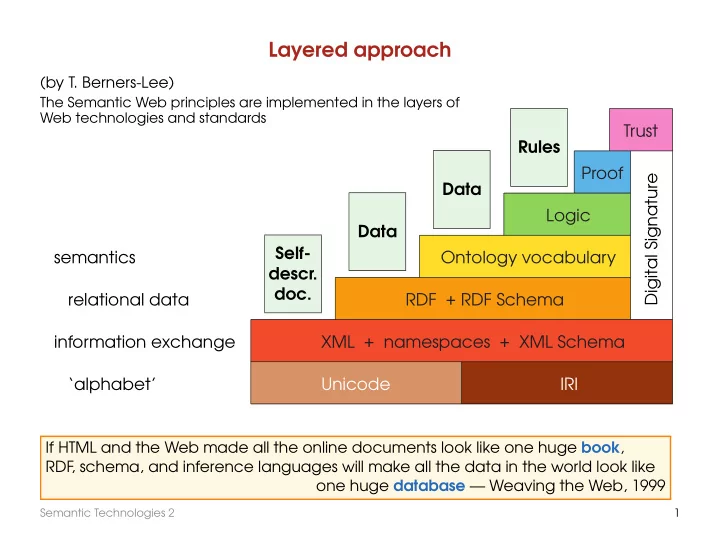
Layered approach (by T. Berners-Lee) The Semantic Web principles are implemented in the layers of Web technologies and standards Trust Rules Proof Digital Signature Data Logic Data Self- semantics Ontology vocabulary descr. doc.


slide-1
SLIDE 1

Layered approach

Unicode IRI XML + namespaces + XML Schema RDF + RDF Schema Ontology vocabulary Logic Proof Trust Digital Signature Self- descr. doc. Data Data Rules ‘alphabet’ information exchange relational data semantics

(by T. Berners-Lee)

The Semantic Web principles are implemented in the layers of Web technologies and standards

If HTML and the Web made all the online documents look like one huge book, RDF , schema, and inference languages will make all the data in the world look like

  • ne huge database — Weaving the Web, 1999

Semantic Technologies 2 1

slide-2
SLIDE 2

Alphabet: Unicode and IRI

  • Unicode is an industry standard designed to allow text and symbols from

all of the writing systems in the world to be consistently represented and manipulated by computers. For details visit http://www.unicode.org/

  • A Uniform Resource Identifier (URI) is a string of ASCII characters used to

identify a resource (http://www.w3.org/Addressing/URL/URI_Overview.html). (Internationalised) IRIs extend URIs by using the Universal Character Set An IRI can be classified as a locator or a name or both:

  • A Uniform Resource Locator (URL) is an IRI that, in addition to identifying a resource,

provides means of obtaining a representation of the resource by describing its pri- mary access mechanism or network ‘location.’ E.g., the URL http://www.bbc.com/ is a URI that identifies a resource (BBC’s home page) and implies that a representa- tion of that resource is obtainable via HTTP from a network host named www.bbc.com

  • A Uniform Resource Name (URN) is an IRI that identifies a resource by name in a par-

ticular namespace. A URN can be used to talk about a resource without implying its location. E.g., the URN urn:isbn:0-395-36341-1 is a URI that, like an International Standard Book Number (ISBN), allows one to talk about a book, but doesn’t suggest where and how to obtain an actual copy of it

Semantic Technologies 2 2

slide-3
SLIDE 3

Information exchange: structured Web documents

SGML — standard generalised markup language:

Historically, electronic manuscripts contained control codes or macros that caused documents to be formatted in a particular way (‘specific coding’). In contrast, generic coding, which began in the late 1960s, uses descriptive tags (for example, ‘heading,’ rather than ‘format-17’). Also in the late 1960s, New York book designer S. Rice pro- posed the idea of a universal catalog of parameterised ‘editorial structure’ tags. In 1969, C. Goldfarb was leading an IBM research project on integrated law office in- formation systems. Together with E. Mosher and R. Lorie he invented the Generalised Markup Language, GML, as a means of allowing the text editing, formatting, and infor- mation retrieval subsystems to share documents. Instead of a simple tagging scheme GML introduced the concept of a formally-defined document type with an explicit nested element structure. The first working draft of the GML standard SGML was published in 1980.

For details consult, e.g., http://www.w3.org/MarkUp/SGML/ and http://www.isgmlug.org/sgmlhelp/g-index.htm

Semantic Technologies 2 3

slide-4
SLIDE 4

HTML

HTML (hypertext markup language) is an SGML application.

HTML is a markup language designed for the creation of web pages with hypertext and other information to be displayed in a web browser. HTML is used to structure information — denoting certain text as headings, paragraphs, lists and so on — and can be used to describe the appearance of a document. It describes information as collections of documents connected by hyperlinks. Originally defined by Tim Berners-Lee, HTML is now an international standard. Later HTML specifications are maintained by the W3C; see http://www.w3.org/MarkUp/

Semantic Technologies 2 4

slide-5
SLIDE 5

HTML

HTML (hypertext markup language) is an SGML application.

HTML is a markup language designed for the creation of web pages with hypertext and other information to be displayed in a web browser. HTML is used to structure information — denoting certain text as headings, paragraphs, lists and so on — and can be used to describe the appearance of a document. It describes information as collections of documents connected by hyperlinks. Originally defined by Tim Berners-Lee, HTML is now an international standard. Later HTML specifications are maintained by the W3C; see http://www.w3.org/MarkUp/

<h2>A Semantic Web Primer</h2> <i>by <b>G. Antoniou</b> and <b>F. van Harmelen</b> </i> <br/>The MIT Press <br/>ISBN 0-262-01210-3

  • Do you understand the meaning of the piece above?

Semantic Technologies 2 4

slide-6
SLIDE 6

HTML

HTML (hypertext markup language) is an SGML application.

HTML is a markup language designed for the creation of web pages with hypertext and other information to be displayed in a web browser. HTML is used to structure information — denoting certain text as headings, paragraphs, lists and so on — and can be used to describe the appearance of a document. It describes information as collections of documents connected by hyperlinks. Originally defined by Tim Berners-Lee, HTML is now an international standard. Later HTML specifications are maintained by the W3C; see http://www.w3.org/MarkUp/

<h2>A Semantic Web Primer</h2> <i>by <b>G. Antoniou</b> and <b>F. van Harmelen</b> </i> <br/>The MIT Press <br/>ISBN 0-262-01210-3

  • Do you understand the meaning of the piece above?
  • What about machines?

Semantic Technologies 2 4

slide-7
SLIDE 7

HTML (cont.)

  • Human reading:

“A Semantic Web Primer” is a book written by G. Antoniou and F . van Harmelen and published by the MIT Press. Its ISBN is 0-262-01210-3.

Semantic Technologies 2 5

slide-8
SLIDE 8

HTML (cont.)

  • Human reading:

“A Semantic Web Primer” is a book written by G. Antoniou and F . van Harmelen and published by the MIT Press. Its ISBN is 0-262-01210-3.

  • Machine ‘reading’:

Semantic Technologies 2 5

slide-9
SLIDE 9

HTML (cont.)

  • Human reading:

“A Semantic Web Primer” is a book written by G. Antoniou and F . van Harmelen and published by the MIT Press. Its ISBN is 0-262-01210-3.

  • Machine ‘reading’:

Can the machine ‘understand’ that “A Semantic Web Primer” is the title? Can the machine ‘understand’ that

  • G. Antoniou and F

. van Harmelen are the authors of this book?

How can we query such documents?

  • HTML documents simply display information and links to other documents.
  • HTML is based on a fixed set of tags.

Semantic Technologies 2 5

slide-10
SLIDE 10

XML (eXtensible Markup Language)

  • XML is another SGML application

see http://www.w3.org/XML/ http://www.w3schools.com/xml/xml_whatis.asp

– XML is based on tags – tags may be nested – tags must be closed

<booktitle>A Semantic Web Primer</booktitle>

  • element

Semantic Technologies 2 6

slide-11
SLIDE 11

XML (eXtensible Markup Language)

  • XML is another SGML application

see http://www.w3.org/XML/ http://www.w3schools.com/xml/xml_whatis.asp

– XML is based on tags – tags may be nested – tags must be closed

<booktitle>A Semantic Web Primer</booktitle>

  • element
  • XML documents give more structural information about their pieces and

relations between them through the nesting structure

<book> <title>A Semantic Web Primer</title> <author>G. Antoniou</author> <author>F. Van Harmelen</author> <publisher>The MIT Press</publisher> <ISBN>0-262-01210-3</ISBN> </book>

thus, the author element ‘refers’ to the enclosing book element, so we can find the authors of the book ‘A Semantic Web Primer’

Semantic Technologies 2 6

slide-12
SLIDE 12

XML (cont.)

  • XML allows the representation of information that is also machine-accessible
  • XML separates content from formatting

(XML was designed to carry data, not to display data)

  • XML is a metalanguage for markup:

it doesn’t have a fixed set of tags but allows users to define tags of their own

XML applications (extensions) for various domains: MathML (mathematics), BSML (bioinformatics), NewsML, etc.

  • XML is not a single markup language that can be extended for other uses,

but rather it is a common notation that markup languages can build upon. (You can define your own markup languages, e.g., for describing recipes, football players, etc.)

  • XML was designed to transport and store data
  • XML can serve as a uniform data exchange format

Semantic Technologies 2 7

slide-13
SLIDE 13

The XML syntax

<?xml version=′′1.0′′ encoding=′′UTF-16′′?> <email> <head> <from address=′′michael@dcs.bbk.ac.uk′′>Michael Zakharyaschev</from> <to address=′′mark@dcs.bbk.ac.uk′′>Mark Levene</to> <subject>REF impact</subject> </head> <body> <!-- the actual content is here --> </body> </email>

Semantic Technologies 2 8

slide-14
SLIDE 14

The XML syntax

<?xml version=′′1.0′′ encoding=′′UTF-16′′?> <email> <head> <from address=′′michael@dcs.bbk.ac.uk′′>Michael Zakharyaschev</from> <to address=′′mark@dcs.bbk.ac.uk′′>Mark Levene</to> <subject>REF impact</subject> </head> <body> <!-- the actual content is here --> </body> </email>

prolog

Semantic Technologies 2 8

slide-15
SLIDE 15

The XML syntax

<?xml version=′′1.0′′ encoding=′′UTF-16′′?> <email> <head> <from address=′′michael@dcs.bbk.ac.uk′′>Michael Zakharyaschev</from> <to address=′′mark@dcs.bbk.ac.uk′′>Mark Levene</to> <subject>REF impact</subject> </head> <body> <!-- the actual content is here --> </body> </email>

prolog      content

  • pening tag

closing tag

Semantic Technologies 2 8

slide-16
SLIDE 16

The XML syntax

<?xml version=′′1.0′′ encoding=′′UTF-16′′?> <email> <head> <from address=′′michael@dcs.bbk.ac.uk′′>Michael Zakharyaschev</from> <to address=′′mark@dcs.bbk.ac.uk′′>Mark Levene</to> <subject>REF impact</subject> </head> <body> <!-- the actual content is here --> </body> </email>

prolog      content

  • pening tag

closing tag

☛ ✡ ✟ ✠ ❍ ❍ ❍ ❍ ❍ ❍ ❍ ❍ ❍ ❨

attribute

Semantic Technologies 2 8

slide-17
SLIDE 17

The XML syntax

<?xml version=′′1.0′′ encoding=′′UTF-16′′?> <email> <head> <from address=′′michael@dcs.bbk.ac.uk′′>Michael Zakharyaschev</from> <to address=′′mark@dcs.bbk.ac.uk′′>Mark Levene</to> <subject>REF impact</subject> </head> <body> <!-- the actual content is here --> </body> </email>

prolog      content

  • pening tag

closing tag

☛ ✡ ✟ ✠ ❍ ❍ ❍ ❍ ❍ ❍ ❍ ❍ ❍ ❨

attribute

comment

Semantic Technologies 2 8

slide-18
SLIDE 18

The XML syntax

<?xml version=′′1.0′′ encoding=′′UTF-16′′?> <email> <head> <from address=′′michael@dcs.bbk.ac.uk′′>Michael Zakharyaschev</from> <to address=′′mark@dcs.bbk.ac.uk′′>Mark Levene</to> <subject>REF impact</subject> </head> <body> <!-- the actual content is here --> </body> </email>

prolog      content

  • pening tag

closing tag

☛ ✡ ✟ ✠ ❍ ❍ ❍ ❍ ❍ ❍ ❍ ❍ ❍ ❨

attribute

comment Syntactic correctness: well-formed XML documents

Semantic Technologies 2 8

slide-19
SLIDE 19

The XML syntax

<?xml version=′′1.0′′ encoding=′′UTF-16′′?> <email> <head> <from address=′′michael@dcs.bbk.ac.uk′′>Michael Zakharyaschev</from> <to address=′′mark@dcs.bbk.ac.uk′′>Mark Levene</to> <subject>REF impact</subject> </head> <body> <!-- the actual content is here --> </body> </email>

prolog      content

  • pening tag

closing tag

☛ ✡ ✟ ✠ ❍ ❍ ❍ ❍ ❍ ❍ ❍ ❍ ❍ ❨

attribute

comment Syntactic correctness: well-formed XML documents

do we really need attributes?

Semantic Technologies 2 8

slide-20
SLIDE 20

The XML syntax

<?xml version=′′1.0′′ encoding=′′UTF-16′′?> <email> <head> <from address=′′michael@dcs.bbk.ac.uk′′>Michael Zakharyaschev</from> <to address=′′mark@dcs.bbk.ac.uk′′>Mark Levene</to> <subject>REF impact</subject> </head> <body> <!-- the actual content is here --> </body> </email>

prolog      content

  • pening tag

closing tag

☛ ✡ ✟ ✠ ❍ ❍ ❍ ❍ ❍ ❍ ❍ ❍ ❍ ❨

attribute

comment Syntactic correctness: well-formed XML documents

do we really need attributes?

  • NB. XML syntax is not part of this module, but you should be able to ‘read’ XML documents

Semantic Technologies 2 8

slide-21
SLIDE 21

The tree model of XML documents

(tree is a special type of graph) ✓ ✒ ✏ ✑

root

✓ ✒ ✏ ✑

email

❳❳❳❳❳❳❳❳❳❳❳❳ ✘ ✘ ✘ ✘ ✘ ✘ ✘ ✘ ✘ ✘ ✘ ✘ ✓ ✒ ✏ ✑

body

✓ ✒ ✏ ✑

head

✟ ✟ ✟ ✟ ❍❍❍❍ ❤❤❤❤❤❤❤❤❤❤❤❤❤❤ ❤ ✓ ✒ ✏ ✑

from

❅ ❅ ❅ ✓ ✒ ✏ ✑

to

❍❍❍❍❍❍ ✓ ✒ ✏ ✑

subject

✓ ✒ ✏ ✑

address

✓ ✒ ✏ ✑

address

Michael Zakharyaschev michael@ dcs.bbk.ac.uk Mark Levene mark@ dcs.bbk.ac.uk REF impact ...

Semantic Technologies 2 9

slide-22
SLIDE 22

The tree model of XML documents

(tree is a special type of graph) ✓ ✒ ✏ ✑

root

✓ ✒ ✏ ✑

email

❳❳❳❳❳❳❳❳❳❳❳❳ ✘ ✘ ✘ ✘ ✘ ✘ ✘ ✘ ✘ ✘ ✘ ✘ ✓ ✒ ✏ ✑

body

✓ ✒ ✏ ✑

head

✟ ✟ ✟ ✟ ❍❍❍❍ ❤❤❤❤❤❤❤❤❤❤❤❤❤❤ ❤ ✓ ✒ ✏ ✑

from

❅ ❅ ❅ ✓ ✒ ✏ ✑

to

❍❍❍❍❍❍ ✓ ✒ ✏ ✑

subject

✓ ✒ ✏ ✑

address

✓ ✒ ✏ ✑

address

Michael Zakharyaschev michael@ dcs.bbk.ac.uk Mark Levene mark@ dcs.bbk.ac.uk REF impact ...

  • exactly one root
  • no cycles
  • each node, other than root,

has exactly one parent

  • each node has a label

the order of elements is important

Semantic Technologies 2 9

slide-23
SLIDE 23

Structuring XML documents

Imagine two applications that try to communicate, and that they wish to use the same vocabulary. For this purpose it is necessary to define

  • all the element and attribute names that may be used;
  • the structure:

– what values an attribute may take; – which elements may or must occur within other elements; – etc.

Semantic Technologies 2 10

slide-24
SLIDE 24

Structuring XML documents

Imagine two applications that try to communicate, and that they wish to use the same vocabulary. For this purpose it is necessary to define

  • all the element and attribute names that may be used;
  • the structure:

– what values an attribute may take; – which elements may or must occur within other elements; – etc. An XML document is valid if it is well-formed, uses structuring information and respects that structuring information.

Semantic Technologies 2 10

slide-25
SLIDE 25

Structuring XML documents

Imagine two applications that try to communicate, and that they wish to use the same vocabulary. For this purpose it is necessary to define

  • all the element and attribute names that may be used;
  • the structure:

– what values an attribute may take; – which elements may or must occur within other elements; – etc. An XML document is valid if it is well-formed, uses structuring information and respects that structuring information. There are two ways of defining the structure of XML documents:

  • Document Type Definition (DTD), used already for SGML documents
  • XML Schema, a significantly richer language

– based on XML

(DTD uses a separate syntax);

– provides a sophisticated set of data types

(DTD is limited to strings only);

– allows one to define new types by extending or restricting existing ones.

Semantic Technologies 2 10

slide-26
SLIDE 26

XML Schema: example

XML-schema is a document describing the valid format of XML data-sets: what ele- ments are (not) allowed at any point, their attributes, the number of occurrences, etc. <schema xmlns=′′http://www.w3.org/2001/XMLSchema′′ version=′′1.0′′> <element name=′′email′′ type=′′emailType′′/> <complexType name=′′emailType′′> <sequence> <element name=′′head′′ type=′′headType′′/> <element name=′′body′′ type=′′bodyType′′/> </sequence> </complexType> <complexType name=′′headType′′> <sequence> <element name=′′from′′ type=′′addressType′′/> <element name=′′to′′ type=′′addressType′′ minOccurs=′′1′′ maxOccurs=′′unbounded′′/> <element name=′′subject′′ type=′′string′′/> </sequence> </complexType> ... </schema>

Semantic Technologies 2 11

slide-27
SLIDE 27

XML Schema

  • elements

<element name=′′...′′ ... /> – type=′′...′′ – minOccurs=′′x′′, where x may be any natural number (1 by default) – maxOccurs=′′x′′, where x may be any natural number or unbounded (1 by default)

Semantic Technologies 2 12

slide-28
SLIDE 28

XML Schema

  • elements

<element name=′′...′′ ... /> – type=′′...′′ – minOccurs=′′x′′, where x may be any natural number (1 by default) – maxOccurs=′′x′′, where x may be any natural number or unbounded (1 by default)

  • attributes

<attribute name=′′...′′ ... /> – type=′′...′′ – use=′′x′′, where x may be optional or required – default=′′...′′

the attribute is to appear unconditionally with the supplied value used whenever the attribute is not actually present

– fixed=′′...′′

the attribute value if present must equal the supplied constraint value, and if absent receives the supplied value as for default

Semantic Technologies 2 12

slide-29
SLIDE 29

XML Schema: data types

  • built-in data types:

(used in RDF , OWL, etc.)

– numerical: integer, short, byte, long, float, decimal – string: string, ID, IDREF, language – date and time: time, date, dateTime, ...

Semantic Technologies 2 13

slide-30
SLIDE 30

XML Schema: data types

  • built-in data types:

(used in RDF , OWL, etc.)

– numerical: integer, short, byte, long, float, decimal – string: string, ID, IDREF, language – date and time: time, date, dateTime, ... User-defined data types:

  • simple data types

(cannot have attributes)

Semantic Technologies 2 13

slide-31
SLIDE 31

XML Schema: data types

  • built-in data types:

(used in RDF , OWL, etc.)

– numerical: integer, short, byte, long, float, decimal – string: string, ID, IDREF, language – date and time: time, date, dateTime, ... User-defined data types:

  • simple data types

(cannot have attributes)

  • complex data types

– sequence — a sequence of existing data type elements, the appearance of which in a predefined order is important – all — a collection of elements that must appear, but the order of which is not important – choice — a collection of elements, of which one will be chosen.

Semantic Technologies 2 13

slide-32
SLIDE 32

Namespaces

Problem: name clashes

Semantic Technologies 2 14

slide-33
SLIDE 33

Namespaces

Problem: name clashes Solution: different prefix for each schema

prefix: name

<?xml version=”1.0” encoding=”UTF-16”?> <vu:instructors xmlns:uky=′′http://www.uky.edu/schema′′ xmlns:gu=′′http://www.gu.au/schema′′ xmlns:vu=′′http://www.vu.com/schema′′> <uky:faculty uky:title=′′lecturer′′ uky:name=′′John Smiths′′/> <gu:academicStaff gu:title=′′lecturer′′ gu:name=′′Mate Jones′′/> </vu:instructors>

  • namespace declaration

xmlns:prefix=′′location′′

  • location used by default

xmlns=′′location′′

A namespace is a context in which a group of one or more identifiers might exist. An identifier defined in a namespace is associated with that namespace.

Semantic Technologies 2 14

slide-34
SLIDE 34

What can XML do?

So far: XML Does not DO Anything and was not designed to DO anything! XML document is just pure information wrapped in XML tags. XSL (eXtensible Stylesheet Language) is a family of recommendations for defining XML document transformation and presentation. XSL is an XML application. It consists of three parts:

  • XSLT — a language for transforming XML documents
  • XPath — a language for navigating in XML documents
  • XSL-FO — a language for formatting XML documents

For more information visit: http://www.w3schools.com/xsl/xsl_languages.asp http://www.w3.org/Style/XSL/

Semantic Technologies 2 15

slide-35
SLIDE 35

Querying XML documents: XPath

http://www.w3.org/TR/xpath, http://www.w3schools.com/xpath/default.asp

<?xml version=′′1.0′′ encoding=′′UTF-16′′?> <library xmlns=′′http://www.lib.org/schema′′ location=′′Bremen′′> <author name=′′Jorge Luis Borges′′> <book title=′′Labyrinths′′/> <book title=′′Doctor Brodie’s Report′′/> <book title=′′The Garden of Forking Paths′′/> </author> <author name=′′Adolfo Bioy Casares′′> <book title=′′The Invention of Morel′′/> </author> <author name=′′Julio Cort´ azar′′> <book title=′′Bestiario′′/> <book title=′′Un tal Lucas′′/> </author> ... </library>

Semantic Technologies 2 16

slide-36
SLIDE 36

Querying XML documents: XPath

http://www.w3.org/TR/xpath, http://www.w3schools.com/xpath/default.asp

<?xml version=′′1.0′′ encoding=′′UTF-16′′?> <library xmlns=′′http://www.lib.org/schema′′ location=′′Bremen′′> <author name=′′Jorge Luis Borges′′> <book title=′′Labyrinths′′/> <book title=′′Doctor Brodie’s Report′′/> <book title=′′The Garden of Forking Paths′′/> </author> <author name=′′Adolfo Bioy Casares′′> <book title=′′The Invention of Morel′′/> </author> <author name=′′Julio Cort´ azar′′> <book title=′′Bestiario′′/> <book title=′′Un tal Lucas′′/> </author> ... </library>

XPath expressions

  • /library/author

Semantic Technologies 2 16

slide-37
SLIDE 37

Querying XML documents: XPath

http://www.w3.org/TR/xpath, http://www.w3schools.com/xpath/default.asp

<?xml version=′′1.0′′ encoding=′′UTF-16′′?> <library xmlns=′′http://www.lib.org/schema′′ location=′′Bremen′′> <author name=′′Jorge Luis Borges′′> <book title=′′Labyrinths′′/> <book title=′′Doctor Brodie’s Report′′/> <book title=′′The Garden of Forking Paths′′/> </author> <author name=′′Adolfo Bioy Casares′′> <book title=′′The Invention of Morel′′/> </author> <author name=′′Julio Cort´ azar′′> <book title=′′Bestiario′′/> <book title=′′Un tal Lucas′′/> </author> ... </library>

XPath expressions

  • /library/author
  • //author

Semantic Technologies 2 16

slide-38
SLIDE 38

Querying XML documents: XPath

http://www.w3.org/TR/xpath, http://www.w3schools.com/xpath/default.asp

<?xml version=′′1.0′′ encoding=′′UTF-16′′?> <library xmlns=′′http://www.lib.org/schema′′ location=′′Bremen′′> <author name=′′Jorge Luis Borges′′> <book title=′′Labyrinths′′/> <book title=′′Doctor Brodie’s Report′′/> <book title=′′The Garden of Forking Paths′′/> </author> <author name=′′Adolfo Bioy Casares′′> <book title=′′The Invention of Morel′′/> </author> <author name=′′Julio Cort´ azar′′> <book title=′′Bestiario′′/> <book title=′′Un tal Lucas′′/> </author> ... </library>

XPath expressions

  • /library/author
  • //author

(anywhere in the document)

  • /library/@location

Semantic Technologies 2 16

slide-39
SLIDE 39

Querying XML documents: XPath

http://www.w3.org/TR/xpath, http://www.w3schools.com/xpath/default.asp

<?xml version=′′1.0′′ encoding=′′UTF-16′′?> <library xmlns=′′http://www.lib.org/schema′′ location=′′Bremen′′> <author name=′′Jorge Luis Borges′′> <book title=′′Labyrinths′′/> <book title=′′Doctor Brodie’s Report′′/> <book title=′′The Garden of Forking Paths′′/> </author> <author name=′′Adolfo Bioy Casares′′> <book title=′′The Invention of Morel′′/> </author> <author name=′′Julio Cort´ azar′′> <book title=′′Bestiario′′/> <book title=′′Un tal Lucas′′/> </author> ... </library>

XPath expressions

  • /library/author
  • //author

(anywhere in the document)

  • /library/@location

(attribute node)

  • //book/@title=′′Bestiario′′

Semantic Technologies 2 16

slide-40
SLIDE 40

Querying XML documents: XPath

http://www.w3.org/TR/xpath, http://www.w3schools.com/xpath/default.asp

<?xml version=′′1.0′′ encoding=′′UTF-16′′?> <library xmlns=′′http://www.lib.org/schema′′ location=′′Bremen′′> <author name=′′Jorge Luis Borges′′> <book title=′′Labyrinths′′/> <book title=′′Doctor Brodie’s Report′′/> <book title=′′The Garden of Forking Paths′′/> </author> <author name=′′Adolfo Bioy Casares′′> <book title=′′The Invention of Morel′′/> </author> <author name=′′Julio Cort´ azar′′> <book title=′′Bestiario′′/> <book title=′′Un tal Lucas′′/> </author> ... </library>

XPath expressions

  • /library/author
  • //author

(anywhere in the document)

  • /library/@location

(attribute node)

  • //book/@title=′′Bestiario′′

(attribute node)

  • //book[@title=′′Bestiario′′]

(filter expression; all books with the title)

Semantic Technologies 2 16

slide-41
SLIDE 41

Querying XML documents: XPath

http://www.w3.org/TR/xpath, http://www.w3schools.com/xpath/default.asp

<?xml version=′′1.0′′ encoding=′′UTF-16′′?> <library xmlns=′′http://www.lib.org/schema′′ location=′′Bremen′′> <author name=′′Jorge Luis Borges′′> <book title=′′Labyrinths′′/> <book title=′′Doctor Brodie’s Report′′/> <book title=′′The Garden of Forking Paths′′/> </author> <author name=′′Adolfo Bioy Casares′′> <book title=′′The Invention of Morel′′/> </author> <author name=′′Julio Cort´ azar′′> <book title=′′Bestiario′′/> <book title=′′Un tal Lucas′′/> </author> ... </library>

XPath expressions

  • /library/author
  • //author

(anywhere in the document)

  • /library/@location

(attribute node)

  • //book/@title=′′Bestiario′′

(attribute node)

  • //book[@title=′′Bestiario′′]

(filter expression; all books with the title)

  • //author[1]

Semantic Technologies 2 16

slide-42
SLIDE 42

Querying XML documents: XPath

http://www.w3.org/TR/xpath, http://www.w3schools.com/xpath/default.asp

<?xml version=′′1.0′′ encoding=′′UTF-16′′?> <library xmlns=′′http://www.lib.org/schema′′ location=′′Bremen′′> <author name=′′Jorge Luis Borges′′> <book title=′′Labyrinths′′/> <book title=′′Doctor Brodie’s Report′′/> <book title=′′The Garden of Forking Paths′′/> </author> <author name=′′Adolfo Bioy Casares′′> <book title=′′The Invention of Morel′′/> </author> <author name=′′Julio Cort´ azar′′> <book title=′′Bestiario′′/> <book title=′′Un tal Lucas′′/> </author> ... </library>

XPath expressions

  • /library/author
  • //author

(anywhere in the document)

  • /library/@location

(attribute node)

  • //book/@title=′′Bestiario′′

(attribute node)

  • //book[@title=′′Bestiario′′]

(filter expression; all books with the title)

  • //author[1]

(the first node)

  • //author[1]/book[last()]

Semantic Technologies 2 16

slide-43
SLIDE 43

Querying XML documents: XPath

http://www.w3.org/TR/xpath, http://www.w3schools.com/xpath/default.asp

<?xml version=′′1.0′′ encoding=′′UTF-16′′?> <library xmlns=′′http://www.lib.org/schema′′ location=′′Bremen′′> <author name=′′Jorge Luis Borges′′> <book title=′′Labyrinths′′/> <book title=′′Doctor Brodie’s Report′′/> <book title=′′The Garden of Forking Paths′′/> </author> <author name=′′Adolfo Bioy Casares′′> <book title=′′The Invention of Morel′′/> </author> <author name=′′Julio Cort´ azar′′> <book title=′′Bestiario′′/> <book title=′′Un tal Lucas′′/> </author> ... </library>

XPath expressions

  • /library/author
  • //author

(anywhere in the document)

  • /library/@location

(attribute node)

  • //book/@title=′′Bestiario′′

(attribute node)

  • //book[@title=′′Bestiario′′]

(filter expression; all books with the title)

  • //author[1]

(the first node)

  • //author[1]/book[last()]

(the last node)

  • //book[not @title]

Semantic Technologies 2 16

slide-44
SLIDE 44

Querying XML documents: XPath

http://www.w3.org/TR/xpath, http://www.w3schools.com/xpath/default.asp

<?xml version=′′1.0′′ encoding=′′UTF-16′′?> <library xmlns=′′http://www.lib.org/schema′′ location=′′Bremen′′> <author name=′′Jorge Luis Borges′′> <book title=′′Labyrinths′′/> <book title=′′Doctor Brodie’s Report′′/> <book title=′′The Garden of Forking Paths′′/> </author> <author name=′′Adolfo Bioy Casares′′> <book title=′′The Invention of Morel′′/> </author> <author name=′′Julio Cort´ azar′′> <book title=′′Bestiario′′/> <book title=′′Un tal Lucas′′/> </author> ... </library>

XPath expressions

  • /library/author
  • //author

(anywhere in the document)

  • /library/@location

(attribute node)

  • //book/@title=′′Bestiario′′

(attribute node)

  • //book[@title=′′Bestiario′′]

(filter expression; all books with the title)

  • //author[1]

(the first node)

  • //author[1]/book[last()]

(the last node)

  • //book[not @title]

(all books without a title) see next page for explanations

Semantic Technologies 2 16

slide-45
SLIDE 45

XPath syntax

  • 1. /library/author

addresses all author elements that are children of the library element, which resides immediately below the root

  • 2. //author

// means that we should consider all elements in the document and check whether they are of type author

  • 3. /library/@location

symbol @ is used to denote attribute nodes

  • 4. //book/@title=′′Bestiario′′

addresses all title attribute nodes within book elements anywhere in the document with value ′′Bestiario′′

  • 5. //book[@title=′′Bestiario′′]

addresses all books with title ′′Bestiario′′

  • 6. //author[1]

addresses the first author element node in the document

  • 7. //author[1]/book[last()]

addresses the last book element within the first author element node in the document

  • 8. //book[not @title]

addresses all book element nodes without a title attribute

Semantic Technologies 2 17

slide-46
SLIDE 46

XML: summary

  • XML is a metalanguage that allows users to define markup for their

documents using tags, a standard syntax for meta data.

  • Nesting of tags introduces structure. The structure of documents

can be enforced using schemas or DTDs.

  • XML separates content and structure from formatting.
  • XML is the de facto standard for the representation of structured information
  • n the Web and supports machine processing of information.
  • XML is supported by query languages.
  • XML creates application-independent documents and data.
  • XML has become the universal syntax for exchanging data between
  • rganisations.

The impact of XML has been so extensive that it can be considered as a data revolution.

Semantic Technologies 2 18

slide-47
SLIDE 47

XML: summary

  • XML is a metalanguage that allows users to define markup for their

documents using tags, a standard syntax for meta data.

  • Nesting of tags introduces structure. The structure of documents

can be enforced using schemas or DTDs.

  • XML separates content and structure from formatting.
  • XML is the de facto standard for the representation of structured information
  • n the Web and supports machine processing of information.
  • XML is supported by query languages.
  • XML creates application-independent documents and data.
  • XML has become the universal syntax for exchanging data between
  • rganisations.

The impact of XML has been so extensive that it can be considered as a data revolution.

  • But is XML powerful enough for the purposes of the Semantic Web?

Semantic Technologies 2 18

slide-48
SLIDE 48

JSON: JavaScript Object Notation

JSON is an open-standard file format that uses human-readable text to trans- mit data objects consisting of attribute-value pairs and array data types. It is a very common data format used for asynchronous browser-server communica- tion, including as a replacement for XML. JSON was derived from JavaScript, and many programming languages include code to generate and parse JSON-format data. The official Internet media type for JSON is application/json. JSON filenames use the extension .json. JSON Schema specifies a JSON-based format to define the structure of JSON data for validation, documentation, and interaction control. It provides a con- tract for the JSON data required by a given application, and how that data can be modified. XML is simpler than SGML, but JSON is much simpler than XML. JSON has a much smaller grammar and maps more directly onto the data structures used in mod- ern programming languages.

Semantic Technologies 2 19

slide-49
SLIDE 49

JSON example: describing a person

{ "firstName": "John", "lastName": "Smith", "isAlive": true, "age": 25, "address": { "streetAddress": "21 2nd Street", "city": "New York", "state": "NY", "postalCode": "10021-3100" }, "phoneNumbers": [ { "type": "home", "number": "212 555-1234" }, { "type": "office", "number": "646 555-4567" }, { "type": "mobile", "number": "123 456-7890" } ], "children": [], "spouse": null }

Semantic Technologies 2 20