SLIDE 1
II-1
Rules
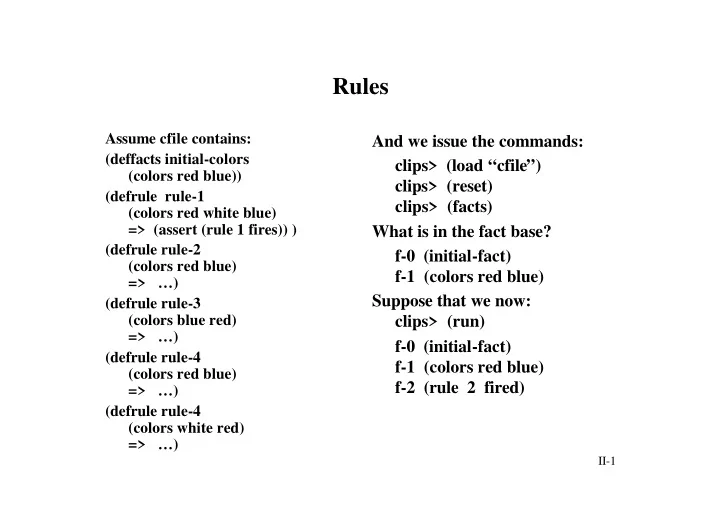
Assume cfile contains: (deffacts initial-colors (colors red blue)) (defrule rule-1 (colors red white blue) => (assert (rule 1 fires)) ) (defrule rule-2 (colors red blue) => …) (defrule rule-3 (colors blue red) => …) (defrule rule-4 (colors red blue) => …) (defrule rule-4 (colors white red) => …)
And we issue the commands: clips> (load “cfile”) clips> (reset) clips> (facts) What is in the fact base? f-0 (initial-fact) f-1 (colors red blue) Suppose that we now: clips> (run) f-0 (initial-fact) f-1 (colors red blue) f-2 (rule 2 fired)
SLIDE 2 II-2
Top Level Rule Commands
(watch <X>) -- where <X> is rules or activations (unwatch <X>) (rules) -- displays names of all rules in K.B. (ppdefrule <r-name>) -- display specified rule (matches <r-name>) -- display list of facts that match conditions of rule (set-break <r-name>) -- sets a break point on rule
- - system returns to top level
before execution of rule Covered Previously: New Commands:
SLIDE 3
II-3
Top Level Rule Commands (cont.)
(remove-break <r-name>) -- removes break (remove-break) -- removes all breaks (show-breaks) -- display all break points (agenda) -- display all rule instantiations on agenda (run) -- start execution, running until no more rules can execute or (halt) is executed (run <n>) -- execute at most <n> rules
SLIDE 4 II-4
Salience
- Numeric value associated with rule
- Range for value: -10000 to 10000
- Default value is 0
- Specifies the priority of rule execution
- Do not (over) use!
Conflict resolution: (1) Find rules which are satisfied (2) Pick rule with highest salience (3) If multiple rules, then apply conflict resolution to pick
SLIDE 5
II-5
Example
(deffacts example-facts (a b c) (Test 1) ) (defrule r-1 (a b c) => (assert (rule 1 fires))) (defrule r-2 (declare (salience 1)) (Test 1) => . . .) (defrule r-3 (declare (salience 1)) (a b c) => ( . . .)
Which rule should be executed first? r-2 Then r-3 Then r-1
SLIDE 6
II-6
Conflict Resolution Strategies
Newly activated rules are placed above all rules of same salience-stack based Suppose: fact-a activates rule-1 and rule-2 fact-b activates rule-3 and rule-4 fact-a is asserted before fact-b Then: rule-3 and rule-4 will be above rule-1 and rule-2 rule-3 and rule-4’s order will be arbitrary rule-1 and rule-2’s order will be arbitrary Depth Strategy
SLIDE 7
II-7
Conflict Resolution Strategies (cont.)
Newly activated rules are placed below all rules of same salience-Queue based Suppose: fact-a activates rule-1 and rule-2 fact-b activates rule-3 and rule-4 fact-a is asserted before fact-b Then: rule-1 and rule-2 will be above rule-3 and rule-4 rule-3 and rule-4’s order will be arbitrary rule-1 and rule-2’s order will be arbitrary Breadth Strategy
SLIDE 8 II-8
Newly activated rules of same salience are placed above all rules of equal or higher specificity Complexity Strategy Among rules of same salience, newly activated rules are placed below all activations with equal
Conflict Resolution Strategies (cont.)
Simplicity Strategy
SLIDE 9
II-9
Conflict Resolution Strategies (cont.)
Each activation is assigned a random number This number determines the activations placement among others of same salience Random Strategy
SLIDE 10
II-10
Conflict Resolution Strategies (cont.)
Scheme used in OPS-5 Rules are ordered by their salience An activation with a more recent fact-index is placed before rules with less recent fact indices If two activations have same recency, then one with higher specificity is placed first LEX Strategy
SLIDE 11
II-11
Conflict Resolution Strategies (cont.)
Scheme available in OPS-5 Rules are ordered by their salience The recency of the fact associated with the first pattern is used to order If two activations have same fact-index for first pattern, then use the LEX strategy MEA Strategy
SLIDE 12 II-12
Pattern Matching
- single field wildcard
- matches anything in corresponding
field of fact
- multi-field wildcard
- matches zero or more fields of a fact
? $?
SLIDE 13 II-13
Pattern Matching (cont.)
?<var>
- single field variable
- <var> is some word
- this symbol matches anything in the
corresponding field of a fact
- value matched is bound to ?<var> for scope of
rule
- examples: ?cat ?color ?machine
$?<var>
- multi-field variable
- matches zero or more fields of a fact
- the value(s) of the matched fields is bound
to $?<var> for the scope of the rule
SLIDE 14
II-14
Examples
LHS Condition Fact in Fact Base Match? (? ?) (data red) (data ?) (data red) (data ?) (data red green) (data ? ?) (data red green) (data red ?) (data red green) (data ? green) (data green) Yes Yes NO! Yes Yes NO! Single field wild cards
SLIDE 15
II-15
Examples
LHS Condition Fact in Fact Base Match? ($?) (data red) (data $?) (data red) (data red $?) (data red) (data $?) (data red green) (data red green $?) (data red green) ($? green) (data red green) ($? red $?) (data red green) (data red $?) (data green red) (data $? red $?) (data green red) ($? $?) (data red) Yes Yes Yes Yes Yes Yes Yes NO! Yes Yes Multi-field wild cards
SLIDE 16
II-16
Examples
LHS Condition Fact in Fact Base Match? (data red ?x) (data red green) (data red ?x) (data red “green”) (data red ?x) (data red 17.4) (data ?x ?x) (data red red) (data ?x ?x) (data red green) (data ?x ?y) (data red green) (data ?x ?y) (data red red) ?x=green ?x=“green” ?x=17.4 ?x=red NO! ?x=red ?y=green ?x=red ?y=red Single Field Variables
SLIDE 17
II-17
Examples
LHS Condition Fact in Fact Base Match? (data red $?x) (data red) (data red $?x) (data red green) (data red $?x) (data red one two) (data $?x $?x) (data red red) (data $?x $?y) (data red green) $?x=() $?x=(green) $?x=(one two) $?x=(red) Multiple matches: Multi-Field Variables $?x=() $?y=(red green) $?x=(red) $?y=(green) $?x=(red green) $?y=()
SLIDE 18
II-18
Fact Base: Rule Base: What rules will be instantiated?
Example of Rules with Variable Pattern Matching
(data red green) (data purple green) (defrule rule-1 (data red ?x) (data purple ?x) => . . .) (defrule rule-2 (data red $?x) (data purple $?x) => . . .) Both rule-1 and rule-2!
SLIDE 19
II-19
Fact Base: Rule Base: What rules will be instantiated?
Example of Rules with Variable Pattern Matching
(data red green) (data red blue green) (data purple blue) (data purple blue brown) (defrule rule-1 (data red ?x) (data purple ?x) => . . .) (defrule rule-2 (data red $?x) (data purple $?x) => . . .) None!
SLIDE 20
II-20
Fact Base: Rule Base: What rules will be instantiated?
Example of Rules with Variable Pattern Matching
(data red green) (data red blue green) (data purple blue) (data purple blue brown) (defrule rule-5 (data red ?x) (data purple ?y) => . . .) (defrule rule-6 (data red $?x) (data purple $?y) => . . .) One instantiation for rule-5, but 4 for rule-6!
SLIDE 21
II-21
Constraints can be placed on the fields of a condition using logical operators: Syntax:
Field Constraints
& and | or ~ not <val1> & <val2> <val1> | <val2> ~<val> ?<var> & (<val1> | <val2>) ?<var> & ~<val>
SLIDE 22
II-22
Examples
Condition Match Facts (data ~red) (data red) (data ~red&~blue) (data green) (data red|blue) (data red) (data ?col&~red) (data green) (data ?col&~red&~blue) (data red) (data ?col&red|blue) (data red) NO Yes Yes ?col=green NO ?col=red
SLIDE 23
II-23
Sample Rule
(defrule complex-eye-hair-match (person ?name1 ?eyes1&blue|green ?hair1&~black) (person ?name2&~?name1 ?eyes2&~?eyes1 ?hair2&red|?hair1) => (printout t ?name1 “ has ” ?eyes1 “ eyes and ” ?hair1 “ hair” crlf) (printout t ?name2 “ has ” ?eyes2 “ eyes and ” ?hair2 “ hair” crlf) )
SLIDE 24 II-24
Built-in Functions
+ - * / ** != = < <= > >= eq neq numberp stringp wordp evenp
integerp Arithmetic: Relational: Predicate:
SLIDE 25
II-25
Examples
Rule Facts Instantiated?
(defrule r-1 (data ?Y) (data 3) (data ?X &:(> ?X ?Y) ) (data 5) => . . . ) (defrule r-2 (data1 ?Y) (data2 4) (data2 ?X &:(= ?X ?Y)) (data1 4) => . . . )
(data ?X &: (numberp ?X) ) (data ?X &: (numberp ?X) & ~: (oddp ?X) ) (data ?X &: (numberp ?X) |: (wordp ?X) )
?X = 5 ?Y = 3 ?Y = 4 ?X = 4
SLIDE 26
II-26
Examples (cont.)
Rule Facts Instantiated?
(defrule r-3 (data1 ?Y) (data1 red) (data2 ?X &:(= ?X ?Y) ) (data2 4) => . . . ) (defrule r-4 (data1 ?Y) (data1 red) (data2 ?X &:(eq ?X ?Y)) (data2 4) => . . . ) (defrule r-5 (data1 ?Y) (data2 4) (data2 ?X &:(neq ?X ?Y)) (data1 red) => . . . ) ERROR! NO! ?Y = red ?X = 4
SLIDE 27 II-27
I/O Functions
- Allows input of a single field
(read <logical-name>)
- Encountering end-of-file returns EOF
- Example:
(defrule rule-1 (initial-fact) => (bind ?input (read)) (assert (data ?input)) )
Read
(defrule rule-1 (initial-fact) => (assert (data =(read t))) )
SLIDE 28 II-28
I/O Functions (cont.)
- Similar to read
- Input is an entire line
- Returns line as a string
(readline <logical-name>) Readline
SLIDE 29
II-29
Open and Close
Files must be opened before used for I/O and closed when finished Modes: R read acess only (default) W write access only R+ read and write access A append access only Close with no arguments closes all opened files (open “<file-name>“ <logical-name> “<mode>“) (close <logical-name>)
SLIDE 30
II-30
Open and Close (cont.)
Example: (defrule read-from-file (initial-fact) => (open “data.clp” my-data) (assert (data1 =(readline mydata))) (close) )