+ + Review n Nested Loops n multiple indices n multiple conditions n - - PDF document

review n nested loops n multiple indices n multiple
SMART_READER_LITE
LIVE PREVIEW

+ + Review n Nested Loops n multiple indices n multiple conditions n - - PDF document

2/15/16 + + Review n Nested Loops n multiple indices n multiple conditions n Trig n unit circle n 360 degrees or 2 pi radians n soh cah toa Trigonometry and Arrays n sin relates to height/y


slide-1
SLIDE 1

2/15/16 ¡ 1 ¡

+

Trigonometry and Arrays

+Review

n Nested Loops n multiple indices n multiple conditions n Trig n unit circle n 360 degrees or 2 pi radians n soh cah toa n sin relates to height/y dimension n cos relates to width/ x dimension n Polar Coordinates n angle and radius.

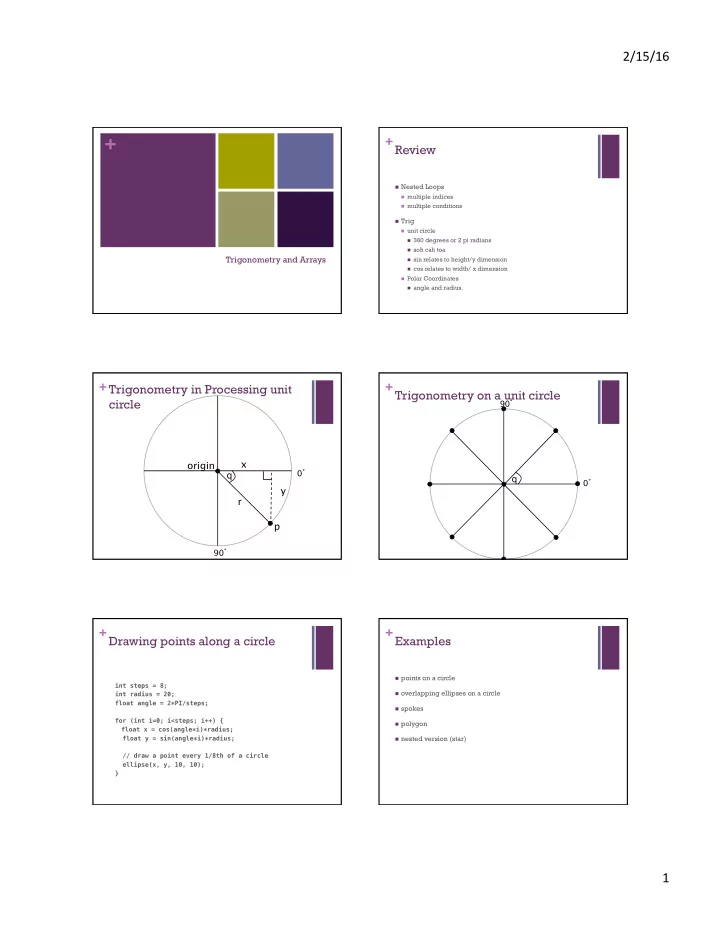
+Trigonometry in Processing unit circle

q r p

0° 90°

  • rigin

x y

+Trigonometry on a unit circle

0° 90°

q

+Drawing points along a circle

  • int steps = 8;

int radius = 20; float angle = 2*PI/steps;

  • for (int i=0; i<steps; i++) {

float x = cos(angle*i)*radius; float y = sin(angle*i)*radius;

  • // draw a point every 1/8th of a circle

ellipse(x, y, 10, 10); }

  • +Examples

n points on a circle n overlapping ellipses on a circle n spokes n polygon n nested version (star)

slide-2
SLIDE 2

2/15/16 ¡ 2 ¡

+So far..

n A program consists of n actions: n call draw functions n line, rect, ellipse, etc. n change the drawing canvas n size, background,

translate, rotate

n do math n *,+,-,/,%,cos, etc. n Input n mouse n keyboard n actions are done on: n literals n 1,2,3,'a',"hello",1.0,true, etc. n variables n int x; n boolean test; n etc. n Actions happen sequentially

unless

n if(condition){}else if(condition)

{}else{}

n switch(variable){ case value:

… default: }

n while(){}, for(){}, do{}while() n functionCall();

+Variables

n So far n store values for re-use n single value n scope defined by where item

is declared.

n New concept n store a group of values n a sequence or collection of

values

n {1,2,3,4} n {2,4,6,8} n {1,3,5,7} n {1,2,3,1,2,1,1,1,1,5,4,3,5,0,2,4,

3,1,6,3,7,2,3,2,2,7,7,7,6,5,4,4}

+Array, Variable Grouping

n a fixed size n one type of value n declare an array n int[] intervals; n float[] temps; n instantiate an array n intervals = new int[10]; n temps = {1.0,32.0,212.0}; n assign values to elements of an array n intervals[0] = 10; n temps[2] = -300.0;

+Arrays

n A ¡special ¡kind ¡of ¡variable ¡that ¡holds ¡not ¡one, ¡but ¡many ¡

data ¡items ¡of ¡a ¡given ¡type. ¡

n Declared ¡like ¡variables, ¡only ¡type ¡is ¡followed ¡by ¡a ¡pair ¡of ¡

  • brackets. ¡

float[] xs;

n Can ¡be ¡iniBalized ¡using ¡a ¡special ¡syntax ¡involving ¡the ¡

new ¡keyword, ¡the ¡type, ¡and ¡a ¡size ¡in ¡brackets. ¡

// Ten diameters int[] diameters = new int[10];

+Arrays

n Individual ¡data ¡items ¡are ¡accessed ¡with ¡an ¡index ¡

and ¡square ¡brackets. ¡

n diameters[0], ¡diameters[1], ¡etc ¡ n Indexes ¡start ¡at ¡0! ¡

n The ¡length ¡of ¡an ¡array ¡can ¡be ¡determined ¡using ¡

its ¡length ¡property. ¡

n diameters.length n The ¡length ¡of ¡an ¡array ¡is ¡one ¡greater ¡than ¡the ¡last ¡valid ¡

  • index. ¡(Because ¡the ¡first ¡index ¡is ¡0.) ¡

n Arrays ¡can ¡be ¡passed ¡to, ¡and ¡returned ¡from ¡

  • funcBons. ¡

+Arrays

n declare an array n int[] intervals; n float[] temps; n instantiate an array n intervals =

new int[10];

n temps =

{1.0, 32.0, 212.0};

n assign values to elements of

an array

n intervals[0] = 10; n temps[2] = -300.0; n int j = 1;

temps[j] = 98.6;

n get the length of an array n println(

"There are " + temps.length + " temperatures.");
slide-3
SLIDE 3

2/15/16 ¡ 3 ¡

+Drawing circles for array of diameters

void drawCircles(int diameter[]) { for (int i=0; i < diameter.length; i++) { float radius = diameter[i]/2.0; float x = random(radius,width-radius); float y = random(radius,height-radius);

  • // draw the circle

ellipse(x, y, diameter[i], diameter[i]); } }

+Example

n Problem: Create 10 circles each with a random diameter at

random positions on the display. Move each circle 1 diameter towards the center of the display once per second.

+Example

n Problem: Create 10 circles each with a random diameter at

random positions on the display. Move each circle 1 diameter towards the center of the display once per second.

n Ada has an idea: n loop 10 times n initialize a diameter, d, with a random value from 10 to 100 n create a circle using ellipse() with n random x from 0 to width n random y from 0 to height n d width and d height

+Example

n Problem: Create 10 circles each with a random diameter at

random positions on the display. Move each circle 1 diameter towards the center of the display once per second.

n Ada has an idea: n loop 10 times n initialize a diameter, d, with a random value from 10 to 100 n create a circle using ellipse() with n random x from 0 to width n random y from 0 to height n d width and d height

This works for the setup, but what about the second step?

+Example

n Problem: Create 10 circles each with a random diameter at

random positions on the display. Move each circle 1 diameter towards the center of the display once per second.

n Grace has an idea: n Create 3 global variables, circleX, circleY, circleDiameter n in setup: initialize global variables randomly,

modify frameRate to 1.

n in draw: n clear drawing n change circleX by circleDiameter * xDist/dist n change circleY by circleDiameter * yDist/dist n draw circle using ellipse: circleX, circleY, circleDiameter,

circleDiameter width/2,height/2 circleX,circleY

+Example

n Problem: Create 10 circles each with a random diameter at

random positions on the display. Move each circle 1 diameter towards the center of the display once per second.

n Grace has an idea: n Create 3 global variables, circleX, circleY, circleDiameter n in setup: initialize global variables randomly,

modify frameRate to 1.

n in draw: n clear drawing n change circleX by circleDiameter * xDist/dist n change circleY by circleDiameter * yDist/dist n draw circle using ellipse: circleX, circleY, circleDiameter,

circleDiameter width/2,height/2 circleX,circleY

This works for one circle, but what about ten?

slide-4
SLIDE 4

2/15/16 ¡ 4 ¡

+Example

n Let's merge Grace and Ada's ideas n Create 3 global arrays, circleXs, circleYs, circleDiameters n in setup: initialize global variables randomly, n loop 10 times n initialize a diameter, circleDiameter[i], with a random value from

10 to width/5

n initialize circleX[i] = random x from 0 to width n initialize circleY[i] = random y from 0 to height n create a circle using ellipse() with n circleX[i] n circleY[i] n circleDiameter[i] width and circleDiameter[i] height n modify frameRate to 1.

+Example

n Let's merge Grace and Ada's ideas (part 2) n in draw: n clear drawing n loop 10 times n compute xDist, yDist, dist n change circleXs[i] by circleDiameters[i] * xDist/dist n change circleYs[i] by circleDiameters[i] * yDist/dist n draw circle using ellipse: circleXs[i], circleYs[i],

circleDiameters[i], circleDiameters[i] width/2,height/2 circleX,circleY

+

int[] diameters = new int[10]; float[] circleXs = new float[10]; float[] circleYs = new float[10]; void setup() { size(displayWidth, displayHeight); background(200); // loop 10 times initializing values randomly for (int i=0; i<diameters.length; i++) { diameters[i] = int(random(0, width/2)); circleXs[i] = random(width); circleYs[i] = random(height);

  • // draw initial circles.

fill(255, 0, 0); ellipse(circleXs[i], circleYs[i], diameters[i], diameters[i]); } frameRate(1); }

+

void draw() { background(200); for (int i = 0; i < diameters.length; i++) { // compute distances float xDist = width/2 - circleXs[i]; float yDist = height/2 - circleYs[i]; float f = 0.001; // modify position by 1 diameter towards center circleXs[i] += diameters[i] * xDist * f; circleYs[i] += diameters[i] * yDist * f; // draw circle ellipse(circleXs[i], circleYs[i], diameters[i], diameters[i]); } }