Pointers and Variables Introduction to Programming and Computer - - PDF document

pointers and variables introduction to programming and
SMART_READER_LITE
LIVE PREVIEW

Pointers and Variables Introduction to Programming and Computer - - PDF document

Pointers and Variables Introduction to Programming and Computer Architecture Cs variables have a data type, e.g. int or double Revision Lectures This tells the compiler how much memory to put aside for it, and the rules for


slide-1
SLIDE 1

1

Introduction to Programming and Computer Architecture Revision Lectures

Review of Pointers

There is no new material in this lecture, but it covers the use

  • f pointers in the various contexts we have seen

There is no new material in this lecture, but it covers the use

  • f pointers in the various contexts we have seen

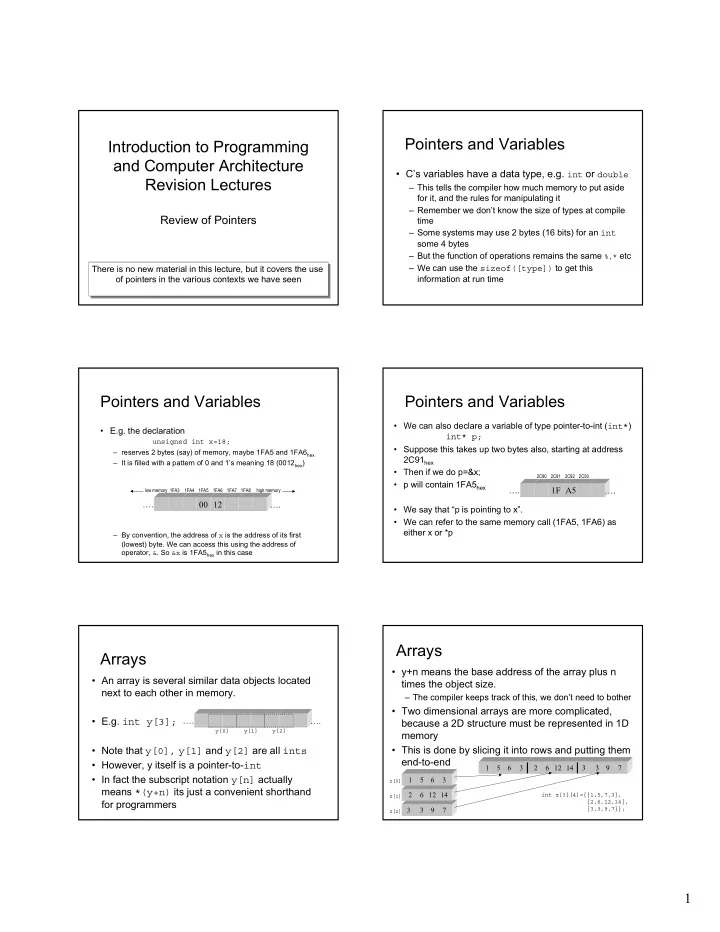
Pointers and Variables

  • C’s variables have a data type, e.g. int or double

– This tells the compiler how much memory to put aside for it, and the rules for manipulating it – Remember we don’t know the size of types at compile time – Some systems may use 2 bytes (16 bits) for an int some 4 bytes – But the function of operations remains the same %,* etc – We can use the sizeof([type]) to get this information at run time

Pointers and Variables

  • E.g. the declaration

unsigned int x=18; – reserves 2 bytes (say) of memory, maybe 1FA5 and 1FA6hex – It is filled with a pattern of 0 and 1’s meaning 18 (0012hex) – By convention, the address of x is the address of its first (lowest) byte. We can access this using the address of

  • perator, &. So &x is 1FA5hex in this case

…. 00 12

low memory 1FA3 1FA4 1FA5 1FA6 1FA7 1FA8 high memory

….

Pointers and Variables

  • We can also declare a variable of type pointer-to-int (int*)

int* p;

  • Suppose this takes up two bytes also, starting at address

2C91hex

  • Then if we do p=&x;
  • p will contain 1FA5hex
  • We say that “p is pointing to x”.
  • We can refer to the same memory call (1FA5, 1FA6) as

either x or *p …. 1F A5

2C90 2C91 2C92 2C93

….

Arrays

  • An array is several similar data objects located

next to each other in memory.

  • E.g. int y[3];
  • Note that y[0], y[1] and y[2] are all ints
  • However, y itself is a pointer-to-int
  • In fact the subscript notation y[n] actually

means *(y+n) its just a convenient shorthand for programmers

…. ….

y[0] y[1] y[2]

Arrays

  • y+n means the base address of the array plus n

times the object size.

– The compiler keeps track of this, we don’t need to bother

  • Two dimensional arrays are more complicated,

because a 2D structure must be represented in 1D memory

  • This is done by slicing it into rows and putting them

end-to-end

z[2] z[1] z[0]

3 3 9 7 2 6 12 14 1 5 6 3 1 5 6 3 2 6 12 14 3 3 9 7

int z[3][4]={{1,5,7,3}, {2,6,12,14}, {3,3,9,7}};

slide-2
SLIDE 2

2

Arrays

  • The first four ints as a group are called

z[0], the second four z[1] and the third four z[2]

  • The first int is called z[0][0], the last one

z[2][3]

  • Now, z[2][3] is an int, so z[2] must be a

pointer-to-int (its an array), so z must be a pointer-to-pointer-to-int (its an array of arrays)

  • So z[2][3] is a shorthand for *(*z+2)+3)

Strings

  • A string is a null-terminated array of chars

– Here null means the null character ‘\0’ which has an ASCII code of zero

  • char s[]=“word”;
  • So s is a pointer-to-char.

– *s is ‘w’ – *(s+1) is ‘o’ – Note that an extra “invisible” character is added as a “sentinel” to mark the end of the string

…. ‘w’ ‘o’ ‘r’ ‘d’ ‘\0’ ….

Pointers and functions

  • A pointer is a variable that holds an address
  • The important thing is that it is a variable, like

any other so can be passed to a function

  • We often see function prototypes like

char* head(char* str, int n);

  • This means “head is a function that takes as

arguments a pointer-to-char and an int”

  • It returns a pointer-to-char

Pointers and functions

  • An important use of pointers with functions is

call-by-reference

  • Here the address of a variable is passed to

the function not the value of the variable

  • This allows the function full access to the
  • riginal variable
  • Any changes made therefore change the
  • riginal variable

Pointers and Structures

  • A struct is simply a user defined data

type

  • Variables of can be created which are of

type struct

  • pointers-to-the-struct-type can be

used e.g. for arrays or passing-by- reference

Pointers and Files

  • There is a special struct type called

FILE which must be used with pointers- to-FILE (streams) for file operations

  • eg

FILE *pf; pf=fopen(“hello.c”,”r”); a stream a function a string (read only) a string (filename)

slide-3
SLIDE 3

3

In summary

  • A pointer is a variable that holds an address
  • It can be the address of an int, float, etc …. or struct
  • The name of an array is a pointer and the subscript notation

is a shorthand for a “pointee”

  • The name of a 2D array is a pointer-to-a-pointer-to ……
  • Strings are just arrays of char, so a string name is a pointer-

to-char

  • Pointer variables can be passed to and returned from

functions just like other variables

  • This is used in call-by-reference
  • We can have pointers-to-struct-types
  • These are used (as pointers-to-FILE, or streams) in file
  • perations.