Outline Encoding Bits to digital signal 15-441/641: Datalink - - PowerPoint PPT Presentation

outline
SMART_READER_LITE
LIVE PREVIEW

Outline Encoding Bits to digital signal 15-441/641: Datalink - - PowerPoint PPT Presentation

4/24/2019 Outline Encoding Bits to digital signal 15-441/641: Datalink Framing Bit stream to packets 15-441 Spring 2019 Packet loss & corruption Profs Peter Steenkiste & Justine Sherry Error detection Flow


slide-1
SLIDE 1

4/24/2019 1

15-441/641: Datalink

15-441 Spring 2019 Profs Peter Steenkiste & Justine Sherry Spring 2019 https://computer-networks.github.io/sp19/

Outline

  • Encoding
  • Bits to digital signal
  • Framing
  • Bit stream to packets
  • Packet loss & corruption
  • Error detection
  • Flow control
  • Loss recovery

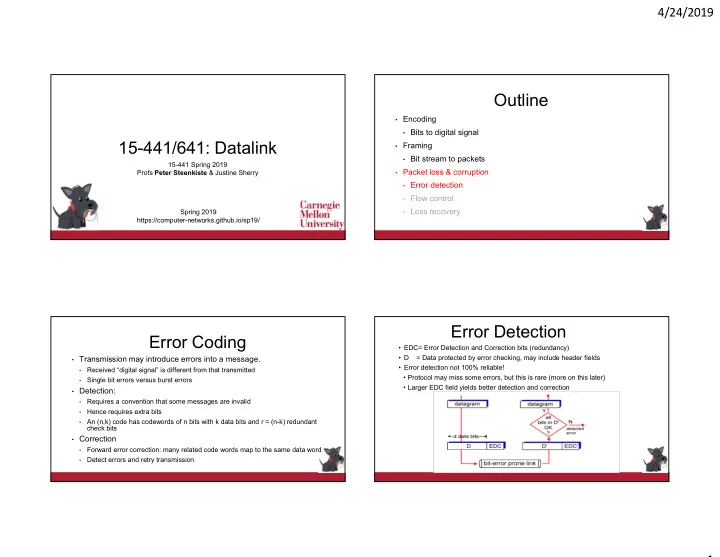
Error Coding

  • Transmission may introduce errors into a message.
  • Received “digital signal” is different from that transmitted
  • Single bit errors versus burst errors
  • Detection:
  • Requires a convention that some messages are invalid
  • Hence requires extra bits
  • An (n,k) code has codewords of n bits with k data bits and r = (n-k) redundant

check bits

  • Correction
  • Forward error correction: many related code words map to the same data word
  • Detect errors and retry transmission

Error Detection

  • EDC= Error Detection and Correction bits (redundancy)
  • D = Data protected by error checking, may include header fields
  • Error detection not 100% reliable!
  • Protocol may miss some errors, but this is rare (more on this later)
  • Larger EDC field yields better detection and correction
slide-2
SLIDE 2

4/24/2019 2

Parity Checking

Single Bit Parity:

Detect single bit errors

6

Internet Checksum

Sender

  • Treat segment contents as

sequence of 16-bit integers

  • Checksum: addition (1’s

complement sum) of segment contents

  • Sender puts checksum

value into checksum field in header

Receiver

  • Compute checksum of

received segment

  • Check if computed checksum

equals checksum field value:

  • NO - error detected
  • YES - no error detected.

But maybe errors nonethless?

  • Goal: detect “errors” (e.g., flipped bits) in transmitted segment
  • Must be easy to computer in software

Basic Concept: Hamming Distance

  • Hamming distance of two bit strings =

number of bit positions in which they differ.

  • If the valid words of a code have

minimum Hamming distance D, then D- 1 bit errors can be detected.

  • If the valid words of a code have

minimum Hamming distance D, then [(D-1)/2] bit errors can be corrected.

1 0 1 1 0 1 1 0 1 0 HD=2 HD=3

Cyclic Redundancy Codes (CRC)

  • Widely used codes that have good error detection properties.
  • Can catch many error combinations with a small number of

redundant bits

  • Based on division of polynomials.
  • Errors can be viewed as adding terms to the polynomial
  • Should be unlikely that the division will still work
  • Can be implemented very efficiently in hardware
  • Examples:
  • CRC-32: Ethernet
  • CRC-8, CRC-10, CRC-32: ATM
slide-3
SLIDE 3

4/24/2019 3

Take-away: Encoding and Modulation

  • Encoding and modulation work together
  • Must generate a signal that works well for the receiver – has good electrical

properties

  • Must be efficient with respect to spectrum use
  • Can shift some of the burden between the two layers
  • Tradeoff is figured out by electrical engineers
  • Maintaining good electrical properties
  • Spectrum efficient modulation requires more encoding
  • For example: 4B/5B encoding
  • Error recovery
  • Aggressive modulation needs stronger coding

What is Used in Practice?

  • No flow or error control.
  • E.g. regular Ethernet, just uses CRC for error detection
  • Flow control only
  • E.g. Gigabit Ethernet
  • Flow and error control.
  • E.g. X.25 (older connection-based service at 64 Kbs that

guarantees reliable in order delivery of data)

  • Flow and error control solutions also used in higher layer protocols
  • E.g., TCP for end-to-end flow and error control

Outline

  • Datalink architectures
  • Ethernet
  • Wireless networking
  • Wireless Ethernet
  • Aloha
  • 802.11 family
  • Cellular

13

Datalink MAC Architectures

  • Media Access control (MAC): who

gets to send packet next?

  • Switches connected by point-to-point

links -- store-and-forward.

  • Used in WAN, LAN, and for home connections
  • Conceptually similar to “routing”
  • But at the datalink instead of network layer
  • Multiple access networks.
  • Multiple hosts are sharing the same

transmission medium

  • Used in LANs and wireless
  • Access control is distributed and much more

complex

slide-4
SLIDE 4

4/24/2019 4

Datalink Classification

Datalink Switch-based Multiple Access Random Access Scheduled Access Packet Switching Virtual Circuits ATM, framerelay Ethernet, 802.11, Aloha Cellular, FDDI, 802.11 Switched LANs

Scheduled Access MACs

  • Reservation systems
  • Central controller
  • Distributed algorithm, e.g. using

reservation bits in frame

  • Polling: controller polls each nodes
  • Token ring: token travels around ring

and allows nodes to send one packet

  • Distributer version of polling
  • FDDI, …

17

Central Controller

1 2 4 2

3 2 1 4

Random Access Protocols

  • When node has packet to send
  • Transmit at full channel data rate R
  • No a priori coordination among nodes
  • Two or more transmitting nodes  “collision”
  • Random access MAC protocol specifies:
  • How to detect collisions
  • How to recover from collisions (e.g., via delayed retransmissions)
  • Examples of random access MAC protocols:
  • CSMA and CSMA/CD
  • Wireless protocols

18

Problem: Sharing a Wire

  • Just send a packet when you are ready
  • Does not work well: collisions! More on this later
  • Natural scheme – listen before you talk …
  • Works well in practice
  • A cheap form of coordination
  • But sometimes this breaks down
  • Why? How do we fix/prevent this?

19

yak yak…

A C B D E

slide-5
SLIDE 5

4/24/2019 5

Ethernet MAC Features

  • Carrier Sense: listen before you talk
  • Avoid collision with active transmission
  • Assumes all nodes can hear each other
  • Collision Detection during transmission
  • Listen while transmitting
  • If you notice interference  assume collision
  • Abort transmission immediately – saves time
  • Assumes a sender can identify competing

transmissions while transmitting 20

Ethernet MAC – CSMA/CD

  • Carrier Sense Multiple Access/Collision Detection

21

Packet? Sense Carrier Discard Packet Send Detect Collision Jam channel b=CalcBackoff(); wait(b); attempts++; No Yes attempts < 16 attempts == 16

Collision Detection: Depends on Packet Length

  • Packets must be long enough to

guarantee all nodes observe collision

  • In this example:
  • A can decode packets
  • C observes collision
  • B and D cannot sense collision
  • Min packet length > 2x max prop

delay 24

Collision Detection: Depends on the Wire Length

  • Wires must be short enough to

guarantee all nodes observe collision

  • In this example
  • B and C will see collision
  • A and D cannot see collision
  • Min packet length > 2x max prop

delay

25

slide-6
SLIDE 6

4/24/2019 6

Scaling Ethernet

  • What about scaling? 10Mbps, 100Mbps, 1Gbps, ...
  • Use a combination of reducing network diameter and

increasing minimum minimum packet size

  • Reality check: 40 Gbps is 4000 times 10 Mbps
  • 10 Mbps: 2.5 km and 64 bytes -> silly
  • Solution: switched Ethernet – see lecture 3
  • What about a maximum packet size?
  • Needed to prevent node from hogging the network
  • 1500 bytes in Ethernet = 1.2 msec on original Ethernet
  • For 40 Gps -> 0.3 microsec -> silly and inefficient

27

Things to Remember

  • Trends from CSMA networks to switched networks
  • Need for more capacity
  • Low cost and higher line rate
  • Emphasis on low configuration and management complexity and cost
  • Fully distributed path selection
  • Trends are towards “Software Defined Networks”
  • Network is managed by a centralized controller
  • Allows for the implementation of richer policies
  • Easier to manage centrally
  • Already common in data centers

28